
User management migration from 10.2.1 to 10.2.2
This page describes how to resolve user management issues that can occur when migrating from 10.2.1 to 10.2.2.
Resolving 'Valid redirect URI' change after migration
Problem
In 10.2.1, the Valid Redirect URIs field for Keycloak clients contains the :443/* value or a link with port 443. Alternatively, the Root URL and Base URL fields can contain a link with port 443.
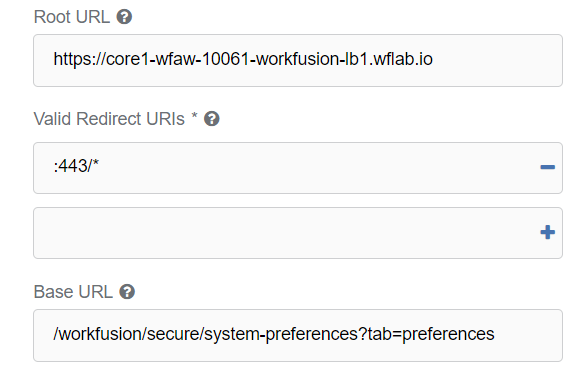
Starting from 10.2.2, Keycloak does not allow the redirect URL to contain port 443, whereas any other custom ports are acceptable. In case, after upgrading, you cannot open any application, except for the Keycloak admin console, choose one of the solutions below and perform the actions described in it.
Solution via UI
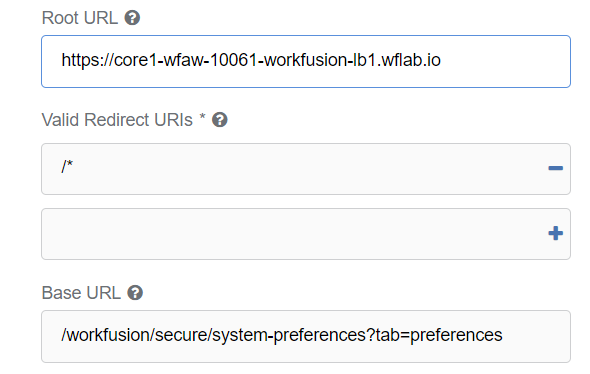
Resolving the issue via the Keycloak user interface is the prefereble option. For that, open the Keycloak admin page, go to the Clients page, and fix the Valid Redirect URIs, Root URL, and Base URL fields for every client by removing port 443 from every link. After the changes, all applications should be available.
Solution via database
Alternatively, resolve the issue via the Keycloak database. For that, follow the steps below:
- Connect to the database.
- In the CLIENT table, fix the BASE_URL and ROOT_URL columns for desired clients by removing port 443 from links.
- In the REDIRECT_URIS table, fix the VALUE column for desired clients by removing port 443 from links.