
Version 10.2.5
Release date
July 25, 2022
Release 10.2.5 introduces a set of no-code workflows to configure and build Digital Workers. These workflows include the Machine Learning processes to create and tune the models with an easy-to-use interface. With the novel Manual Task Builder, you can create an advanced and visually rich HITL experience. While the Solution Catalog brings new life to more intuitive installation and configuration of packaged and your custom Digital Workers.
For engineering teams, the new release offers a new REST API for Digital Workers to significantly optimize their performance.
What is more, Enterprise Edition 10.2.5 introduces native integration with Google Cloud. The Google Cloud Platform users can now install Digital Workers directly from Marketplace in their account or acquire a SaaS profile from WorkFusion.
The release is also abundant in new features to give you better control over deployment, development of automation, human-in-the-loop solutions, your data, and expenses. Here's the list of novelties:
- The ability to run multiple Digital Worker configurations in the same environment allows different departments in your organization to employ them simultaneously. You can also create multiple variations, update them on the fly, and move conveniently across environments, which saves you time and effort to deliver and adopt new customizations.
- Improved management of Python dependencies within Digital Worker packages enables you to install them in a few clicks via Asset Bundle import or Solutions Catalog without cumbersome manual workarounds.
- A user interface to build Manual Tasks via Control Tower offers pre-built templates and drag-and-drop blocks to design custom task layouts with minimum effort and time investment.
- The dataset management UI reduces the time to integrate or re-train a machine learning model while enhancing its overall quality.
- Now, you can configure the training and testing flows for Machine Learning models without a single code line via a convenient interface in Control Tower.
- A REST connector lets you communicate with individual Business Processes directly as with microservices to get or input whatever data you need, including one from external sources.
- A new transaction-based billing approach provides you with a tool to manage your automation expenses efficiently, whether your deployment is of the cloud, on-premises, or SaaS type.
- Introduced support for multiple OCR providers—ABBYY, Azure Form Recognizer, and Google Vision API—gives you a choice of tools to handle your documents.
- Data Purge UI and API are extended to cover S3 buckets so you can conveniently cleanse all Platform's operational data from a single point.
- Data Purge configured as part of a Digital Worker implementation and deployed with the Workers' configuration bundles to eliminate the need for any additional purging setup.
- Shared queues in WorkSpace help track and distribute Manual Tasks more efficiently.
- Video recording of the RPA Unit screen is a handy tool to investigate Bot Task failures and troubleshoot RPA issues.
- A new REST API endpoint for the RPA component gives you a comprehensive overview of your Bot Fleets.
- The Control Tower UI now fully meets the Web Content Accessibility Guidelines (WCAG), enabling you to comply with occupational standards and create an unbiased work culture.
- A major upgrade under the release is the transition to Tableau v2021.4.6.
Other improvements also include:
- Increasing the stability of the RPA component and the RDP connection
- ODF enhancements based on your feedback
- WorkSpace database optimization
- Queue management, installer, and monitoring enhancements
New way to design Manual Tasks
In addition to the existing options for Manual Task design, Control Tower now boasts the novelty Task Designer Operation. This feature gives you access to the advanced Manual Task Designer, a new tool covering typical layout forms, 80% of which business users can re-create using OOTB features. For the remaining 20%, the framework provides a well-documented component extension SDK.
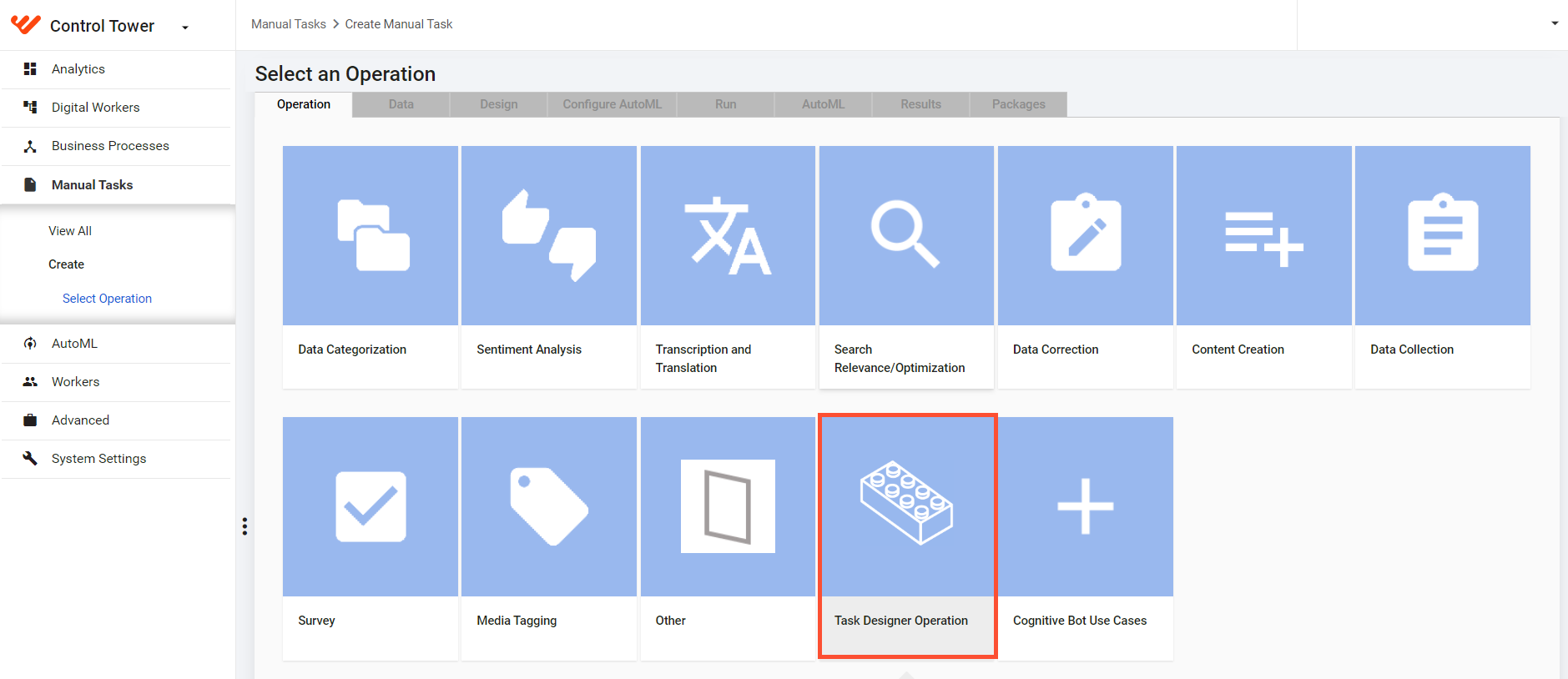
You are free to choose the way to build tasks: the old or the new one, but we recommend trying the novelty tool for the following reasons:
Low-code approach requires no special training to start building tasks.
Pre-configured templates let you design different task types: single- or multi-document and those without documents.
An intuitive interface guides you through the tricky task customization process.
30+ prebuilt configurable drag-and-drop components minimize the task development time and effort.
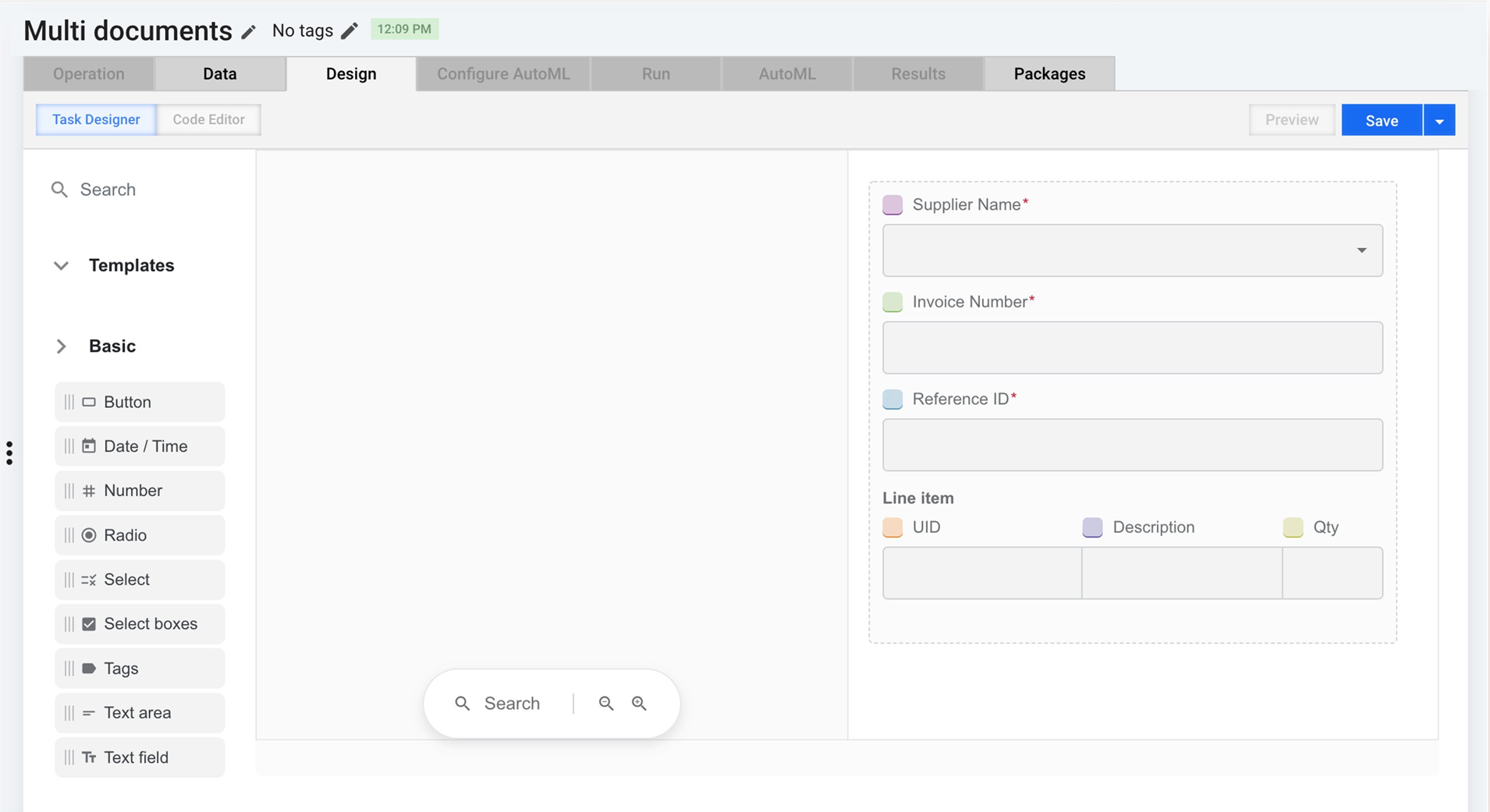
Immediate preview of anything you are designing in your task.
Multi-language support.
Enhanced usability and representation of the resulting Manual Tasks in the WorkSpace UI
Improved tagging-over-document mechanism for line items, allowing you to tag an entire table with a single click.
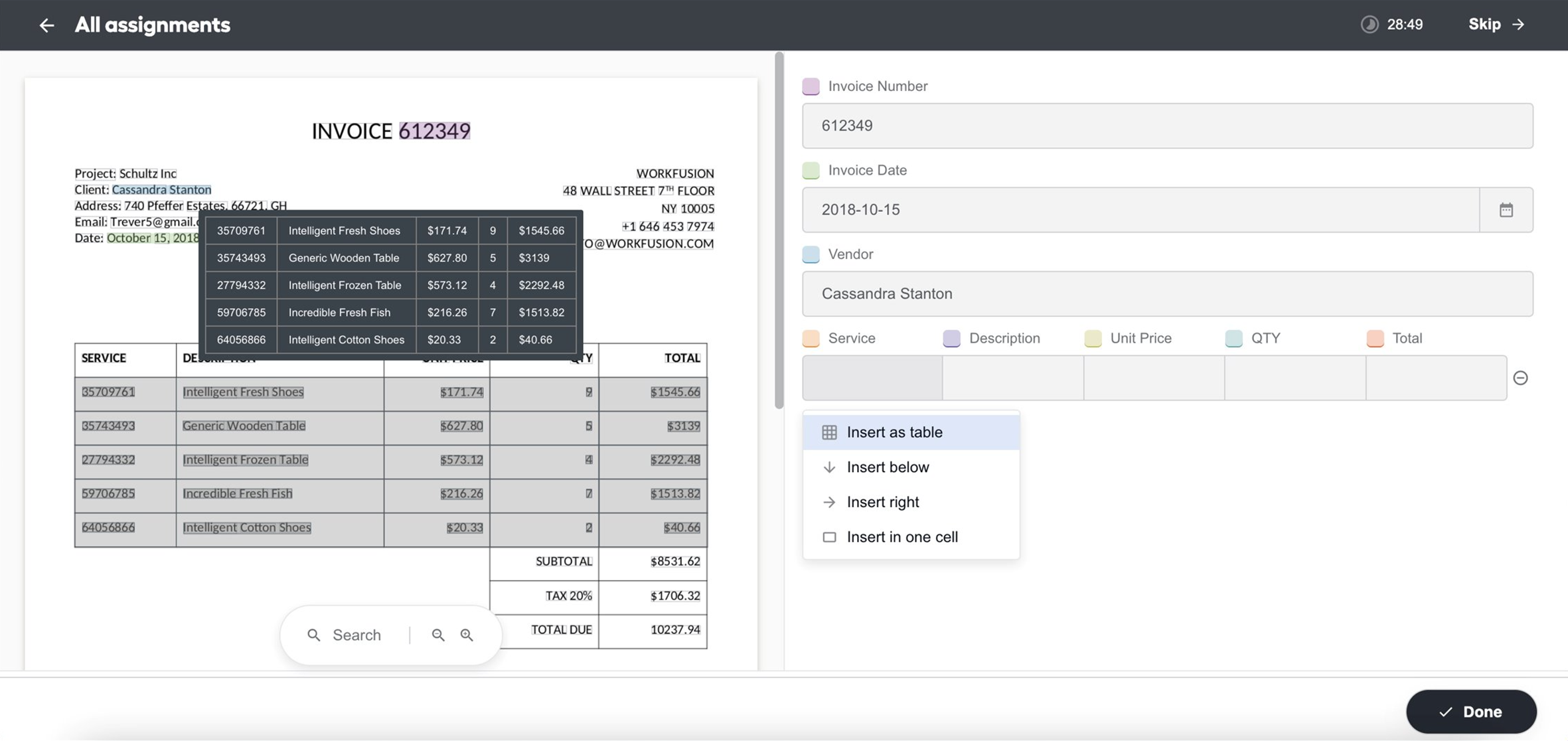
For details, refer to the Design custom Manual Tasks documentation.
Enhanced ML model quality and manageability
To improve the Machine Learning quality and reduce customers' efforts to re-train models, WorkFusion has dramatically reworked its approach to dataset management. Datasets are now becoming standalone entities not explicitly associated with a particular model or data storage mechanism.
Moreover, Data Science professionals can now manage datasets via the Control Tower user interface. For instructions and related details, refer to Manage datasets.
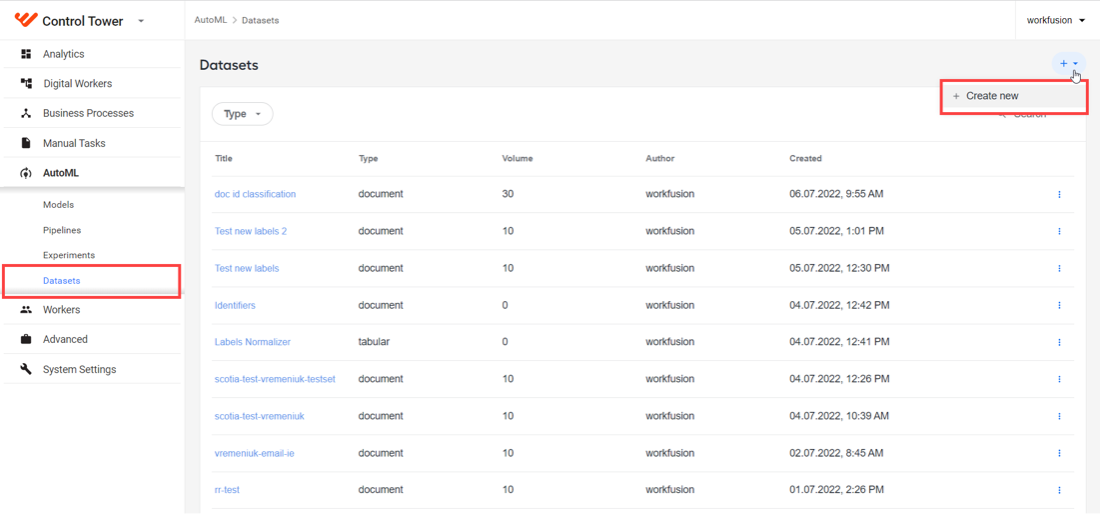
As a result, the time to integrate a model into a Business Process is reduced to one or two days. Other immediate benefits are as follows:
- Data exploration and cleansing within days instead of weeks.
- Сonvenient UI to work with datasets.
- Simplified labeling flow integrated with the dataset management UI. For labeling instructions, refer to Manage datasets | Set up labels.
Model training and testing for non-engineers
This release features multiple updates of the AutoML capability to make the model training and testing flow available to non-engineers. Business users can train and test models via the UI with little or no coding and complicated Business Process manipulations.
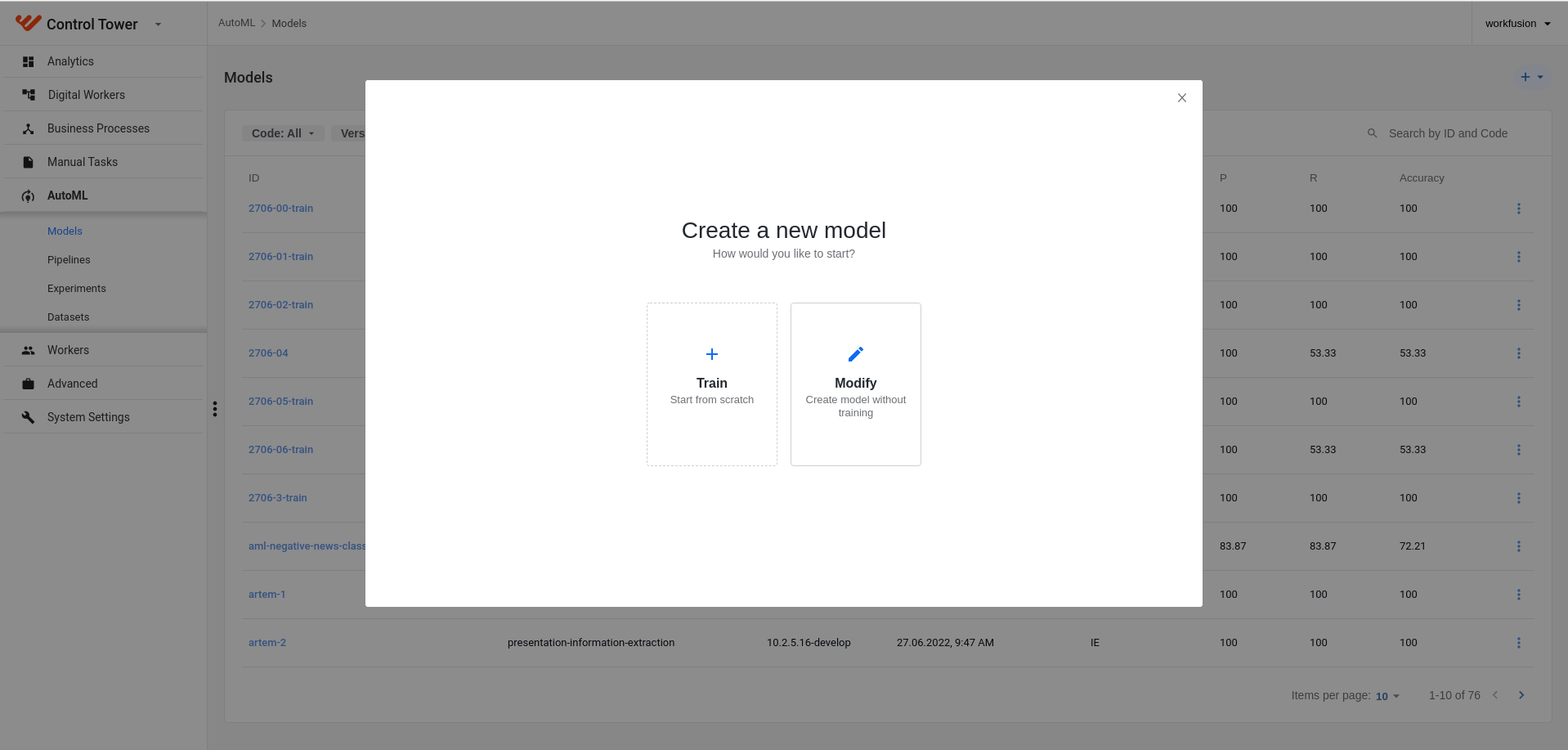
The AutoML improvements are as follows:
To align the WorkFusion terminology with the industry standard, we have renamed the following UI features:
- Hyper models are now Pipelines.
- Trained models are now Models.
- Trainings are now Experiments.
New UI functionality is implemented in Control Tower to run and manage models, experiments, and tests via UI:
- The low-code, user-friendly model training workflow lets you train and manage machine learning models as follows:
- Create and tune model configurations.
- Set up post-processors and rules.
- Select training and test sets, and so on. For details, refer to the Manage models | Train model documentation.
- The test model workflow allows you to apply an existing model to a labeled dataset, launch a test for a specific model, select a model during a test workflow, and analyze the results. See Manage models | Test model.
- The low-code, user-friendly model training workflow lets you train and manage machine learning models as follows:
You can now set create extended model configurations, for example, set normalizers and their parameters, rules, and post-processors.
For more information, refer to Manage AutoML models in Control Tower.
New REST connector to manage Business Process data
Previously, external data monitoring and posting its results to or fetching them from a Business Process required complex workarounds and entailed building complicated business logic. To address this issue, WorkFusion has designed a new solution where each BP becomes a type of "microservice" with which you can interact directly via REST API.
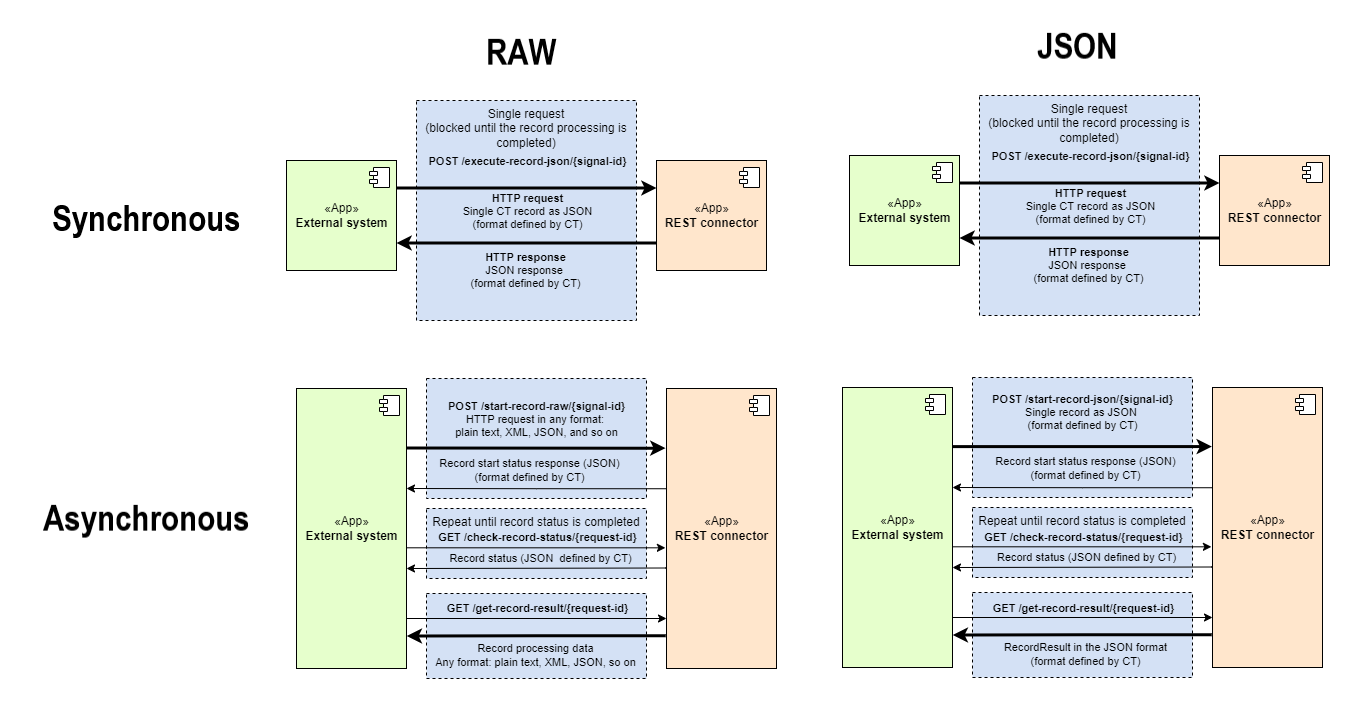
These changes increase the transaction throughput to 250k+ per hour. The newly designed REST (HTTP) connector gives you complete control over both external and internal BP data:
- BPs consume messages synchronously and asynchronously, allowing for real-time transaction processing.
- You can use structured and unstructured data as the input to BPs.
- You can stream input data into BPs directly and extract data from them at any time as required without delay.
- The solution enables more transparent exception and event handling, making locating and fixing issues faster.
- You can pass data directly from one BP to another without adding any code or extra steps.
For more information, refer to Process transactions with REST connector.
New billing approach
WorkFusion is introducing a single mechanism to consolidate, review, and report information on the usage of WorkFusion services in a standardized format. You can easily monitor and manage your automation expenses, irrespective of your deployment types—cloud, on-premises, or SaaS.
Unlike the former subscription-based approach, this mechanism tracks each transaction processed by the WorkFusion platform. It creates detailed invoices for customers from the traced data on a monthly, quarterly, or annual basis. A transaction is understood as a single unit of work (email, message, and so on) or any Digital Worker add-ons, such as additional fields, RPA enhancements, etc.
| Time | Base SKU | DW Name | DW Skill | Transaction Volume |
|---|---|---|---|---|
| July 22 | DW-TARA-PSS | Tara | Payment Sanction Screening Alert Review | 983 |
| July 22 | DW-EVLY-NSS | Evelyn | Names Screening Alert Review | 218 |
| May 22 | DW-TARA-PSS | Tara | Payment Sanction Screening Alert Review | 8.47k |
More OCR providers
We are now expanding OCR choices with multiple providers to empower our customers with flexibility in document handling. The originally supported ABBYY is supplemented with two more choices: Azure Form Recognizer and Google Vision API, fully compatible with the standard models and Tagging-over-Document labeling. So, you can choose your preferred and probably more familiar tool.
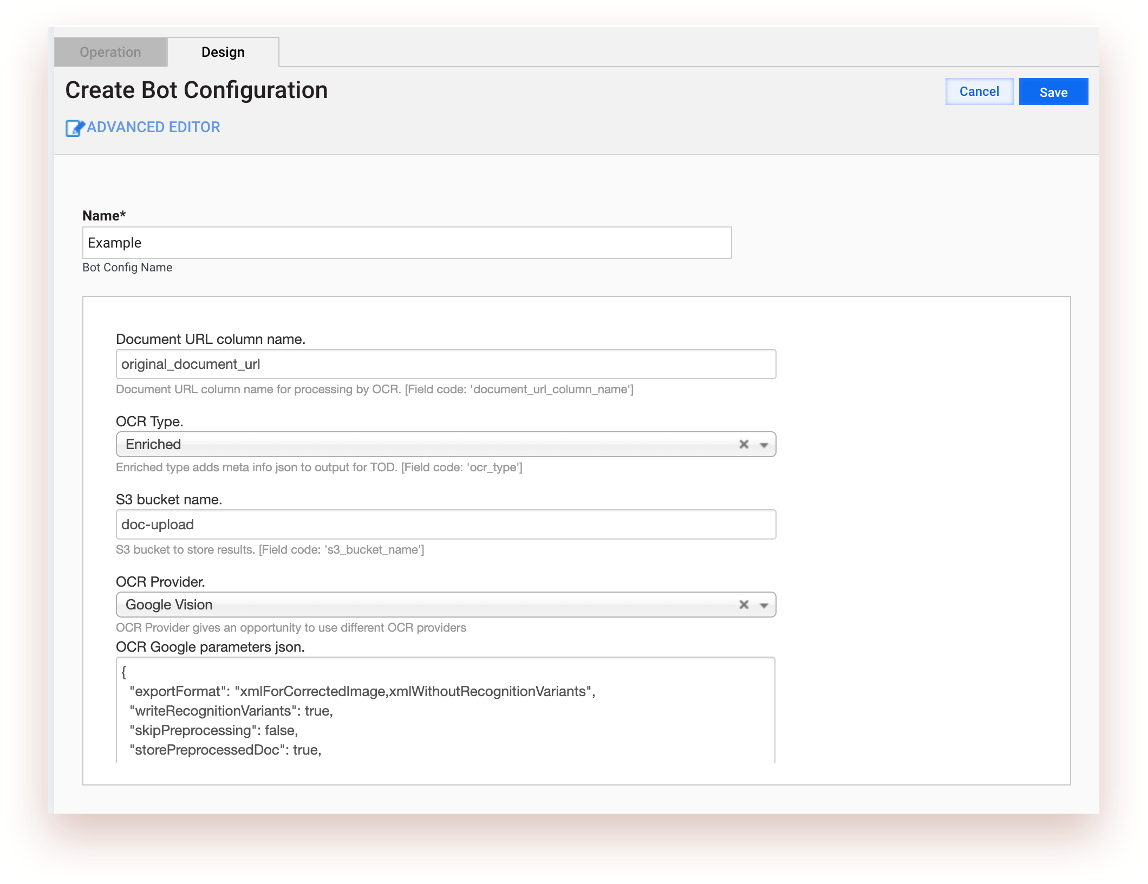
For end-users, nothing changes significantly as the output of any alternative tool is converted to the standard format. For details, read Configure multiple OCR providers.
Improved Control Tower UI accessibility
The Control Tower user interface now conforms to the Web Content Accessibility Guidelines (WCAG), the internationally recognized industry standard regulating the representation of information on web pages or in apps. These improvements cover keyboard navigation, tooltips, and the general look and feel of the UI. They enhance the usability of the WorkFusion product, including better access for people with hearing and visual impairments. You are empowered to meet accessibility requirements of employment policies and upgrade the operational comfort for your employees, thus improving overall work productivity.
GCP: elastic scaling and simplified deployment
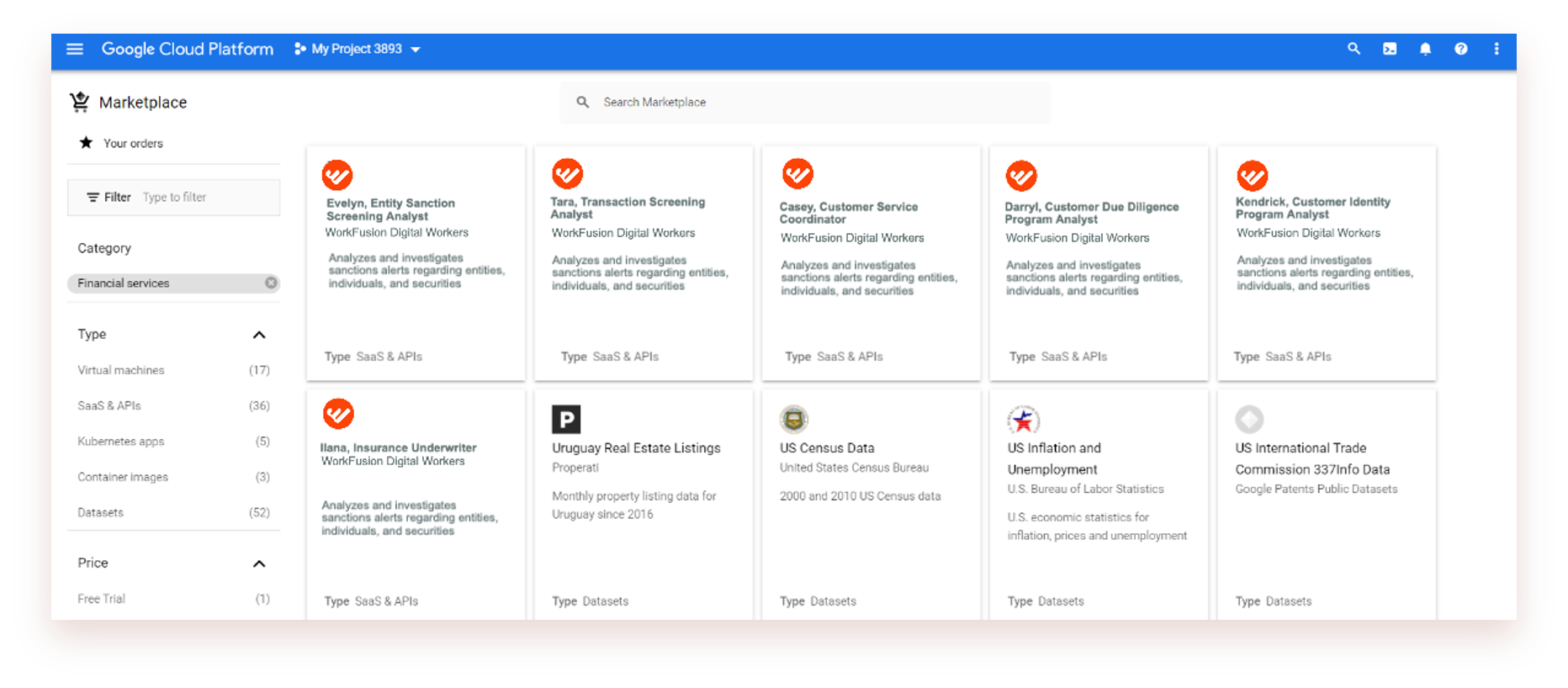
Committed to enhancing the accessibility of its cloud services, WorkFusion works toward integrating the Product with the Google Cloud Platform (GCP). WorkFusion IA Cloud is now officially available via Google Marketplace, bringing you the benefits of accessibility, lower infrastructure costs, and easier installation.
When installing via GCP, the approximate time-to-value for a Digital Worker is 4 hours from the click to procurement. You can choose any of the three models:
- SaaS
- Managed service
- Client private cloud
To facilitate the High Availability Product deployment in GCP, we now employ Google Deployment Manager—an infrastructure deployment service that automates the creation and management of Google Cloud resources.
To let you increase or decrease the number of active Worker instances on demand, we have implemented a mechanism to autoscale the Mesos cluster based on a metrics-driven monitor. At any given moment, you are entirely in control of how and to what extent you are employing your Digital Worker resources and hence—the financial aspects of your cloud deployments.
The scaling mechanism is also applicable to any Python-based Digital Worker configurations.
Extended Data Purge capabilities
We have expanded the out-of-the-box Data Purge functionality to cover S3 buckets (MinIO) data so that you can conveniently set up and schedule operational data cleansing across the platform. Now, the platform features two types of Data Purge settings:
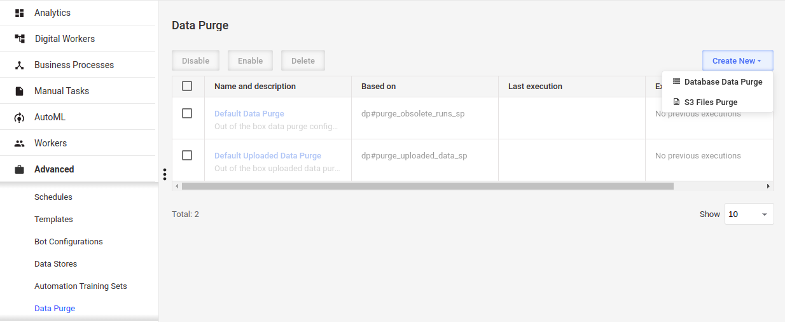
You can configure both database and S3 data purging via a single place in the Control Tower interface. Alternatively, you can work with them using Data Purge API endpoints.
Previously, there was no way to automatically configure data cleansing for a given Digital Worker right after the installation. With this release, we have extended the Asset Bundle definition to include Data Purge configurations. Now, you can deploy Digital Workers with Data Purge already configured for them, and you will not have to do any additional setup. For details, refer to Import Data Purge configurations via Asset Bundles.
Enhanced queue management in WorkSpace
Further improvements in WorkSpace provide more options for managers to track their team's activities and distribute tasks to achieve higher efficiency in Manual Task handling. The possibility to share queues is introduced to assign them to your subordinates according to their qualification and responsibilities:
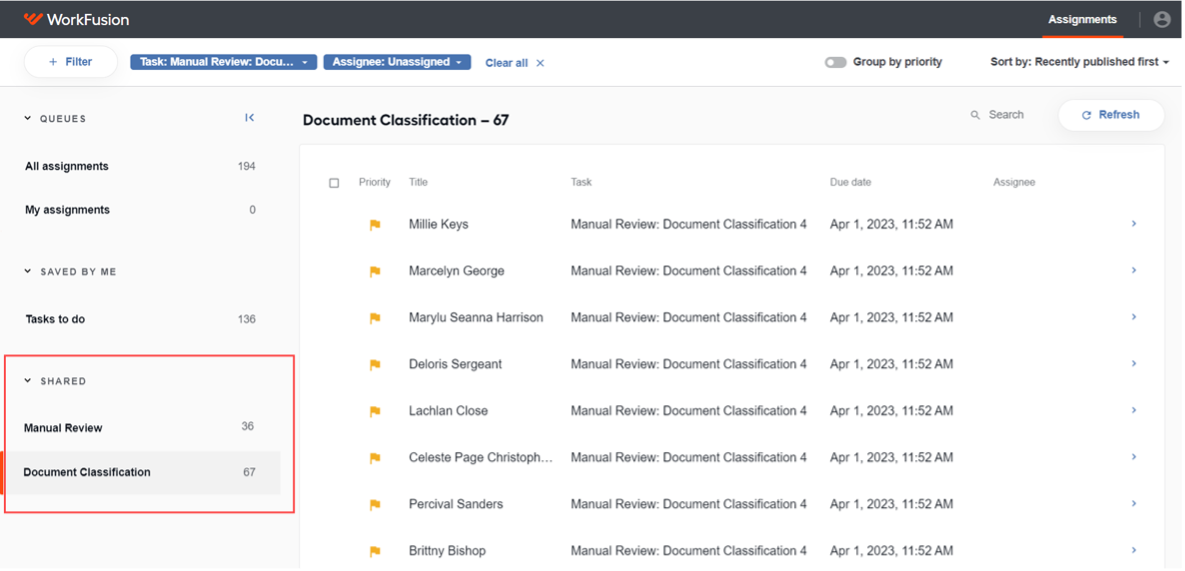
- You can modify your saved queue by editing its name, adding and removing collaborators, or even un-sharing it with all of them. Users you share the queue with can only process tasks from the shared queue, not modify it.
- You can generate a direct link to a selected queue. This allows you to share it with any WorkSpace user, paste it to the browser address line, and view the filtered assignments in a separate browser tab.
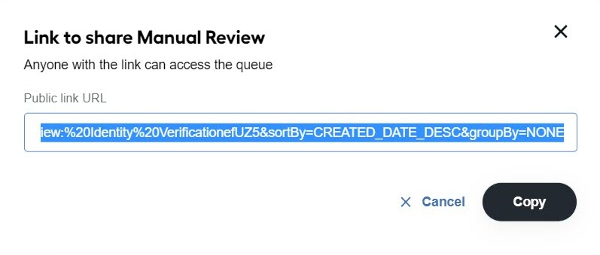
- Visually impaired users can access the shared queues functionality via the keyboard navigation.
- The options to hide, expand, and scroll queues allow for their better management.
For more details, refer to Work with queues.
Multiple configurations for Digital Workers
The release presents multiple configurations of a Digital Worker that can now be run simultaneously in the same environment. A new feature encourages the Digital Worker usage on a single IA Cloud Enterprise instance by different departments of your company.
Now, you can set up any number of variations with dozens of configuration fields and manage them via the Control Tower UI. You can also review your changes and adjust the parameters on the fly.
Moving variations between environments, from development to production, saves time and effort compared to the need to re-create the whole set of modifications for each environment. The added Export and Import buttons provide options to quickly upload and download zip files containing user-specific configurations.
For more details, refer to the documentation.
RPA Unit screen video recording
To simplify the investigation of failed Bot Tasks and enrich the RPA Server troubleshooting practices, we have introduced the ability to record the RPA Unit screen. Watch recordings of selected Bot Task execution failures to find and address an issue quickly. They can be extremely helpful, especially when it is hard or even unclear how to reproduce them.
You can enable or disable recordings for a particular unit and master session and configure the video length and the rotation storing period. By default, your video stream is split into hour-long files. Then, the files are uploaded to the S3 storage and deleted from the RPA Server.
Links to all video files for each worker are available in the Bot Manager UI. Videos play on a new browser's tab after you click their links.
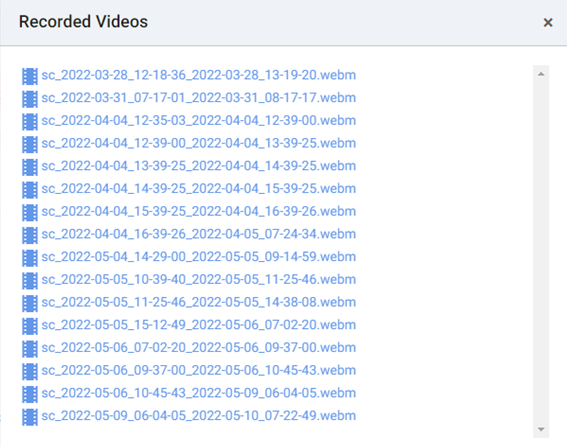
To use screen capturing, refer to the instructions in the Troubleshoot with RPA unit screen video recording section.
Email fetch connector
We added the Email Fetch Connector as a UI-configurable solution for receiving emails from supported email services and preparing them for further processing by Digital Workers based on the ODF 2 framework. Currently, the Connector supports email services compatible with Microsoft Graph API (current Outlook versions) and EWS (legacy Outlook API).
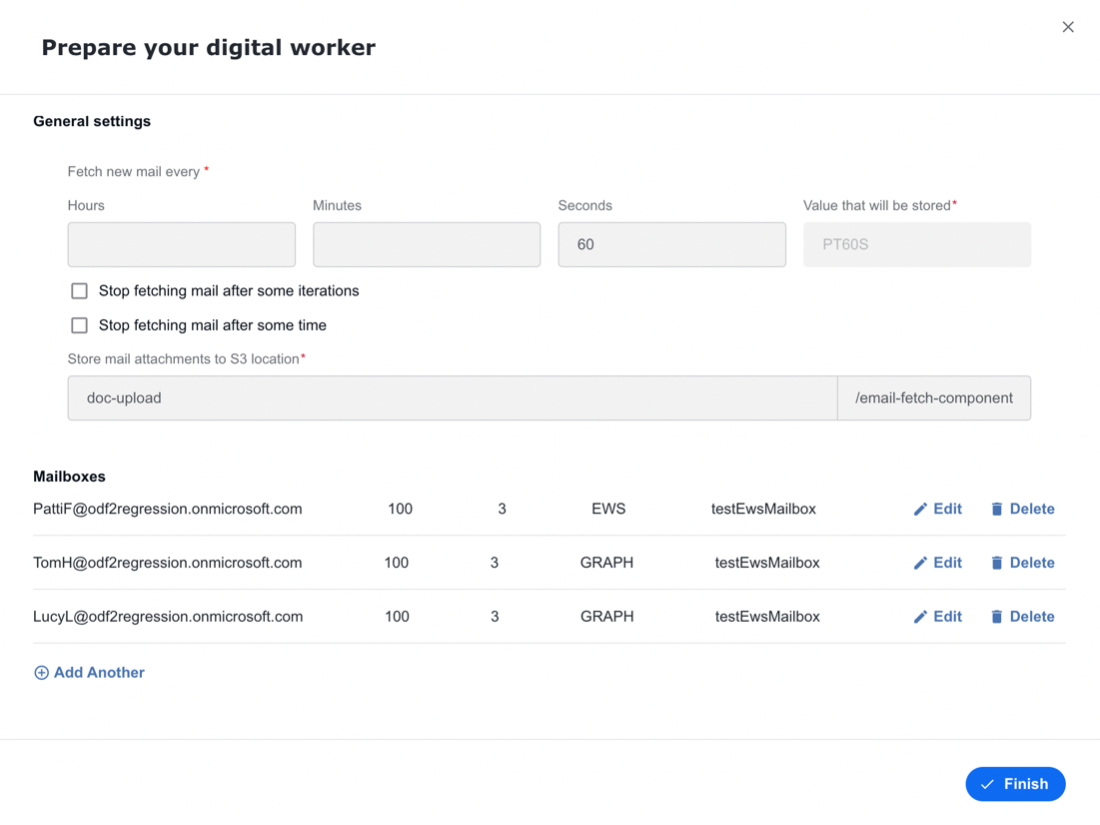
One Connector can monitor multiple mailboxes in parallel, providing extendable custom filtering and exception handling. For more details, see the documentation.
Enhanced performance monitoring
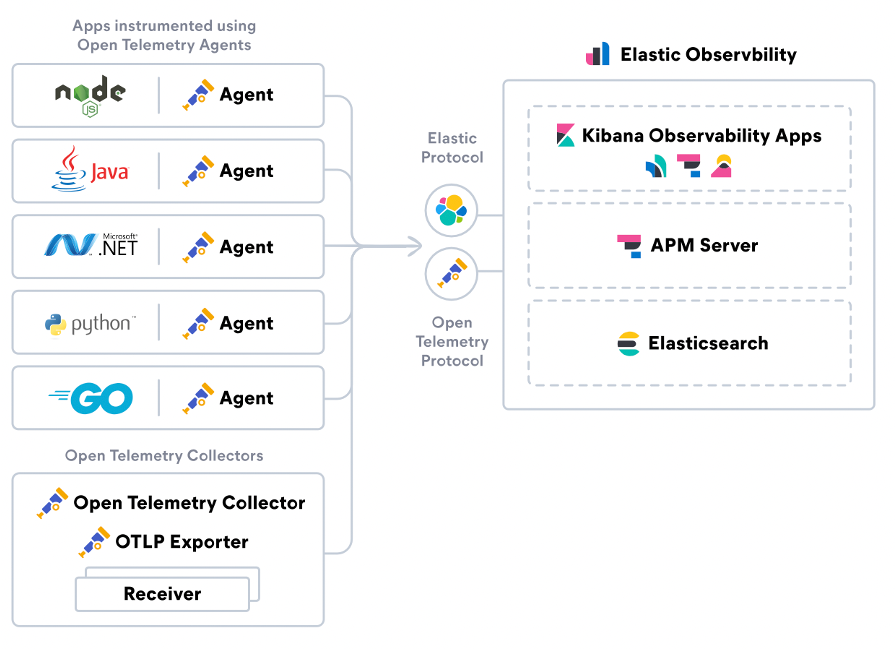
The integrated Elastic observability capability helps you ingest metrics and logs from the various Product's components and applications to unify and visualize data in one solution: the ELK stack. This robust infrastructure monitoring detects anomalies in system metrics across all environments and simplifies issue root-cause analysis. Along with that, the enhanced Application Monitoring is aimed at:
- Identification of communication problems by dynamically building services communication map
- Tracing distributed transactions
- Monitor business-related SLAs (for example, response time)
- Alerting configurations allow flexibility when setting up various notification channels
Improved Python dependency management
Even though Digital Worker configurations are typically packaged into easy-to-deploy Asset Bundles, their installation has required particular manual effort, including the setup of Python dependencies.
Our engineers have improved the management of Python dependencies so that you can install any Digital Worker in a few clicks via Asset Bundle import or Solution Catalog. Each Asset Bundle is now self-sufficient and contains all dependencies required (except for ODF Data Stores) to successfully deploy a Digital Worker in your environment without any additional manual tuning.
Improvements
WorkSpace
- To optimize WorkSpace database performance, we adopted a new approach for storing WorkSpace user account data. WorkSpace accounts tables, such as account, worker, requestor, and so on, were deprecated. Now, the application gets user information from the user management system.
- As part of the mentioned WorkSpace database optimization, another new approach was introduced to storing assignment data. With the ws.hit table deprecated, and all assignments now stored in a single table, both SQL queries and business logic are more straightforward than ever before.
- You can configure your Manual Task to quit the queue. Thus you can return to the assignment list once you finish processing it. It is incredibly convenient when you work on lengthy tasks that can take up to several hours. To enable a dequeued task, see the instruction.
- We improved user synchronization with Keycloak. Now, users are displayed in the Assignee filter and the Assign menu without a need to log in first.
Installer and environment
All Java services are configured to send the application monitoring metrics to ELK, which provides a clear picture of inter-service communication within the platform and helps identify hot spots.
For enhanced security, MinIO Key Encryption Service is integrated with the Product to support server-side encryption with an external Key Management Service.
To eliminate the security vulnerability related to weak etcd ciphers, the Master server is configured to use GCM ciphers, such as AES-GCM and AES-CCM.
Note that static key cipher suites, CBC, and 3DES ciphers are disabled.
To address the Product's RAM shortage issues, swap is enabled on all Master servers; the appropriate prechecks are added to the installer to verify this.
To eliminate false-positive alerts about CPU spikes, Agent servers are excluded from the current alert rule. The alert threshold is also increased to be triggered when the CPU load is consistently high for 15 minutes.
We added the ability to easily enable and disable Application Performance Monitoring on the Kibana UI. For available actions with APM, refer to the related documentation.
For convenient user access to MinIO via SSO, the SSO timeout in Keycloak for MinIO is increased to 30 minutes. Previously, the timeout was one minute only, which caused the MinIO token to expire and the user to log in again after several minutes of inactivity.
AutoML
- Support of tagged text with meta-manual-answer for classification models is added. For more details, see the documentation.
Control Tower
- The Control Tower email notification now supports the StarTLS feature, allowing our customers to fully utilize the WorkFusion alert and notification capability. In addition to Kibana notifications, you can get alerts straight from Control Tower with information on run completion, schedule failures, or task completion issues.
- For the task-start plugin, we excluded the ability to start the single-bot configuration. However, you can still run a Business Process or Manual Task with it.
- The integrated pipelined execution of Bot Tasks allows you to package steps into a single batch and execute them as a single transaction on a worker. This feature minimizes communication issues between Control Tower and workers. See the documentation on stateless tasks.
- The Finish Earlier Started Runs First feature lets you prioritize records execution over Business Process steps on the Bot source level. As a result, enabling this capability saves your business several hours of document processing. For the instructions, see Add Bot Source.
ODF 2
For a better Digital Worker developer experience, we enabled Spoke to support database assertions. This new feature allows you to manipulate Data Stores right from your test. This can be helpful when preparing test data on the Data Store level before a Business Process execution or asserting a Data Store state right after the execution. See Business Process integration testing | Work with Data Stores for more information.
For ODF 2 specifics, refer to Data Stores in ODF 2.
Spoke is now compatible with ODF and ODF 2 with the support of framework-specific assertions. To see how to assert results in different frameworks, refer to the Spoke documentation.
To enrich the developer's experience and utilize the environment to its total capacity, a new Spoke API allows you to create multiple Digital Worker variations with different configuration data and run tests in parallel. For available actions with variations, refer to Package assets into DW Variation Asset Bundle and DW Variation Asset Bundle migration API.
The ODF 2 configuration API now fetches settings from the Platform's internal usage. To learn more, go to Configuration APIs.
Missed APIs are added to the ODF 2 S3 wrapper.
As an improvement of the ODF 2 dependency injection functionality, in addition to the standard Feather behavior, Feather forking is implemented in the codebase. With ODF 2, you can identify any named instances of a given type known to Feather and then decide in runtime which one to use. For changes and additions to the standard Feather behavior, refer to Feather modules | Non-static injection of named instances.
To improve OCR processing in the scope of the ODF 2 framework, we added the OCR usage examples based on the asynchronous approach. For more details, refer to the documentation.
ODF 2 and connector dependencies are included in on-premises Nexus out of the box.
To simplify working with uncomplicated RPA use cases, we now recommend using a simple default ODF 2 Archetype. To view the structure of a project created from the ODF 2 Simple Archetype, study its description. For an example project, go to Example project overview.
The
send-to-external-connectorattribute for the export plugin was added. This works as a marker field and states that export data must be sent back to RabbitMQ for the following processing. For more information, see Create Bot Task | Additional annotations for Bot Tasks.We introduced dynamic Data Stores to ODF 2 for dictionaries and added the ability to dynamically create DAO and maintain the database table compatibility with Manual Task's auto-populated option list. For more details, see Data Stores with ORMLite | Access Data Stores with dynamic names.
RPA
- Multiple fixes and improvements were implemented to increase the stability of the RPA component, in general, and the RDP connection, in particular. As part of the effort, a solution was delivered to prevent developers from being logged out of RDP as they use the server RPA Worker UI for debugging. Now, multiple developers can access a single Windows server in a VDI installation. Users can execute a specific Bot Task using a specific RPA Worker and connecting immediately to it without observing all RPA Workers simultaneously.
- A new REST API endpoint was introduced to give Digital Worker developers a more comprehensive picture of bot resources. Now, you can get a list of all bot fleets within one API call. This authorization mechanism is the same as for Control Tower workers, enabling Control Tower to get a response from the endpoint without certificates or credentials.
- The login mechanism under the Master user was improved. In the case of the VDI installation, the Master Agent checks in any user with an active session and then waits until the session is completed.
- The ability to push Digital Worker usage data into RabbitMQ exchange was introduced. The usage data is published into the usage_data_exchange RabbitMQ exchange.
- Logstash pipelines are responsible for creating the exchange and all necessary queues.
- If the exchange doesn't exist, BEP throws an exception to notify users about a missing usage data collection pipeline.
- A CRT core dump filter was implemented. From now on, CRT core dumps are generated only if the CRT assertion comes from the
rpa-mfwlibrary.
OCR
- Full compatibility with out-of-the-box models (ML SDK) and the Tagging-over-Documents (ToD) functionality is introduced.
- Out-of-the-box dashboards are added to monitor the processing status and metrics.
Bug fixes
WorkSpace
Expand to learn more
- Fixed various high- to low-grade vulnerabilities to stabilize the Product performance and improve user experience. The most significant fixes are as follows:
- In case of validation errors, the WorkSpace API returns usable issue information, including error type and code.
- The MSG-type files are now accepted for upload in Manual Tasks on the WorkSpace side.
- Assignee information in WorkSpace is now synched with user management system data to remove deleted or deactivated users as assignees for tasks.
- The WorkSpace query
parametersortBy=CREATED_DATEis now working correctly, opening a proper assignment list page. - There is no longer any delay in setting newly-created users as WorkSpace assignees, provided they log in successfully.
- The attribute
_key_value_dicttable is normalized to work with attribute IDs. - Filter configuration parameters are checked against the database. If they do not exist in it, an error is returned about incorrect filter configuration.
- Fixed the issue, making it impossible to submit customized Manual Tasks after a Product's version upgrade. This fix updated the
multi-grid.js.xmltemplate for the customization of the Multiple tables per task grid answer. You can find the updated template in the Customize Manual Task. - Investigated the problem with a Manual Task containing the File Upload required answer type that could not be submitted from WorkSpace even after the answer was filled. A solution to this problem is to ensure the uploaded file name is no longer than 60 characters. For details, read the Answer Type topic.
AutoML
Expand to learn more
- Fixed the issue with automl_model_service in Marathon frozen in the deployment state and unable to run ML models. This problem was caused by errors with listing status files in the AMS directory. As a workaround, move the directory
/opt/app/workfusion/vds-data/ams-base-dir/in_progress/to another location, create empty/in_progress, and restart automl_model_service. - Fixed the bug where the
vds-data/evaldirectory was not cleaned if the training failed. As a result, the shared disk was fully occupied, causing performance issues in the environment. - Unified the default number format in parameters
DecimalNumberFormatNormalizerandAmountFormatNormalizerto prevent issues during data conversion. - Fixed the issue with the parameter
RemoveEmptyDocsTasknot removing empty documents provided as JSON. Now, empty documents obtained in any format are correctly deleted.
Control Tower
Expand to learn more
- Fixed the external endpoint calls issue. Earlier, these endpoints failed to work in Workers running on BEP nodes with configured proxy.
- Fixed the issue with the
cacheplugin failing in distributed mode when Bot Config Bundle used Isolated Class Loading. - Fixed the inability to use WSDL in Bot Config Bundle with Isolated Class Loader.
- Fixed the inability to import bundles of 5 GB or larger or install them from the Solution Catalog. The error appeared because of the working session expiration. Now, the import procedure ignores the timeout period and does not require a re-login to Control Tower after the operation.
- Fixed the bug with a user-management method causing the out-of-memory error in Keycloak. The problem appeared when many events were recorded inside the EVENT_ENTITY table.
- Fixed events storage in Keycloak. Now, when the expiration period is added for them, it can prevent the overgrowth of the Keycloak table, potentially leading to the out-of-memory error.
- Fixed the bug with the Bot Config Bundle import. When a user clicked the Import From Repository button in Control Tower, the system updated unchanged artifacts and relevant ones. This caused a tremendous load on the server leading to a frozen Control Tower and Business Processes failing to start.
- Fixed the inability to disable audit and archive capabilities for Data Stores completely. The enabled features might cause specific problems, like exceptions when deleting data from Data Stores, overly-complicated purge scripts, performance degradation, and inefficient use of disk space.
- Fixed the bug with a running Business Process getting stuck if a global variable is added to an active BP's step. In this case, a null pointer exception was thrown.
- Fixed the issue with advanced settings of a Manual Task not visible in Control Tower. Now, when running a BP, you can check the Manual Task displayed with all settings in the corresponding section in the CT interface.
- Fixed the issue with the accidental connection reset after a task transaction. That led to another attempt to insert the task into the
completed_bot_tasktable, throwing an SQL exception as the data had already been written to the disk. - Fixed the bug with Task Dispatcher Service stuck and routing tasks from the task queue to the worker queue with a delay of about 10 min. The incident occurred if you tried running a Business Process with 1 or 2 steps and Bot-source with a concurrency of 1 for these steps and then paused it for a few seconds right after the start. Within this time, task and worker queues were created, but workers were not started yet, so they didn't connect to the queues.
ODF 2
Expand to learn more
- Resolved the issue with the empty Maven module version using
VersionProvider. To get version information at runtime, see the instructions in Bundle Versions Maven plugin | Use in Java code. - Resolved the issue with Monitor working incorrectly if multiple instances of the same BP are active.
- Fixed the "Address already in use" error after executing a Bot task JUnit test.
- Resolved the issue where the system failed to upload an Asset Bundle with Spoke mock step modifications by removing obsolete entities causing the failure.
- Fixed the NoClassDefFoundError issue due to an unexpected dependency version caused by ODF 2 dependencies. For a workaround to resolve this dependency conflict, see Troubleshooting | Dependency management issues.
- Fixed the issue with the Log4j dependency in the ML SDK module by removing archetypes with the ML SDK module. Now, you can use ML Archetypes described in the Start from Archetype section.
RPA
Expand to learn more
- Fixed the issue with the
pressCtrlA()andpressCtrlX()methods not working correctly in Chrome and Edge by updating the drivers for the browsers. - Resolved the problem when Workers waited for the wrong queue, causing a BP failure.
- Fixed the issues when RPA task executions continued even after an associated BP was stopped. Now, pause and stop calls for RPA tasks take immediate effect, eliminating undesired RPA load.
- Resolved the issue inhibiting the deployment of the Windows 10 VDI environment by fixing the Bot Master start problem occurring after stopping the WFSvc service.
- Resolved reported RPA service start issues by removing the hardcoded pointing to the RPA installation folder from Bot Agents (
_bot-master-service.bat_and_bot-nordp-service.bat_files). - Fixed the problem with the Enter Keystroke action (Ctrl+Shift+Arrow) for Excel report generation, causing BPs to fail due to improper selection. Now, the selection is working correctly.
- Resolved the issue with parsing of Info and Uptime data not working on the second page of the Bot Manager UI. Now, the info formatting on that page is the same as on the first one.
- Developed a workaround to address RPA crashes by guarding specific code against null pointers and clearing the floating-point status before going into
UIAutomationCore. - Fixed the issue with the login to VDI under the Master user. Now, with a VDI installation, the Master Agent checks if any user has active sessions and, when needed, waits until those are logged out.
- Resolved the problem with the
SendKeysmethod that provided incorrect text input to applications. - Fixed the issue when the Bot Master started successfully with a wrong password contained in the Secrets Vault. After the fix, Bot Master starts only if the provided password is correct.
Installer and infrastructure
Expand to learn more
- Fixed the failed Analytics license alert if the license expired.
- Fixed corrupted ZooKeeper snapshots by increasing the backups' default timeout.
- Removed false-positive alerts about short CPU load spikes in Tableau and Agent servers.
Updates
- Due to a reported access control vulnerability, Tableau v2018.3.10 is no longer supported. To protect you from related threats, we have upgraded to Tableau v2021.4.6, making it the default and only option installed with the WorkFusion package.
- The Log4j dependency in the
logstash-mssql-outputplugin was updated to version 2.17.2. - JDK used in the installer was updated to version 8u333.
- Tomcat was upgraded to 9.0.63 to fix the reported security gaps.
- Eclipse Jetty used in the ODF 2, RPA, and AutoML components was updated to v9.4.31.v20200723.
Known issues
The configuration interface of Adverse Media Monitoring skill 2.9 contains several fields with Secret Vaults that store credentials for external news providers. Currently, the skill cannot validate data in these Vaults of Enterprise Edition 10.2.5 as it requires additional security permissions “View Secrets Vault Entries” for Control Tower API. The issue is resolved for the AMM skill 3.0 to be released in August 2022.
As a temporary workaround, you can remove calls to the /v1/secrets-vault/entry endpoint from the validation of fields that are supposed to store credentials.