
WorkFusion design patterns
Continuous monitoring
Overview
Most automation processes start with getting input data, such as emails, new requests from external systems. If data comes during the day, it is required to constantly monitor the system and pull new items for processing.
A possible solution is to use scheduling. However, if SLAs are tight and data needs to be monitored every 5-15 min, scheduling creates many instances of the same Business Process (BP). This, in turn, makes it harder to monitor and troubleshoot issues.
Having a machine config running non-stop inside one BP instance solves the problem.
Common usage
The design pattern is used for frequent or continuous monitoring of incoming data.
Advantages
The design pattern boasts the following benefits:
- Significantly reduces the BP numbers.
- Facilitates troubleshooting and analyzing data.
Implementation
To keep your monitoring task active, use a back loop: when one output record from a step comes back as input. On the screenshot below, you can see a Polling Record going back after the decision block.
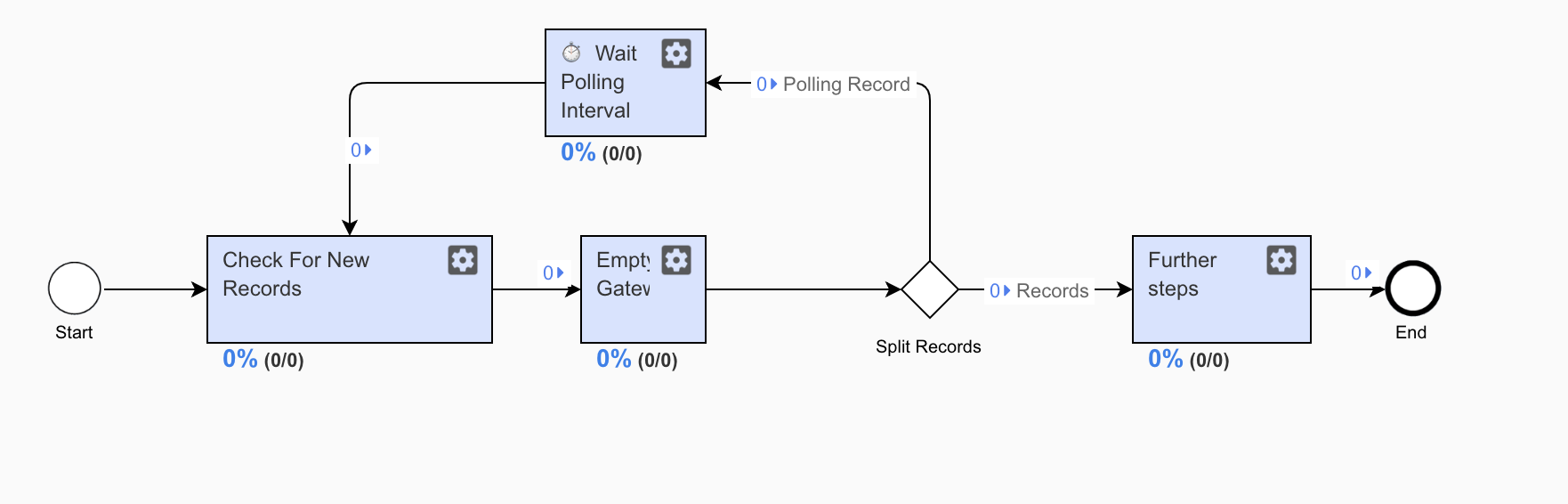
This is achieved by producing one fake record coming out of the monitoring step and then routing the step back. The code below is an example of monitoring new records from a Data Store and exporting them.
Monitoring step
<config xmlns="http://web-harvest.sourceforge.net/schema/1.0/config" scriptlang="groovy">
<var-def name="recordsVar">
<datastore name="test-polling-ds">
<template>select * from @this where status = 'NEW'</template>
</datastore>
</var-def>
<script></script>
<case>
<if condition="${results.toList().size() != 1}">
<export include-original-data="true">
<multi-column list="${results}" split-results="true">
<put-to-column-getter name="link" property="link" />
<put-to-column-getter name="polling" property="polling" />
</multi-column>
</export>
</if>
<else>
<release time-in-seconds="900" />
</else>
</case>
</config>
As you can see from the example above, one fake record with the polling attribute set to false is added to the list, which is then used to rerun the step again. When there are no records available, the step is rerun using the release plugin.
The intervals at which the monitoring step is executed are managed by the Wait Polling Interval step—a simple thread sleep.
Wait step
<config charset="UTF-8">
   <script><![CDATA[

    Thread.sleep(5000)

    ]]>
    </script>

   <export include-original-data="true" />
</config>
You can use the design pattern in combination with scheduling when a BP starts daily in the morning and runs till the end of the day. For a reference, download the example.
Critical section
Overview
Sometimes, concurrent access to shared resources can lead to unexpected behavior, and the BP logic is to be included in the critical section.
Common usage
Typical usage examples for the design pattern are as follows:
- Calls to an external system
- Read or write operations to a database
- Robot synchronization
Advantages
The Intelligent Automation Cloud ensures exclusive access and consistency when issues occur.
Implementation
WorkFusion allows running one Bot Config instance using Bot Sources with the number of threads equal to 1. However, the pattern is applied to the entire bot step. To include only a specific part in the critical section, use the pool plugin.
Maker-checker
Overview
Banks and insurance companies apply the Maker-checker, or four-eye, pattern, where a completed task needs to be reviewed by another person to ensure there is minimal number of mistakes.
Common usage
Typical usage examples for the design pattern are as follows:
- Wait for a record to have a particular status—a Data Store, external service, and so on.
- Wait for new records—a shared folder, Data Store, and so on.
Advantages
The design pattern allows you to increase overall data quality.
Implementation
Refer to the Moderation flow article, describing how you can apply a Moderation Task for approval or rejection.
Non-blocking bot execution
Overview
In some cases, it is required to wait for certain conditions outside the script execution. IA Cloud executes Bot Configs inside a JVM thread. Therefore, if the logic constantly checks the condition, the thread is blocked for that time. The pattern describes how you can share the thread across similar tasks.
Common usage
Typical usage examples for the design pattern are as follows:
- Wait for a record to have a particular status—a Data Store, external service, and so on.
- Wait for new records—a shared folder, Data Store, and so on.
Advantages
The design pattern enables you to use the platform's resources more efficiently.
Implementation
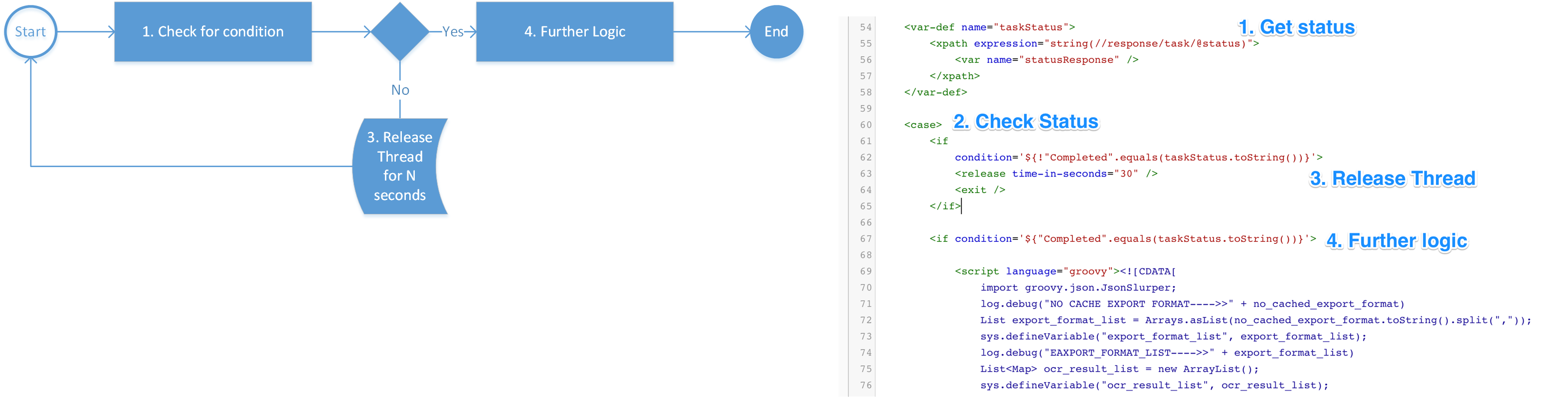
If a Bot Config is executed without any export, it is re-submitted from the very start. You can combine the feature with the release plugin, which allows you to pause before re-submitting the Bot Config.
You can use the feature to wait until a condition is met and allow the thread to be used by other Bot Configs. The concept is similar to asynchronous callbacks in Node.js. The main difference is that your Bot Config is restarted from the beginning.
You can see the usage in the Constant Monitoring pattern.
Attended automation
Overview
For certain BPs, Workers are required to get information in real time to make a decision within the scope of the single step.
Common usage
Typical usage examples for the design pattern are as follows:
- Look up information in external systems in real time.
- Provide a temporary authentication token to trigger a robot.
Advantages
Instead of splitting the step into two or more, users can complete the task without leaving the WorkSpace portal.
Implementation
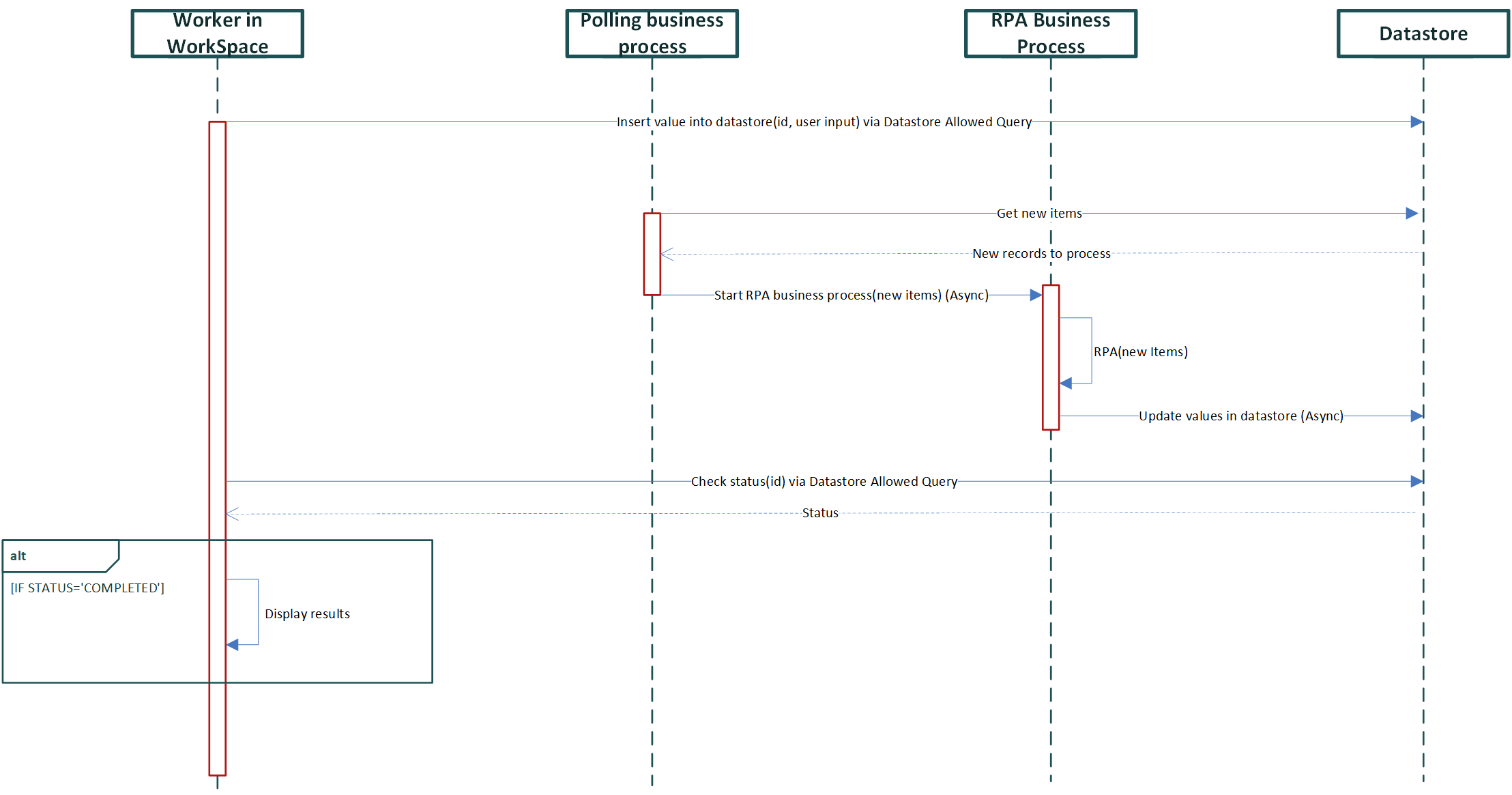
The implementation is based on the three items:
- A Data Store representing the queue items
- Execution of Allowed Data Store Queries to insert and monitor items in the Data Store
- a Business Process that monitors and executes actions, updating the results in the Data Store
Manual Task custom code
<#include "extras.ftl" parse=true/>
<#include "html.ftl" parse=true/>
<#include "answers.ftl" parse=true/>
<#assign FEEDBACK_ENABLED = true>
<@hit contentCss="${applicationResourceUrl}/workfusion-resources/saas/ms/ms.bootstrap.min.css">
<@script src="${applicationResourceUrl}/workfusion-resources/bootstrap/js/bootstrap-tab.js"/>
<style>
.lookup-btn {
color: #fff;
background-color: #216cd8;
}
.f-left {
width:48%;
float:left;
}
.f-right {
width:48%;
float:right;
}
.place {
overflow:auto;
padding:10px !important;
}
</style>
<@instructions title="<h2>CSR Verification</h2>">
<!--- editable content -->
<@editable id="__INSTRUCTIONS__"><br><br></@editable>
</@instructions>
<@form>
<#if questions??>
<div class="thumbnail">
<#list questions as question>
<@report question=question includeAll=true/>
<div style="position:relative;margin:2px 0px" class="block question">
<div style="position:absolute;top:0px;right:0px;background-color:#e0e0e0;padding:1px 4px;border: 1px solid #C0C0C0;border-radius: 0px" class="number">
<b>${question_index + 1}</b>
</div>
<div>
<div class="place bg-dark">
<@editable id="__DATA__"> fill in the details below and click "Lookup Details"</@editable>
</div>
<div class="place">
<div class="f-left">
<@answers question=question/>
<br/>
<input type="button" value="Lookup Details" class="lookup-btn" onclick="lookup()"/>
</div>
<div class="f-right">
<div id="results">
</div>
</div>
</div>
</div>
</div>
</#list>
</div>
</#if>
<@submit text="Save and Proceed to Next >>" />
</@form>
<script type="text/javascript">
//utils
function guid() {
function s4() {
return Math.floor((1 + Math.random()) * 0x10000)
.toString(16)
.substring(1);
}
return s4() + s4() + '-' + s4() + '-' + s4() + '-' +
s4() + '-' + s4() + s4() + s4();
}
$(document).keyup(function(e) {
if (e.keyCode == 27) { // escape key maps to keycode `27`
$("#results").html("");
}
});
function setStatus(status) {
var statusStr = status;
if(status == "NEW")
statusStr= "Initiating bot";
else if(status == "IN_PROGRESS")
statusStr= "Searching";
$("#results").html($("<h4> wait...</h4><br><span>Current Status: " + statusStr +"</span>"));
//new Spinner().spin(document.getElementById("results"));
}
function pollResults(hitId, requestid){
$.ajax({
url: "/workfusion/public/v2/datastores/executeNamedQuery?queryName=GET_LOOKUP_STATUS&nativeId=" + hitId + "¶meters={requestid:'" + requestid + "'}",
dataType: 'json',
error: function(data) {},
success: function(data) {
console.log(data[0]);
if ($.inArray("DONE", data[0]) == -1) {
setStatus(data[0][8]);
// Wait 1 second and poll again
setTimeout(function() { pollResults(hitId, requestid); }, 1000);
} else {
$("#results").html("<br><br><span>" +
"<b>Regulated by Finra:</b> " + data[0][5] + "<br><br>" +
"<b>License in North Carolina:</b> " + data[0][7] + "<br><br>" +
"<b>North Carolina Department of Insurance reference:</b> " + data[0][14] + "<br><br>" +
"<b>Broker Check reference:</b> " + data[0][15] + "<br><br>" +
"</span>");
}
},
contentType: 'application/json'
});
}
function lookup() {
//these are utility fields "requestid" for tracking and "hitId" for security purposes
var requestid= guid();
var hitId= $("input[name=hitId]").val();
//actual fields used in the search
var firstname= $("input[name*=firstname]").val();
var lastname= $("input[name*=lastname]").val();
var middlename = $("input[name*=middlename]").val();
var city= $("input[name*=city]").val();
var state= $("select[name*=state]").val();
var resident= $("input[name*=resident]:checked").val();
var record = "requestid: '" + requestid + "',firstname: '" + firstname + "',middlename: '" + middlename + "', lastname: '" + lastname +"', city: '" + city +"', state: '" + state +"', resident: '" + resident + "'";
console.log(record);
$.ajax({
dataType: "json",
url: "/workfusion/public/v2/datastores/executeNamedQuery?queryName=NEW_LOOKUP&nativeId=" + hitId + "¶meters={" + record + "}",
success: function (data) {
pollResults(hitId, requestid);
},
error: function (data) { alert("error") },
timeout: 5000
});
setStatus("NEW");
}
</script>
</@hit>
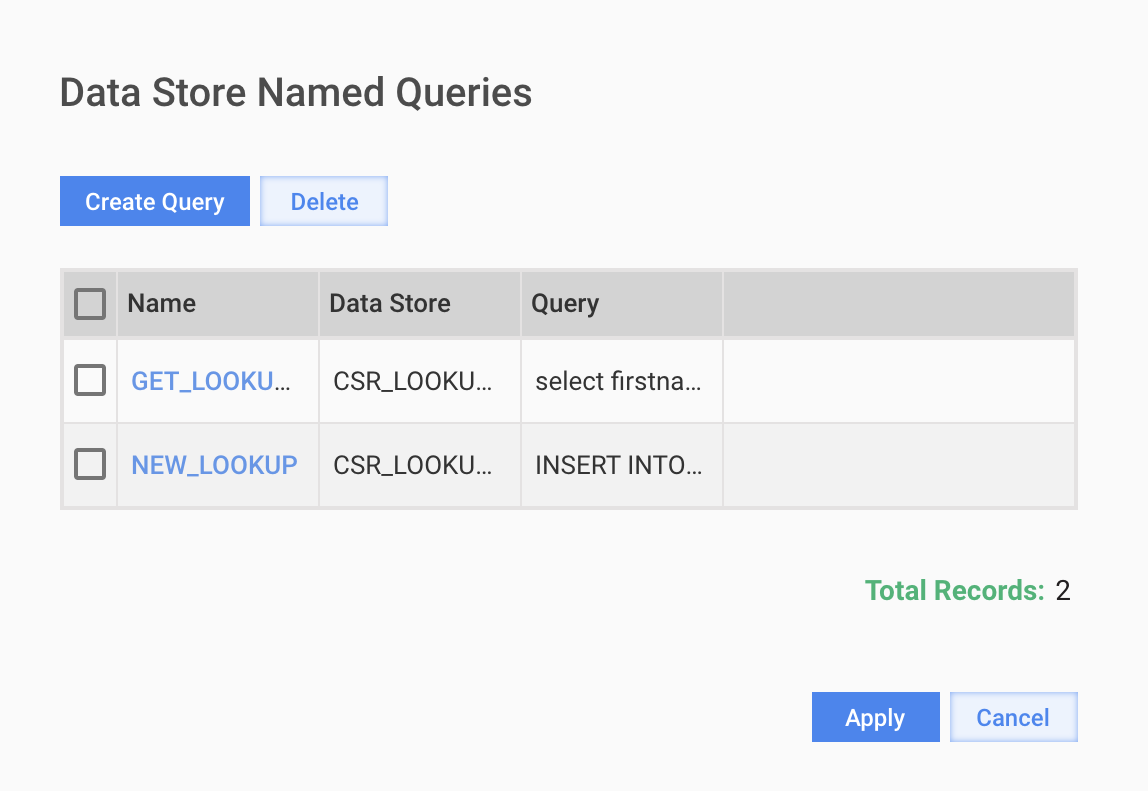
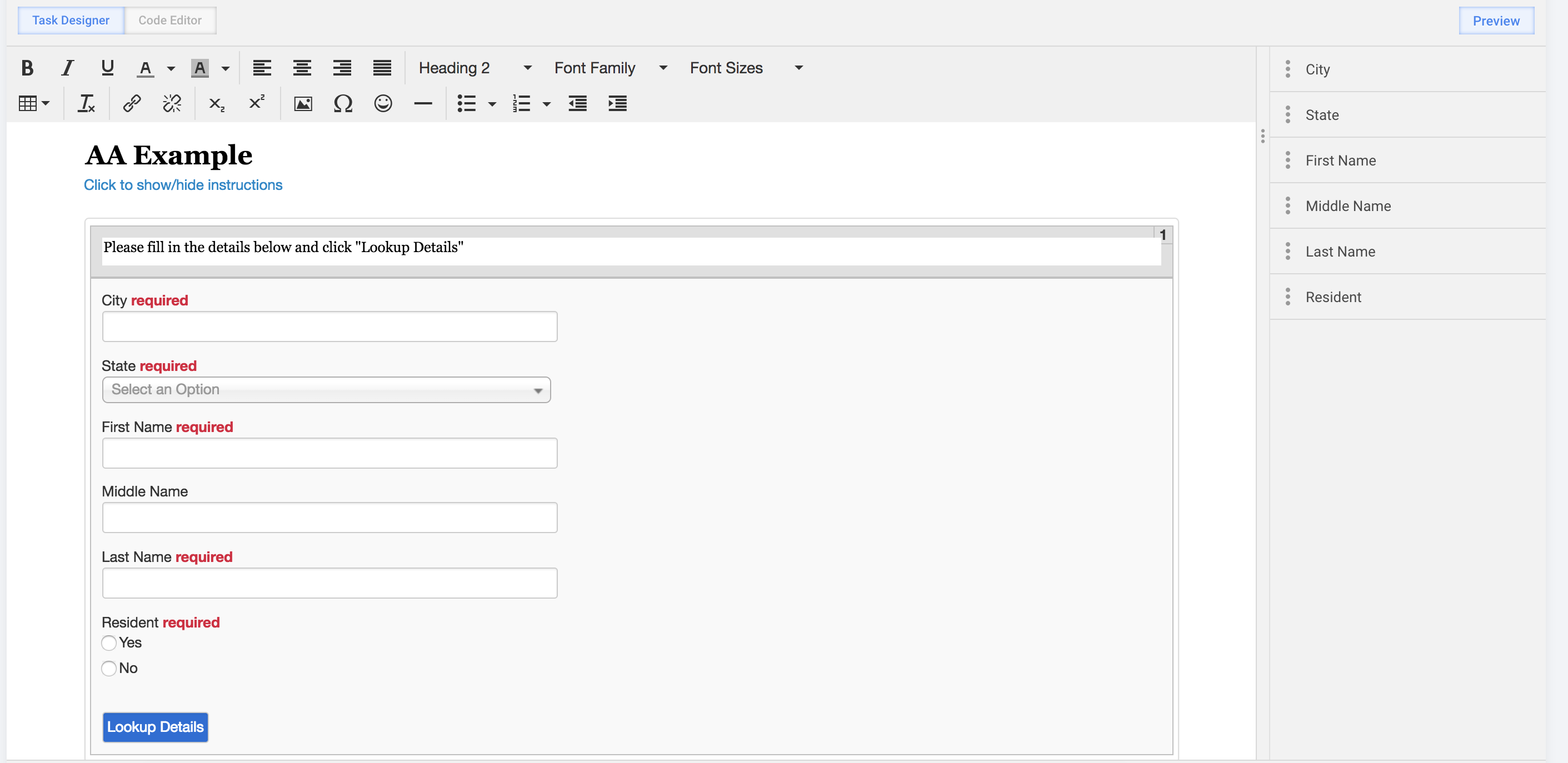
Manual Task example and allowed queries
Polling BP example
<config xmlns="http://web-harvest.sourceforge.net/schema/1.0/config" scriptlang="groovy">
    <var-def name="records_datastore">CSR_LOOKUP_RECORDS_V3</var-def>

    <var-def name="mainData">
        requestid
    </var-def>

    <var-def name="recordsToVerify">
        <datastore name="CSR_LOOKUP_RECORDS_V3">
            select requestid from @this WHERE  processingstatus = 'NEW';
        </datastore>
    </var-def>

    <loop item="row">
        <list>
            <var name="recordsToVerify" />
        </list>
        <body>
            <var-def name="mainData">
                <template>
                    ${mainData}
                    ${row.get("requestid")}
                </template>
            </var-def>

            <datastore name="${records_datastore}">
                UPDATE @this SET processingstatus = 'IN_PROGRESS' WHERE requestid = '${row.get("requestid")}';
            </datastore>
        </body>
    </loop>

    <case>
        <if condition="${recordsToVerify.size() != 0 }">
            <task-start
                 campaign-uuid="f779ca02-131c-485f-bef1-f7d0999a5a79"
                 main-data="${mainData}"
                 file-separator="," />
        </if>
    </case>
</config>