
Version 10.1.6.2
Release date
May 21, 2021
The release introduces the following major improvements to IA Cloud Enterprise:
a new SKIP_datastores strategy to avoid data losses during Asset Bundle import
a new user interface in Control Tower for simplified managing of AutoML models
encryption of answers to Manual Tasks to enhance private data security within the platform
the ODF 2 framework to facilitate Use Case development
the Launcher desktop application for IA Cloud Developer to manage server components
a new French localization for WorkFusion Studio IDE
Other improvements are related to the RPA component performance and stability, static resource caching, and Jupiter Notebook deployment. They aim to enhance user experience with the platform in terms of its performance, transparency, and development flexibility. Also, several components were updated to address vulnerabilities.
New Asset Bundle import strategy
A new SKIP_datastores strategy was introduced to facilitate the import of Use Case files via API and Maven. The strategy behaves similarly to the default REPLACE one for all files in an Asset Bundle, except for Data Stores and Training sets. The two file types are not overwritten but skipped during import.
The new strategy improves use case development, allowing engineers to avoid data losses due to multiple file replacements during Asset Bundle import.
For details on applying the SKIP_datastores strategy for importing Use Case files via API, refer to Asset Bundle migration API.
For the command to apply the SKIP_datastores strategy to import Use Case files via Maven, refer to the following guides:
New Control Tower UI for AutoML models
Previously, engineers had no easy and illustrative means to understand which AutoML models are run or available in an environment. Managing trained models and hyper models was cumbersome, even for a ML engineer.
Therefore, Control Tower was enhanced with a basic user interface (UI) where ML engineers can view all available AutoML models, as well as their parameters and performance statistics. The interface also enables importing and exporting AutoML artifacts and trained models, monitoring model trainings, and accessing related error logs.
The new AutoML UI improves the usability of the AutoML-related platform features for ML engineers and reduces the model operation time and error rate. Overall, it makes IA Cloud Enterprise more transparent for users.
For detailed information about the UI functionality, refer to AutoML menu in Control Tower.
Answer encryption for Manual Tasks
Personally identifiable information from customer projects is protected by encryption at the Data Store level. However, the same data is used in Manual Tasks, namely, in worker answers, thus persisting in system tables without encryption.
A new mechanism was implemented to protect such sensitive WorkSpace data at the database level by enabling MS SQL column encryption with Azure Key Vault. The mechanism allows Control Tower and other client applications to encrypt data and store it encrypted in the database, thus limiting access to sensitive data.
For the instruction to enable answer encryption, refer to the Encrypt Manual Task answers article.
ODF 2
ODF 2 is a new framework inspired by ODF but designed to address its design limitations. The approaches applicable for the earlier ODF framework work for ODF 2 as well, with the major improvements including but not limited to the following:
ODF 2 features the Use Case-based approach representing an ODF project as a Use Case that encapsulates all resources required for its work. Also, it allows isolating all versioned Use Case resources from other versions and other resources.
The Java-based approach for standard Bot Tasks enables to code the Bot Task logic in pure Java and have the Web-Harvest XML markup of the tasks generated automatically. In addition, you can use integration with Intelligent Automation Cloud internal services (S3, OCR) and the Bot Task plugin functionality from Java now.
A new versioning mechanism involves using the ODF Bundle Versions Maven plugin developed to simplify Use Case Asset Bundle versioning and to change all Use Case versioned resources on changing a Use Case version. For more details, see Use Case Asset Bundle versioning.
ODF 2 contains a library of out-of-the-box extensible templates for the most common Bot Task scenarios to be reused from project to project.
From the object-relational mapping perspective, WorkFusion integrates the built-in ORM framework— is ORMLite. It provides lightweight functionality for persisting Java objects to SQL databases, making it possible to avoid the complexity and overhead of more standard ORM packages.
ODF 2 defines a data model in Liquibase migrations allowing to create and modify Data Store tables with different column types, index constraints, and relations between the tables. For more details, refer to Data model management.
The out-of-the-box integration of a standard data model with Datamart 2.0 makes it possible to automatically integrate data inserted into standard data schema tables with Analytics dashboards.
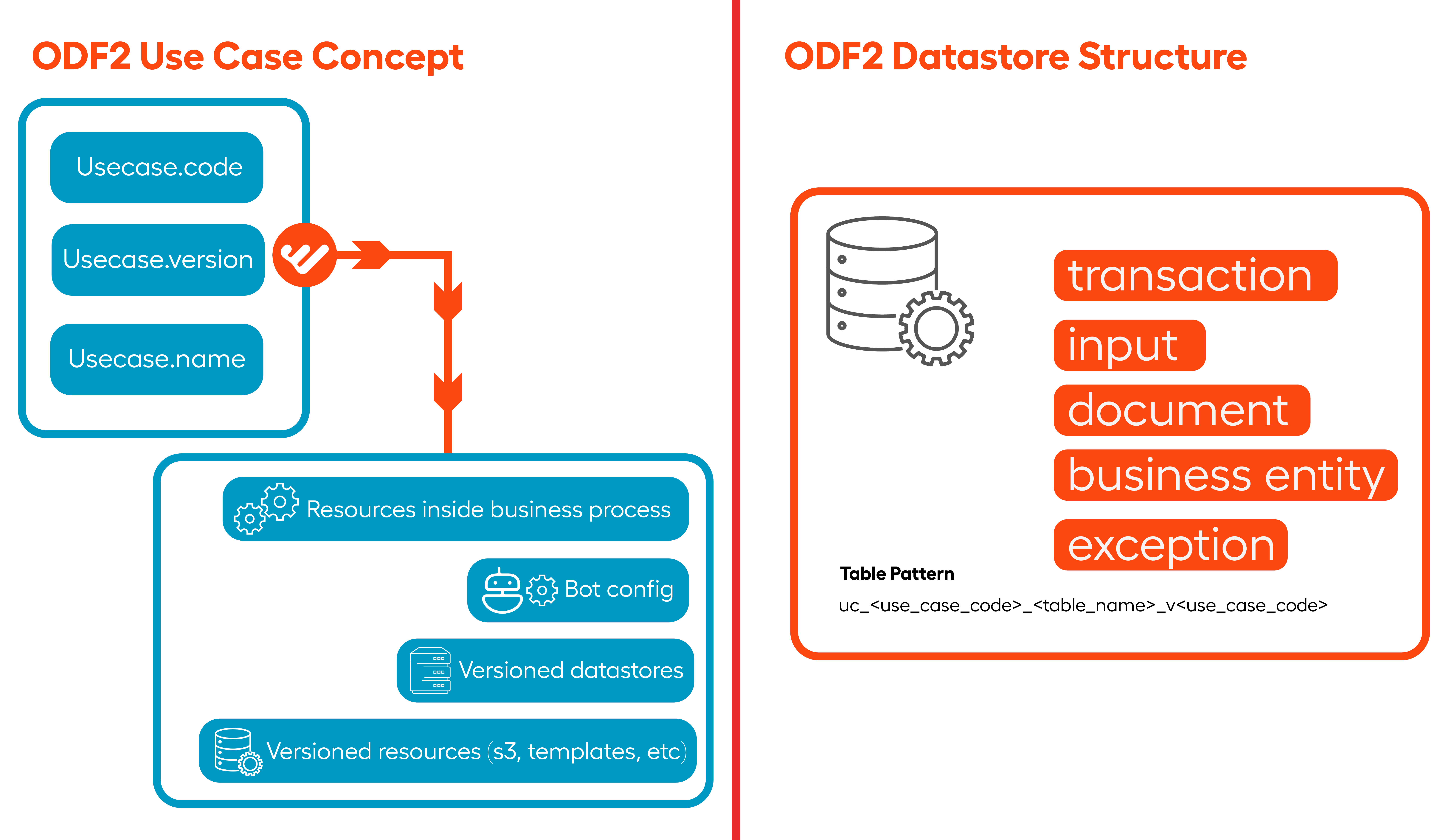
For more information on the new framework, refer to the ODF 2 documentation.
Launcher for IA Cloud Developer
The desktop Launcher application is a specific tool for managing server components. The main features are as follows:
Components are grouped to flexibly launch and manage only currently required servers depending on development needs: RPA Worker, OCR, or Control Tower & WorkSpace, and related dependencies. Grouping reduces RAM and CPU loads on local development workstations and makes the startup of components much faster.
Options to enable and disable components are available both from Launcher and the tray menu.
The console output available right in the application enables to track log data and search within it.
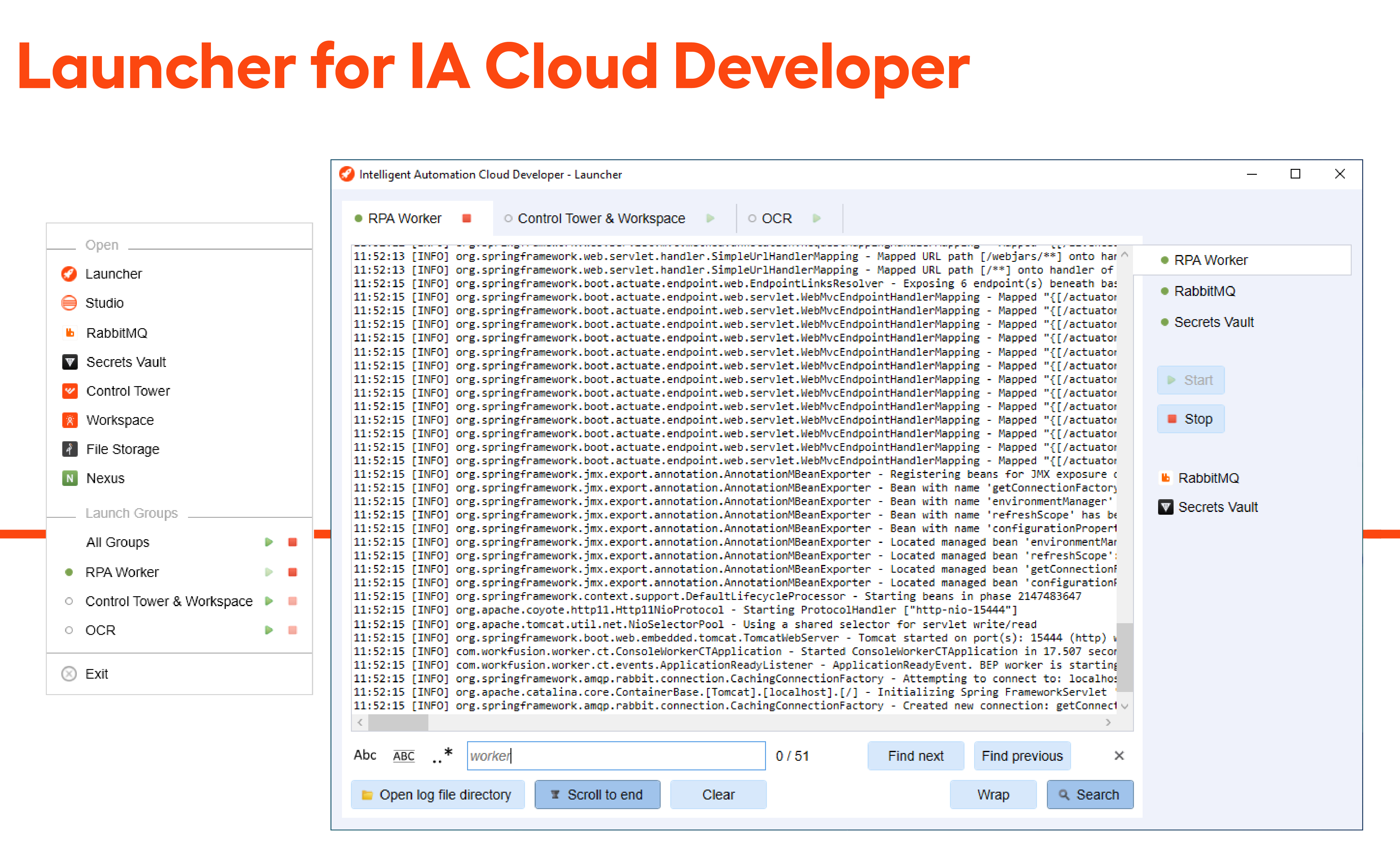
For more details, refer to the Launcher documentation.
French localization for WorkFusion Studio IDE
In addition to the Japanese, German, and Spanish language packs, WorkFusion Studio now features French localization. The new localization increases the IDE’s accessibility for native speakers and supports customers’ ambitions to cover use cases in more languages.
For language setting instructions, refer to the Preferences article.
Improvements
RPA stabilization
A number of issues in RPA-as-a-service and RPA Worker were resolved to improve the component's stability, such as:
A reconnection action timeout was implemented for command-line start of the Unit Bot Agent to address the RPA-to-BEP interaction issues due to connectivity disruptions between Bot Agents and RabbitMQ. The timeout has a preset to which it defaults when no particular value is specified via the command line. Thus, Unit Bot Agents can continue working in case the Master Bot Agent is down.
The default Windows Task Scheduler setting was changed in Windows RPA Installer. Previously, the setting specified to kill tasks running for over three days, which caused Bot Agents to crash.
The problem with RPA Bot Unit RDP connections was resolved. Previously, RDP connections did not open when users attempted to log in to monitor and manipulate Bot Unit session windows. As a result of the fix, user connections do not impact the RPA bot step execution.
A system-level performance issue was resolved when Bot Agent could freeze due to attempts to terminate non-existent Bot Unit processes.
Other RPA improvements included the following:
A possibility was provided to change the resolution of the RPA unit session on all RPA units. Previously, the WorkFusion RPA’s RDP client supported only a single fixed resolution, whereas now the resolution can be configured on each RPA server for each RPA unit specifically. Also, you can set one resolution for all units or different resolutions for each unit on an RPA server. The new feature allows enhancing RPA performance and greater flexibility in Business Process implementation. For configuration details, refer to the Change resolution of unit sessions article.
A new mechanism to process login failures was delivered for the WinLogonUI customization to improve the WorkFusion platform’s transparency for users and error traceability. Previously, when credentials were customized incorrectly, login attempts would continue with the wrong credentials. Now, the login results are sent back to the Bot Master Agent. The Agent’s log includes an error clearly stating that credentials are invalid. You can access the log data by building an RPA dashboard in Kibana.
Other
The Jupiter Notebook can be deployed for the already running IA Cloud Enterprise environment. For the installation procedure, refer to Install Jupiter Notebook.
Caching for static resources (js, html, css, and so on) was implemented for Workspace and Control Tower to improve response time and, hence, user experience.
The Workflow designer load was optimized. The previous implementation of
com.freedomoss.requester.service.campaign.impl.CampaignService.findDistinctTitleCampaigns(SimpleCriteriaBuilder)loaded definitions and then checked each for visibility deteriorating the designer's performance. The solutions to address the issue included batching for definition checks and caching.
Updates
A few updates were implemented to fix component vulnerabilities, in particular:
Erlang upgraded to v22.3.4.17
Rsync upgraded to v3.2.3
Apache Subversion upgraded to 1.14.0
Apache Tomcat upgraded to v8.5.63
Bug fixes
Expand to see the list of bug fixes
Infrastructure
Enabled configuring Nginx security properties to ensure that a 403 error is thrown if undesirable or blacklisted user agents are present in the user-agent string.
Resolved the username formatting issue within the
config.ymlfile that caused installation failures.Fixed the issue with WinRM connections, disabling basic authentication for them.
Eliminated the
Partition does not have an owner. partitionId: 74exception thrown by Hazelcast when a connection is lost.Ensured that hybrid and ensemble queues are created in RabbitMQ and declared at the AMS service startup.
Added a startup flag that improves troubleshooting of OOM errors by immediately restarting the application in case of such errors.
Control Tower
Fixed errors related to authentication from WorkFusion Studio to Control Tower.
Fixed the CT database migration error that occurred in the course of upgrading IA Cloud Developer.
Enabled backporting of PDFBox 2.0.19 to resolve HTLM-to-PDF conversion issues.
Added a manual mode to change the default value of the Review Task setting.
Fixed the issue when the CT UI rendered slowly Manual Tasks with multi-value answers.
Fixed the slow UI and out-of-memory error caused by
SnapshotBuilderImpl#generateSnapshotwhen generating snapshots of massive data volumes.Reduced the prefetch count of the TDS message and enabled lazy task queues for Control Tower.
Increased the TDS default max channel limit to 4096 and decreased the GC interval to 24 h.
Fixed the issue with custom dashboard localization in the side menu. As a result, OOTB dashboards are displayed in the side menu with localized names, whereas non-OOTB dashboards—with their original ones.
Fixed errors with deleting filtered users in Control Tower.
Enabled rollback of the prolong time feature for processing Manual Tasks.
Resolved the issue with
spokectclientgeneration in Control Tower API.Fixed the problem when users were unable to delete Data Stores linked to answers in the database by enabling hard delete of Field Schema.
Ensured that every time a Data Store is created via migration, an archive table also gets created, and it behaves the same way as an archive table created via UI.
Fixed the issue of the RV column not generating automatically when a user tried to edit a Data Store created via migration.
Increased the name limit for Data Stores up to 100 symbols.
Fixed the issue when deleted Campaigns prevented Data Store deletion. Now, removed entities are no longer fetched from the database for the purposes of checking connections to Data Stores.
Resolved the problem when Workers failed to load classes from a BCB jar. For the purpose, a BCB jar check was added for incoming tasks to make sure BCB jar artifacts are available in the file system and Workers are ready to process them. Based on the check, if a BCB jar was removed for some reason, it is now re-downloaded before task processing.
AutoML
- Changed the memory usage unit for AutoML Workers from kilobytes to megabytes in the
worker-\*.ymlfiles or Apache ZooKeeper variables.
WorkSpace
Extended the zooming capability in WorkSpace documents from 1.9x to 5x.
Fixed task failures on CT Preview and WorkSpace caused by an empty
meta_info_jsonfield.
Deprecations
The requirement for BEP Agent servers to be in UTC timezone is no longer valid. The precheck and preinstall steps for timedatectl are removed from the IA Cloud Enterprise installer.