
Version 10.2.4
Release date
March 9, 2022
This release introduces Digital Workers—a major change in WorkFusion's approach to automating customer business processes. The novelty Solution Catalog and Configuration Framework, available as early-access features via Control Tower, are designed to back up the installation and configuration of the new capability.
In this release, WorkFusion puts specific emphasis on fortifying the three Product pillars: performance, stability, and security. The enhancements affected the RPA, OCR, and BEP components, as well as the installer and environment. Overall optimization of the Product's workflow and data handling has substantially improved Business Process execution.
For Automation Engineers, the release also has improvements in store, in particular:
Simplified Python-based model development and AutoML SDK updates.
More efficient exception handling in ODF2.
Enhanced ODF2 extensibility.
Simplified Business Process implementation, including support for isolated loading of third-party libraries and Bot Step logic separated from Bot Step configuration.
Other Product enhancements include the following:
Role-based restrictions for WorkSpace users were extended with more user roles and configurable fine-grained permissions, making it easier to manage assignments and safeguard your data. The flow to configure the restrictions has also been simplified.
The WorkSpace interface got several enhancements to accommodate customers' feedback and make your experience with the application more enjoyable.
Analytics was improved in terms of usability to get you still more valuable insights into process data. In addition, Tableau v.2021.4.3 now contains the Log4j fix out of the box.
The ELK (Elasticsearch-Kibana-Logstash) stack features a new capability to create custom incident alerts, thus improving traceability across the platform.
The Data Purge capability has been extended to cover Data Stores and to include custom purge procedures. It got an interface for flexible scheduling and configurations and REST API for third-party integrations.
Single sign-on (SSO) integration was configured in MinIO for the High Availability and non-HA modes.
The Product now supports MS SQL managed services in Azure.
Solution Catalog
With the introduction of the Digital Worker concept, Control Tower got a new user interface feature—Solution Catalog providing access to a repository of proprietary pre-packaged automation solutions.
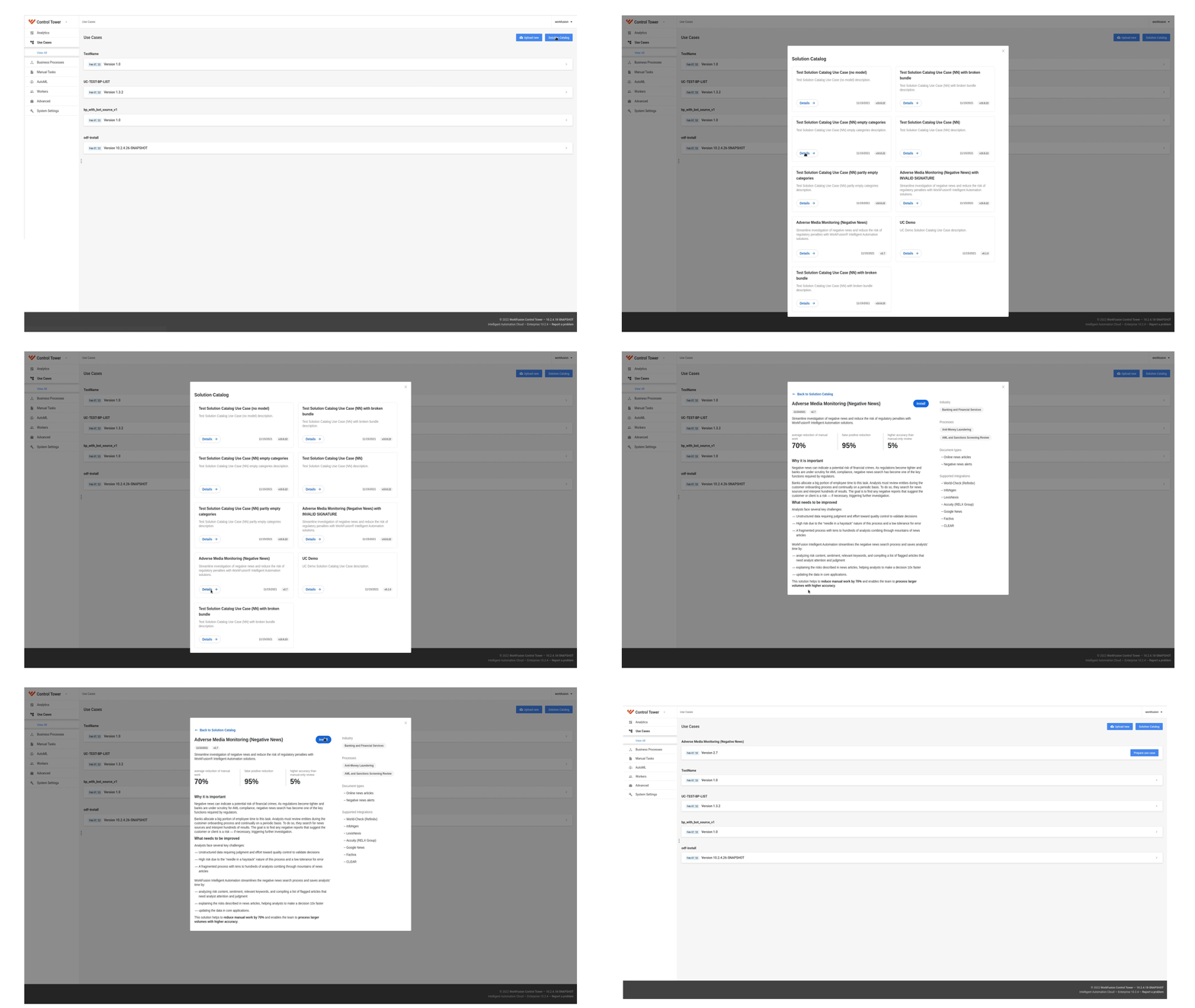
The Solution Catalog is now available only as an early-access feature. It lets you download and install pre-packaged automations, also known as Digital Workers, in a few clicks without additional engineering support. The efforts to prepare target environments for the installations have also been minimized.
Digital Workers can deliver value out-of-the-box since they are designed to address typical business problems. As a result, the time to value is reduced dramatically—from months to mere hours. They are also a good starting point to try out pre-packaged automation for a simple use case and then customize it to match your exact business needs.
note
The Solution Catalog feature is disabled by default. For instructions on enabling it, refer to the Configure Solution Catalog topic. For the user manual, go to the Use Solution Catalog topic.
The Solution Catalog introduces the Configuration Framework that makes the configuration of any Digital Worker straightforward and intuitive—even for non-technical users. It provides a single place for the UI configuration, a common look and feel for the configuration UI across all Digital Workers, and a framework to build a configuration UI that follows the same intuitive patterns—for custom Digital Workers. For more details, see the Manage Use Case instruction. For guidelines on the configuration UI design, refer to the Configuration UI guide.
ODF 2
important
Due to significant changes, ODF 2 requires manual migration of existing projects based on ODF 2 versions 10.2.3.7 or 10.2.1.8 or 10.1.6.1 into the latest version compatible with IA Cloud Enterprise 10.2.4. Thus, each ODF is linked to the corresponding IA Cloud version and requires updating a dependency on a new IA Cloud version in the root POM.
To simplify work with the ODF 2 framework for your coding-based automations and make development processes less time-consuming, we introduced the following improvements:
Simplified structure
The release simplifies the structure of the Full Archetype automation project blueprint. Instead of five modules, only two are provided. It means that the project generated out of the ODF 2 Archetype has a different structure as compared to the previous versions. For more details, refer to the ODF 2 Full Archetype description.
The WorkFusion team decomposed the ODF 2 core into four modules with heavy refactoring:
Mind that the modules are optional, and you can add them as dependencies in your automation implementations if needed. For details, see the ODF 2 core structure.
Extensibility
We also added new extension points to the Bot Task interface to inject your custom behavior in specific points of Bot Tasks, including those from the ODF 2 standard library.
The simplified manipulation with Bot Task input and output enables you to access the data in specific extension points.
Improved integration with AutoML and OCR provides an easier connection with the input and output data. Now, you can get your output results right after the ML model produces it. When working with OCR integration tasks, you can customize the location for your output documents on S3.
Enhanced exception handling
Based on the feedback of ODF 2 users, we significantly reworked the exception handling mechanism to make it more convenient to use.
The enhanced exception handling implementation no longer assumes a special Business Process to which you route error transactions.
We segregated framework-level exceptions from custom-level ones to make the error-handling processing more straightforward. Extension points implement custom logic to handle errors right in the task, while specific preconditions allow you to skip error transactions. The new approach simplifies error handling and provides more control for end-users, enabling them to write less code to handle exceptions. For more details, refer to Exception handling.
Isolated class loading
In version 10.2.4, the platform can operate with isolated and non-isolated class loading, depending on the code packaging.
ODF 2 packages the code to support isolated class loading by default, allowing you to change your internal implementation of the runtime environment without impacting the existing automation. The facade worker API is introduced to expose the externally available functionality of the platform at the runtime.
The isolated class-loading mechanism makes it easy to load extra third-party dependencies, avoiding conflicts between those and the internal libraries in the runtime environment. For more information, refer to Isolated loading of third-party libraries.
note
Contrary to new ODF 2 projects, the legacy ODF framework operates with non-isolated class loading due to compatibility reasons.
WorkSpace
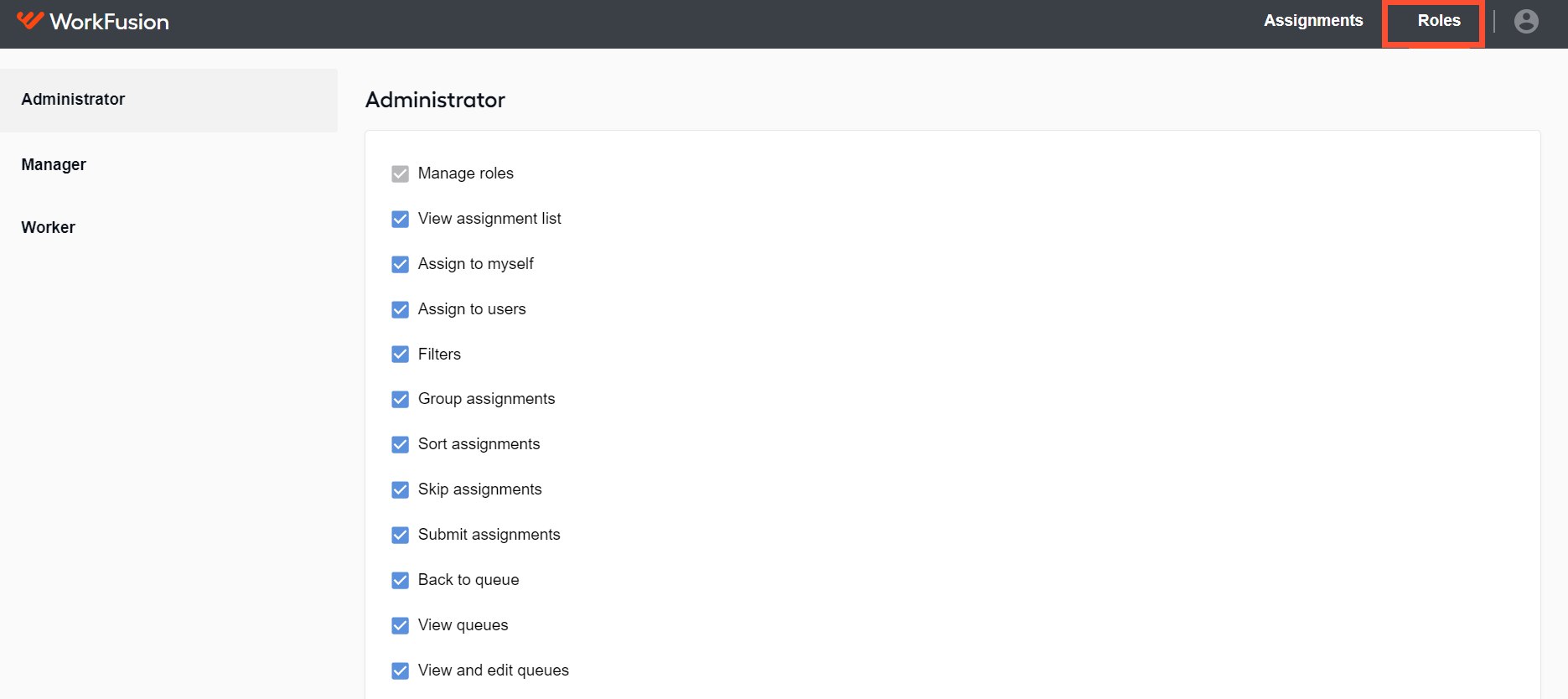
The release extends and improves the role-based restrictions introduced with IA Cloud Enterprise v10.2.3 to limit access to the WorkSpace functionality. The changes are intended to improve assignment management and information security: you can set up only certain people to view, filter, assign, sort, or otherwise handle WorkSpace assignments.
Unlike in version 10.2.3, the restrictions are enabled by default without the need for changing configuration files. Roles have become more numerous—Administrator, Manager, and Worker, and you can configure them via the single user management system. Whereas previously permissions were set for the entirety of WorkSpace functions, you can now configure permissions for its separate features on the new Roles tab. For details, refer to the Manage WorkSpace roles and permissions topic.
Analytics
In this release, the performance of Extract, Transmit, Load (ETL) procedures has been enhanced significantly—now they run 10 to 25 times faster than previous Product versions. From the business perspective, this means users can get more value from data in a shorter time.
The WorkFusion team has also worked to incorporate our customers' feedback on WF Analytics to make dashboards less technically oriented and more metrics-focused. We removed redundant technical data and updated the look and feel of the dashboards available via Control Tower:
The Overview dashboard was completely changed to provide a more accurate and comprehensive summary of daily operations and overall automation health metrics. The new Activity hours view lets you evaluate hourly workload and process scheduling to plan resources and overall optimization efficiently. For details, refer to the topic.
The Process dashboard now covers all transaction volumes by the Service-Level Agreement (SLA) in a single chart. The time breakdown view features a broad range of metrics— average cycle time, processing time, wait time, and manual time. The new Time Grouping filer allows specifying the date granularity: daily, weekly, monthly, or quarterly. For details, refer to the topic.
The Speed dashboard makes it possible to conduct the root cause analysis not only by Bot Tasks but also by user-defined steps. The feature is beneficial when a huge piece of logic is included in a single Bot step: users can define precise Business Process steps where they want to track timing. For specifying the logic, you are supposed to use the ODF2 framework. For details, refer to the topic.
The Overview, Process, Speed, and Manual dashboards are supported with the Key Performance Indicators views providing information on daily trends. They make it easier for a user without specific WorkFusion platform knowledge to understand the Product metrics.
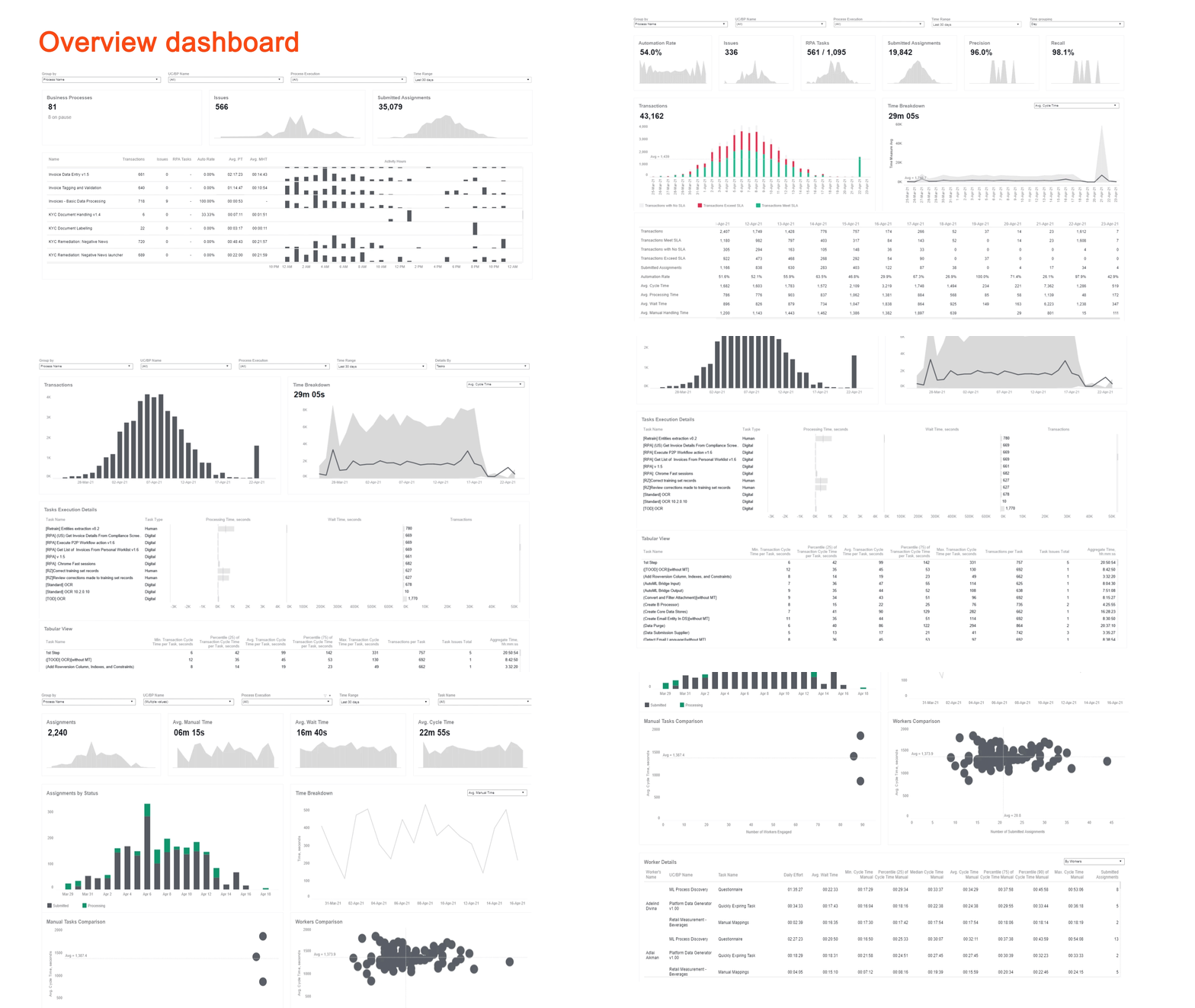
With the dashboard improvements, you can get access to required analytical data faster and easier, avoiding the need to look through unnecessary and confusing technical details.
The Product now supports the new Tableau v.2021.4.3 containing the Log4j fix out of the box. When installing or upgrading the Analytics component, you now have two options:
Upgrade to Tableau v.2021.4.3 with embedded fixes. Note that this version requires twice the CPU and memory capacity.
Install standard Tableau v.2018.3.2 and mitigate the issue manually by following the instruction on the official website.
Alerting and Monitoring
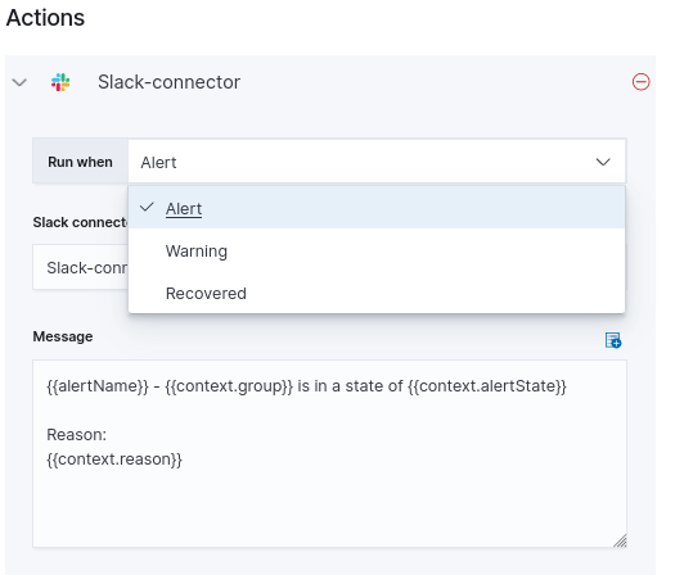
With the upgraded ELK (Elasticsearch-Kibana-Logstash) stack, you can create custom alerts for incidents via a simple web interface and set notification channels based on the issue severity level. The upgrade also removes the vulnerable Log4j version.
The additional monitoring dashboards in Kibana help you troubleshoot problems with Minio, RabbitMQ, and ZooKeeper.
The implemented support of managed SQL and Azure allows you to use the managed SQL instance instead of the local one. You can configure it via two simple actions: by enabling the cloud SQL service and choosing Azure as your cloud platform.
Enhanced Business Process execution
To boost the performance and stability of Business Process execution, the following improvements were put in place:
Optimized database structure
The platform's database structure was optimized by removing unnecessary tables and fields and rebuilding large tables. As a result, stored data volumes are down by 20%, making it possible for the database to function more efficiently under high load. Even more, the change did not affect the database's backward compatibility.
Revamped OOTB Data Purge
A new user interface was implemented to configure and run Data Purge via Control Tower. You can now conveniently schedule and otherwise manage data cleansing across the platform using out-of-the-box (OOTB) Data Purge options or create custom procedures. For details, refer to the Data Purge articles.
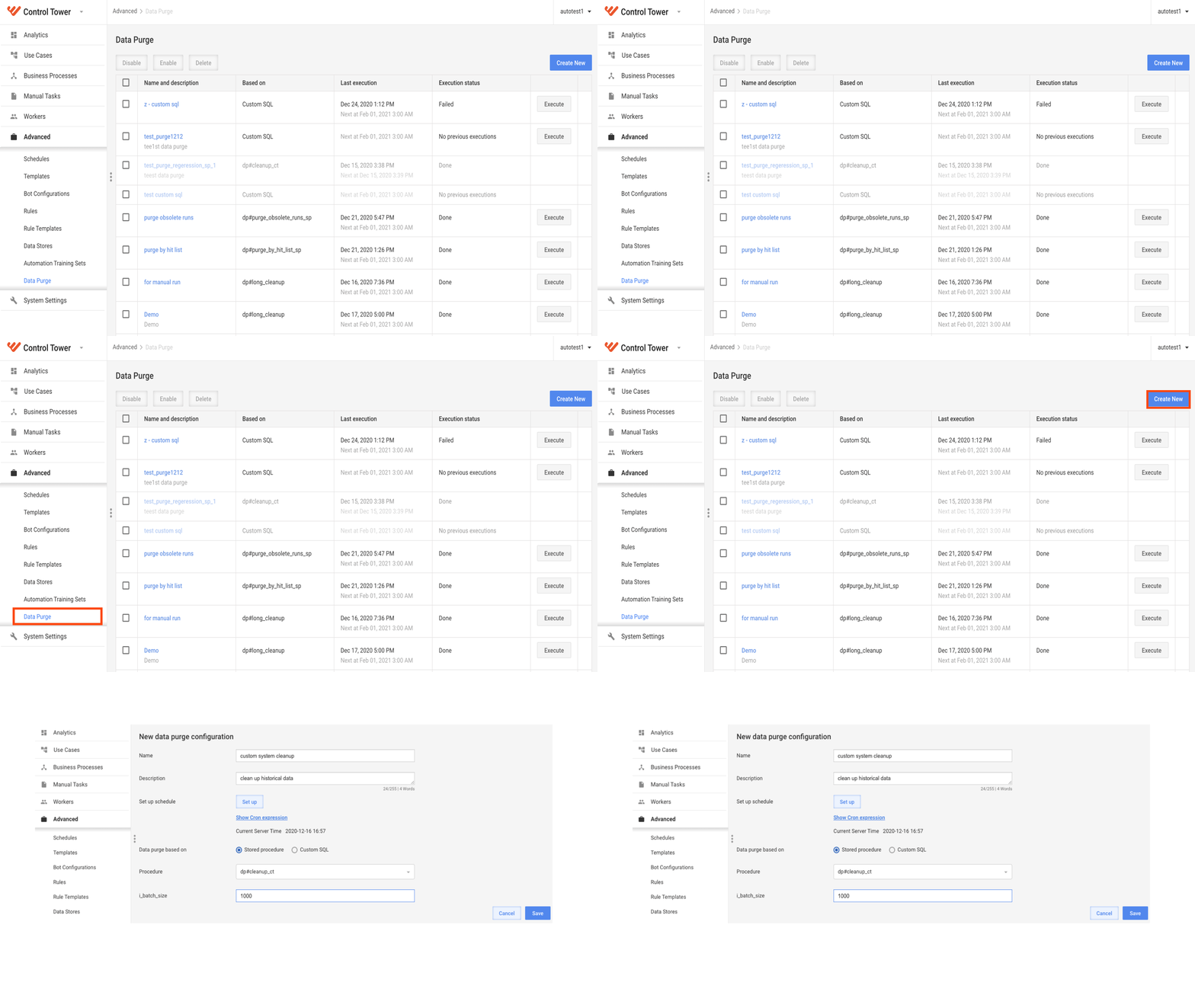
The performance of OOTB stored procedures for purging was improved. Data Purge now covers the database and Data Stores (DS). You can also use Data Purge REST API to set up data cleansing to be triggered from third-party systems. For details, refer to Data Purge API.
Accelerated data transition
Under high load, significant latency overhead was observed when moving transactions between Business Process steps. The workflow processing internals were improved to resolve the issue, resulting in faster data transition between BP steps.
Improved Manual Task rendering
The Manual Task rendering mechanism was decomposed into a standalone horizontally scalable microservice. The horizontal scaling support has made it possible to increase throughput by up to three times. The rendering mechanism was also optimized to only read data from the database to avoid any write locks.
Optimized RabbitMQ queue and channel management
Optimization also covered the management of active queues and channels in RabbitMQ, making it possible to eliminate stuck BP issues.
Improvements
Bot Execution Platform
- Improved the BP starting mechanism and sped up the first transaction processing time up to 25 times.
WorkSpace
Apart from the introduction of roles and permissions, WorkSpace has had a major interface makeover based on user feedback. The improvements enhance user experience with the application and reduce the time to handle assignments:
Improved searching in specific queues. The assignments from the search results now form a separate queue.
Introduced a timer inside assignments showing how much time users spent working on them.
Added hints to those assignments on the list displayed as blocked. The hints specify the users who blocked the assignments.
Made assignment sorting options more self-explanatory. Now, as you attempt to apply the sorting function, five options are shown:
Recently published first
Recently published last
Expiring soon first
Expiring soon last
Custom sorting
Improved the flow to update custom queue names. You can now click the Edit (pen) button at any time you need, whereas previously, the renaming was possible only after a filter or grouping update or search.
Improved the flow to save and update custom queues. The Save and Update buttons appear on the screen once you start changing filters, sorting, or grouping in a queue.
Enhanced the Queues sidebar design to simplify access to assignments. The sidebar is now visible by default and can include the following sections:
All assignments, comprising all assignments visible to the user in WorkSpace
My assignments, listing all assignments assigned to the user
Saved by me, showing only when you have saved custom queues and listing them
Unsaved queues, appearing when a user starts creating a custom queue
Updated the controller to expand and collapse the sidebar and moved it to the top, making it more convenient for users to apply it.
Updated the filtering functionality to make it more intuitive for users. New filter controls were introduced, including the Add filter and Clear all buttons.
Added tooltips for all partially hidden elements in the assignment list. The tooltips display complete information, for instance, full assignment titles.
Enabled resizing and relocating of the columns in the assignment list. You can now customize the list at runtime to achieve the required look and feel.
Changed the conditions for displaying data loss notifications upon closing of assignments. The notifications now appear only if you enter data in assignments. If no data are added or updated, the notification is off.
Updated the look of the notifications about assignment rendering issues and custom queue deletion to make them more user-friendly.
Installer and environment
Added support for MSSQL column level encryption to store encrypted data in the database and restrict access to sensitive information.
Added the validation that the High availability mode is enabled in
config.ymlafter a user specifies three Master server hostnames inhosts.yml. The check prevents errors during the installation.Added the precheck step to verify that the
mssql_hostname,master_hostnames,agent_hostnamesvariables are specified inhosts.yml. If the lines are missing, the error is now reported.Added the precheck step to verify that Zookeeper's
/datalogdirectory is not mounted to a disk withINSTALL_DIR. If the check fails, the automation automatically stops. This script also verifies that Elasticsearch/datadirectory is not mounted to a disk withINSTALL_DIRand shows the Warning in case such deployment is detected.Added ZooKeeper dashboard in Kibana for showing critical metrics, like latency, traffic, number of znodes, datalog disk performance, and so on to improve troubleshooting.
Added the support of Mesos Framework Authentication to integrate Marathon interface with build-in SSO.
Enhanced the look and feel of the RabbitMQ dashboard in Kibana and fixed minor flaws in it to improve troubleshooting.
Set the number of ELK index templates replicas to zero (0) for the non-high-availability mode to improve performance and decrease the occupied shards (?) in case of multiple large log files.
Changed the default directory for storing all components' temporary files to
INSTALL_DIR/tmp/to improve logs' searchability.Improved the precheck of certificates to ensure a flawless installation. The precheck won't pass now if there is no new line character at the end of
ca.crtor any lines unrelated to certificates are detected inca.crt,server.crt, orserver.key.Updated the RPA passwords precheck to include new definitions of allowed and forbidden characters in passwords.
Included the legacy logs directory
SUPERVISORD_HOME/log/in the cleanup procedure executed after the upgrade from v.10.1.X to v.10.2.4.Updated the Filebeat configuration to send Control Tower access logs from
localhost_access_log.txtto Logstash and show them in Kibana for better troubleshooting.Updated the Filebeat configuration to rotate and send Nexus logs from
NEXUS_HOME/sonatype-work/nexus/logs/to Logstash and show them in Kibana for better troubleshooting.Made Kibana alerting active by default right after the Product is installed.
Integrated the Minio server credentials management into Keycloak. Now, after the Product installation, you can use your Control Tower credentials to log into the Minio server.
Separated services credentials from UI ones to improve inter-service communication security. The secrets of the service are stored in Secrets Vault, while Keycloak handles interface usernames and passwords.
Disabled unsafe Nginx modules to improve Product's security.
Removed default passwords from
config.ymlfor security reasons. Now, during the installation, you must set them manually or generate with the script.Enabled the traffic SSL encryption among ZooKeeper cluster nodes in the multi-point deployments.
Enhanced the [BEP] Cluster utilization dashboard in Kibana. Now, it delivers metrics from mesos-agent via Metricbeat and shows memory and CPU utilization for each server.
Removed the user creating capability from the installer to stabilize the deployment process.
Configured protection against buffer overflow in Nginx to improve Product's stability and security.
Configured Mesos interface to be switched off by default to fix vulnerabilities and security issues. You can enable it voluntarily using the guide.
Updated the RabbitMQ configuration to make its user interface disabled by default for security reasons.
Configured log rotation for Mesos container to avoid overconsumption of free space by system records.
Redesigned the MSSQL check supervisord script to verify that at least one IP address (+ port), which DNS returns, is alive.
AutoML
Simplified the development process for Python-based models.
Added integration with Pure Python projects used instead of mixed Java and Python projects.
Enabled generation of custom Python models. For a detailed guide, refer to Generate pure Python project.
Enabled launching Python model locally without a Java wrapper during the development process.
Packed pre-trained models to IA Cloud compatible ready-to-use artifacts.
Enabled building hyper models without the explicit call of Maven and Java, thus reducing skill requirements for a developer, with Java not needed anymore.
Implemented the Automatic Algorithm mechanism to find the best classifier for the current dataset. The main goal of this approach is to choose the best classifier and apply it during training. For more details, refer to Configure automatic algorithm selection.
Finalized the Python-based Vowpal Wabbit (VW) Classifier implementation by adding the VW library to Python dependencies to the installer.
Enabled the image-based clustering model integration available in the platform out-of-the-box.
Added a possibility to work with document links for all types of models. Now, the links are available from the AutoML service without authentication.
Added the URL-based image support to ML SDK on the Python side.
Added a utility to merge and split several IE models into one.
Moved labeling information outside the document structure.
Provided a possibility to use a single file, for example, CSV, JSON per line, as input data for local training and execution.
Applied corrections to feature files for SE 2.0 Classification Model.
Improved the AutoML Worker initialization by removing the Lazy initialization for task executor beans.
Enriched Python exception log messages to include Python version, Python path, the
WF_PYTHON_ENVvalue, andsys.path.
Control Tower
Removed the obsolete table
HitDisabledForWorker.Introduced the new mechanism for handling stuck Bot tasks. Now you can receive alerts about these tasks and force-stop them when needed. See Configure Bot Task alerts and forced stop.
Changed the default number of Business Process retries to zero. This will help start the troubleshooting immediately without waiting for a BP to stop. Also, multiple duplicate exception messages won't pollute logs.
Added logs for workers that won't start due to insufficient Agents in the BEP cluster. This will help decrease the support team reaction and troubleshooting time.
RPA
Improved the auto reconnection procedure enabling a Bot Unit to log in with RDP. If a Bot Unit RDP session is disconnected, WFClient activates. For more details, refer to Perform smart auto-reconnection for Bot Unit RDP session.
Disabled sending the
Ctrl+Ccombination to Workers on all instances to prevent their shutting down.Improved the logging mechanism enabling to state which actions triggered the restart of the Worker and caused timeouts.
Set the auto-restart parameter for the Worker to
trueto enable the automatic restart in case of accidental closure.Improved the restart mechanism enabling the WFSvc service to restart Master Agent on its crushing. If child services are run, they are stopped, and new ones are restarted.
Improved the log sending procedure from UI Manipulation Framework to a Java parent process by checking the Java process availability before sending logs.
Increased the default timeout for RPA web actions (such as
switchToFrame,clickElement,screenshot,getWindowHandles,isElementDisplayed) from 5 seconds to 10 minutes to improve the performance for slow browsers.Increased the default timeout for RPA native actions from 5 minutes to 15 minutes.
Enabled the call frequency control by adding delay parameters to configure
MemoryUsageTracker. For more details, refer to Resolve handle leaks in Worker.Added the ability to configure the reconnection timeout between the Worker and Bot Agent for the REST client in
roboticsFlowPlugin. For more details, refer to Configure timeout to reconnect.Improved the behavior of Bot Agent when users try to log in to the system under Master with the wrong credentials. A new log is added if there is no session for the username given in Vault. To compare the existing users and a user from Vault, you can search for the "Can't find master session for user" string in the log now.
Added the Edge driver support to the
robotplugin.Enabled the RPA service to log into the Bot Unit session when the legal agreement banner is enforced by Group Policy Objects or registry settings.
Improved the restart functionality if the Worker was forcefully closed in the middle of execution.
Prevented the Worker console closing on using the
Ctrl+Ccombination. Mind that the functionality is available for Windows machines only.Stabilized the close driver functionality, making some of the calls independent of previous exceptions.
Added a legacy way to search elements in JVM applications. For more information, refer to Switch to old UI elements search.
OCR
Improved OCR performance by increasing the document processing speed up to 30%.
Updated the following vulnerable dependencies:
- jackson-databind, Apache CXF, Jackson Dataformats: Binary, json-smart, dom4j, Apache Commons BeanUtils, Spring Integration
Bug fixes
Installer and environment
Fixed the patterns in the
check-nfs.shscript producing irrelevant errors in Kibana. The script is now only present on the AGENT servers in the non-high-availability environments and ignores the "NFSD" filesystems.Fixed crashes of Marathon because of the Keycloak being unavailable after restarting servers.
Fixed installation failures due to running the installer under users other than default
WF_USERand switching to the correct one during the process.Fixed the Product Multi-point installation failing when the "preinstall" step is executed under the
rootuser.Fixed the bug preventing uploading files from a Control Tower Manual task into Minio.
Fixed the issue with the automatic redirect from Kibana load balancer URL to Kibana interface.
WorkSpace
Resolved the JS code issue in custom Manual Task templates that prevented correct manual entering of a date for Information Extraction answers.
Eliminated the risk of malicious file upload by introducing the pre-signed link feature. Previously, files were uploaded directly to Minio. Now, there is a dedicated endpoint that validates the file size, content type, extension and generates a pre-signed link.
AutoML
Fixed the issue with the
parameters.put(ConfigurationConstants.ENABLE_FEATURE_IMPORTANCE_EXPLANATION,true);option not working for Python-based classifiers.Fixed the issue with the inability to pass Boolean parameters from Control Tower to AutoML.
Fixed
NullPointerExceptionon statistics calculation after generating a project from the python-classification archetype and launching training on the presentation dataset.Fixed the issue with the AutoML services removing the work folder when executing training in the DEBUG mode.
Fixed the issue with the Manual Task default value not rendered for Tagging Over Document Manual Task.
Fixed the issue with
ExtractionDocumentPostProcessorexecuting the init and destroy methods for each document.Fixed the issue with only one line item used for the group statistics calculation.
Fixed the issue with the feature extractor filter based on the
filtered-featuresfile.Fixed the issue with
CrossValidationSplitTasknot working correctly for any training set size.Fixed the issue with sensitivity-based parent models not synchronizing in AMMS due to the missing
model-info.jsonfile.Fixed the issue with line-item fields extracted but not joined by the tab number during the model execution.
Control Tower
Fixed the issue with the
<dropColumn>change not reflected to Control Tower metadata if the<columns>nested attribute is not provided.Fixed the failure when a Business Process was exported with specific Data Stores excluded.
Fixed the issue with users not being able to log in to Control Tower after upgrading from version 10.1.6.1 to 10.2.3.
Fixed the issue with the "Loading..." message not disappearing on the Design tab when creating a Manual Task from Operation using values from an imported bundle.
Fixed the issue with Control Tower showing different platform versions on the UI.
Fixed the issue with Bot Tasks not being shown on the Quick Search panel if created using the
Copyaction.Fixed the issue with Bot Tasks not being shown on the Quick Search panel if the Business Process run containing them was deleted.
Fixed the issue with deleted Bot Configs not re-appearing when the bundle that contains them is re-uploaded.
Fixed the Manual Task import issue with the Data Store input not working as expected.
Fixed the issue with bundles not running and logging the "Step Name '...' has failed. Reason: 'Artifact on nexus has a different checksum'" message due to the error handling mechanism on Workers.
Fixed the bundle import failure when a bundle contains a workbook name consisting of several parts and such workbook has been already imported before.
Fixed the login failure issue due to a user having sub-user groups with the same name.
Fixed the navigation issue if a Business Process is run from the list of Use Cases.
Fixed the out-of-memory issue while generating snapshots of massive data volumes when migrating changes in Control Tower.
Fixed the issue when importing bundle changes in the
<name>tag of pom.xml are not reflected in imported Bot Task names.Fixed the issue when refreshing Data Sources imported with a bundle Use Case fails on the Tableau side with the custom MS SQL server port.
Fixed the issue with two Manual tasks visible on the Join step after taking the assignment in Workspace. Now, only one task is visible, while others wait for joining.
Fixed missing result records in the completed Business Processes with the Join rule.
Fixed the issue with Manual Tasks that have been deleted but can still be added to Business Process via Search.
Fixed the wrong answer codes in the ETL use case to improve troubleshooting.
Fixed Task Dispatcher Service trying to consume data from removed queues. This change improves the BP execution performance.
Fixed issues with Bot steps showing incorrect performance statistics.
Bot Execution Platform
Fixed the StackOverflow issue with IE processing containing multiple tags.
Fixed incorrect cluster capacity calculation and workers distribution algorithm.
Fixed multiple restore-related issues in the Tagging over Document Business Process.
Fixed the issue with the excessive records joined on the Manual Step after the split operation.
Fixed the failed import of out-of-the-box Use Cases during the Control Tower start-up.
Fixed the deletion of the training result queue if the AutoML model training fails.
ODF
Fixed the issue with the
Session.getDefaultInstancemethod caching the session to be used in different Bot Tasks despite the provided email settings.Fixed the issue with the
EmailMessageclass having a date field that is not populated when getting emails from an Outlook inbox.Fixed the issue with the OCR output location by customizing S3 location of documents for the OCR integration task.
RPA
Fixed the
EnumerateSessionsmethod failure, not allowing Master and RPA Unit sessions to reconnect after possible disconnection sign-off.Fixed the issue with the
CountdownRestoreparameter not resetting after a successful Bot Master connection.Fixed the issue with the screenshot function not being displayed for an RPA Unit in Bot Manager on Windows 10 VDI.
Fixed the issue with Master Agent failing to make a Master session active on its disconnecting.
Fixed the close driver functionality failure on having the "UIManipulationFramework TimeoutException" issue.
Fixed the issue with the WFSvc service not stopping in case of the Vault service unavailability.
Fixed the issue with the Worker continuously waiting for a wrong queue on Windows 10 VDI, HA single-point, or HA multi-point.
Fixed the logging issue with
JvmUiAgentcontaining several logs with a wrong pattern and causing exceptions when the log function is called.Fixed the issue with
RPAUtils.callMethodWithoutParamsreturning Object instead of String and failing the execution withClassCastException.Fixed the issue with an RPA Unit disappearing from Bot Manager due to the Bot Agent's
_javasysmon_library crash.Fixed the issue with the
blockImages=truescript parameter not working for the Edge browser.Fixed the issue with failing to stop an RPA Unit in the Bot Manager UI.
Fixed the issue with Bot Master not signing in automatically.
Fixed the issue with the automation scripts freezing when working with UI-rich Swing-based Java applications with over one million cells in a table.
Fixed the methods
pressCtrlA()andpressCtrlX()working incorrectly in the Chrome and Edge browsers.
Updates
Upgraded components' versions:
Tomcat v.9.0.55
Nginx v.1.21.3
Tableau 2021.4.3
For more information on the libraries' and third-party components' versions used in the Product, refer to the tools list.
Deprecations
Removed the Apache log4j library from all the platform components to fix a major security vulnerability.
Removed the
python-versionparameter fromworker-<profile>.ymlfiles for the AutoML component.Removed the Matching model from the AutoML and Control Tower components.