
View ODF 2 core structure
Design concepts
ODF 2 is built with two foundational principles in mind:
Pure Java everywhere. To use ODF 2, you need Java and Maven. There is no need to use any special IDE or IDE plugin. Any tool that supports Maven projects can work with ODF 2. You can build, test, and deploy ODF 2 projects using only Maven commands.
All boilerplate is hidden. IA Cloud works with a Bot Task written in XML. ODF 2 automatically generates this XML during the project compilation. All code required for the ODF 2 initialization is generated automatically. You do not need to interact with generated XML files in any way.
ODF 2 is designed to allow you to use the required subset of the framework features and ignore everything else.
- The Foundational layer implements the basic framework concepts and allows writing Bot Tasks in Java.
- The Transactional layer introduces the concept of ODF 2 Transactions.
- The Services layer allows you to use assorted services provided by IA Cloud.
- The Multiprocess layer contains building blocks for designing Digital Workers in a multi-process style.
Foundational layer
In ODF 2, a Bot Task is a Java class. To become a Bot Task, a class must implement the com.workfusion.odf2.core.task.OdfTask interface and be annotated with the com.workfusion.odf2.compiler.@BotTask annotation.
During the project compilation, a Bot Task XML file is created for each class with the @BotTask annotation. When IA Cloud executes a Bot Task, a code from this XML initializes ODF 2 for the needs of the corresponding task. Then, the Bot Task class is instantiated, and the execution result is exported to the Business Process next step.
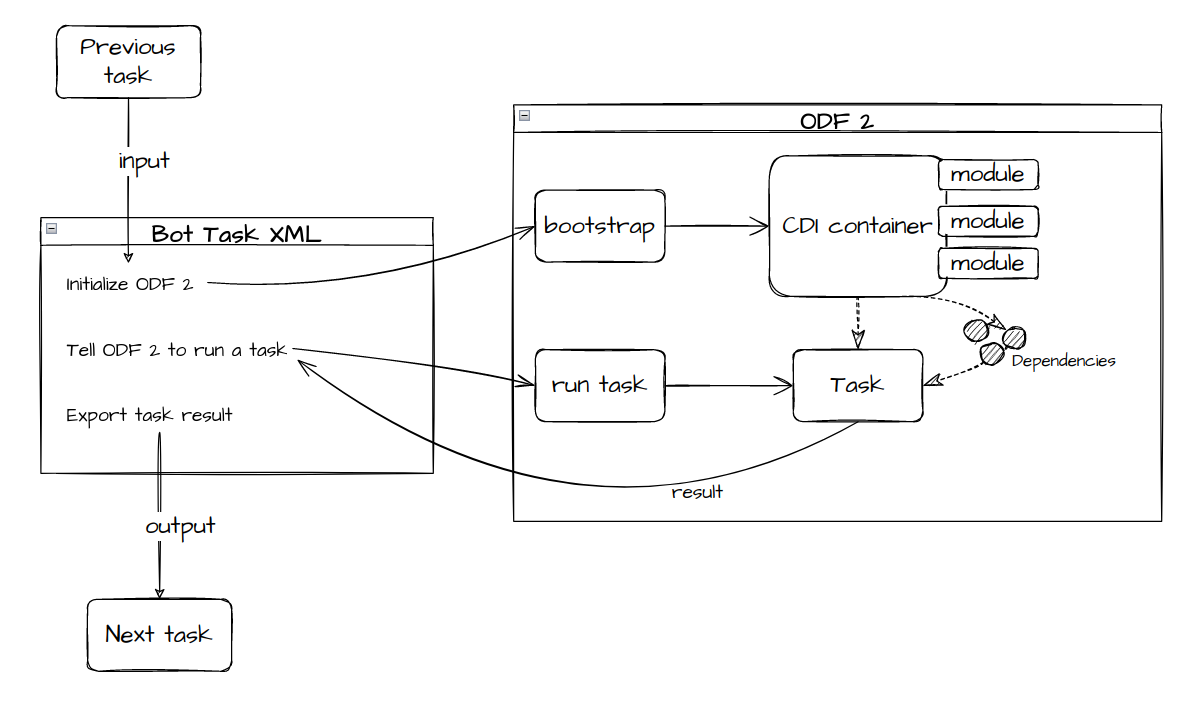
The ODF 2 Foundational layer is a comprehensive toolset that provides you with everything required to build Bot Tasks, including:
- Annotation processor for XML generation
- Dependency injection container
- Fundamental abstractions for Bot Tasks
- ORMLite-based toolkit for working with IA Cloud Data Stores
- Configuration mechanisms
- Error handling mechanism
- Integration with RPA
Automatic generation of Bot Task XML files
Any Maven project that uses the odf2-core module receives the odf2-compiler module as a transitive dependency. odf2-compiler contains an annotation processor that is a piece of additional functionality for the Java compiler. For each Java class annotated as @BotTask, the annotation processor generates a corresponding Bot Task XML file.
Generated XML files are placed in the target/classes/configs/main directory for IA CLoud to find these files and import them as Bot Tasks. XML file names are derived from the Java class names. For example, the MyExampleOcrTask.java class is accompanied by my-example-ocr.xml. You can also explicitly specify a name for this file in an annotation parameter, for example, @BotTask(fileName="other-file-name.xml"), to avoid duplication, improve readability, and so on.
The XML file generated from the Bot Task class contains a code that initializes and runs the ODF 2 framework:
def odf = Odf.builder()
    .withInput(__taskInputMap.getWrappedObject()) // this line allows Odf instance to access task input
    .withModules(new com.workfusion.odf2.core.webharvest.WebHarvestIntegrationModule(binding)) // this line allows Odf instance to access everything that IA Cloud offers to a bot task
    .build()

result = odf.runTask(SimpleBotTask)             // this line asks Odf to instantiate and run bot task class
The com.workfusion.odf2.core.Odf class is an entry point to the framework. Knowing this, you can analyze and debug the control flow of the Bot Task execution.
Dependency injection container
ODF 2 is built around a dependency injection container. Every class of the framework is constructed through this container, including Bot Tasks classes. It means that you can acquire anything a Bot Task needs by asking the container to inject it:
@BotTask
public class SimpleBotTask implements OdfTask {


    @Inject
    public SimpleBotTask(TaskInput taskInput) {
        String data = taskInput.getVariable("some_column").orElse("default value"); // here we are accessing a data from task input
    }

}
Here, SimpleBotTask is injected with TaskInput, an object containing data passed to the task from the previous one or the Business Process input data.
The DI container used in ODF 2 is lightweight and efficient. However, load things only if you really need them. To address this, ODF 2 uses the concept of dependency injection modules, where a module is a class that defines what a DI container can construct.
All framework classes used in Bot Tasks are defined in modules. Some modules are essential and are always loaded by the framework. Others are optional and can be explicitly requested by a Bot Task class:
@BotTask
// highlight-next-line
@Requires(ControlTowerServicesModule.class)
public class SimpleBotTask implements OdfTask {

}
In the example, SimpleBotTask states that it requires ControlTowerServicesModule. Now, it can use S3Service or other services provided by that module.
You are encouraged to write your own modules to provide common functionality for Bot Tasks:
public class ExampleModule implements OdfModule {

    @Provides
    public FancyInputReader(TaskInput taskInput) {
        return new FancyInputReader(taskInput); // Assuming that there is some FancyInputReader class that can do some operation on TaskInput
    }

}

@BotTask
// highlight-next-line
@Requires(ExampleModule.class)
public class SimpleBotTask implements OdfTask {

    @Inject
    public SimpleBotTask(FancyInputReader inputReader) {
        inputReader.doSomethingImpressive();
    }
}
tip
For more information on the Dependency Injection in ODF 2, refer to Feather modules.
Writing and running Bot Tasks
To write Bot Task classes with ODF 2, you should know about the concept of task runners. The framework makes writing tasks with similar functionality convenient by extracting the common code to runner classes.
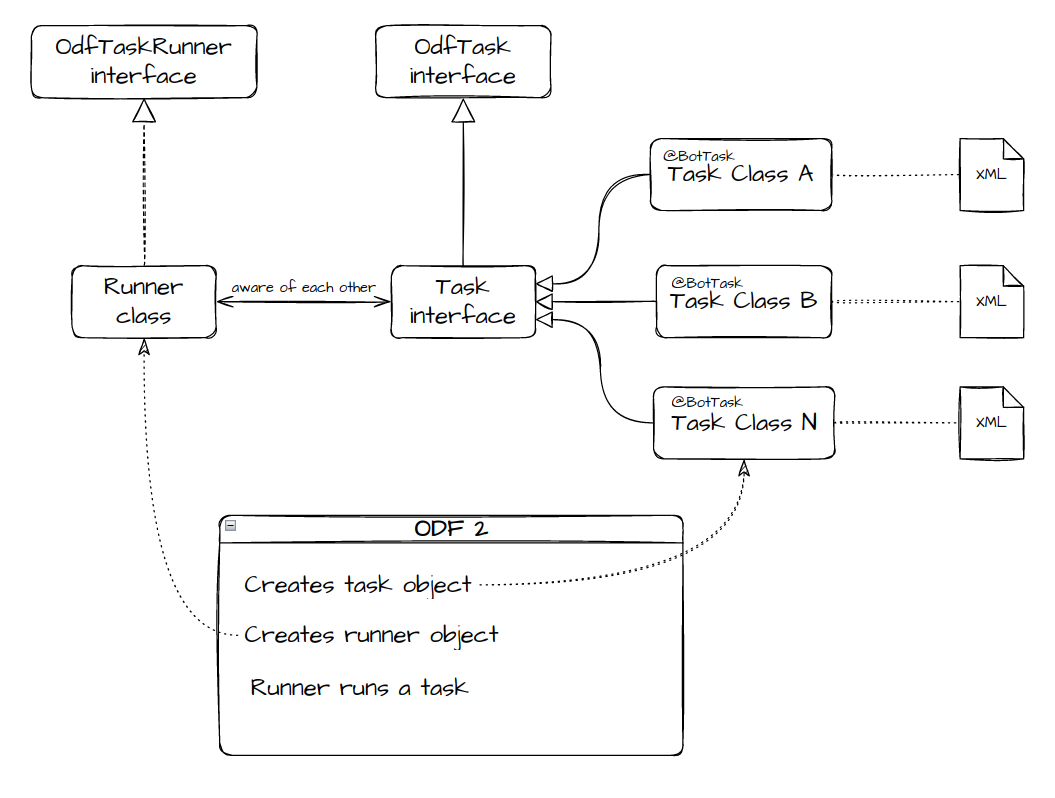
The example below illustrates this concept and its usage. Let's assume you require to build a Business Process to perform arithmetic calculations and create a task for each possible operation.
public interface ArithmeticOperation extends OdfTask {

    int perform(int a, int b);

}
ArithmeticOperation describes a basic calculation done on two numbers. It can be easily implemented to represent four basic operations:
@BotTask
public class AdditionTask implements ArithmeticOperation {

    @Override
    public int perform(int a, int b) { return a + b; }
}

@BotTask
public class SubtractionTask implements ArithmeticOperation {

    @Override
    public int perform(int a, int b) { return a - b; }
}

@BotTask
public class MultiplicationTask implements ArithmeticOperation {

    @Override
    public int perform(int a, int b) { return a * b; }
}

@BotTask
public class DivisionTask implements ArithmeticOperation {

    @Override
    public int perform(int a, int b) { return a / b; } // let's use integer division for simplicity of example
}
The four different task classes are easy to write and understand. Though, the framework does not know how to execute them at this point. It is unclear where operands come from and how the result is passed to the next task in the Business Process. Runners take care of such details:
public class ArithmeticTaskRunner implements OdfTaskRunner<ArithmeticOperation> {

    private final TaskInput taskInput;

    @Inject
    public ArithmeticTaskRunner(TaskInput taskInput) {
        this.taskInput = taskInput; // to have an access to data passed from previous task
    }

    @Override
    public TaskRunnerOutput run(ArithmeticOperation task) {
        // task here is an instance of AdditionTask, SubtractionTask, or any other ArithmeticOperation. It will be created by framework and passed here

        int a = Integer.parseInt(taskInput.getRequiredVariable("operand_a")); // taking operands from input columns
        int b = Integer.parseInt(taskInput.getRequiredVariable("operand_b"));

        final int result = task.perform(a, b); // calling task object to perform actual operation

        return taskInput.asResult()                           // we will pass all the input data to the output
                .withColumn("result", String.valueOf(result)) // adding our calculation result to it
                .withoutColumn("operand_a")                   // but explicitly not passing operands
                .withoutColumn("operand_b");                  // (just to show that it is possible)
    }
}
You have to tell the framework which runner to use with the ArithmeticOperation tasks:
public interface ArithmeticOperation extends OdfTask {

    // highlight-start
    @Override
    default Class<? extends ArithmeticTaskRunner> getRunnerClass() { // this method could be implemented in descendant classes
        return ArithmeticTaskRunner.class;                           // but it is better to do it in one place instead of four
    }                                                                // (and it can be overridden in descendants if needed)
    // highlight-end

    int perform(int a, int b);

}
Now, the framework has all the information on running arithmetic tasks, and adding a new type of operation becomes trivial:
@BotTask
public class PowerTask implements ArithmeticOperation {

    @Override
    public int perform(int a, int b) { return (int) Math.pow(a,b); }
}
Avoiding complexity
The design based on the separation of tasks and runners can be too cumbersome. For example, there is a singular task with given logic, without any future generalization, or there is a need for quick prototyping with minimal coding.
The framework provides the solution for such cases in the form of the AdHocTask interface:
public interface AdHocTask extends OdfTask {

    class Runner implements OdfTaskRunner<AdHocTask> {

        private final TaskInput taskInput;

        @Inject
        public Runner(TaskInput taskInput) {
            this.taskInput = taskInput;
        }

        @Override
        public TaskRunnerOutput run(AdHocTask task) {
            return task.run(taskInput);
        }

    }

    @Override
    default Class<? extends OdfTaskRunner<?>> getRunnerClass() {
        return Runner.class;
    }

    TaskRunnerOutput run(TaskInput taskInput);
}
You can implement it and put all the task logic into the run method. The execution is done by the trivial runner class contained in the interface:
@BotTask
public class SimpleTask implements AdHocTask {

    public TaskRunnerOutput run(TaskInput taskInput) {
        return taskInput.asResult().withColumn("simple_task", "was executed");
    }
}
warning
AdHocTask is a task type that does nothing beyond what's written in the task class. It means no error handling, transaction status analysis, transaction pass-through, or other things that ODF 2 provides behind the scenes.
In the production implementation, AdHocTask should not be the go-to task type. Instead, TransactionalTask is recommended.
tip
For more information on writing Bot Tasks in ODF 2, refer to Create Bot Task.
Access to IA Cloud Data Stores
The ODF 2 database access layer is based on the popular lightweight open-source library named ORMLite. Using provided classes, you can start using IA Cloud Data Stores with minimal coding and configuration.
com.workfusion.odf2.core.orm.OdfEntity is an abstract base class for all entities in ODF 2. You can write entities using techniques described in the ORMLite documentation. You are strongly encouraged to extend OdfEntity:
@DatabaseTable(tableName = "user") // ORMLite annotation
public class User extends OdfEntity {

    @DatabaseField // ORMLite annotation
    private String name;

    // getter and setter omitted for clarity
}
In this example, User is the simplest possible functional database entity. To perform database operations with it, create the instance of com.workfusion.odf2.core.orm.OrmLiteRepository. It is recommended to extend this class for each used entity and construct it inside a dependency injection module. Mind that OrmLiteRepository has a dependency that must be injected. The example below shows how to do it:
public class UserRepository extends OrmLiteRepository<User> {

    public UserRepository(ConnectionSource connectionSource) throws SQLException {
        super(connectionSource, User.class);
    }
}

public class ExampleDatabaseModule implements OdfModule {


    @Provides
    @Singleton
    public UserRepository userRepository(ConnectionSource connectionSource) {
        return new UserRepository(connectionSource);
    }
}
ConnectionSource injected this way is preconfigured to access the IA Cloud database. No other configuration is needed, and you can use UserRepository immediately.
@BotTask
// highlight-next-line
@Requires(ExampleDatabaseModule.class)
public class FindUsersTask implements AdHocTask {

    private final UserRepository userRepository;

    @Inject
    public FindUsersTask(UserRepository userRepository) {
        this.userRepository = userRepository;
    }

    public TaskRunnerOutput run(TaskInput taskInput) {
        final List<User> users = userRepository.findAll(); // findAll() is a method inherited from OrmLiteRepository

        final MultipleResults results = new MultipleResults();

        for (User user : users) {
            results.addRow(new SingleResult().withColumn("user_name", user.getName()));
        }

        return results; // this task will return a name of each user found as a column in separate IA Cloud record
    }
}
tip
- For more information on ORMLite in ODF 2, refer to Data Stores with ORMLite.
- Data Stores naming is generally not freeform. See Data Stores with ORMLite | Entity to Data Store conversion to follow the best practice for Digital Worker versioning.
- For details on Data Store management, refer to Manage Data Model with Liquibase.
Error handling
ODF 2 allows you to implement custom error processing on multiple levels. You can define a centralized handler class for the whole Digital Worker. There are also callback methods on tasks and runners to alter the centralized behavior. For error handling in ODF 2, see Exception handling.
Transactional layer
The atomic element of data flowing through a Business Process is a record., which is a collection of named columns with some values inside. No matter how a Business Process is designed, some data is usually passed between tasks. However, passing a large amount of data in this way is too complicated and ineffective. Instead, you can keep all business data in IA Cloud Data Stores and pass only identifiers in a record.
The ODF 2 Transactional layer introduces building blocks required to implement this approach. The com.workfusion.odf2.transaction.model.Transaction entity is kept in the Data Store, and its ID and key attributes are passed between Bot Tasks. All other data refer to this Transaction and can be queried by this reference.
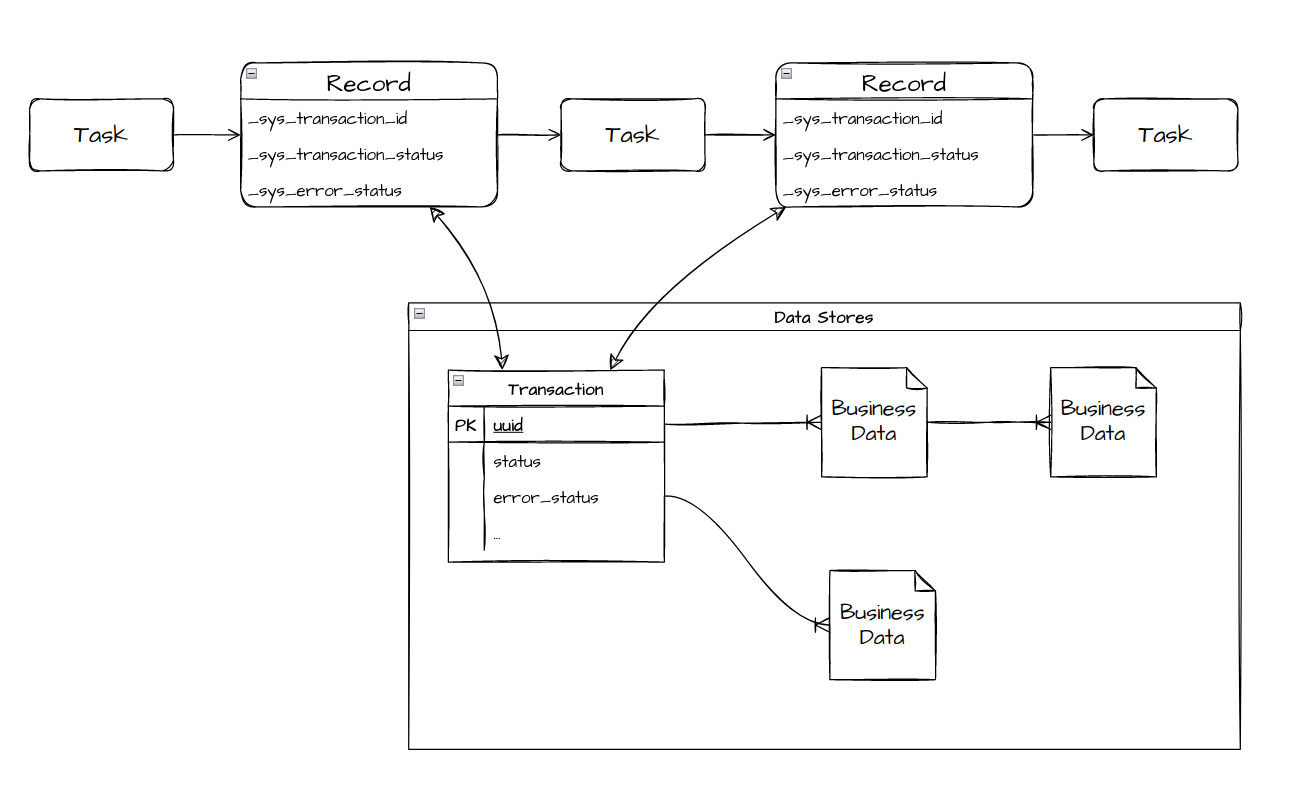
The essentials for the Transactional layer are provided by com.workfusion.odf2.transaction.TransactionModule. Adding the @Requires annotation for this module to a Bot Task class ensures that all Transactional level dependencies are properly initialized.
The recommended way to use Transactions in a Bot Task class and a runner is to extend one of the base abstractions provided by the framework.
Tasks working with single Transaction
The most common case in any Transaction-based implementation is the task used to work with an incoming Transaction and pass it further.
The TransactionalTask interface describes such a task and is tied to a runner that guarantees that the Transaction is processed according to the rules defined by the framework.
The correct way to use it is to implement the interface:
public class ExampleTask extends TransactionalTask {

    @Override
    public void run(CurrentTransaction currentTransaction, TransactionResult result) {
        // do something
    }
}
The CurrentTransaction class provides convenient access to the Transaction attributes in the input record. The class also loads the whole Transaction entity from Data Stores if and when needed. The TransactionResult class allows adding columns to the output record or changing the existing ones.
In contrast to the interface simplicity, the runner for TransactionalTask is responsible for many things. Together with its ancestor, BaseTransactionalTaskRunner, it implements several lifecycle methods of OdfTask to provide the following behavior:
- An output record of the task is a copy of an input record. The task code can manipulate it through the
TransactionResultobject. - The
run()method is called only if:- The input record contains Transaction attributes (meaning
CurrentTransaction.isPresent()is alwaystrue). - AND Transaction has no error status, OR the task declares intention to process errors by overriding the
BaseTransactionalTask.shouldProcessErrors()method. - AND the task's
shouldRun()method returnstrue. - AND the task's
shouldRun(Transaction)method returnstrue. - AND the Transaction does not mark to skip the step. For more details, see Split and join Transactions.
- The input record contains Transaction attributes (meaning
- After the
run()method is executed:- If
CurrentTransaction.get()was called, a Transaction object wrapped byCurrentTransactionis saved to the Data Store. The task code does not interact withTransactionRepositoryand save theTransactionobject explicitly. - If
CurrentTransaction.get()was called, the output record columns containing Transaction attributes (ID, status, and so on) are updated with values from the Transaction object wrapped byCurrentTransaction.
- If
note
ExampleTask is not annotated as @Requires(TransactionModule.class). It is intentional, as TransactionalTask (or its ancestor) is already annotated this way. All descendant classes inherit this requirement and are not required to define it explicitly.
Tasks producing Transactions
Any Transaction-based Business Process needs a source of Transactions. That is some task that initially creates Transaction entities based on input data or some external data source. You can write a task like this with ODF 2 quite easily. For clarity, the following example is based on AdHocTask:
@DatabaseTable(tableName = "some_data")
public class SomeData extends OdfTransactionalEntity {

    @DatabaseField
    private String data;

    // getter and setter omitted for clarity
}

@BotTask
@Requires(TransactionModule.class)
public class TransactionForEachInputRecordTask implements AdHocTask {

    private final TransactionRepository transactionRepository;

    private final SomeDataRepository someDataRepository;

    @Inject
    public TransactionForEachInputRecordTask(TransactionRepository transactionRepository, SomeDataRepository someDataRepository) {
        this.transactionRepository = transactionRepository;
        this.someDataRepository = someDataRepository;
    }

    @Override
    public TaskRunnerOutput run(TaskInput taskInput) {
        final Transaction transaction = transactionRepository.startNewTransaction("JUST CREATED");

        final SomeData someData = new SomeData();
        someData.setData(taskInput.getRequiredVariable("data"));
        someData.setTransaction(transaction);
        someDataRepository.create(someData);

        return new TransactionResult(taskInput, transaction);
    }
}
Creating a Transaction is a matter of one method call. TransactionRepository.startNewTransaction() creates and persists the entity. It is also important to return TransactionResult to pass this Transaction to the next steps of the Business Process.
SomeData is a simple database entity that extends OdfTransactionalEntity and inherits the relation to the Transaction entity. The SomeDataRepository implementation is omitted. Refer to the Access IA Cloud Data Stores section for more details.
The task can also create multiple transactions in a single run:
@BotTask
@Requires(TransactionModule.class)
public class MultipleTransactionsTask implements AdHocTask {

    private final TransactionRepository transactionRepository;

    @Inject
    public MultipleTransactionsTask(TransactionRepository transactionRepository) {
        this.transactionRepository = transactionRepository;
    }

    @Override
    public TaskRunnerOutput run(TaskInput taskInput) {
        final MultipleResults results = new MultipleResults();

        for (int i = 0; i < 10; i++) {
            // starting 10 transactions
            final Transaction transaction = transactionRepository.startNewTransaction("JUST CREATED");
            results.addRow(new TransactionResult(taskInput, transaction));
        }

        return results;
    }
}
Monitor Tasks
A Monitor Task is a special case of a Transaction-producing task designed to retrieve data from an external source continuously. Once a Business Process starts, the Monitor Task wakes up. Each time it wakes up, it can pass some Transactions to the next steps of its Business Process.
Tools for implementation of such tasks are contained in com.workfusion.odf2.transaction.task.monitor.MonitorModule. AbstractMonitorTaskRunner and MonitorTask are used as base abstractions:
public interface SearchMonitorTask extends MonitorTask {

    @Override
    default Class<? extends OdfTaskRunner<?>> getRunnerClass() {
        return SearchMonitorTaskRunner.class;
    }

    List<URL> performSearch(String query);
}

public class SearchMonitorTaskRunner extends AbstractMonitorTaskRunner<SearchMonitorTask> {

    private final TaskInput taskInput;
    private final TransactionRepository transactionRepository;
    private final ArticleRepository articleRepository;

    @Inject
    public SearchMonitorTaskRunner(MonitorFactory monitorFactory, TaskInput taskInput,
            TransactionRepository transactionRepository, ArticleRepository articleRepository) {

        super(monitorFactory, taskInput);
        this.taskInput = taskInput;
        this.transactionRepository = transactionRepository;
        this.articleRepository = articleRepository;
    }

    @Override
    protected Collection<Transaction> queryTransactions(SearchMonitorTask task) {
        final List<Transaction> result = new ArrayList<>();

        for (URL url : task.performSearch(taskInput.getRequiredVariable("query"))) {
            final Transaction transaction = transactionRepository.startNewTransaction("ARTICLE FOUND");
            result.add(transaction);

            final Article article = new Article();
            article.setTransaction(transaction);
            article.setUrl(url);
            articleRepository.create(article);
        }

        return result;
    }
}

@BotTask
public class GoogleSearchMonitorTask implements SearchMonitorTask {

    private final GoogleSearchService googleSearchService;

    @Inject
    public GoogleSearchMonitorTask(GoogleSearchService googleSearchService) {
        this.googleSearchService = googleSearchService;
    }

    @Override
    public List<URL> performSearch(String query) {
        return googleSearchService.limit(15).searchFor(query);
    }
}
The example above is simple but fully functional, assuming you already have some GoogleSearchService implementation and the Article entity. The GoogleSearchMonitorTask behavior is controlled through the monitor_configuration and monitor Data Stores. See com.workfusion.odf2.transaction.task.monitor.MonitorConfigurationEntity and com.workfusion.odf2.transaction.task.monitor.MonitorStateEntity.
For cases when the separation of task and runner introduces unneeded complexity, the framework offers an AdHocMonitorTask interface. You can rewrite the previous example using the interface like this:
@BotTask
public class GoogleSearchMonitorTask implements AdHocMonitorTask {

   private final TaskInput taskInput;
   private final TransactionRepository transactionRepository;
   private final ArticleRepository articleRepository;

   private final GoogleSearchService googleSearchService;

   @Inject
   public GoogleSearchMonitorTask(TaskInput taskInput, TransactionRepository transactionRepository, ArticleRepository articleRepository,
                                  GoogleSearchService googleSearchService) {

      this.taskInput = taskInput;
      this.transactionRepository = transactionRepository;
      this.articleRepository = articleRepository;
      this.googleSearchService = googleSearchService;
   }

   public List<URL> performSearch(String query) {
      return googleSearchService.limit(15).searchFor(query);
   }

   @Override
   public Collection<Transaction> queryTransactions() {
      final List<Transaction> result = new ArrayList<>();

      for (URL url : performSearch(taskInput.getRequiredVariable("query"))) {
         final Transaction transaction = transactionRepository.startNewTransaction("ARTICLE FOUND");
         result.add(transaction);

         final Article article = new Article();
         article.setTransaction(transaction);
         article.setUrl(url);
         articleRepository.create(article);
      }

      return result;
   }
}
tip
- For more details on using Transactions in ODF 2, see Create and process user Transactions.
- For information on Monitor Tasks, refer to Multi-process Digital Worker design | Monitor Tasks and Soft-stop Business Process.
- To split and join Transactions, see the Split and join Transactions guide.
Services layer
ODF 2 contains APIs for useful services provided by IA Cloud Enterprise. You can use these services in a Bot Task class with the help of com.workfusion.odf2.service.ControlTowerServicesModule.
Secrets Vault
com.workfusion.odf2.service.vault.SecretsVaultService allows a Bot Task to access IA Cloud Secrets Vault:
@BotTask
@Requires(ControlTowerServicesModule.class)
class SecretsVaultExampleTask implements AdHocTask {

    private final SecretsVaultService secretsVaultService;

    @Inject
    public SecretsVaultExampleTask(SecretsVaultService secretsVaultService) {
        this.secretsVaultService = secretsVaultService;
    }

    @Override
    public TaskRunnerOutput run(TaskInput taskInput) {
        final SecureEntryDTO entry = secretsVaultService.getEntry("some-alias");
        // ...
    }
}
tip
- For working examples of OCR-based tasks, refer to ODF 2 sources, for example, the
odf2-core-parent/odf2-it/src/main/java/com/workfusion/odf2/client/task/ocrpackage. - For documentation on Secrets Vault API, see Use pre-packaged APIs | Secrets Vault.
S3 Client
com.workfusion.odf2.service.s3.S3Service is a convenience wrapper around the Amazon client library preconfigured to use the IA Cloud Minio server:
@BotTask
@Requires(ControlTowerServicesModule.class)
class S3ExampleTask implements AdHocTask {

    private final S3Service s3Service;

    @Inject
    public S3ExampleTask(S3Service s3Service) {
        this.s3Service = s3Service;
    }

    @Override
    public TaskRunnerOutput run(TaskInput taskInput) {
        final byte[] data = "some data".getBytes(StandardCharsets.UTF_8);

        final S3Bucket bucket = s3Service.getBucket("some-bucket");
        final String url = bucket.put(data, "some/path/and/file.name").getDirectUrl();

        // ...
    }
}
You can also inject com.amazonaws.services.s3.AmazonS3 for more complex usage scenarios. To customize the client configuration, inject com.amazonaws.services.s3.AmazonS3ClientBuilder.
Exclusive access mechanism
ODF 2 is able to use the IA Cloud pool plugin for exclusive access to resources. For more information, refer to Exclusive access with pool.
Multiprocess layer
The Multiprocess layer in the com.workfusion.odf2.multiprocess package is an optional toolkit for building Digital Workers based on several constantly running and interacting Business Processes. For more information, see the development paradigm description in Multi-process Digital Worker design.