Decrease web page loading time
Before executing each command, the RPA web driver checks the value of the document.readyState property and stops the command execution until the property gets the complete status.
However, sometimes, this strategy leads to failure. There are situations where the document.readyState property either fails to get into the complete status for a very long time or never reaches that status at all.
For example, there is a large picture on your website loaded with a very slow server. The entire page has been downloaded, but you can't work with it because the browser continues to load this picture, and the RPA web driver continues to wait for the browser to finish downloading.
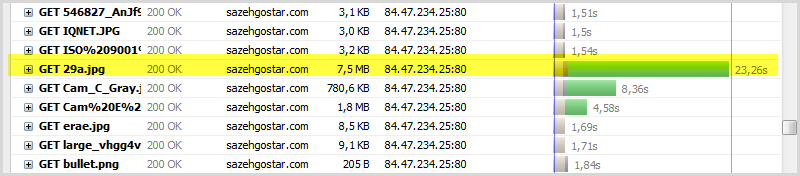
This is a real example that demonstrates this problem:
// inicialization
WebDriver driver = new ChromeDriver();
WebDriverWait wait = new WebDriverWait(driver, 10);
// try to open site and wait when status stay 'complete'
driver.get("http://www.sazehgostar.com/SitePages/HomePage.aspx");
// button click
driver.findElement(By.id("en")).click();
// wait loading next page
wait.until(visibilityOfElementLocated(By.id("menu")));
The execution of this code fragment takes from 20 to 40 seconds without taking into account the time to start the browser. The reason is that a large image is loaded onto the page (~ 7 MB). In this case, the desired button for switching to the English version of the site becomes available after a few seconds, but the RPA web driver waits until the entire page loads.
To prevent the RPA web driver from waiting so long while page loading, use the following ways to solve the issue:
- Set download wait timeout
- Change download completion strategy
Set download wait timeout
If your set the page download timeout, you can get TimeoutException in case the page downloading takes more time than your timeout limit.
After the exception occurs, the page load doesn't stop, but you can perform any actions with it.
However, note that on such an underloaded page, the elements needed for further actions might not yet appear. Therefore, the driver has to wait additionally for the elements to load.
// inicialization
WebDriver driver = new ChromeDriver();
WebDriverWait wait = new WebDriverWait(driver, 10);
// set page load timeout
driver.manage().timeouts().pageLoadTimeout(1, TimeUnit.SECONDS);
// try to open site and wait in the try catch because we have small timeout
try {
  driver.get("http://www.sazehgostar.com/SitePages/HomePage.aspx");
} catch (TimeoutException ignore) {
}
// wait when button will be available on the page after exception
WebElement button = wait.until(visibilityOfElementLocated(By.id("en")));
// click
try {
  button.click();
} catch (TimeoutException ignore) {
}
// wait loading next page
wait.until(visibilityOfElementLocated(By.id("menu")));
As you can see, this works faster, but fast work does not mean correct. You have the menu element on both web pages and at the moment you click En (change the site language to English), the element with the menu identifier exists on this page. Instead of waiting for the second page to load after the click, the RPA web driver finds the element immediately on the first page.
The main reason for this problem is that the page load doesn't stop after TimeoutException and at the moment when you execute the click command too. This confuses the RPA web driver, it doesn't understand that another page should appear and looks for the items on the current page instead.
Since you decreased the wait timeout, you must take responsibility for the page load.
Before waiting for the element to appear on the next page, it should first wait for the element on the current page to disappear, for example, till a clicked button disappears:
// inicialization
WebDriver driver = new ChromeDriver();
WebDriverWait wait = new WebDriverWait(driver, 10);
// set page load timeout
driver.manage().timeouts().pageLoadTimeout(1, TimeUnit.SECONDS);
// try to open site and wait in the try catch because we have small timeout
try {
  driver.get("http://www.sazehgostar.com/SitePages/HomePage.aspx");
} catch (TimeoutException ignore) {
}
// wait when button will be available on the page after exception
WebElement button = wait.until(visibilityOfElementLocated(By.id("en")));
// click
try {
  button.click();
} catch (TimeoutException ignore) {
}
// wait when button will not be available on the page after click
wait.until(stalenessOf(button));
// wait loading next page
wait.until(visibilityOfElementLocated(By.id("menu")));
The disadvantage of the above method is that you have to wrap all the code in the try-catch block where you can get TimeoutException. Thus, the second method is recommended.
Change download completion strategy
Before executing each command, the RPA web driver checks the value of the document.readyState property and stops the command execution until the property gets the complete status.
During the processing of the site page, the browser changes this document.readyState reflecting information about the current loading stage:
loading: the page is still loading.interactive: the page main content has been loaded and rendered. The user can already interact with it, but additional resources are still loaded.complete: all additional resources have been loaded.
You can change the RPA web driver settings, so that it does not wait for the complete value, the interactive value, or even does not expect anything at all.
For this, set pageLoadStrategy to:
normal(default): wait until thedocument.readyStateproperty is set tocomplete.eager: wait until thedocument.readyStateproperty is set tointeractive.none: don't wait at all.
In this case, you must take responsibility for waiting for the unloading of the pages.
Here is the same example without timeouts but with a modified wait strategy:
// initialization
DesiredCapabilities capabilities = new DesiredCapabilities();
capabilities.setCapability(CapabilityType.PAGE_LOAD_STRATEGY, "eager");
WebDriver driver = new ChromeDriver(capabilities);
WebDriverWait wait = new WebDriverWait(driver, 10);
// try to open site
driver.get("http://www.sazehgostar.com/SitePages/HomePage.aspx");
// waiting when button will be available
WebElement button = wait.until(visibilityOfElementLocated(By.id("en")));
// click
button.click();
// waiting when button will be unavailable
wait.until(stalenessOf(button));
// waiting loading next page
wait.until(visibilityOfElementLocated(By.id("menu")));