Develop data management procedures
All stored procedures supporting the Data Management API functionality reside within the dp schema and are divided into the following subsets:
| Prefix | Purpose | Sample |
|---|---|---|
dp# | Stored procedures available via the Control Tower (CT) user interface (UI) to create data management configurations. | dp#purge_obsolete_runs_sp |
dp#purge_ | Stored procedures for data purging. | dp#purge_obsolete_runs_sp |
dpg# | Custom procedures created automatically on the CT UI from the T-SQL code delivered by a developer. Their names are GUID-based. | dpg#24282ad1_7090_49d0_a878_402ddd4b738f_sp |
dp_core# | Basic procedures to support the Data Management API functionality. | |
dp_core#process_sp | Queued tasks for processing the main procedure. | dp_core#process_sp |
dp_core#log_ | Procedures to log events and batch statistics. | dp_core#log_error_sp and dp_core#log_batch_sp |
dp_api# | Procedures providing the back end for Data Management REST API. | dp_api#v1_submit_sp |
dp_purge# | Procedures for the Data Management Framework. | dp_purge#by_hit_list_sp |
In general, stored procedures come in two ways:
- Several procedures are available out of the box, for example,
dp#purge_. - Authorized developers can create and add stored procedures to the dp schema.
Explore OOTB stored procedures
The following stored procedures are available for data management out of the box via CT UI:
- dp#purge_obsolete_runs_sp
- dp#purge_outdated_data_sp
- dp#purge_all_tables_sp
- dp#purge_purge_forced_sp
- dp#purge_uploaded_data_sp
dp#purge_obsolete_runs_sp
Purpose: clears completed and deleted Business Process (BP) runs and archives the related data in the ds and ct schema replicas for temporary storage. The procedure also purges related records from the _odf_transactions Data Store if this table exists in the database.
Parameters:
| Parameter | Type | Description |
|---|---|---|
i_exec_id | bigint | Predefined internal parameter. |
i_session_duration_min | bigint | Defines how long each data purge session lasts after the procedure is triggered. The default value is 60. |
i_storage_period_days | bigint | Sets the number of days to keep BP data after BP completion. The default value is 90. Note: The procedure purges data for completed and deleted BP executions, except A/B tests. Draft, processing, and other executions are skipped. |
i_batch_delay_ms | bigint | Defines the time (in milliseconds) between batches to release CPU resources for other computations. The default value is 1,000. |
i_batch_size | bigint | Defines the number of database records to delete in a single batch. The default value is 100,000. |
See sample code
declare @v_exec_id      bigint;
declare @v_args         dp.dp_api#v1_argument_list_tp;
declare @v_config_uuid  nvarchar(40)    = newId();
declare @v_exec_mode    nvarchar(40)    = 'UI';
declare @v_exec_user    nvarchar(128)   = 'username';

-- prepare a table variable with input parameters:
insert into @v_args( argument_name, argument_value)
    values ( 'i_session_duration_min', '600'  )
          , ( 'i_storage_period_days' , '7'    )
          , ( 'i_batch_delay_ms'      , '100'  )
          , ( 'i_batch_size'          , '10000')
;

-- register the procedure in the queue:
exec dp.dp_api#v1_submit_sp @i_sp_name      = 'dp#purge_obsolete_runs_sp'
                        , @i_config_uuid     = @v_config_uuid
                        , @i_exec_mode       = @v_exec_mode
                        , @i_exec_user       = @v_exec_user
                        , @i_args            = @v_args
                        , @o_exec_id         = @v_exec_id  output;
print concat( 'exec_id:', @v_exec_id);

-- call the next task from the queue.
-- in general, this call is made by the SQL Agent
exec dp.dp_core#process_sp;
Purged transaction records
The dp#purge_obsolete_runs_sp procedure purges records from the _odf_transactions Data Store only if this table exists in the database. If it is not available, the procedure skips it. A record is purged when its bp_run_id matches the run_id of a Business Process run selected for cleanup.
The following fields are included in the purged transaction records:
| Field | Description |
|---|---|
transaction_id | Transaction identifier |
bp_run_id | Identifier of the related BP run |
transaction_data | Payload transaction data stored for the record |
dp#purge_outdated_data_sp
Purpose: it is a multi-purpose stored procedure allowing you to purge a specific set of tables based on a simple condition, such as < N days ago.
Parameters:
| Parameter | Description |
|---|---|
@i_purge_set | Defines the table set to purge. For the OOTB procedure, the parameter must be set to outdated tables. |
@i_retention_days | Sets the number of days to keep data. |
@i_batch_size | Specifies the maximum size of a single batch to delete. |
@i_batch_delay_ms | Defines an interval between batches (in milliseconds) to release the resources for the system needs. |
@i_session_duration_min | Sets the maximum time to execute. |
dp#purge_all_tables_sp
Purpose: the procedure combines dp#purge_outdated_data_sp and dp#purge_obsolete_runs_sp and can optionally clear purge history.
Parameters:
| Parameter | Description |
|---|---|
@i_session_duration_min | Defines the maximum total duration of the SP in minutes. |
@i_storage_period_days_ct | Sets the number of full days to keep data based on the BP end date. So, if the BP finished more than # full days ago, excluding the current day, it is purged. |
@i_storage_period_days_an | Specifies the number of full days to keep data in dm and pm schemas. Do not set it to less than 30 days to avoid losing dashboard data. |
@i_storage_period_days_dp | Defines the number of full days to keep data in the dp schema. Set to NULL if you don't want to purge the dp schema. |
@i_batch_delay_ms | It is the delay in ms between batch executions. |
@i_batch_size | Defines the number of rows deleted in one batch (single delete statement). To avoid blocks, use values < 5000 if you don't stop or pause all BPs during the purge. |
@i_purge_unlinked_events | Defines whether to look for delete event_tracking table records if there are no appropriate event_object records. Don't set it to 1 on a regular basis since it can slow down data cleansing significantly. If you see that the number of records in the event_tracking and event_object tables differs a lot, run the SP with the parameter set to 1 once to remove orphaned records. |
dp#purge_purge_forced_sp
Purpose: clears tables in the ct schema before a specific date—according to the id < @max_id condition, where @max_id is based on a date. Since the procedure involves no status check, the procedure is for emergency situations only and must not be used on a regular basis.
| Parameter | Type | Default value | Description |
|---|---|---|---|
@i_exec_id | bigint | - | It is a predefined internal parameter. |
i_last_date | datetime2 | - | Defines the earliest date when data is kept. Any data before the date is purged. See i_preserve_active, i_reserve_draft for exceptions. |
i_preserve_active | bit | 0 | Enables keeping data for non-completed or non-deleted BPs even before i_last_date. |
i_preserve_draft | bit | 0 | Enables keeping data for DRAFT BPs even before i_last_date. |
i_batch_size | bigint | 10000 | Sets the number of rows to be deleted as a batch at a time. The bigger i_batch_size is, the faster purging is, but the more space and time per transaction are needed. This can lead to deadlocks. If deadlocks are numerous, reduce i_batch_size to 2000-3000. |
i_batch_delay_ms | bigint | 10,000 | Defines the sleep time between two batches. It releases some resources for the system but slows down the overall data cleansing speed. |
See sample code
declare @v_exec_id      bigint;
declare @v_args         dp.dp_api#v1_argument_list_tp;
declare @v_config_uuid  nvarchar(40)    = 'test-force-purge-123';
declare @v_exec_mode    nvarchar(40)    = 'SCHEDULE';
declare @v_exec_user    nvarchar(128)   = 'SYSTEM';

insert into @v_args( argument_name, argument_value)
values( 'i_last_date'      , '2021-01-31')
    , ( 'i_preserve_active', '0'         )
    , ( 'i_preserve_draft' , '0'         )
    , ( 'i_batch_size'     , '10000'     )
    , ( 'i_batch_delay_ms' , '0'         )
;

exec dp.dp_api#v1_submit_sp @i_sp_name      = 'dp#purge_forced_sp'
                          , @i_config_uuid     = @v_config_uuid
                          , @i_exec_mode       = @v_exec_mode
                          , @i_exec_user       = @v_exec_user
                          , @i_args            = @v_args
                          , @o_exec_id         = @v_exec_id  output;
print concat('EXEC-ID:', @v_exec_id);

exec dp.dp_core#process_sp ;
For more details, read also Data management and purging | Forced purge.
dp#purge_uploaded_data_sp
Purpose: clears uploaded data after a massive feeding.
Parameters: none
See sample code
declare @v_exec_id      bigint;
declare @v_args         dp.dp_api#v1_argument_list_tp;
declare @v_config_uuid  nvarchar(40)    = newId();
declare @v_exec_mode    nvarchar(40)    = 'UI';
declare @v_exec_user    nvarchar(128)   = 'username';

-- register the procedure in the queue:
exec dp.dp_api#v1_submit_sp @i_sp_name      = 'dp#purge_uploaded_data_sp'
                        , @i_config_uuid     = @v_config_uuid
                        , @i_exec_mode       = @v_exec_mode
                        , @i_exec_user       = @v_exec_user
                        , @i_args            = @v_args
                        , @o_exec_id         = @v_exec_id  output;
print concat( 'exec_id:', @v_exec_id);

-- call the next task from the queue.
-- in general, this call is made by the SQL Agent
exec dp.dp_core#process_sp;
Other OOTB purge procedures
The following procedures support the Data Management Framework but are not available in the Control Tower interface.
Pay attention: the procedures are prefixed with dp_purge# so that they are excluded from the list of available dp procedures in the CT UI.
dp_purge#hit_by_list_spRemoves data related to BP instances (hits), including BP tasks and items.
noteThe procedure can't be called via Data Management API. A wrapper procedure must be created for that.
Parameters: the
#dp_hit_ids_to_purgetable must be created and populated before the procedure call.Column Type Description hit_idbigint ct.awshit.idInput parameters:
Parameters Type Description i_exec_idbigint Predefined internal parameter. i_batch_delay_msbigint See the description for dp#purge_obsolete_runs_sp. i_batch_sizebigint See the description for dp#purge_obsolete_runs_sp.
Develop stored procedures
When developing, observe the following conventions:
- Add the resulting procedures to the
dpschema. - Start with the
dp#prefix. - Add the
with execute as owneroption to enable operation in any WorkFusion schema. Whenwith execute as owneris not specified, the stored procedure operates only inside thect-userschema. - Always include the
@i_exec_idparameter. - Follow the WorkFusion database conventions detailed below.
See sample code
create or alter procedure dp.dp#demo_minumal_sp
  @i_exec_id bigint
with execute as owner
as
begin
    exec dp.dp_core#log_info_sp 'Demo Minimal. Start';

    -- do something useful here --

    exec dp.dp_core#log_info_sp 'Demo Minimal. Stop';
end;
WorkFusion database conventions
Use a group prefix for related objects, such as tables, views, and stored procedures.
Example:
ab_test_load_list_of_runs_sp, whereab_test_is the group prefix for theload_list_of_runs_spstored procedure.To emphasize the group prefix, you can use the hash symbol:
ab_test#load_list_of_runs_sp.For object name conventions, refer to the following table:
Object Convention Base table names underscored_lower_caseTemporary table Use system prefixes: ##—global temporary table;#— session temporary table;@—table variable.View name Suffixed with _v, for example,process_v.Constraint name Prefixes: fk_source_table_source_column_target_table_target_column;pk_table_name_column_namesIndex name Prefixed with idx_table_name_column_namefor a general index and withudx_table_name_column_namefor a unique index.Column name underscored_lower_casePrimary key idid-column (fk) Use the _idsuffix.day column (date) Use the _datesuffix for datetime and date data types and the_timefor the time data type.Procedure name Use the _spsuffix.Function name Use the _fnsuffix.Trigger name table_name_<type>_trg, where<type>can have the following values:b=before,a=after,i=insert,u=update,d=delete. Example:table_one_bir_trg.Type name Use the _tpsuffix. Example:type_name_tp.SQL style Reserved words in lower case. Use SQL syntax rules. Data types For strings or text fields, use ONLY the NVARCHAR type. Data types For the date time field, use ONLY the datetime2 type (NOT datetime). For building SQL statements, follow the guidelines based on the
selectsample: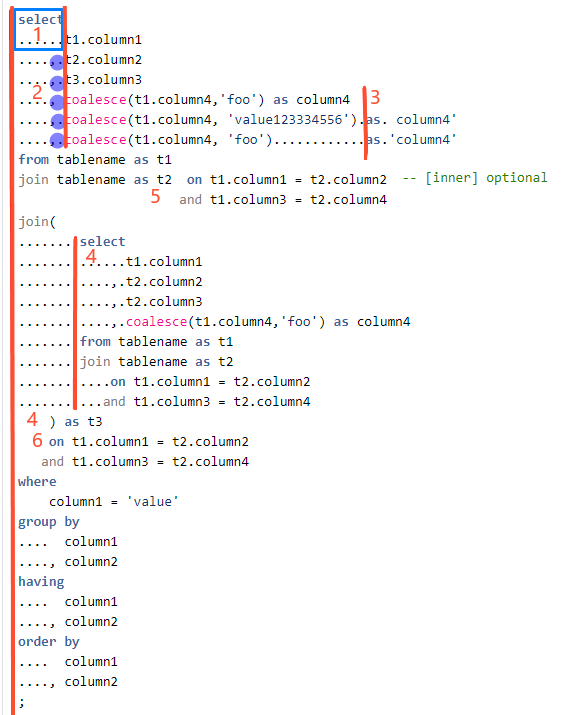
- Align the text under
selectby a single vertical line. - Use a comma or space before a field or a function. Observing the rule is essential for running scripts from the console.
- Using spaces, align aliases to be on the same line with
as. - Align the commands under each
selectsub-level by a separate vertical line. - For simple joins, use
onafter a table name in the same line. Align as shown in the figure above. - For complex joins, use
onafter a tab as described for item 4. Keep in mind that the width of the complex joins must not exceed 120 symbols.
- Align the text under
For stored procedures, use the following conventions:
@i_<name>: input parameter@o_<name>: output parameter@io_<name>: input or output parameter@v_<name>: local variable
See sample code
create procedure test_sp
  @i_id    bigint
, @i_val   nvarchar(20)
as
begin
    declare @v_val  nvarchar(20)
    set @v_val = lower( @i_val)

    update my_tab
        set
            one = @v_val
    where
        id = @i_id
end
Create procedures based on custom SQL
Procedures based on custom SQL are intended to operate in the ds schema only. They are generated with the execute as <ds-user> option, where <ds-user> is the name of the database user who owns the ds schema.
Every procedure based on custom SQL has a predefined @i_exec_id parameter. This parameter is added automatically during the generation of the procedure body and can be used for event and batch logging.
See sample code
-- create a procedure based on custom SQL:
declare @v_sp_name nvarchar(128);
declare @v_sql     nvarchar(4000);

-- define the body of the future procedure:
set @v_sql = N'
exec dp.dp_core#log_debug_sp @i_exec_id, ''Start DPG'';
-- do something
exec dp.dp_core#log_debug_sp @i_exec_id, ''Stop DPG'';
';

-- generate a new stored procedure:
exec dp.dp_api#v1_create_sp_from_sql_sp @i_sp_title   = 'Test-logging'
                                      , @i_sql_string = @v_sql
                                      , @o_sp_name    = @v_sp_name out
                                      ;
print @v_sp_name;     -- a new name is generated

-- register the procedure in a queue:
declare @v_config_uuid nvarchar(36) = newId();
declare @v_exec_mode   nvarchar(40) = 'REST-API';
declare @v_exec_user   nvarchar(40) = 'auser';
declare @v_args        dp.dp_api#v1_argument_list_tp;
declare @v_exec_id     bigint;
exec dp.dp_api#v1_submit_sp @i_sp_name      = @v_sp_name
                       , @i_config_uuid     = @v_config_uuid
                       , @i_exec_mode       = @v_exec_mode
                       , @i_exec_user       = @v_exec_user
                       , @i_args            = @v_args
                       , @o_exec_id         = @v_exec_id  output
                       ;
print @v_exec_id;
go
When purging the ds schema with custom SQL, make sure not to delete the ds table itself. For instance, using drop table ds_delete_me is wrong as it would lead to the delete_me Data Store becoming unoperational.
Run procedure from queue
If the SQL Agent Job executing the procedure queue is enabled and configured correctly, there is no need to run submitted procedures explicitly. Otherwise, you can call the next submitted procedure from a queue by executing d.dp_core#process_sp with no parameters:
exec dp.dp_core#process_sp
go
As a result, the dp.dp_event_log table will contain something like this:
See log sample
| id | exec_id | log_date | level | description |
|---|---|---|---|---|
| 138 | 40 | 2021-01-06 13:23:27 | INFO | eexec_id:40, status:QUEUED, sp_body:[create procedure dp.dpg#728be549_3e55_4c8b_b126_3d1b152c1c16_sp¶@i_exec |
| 139 | 40 | 2021-01-06 13:23:52 | INFO | SP [dp].[dpg#728be549_3e55_4c8b_b126_3d1b152c1c16_sp] STARTED. |
| 140 | 40 | 2021-01-06 13:23:52 | DEBUG | Start DPG |
| 141 | 40 | 2021-01-06 13:23:52 | DEBUG | Stop DPG |
| 142 | 40 | 2021-01-06 13:23:52 | INFO | SP [dp].[dpg#728be549_3e55_4c8b_b126_3d1b152c1c16_sp] FINISHED. |
Limit procedure execution time
To set up a limit to execute a stored procedure, follow the instruction below:
Add the
@i_duration_mininput parameter to specify the duration in minutes.Add a row to calculate the initial and final dates.
Stop execution if the current time exceeds the final date.
See sample code
create or alter procedure dp.dp#demo_time_sp
  @i_exec_id       bigint
, @i_duration_min  int           -- << Step 1
as
begin
    -- Step 2:
    declare @v_sp_start_date  datetime2 = getDate();
    declare @v_sp_stop_date   datetime2;
    set @v_sp_stop_date = dateAdd( mi, @i_duration_min, @v_sp_start_date);

    while(1=1)
    begin
        -- Step 3:
        if getDate() > @v_sp_stop_date
        begin
            exec dp.dp_core#log_info_sp @i_exec_id, 'Stopped: time is out';
            break;
        end;

        ----------
        -- do something useful here
        ----------

        -- release system resources for 10 secs:
        waitFor delay '00:00:10';
    end;
View sample development approach
To illustrate the approach to data management procedure development, let's remove rows in batches and prepare a list of rows based on a specific criterion to avoid multiple scans of a target table.
To achieve that, define a purge criterion, prepare a list of IDs to purge, and purge the rows in batches. Thus, the sequence of steps to cover with the code is as follows:
Create a list of table IDs to purge based on complex criteria.
Fetch a batch of the IDs from the list.
Remove the rows in the table based on the IDs from the batch.
Shrink the ID list to exclude the removed IDs.
Repeat Steps 2 to 4 until the list of IDs is empty.
See sample code
  create or alter procedure dp.dp#demo_aux_sp
  @i_exec_id    bigint
, @i_batch_size bigint
as
begin
    /***
    DESCRIPTION:
        Demonstrate basic approaches for table purging

    CHANGELOG: 10.3-rev-1
        2020-12-24 apouckatch created

    SAMPLE:
        declare @v_exec_id      bigint;
        declare @v_args         dp.dp_api#v1_argument_list_tp;
        declare @v_config_uuid  nvarchar(40)    = newId();
        declare @v_exec_mode    nvarchar(40)    = 'UI';
        declare @v_exec_user    nvarchar(128)   = 'adeveloper';

        insert into @v_args( argument_name, argument_value)
            values ( 'i_batch_size', '500'  )
        ;
        exec dp.dp_api#v1_submit_sp @i_sp_name      = 'dp#demo_aux_sp'
                               , @i_config_uuid     = @v_config_uuid
                               , @i_exec_mode       = @v_exec_mode
                               , @i_exec_user       = @v_exec_user
                               , @i_args            = @v_args
                               , @o_exec_id         = @v_exec_id  output;
        print concat( 'exec_id:', @v_exec_id);

        exec dp.dp_core#process_sp;

        select * from dp.dp_event_log where exec_id = @v_exec_id;
        select * from dp.dp_batch_log where exec_id = @v_exec_id;
    ***/

    declare @v_cnt_rows         bigint            -- keep number of processed rows
        ,   @v_batch_from_id    bigint            -- minimal row ID
        ,   @v_batch_to_id      bigint            -- maximal row ID
        ,   @v_batch_start_date datetime2         -- specify the start time
        ,   @v_batch_exec_ms    bigint            -- processing time
        ,   @v_msg              nvarchar(255)     -- variable to store message texts
        ;

    -- initial message:
    set @v_msg = formatMessage( 'Demo AUX: start. exec-id:[%I64d], batch-size:[%I64d]', @i_exec_id, @i_batch_size);
    exec dp.dp_core#log_info_sp @i_exec_id, @v_msg;

    set @v_batch_start_date = getDate();   -- store the start time

    -- prepare a table to store demo data:
    drop table if exists #dp_demo_aux;
    create table #dp_demo_aux
    ( obj_id        bigint
    , obj_schema    nvarchar(128)
    , obj_name      nvarchar(128)
    , obj_type      nvarchar(5)
    , primary key(obj_id)
    );

    -- populate the demo table with data:
    insert into #dp_demo_aux
        ( obj_id
        , obj_schema
        , obj_name
        , obj_type
        )
    select
          o.object_id
        , schema_name( o.schema_id)
        , o.name
        , o.type
    from sys.objects as o
    ;

    -- get and write overall stats:
    select
          @v_cnt_rows      = count(*)
        , @v_batch_from_id = min( obj_id)
        , @v_batch_to_id   = max( obj_id)
    from #dp_demo_aux
    ;
    set @v_batch_exec_ms  = dateDiff( ms, @v_batch_start_date, getDate());

    exec dp.dp_core#log_batch_sp @i_table_name  = '#dp_demo_aux (insert)'
                               , @i_exec_id     = @i_exec_id        , @i_start_date  = @v_batch_start_date
                               , @i_from_id     = @v_batch_from_id  , @i_to_id       = @v_batch_to_id
                               , @i_num_rows    = @v_cnt_rows       , @i_duration_ms = @v_batch_exec_ms
                               ;

    -- interim table to store IDs of removed rows:
    drop table if exists #dp_deleted_ids;
    create table #dp_deleted_ids( obj_id bigint);

    -- proc in batches:
    while (1=1)
    begin
        set @v_batch_start_date = getDate();

        -- delete a batch of rows:
        delete top (@i_batch_size)
        from #dp_demo_aux
        output deleted.obj_id into #dp_deleted_ids
        ;

        -- get stats of the batch:
        select @v_cnt_rows      = count(*)
             , @v_batch_from_id = min(obj_id)
             , @v_batch_to_id   = max(obj_id)
        from #dp_deleted_ids
        ;

        -- stop processing if there is no deleted rows:
        if @v_cnt_rows = 0
        begin
            exec dp.dp_core#log_debug_sp @i_exec_id, 'Demo AUX: no rows deleted. End of processing';
            break;
        end;

        -- continue processing if some rows were deleted:
        exec dp.dp_core#log_debug_sp @i_exec_id, 'Demo AUX: next batch processing';

        set @v_batch_exec_ms  = dateDiff( ms, @v_batch_start_date, getDate());

        -- log stats about the last batch:
        exec dp.dp_core#log_batch_sp @i_table_name = '#dp_demo_aux'
                               , @i_exec_id     = @i_exec_id        , @i_start_date  = @v_batch_start_date
                               , @i_from_id     = @v_batch_from_id  , @i_to_id       = @v_batch_to_id
                               , @i_num_rows    = @v_cnt_rows       , @i_duration_ms = @v_batch_exec_ms
                               ;
        -- purge a set of deleted rows:
        truncate table #dp_deleted_ids;
    end;

    exec dp.dp_core#log_info_sp @i_exec_id, 'Demo AUX: Finish';
end;
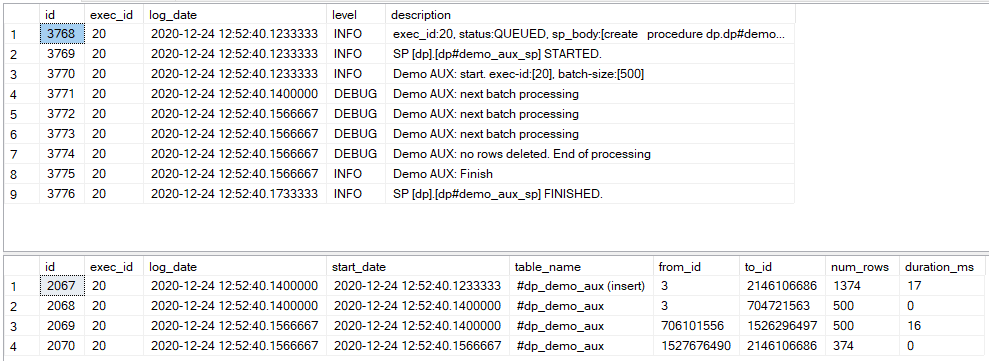
See output
Database output: exec_id: 20
Submit a new procedure in T-SQL
There are three ways to submit a new procedure:
- Via the CT UI by [creating a new configuration](/platform/docs/10.2.9/automate/control-tower/data-purge-settings #create-database-data-management-configuration) based on either a stored procedure or custom T-SQL code.
- Via Data Management API.
- By calling database stored procedures directly.
The example below illustrates the code for submitting a new procedure using Method 3.
See sample code
declare @v_exec_id      bigint;
declare @v_args         dp.dp_api#v1_argument_list_tp;
declare @v_config_uuid  nvarchar(40)    = newId();
declare @v_exec_mode    nvarchar(40)    = 'UI';
declare @v_exec_user    nvarchar(128)   = 'username';

insert into @v_args( argument_name, argument_value)
    values ( 'i_session_duration_min', '600'  )     -- don't specify '@' before the parameter name
         , ( 'i_storage_period_days' , '14'   )
         , ( 'i_batch_delay_ms'      , '100'  )
         , ( 'i_batch_size'          , '10000')
         ;

exec dp.dp_api#v1_submit_sp @i_sp_name      = 'dp#purge_obsolete_runs_sp'
                          , @i_config_uuid  = @v_config_uuid
                          , @i_exec_mode    = @v_exec_mode
                          , @i_exec_user    = @v_exec_user
                          , @i_args         = @v_args
                          , @o_exec_id      = @v_exec_id  output
                          ;

print concat( 'exec_id:', @v_exec_id);
For troubleshooting tips, refer to the following support guides: