Implement FIFO processing
FIFO (First In, First Out) is a prioritization strategy in which the oldest (first) entry is processed first. The FIFO strategy helps improve adherence to the service-level agreement (SLA) for record processing time.
FIFO logic
Record priority and order are determined based on the record date (primary parameter) and record order (secondary parameter). All records from the same Manual Task (MT) have the same date. If the record date is not set, it is equal to the MT start date.
Basic flow
Let's say an MT contains five records: record1, record2, record3, and so on. Since they have the same date (the MT start date), they appear in Workspace in the same order:
- record1
- record2
- record3
- record4
- record5
Gateway flow
Let's say the MT from the previous example is part of a Business Process (BP) with a decision rule, where record1, record3, and record5 are routed to a 10-second processing step, and record2 and record4 are processed in a 30-second step:
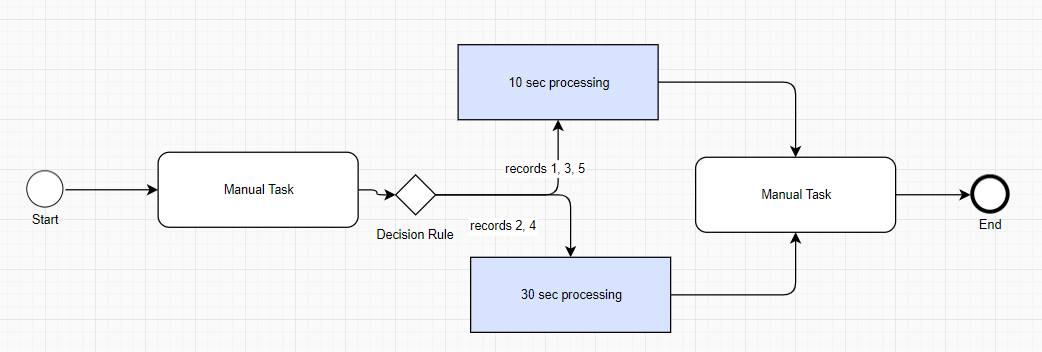
For the first 20 seconds, only record1 and record3 appear in Workspace:
- record1
- record3
At the 30-second mark, record2 appears after record1 because of its record order, and the list looks as follows:
- record1
- record2
- record3
- record5
At the 60-second mark, the list looks as follows:
- record1
- record2
- record3
- record4
- record5
FIFO in Control Tower
Control Tower sets hit ordering during hit creation.
When a hit is created, Control Tower adds a JSON object to it. This JSON object is stored in the _sys_record_order column of BP or MT data and contains parameters for ordering. BP or MT data is used to start a BP or an MT and to transfer data between steps in a BP.
The parameters are passed to Workspace during the hit submission operation in the CreateHITRequest#customAttributes field.
{
"hitOrder" : {number of record in csv file },
"hitOrderDate" : { date from csv file column, in case date is missed in input record, current time will be used. }
}
Here's an example of a JSON object:
{
"hitOrder":1,
"hitOrderDate":"2020-03-11T10:15:55.935"
}
The hitOrderDate parameter value must be formatted according to the ISO-8601 specification: "YYYY-MM-DDThh:mm:ss[.sss]", for example, "2025-09-15T15:00:28.638".
Here's an example of a CSV:
_sys_record_order,task_id,_sys_mt_hit_title
"{hitOrder:1,hitOrderDate:'2021-08-25T06:52:44.048'}",WF_Aug,WF_Aug
"{hitOrder:1,hitOrderDate:'2021-07-25T16:52:44.048'}",WF_Jul,WF_Jul
"{hitOrder:1,hitOrderDate:'2021-11-25T06:52:44.048'}",WF_Nov,WF_Nov
"{hitOrder:1,hitOrderDate:'2021-09-25T06:52:44.048'}",WF_Sep,WF_Sep
"{hitOrder:1,hitOrderDate:'2021-10-25T06:52:44.048'}",WF_Oct,WF_Oct
- For details on FIFO in Workspace, see Configure custom sorting.
- For troubleshooting tips, refer to Hits are not shown in correct order in Control Tower.