Develop and import steps for schema-based Business Process
In a schema-based Business Process (BP), each step can have a contract defining variables expected as input for this step and those produced as the output.
To implement steps for a schema-based BP, you can create Bot Configs and Java Native Workers (JNW), add contracts, and then import them to an environment with an Asset Bundle.
For WebHarvest Bot Configs, you can create contracts only in the Control Tower user interface (UI).
Currently, creating or importing contracts for a Manual Task is not supported.
Both the schema and contracts have the v3 OpenAPI format.
Create Bot Config or Java Native Worker
To implement a step for a schema-based BP, start with creating one of the following:
A Bot Config using the ODF 2 framework and Bot Task plugins
A Java Native Worker according to the guide
If you create a Java Native Worker for a schema-based BP, implement JsonTaskProcessor instead of ITaskProcessor. JsonTaskProcessor allows working with structured data instead of plain strings. This means that you can get typed objects from JsonTaskInputData and put them to JsonTaskOutputData.
You can also use ITaskProcessor. However, in this case, you must fisrt manually deserialize all input data from JSON and then serialize the output data to JSON, which is error-prone and inconvenient.
See the sample code for a Java Native Worker:
package com.wf.task;

import java.util.Map;

import org.slf4j.Logger;
import org.springframework.beans.factory.annotation.Autowired;

import com.workfusion.spa.jnative.worker.core.api.JsonTaskInputData;
import com.workfusion.spa.jnative.worker.core.api.JsonTaskOutputData;
import com.workfusion.spa.jnative.worker.core.api.JsonTaskOutputRow;
import com.workfusion.spa.jnative.worker.core.api.TaskOutputData;
import com.workfusion.spa.jnative.worker.core.task.JsonTaskProcessor;
import com.workfusion.spa.jnative.worker.core.task.TaskProcessor;
import com.workfusion.spa.jnative.worker.core.task.TaskProcessorException;
import com.workfusion.spa.jnative.worker.module.event.EventLogger;

/**
 * Sample task processor for a schema-based BP operating JSON-based data
 */
@TaskProcessor(id = "sample-json-task")
public class SampleSchemaBasedTaskProcessor extends JsonTaskProcessor {

    //Java Native Worker logger, all messages are sent to CT as events.
    private final Logger logger;

    @Autowired
    public SampleSchemaBasedTaskProcessor(EventLogger workerLogger) {
        this.logger = workerLogger.getEventLogger();
    }

    @Override
    public TaskOutputData process(JsonTaskInputData jsonTaskInputData) throws TaskProcessorException {
        try {

            String invoiceNumber = input.getValueAsType("invoice_number", String.class);
            Integer invoiceAmount = input.getValueAsType("amount", Integer.class);
            Map<String, Object> config = input.getValueAsType("config", Map.class);
            Email email = input.getValueAsType("email", Email.class);
            Boolean isNew = input.getValueAsType("new_record", Boolean.class);
            List<String> links = input.getValueAsType("links", List.class);

            /* Processing starts here
               ...
             */
            email.setSubject("Invoice ABC");
            email.setBody("test email");
            String datastoreName = String.valueOf(config.get("datastore_name"));
            /* ...
               Processing ends here
             */

            return new JsonTaskOutputData()
                    .addRow(new JsonTaskOutputRow()
                            .putValue("invoice_number", invoiceNumber + "_updated")
                            .putValue("amount", invoiceAmount + 100)
                            .putValue("config", config)
                            .putValue("new_record", false)
                            .putValue("author", "ABC")
                            .putValue("email", email)
                    );
        } catch (Exception e) {
            logger.error(e.getMessage(), e);
            throw e;
        }
    }
}
Create object schema
An object schema is a set of type definitions (object structures) used to describe data in a BP workflow, perform validation, define templates for tasks, and so on. It contains definitions of complex types (not primitive ones) used in a schema-based BP. Contracts can have references to the types.
An object schema is represented as an OpenAPI YAML file. See the example below:
openapi: 3.0.0
info:
  title: SharedSchema for Invoice
  description: Shared Schema for invoice components
  version: "1.0.0"
  x-package: com.mycompany.connector.email

components:
  schemas:
    Invoice:
      type: object
      properties:
        number:
          type: string
        amount:
          type: number
        date:
          type: string
          format: date
        # ...
When creating an object schema, mind the following considerations:
x-packageis a required field and should match the schema path inside an Asset Bundle. For example, if the schema path in the bundle isschema/com/mycompany/connector/email/schema.yaml, thex-packagevalue should becom.mycompany.connector.email.The
versionfield is required as well. Use the semantic version format.Always wrap the
versionvalue in quotes. Otherwise, the YAML parser interprets it as a number, and trailing zeroes are lost.In Control Tower, it's impossible to have two schemas with the same
x-packageandversion.
Create component contracts
Input and output contracts are represented as separate YAML files in the OpenAPI format.
If a field has a type defined in an object schema, it can be referenced using the $ref attribute. To build the $ref attribute, use the formula: schema/ + ${schema-x-package} + .${schemaFileShortName} + #/components/schemas/ + ${typeName}.
For example, if the x-package schema is com.mycompany.connector.email and the type name is Invoice, the $ref attribute is schema/com/mycompany/connector/email/schema.yaml#/components/schemas/Invoice.
Input contracts contain input field specifications under the #/components/schema/in object:
openapi: 3.0.0
info:
  title: Aggregate Invoice Contract
  description: Contract for the step that aggregates fields into an Invoice document
  version: "1.0.0"

components:
  schemas:
    in:
      type: object
      properties:
        invoice_number:
          type: string
        invoice_amount:
          type: string
        invoice_date:
          type: string
        # ...
Output contracts contain output field specifications under the #/components/schema/out object:
openapi: 3.0.0
info:
  title: Aggregate Invoice Contract
  description: Contract for the step that aggregates fields into an Invoice document
  version: "1.0.0"

components:
  schemas:
     out:
      type: object
      properties:
        invoice:
          $ref: './com.mycompany.connector.email.schema.yaml#/components/schemas/Invoice'
It's not allowed to define custom types in contracts because if a complex type is defined in the contract itself, you cannot reference it in other parts of a BP. Define the custom types in object schemas. Contracts should contain only definitions of input and output contracts under the #/components/schema/in and #/components/schema/out objects.
Create Asset Bundle
After your Bot Configs or JNWs, contracts, and schemas are ready, create an Asset Bundle to import them to Control Tower.
In terms of schema-based BP development, an Asset Bundle must have the following structure:
├── artifactory-dependency
│   └── workers
│     └── com
│       └── mycompany
│         └── myworker
│           └── 1.0.0
│             └── myworker-1.0.0.jar
├── schema
|     └── com
│       └── mycompany
│         └── connector
│           └── email
|             └── schema.yaml
└── meta-info.json
If you use a JNW or a BCB, put the input and output contracts next to the Bot Config XML in the resulting bundle.
...
|
├── BOOT-INF
│   └── classes
│     └── configs
│       └── main
│         └── my-bot-config.xml
│         ├── my-bot-config.in-contract.yaml
│         └── my-bot-config.out-contract.yaml
....
The naming pattern for contract files is as follows:
${bot config name}+.in-contract.yamlfor input contracts${bot config name}+.out-contract.yamlfor output contracts
So, for my-bot-config.xml, you need to create my-bot-config.in-contract.yaml and my-bot-config.out-contract.yaml.
Import Asset Bundle to environment
To import an Asset Bundle containing a schema and contracts, follow the steps below:
Log in to Control Tower and navigate to Digital Workers > View all.
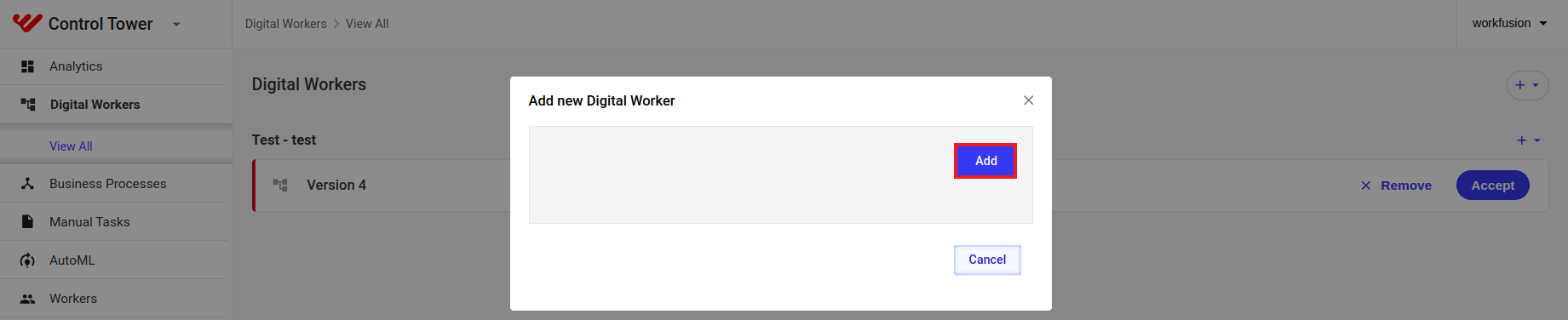
On the Digital Workers page, click + and select Upload new.

In the displayed window, click Add and upload the created bundle.
Add to Business Process
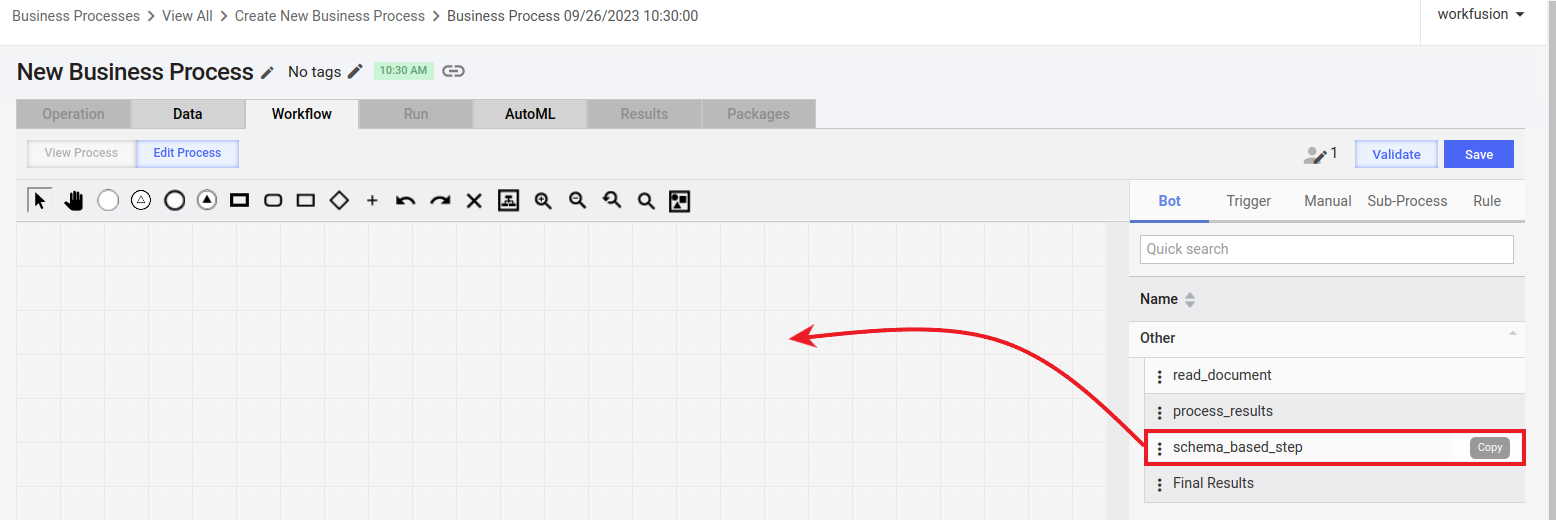
Once the Asset Bundle is successfully imported, you can utilize the imported JNW in a Business Process. To do that, drag and drop the corresponding bot step from the panel on the right to the workflow designer canvas. If the source step has contracts, the step you are adding will have them, too.
For instructions to implement a schema-based BP in the Control Tower UI, refer to the guide. In the guide, you can also find answers to some frequently asked questions on schema implementation.