Start Business Process from Manual Task
You can start a Business Process (BP) from a Manual Task. Below are some code samples of how you can perform various operations with it.
Prepare input data
Create a CSV file with the input data. The file should contain only one column.
var campaignUuid = "ff244048-031f-4fc4-82f3-b658d1b571f2";
// create csv input data containing only 1 column
var dataToSend = "merged_input_fields_json\n" + "\"" + JSON.stringify(combinedObject).replace(/"/g,"\"\"") + "\"";
var processData = btoa(dataToSend);              //encode to base64 format
var startProcessData = {"campaignUuid":campaignUuid,"mainData": processData};
Get Data Source UUID
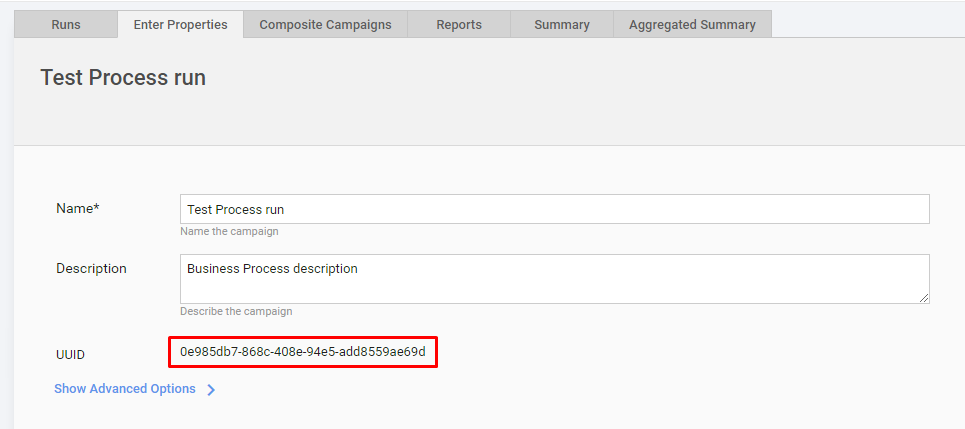
To get a Data Source UUID, perform the following steps:
Go to Data Sources > Data Source and navigate to the Enter properties tab.
Find and copy the UUID value there.
Start Business Process with AJAX call
To make API calls, make sure to provide form-based (login and password) authentication. For details, refer to WorkFusion REST API.
To create and start a Business Process with an AJAX call, do as follows:
var startTaskUrl = instanceBaseUrl+"/workfusion/api/v2/workfusion/task/file";
 var startProcessPromise = $.ajax({
   type: "POST",
   url: startTaskUrl,
   contentType: 'application/json; charset=utf-8',
   dataType: 'text',
   async: true,
   data: JSON.stringify(startProcessData)
});
startProcessPromise.then(startBPSuccess, startBPError);
Get started Business Process ID
To get an ID of a started BP, use the following command:
var startBPSuccess = function(id){
  processStatusCheck(id);
};
Check execution status
To check a BP execution status, do as follows:
checkStatusUrl = instanceBaseUrl + "/api/v2/workfusion/task/{uuid}/steps";
waitForStatus(checkStatusUrl.replace("{uuid}", uuid), "COMPLETED", retriesCount, processCompletionSuccess, processCompletionFailure);
function waitForStatus(url, status, maxRetries, processCompletionSuccess, processCompletionFailure) {
  var count = 0;
  var restartCheck = setInterval(function() {
    count++;
    if (count <= maxRetries) {
      setProcessCompleteStatus(bpResponseElementId, processInProgressMessage, "blinkText normalResponseStatus");
      $.ajax({
        url: url,
        type: "GET",
        complete: function (jqXHR, textStatus) {
          var finalStepUuid = checkIsTaskCompleted(jqXHR,status);
          if (finalStepUuid) {
            clearInterval(restartCheck);
            processCompletionSuccess(status, finalStepUuid);
          }
        }
      });
    } else {
      clearInterval(restartCheck);
      alert("Exceeded maxRetries value");
    }
  }, checkProcessStatusInterval * 1000);
};
function checkIsTaskCompleted(response, requiredStatus) {
  var finalStepUuid = undefined;
  var responseObj = JSON.parse(response.responseText);
  for(var step in responseObj){
    if(responseObj[step].finalStep == true && responseObj[step].runStatus === requiredStatus){
      finalStepUuid = responseObj[step].runUuid;
    }
  }
  return finalStepUuid;
};
Get final step snapshot
To get a final step snapshot, do as follows:
function processCompletionSuccess(status, stepUuid){
   setProcessCompleteStatus(bpResponseElementId, successProcessMessage, sucessProcessClass + " normalResponseStatus");
   retrieveSnapshot(stepUuid);
};


function retrieveSnapshot(processUuid) {
   retriveSnapshotUrl= instanceBaseUrl + "/api/v2/workfusion/task/{uuid}/snapshot/CSV";
   var startProcessPromise = $.ajax({
     type: "GET",
     url: retriveSnapshotUrl.replace("{uuid}", processUuid),
     contentType: 'text',
     headers: {'Authorization': 'Basic ' + btoa(userId + ":" + pwd)},
     dataType: 'text',
     cache:false,
     async: true
   });
 startProcessPromise.then(snapshotRetrieveSuccess, snapshotRetrieveError);
};

function snapshotRetrieveSuccess (response){
   var decodedResponseString = atob(JSON.parse(response).content);
};
For troubleshooting tips, refer to the following support guides: