Use Split-Join rule
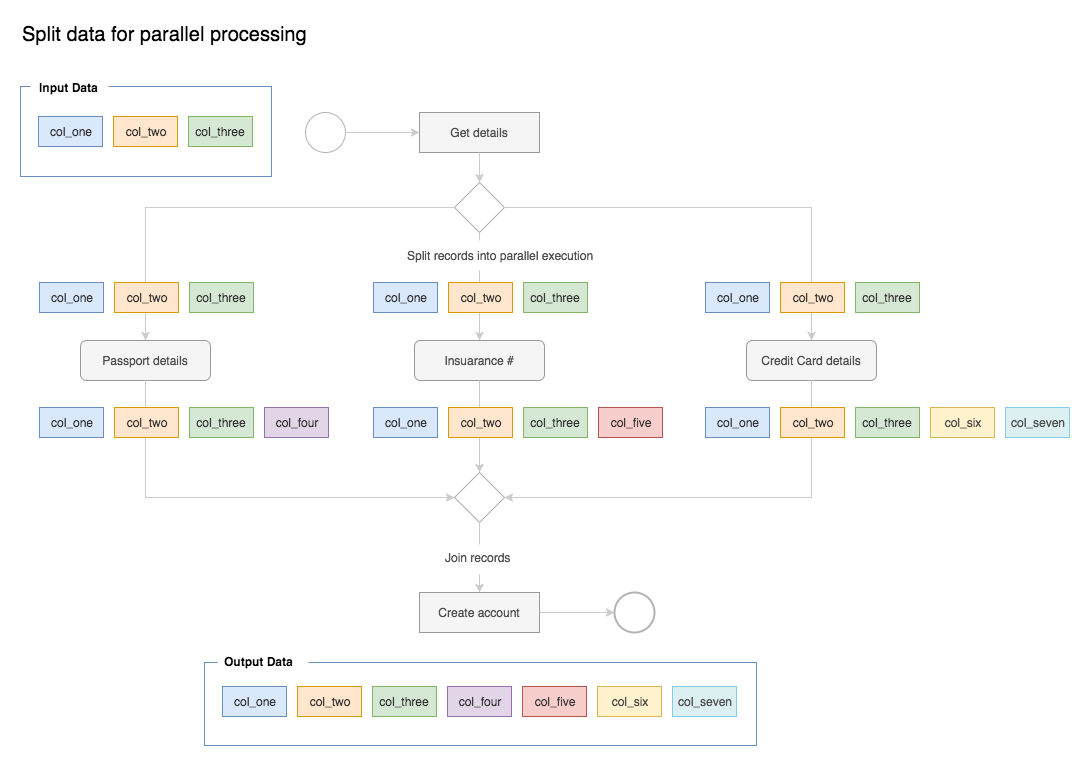
The Split-Join rule is used to separate every single record (or document) from Input Data into a few records to let them pass through different steps (either Bot or Manual Tasks) of a Business Process (BP) in parallel (in the split point) and then combine the processed records back into a single record or a document (in the join point) to process the consolidated results from the previous steps further.
When a record in a BP is split into multiple records, they are routed to different steps, so some of them are processed faster, while the others require more time to get processed. It happens due to different types of steps, as some of them are Bot Tasks and the others are Manual. In the case of Manual Tasks, the availability of workforces to perform assignments is a key point to how fast the records are processed.
The records that are processed faster reach the Join rule quicker. They should wait for the rest of the records to get joined for processing at the step behind the rule.
The original Input Data record is immediately promoted to the next step after the rule, when all the split records from this original record arrive, and gets processed in the step.
The Split-Join visualization is as follows:
Configure Split-Join rule
To implement the Split-Join rule, mark the corresponding rules with the split and join flags:
RuleContext.SPLIT_RULE: the Split rule markerRuleContext.JOIN_RULE: the Join rule marker
If there are multiple split-join flows (nested, parallel, or serial) in a BP, each flow should have its name, unique in the context of the BP. You should add this name to the marker after a semicolon for the corresponding composite rule. For example:
- Outer Split rule:
RuleContext.SPLIT_RULE:main- Inner branch #1:
- Split rule:
RuleContext.SPLIT_RULE:subprocess_N1 - Join rule:
RuleContext.JOIN_RULE:subprocess_N1
- Split rule:
- Inner branch #2:
- Split rule:
RuleContext.SPLIT_RULE:other_subprocess - Join rule:
RuleContext.JOIN_RULE:other_subprocess
- Split rule:
- Inner branch #1:
- Outer Join rule:
RuleContext.JOIN_RULE:main
For the rule setup, refer to Composite rules | SPLIT_RULE and JOIN_RULE and Edit rule.
Add Split-Join to Business Process
You can add the Split-Join rule to a BP using one of the following methods:
- From the Toolbar or Canvas Context Menu. A blank rule is created.
- From the Sidebar or Element Context Menu. In this case, the rule is copied from the source rule. You can edit the rule if needed.
View Business Process flow
A sample BP below explains how the Split-Join works in opening an account.
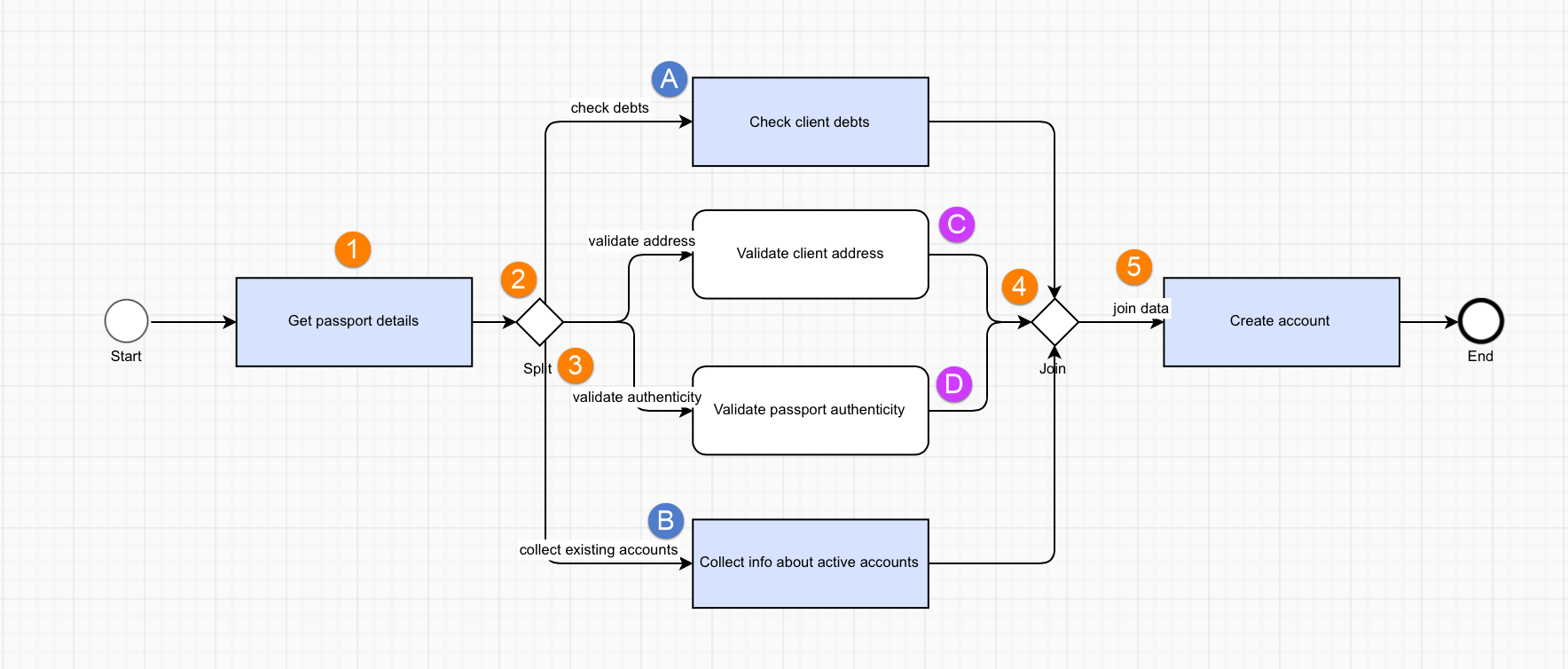
- Client's passport details are used as Input data.
- Via the Split rule, the details are sent to different steps to acquire and validate the information.
- Processing of split records includes the following steps:
- Check the client's debts to find out the current client's financial situation (a Bot Task).
- Collect information about the active client accounts to learn how many active accounts the client has (a Bot Task).
- Validate the client's address to make sure that the address provided is valid (a Manual Task).
- Validate the client's passport authenticity to confirm that the passport provided is real (a Manual Task).
- The Join rule is intended to manage the processing of split records. It sends the processed split records to the next step immediately as they arrive at the rule and triggers the Bot Task execution after the last split record has passed through it.
- At the next step after the Join rule, the algorithm waits till all the split records of the original one arrive and starts the Bot Task execution. The Bot creates the account or rejects the creation depending on the information in the joined record. If record R1 from Input Data starts earlier than record R2, but all the split records of R2 pass sooner through the Join rule, the Bot Task executes record R2 and then waits for all the split records from record R1.