Explore Data Model
In the article, the standardized Data Store schema is understood as equivalent to the ODF 2 example project's Data Store schema. With few exceptions, it utilizes concepts from Transaction and Multi-process layers of the ODF 2 architecture. If you do not use the Multi-process layer, you can ignore some entities, and this won't impact the framework integrity. In extreme scenarios, when even the Transaction layer is not used, the Data Store schema should be designed from scratch.
Overview
ODF 2 introduces a convenient approach to work with various data structures and supports a new standardized Data Model and Data Store schema for AI Agent development. The updates provide the following benefits:
- A unified approach to store process execution data, enabling engineers to reuse the same practices across AI Agents and decrease the development time and effort.
- Though standardized, the new Data Model is flexible and can be extended and adjusted to specific AI Agent needs and requirements.
- The extendable standardized Data Model is incorporated into analytics data processing, allowing one to automatically move analytics to a separate storage and isolate it from operational Data Stores. This improves Business Process (BP) execution and stability, while excluding additional steps.
- The ability to arrange data for various analytical purposes. For details, refer to the analytics documentation.
Standardized Data Store schema
When a Data Store schema is created, indexes are generated automatically for required columns. The automatic indexing is intended to facilitate concurrent read-and-write and analysis operations. So, you can start working with your extensions and data without having to worry about how those things are connected and whether the connections are optimized.
Table columns in Data Stores have specific types. Within the standardized schema, these types are limited for easier troubleshooting. Thus, account for the schema as you think through how to map your entities, getting down to an AI Agent implementation. Otherwise, you can face issues with a stuck Business Process workflow.
Each AI Agent has its peculiar requirements. For example, you may not need the document table. Otherwise, it is advisable to follow the supported standardized Data Store schema. This saves time on optimizing data management, analytics, and other things, especially at later stages when you roll something out to the production environment or run performance tests.
You can also add other tables to extend the standardized schema without the fear of impacting the performance of an existing AI Agent. Each AI Agent has an individual Data Store separated from the other ones.
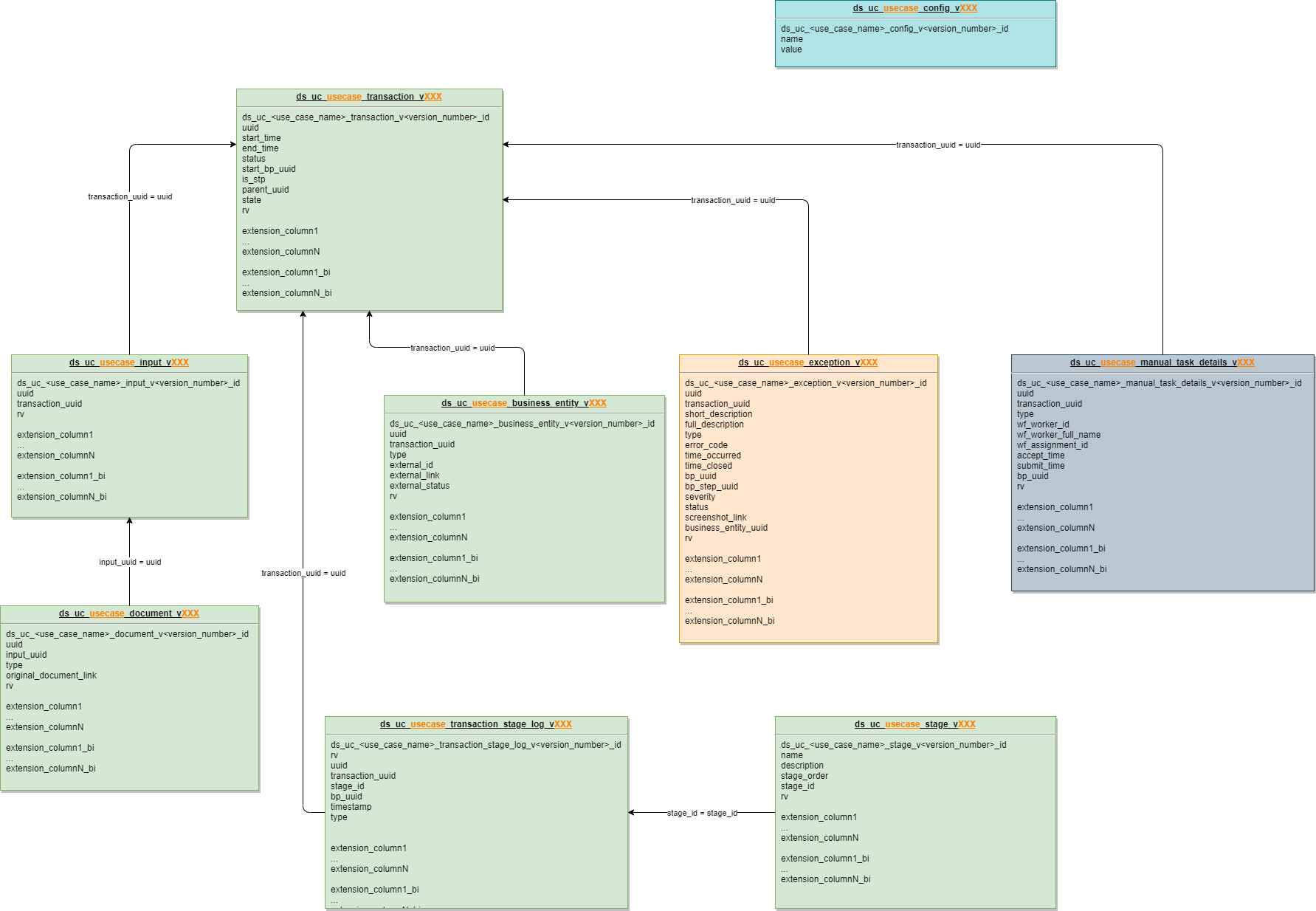
Logical data schema
The figure below illustrates the logical data schema employed under the standardized extendable Data Model.
Separation of analytics schema
In the figure below, on the left, you can see the OLTP (Online Transactional Processing), or transactional, schema. On the right, there is the OLAP (Online Analytical Processing), or the analytics, schema with separate tables created for analytics purposes.
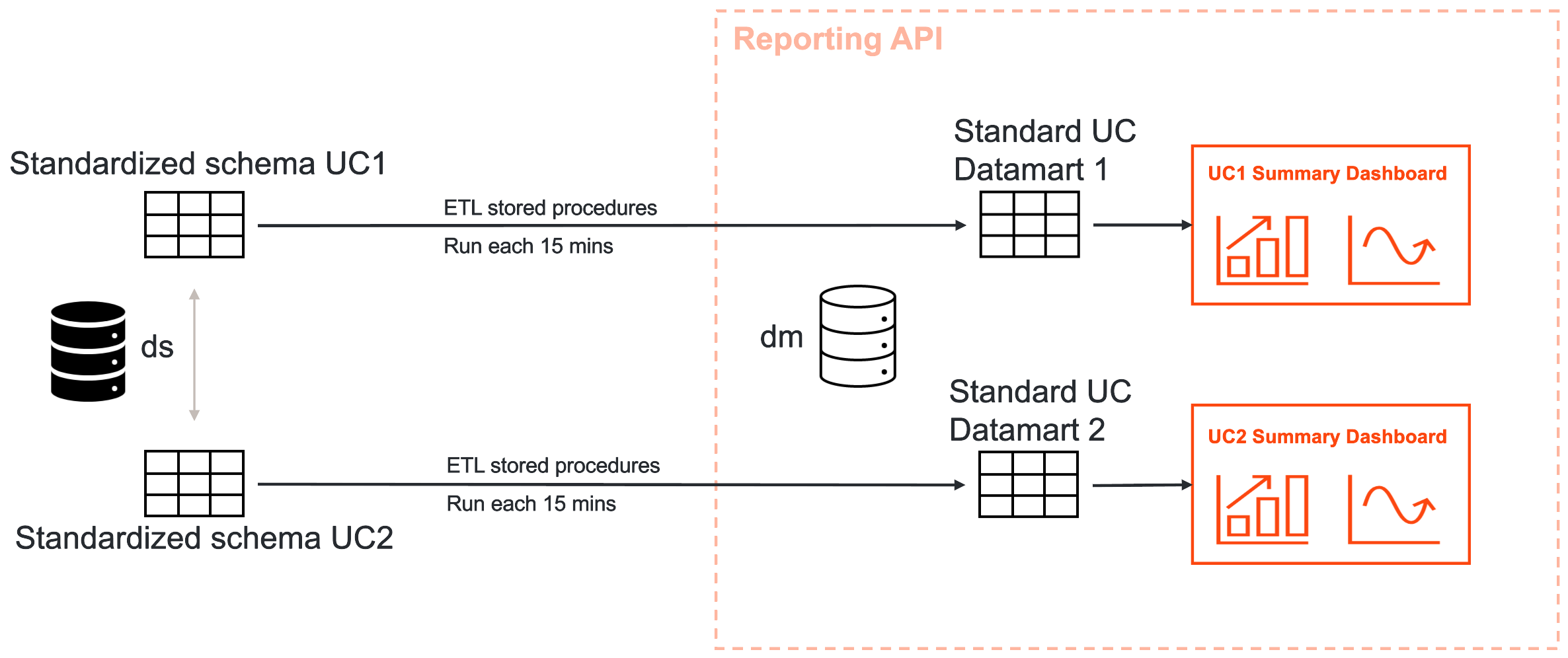
The standardized schemas have key columns for linking entities. On the transactional schema, updates are consistent because BPs process data continuously. The flow leads to the automatic creation of ETL (Extract, Transform, Load) stored procedures enabling you to push data into Datamarts and generate new types of dashboards from there.
The approach excludes system overloads. For analytics, you mainly read data and control how you write and aggregate them. You can also introduce your indexes and make them immutable. This enables you to extract specific data, creating links, for example, between a transaction, a particular document, and a person who processed it in a Manual Task.
Data Store tables
The standardized Data Model includes the nine default predefined structures to serve different needs and support process execution.
| Alias | Technical table name | Description |
|---|---|---|
| Transaction | ds_uc_<use_case_code>_transaction_v<version_number> | WorkFusion Transaction details (to replace ODF 2 transactions in future). Defines the e2e business entity processing in Work.AI. |
| Input | ds_uc_<use_case_code>_input_v<version_number> | Input data description and required meta information. For example, emails, document packages, and so on. Required for some out-of-the-box implementations in the Multi-process module. |
| Document (1) | ds_uc_<use_case_code>_document_v<version_number> | Child entity for the Input structure, describes a single processing unit. For instance, it can be a specific document obtained from the input, an attachment associated with an email, and so on. Includes required meta information and external links. Required for some out-of-the-box implementations in the Multi-process module. |
| Business entity (2) | ds_uc_<use_case_code>_business_entity_v<version_number> | Describes the AI Agent output generated in the course of processing. For example, it can serve as a medium to describe Incident Cases, Service Requests, Reports, and other entities, most commonly downstream into the third-party systems. Optional even for the Multi-process module. |
| Exception | ds_uc_<use_case_code>_exception_v<version_number> | A common table to store exception information. |
| Configuration | ds_uc_<use_case_code>_config_v<version_number> | Business Process settings required for proper operation and storing information in key-value pairs. This is the only Data Store powering a Configuration service that belongs to the Foundation layer. |
| Manual Task | ds_uc_<use_case_code>_manual_task_details_v<version_number> | Detailed information about Manual Tasks in an AI Agent workflow to extend default data available through Workspace and Control Tower if required. |
| Transaction stage log | ds_uc_<use_case_code>_transaction_stage_log_v<version_number> | Flow to track transactions across different stages defined by business and technical needs. Improves processing transparency and simplifies process metrics gathering and process troubleshooting. |
| Stages (3) | ds_uc_<use_case_code>_transaction_stage_log_v<version_number> | A list of stages defined for an AI Agent (reference data with ordering as required for analytics). |
Notes to the table above:
(1) Documents are designed based on the one-to-many relation to the Input table. However, specific simplified AI Agents can have one-to-one relations where the table can be unnecessary. The overall recommendation is to follow normalization practices and arrange data based on the default table structure to provide consistency across multiple AI Agents and support analytics.
(2) In specific implementations, it may not be enough to have a single Business entity table. In this case, the suggestion is to define a core entity, store related data in the pre-defined Business entity table, and create additional tables with custom naming as required.
(3) Stages are a way to describe a processing flow in a meaningful way. In a complex design with dozens of process tasks, this allows one to logically group multiple tasks into a single entity. Stage definitions are controlled on the code level and to be defined by developers according to business needs and requirements.
For more information about individual table structures, see Data Store table definitions.
Data Model conventions
To support seamless integration with the analytics flow and out-of-the-box ETL (Extract, Transform, Load), all Data Store tables must comply with specific conventions, including table names, required columns, and their definitions (name and type). Otherwise, the Analytics engine fails to recognize the data and move it to the Analytics data warehouse for further usage.
All tables have consistent naming, for example, ds_uc_myuc_transaction_v1, where:
- ds is the standard system prefix for all Data Stores.
- uc is the standard ODF prefix to group schema tables for a particular AI Agent.
- myuc is the AI Agent code defined at the project generation time.
- transaction is the name of a specific Data Store required for entity mapping. Refer to the section above for more table names to be used.
- v1 is the version suffix, unique for the environment where the AI Agent Data Store is utilized.
The naming pattern ensures proper entity mapping and versioning out of the box.
Other important conventions are as follows:
- AI Agent designations or abbreviations in the table names must not contain extra "_," except as defined by the pattern and in the version number element.
- Column names must not coincide with reserved SQL words, such as
order,select,group,status,cdc_date, and so on. - You can extend tables with any number of additional columns as required for BP development and operations.
- Additional columns required specifically for analytics must have the "_bi" postfix in their names and have a unique base name without it. For example, you cannot have columns named as "title" and "title_bi" in the same table.
- The rv column is required and must be present in all tables. It is used to run data updates.
Data Store table definitions
Transaction
The Transaction Data Store contains all fields required to keep track of your end-to-end transaction.
A transaction is the unit of work that you do within your BP workflow. A transaction starts when you launch a BP and ends once you have processed all necessary data and submitted it to a destination. The latter can be a record system on the customer's side, database, or queues to push the data further via APIs to other systems.
Table name pattern: ds_uc_<use_case_code>_transaction_v<version_number>.
Any transaction is supposed to contain only minimum details about its processing. Possible columns includes the ones listed below.
| Column name | Data type | Description | Comment |
|---|---|---|---|
ds_uc_<use_case_code>_transaction_v<version_number>_id | PK: bigint, null | Table's default identifier | Auto increment |
uuid | nvarchar(36), null | The primary business key with which you can migrate the transaction Data Store. For example, export it as a CSV file and then import it to another environment without losing consistency or relations. | 1f59a46c-b5d6-4d28-af73-537b77e897fe |
start_time | datetime2(7), null | Transaction start time | Start of the transaction processing (GMT-0/UTC). For example, 2020-08-26 09:12:08.7750000. |
end_time | datetime2(7), null | Transaction end time | End of the transaction processing (GMT-0/UTC). For example, 2020-08-26 09:12:17.4460000. |
status | nvarchar(36), null | Transaction status | Processing status in Work.AI: {NEW, IN_PROGRESS, COMPLETED, SUSPENDED, ABORTED} |
start_bp_uuid | nvarchar(36), null | Business Process UUID | BP starting the transaction: 71ecc879-638e-4bd6-addb-40edb406abda |
is_stp | int, null | Boolean—0/1. STP indication controlled by the implementation, usually updated at the end of a transaction. Used if you want to track human interactions with the data in the transaction. | {0,1} |
parent_uuid | nvarchar(36), null | Parent transaction UUID | For a single transaction, it's going to be NULL. For a sub-transaction, it's the uuid of the initial transaction. Helpful when you need to split a workflow. |
state | nvarchar(36), null | Enumerated value denoting a specific processing part, for instance, Classification_started, Classification_completed, Extraction, DataSubmission. Can be used to pass a transaction from one BP to another. | |
rv | binary(8) | Row version to track data updates for analytics increments and performance optimization | Timestamp |
cdc_date | datetime2(7), null | Actual date of row data loading | Used within ETL only, no coding is required. |
Input
Input is a specific data point used to trigger processing. For example, it can be an email, or an invoice, or a record from a record system, or a document package—a set of documents consolidated based on specific criteria.
Table name pattern: ds_uc_<use_case_code>_input_v<version_number>.
Basic columns for the structure are as listed in the table below.
| Column name | Data type | Description | Comment |
|---|---|---|---|
ds_uc_<use_case_code>_input_v<version_number>_id | PK: bigint, null | Table identifier | Auto increment |
uuid | nvarchar(36), null | Unique ID for a particular entity | |
transaction_uuid | nvarchar(36), null | Transaction UUID | Reference to the transaction where the input is to be connected |
rv | binary(8), null | Row version to track data updates for analytics increments and performance optimization | Timestamp |
cdc_date | datetime2(7), null | Actual date of row data loading | Used within ETL only, no coding is required. |
The schema provides you with a structure: it doesn't tell you which data is to persist, apart from specific metadata and linkage, but allows you to extend it based on your own requirements. For example, if you deal with emails, you can extend the schema by adding more columns related to emails, such as email_id, and additional metadata, such as title, received, and so on.
Mind that input is not likely to change. Once you capture an email, it remains in there. Avoid changing the state of the record as much as possible.
Document
Sometimes, you need to break down an input into sub-documents for multiple AI Agents without consolidating them in a single storage. For example, if your input is emails, all attached documents are to be broken down into separate entities to be stored as one package document and separate documents with their own metadata. Once you break down the input into multiple documents, it's easier to apply the logic to aggregate them and bring them further in as input for processing. For the purpose, the Document table is used.
Table name pattern: ds_uc_<use_case_code>_document_v<version_number>.
The table includes the columns listed below.
| Column name | Data type | Description | Comment |
|---|---|---|---|
ds_uc_<use_case_code>_document_v<version_number>_id | PK: bigint, null | Table identifier | Auto increment |
uuid | nvarchar(36), null | Document UUID | Unique ID for the particular entity |
input_uuid | nvarchar(36), null | Input UUID | Reference to the input to connect the document to |
type | nvarchar(36), null | Document type | Any customer's document type, for example, {Invoice, Title, Act, Endorsement,...}. |
original_document_link | nvarchar(max), null | Document original link | Link to an original document stored in Object Storage |
rv | binary(8), null | Row version to track data updates for analytics increments and performance optimization | Timestamp |
cdc_date | datetime2(7), null | Actual date of row data loading | Used within ETL only, no coding is required. |
Business entity
Business entities are intended to track updates and changes in a workflow.
A business entity is an abstraction meant to store all results. You have an input to ingest, and you return specific results when you process the data. Thus, the business entity is a destination where you consolidate different data points associated with the results.
Table name pattern: ds_uc_<use_case_code>_business_entity_v<version_number>.
The table can contain the columns listed below.
| Column name | Data type | Description | Comment |
|---|---|---|---|
ds_uc_<use_case_code>_business_entity_v<version_number>_id | PK: bigint, null | Table identifier | Auto increment |
uuid | nvarchar(36), null | Business entity unique identifier | Examples of a business entity: email, invoice. |
transaction_uuid | nvarchar(36), null | Transaction unique identifier | Reference to the transaction to connect the business entity to |
type | nvarchar(36), null | Business entity type | For example, {Claim, Case, Service Request, ...} |
external_id | nvarchar(36), null | External ID | Customer entity original ID. Sometimes the value is generated in Work.AI for tracking on the customer side, for example, WF10000123. |
external_link | nvarchar(max), null | External link | Link to the business entity in an external system |
external_status | nvarchar(36), null | External status | The business entity status in a customer application. Enables tracking of specific cases and analysis of processing completion. For instance, {Open, New, Closed,...}. |
rv | binary(8), null | Row version to track data updates for analytics increments and performance optimization | Timestamp |
cdc_date | datetime2(7), null | Actual date of row data loading | Used within ETL only, no coding is required. |
It is recommended to fill all the columns to aggregate data more efficiently for analytics at later stages.
The table is extendable. Thus, you can add more columns, depending on the AI Agent specifics.
Exception
With the structure, you have a more advanced exception handling mechanism. If you follow the framework, exceptions are logged properly.
Table name pattern: ds_uc_<use_case_code>_exception_v<version_number>.
Columns for the structure are as listed in the table below.
| Column name | Data type | Description | Comment |
|---|---|---|---|
ds_uc_<use_case_code>_exception_v<version_number>_id | PK: bigint, null | Table identifier | Auto increment |
uuid | nvarchar(36), null | Exception UUID | |
transaction_uuid | nvarchar(36), null | Transaction UUID | |
short_description | nvarchar(450), null | Exception short description | |
full_description | nvarchar(max), null | Exception full description | |
type | nvarchar(36), null | Exception type | {BUSINESS, TECHNICAL} |
error_code | int, null | Code for a UC error | AI Agent defined error code, for instance {1000,1001,...} |
time_occurred | datetime2(7), null | Occurence time | (GMT-0/UTC) 2020-08-26 09:12:08.7750000 |
time_closed | datetime2(7), null | Closing time | (GMT-0/UTC) 2020-08-26 09:12:08.7750000 |
bp_uuid | nvarchar(36), null | Business Process UUID | b7a78219-6f84-4da9-aaad-77a28520e769 |
bp_step_uuid | nvarchar(36), null | Business Process step UUID | cb81834d-47f0-40e7-a6f3-23593a723501 |
severity | nvarchar(36), null | Severity level of the error or exception | {NORMAL, HIGH,...} |
status | nvarchar(36), null | Status of the exception processing | {NEW, IN_PROGRESS, CLOSED} |
screenshot_link | nvarchar(max), null | For RPA automations, a link to captured screenshots | |
business_entity_uuid | nvarchar(36), null | Reference to a related business entity | 491c60da-4a63-46e7-929b-fa30801e80d9 |
rv | binary(8), null | Row version to track data updates for analytics increments and performance optimization | Timestamp |
cdc_date | datetime2(7), null | Actual date of row data loading | Used within ETL only, no coding is required. |
The structure includes the most standard scenarios to use in an AI Agent. For example, you can capture screenshot_link data when you deal with RPA. It is also possible to extend the table with additional columns.
Manual Task
Sometimes, when you process AI Agent transactions, it's essential to understand who worked with a particular document, for instance, to find out how much data the particular person reviewed for security reasons.
Basically, when a person submits a task, the data is transmitted to a system table. You have to connect the entity and the system table with Data Stores. Mind that, currently, it is not advisable to link the data in the Manual Task details structure to external tables because this can impact system performance.
Table name pattern: ds_uc_<use_case_code>_manual_task_details_v<version_number>.
The table columns contain metadata you may want to capture, including that listed below.
| Column name | Data type | Description | Comment |
|---|---|---|---|
ds_uc_<use_case_code>_manual_task_details_v<version_number>_id | PK: bigint, null | Table identifier | Auto increment |
uuid | nvarchar(36), null | Manual Task UUID | |
transaction_uuid | nvarchar(36), null | Transaction UUID | Reference to the transaction where Manual Task is to be connected |
type | nvarchar(36), null | Manual Task type | {Classification, Extraction, Duplication Review, ...} |
wf_worker_id | nvarchar(36), null | Worker ID | |
wf_worker_full_name | nvarchar(450), null | Worker's full name | 'John Doe' |
wf_assignment_id | nvarchar(36), null | Assignment ID | |
accept_time | datetime2(7), null | Time when the Manual Task was accepted | (GMT-0/UTC) 2020-08-26 09:12:08.7750000 |
submit_time | datetime2(7), null | Time when the Manual Task was submitted | (GMT-0/UTC) 2020-08-26 09:12:08.7750000 |
bp_uuid | nvarchar(36), null | Business Process UUID | |
rv | binary(8), null | Row version to track data updates for analytics increments and performance optimization | Timestamp |
cdc_date | datetime2(7), null | Actual date of row data loading | Used within ETL only, no coding is required. |
The table allows you to keep Manual Task data independent from system tables. Thus, even if you purge system tables, the data is intact, and you can use it for audit or other reasons.
Configuration
The Configuration table is intended to store AI Agent key-value pairs for handling required configurations without hard-coding them. It can contain URLs to different systems, constants, a list of elements in a dictionary, and so on.
Table name pattern: ds_uc_<use_case_code>_config_v<version_number>.
The columns for the structure are as listed in the table below.
| Column name | Data type | Description | Comment |
|---|---|---|---|
_id | bigint | Table identifier | Auto increment |
name | nvarchar(450) | ||
value | nvarchar(max) |
Introduce the configuration into each AI Agent implementation. If you have multiple Data Stores, you can add several Configuration tables.
Stage
Table name pattern: ds_uc_<use_case_code>_stage_v<version_number>.
The columns for the structure are as listed in the table below.
| Column name | Data type | Description | Comment |
|---|---|---|---|
ds_uc_<use_case_code>_stage_v<version_number>_id | PK: bigint, null | Table identifier | Auto increment |
name | nvarchar(450), null | Stage name | |
description | nvarchar(max), null | Stage description | |
stage_order | int, null | Stage order | UC-defined order of the stage |
stage_id | int, null | Original stage ID | PK |
rv | binary(8), null | Row version to track data updates for analytics increments and performance optimization | Timestamp |
cdc_date | datetime2(7), null | Actual date of row data loading | Used within ETL only, no coding is required. |
Stage Log
Table name pattern: ds_uc_<use_case_code>_transaction_stage_log_v<version_number>.
The columns for the structure are as listed in the table below.
| Column name | Data type | Description | Comment |
|---|---|---|---|
ds_uc_<use_case_code>_transaction_stage_log_v<version_number>_id | bigint | A value generated in Work.AI. Can't be changed, auto-incremented. | |
rv | binary(8) | Row version to track data updates for analytics increments and performance optimization | Timestamp |
uuid | nvarchar(36) | ||
transaction_uuid | nvarchar(36) | Reference to a related transaction entity | |
stage_id | int | Reference to a related stage entity | |
bp_uuid | nvarchar(36) | ||
timestamp | datetime2(7) | ||
type | nvarchar(36) | START/END |