Synchronize Business Processes
While designing a Business Process (BP), it is helpful to use a synchronization design pattern.
Assume you have two BPs. If BP 1 is running, you cannot run BP 2 in parallel. Both BPs can run on schedule. BP 2 should automatically detect if BP 1 is running; if it is, the BP 2 flow goes to its end.
BP 1
BP 1 looks as follows:

Set sync flag
<?xml version="1.0" encoding="UTF-8"?>
<config charset="UTF-8">

    <var-def name="sync_datastore">sync_bp</var-def>
    <var-def name="sync_variable">sync_bp_flag</var-def>
    <var-def name="sync_variable_set_value">BUSY</var-def>

    <datastore name="${sync_datastore}" max="1">
        <template>
            update @this set ${sync_variable}='${sync_variable_set_value}'
        </template>
    </datastore>

    <export include-original-data="true"></export>
</config>
Configure long-lasting task
<?xml version="1.0" encoding="UTF-8"?>
<config charset="UTF-8">

  <script><![CDATA[
    Thread.sleep(60000);
  ]]></script>

  <export include-original-data="true">
  </export>
</config>
Drop sync flag
<?xml version="1.0" encoding="UTF-8"?>
<config charset="UTF-8">

    <var-def name="sync_datastore">sync_bp</var-def>
    <var-def name="sync_variable">sync_bp_flag</var-def>
    <var-def name="sync_variable_set_value">AVAILABLE</var-def>

    <datastore name="${sync_datastore}" max="1">
        <template>
            update @this set ${sync_variable}='${sync_variable_set_value}'
        </template>
    </datastore>

    <export include-original-data="true"></export>
</config>
BP 2
BP 2 looks as follows:
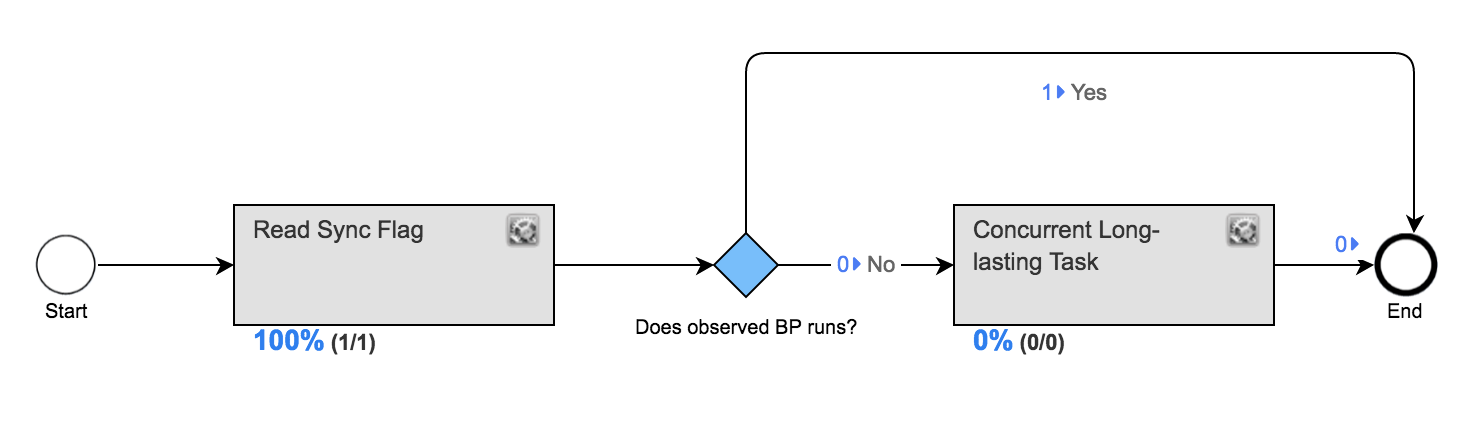
Read sync flag
<?xml version="1.0" encoding="UTF-8"?>
<config charset="UTF-8">

  <var-def name="sync_datastore">sync_bp</var-def>
  <var-def name="sync_variable">sync_bp_flag</var-def>

  <var-def name="syncRecord">
    <datastore name="${sync_datastore}" max="1">
        <template>
            select * from @this
        </template>
    </datastore>
  </var-def>

  <export include-original-data="true">
    <var-def name="value">
        <xpath expression='/row/${sync_variable}/text()'>
            <var name="syncRecord"/>
        </xpath>
    </var-def>
    <single-column name="${sync_variable}" value="${value}"/>
  </export>

</config>
Configure concurrent long-lasting task
<?xml version="1.0" encoding="UTF-8"?>
<config charset="UTF-8">

  <script><![CDATA[
    Thread.sleep(30000);
  ]]></script>

  <export include-original-data="true">
  </export>
</config>
Test execution
If you add both BPs into the Work.AI instance and create a synchronization Data Store with sync_bp_flag = AVAILABLE, you can test the synchronization as follows:
- Execute BP 1. It sets the flag and then pauses for one minute at the second Bot Task.
- Execute BP 2. The flow ends without running the concurrent long-running task.
- Execute BP 2 again. This time, it proceeds to the concurrent long-running task.