Perform stateless execution of Bot Tasks
Stateless execution definition
Stateless execution allows executing of Bot Tasks in memory without saving intermediate results to the database.
The feature is handy for Business Processes (BPs) of chatbot execution.
- Bot steps can be logically joined into one long transaction (chain of bot steps). Only input and output are essential for this transaction (this particular chain of bot steps). Intermediate results and analytics are not visualized as the intermediate data are not saved.
- Result data of the intermediate steps are confidential and should not be saved to the database.
The benefits are as follows:
Performance. Transition records between steps are accelerated while the database load is decreased.
Confidentiality. Results from intermediate steps of the stateless execution chain are kept in memory without storing in the database.
Multi-step transaction execution. A single logical transaction (for example, placing an order) can be split into multiple steps (log in, navigate to the order page, submit the order, and log out). If a step fails, the transaction processing starts from the very beginning without retrying to complete the failed step.
Stateless execution usage
To apply the stateless execution feature, in BP Designer, right-click a Bot Task and select the Stateless Execution option in the step context menu:
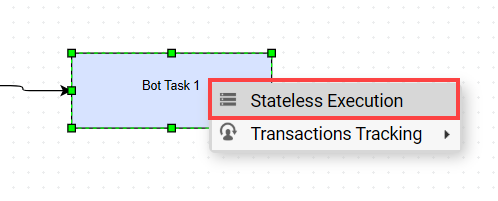
If you enable Stateless Execution, the Bot Task's border is shown as a dashed line to distinguish it from the normal Bot Task execution.

The stateless execution is aimed to be used in a chain of a few bot steps, rather than a single task.

The record transition between Step 1 > Step 2 and Step 2 > Step 3 occurs in memory only.
Pipelined execution
You can create any number of stateless steps and arrange them into a single chain. As a result, you execute several Bot Tasks as a single transaction on the same worker without queueing.
You should apply this pipelined execution only for the chain of stateless steps, for example:

The feature is enabled by default and automatically detects pipelines in the BP executions. To use this capability, you have to annotate the required bot steps as stateless. Your steps must satisfy the following conditions to be used in a pipeline:
- There must be a minimum of two linked stateless bot steps.
- All steps in the pipeline must be of the ct-worker type only. No AutoML, OCR, or RPA steps are allowed in the pipeline.
- There must be no business rules between chained stateless steps.
- Steps must have no Bot Sources.
- Steps can have Bot Config Bundles.
Constraints
Mind the following constraints and using the stateless execution capability:
Only the first stateless bot step is created and stored in the database. The next bot steps of the stateless execution chain are made in memory only. No statistics on intermediate steps are available.
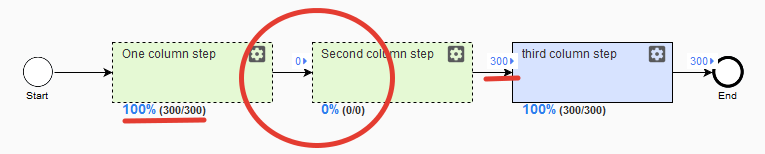
The Results tab: Second column step is not created. All processed results are stored in One column step.
The WebHarvest context objects, such as
AwsHitDtoorRunDto, are created once in the first step of the stateless execution chain and reused in the next stateless steps. See the details in the table:DTO type Created in first step Created in active step RunDtoX AwsHitDtoX SubmissionDtoX AwsHitAssignmentDtoX AutomationInfoDtoX CampaignDtoX ProxySettingsDtoX The End step of a sub-process is always in the Stateless Execution state. It prevents the chain from being broken when using sub-processes.

For a Stateless Execution step, Split record and Split data are not supported.
One record goes into several, and one record goes after the rule to several branches (like split_rule Join_rule).
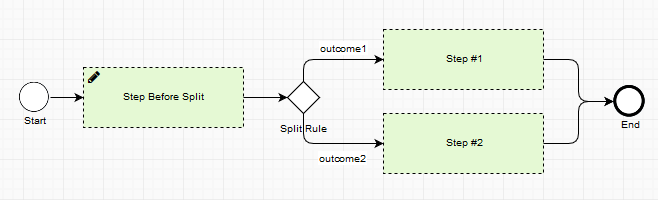
If the Split Rule composite rule has the SPLIT_DATA option, you see the following validation message when saving the process.

The record processing fails if it tries to go through more than one step after the Split Rule rule is executed. The error message appears in Event log.

The release plugin is not supported in stateless Bot Tasks. If the release plugin is used, results are not exported, and the minimum execution date is applied to the hit at the beginning of the chain. So, it behaves similarly to retry.
All errors in the Event log are only related to the first stateless step. Each failed stateless step is mentioned in the message.
In case of failure in the middle of the stateless execution chain, Repair/Retry starts from the first stateless step.
Start, End, Manual Tasks, and Rules cannot be marked as stateless.
Additional cases
A step can take part in the stateless execution chain and regular execution simultaneously. For example, after the first step, five records go to the Yes outcome, and five records go to No:
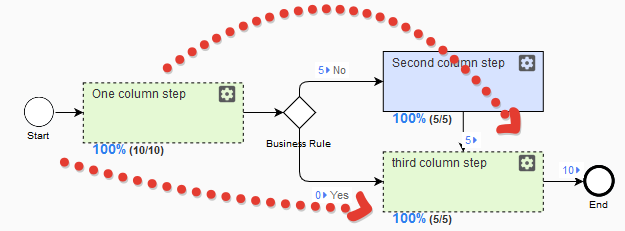
Third column step does not have statistics from the stateless execution, but only the history about five records from the regular execution.
A single Stateless Execution step works like a regular step with statistics and stores the results in the database.
Performance analysis
To analyze performance gained from executing a stateless step, you can use a jstack to identify the required step. The jstack contains the following information: run-{run_id}-hit-{hit_id}-step-{step_id} (if step_id is not presented, it is the first step).
Once the step is identified, you can analyze how fast the step is executed as stateless and regular. Additionally, you can check the information in the logs.
Business Process example
The BP contains ~ 30 steps with several conditional rules; all of the steps are marked as stateless.
The execution time of each record is logged to Event Log and the MonitorExecutionDataStore Data Store, so the execution time improvements can be measured by running this BP with or without the stateless option enabled for its bot steps.