Split and join Transactions
JNW Toolkit allows splitting a record into multiple sub-records and joining them back. This is usually done to process some data in parallel.
Prerequisites
To use the split and join functionality in your project, add the jnw-toolkit-splitjoin-jdbc module to the dependencies of your Maven project.
<dependency>
    <groupId>com.workfusion.jnw.toolkit</groupId>
    <artifactId>jnw-toolkit-splitjoin-jdbc</artifactId>
</dependency>
The split and join mechanism requires certain database tables to be created. If your project was created from the bundle archetype, the package module contains the required configuration for that. Otherwise, check that your package module contains the following configuration in the <build>/<plugins> section of the pom.xml file:
<plugin>
    <groupId>com.workfusion.odf</groupId>
    <artifactId>bundle-maven-plugin</artifactId>
    <version>${wf.bundle-maven-plugin.version}</version>
    <executions>
        <execution>
            <id>apply-migrations</id>
            <phase>prepare-package</phase>
            <goals>
                <goal>apply-migration-templates</goal>
            </goals>
        </execution>
    </executions>
</plugin>
There may be other parts of the configuration for that plugin, but they are not relevant to the current topic.
After that, you can inject an instance of the com.workfusion.jnw.toolkit.splitjoin.BpSplitJoinService class, which implements all the required operations.
Concept
The idea behind this mechanism is as follows:
- Any task can use
BpSplitJoinServiceto declare the existence of a group of data that contains multiple data items. Each item represents a unit of data that can be processed independently. - Any subsequent task can use
BpSplitJoinServiceto mark an item as done, store a JSON payload that represents the result of the processing, and check if the item was the last one in the group. - A subsequent task can use
BpSplitJoinServiceto retrieve all JSON payloads associated with the completed group.
Example
Data Model
For the sake of example, let's assume that we want to design a Business Process that processes strings. Each incoming input contains a list of strings. We want to process each string in parallel and then concatenate the results into a single string.
public record Input(String id, List<String> items){
}

public record SplitInput(String groupId, String itemId, String item){
}
Component containing tasks
This is the component that will contain the tasks that demonstrating the split and join functionality. We will inject the BpSplitJoinService instance into it. The code of the component itself will be omitted in further sections.
@Component
public class SplitJoinDemo {

    private final BpSplitJoinService splitJoinService;

    public SplitJoinTask(BpSplitJoinService splitJoinService) {
        this.splitJoinService = splitJoinService;
    }

    // here all our methods will be placed
}
Splitting input
The group ID needs to be unique. Here we assume that the input ID will suffice. In production code, you can generate a random UUID or use some other unique identifier.
This task creates a SplitInput instance for each string in the Input.items list. It registers the group and its items and returns the list of the SplitInput instances. In this way, each Input record produces multiple SplitInput records.
@AutoTaskProcessor
@TaskProcessorOutput(deconstruct = false, columnName = "split_input")
public List<SplitInput> splitInput(Input input) {

    final String groupId = input.id; // input id will serve as group id

    final List<String> itemIds = new ArrayList<>();  // we will need the list of item ids to register them
    final List<SplitInput> items = new ArrayList<>(); // and the list of items to return

    for (int i = 0; i < input.items.size(); i++) {
        final String itemId = String.valueOf(i); // item id will be the index of the item in the list
        itemIds.add(itemId);
        items.add(new SplitInput(groupId, itemId, input.items.get(i)));
    }

    splitJoinService.register(groupId, itemIds.toArray(String[]::new)); // here we are registering the group and its items

    return items; // and returning the items to be processed by the next task
}
Processing items
To demonstrate the processing, this task converts the string inside the SplitInput instance to uppercase and returns it inside a new instance.
@AutoTaskProcessor
@TaskProcessorOutput(deconstruct = false, columnName = "split_input")
public SplitInput processSplitInput(SplitInput splitInput) {
    final String processedItem = splitInput.item.toUpperCase();

    return new SplitInput(splitInput.groupId(), splitInput.itemId(), processedItem);
}
Merging items
This task calls the splitJoinService.mergeItemPayload() method, which does several things under the hood:
- Serializes the object we passed to it into JSON.
- Tries to acquire a lock for the whole group to avoid race conditions.
- Stores the JSON payload in the database.
- Checks if the item was the last one in the group and returns
trueif it was.
@AutoTaskProcessor
@TaskProcessorOutput(columnName = "group_complete")
public boolean mergeSplitInput(SplitInput splitInput) {
    try {

        return splitJoinService.mergeItemPayload(splitInput.groupId(), splitInput.itemId(), splitInput);

    } catch (TimeoutExceededException e) {
        throw new ReprocessRequiredException(Duration.ofMillis(500));
    }
}
If another SplitInput is currently being merged into the same group, and it takes too long for some reason, lock acquisition can fail due a timeout. In this case, the task raises ReprocessRequiredException to request the worker to repeat it with exactly the same input. Sooner or later, the item is merged successfully.
This task returns the output of the splitJoinService.mergeItemPayload() method as the group_complete column value. Only one of the records�the one that was processed last�will have this value set to true. The other records will have it set to false.
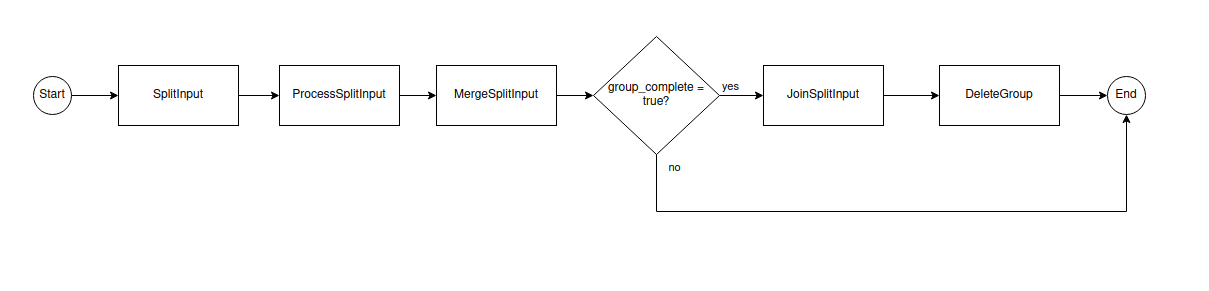
Once this task is complete, the Business Process contains a rule that sends all records with the group_complete column set to false to the end of the process. Only the last record is passed to the next task, so for each group there will be one record again.
This is what the Business Process will look like:
Joining items
The last task gets all the SplitInput items for the group, joins them into a single string, and returns it as the processed_input column value.
@AutoTaskProcessor
@TaskProcessorOutput(columnName = "processed_input")
public String joinSplitInput(SplitInput splitInput) {
    final String groupId = splitInput.groupId(); // splitInput corresponds to the last record in the group; we will take its group id

    return splitJoinService.getGroupPayloads(groupId, SplitInput.class) // getting all the SplitInputs in the group
            .stream()
            .map(SplitInput::item) // getting the strings that we converted to the uppercase in one of the previous tasks
            .collect(Collectors.joining()); // concatenating them into a single string
}
The next task gets all the SplitInput items for the group, joins them into a single string, and returns it as the processed_input column value.
Cleanup
After joining the items, it is recommended to remove the group and all its associated payloads from the database, as they will no longer be used.
@AutoTaskProcessor
@TaskProcessorOutput(columnName = "group_deleted")
public boolean deleteGroup(SplitInput splitInput) {
    final String groupId = splitInput.groupId();

    splitJoinService.deleteItemGroup(groupId); // removing the group and all associated payloads from the database

    return true; // the task must return something
}