
ML support guide
important
Applicable for IA Cloud Enterprise v10.0, 10.1.2, 10.1.4.
Machine Learning components
WorkFusion components
Located on BEP Master
An entry point of Machine Learning (ML) that processes all requests from Control Tower (or Control Tower's Worker during training) for model training and execution.
- automl-model-service deploys workers for extract and training, manages the training process.
- automl-model-management-service is responsible for uploading, upgrading, and improving the model to infrastructure. The service is not used during training or execution.
External applications
Located on BEP-master
An HTTP and reverse proxy server, a mail proxy server, and a generic TCP/UDP proxy server.
- Marathon is a framework for Mesos designed to launch long-running applications. It is accessible via the following URL: http://<bep_master_server_url>:8080.
- Mesos Master: Mesos is a cluster management system. It is built using the same principles as the Linux kernel, only at a different level of abstraction. The Mesos kernel runs on every machine and provides applications (for example, Hadoop, Spark, Kafka, Elasticsearch) with APIs for resource management and scheduling across the entire datacenter and cloud environments.
Mesos consists of:
- Master daemon that manages agent daemons running on each cluster node.
- Mesos frameworks that run tasks on these agents. Mesos Master aggregates resources offered from all agent nodes and provides them with registered frameworks. Mesos is accessible via the following URL: http://< bep_master_server_url>:5050.
- Mesos Agent node runs a discrete Mesos task on behalf of a framework. It is an agent instance registered with the Mesos master. The synonym of agent node is a Worker or slave node.
Located on INT
- ZooKeeper is a centralized service for maintaining configuration information.
- RabbitMQ is a messaging broker—an intermediary for messaging and communication between gateway services and other services. It is accessible via the following URL: http://<ml_server_url>:15672. The login and password are set during installation.
Located on APP
- ZooNavigator is a web-based GUI for ZooKeeper. The AutoML configuration can be changed there.
Located on INT or APN
- Logstash is a tool for managing events and logs. Usually, there are no useful logs for VDS troubleshooting.
AutoML components logs
Find all logs of components in the following directory on the BEP Master server: /opt/workfusion/supervisord/log.
- automl_gateway_service >
/opt/workfusion/automl-gateway-service/logs automl-gateway-service-stderr.logautoml-model-management-service-stderr.log- automl_model_managment_service >
/opt/workfusion/automl-model-management-service/logs - automl_model_service >
/opt/workfusion/automl-model-service/logs automl-model-service-stderr.logmarathon-accessandmarathon-error logs- mesos-master logs
- worker_management_service >
/opt/workfusion/worker-management-service/logs worker-management-service-stderr.lognginx.access/nginx.errorlogs
AutoML services
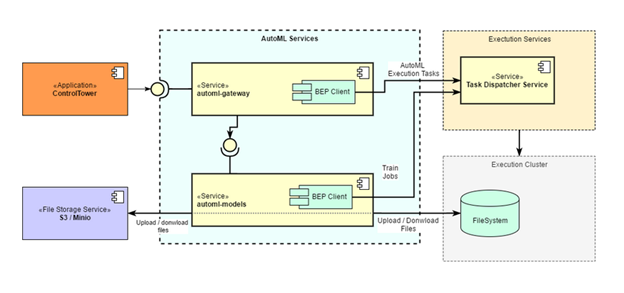
Here, there is a high-level view of AutoML services.
Model training
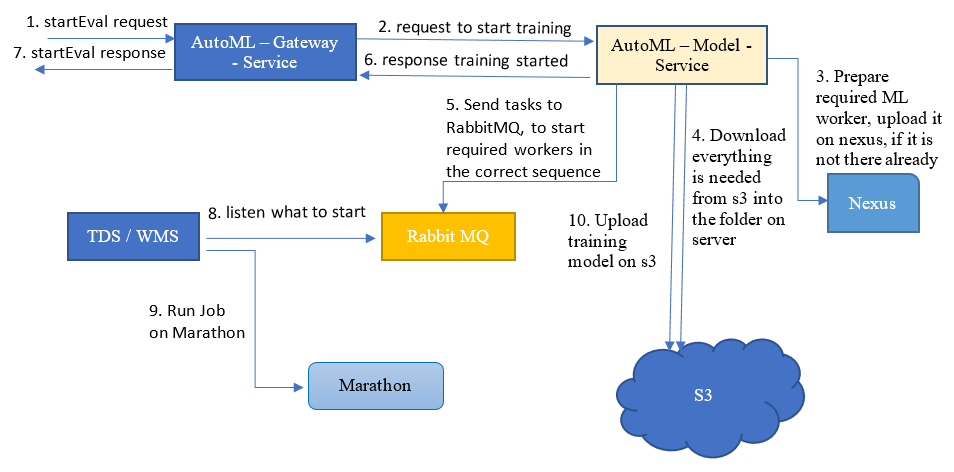
The main differences from version 9.x are as follows:
- There is no main job. Its functionality is handled by automl-model-service.
- A request to start a job (
startEval) comes from a Worker launched by Control Tower instead of Control Tower directly.

If training starts successfully, the second step is repeating until the Worker gets a response that the training process is completed or failed.

AutoML components communication during model training
Extraction
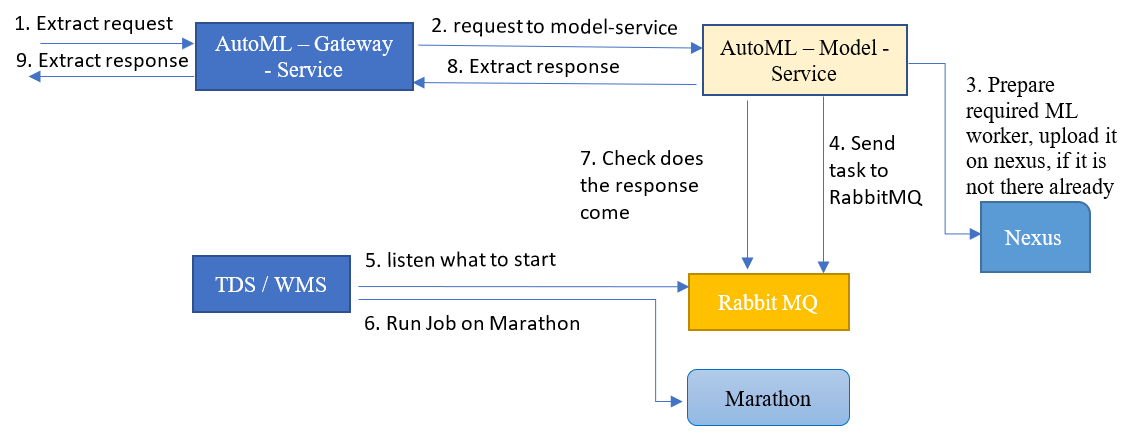
AutoML components communication during extraction using model
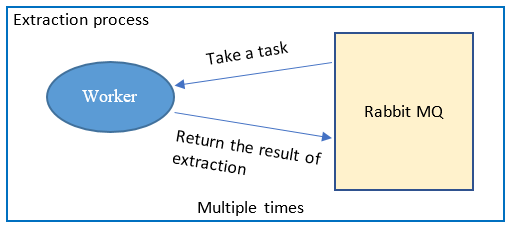
Communication between Worker and RabbitMQ during extraction
ML triage
Issues during model training
Once you launch the training, Control Tower will automatically create a Cognitive Bot Training Business Process, hidden by default. You can find it on the Business Processes List page. Go to Business Process List, select Cognitive bot training in the drop-down box, and apply the filter.
- Check that the record in the Automation Business Process has reached the Start Train&Evaluation step.
- Check automl-gateway-service logs on the BEP Master Linux machine. If you do not see any logs that the request reached the BEP Master server, there is an issue with communication between the APP and BEP Master servers. Possible reasons are as follows:
- Wrong nginx component setting, check Nginx logs.
- Wrong ports set in server configs.
- Firewall restrictions.
- If the request reached the BEP Master server and something failed, in most cases you will see a helpful error description in the automl-gateway-service logs.
- If everything is fine on the automl-gateway-service side, but the model failed to start anyway, check the automl-model-service log on the BEP Master server. After that, a queue should appear on RabbitMQ.
- If a job on the Mesos was created, check the job logs. On the Mesos, click the Sandbox link next to the job name and check stdout and stderr logs.
- In some cases, you may need to check worker-management-service, marathon, task-dispatcher-service, mesos-master logs for a useful error message. During the model training process, you can find additional logs in the model working directory on the BEP Master:
/apps/workfusion/automl-model-service/logs/training. For example, there can be some errors in the training set.
Issues during model execution
The flow is pretty similar to troubleshooting for the training model.
- Check that the record in the Automation Business Process reached the Execute AutoML Model Call step. On this step, you make a request to model for extraction.
- On the Execute AutoML Model Process Result step, you get the response from the model with the result. After that step, you are able to check what the model extracted in the result table.
- Check automl-gateway-service.
- If everything is fine, check automl-model-service. After that, a queue should appear on RabbitMQ.
- If a job on the Mesos was created, check the job logs. On the Mesos, click the Sandbox link next to the job name, and check stdout and stderr logs.
If you want to check the logs for a particular Worker, you can find it by clicking on Sandbox. Or you can find it on the BEP Master by the Worker name.
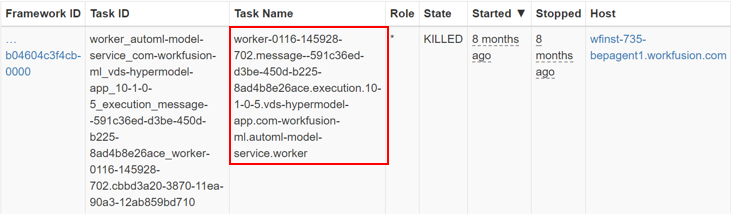
- Go to the log's directory:
/opt/workfusion/vds-data/workers/log. - Find the Worker logs by its name:
worker/automl-model-service/com-workfusion-ml/vds-hypermodel-app/10-1-0-5/execution/message--591c36ed-d3be-450d-b225-8ad4b8e26ace/.