Requirements techniques
The Data Analyst should know and use techniques to elicit, specify or model the requirements. You can apply the techniques separately or as a combination. Let's consider the most common techniques.
Workshops
A requirements workshop is a highly productive, focused event attended by key stakeholders. It takes a short, intensive period and is used to scope, discover, define, prioritize, and reach closure on the requirements.
Requirements workshops help to build strong communication with project stakeholders and gain trust and mutual understanding. They can also help generate ideas for new features or products, reach a consensus on a topic, or review requirements.
A requirements workshop should be prepared and planned in advance. The Data Analyst should review all the available documentation, align with the team internally on questions, risks, and approaches, and prepare the initial list of questions to clarify. You should share the workshop questions and plan with stakeholders in advance so that they can make sure the key people who can address the questions on business logic are included, relevant demo materials are prepared, and so on. The Data Analyst should drive the workshop, ask questions, explain the team understanding of the requirements, and so on. Data Analysts are also responsible for capturing the items discussed, documenting them, and sharing the output with all the workshop participants and interested parties.
After this session, an additional task for the Data Analyst or Delivery Manager is to send a follow-up letter to all the participants. The letter should include a summary of items discussed, action items and people responsible for them, ETA for action items, and agreements reached on the workshop. The Data Analyst should update the documentation according to the results of the conversation and requirements revealed or clarified and distribute the updated version to the stakeholders and team.
Prototyping
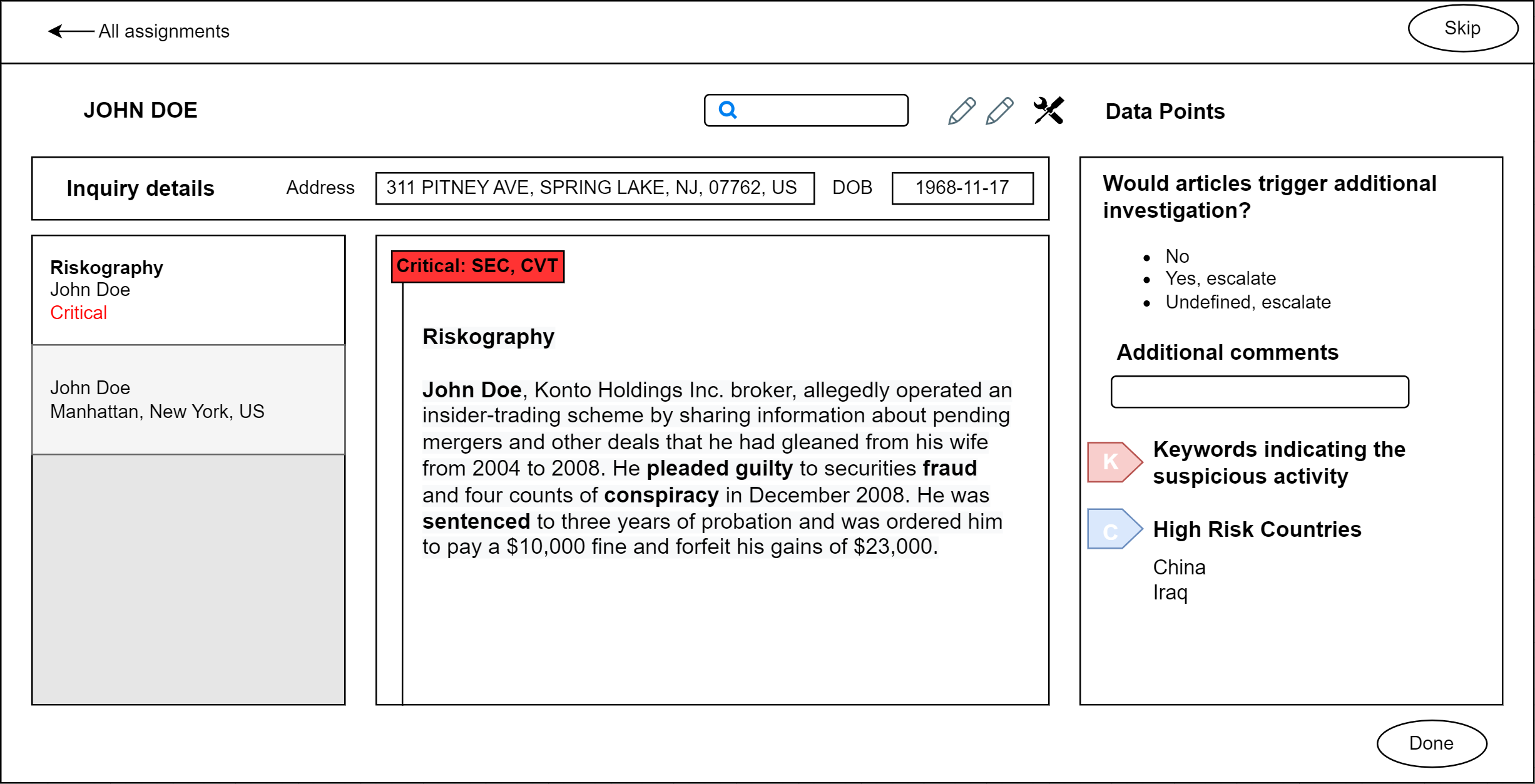
Prototypes are usually utilized when a use case implies Manual Task customization according to business needs. Prototypes help to reach two goals:
- Describe the interface, present it to the client, and validate that the solution meets their needs.
- Verify that the logical interface elements trace to user requirements such as processes, data, and business rules.
Building the prototype is an iterative process. Initial efforts outline the high-level views, and a further analysis enables drafting a detailed layout. While creating complex prototypes, you can figure out additional questions regarding data input, data visualization, the review process, and business rules. Prototypes also help to reveal hidden requirements that are implied but not clearly stated or requirements caused by a specific interface implementation.
Interface elements of detailed prototypes should trace to user requirements, data, and business rules. In other words, the interface should have all the attributes and data, all data should be derived from a Business Process, user actions and exceptions should be included in the scenarios, and so on.
Interface prototypes are helpful when you need to create user behavior scenarios in a Manual Task and test cases to test interfaces during the testing phase.
Expand to see the example
Process modeling
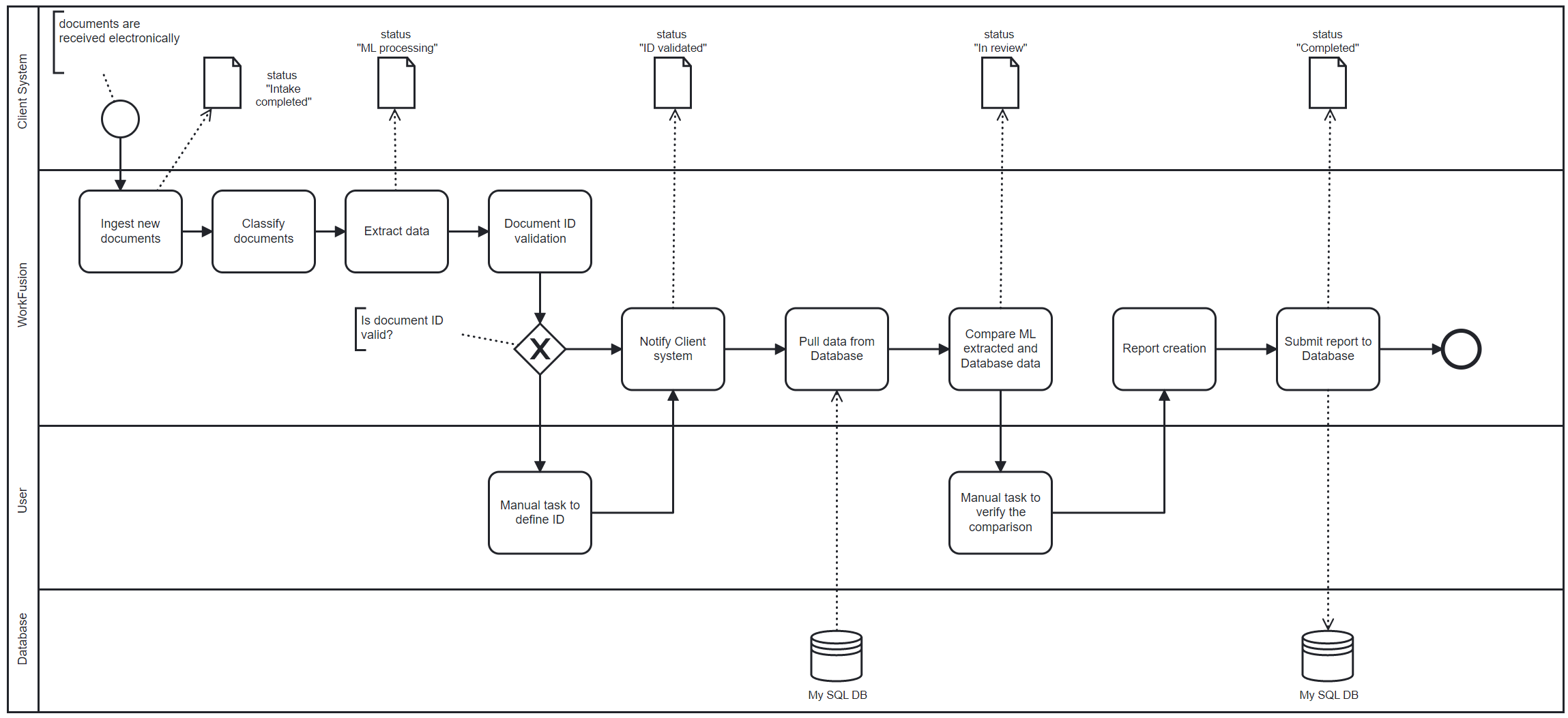
A process model is a visual representation of activities linked by the sequential flow and business logic. A process is usually repeatable and can have multiple paths to completion.
Process modeling is used to obtain a general understanding of a process, describe how people will interact with the software in the future flow, and describe systems, process steps, and exception scenarios. Process models are effective at showing how to handle a large number of scenarios and parallel branches.
There are many different notations to depict process models. The most commonly used are flowcharts, UML activity diagrams, and BPMN. Process models typically contain some or all of the following key elements:
Terminal Points represent the beginning or end of a process or a process flow.
Events initiate processes and can contain actions taken by a person, rules that cause some action to be taken, or the passage of a period of time. Events can create, interrupt, or terminate processes.
Activities are individual steps that should be completed to execute a Business Process. A step can be a single task, or it can be further decomposed into a subprocess with its own activities, flow, and other process elements.
Flow indicates the direction of the step-by-step workflow sequence. Diagrams are drawn from top to bottom or in the direction of reading to show the passage of time. You can split a process flow when activities occur simultaneously and are merged later.
Roles represent a type of person or group, or a system.
Decisions are forks where the workflow proceeds in two or more flows and, optionally, where separate flows merge. A decision can create mutually exclusive or parallel flows.
Swimlanes are horizontal or vertical sections showing by which role particular activities are performed. Pools represent organizational boundaries.
The Solution Architect or Data Analyst supported by Solution Architects provide process modeling.
Expand to see the example
Interface analysis
The interface analysis is applied to review interfaces of solution components and define requirements that describe how they interact, how input and output data should be generated, and which user actions and scenarios should be considered.
The interface analysis helps to clarify the solution boundaries and distinguish specific functionality required along with the input and output data. The analysis can be done with the help of screenshots provided by a client or video recordings of user actions in the system.
User stories
A user story is a textual description of things the solution needs to allow users to do. User stories are typically one or several sentences that describe who uses the story, the goal they are trying to accomplish, and any additional information that can be critical for understanding the story's scope.
A user story includes:
- Actor: a stakeholder who benefits from the user story.
- Description: a high-level overview of the functionality the user story includes.
- Benefit: a business value the story delivers.
Any user story should include the following structure:
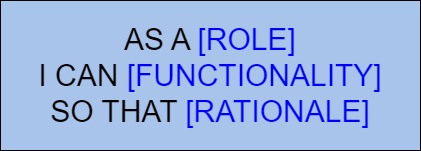
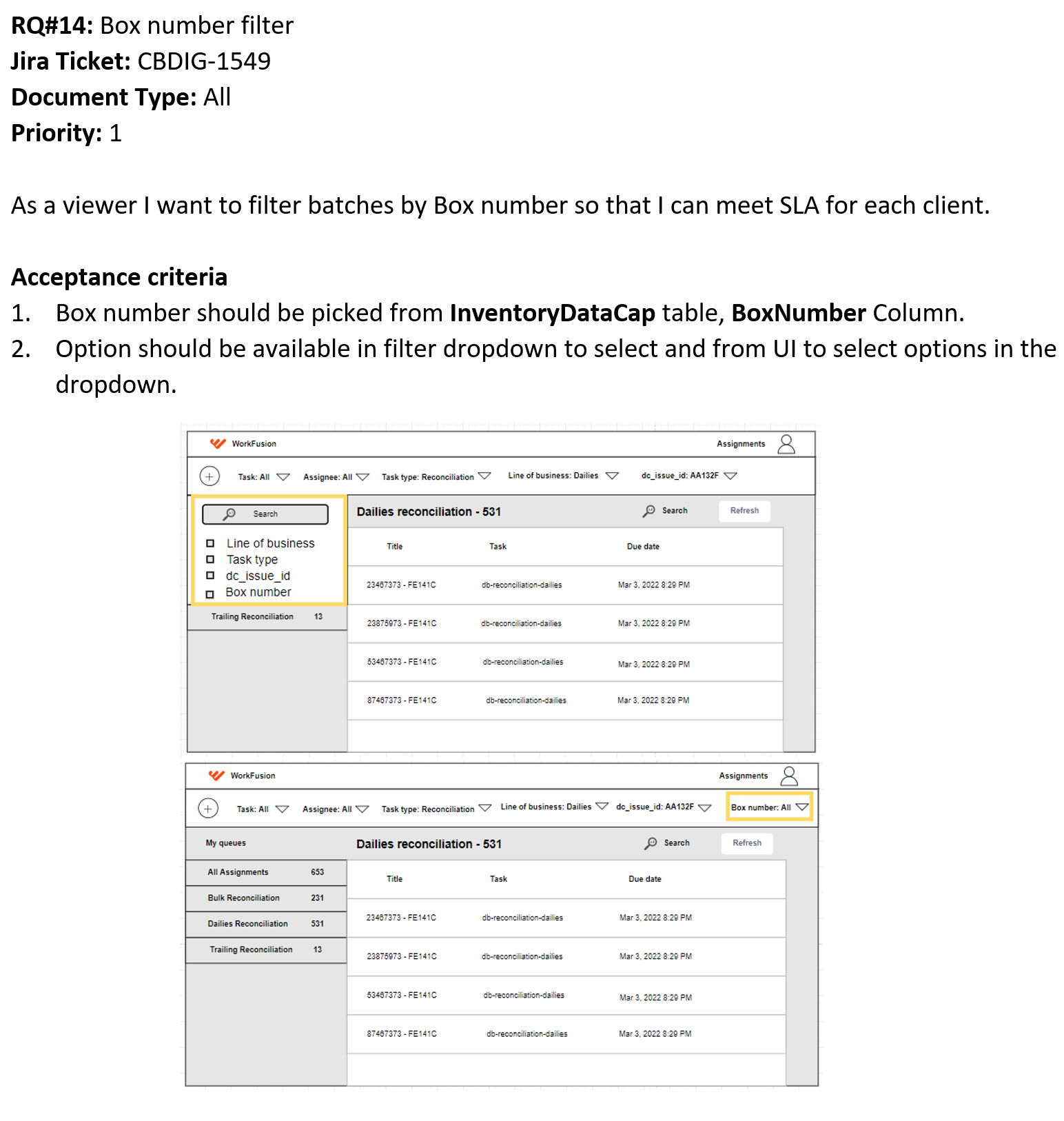
A user story should have defined acceptance and evaluation criteria. It should also have number, priority, any constraints defined, notes, details or mock-ups where applicable to ease the user story understanding.
Expand to see the example
Scenarios and use cases
Scenarios are series of steps performed by actors or by the solution that enables an actor to achieve a goal. A use case describes several scenarios in the form of primary and alternate flows. The primary or basic flow represents a happy path of the use case or scenario when the goal is accomplished. An alternate flow contains special circumstances and exceptions that result in a failure to complete the use case goal.
Let's consider the scenario's key elements:
Actor: any person, system, or event external to the system that interacts with that system through a use case.
Precondition: any fact the solution can assume is true when a use case begins. For example, a textual statement, such as "manual task is created" or "status is NEW", or the successful completion of other use cases.
Flow of events: a description of a sequence of actions that the actor and the system perform during the scenario or use case execution.
Post-condition: any fact that should be true when the use case is complete. For example, a process result or data output. The result should be true for all possible flows through the use case. The output for successful and unsuccessful use case executions can differ and should be documented separately.
Relationships: relationships between actors and use cases are called associations. Associations do not represent input, output, time, or dependency. An association line indicates that the actor has access to the functionality represented by the use case.
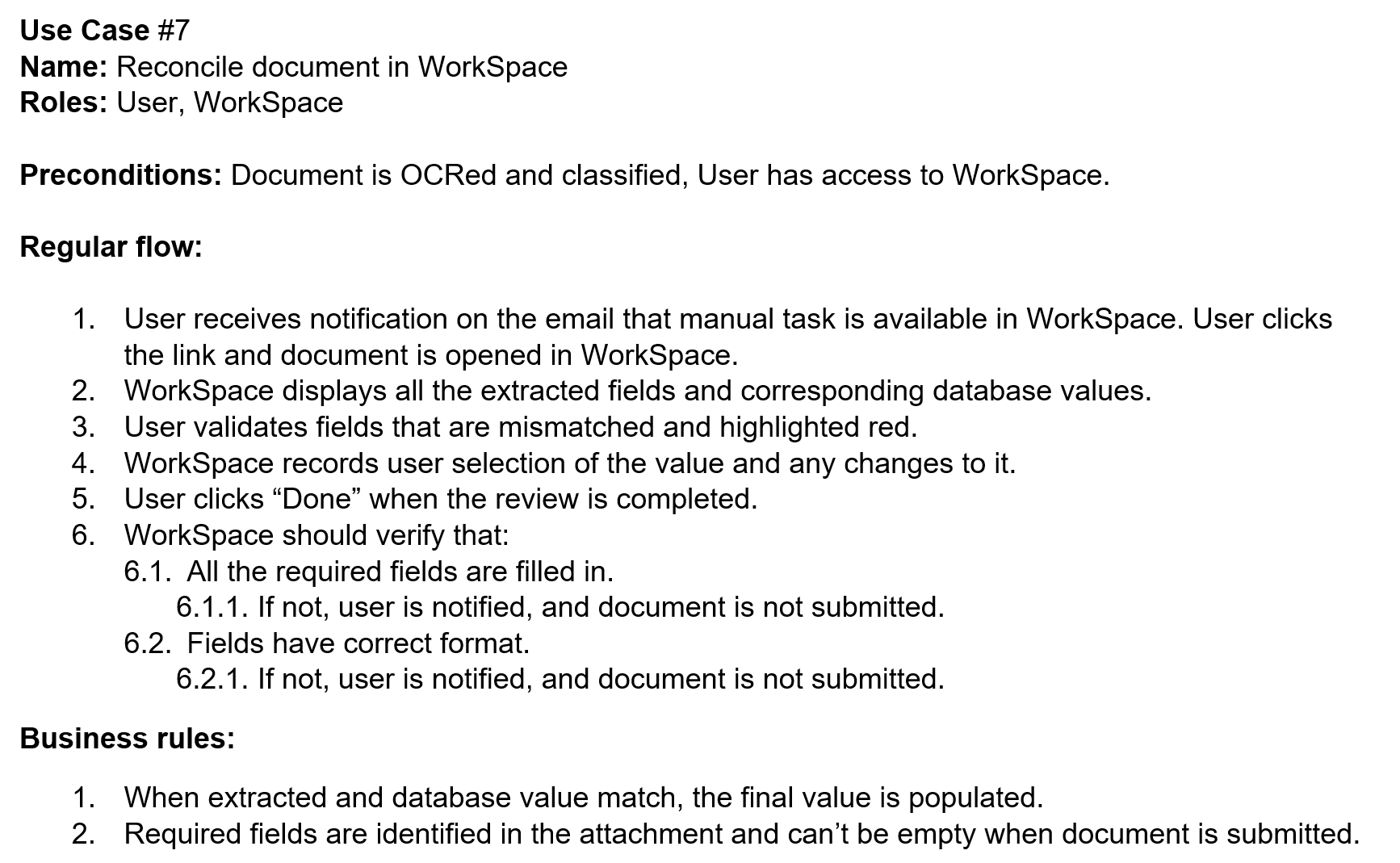
Use cases, scenarios, and use case diagrams help to clarify scope and solution borders, description of normal and exception paths of a Business Process, and user and system actions during the process.
Expand to see the example