
Configure and run Automation Business Process
After you have applied automation to a Manual Task, an Automation BP creation wizard is opened where you need to:
Upload Data (production batch) and map input column(s) if needed.
Set up BP options (Due Date, Streaming, and so on). You can optionally edit the BP bot steps (Automation Settings, Normalization Step) to enable or disable Statistical Quality Control (SQC), or set the data formats, and so on.
Run the BP.
Watch the BP progress on the BP diagram in the View mode or on the Data tab.
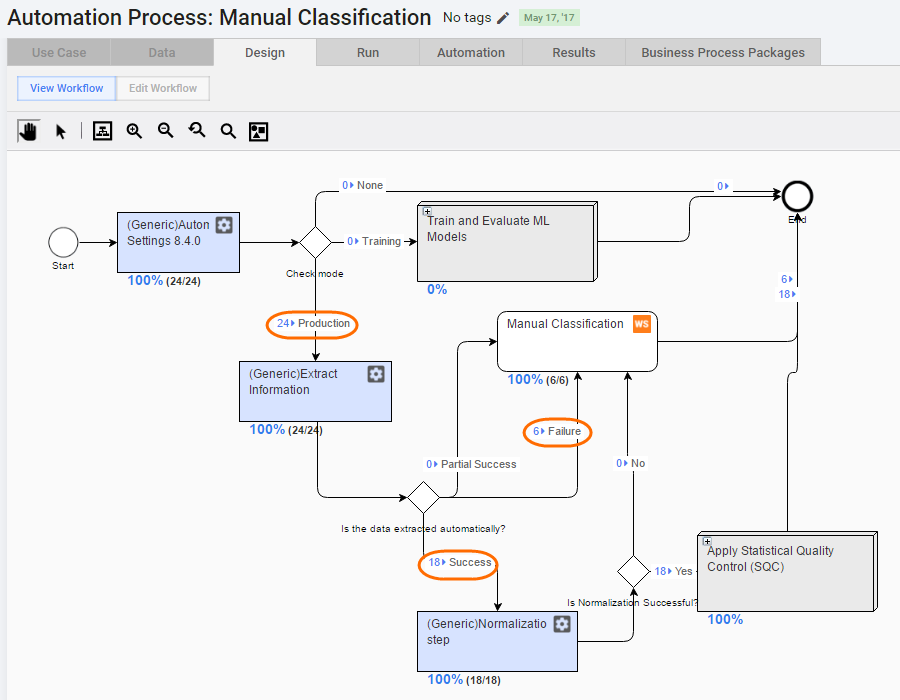
On the process diagram above, there are 24 documents uploaded as process input data:
- 18 documents are successfully extracted by cognitive bot and then normalized.
- 6 documents are routed to a human workers because cognitive bot failed to extract information.
Complete some Manual Tasks when:
- Automatic Extraction fails or is partially successful (the Is the data extracted automatically? rule).
- Data Normalization fails (the Is normalization Successful? rule).
- SQC (Statistical Quality Control) is enabled.
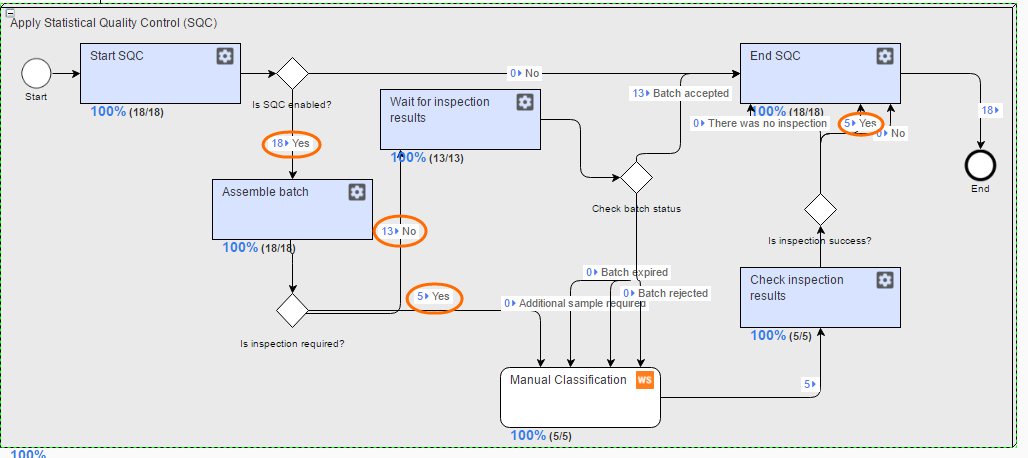
On the diagram above, 18 documents are successfully extracted and normalized by a cognitive bot, and then routed to the SQC sub-process:
5 documents are taken to the inspection (tasks for human workers to verify model results).
13 documents are held until inspection results.
Human workers provide the same answers as the cognitive bot, therefore all batch is approved and no additional inspection is needed (Is inspection success? rule results).
Finally, you get result data partially generated by VDS, partially submitted by human workers. Afterwards, you can perform post-processing of these results.