RPA overview
The section describes robots – WorkFusion Bot configs that execute actions of a human Worker interacting with a user interface of a computer system.
Robots have the following capabilities:
- Clicking through a browser web page or a desktop application on a remote server.
- Reading and writing content from or to user interface fields.
- Iterating through a set of predefined steps (looping) and executing steps upon some conditions (if-then-else logic).
- Executing scripts, opening applications and browser windows.
RPA high-level architecture
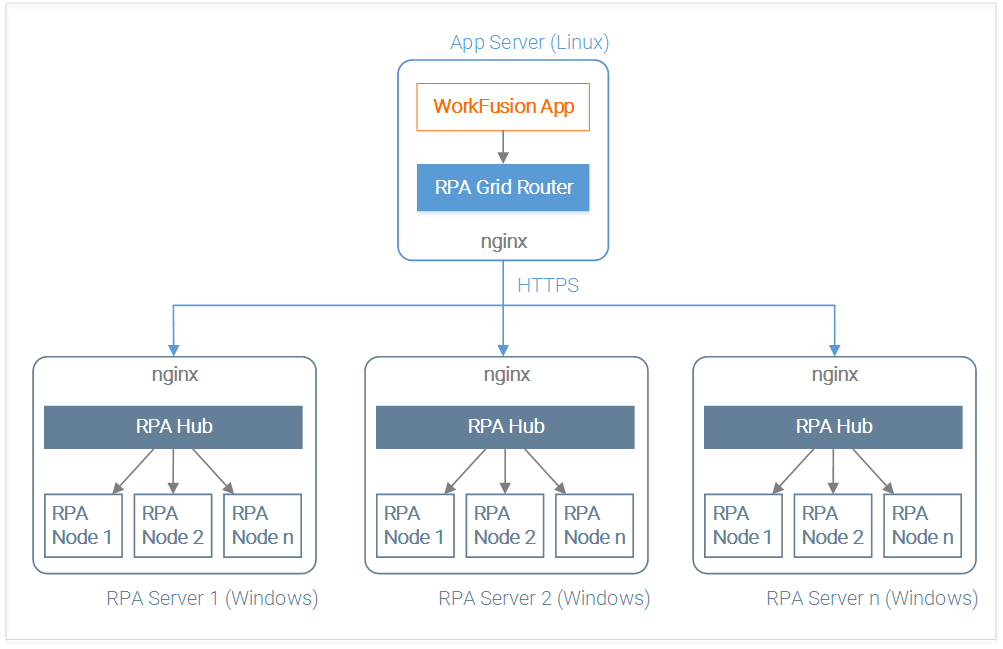
The following diagram shows how WorkFusion RPA works:
WorkFusion engine executes RPA Bot configs having the robotics-flow plugin.
All instructions go to RPA Grid Router (Cluster) which distributes them among available RPA Hubs (Orchestrators / Load Balancers) depending on their capacity and supported capabilities.
RPA Hub searches for RPA Nodes with a suitable set of capabilities (e.g. installed browsers and desktop apps to be automated), and when found, creates a new session on that Node.
RPA Node acts like a Robot Aggregator:
- Receives a set of instructions from RPA Hub.
- Initializes a Robot – Browser Driver (Selenium) or Desktop Driver (AutoIt).
- Executes script instructions one by one (for example, open Excel application, copy all content from the 2nd sheet, save it to a text file, put the file into SharePoint folder).
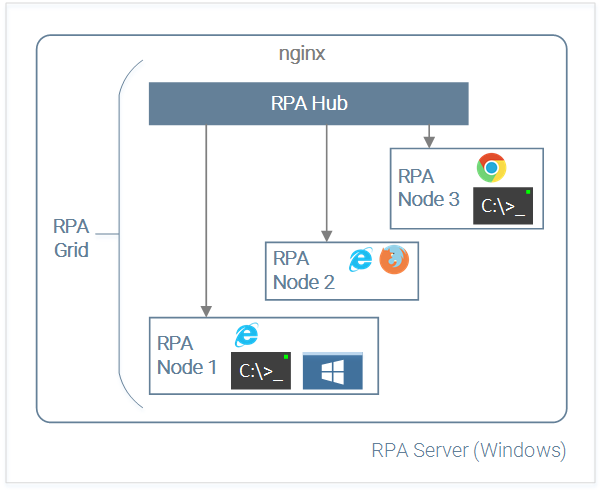
One RPA script can use several RPA Nodes with different capabilities, for example:
Node 1: to run a Windows desktop application and get initial data from it.
Node 2: to run an Internet Explorer browser, input that data to a CRM web application, and keep browser opened.
Node 3: to run a console application and read customer balance from it.
Finally, RPA script can switch to Node 2 again to save a transaction in CRM, and close the browser on completion.
RPA Development Process
To start developing RPA scripts, you need to:
- Install WorkFusion Studio IDE.
- Install RPA Grid and make necessary Windows, Java, and IE tuning.
- Learn how to create Bot Tasks and use Web-Harvest plugins.
- Learn Robotics API and simplified API cheatsheet.
- Learn how to use desktop automation tools.
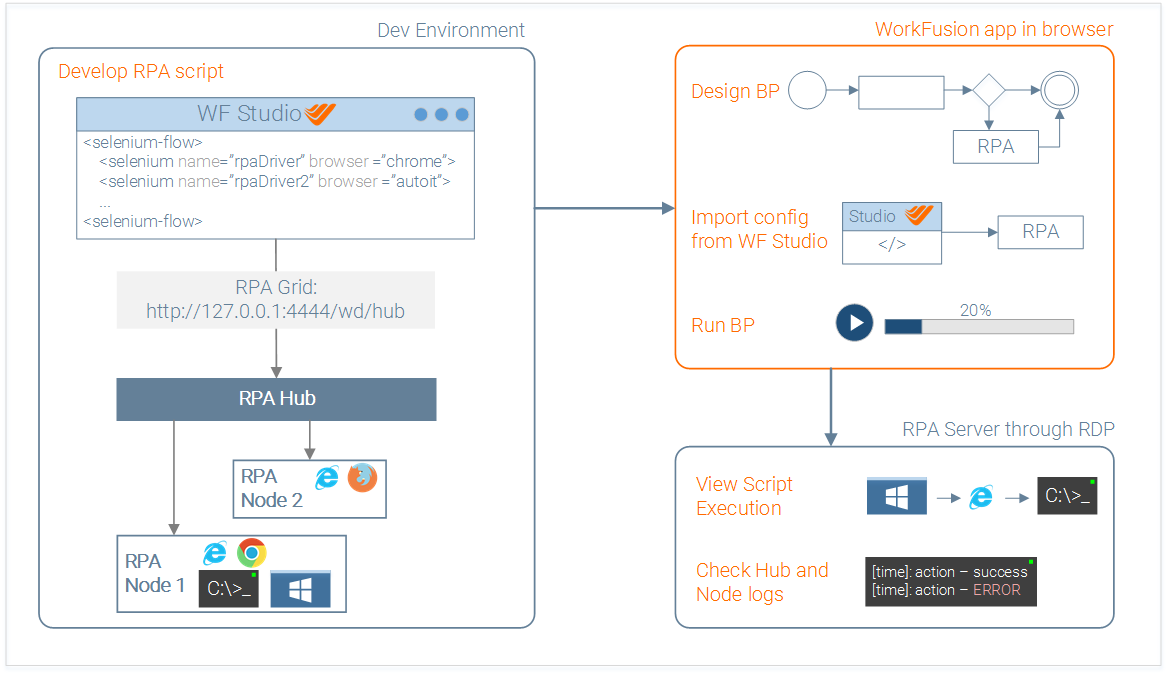
The RPA scripts development life-cycle looks like this:
Develop PRA script in WorkFusion Studio IDE.
Debug and test it on local machine using RPA Grid.
Do one of the following:
Deploy a Bot config bundle to Nexus using the WorkFusion repository (recommended way).
OR create a Bot Task in WorkFusion and paste the tested RPA script from WF Studio manually.
Set Bot Task parameters (Streaming, Number of Threads, etc.) and run it as a part of a Business Process.
Watch the RPA script execution on a remote RPA server managed by WorkFusion app through RPA Grid Router. You need to set an RDP connection to the RPA Server – contact your system administrator for details.
If something fails:
- Check the RPA Hub and Node console logs on RPA server.
- Check the BP error logs.
tip
Watch the video explaining how to add RPA steps to your process and watch config execution on the RPA server.