Split and join Transactions
ODF 2 allows splitting a Transaction into multiple sub-transactions and joining them back. This is usually done to process some data from the original Transaction in parallel.
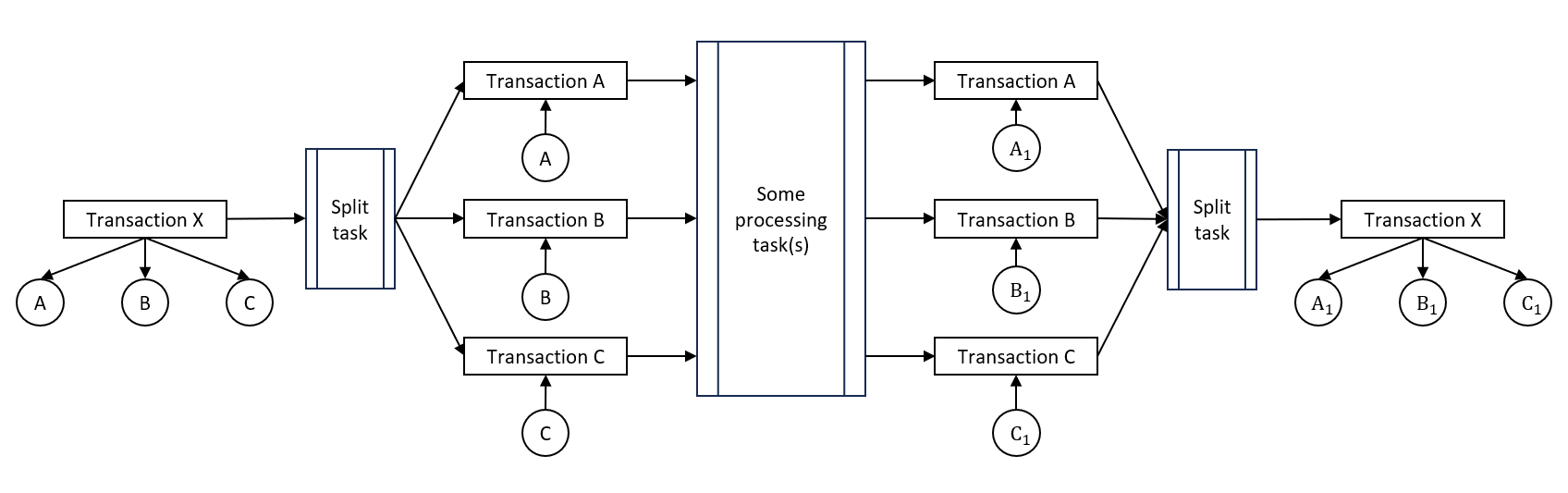
Split transactions
Transaction splitting is achieved with the help of the AbstractSplitTransactionTask abstract class.
public abstract class AbstractSplitTransactionTask implements MultiTransactionalTask {

    // some code omitted for clarity

    protected Transaction createChildTransaction() {
        final Transaction child = transactionBuilder.byParent(currentTransaction.get());
        transactionRepository.create(child);

        currentTransaction.get().setSplitStatus(SplitStatus.SPLIT.toString());
        return child;
    }

    protected Collection<TransactionResult> result(Collection<Transaction> transactions) {
        return transactions.stream()
            .map(t -> new TransactionResult(taskInput, t))
            .collect(Collectors.toList());
    }

    protected Collector<Transaction, ArrayList<TransactionResult>, ArrayList<TransactionResult>> resultCollector() {
        return Collector.of(ArrayList::new,
                (builder, entry) -> builder.add(new TransactionResult(taskInput, entry)),
                (left, right) -> {
                    left.addAll(right);
                    return left;
                });
    }
}
To use it, override the run(CurrentTransaction currentTransaction) method from MultiTransactionalTask. This class does not automatically split your Transaction but provides tools to make the process easier.
As you can see above, AbstractSplitTransactionTask contains three methods that can help you split a Transaction:
Transaction createChildTransaction()automatically creates a child Transaction based on the current Transaction (the current Transaction is used as the Parent Transaction, and the status is also taken from the current Transaction) and pushes it to the Data Store. If the method is called for the first time, the current Transaction sets the split status toSPLIT.Collection<TransactionResult> result(Collection<Transaction> transactions)prepares a list of child Transactions to return from therun(CurrentTransaction currentTransaction)method.Collector<Transaction, ArrayList<TransactionResult>, ArrayList<TransactionResult>> resultCollector()collects child Transactions into the return type of therun(CurrentTransaction currentTransaction)method from the stream.
The task logic looks like this:
- There are entities that are stored in the current Transaction. Collect the entities from the current Transaction.
- Convert entities to type
OdfTransactionalEntityto attach them to sub-transactions. - Use the
createChildTransaction()method to create sub-transactions and attach entities to them.
Don't forget to create or update your new entities in the Data Store as the Transaction ID has changed, and the data needs to be updated in the Data Store.
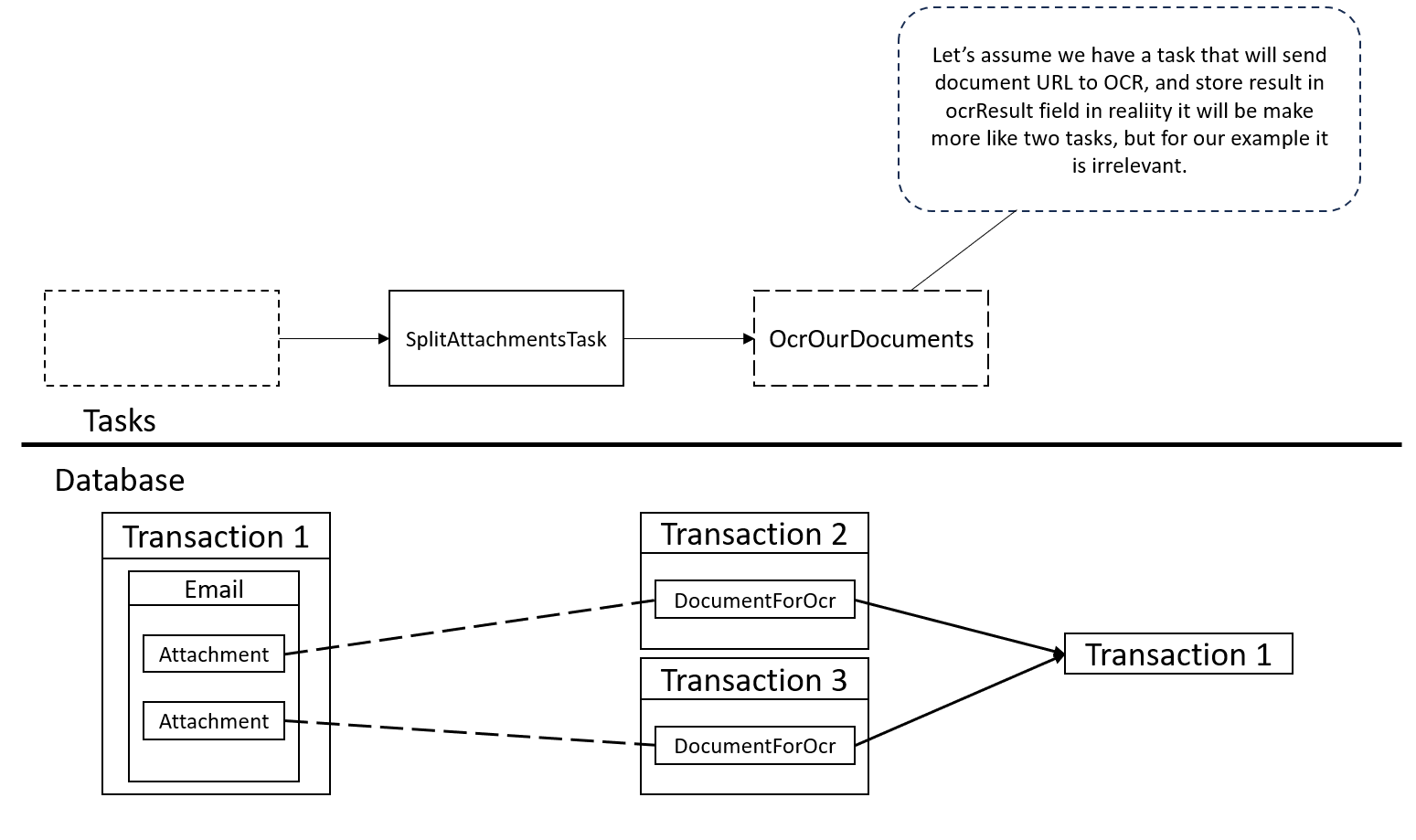
For example, let's assume that our Task takes emails and sends attached images to OCR. There are the Email and Attachment entities to store the data. To take advantage of multiple workers in the environment, you can process Attachments in parallel.
@DatabaseTable(tableName = "email")
public class Email extends OdfTransactionalEntity {
    @ForeignCollectionField
    public Collection<Attachment> attachments;
}

@DatabaseTable(tableName = "attachment")
public class Attachment extends OdfEntity {
    public String url;     // will contain URL of attached image
    public String content; // will be set after OCR is done
}
Attachment cannot be tied directly to the Transaction. Thus, you need to create a new entity called, for example, DocumentForOcr.
@DatabaseTable(tableName = "document_for_ocr")
public class DocumentForOcr extends OdfTransactionalEntity {
    public String url;
    public String ocrResult;
}
For brevity, we omit the creation of a repository class for these entities.
Your task for splitting the data looks like this:
@BotTask
public class SplitAttachmentsTask extends AbstractSplitTransactionTask {

    private final EmailRepository emailRepository;
    private final DocumentForOcrRepository documentForOcrRepository;

    @Inject
    protected SplitAttachmentsTask(CurrentTransaction currentTransaction, TransactionRepository transactionRepository, TransactionBuilder transactionBuilder, TaskInput taskInput, EmailRepository emailRepository, DocumentForOcrRepository documentForOcrRepository) {
        super(currentTransaction, transactionRepository, transactionBuilder, taskInput);
        this.emailRepository = emailRepository;
        this.documentForOcrRepository = documentForOcrRepository;
    }

    @Override
    public Collection<TransactionResult> run(CurrentTransaction currentTransaction) {
        return emailRepository.findByTransactionId(currentTransaction.getRequiredId()).stream()
                .flatMap(email -> email.getAttachments().stream())
                .map(this::createDocumentForOcr)
                .map(this::createSubTransactionWithDocumentForOcr)
                .collect(resultCollector());
    }

    private Transaction createSubTransactionWithDocumentForOcr(DocumentForOcr documentForOcr) {
        Transaction childTransaction = createChildTransaction();

        documentForOcr.setTransaction(childTransaction);
        documentForOcrRepository.createOrUpdate(documentForOcr);

        return childTransaction;
    }

    private DocumentForOcr createDocumentForOcr(Attachment attachment) {
        DocumentForOcr documentForOcr = new DocumentForOcr();
        documentForOcr.setUrl(attachment.getUrl());
        return documentForOcr;
    }

}
As you can see, each Email can have any number of Attachments, including zero. You convert Attachments to DocumentForOcr instances one to one, but you can do it another way, depending on your data model. For example, you can filter Attachments by the MIME type and skip those that are not images.
Here, you can see how the data looks before and after SplitAttachmentTask is applied. Each DocumentForOcr is tied to its own Transaction. These sub-transactions retain a connection to their original Transaction (Parent Transaction) and have the same status. The Parent Transaction is marked as split and not processed further.
Join by Parent Transactions
Transaction joining by the Parent Transaction is achieved with the help of the AbstractJoinByParentTransactionTask abstract class.
The task works in conjunction with a split task only. If you use this task without splitting, all Transactions are released from this task without any changes.
public abstract class AbstractJoinByParentTransactionTask implements MultiTransactionalTask {

    // some code omitted for clarity

    abstract SingleResult run(Collection<Transaction> childTransactions, Transaction parentTransaction);

    // some code omitted for clarity
}
As you can see, this task has only one method to implement. The main information is stored in the method parameters:
Collection<Transaction> childTransactionscontains all sub-transactions for the Parent Transaction.Transaction parentTransactionis the Parent Transaction for the current Transaction.
In this method, you need to collect entities from sub-transactions, transform, and attach them to the Parent Transaction.
Mind to update or create the entities you attach to the Parent Transaction as they change the Transaction ID value, and this data needs to be updated in the Data Store.
The task result is the Parent Transaction if all sub-transactions are processed, and an empty result if the join task waits for a sub-transaction. To add more columns for output, modify SingleResult, for example:
public class InvoiceToEmailJoinByParentTransactionTask extends AbstractJoinByParentTransactionTask {

    // some code omitted for clarity

    @Override
    protected SingleResult run(Collection<Transaction> childTransactions, Transaction parentTransaction) {
        final Email email = new Email();

        email.setFrom("from");
        email.setTo("to");
        email.setMessage(createInvoiceMessage(childTransactions));

        email.setTransaction(parentTransaction);
        emailRepository.create(email);

        return new SingleResult(taskInput).withColumn("additional_column", "data");
    }

    // some code omitted for clarity

}
The join task uses the pool plugin, and you have to add ControlTowerServicesModule.class to the Requires annotation.
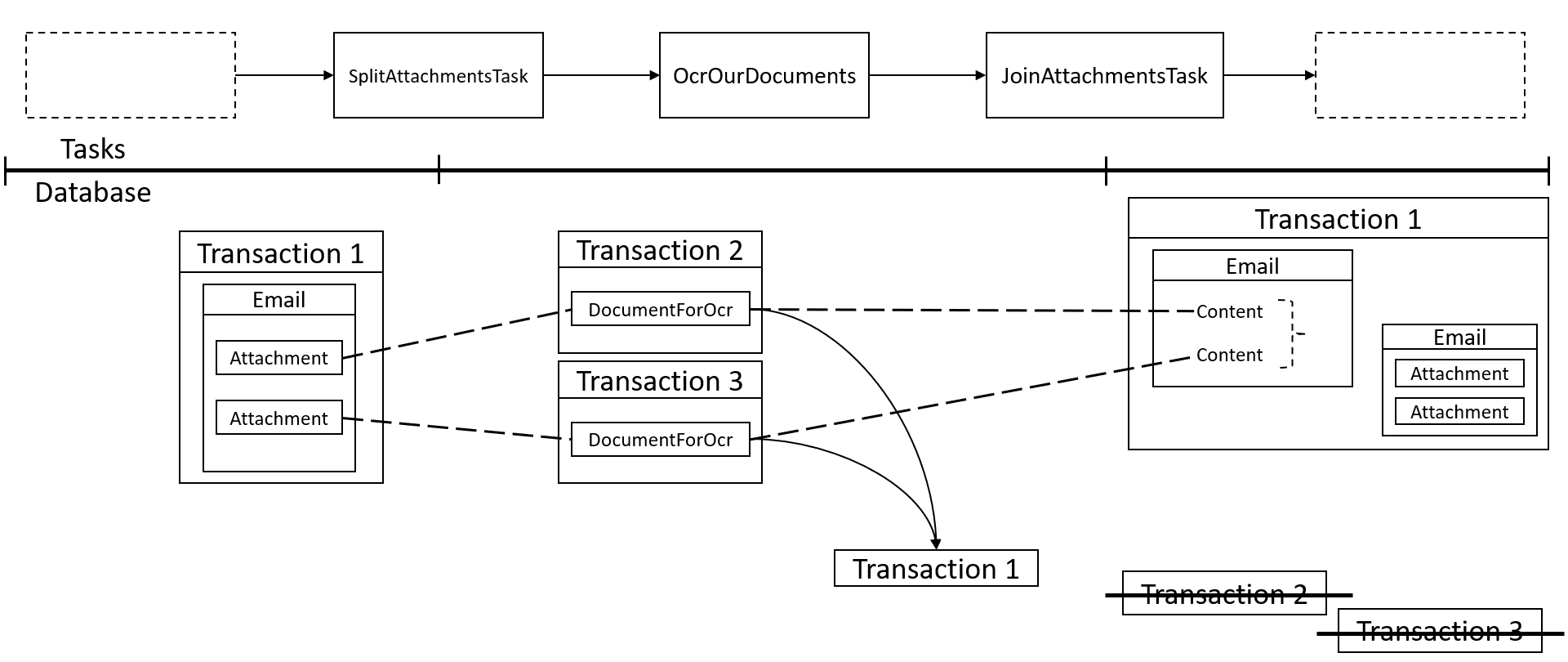
After OCR is done, join all the documents back together. See a new entity that represents an already OCRed email:
@DatabaseTable(tableName = "processed_email")
public class ProcessedEmail extends InputEntity {
    public Collection<String> attachments;
}
Now, implement AbstractJoinByParentTransactionTask:
@BotTask
@Requires({RepositoryModule.class, ControlTowerServicesModule.class})
public class JoinAttachmentsTask extends AbstractJoinByParentTransactionTask {

    private final DocumentForOcrRepository documentForOcrRepository;
    private final ProcessedEmailRepository processedEmailRepository;

    @Inject
    protected JoinAttachmentsTask(TaskInput taskInput, CurrentTransaction currentTransaction, TransactionRepository transactionRepository, PoolObjectFactory poolObjectFactory, OdfTime odfTime, DocumentForOcrRepository documentForOcrRepository, ProcessedEmailRepository processedEmailRepository) {
        super(taskInput, currentTransaction, transactionRepository, poolObjectFactory, odfTime);
        this.documentForOcrRepository = documentForOcrRepository;
        this.processedEmailRepository = processedEmailRepository;
    }

    @Override
    protected SingleResult run(Collection<Transaction> childTransactions, Transaction parentTransaction) {
        final ProcessedEmail processedEmail = new ProcessedEmail();

        processedEmail.attachments = childTransactions.stream()
            .flatMap(transaction -> documentForOcrRepository.findByTransactionId(transaction.getUuid()).stream())
            .map(DocumentForOcr::getOcrResult)
            .collect(Collectors.toList());
        processedEmail.setTransaction(parentTransaction);

        processedEmailRepository.createOrUpdate(processedEmail);

        return new SingleResult(taskInput);
    }

}
After all sub-transactions reach the task, the run(Collection<Transaction> childTransactions, Transaction parentTransaction) method is called with all DocumentForOcr instances as input. The Parent Transaction is updated in the database and clears its split status. Sub-transactions are marked as joined and aren't processed further. The original Transaction continues from this place.
Join Transactions without Parent
You can join Transactions without the Parent Transaction is achieved with the help of AbstractJoinTransactionTask:
public abstract class AbstractJoinTransactionTask implements MultiTransactionalTask {

    // some code omitted for clarity

    protected abstract String getKey();

    protected abstract boolean shouldJoinSelectedTransaction();

    protected Collection<Transaction> chooseTransactionsForJoin() {
        try {
            return transactionRepository.getDao().queryBuilder().where()
                    .eq(Transaction.SPLIT_STATUS_COLUMN, getWaitingTransactionSplitStatus()).and().isNull(Transaction.ERROR_STATUS_COLUMN).query();
        } catch (SQLException e) {
            throw new IllegalStateException(String.format("The transaction repository query could not be completed due to: %s", e.getMessage()), e);
        }
    }

    protected abstract Transaction prepareOutputTransaction(Collection<Transaction> inputTransactions);

    protected abstract String getPoolKey();

    // some code omitted for clarity
}
The task has more than one method to implement, as you must create a rule to trigger the join process, implement it, and make the task individual. The methods are as follows:
getKey()provides an individual key for the join task. The key is used in the split status name to understand which Transactions are pending join in the current task.shouldJoinSelectedTransaction()provides a decision to start the joining process. The method can contain SQL queries, a timer, or a counter.chooseTransactionsForJoin(), by default, returns all Transactions that have already entered the join task. You can override it and create your own rule to select a Transaction for join. The method is called if yourshouldJoinSelectedTransaction()returnstrue. Transactions selected in this step change the split status to empty; others are available in the next iterations.prepareOutputTransaction(Collection<Transaction> inputTransactions)returns a new Transaction based on the Transactions selected for the join.getPoolKey()provides an individual pool plugin key so as not to lock the database for other tasks.
Don't forget to put your new Transaction into the Data Store because the task doesn't do it automatically.
If the getKey() and getPoolKey() methods do not return individual values, your task will not work correctly.
For example, to combine some processed emails into a bucket of five, you can use AbstractJoinTransactionTask.
Now, implement AbstractJoinTransactionTask:
@BotTask
@Requires({RepositoryModule.class, ControlTowerServicesModule.class})
public class JoinWithoutParentProcessedEmailInBundleTask extends AbstractJoinTransactionTask {

    private final ProcessedEmailRepository processedEmailRepository;

    @Inject
    protected JoinWithoutParentProcessedEmailInBundleTask(TaskInput taskInput, CurrentTransaction currentTransaction, TransactionRepository transactionRepository, TransactionBuilder transactionBuilder, PoolObjectFactory poolObjectFactory, OdfTime odfTime, ProcessedEmailRepository processedEmailRepository) {
        super(taskInput, currentTransaction, transactionRepository, transactionBuilder, poolObjectFactory, odfTime);
        this.processedEmailRepository = processedEmailRepository;
    }

    @Override
    protected String getKey() {
        return "bundle_creator";
    }

    @Override
    protected boolean shouldJoinSelectedTransaction() {
        try {
            return (int) transactionRepository.getDao()
                    .queryBuilder()
                        .where()
                            .eq(Transaction.SPLIT_STATUS_COLUMN, getWaitingTransactionSplitStatus())
                    .countOf() >= 5;
        } catch (SQLException e) {
            throw new OdfFrameworkException("The SQL query is not working correctly, please check and try again.");
        }
    }

    @Override
    protected Transaction prepareOutputTransaction(Collection<Transaction> transactions) {
        Transaction result = transactionBuilder.byStatus("IN_PROGRESS");

        transactions.stream().flatMap(transaction -> processedEmailRepository.findByTransactionId(transaction.getUuid()).stream())
                .forEach(processedEmail -> {
                    processedEmail.setTransaction(result);
                    processedEmailRepository.createOrUpdate(processedEmail);
                });

        return result;
    }

    @Override
    protected String getPoolKey() {
        return "custom_bundle_creator_pool_key";
    }

}
The AbstractJoinTransactionTask class has the getWaitingTransactionSplitStatus() method that provides the split status of Transactions waiting to be joined in the task. The status is based on the key you set in the getKey() method.
As you can see, this task collects all processed emails from the five Transactions that came to the join task and attaches them to a new Transaction. Now, this Transaction is ready to be processed by other tasks. For example, the shouldJoinSelectedTransaction method can wait until all Transactions in the Business Process go to the task, create a report, and send it to the email of a person responsible for the process.
Error handling for split and join by parent tasks
If any sub-transactions encounter an error, the behavior of its siblings and Parent Transaction depends on the error handling logic.
- With
com.workfusion.odf2.multiprocess.MultiProcessErrorHandlingModule, they are marked withHAS_ERRORS. - With
com.workfusion.odf2.core.errorhandling.DefaultErrorHandlingModule, they remain unchanged.
If you want to change the behavior but leave the error status for all sibling and Parent Transactions when one of them fails, create your own ErrorHandlingLogic class and override the shouldSetHasErrorStatusForSiblingTransactions(Transaction transaction, Exception e, OdfTask odfTask) method to create a rule that some Transactions should drop all Transactions while others should drop only one.
The class might look like as follows:
public class JointErrorHandlingLogic extends MultiProcessErrorHandling {

    public JointErrorHandlingLogic(TaskInput taskInput, CurrentTransaction currentTransaction,
            TransactionRepository transactionRepository, JoinRepository joinRepository, FailFastErrorHandling failFastErrorHandling,
            ErrorRepository errorRepository, OdfTime odfTime, RpaExceptionScreenshotUploader screenshotUploader) {

        super(taskInput, currentTransaction, transactionRepository, joinRepository, failFastErrorHandling,
                LoggerFactory.getLogger(JointErrorHandlingLogic.class), errorRepository, odfTime, screenshotUploader);
    }

    @Override
    protected boolean shouldSetHasErrorStatusForSiblingTransactions(Transaction transaction, Exception e, OdfTask odfTask) {
        return !(e instanceof JoinException);
    }

}
As you can see, the class is based on the MultiProcessErrorHandling class with one change that refers to overriding the shouldSetHasErrorStatusForSiblingTransactions method. If some split Transaction fails with a JoinException error, it gets the HAS_ERROR status.
To use your ErrorHandlingProcess in a package, change the errorHandlingModule path in the usecase.properties file.
To apply the option, do as follows:
- Send a Transaction to the Error Handling Business Process, correct the Transaction, and send it back to the previous process. Mind that the split Transaction first enters the monitor, and you need to send this Transaction to some Bot Task after the split task. To do this, use the skip logic. You can use the option in the OCR process; for example, while paginating large documents, one page is not parsed correctly, and you don't want to reprocess the entire document.
- Skip some split Transaction. To do this, override the
shouldProcessErrors()method for the join task. Your join process starts without a failed Transaction.