Statistics
To better understand the model results, AutoML SDK provides comprehensive statistics for further analysis and model tuning.
For statistics calculation, AutoML SDK applies the standard MapReduce approach:
- The statistics calculator processes one document with gold and extracted fields at a time and creates a data transfer object (DTO)—a lightweight representation of statistics for the processed document.
- Statistics is calculated based on a collection of DTOs created previously.
Together with a number of interfaces for custom calculations, we also provide a basic reference implementation of the statistics calculator for information extraction and classification.
The visual representation of the calculated statistics is produced using a set of out-of-the-box (OOTB) printers. Machine learning engineers (MLE) can also create their own printers and plug them into the reference implementation of the statistics calculator to generate various types of reports: CSV, Excel document, and so on.
Main interfaces
StatisticsCalculator<I extends Document, O extends DocumentResult> is the main interface for statistics calculation and should be implemented for a custom statistics calculation as well.
O process(I document)
O process(I document) gets Document as an input parameter and returns a DTO that extends DocumentResult. The MLE manually implements the mapping from Document to DocumentResult.
The method is called for each document in a training set.
void calculate(Collection<O> results)
With void calculate(Collection<O> results), the input parameter is a collection of DocumentResults calculated during the above-mentioned Process method call. The MLE implements the main statistics calculator and execution of the provided Printers.
The method is called only once at the end of an execution.
DocumentResult is an interface for the DTO returned by the Process method during the mapping of Document to its statistics result.
String getDocumentId()
String getDocumentId() returns the ID of the Document for which the results were calculated.
Information extraction
IeStatisticsCalculator is a StatisticsCalculator implementation for information extraction tasks. It accepts IeDocument as an input parameter and outputs IeDocumentResult.
Using the Enable and Disablemethods of the calculator, you can enable or disable the following three different evaluation types:
- Value-based (enabled by default): gold and extracted results evaluated by the
data-valueattribute of correspondingFieldandGoldField. - Position-based: gold and extracted results evaluated by the
beginandendposition of correspondingFieldandGoldField. - Text-based: gold and extracted results evaluated by the extracted
textof the correspondingFieldandGoldField.
See StatisticsEvaluationType for more details.
The calculator produces statistics based on the provided strategies. It maps the extracted result of all Fields and the gold result of all GoldFields for each FieldInfo to create an object-based DTO structure representing the result of mapping.
IeDocumentResult contains information about the mapping result of extracted and gold fields. This information is represented as DTO to store all the needed data from the corresponding Field or GoldField with a corresponding result type.
StatisticCalculator transforms the Field or GoldField data into a lightweight DTO that is included in DocumentResult to prevent memory issues.
| Method | Description |
|---|---|
Collection<GroupFieldResult> getGroupResults() | Returns mapping results for group fields. A group field is a field represented as a collection of child fields. |
Collection<FieldResult> getResults() | Returns mapping results between Field and GoldField aggregated into a DTO. |
Classification
ClassificationStatisticsCalculator is a StatisticsCalculator implementation for classification. It accepts ClassificationDocument as an input parameter and outputs ClassificationDocumentResult.
ClassificationDocumentResult contains information about the mapping result between the extracted Label and GoldLabel. This information is represented as DTOs to store data from the corresponding Label and GoldLabel.
| Method | Description |
|---|---|
Collection<LabelResult> getLabels() | Returns a mapping result for Label and GoldLabel classification. |
Printers
The reference implementation contains a basic interface for all printers. You can plug any number of printers into corresponding StatisticsCalculator.
StatisticsPrinter<D extends DocumentResult> is an interface for statistics printer. It should be implemented to print statistics in a custom format.
| Method | Description |
|---|---|
void print(Collection<D> results, Path output) | Input parameters: collection of statistics DTOs and a path to the target folder. By default, the method is called for each evaluation type and in each statistics calculator where it's plugged in. This method is called during the statistics calculation. |
IeGoldVsExtractedCSVPrinter
IeGoldVsExtractedCSVPrinter provides statistics for information extraction and represents the mapping result between the gold and model extracted values.
- Input: collection of
IeDocumentResult. - Output: mapping result between each gold and extracted field.
You can configure the printer to save results for all field names to a single file (enabled by default) or to separate files, where each file corresponds to a single field name (set filePerField(true)).
The result will be stored in gold-vs-extracted.csv or fieldName-gold-vs-extracted.csv, where fieldName is the field name when filePerField is set to true.
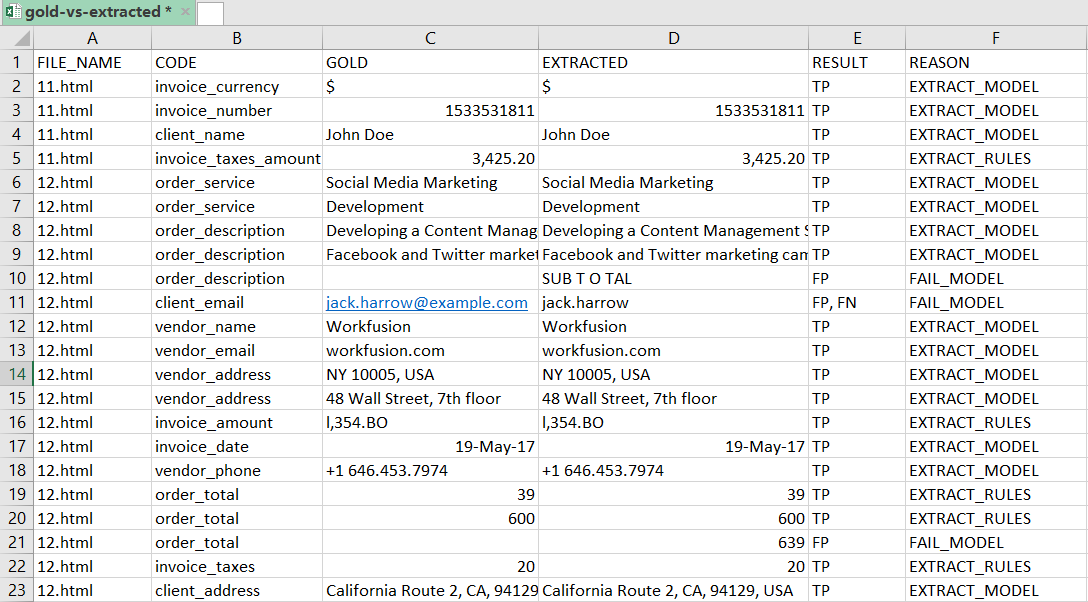
FILE_NAME: name of the document file from a training or an evaluation set.FIELD_NAME: field name.GOLD: gold value of the field. The column values depend on the evaluation type.EXTRACTED: extracted value of the field. The column values depend on the evaluation type.RESULT: type of mapping between gold and extracted value. It can have the following values:TP(True Positive) means that gold and extracted values are identical.FP(False Positive) means that the field was extracted but does not map to any gold value.FP,FN(False Positive, False Negative) means that both gold and extracted values are present but differ.FN(False Negative) means that the gold value is present but does not map to any extracted field.
REASONrepresents information about what caused theRESULT. It can have the following values:EXTRACT_MODELmeans that the gold and extracted values are identical and were extracted by the model. Extracted by the model means that the value and the text in the extracted field are identical.EXTRACT_RULESmeans that the gold and extracted values are identical and were extracted by rules. Extracted by rules means that value and the text in the extracted field are different.FAIL_MODELmeans that the gold and extracted values are different and failed by the model. Failed by the model means that the value and the text in the extracted field are identical.FAIL_RULESmeans that the gold and extracted values are identical and failed by rules. Failed by rules means that the value and the text in the extracted field are different.
IeGoldVsExtractedPerGroupCSVPrinter
IeGoldVsExtractedPerGroupCSVPrinter provides statistics for information extraction and represents the mapping result between the gold and the group field values extracted by the model.
- Input: collection of
IeDocumentResult. - Output: mapping result between each gold and extracted group fields. A group field is a collection of multi-value child fields associated via the
tabNumberattribute.
You can configure the printer to save results for all field names to a single file (enabled by default) or to separate files, where each file is created for a single field name (set filePerField(true)).
The result is written into group-gold-vs-extracted.csv or fieldName-group-gold-vs-extracted.csv, where fieldName is the field name when filePerField is set to true.
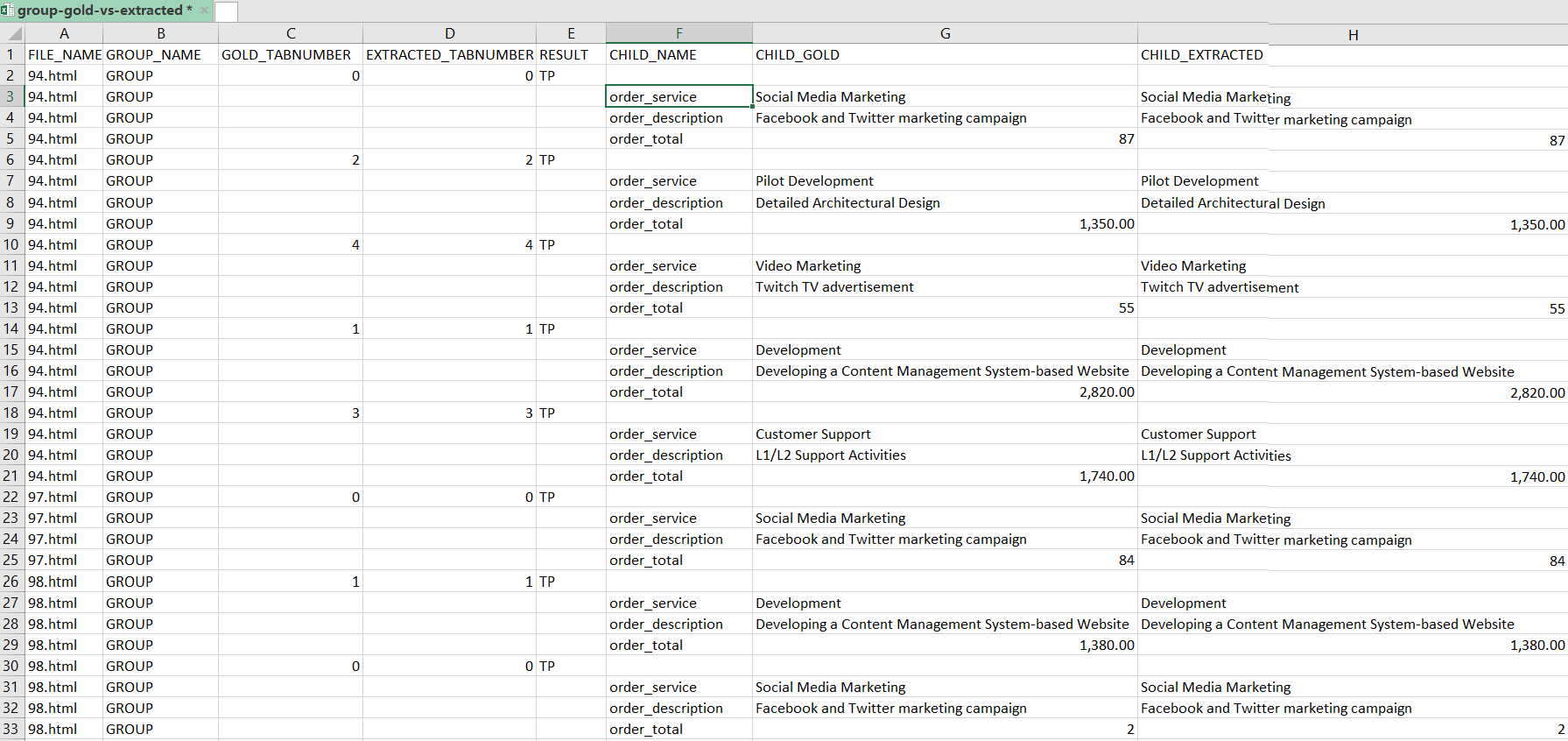
FILE_NAME: name of the document file from a training or evaluation set.GROUP_NAME: group field name.GOLD_TABNUMBER: value of thetabnumberattribute of all child fields in the gold group field.EXTRACTED_TABNUMBER: value of thetabnumberattribute of all child fields in the extracted group field.EXTRACTED: extracted field value. The value in the column depends on the evaluation type.RESULT: type of mapping between the gold and extracted values. It can have the following values:TP(True Positive) means that the gold and extracted values are identical.FP(False Positive) means that the field was extracted but does not map to any gold value.FP,FN(False Positive, False Negative) means that both the gold and extracted values are present but differ.FN(False Negative) means that the gold value is present but does not map to any extracted field.
CHILD_NAME: child field name.CHILD_GOLD: gold value of a child field. The value in the column depends on the evaluation type.CHILD_EXTRACTED: extracted value of a child field. The value in the column depends on the evaluation type.
IePerFieldCSVPrinter
IePerFieldCSVPrinter provides statistics for information extraction.
- Input: collection of
IeDocumentResult. - Output: metrics for each field name based on the mapping result between each gold and extracted field.
The result is written to the per-field.csv file, as in the following
example.
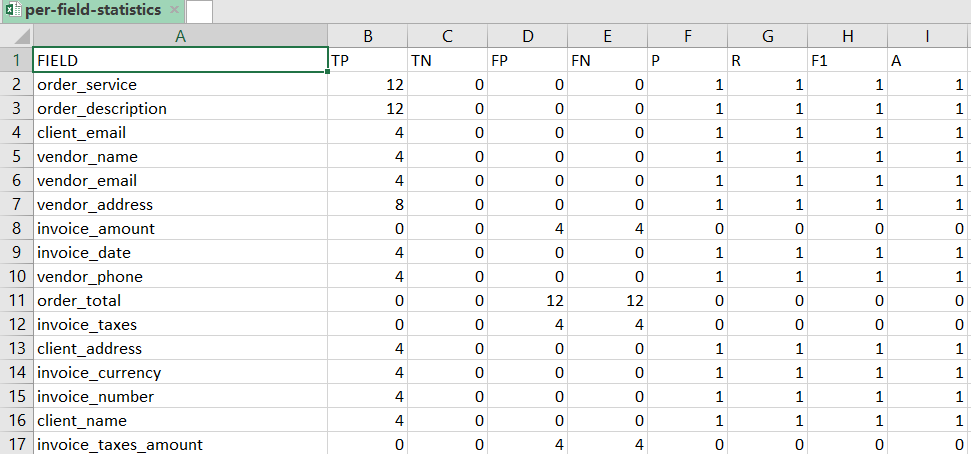
FIELD: name of a field.TP: True Positive. Number of correctly extracted fields.TN: True Negative. Always zero for information extraction tasks.FP: False Positive. Number of extracted fields that are not identical to any gold field.FN: False Negative. Number of gold fields that are not identical to any extracted fields.P: Precision.R: Recall.F1: F1score.A: Accuracy.
IePerGroupFieldCSVPrinter
IePerGroupFieldCSVPrinter provides statistics for information extraction.
- Input: collection of
IeDocumentResult. - Output: metrics for each group field name based on the mapping result between each gold and extracted group field.
The result is written into the per-group-field.csv file.
FIELD: field name.TP: True Positive. Number of correctly extracted fields.TN: True Negative. Always zero for information extraction tasks.FP: False Positive. Number of extracted fields that are not identical to any gold field.FN: False Negative. Number of gold fields that are not identical to any extracted fields.P: Precision.R: Recall.F1: F1 score.A: Accuracy.
ClassificationGoldVsExtractedCSVPrinter
ClassificationGoldVsExtractedCSVPrinter provides statistics for classification.
- Input: collection of
ClassificationDocumentResult - Output: mapping result between each gold and extracted label for each file.
Results are written to the label-gold-vs-extracted.csv file.

FILE_NAME: document file name from a training or evaluation set.GOLD_LABEL: gold value of a label for a document.EXTRACTED_LABEL: extracted value of a label for a document.RESULT: type of mapping between the gold and extracted value. It can have the following values:TP(True Positive) means that the gold and extracted values are identical.FP(False Positive) means that the field was extracted but does not map to any gold value.FP,FN(False Positive, False Negative) means that both the gold and extracted values are present but differ.FN(False Negative) means that the gold value is present but does not map to any extracted field.
REASONrepresents information about what caused theRESULT. It can have the following values:EXTRACT_MODELmeans that the gold and extracted values are identical and were extracted by the model.FAIL_MODELmeans that the gold and extracted values are different and were failed by the model.
ClassificationPerLabelCSVPrinter
ClassificationPerLabelCSVPrinter provides statistics for classification.
- Input: collection of
ClassificationDocumentResult. - Output: metrics for each label in the mapping result between each gold and extracted labels for each document.
Results are written to the per-label.csv file.
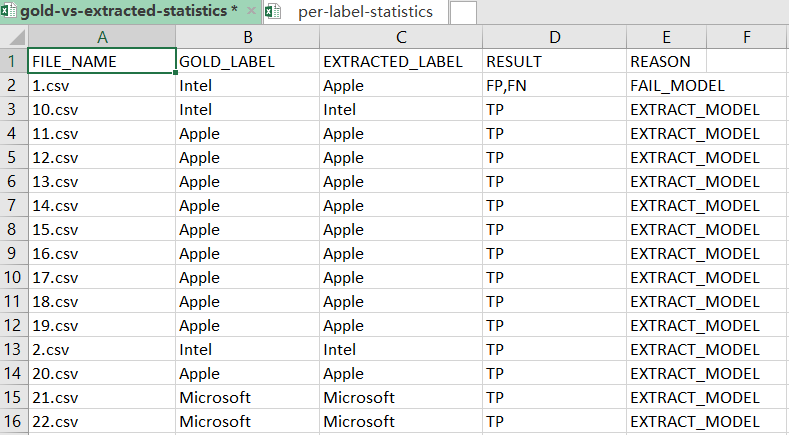
LABEL: name of a label.TP: True Positive. Number of correctly extracted fields.TN: True Negative. Always zero for information extraction tasks.FP: False Positive. Number of extracted fields that are not identical to any gold field.FN: False Negative. Number of gold fields that are not identical to any extracted fields.P: Precision.R: Recall.F1: F1 score.A: Accuracy.
Statistics configuration
To configure statistics calculators, define a @Named component in your model configuration that returns a list of StatisticsCalculator.
The following code sample can be applied to an information extraction model:
import java.util.ArrayList;
import java.util.List;

import com.workfusion.vds.sdk.api.hypermodel.annotation.ModelConfiguration;
import com.workfusion.vds.sdk.api.hypermodel.annotation.Named;
import com.workfusion.vds.sdk.api.nlp.statistics.StatisticsCalculator;
import com.workfusion.vds.sdk.nlp.component.statistics.IeStatisticsCalculator;
import com.workfusion.vds.sdk.nlp.component.statistics.StatisticsEvaluationType;
import com.workfusion.vds.sdk.nlp.component.statistics.printer.IeGoldVsExtractedCSVPrinter;
import com.workfusion.vds.sdk.nlp.component.statistics.printer.IeGoldVsExtractedPerGroupCSVPrinter;
import com.workfusion.vds.sdk.nlp.component.statistics.printer.IePerFieldCSVPrinter;
import com.workfusion.vds.sdk.nlp.component.statistics.printer.IePerGroupFieldCSVPrinter;

@ModelConfiguration
public class CustomStatisticConfiguration {

    @Named("customStatistics")
    public List<StatisticsCalculator> statisticsCalculators() {
        List<StatisticsCalculator> calculators = new ArrayList<>();
        // add any number of OOTB or custom calculators
        calculators.add(new IeStatisticsCalculator()
                // enable evaluation type (VALUE_BASED is enabled by default)
                .enable(StatisticsEvaluationType.VALUE_BASED).enable(StatisticsEvaluationType.POSITION_BASED)
                .enable(StatisticsEvaluationType.TEXT_BASED)
                // add any number of OOTB or custom printers
                // field printers
                .printer(new IeGoldVsExtractedCSVPrinter())
                .printer(new IePerFieldCSVPrinter())
                // group field printers
                .printer(new IeGoldVsExtractedPerGroupCSVPrinter())
                .printer(new IePerGroupFieldCSVPrinter()));
        return calculators;
    }

}
The following code sample can be applied in a classification model:
import java.util.ArrayList;
import java.util.List;

import com.workfusion.vds.sdk.api.hypermodel.annotation.ModelConfiguration;
import com.workfusion.vds.sdk.api.hypermodel.annotation.Named;
import com.workfusion.vds.sdk.api.nlp.statistics.StatisticsCalculator;
import com.workfusion.vds.sdk.nlp.component.statistics.ClassificationStatisticsCalculator;
import com.workfusion.vds.sdk.nlp.component.statistics.printer.ClassificationGoldVsExtractedCSVPrinter;
import com.workfusion.vds.sdk.nlp.component.statistics.printer.ClassificationPerLabelCSVPrinter;

@ModelConfiguration
public class CustomStatisticConfiguration {

    @Named("customStatistics")
    public List<StatisticsCalculator> statisticsCalculators() {
        List<StatisticsCalculator> calculators = new ArrayList<>();
        // add any number of calculators OOTB or custom
        calculators.add(new ClassificationStatisticsCalculator()
                // add any number of printers OOTB or custom
                .printer(new ClassificationGoldVsExtractedCSVPrinter())
                .printer(new ClassificationPerLabelCSVPrinter()));
        return calculators;
    }

}