Split and merge Business Process records
Split and merge records
Split and Merge algorithm is very helpful to accelerate execution of a Business Process by running tasks in parallel rather than sequentially. For example, if a document consists of several pages, you can split them, process and then merge back to work with a single document from this point.
There is a few options to help us accomplishing this task:
Option 1: via rule
Few details to consider in this approach:
- Grouping by Rule contains hard-coded value for column name, see example below.
- The flow can work with any amount of initial data, no restrictions (Option 2 works with 1 record on Input).
Usage:
You need to merge (group) results after join rule. Results should be joined by columns and in each column values (all values from all records) should be separated by pipes (|).
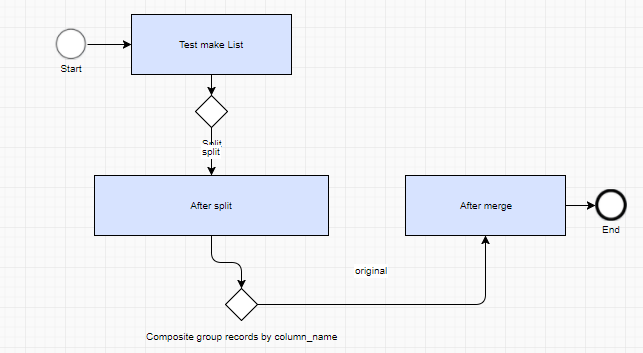
Package to import: Split-and-join-sample-TEST.zip
Explicit grouping by rule: new-subm-accum-split-rule.txt
Option 2: via Data Store
This sample shows how to use data stores functionality to achieve split and merge functionality.
Features:
- Works with any column names with no extra coding.
- Ability to filter away unwanted records.
- Auto-recovery after abrupt failures (after "kill -9" hard restart of the server will continue the processing without loosing data or state).
- Clean up of the temporal data after itself.
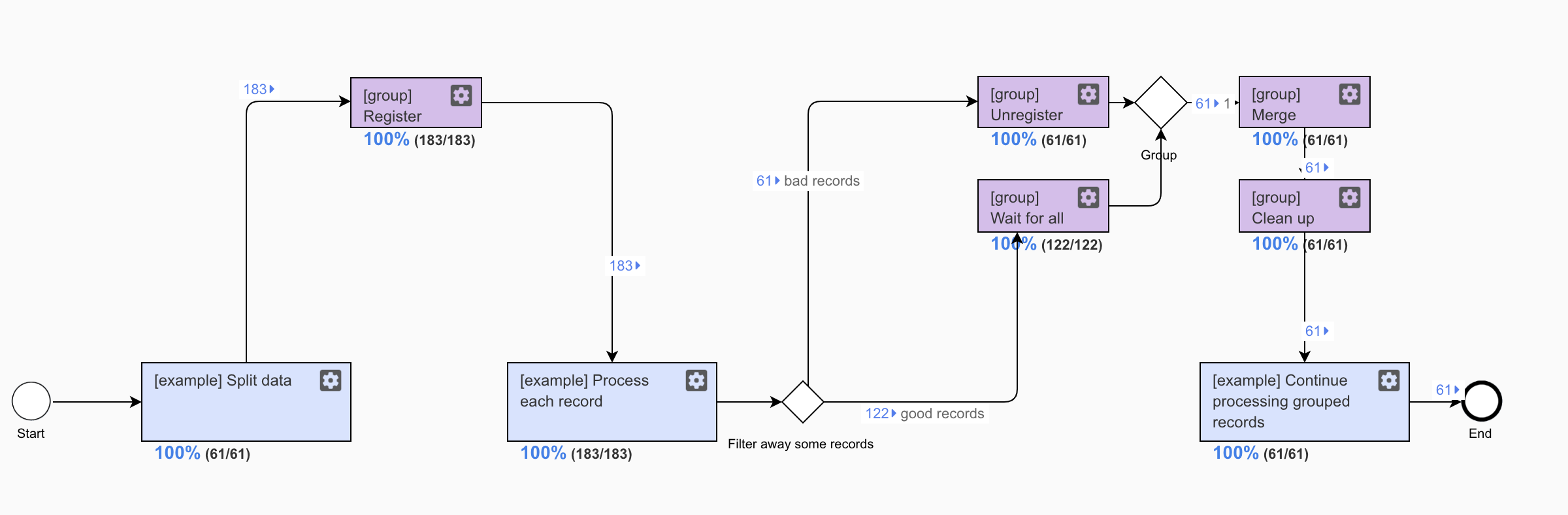
Steps with blue background are the bot tasks with business logic. These steps one would want to replace with business case specific steps.
Steps with purple background are common re-usable bot tasks. These steps contain split-merge orchestration logic and can be re-used across multiple business processes.
See how many tasks go from step to step:
- Initially, you have 61 record arriving to the first step.
- The first step splits every record into three records
- Split records are send to "[group] Register" step
- Every split record is registered in split_merge_state Data Store
- Every split record is processed by the business case specific logic
- After that records are sent to either of two steps:
- "[group] Unregister" step: this bot task will mark the record as Ignored, and will not include into the result
- "[group] Wait for all": this bot task will wait for all the records to arrive to this or Unregister step before proceeding
- "[group] Merge" step. All the processed records are read from the Data Store and merged back into single record (JSON array)
- "[group] Clean up" step. At this point it's safe to delete data from the data store, as all the required data was read on the previous step and supplied to the input.
- Warning: this step should not be combined with "[group] Merge" step. As otherwise you can loose the data if something goes wrong (for example server is force restarted right after you clean up the Data Store).
- Processing of the merged batch continues.
Package to import: Split-and-merge-using-datastore.zip
Variables required in the input to Register step:
_group_size: set in the step where you split records. Required to know the number or records to wait for_group_uuid: set in the step where you split records. Required to identify records related to the same group
Split sample:
 <export include-original-data="true">
        <single-column name="_group_size" value="${toExport.size()}"/>
        <single-column name="_group_uuid" value="${java.util.UUID.randomUUID()}"/>

        <multi-column list="${toExport}" split-results="true">
            <put-to-column name="test_split"/>
        </multi-column>
    </export>
Technical details:
_group_datastore_name: auto-populated by "[group] Register split records". It is not stored in the Data Store itself._group_item_id: auto-populated by "[group] Register split records"_group_item_status: auto-populated by "[group] Register split records"PROCESSING: set by "[group] Register split records"IGNORED: set by [group] Unregister split recordsCOMPLETED: set by "[group] Wait for all split records". Such records are "secondary" in the group. They will be merged by "master" record in the groupREADY_FOR_MERGE: set by "[group] Wait for all split records". Master record in the group. It is responsible for merging all records.
_group_merge_datastore_name: set in the very end by "[group] Wait for all split records". Actual process data is stored here before merge.
Create multiple records and split them using original data
Business case:
- You have 1 record at the start.
- You want to keep original record from start and split it to multiple records.
- All new records will have original data plus new data.
Splitting code sample
Example of config.yml
<config>
<var-def name="multiple_dividends">
<template>${multiple_dividends}</template>
</var-def>
<script><![CDATA[
List itemsForExport = new ArrayList();
List columns = new ArrayList();
List values = hit_submission_data_item.getWrappedObject().getItemValueList();
int originalListSize = values.size();
for(int i = 0; i < originalListSize; i++) {
com.freedomoss.crowdcontrol.webharvest.HitSubmissionDataItemValueDto dataItem = (com.freedomoss.crowdcontrol.webharvest.HitSubmissionDataItemValueDto) values.get(i);
String name = dataItem.getName();
columns.add(name);
}
columns.add("payment_date");
columns.add("issuer");
columns.add("record_date");
columns.add("gross_amount");
columns.add("stock_type");
columns.add("currency");
columns.add("ex_date");
columns.add("dividend_type");
columns.add("tax_rate");
columns.add("frank_rate");
columns.add("unfranked_amount");
columns.add("franked_amount");
columns.add("drp_price");
columns.add("conduit_foreign_income");
columns.add("election_date");
columns.add("meeting_date");
columns.add("conditional");
columns.add("conditional_criteria");
columns.add("announcement_date");
columns.add("unfranked_tax_rate");
//columns.add("interest");
//columns.add("selic_rate");
//columns.add("conversion_rate");
]]>
</script>
<case>
<if condition='${!multiple_dividends.toString().isEmpty() &&multiple_dividends.toString().contains("{") }'>
<var-def name="multiple_divdends_json_val">
<json-to-xml>
<template>${multiple_dividends}</template>
</json-to-xml>
</var-def>
<var-def name="results">
<xpath expression="//multiple_dividends">
<template><content>${multiple_divdends_json_val}</content></template>
</xpath>
</var-def>
<loop item="item">
<list>
<var name="results" />
</list>
<body>
<empty>
<var-def name="payment_date_value_ret">
<xpath expression="//payment_date_value/text()">
<var name="item" />
</xpath>
</var-def>
<var-def name="record_date_value_ret">
<xpath expression="//record_date_value/text()">
<var name="item" />
</xpath>
</var-def>
<var-def name="gross_amount_value_ret">
<xpath expression="//gross_amount_value/text()">
<var name="item" />
</xpath>
</var-def>
<var-def name="stock_type_value_ret">
<xpath expression="//stock_type_value/text()">
<var name="item" />
</xpath>
</var-def>
<var-def name="currency_value_ret">
<xpath expression="//currency_value/text()">
<var name="item" />
</xpath>
</var-def>
<var-def name="ex_date_value_ret">
<xpath expression="//ex_date_value/text()">
<var name="item" />
</xpath>
</var-def>
<var-def name="dividend_type_value_ret">
<xpath expression="//dividend_type_value/text()">
<var name="item" />
</xpath>
</var-def>
<var-def name="meeting_date_value_ret">
<xpath expression="//meeting_date_value/text()">
<var name="item" />
</xpath>
</var-def>
<var-def name="tax_rate_value_ret">
<xpath expression="//tax_rate_value/text()">
<var name="item" />
</xpath>
</var-def>
<var-def name="conditional_value_ret">
<xpath expression="//conditional_value/text()">
<var name="item" />
</xpath>
</var-def>
<var-def name="announcement_date_value_ret">
<xpath expression="//announcement_date_value/text()">
<var name="item" />
</xpath>
</var-def>
<var-def name="issuer_value_ret">
<xpath expression="//issuer_value/text()">
<var name="item" />
</xpath>
</var-def>
<var-def name="frank_rate_value_ret">
<xpath expression="//frank_rate_value/text()">
<var name="item" />
</xpath>
</var-def>
<var-def name="unfranked_amount_value_ret">
<xpath expression="//unfranked_amount_value/text()">
<var name="item" />
</xpath>
</var-def>
<var-def name="franked_amount_value_ret">
<xpath expression="//franked_amount_value/text()">
<var name="item" />
</xpath>
</var-def>
<var-def name="unfranked_tax_rate_value_ret">
<xpath expression="//unfranked_tax_rate_value/text()">
<var name="item" />
</xpath>
</var-def>
<var-def name="election_date_value_ret">
<xpath expression="//election_date_value/text()">
<var name="item" />
</xpath>
</var-def>
<var-def name="drp_price_value_ret">
<xpath expression="//drp_price_value/text()">
<var name="item" />
</xpath>
</var-def>
<var-def name="conduit_foreign_income_value_ret">
<xpath expression="//conduit_foreign_income_value/text()">
<var name="item" />
</xpath>
</var-def>
<var-def name="total_dividend_amount_ret">
<xpath expression="//total_dividend_amount_value/text()">
<var name="item" />
</xpath>
</var-def>
<var-def name="total_dividend_amount_estimated_or_actual_ret">
<xpath expression="//total_dividend_amount_estimated_or_actual_value/text()">
<var name="item" />
</xpath>
</var-def>
<!--<var-def name="interest_value_ret">
<xpath expression="//interest_value/text()">
<var name="item" />
</xpath>
</var-def>
<var-def name="selic_rate_value_ret">
<xpath expression="//selic_rate_value/text()">
<var name="item" />
</xpath>
</var-def>
<var-def name="conversion_rate_value_ret">
<xpath expression="//conversion_rate_value/text()">
<var name="item" />
</xpath>
</var-def> -->
<script><![CDATA[
Map rec = new HashMap();
for(int i = 0; i < originalListSize; i++) {
com.freedomoss.crowdcontrol.webharvest.HitSubmissionDataItemValueDto dataItem = (com.freedomoss.crowdcontrol.webharvest.HitSubmissionDataItemValueDto) values.get(i);
String name = dataItem.getName();
String value = dataItem.getValue();
rec.put(name, value);
}
rec.put("payment_date", payment_date_value_ret.toString().trim());
rec.put("record_date", record_date_value_ret.toString().trim());
rec.put("gross_amount", gross_amount_value_ret.toString().trim());
rec.put("stock_type", stock_type_value_ret.toString().trim().replace("|",""));
rec.put("currency", currency_value_ret.toString().trim());
rec.put("ex_date", ex_date_value_ret.toString().trim());
rec.put("dividend_type", dividend_type_value_ret.toString().trim());
rec.put("tax_rate", tax_rate_value_ret.toString().trim());
rec.put("meeting_date", meeting_date_value_ret.toString().trim());
if (conditional_value_ret.toString().trim().isEmpty()) {
rec.put("conditional", "No");
}
else {
rec.put("conditional", "Yes");
}
rec.put("conditional_criteria", conditional_value_ret.toString().trim());
rec.put("issuer", issuer_value_ret.toString().trim());
rec.put("frank_rate", frank_rate_value_ret.toString().trim());
rec.put("announcement_date", announcement_date_value_ret.toString().trim());
rec.put("unfranked_amount", unfranked_amount_value_ret.toString().trim());
rec.put("franked_amount", franked_amount_value_ret.toString().trim());
rec.put("unfranked_tax_rate", unfranked_tax_rate_value_ret.toString().trim());
rec.put("drp_price", drp_price_value_ret.toString().trim());
rec.put("conduit_foreign_income", conduit_foreign_income_value_ret.toString().trim());
rec.put("election_date", election_date_value_ret.toString().trim());
rec.put("total_dividend_amount", total_dividend_amount_ret.toString().trim());
rec.put("total_dividend_amount_estimated_or_actual", total_dividend_amount_estimated_or_actual_ret.toString().trim());
//rec.put("interest", interest_value_ret.toString().trim());
//rec.put("selic_rate", selic_rate_value_ret.toString().trim());
//rec.put("conversion_rate", conversion_rate_value_ret.toString().trim());
itemsForExport.add(rec);
]]></script>
</empty>
</body>
</loop>
</if>
</case>
<export include-original-data="false">
<multi-column list="${itemsForExport}" split-results="true">
<loop item="columnName">
<list>
<script return="columns" />
</list>
<body>
<put-to-column-getter name="${columnName}" property="${columnName}" />
</body>
</loop>
</multi-column>
</export>
</config>