
Sunbird 1.2.0
note
Available from February 7, 2018.
Sunbird 1.2.0 contains updates of major components of RPA Express platform, new Actions in Recorder, improvements and a few fixes for issues found in previous releases.
New features and improvements
General
All major components such as Control Tower, Platform Monitor and WorkSpace have been updated to ensure more productivity, stability and reliability of operations.
New Recorder actions
There are two new Variables Actions in Recorder that enable proper conversion of number and date/time values to/from text and a possibility to extract numbers and dates from a text (string value) using predefined or user-created masks including regional settings.
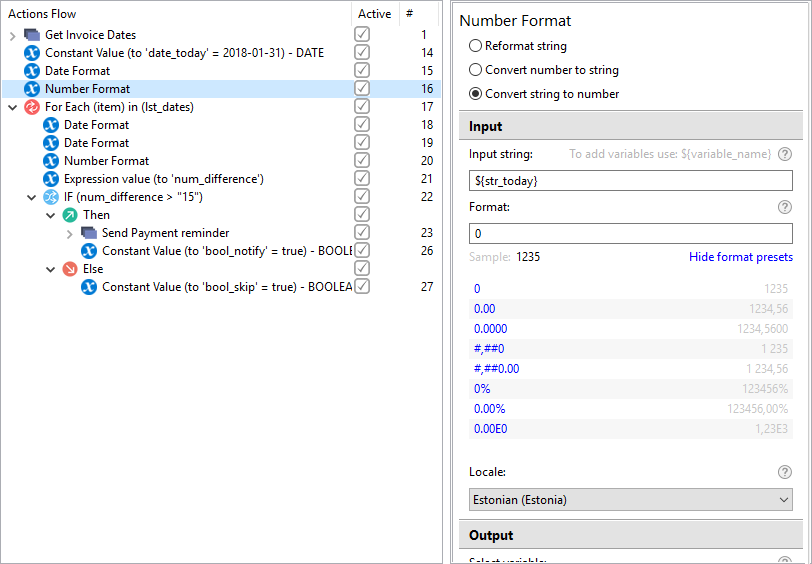
Number Format
Use the Action to convert string values to number values of the defined format to perform arithmetical actions or comparisons. For example, you can sum 23.7USD with 6,3 and get 30 as a result, which can be further treated as a Number.
Date Format
With the Action you can take February 5, 2018 and convert it to Monday. You don't even need Google Translate to translate it into other languages, so your result can be Montag / lundi /mandag / maanantai / lunedì / 星期一 / 월요일 / 月曜日
tip
For more information, refer to Number Format and Date Format.
Recorder Variables
Recorder Variables are now moved from a separate file to a recording to make handling (sharing or backup) of recordings more convenient and comprehensive.
Variables list
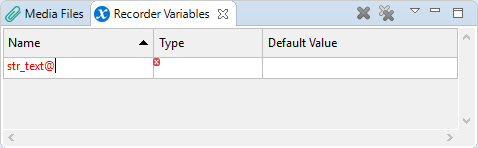
Recorder Variables List now supports input validation as you type a name of a variable. Should you key in a character which is not allowed being used in the variable name, the text turns red and you cannot save the variable as long as the name is not corrected.
Variables names refactoring
If you change a name of a variable in Variables List, the new name will be automatically applied to all places in all Actions, where the variable is used. It's valid for the free text fields too, where the variable is defined as ${recorder_variable}.
Bug fixes
Recorder
- Recorder's Welcome screen opens correctly.
Known issues
WorkSpace
- WorkSpace sometimes is not accessible upon re-installing RPA Express due to incorrect uninstall of the previous version. The solution is to uninstall RPA Express and delete the RPA Express working folder manually, if it has not been completely removed.
Control Tower
After re-installing RPA Express, the Publish To Control Tower option does not work for the recordings that have been published already with the previous version. The workaround is as follows. First, use the Publish As new Business Process option to deploy such recordings to Control Tower. After that the Publish To Control Tower option will work correctly.
OCR Step in Account Payable Business Process. Due to changes in OCR API this step has been updated in Account Payable Business Process, which comes as a sample with RPA Express. If you changed or used the Business Process, it won't be updated. The workaround is as follows. Update the step's code manually with the code provided below.
Expand to see the code
```
<?xml version="1.0" encoding="UTF-8"?>
<config xmlns="http://web-harvest.sourceforge.net/schema/1.0/config" scriptlang="groovy">

<!--
    Included functions
-->

    <!--
         Input parameters:
             doc_uuid: Optional (can be empty): Document UUID
             image_link: URL to document
             custom_regions: Optional (can be empty): [{"left":0, "top":1000, "right":100000, "bottom": 100000}]
             format: txt, html
         Output:
             ocrMap: {contentUrl, content, htmlContent} - the last one will be empty if format is txt
    -->
    <function name="performOcr">
        <var-def name="ocrUrl">localhost:15580/api/v1/cloud/</var-def>

        <!-- for an unknown reason without var http-extended does not send the body -->
        <var-def name="j">{"username":"workfusion","password":"workfusion"}</var-def>
        <var-def name="tokenJson">
            <http-extended url="localhost:15280/workfusion/api/v1/jwt/login" method="POST" charset="UTF-8" content-type="application/json">
                <var name="j"/>
            </http-extended>
      </var-def>

<!--
    Please note that obtained token has limited duration (jwt.expiration.minutes).
    For simplicity reason and because we use local OCR we do not expect to exceed this duration.
    But in real life it may be needed to refresh token value if OCR wait time is too long.
-->

      <var-def name="token">
          <json expression="$.result"><var name="tokenJson"/></json>
      </var-def>

        <var-def name="document_uuid">
            <var name="doc_uuid"/>
        </var-def>
        <case>
            <if condition="${document_uuid.toString().length() == 0}">
                <var-def name="document_uuid">
                    <template>${java.util.UUID.randomUUID().toString()}</template>
                </var-def>
            </if>
        </case>

        <var-def name="document_image_link">
            <var name="image_link"/>
        </var-def>
        <var-def name="customRegions">
            <var name="custom_regions"/>
        </var-def>

        <case>
            <if condition="${customRegions.toString().length() == 0}">
                <var-def name="customRegions">
                    [{"left":0, "top":0, "right":2000, "bottom":2000}]
                </var-def>
            </if>
        </case>

        <function name="checkForErrors">
            <var-def name="status">
                <xpath expression="//task/@status">
                    <var name="response" />
                </xpath>
            </var-def>
            <script><![CDATA[
                // "OCR Status: " + status
                positiveStatusList = ["Submitted","Queued","InProgress","Completed"]
                if (!positiveStatusList.any {it.equals(status.toString())}) {
                    throw new RuntimeException("OCR task has error status. Details:\n" + response);
                }
            ]]></script>
        </function>

        <var-def name="processResponse">
            <http url="${ocrUrl}/processImage" method="post" multipart="true">
                <http-header name="Authorization"><script return="'Bearer ' + token.get(0).wrappedObject.asText()"/></http-header>
                <http-param name="file" isfile="true"><http url="${document_image_link}"/></http-param>
                <http-param name="profile">documentConversion</http-param>
                <http-param name="exportFormat"><var name="format"/></http-param>
                <http-param name="language">English</http-param>
                <http-param name="engine">abbyy</http-param>
                <http-param name="customRegions"><template>${customRegions}</template></http-param>
                <http-param name="useOnlyCustomRegions">true</http-param>
                <http-param name="correctSkew">true</http-param>
                <http-param name="xml:writeRecognitionVariants">true</http-param>
                <http-param name="correctOrientation">true</http-param>
            </http>
        </var-def>

        <call name="checkForErrors">
           <call-param name="response">
              <template>${processResponse}</template>
           </call-param>
        </call>

        <var-def name="taskId">
            <xpath expression="//response/task/@id">
                <template>${processResponse}</template>
            </xpath>
        </var-def>

        <var-def name="taskStatus">Unknown</var-def>

        <while condition="${!taskStatus.toString().equals('Completed')}" maxloops="300">
            <script>Thread.sleep(5000)</script>

            <var-def name="statusResponse">
                <http url="${ocrUrl}/getTaskStatus?taskId=${taskId}" method="get">
                    <http-header name="Authorization"><script return="'Bearer ' + token.get(0).wrappedObject.asText()"/></http-header>
                </http>
            </var-def>

            <call name="checkForErrors">
                <call-param name="response">
                    <template>${statusResponse}</template>
                </call-param>
            </call>

            <var-def name="taskStatus">
                <xpath expression="string(//response/task/@status)">
                    <var name="statusResponse"/>
                </xpath>
            </var-def>
        </while>

        <var-def name="resultUrl">
            <xpath expression="string(//response/task/@resultUrl)">
                <var name="statusResponse" />
            </xpath>
        </var-def>

        <var-def name="resultContent">
            <http url="${resultUrl}" method="get">
                <http-header name="Authorization"><script return="'Bearer ' + token.get(0).wrappedObject.asText()"/></http-header>
            </http>
        </var-def>

        <var-def name="resultHtml">
            <case>
                <if condition='${"html".equals(format.toString())}'>
                    <html-to-xml>
                        <script return="res"><![CDATA[
                            // Removing BOM and DOCTYPE
                            res = resultContent.toString().replaceAll("^\uFEFF", "")
                            res = res.replaceAll("<!DOCTYPE[^>]*>", "")
                            // "OCR results: " + res
                        ]]> </script>
                    </html-to-xml>
                </if>
                <else>
                </else>
            </case>
        </var-def>

        <return>
            <script return="ocrMap"><![CDATA[
               Map resultMap = new HashMap();
               resultMap.put("contentUrl", resultUrl.toString());
               resultMap.put("content", resultContent.toString()); // May give wrong results if PDF is requested but this case is not in our scenario
               resultMap.put("htmlContent", resultHtml.toString());
               ocrMap = resultMap;
            ]]></script>
        </return>

    </function>


<!--
    Primary code
-->

    <required name="s3_invoice_link"/>

    <var-def name="ocrResultsPart">
        <call name="performOcr">
            <call-param name="image_link"><var name="s3_invoice_link"/></call-param>
            <call-param name="doc_uuid"></call-param>
            <call-param name="custom_regions"></call-param>
            <call-param name="format">html</call-param>
        </call>
    </var-def>

    <var-def name="partUrl">
        <template>${ocrResultsPart.getWrappedObject().get(0).getWrappedObject().get("contentUrl")}</template>
    </var-def>

    <var-def name="partContent">
        <template>${ocrResultsPart.getWrappedObject().get(0).getWrappedObject().get("content")}</template>
    </var-def>

    <var-def name="partContentHtml">
        <template>${ocrResultsPart.getWrappedObject().get(0).getWrappedObject().get("htmlContent")}</template>
    </var-def>

<!--     "ocrResultsPart contentUrl: " + partUrl.toString() -->
<!--     "ocrResultsPart content: " + partContent.toString() -->
<!--     "ocrResultsPart htmlContent: " + partContentHtml.toString() -->

    <export include-original-data="true">
<!-- Please note that content URL will not be accessible without auth token -->
        <single-column name="content_url" value="${partUrl}"/>
        <single-column name="content" value="${partContent}"/>
        <single-column name="html_content" value="${partContentHtml}"/>
    </export>

</config>
```
Excel actions
- Set Range fails when copying a large amount of data (currently, limitation is 65,535 characters).