
RPA Express 2.0.2
note
Available from July 5, 2018.
All major components - Control Tower, Platform Monitor, and WorkSpace - have been updated to ensure more productivity, stability and reliability of operations.
Deployment
New download process
After registering for RPA Express, users will no longer need to wait for the download link. The download will start automatically after the user submits the registration form.
License key
After registering for RPA Express, users will be sent the license key required to install the software.
WorkFusion Studio
Expand/collapse in Actions flow
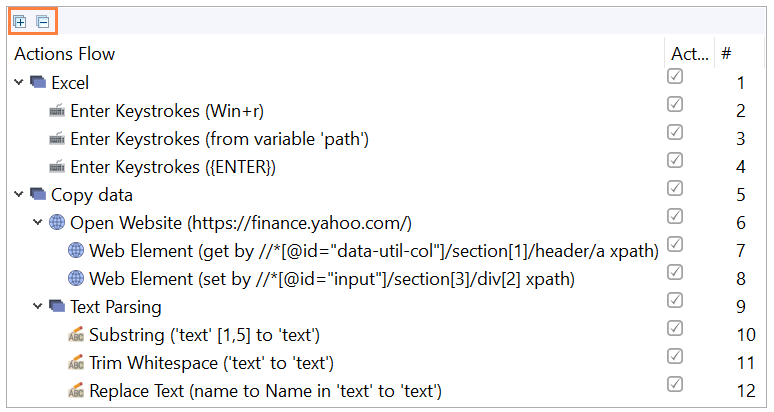
Expand and Collapse options have been added to the Actions Flow in WorkFusion Studio.
Expand opens all actions in the Actions flow down to the last level of nested actions.
Collapse closes all actions in the Actions flow.
Wildcard in For Each Action
Using wildcard as the end filter element in the For Each action means "till the last element in the variable".

OCR
The new license is valid till September 1, 2018 and includes 1,000 free OCR pages.
Bug fixes
Deployment
- Server hostname is kept when switching from "Workstation" to "Server + Workstation" during installation.
- Server profile is empty after switching to another workspace.
- Pro license defaults to the trial version after update.
RPA
- Variable disappears from Date Format action after renaming.
- Unable to change timeout for Open website action inside For Each loop.
- Unable to save recording when timeout field is active in Open website action.
- Playback fails if the end filter element in For Each action is bigger that the number of elements in the variable.
- Filter option in For Each action doesn't work for Table variables.
- The direction of Mouse Scroll action is inverted.
Known issues
- Sporadic crash of Inspector causing WorkFusion Studio crash.
- Inspector highlights elements from the second attempt.
- Inspector crashes sporadically while inspecting Outlook or Excel.
- Unstable playback of Enter Keystrokes actions.