
RPA Express 2.3.3
note
Available from June 19, 2019.
important
Compatible with SPA 9.3.1.
Installation
- When defining Administrator credentials, case-sensitive characters are enabled for username, thus allowing to enter both lowercase and uppercase Latin letters on this installation step.
Secrets Vault
To increase security, Secrets Vault has been incorporated into the RPA Express installation process, resulting in a number of changes:
- A self-signed Secrets Vault certificate is generated on the installation step or while updating to a newer version to be used by RPA Express components.
- During upgrade to a newer version, data from Secrets Vault is reused - including Administrator username and password as well as Secrets Vault values from Control Tower.
- You are able to c[reate/change Secrets Vault entries in accordance with the credentials you have entered during installation/modification.
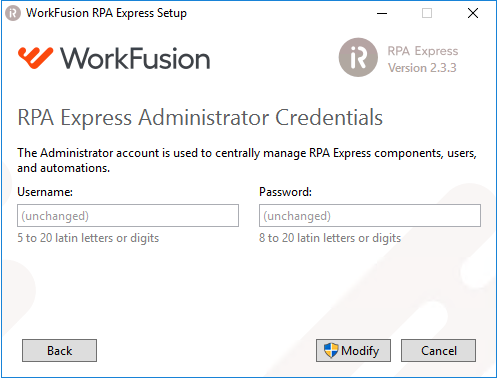
- The Modify mode is changed to work with Secrets Vault. By default, the Username and Password fields are empty with the "(unchanged)" placeholder. To modify Administrator credentials, enter new username and password values.
Authentication procedure
- To authenticate to Control Tower, requirements for credentials are now the same as during installation. Both username (5 to 20 characters long) and password (8 to 20 characters long) are case-sensitive and contain Latin letters and digits. Special symbols are not allowed.
Bug fixes
- A typo has been fixed on the Installer screen.