Evan | Adverse Media Monitoring
Version 4.7
- Release date: September 11, 2026
- Compatible platform version: Work.AI 10.3.0+
The Evan v4.7 release introduces more fine-grained Manual Task access control, a new Google (Site Search) input data provider, a decision reapplication step in the Core Business Process (BP), and support for file ingestion across providers. The release also replaces the Data Purge BP with an SQL-based purge mechanism, upgrades article parsing with Defuddle and Trafilatura, and adds configurable review requirements and autogenerated investigation comments. Other notable improvements include ML model enhancements, LLM fallback processing, support for large-batch investigations, refined crime category detection, and clearer visibility into AI-assisted dispositioning.
Features
Evan now lets you configure whether specific user groups should be allowed or restricted from viewing and handling Manual Tasks within AMM BPs. The new feature eliminates the need to create new schemas, use hardcoded values, or carry out additional development for each new BP.
Permission assignment is done using the Show Manual Review task only for user groups setting in the configuration interface or the
_sys_user_groupsinput data field, the latter taking priority when both methods are used simultaneously.The list of data providers for sourcing input data has been extended with the Google (Site Search) provider, giving you a way to search only within a defined list of websites. The provider inherits all settings from the existing Google API provider, except screening keywords, partial name search, and location search. In addition, it features the new Search web-sites field where you can specify or upload exact websites or patterns for search.
The Core AMM BP includes the new Decision Reapplication step that executes before investigations are split into articles. Where a prior decision reapplication is available for an entity, AMM reuses that decision and skips the call to the ML model. The enhancement reduces redundant processing and ensures that previously applied decisions are reused consistently in relevant investigations.
Evan now supports the execution of the File Ingestion Business Processes with providers beyond External Source, enabling more flexible integration with third-party data sources.
The CSV File Monitoring settings section is now always visible in the configuration interface, regardless of the selected provider. The change makes it easier to configure and review file monitoring settings across providers.
The data cleanup approach has been changed from a mechanism based on the dedicated Data Purge AMM Business Process to the Work.AI-native SQL-based purge. The update provides a more scalable and reliable way to remove obsolete data while simplifying purge operations.
The Poslight parser, which is no longer supported, has been replaced with Defuddle, while Trafilatura is now used as the primary parser. The enhancement reduces parsing failures and supports more accurate downstream screening and analysis.
Evan now allows displaying additional information in manual review tasks in Workspace as a collapsible section below the article content, helping experts to review article details more efficiently and with greater convenience. You can switch the section display with the Show/Hide additional information toggle and navigate it using independent scrolling.
The new Do you want Evan to automatically generate comment on close investigation popup? option has been added to the Human in the Loop step in the configuration interface. When the option is selected, Evan automatically generates a comment when you close an investigation, reducing manual effort and assignment review time.
You can now set Evan to require Manual Task reviewers to specify review reasons and decision explanation comments at the article level or when closing investigations. The dedicated settings are available on the Human-in-the-loop step in the AMM configuration interface:
If the Require Review Reason when closing an investigation? and Require Decision Explanation when closing an investigation? options are set to Yes, reviewers cannot save or close an investigation until the review comment and decision explanation are provided.
If the Require Review Reason for article decisions? and Require Decision Explanation for article decisions? options are set to Yes, reviewers cannot save or close an investigation until review comments and decision explanations are provided at the article level.
Improvements
To improve screening accuracy and content analysis, enhancements were introduced to the ML model. The updated model uses a Cross Encoder for improved focality detection, provides more reliable extraction of Moody's article data, and enhances name extraction and matching.
The AMM Batch Processing BP now supports large batches of investigations more reliably. When merged investigation results exceed RabbitMQ message size limits, AMM can use a configurable reference output mode that stores the merged results in an object storage, such as S3, and returns a URL or a file pointer instead of the full payload.
Articles dispositioned by a Large Language Model (LLM) now display the Auto (AI Assisted) label as the reviewer, while those processed by the original ML model continue to display Auto. The update provides better visibility into how disposition decisions are generated across Manual Tasks and reports.
To improve processing reliability and reduce disruptions caused by external AI service issues, a fallback mechanism was introduced for article disposition and age detection. When an LLM API call fails, processing automatically continues using the original ML model. The failure is also recorded in the event log for monitoring and troubleshooting purposes.
The crime category matching logic has been updated to make crime type detection more consistent:
The Other crimes category has been removed from the configuration interface, and the Escalate article if no crimes were detected checkbox is now enabled by default. The resulting logic is as follows:
If an article is ML-adverse and a configured crime category matches, the article follows the standard AMM processing flow.
If the article is ML-adverse but no configured crime category matches,
escalate_article_with_no_crimes = trueresults in the Needs Investigation status.If the article is ML-adverse but no configured crime category matches,
escalate_article_with_no_crimes = falseresults in the False Positive decision.If crime detection is not applicable or no adverse signal is present, the remaining standard disposition logic applies.
The AMM model input contract has been updated by removing the
detect_crime_typesBoolean field.Spanish crime type categories are now supported in model configuration, crime classification, and configuration interface settings.
Crime types are now also recognized by the Evan LLM model.
For AMM Manual Tasks opened outside Workspace, the Save and Continue and Close Investigation actions are now disabled. The improvement prevents unintended changes while keeping investigation data accessible for review in the read-only mode.
The Redirect articles filtering policy has been renamed to Articles with redirect failed to make its purpose clearer, helping you identify and review articles more efficiently.
Bug fixes
Resolved the issue when adversity scores were not consistently aligned with the focal party in processed articles. Now, party names are passed as explicit scoring context with name focality weighting and suppression of articles where the entity is not a primary subject.
Fixed the issue when the Quality Control (QC) Business Process created empty Manual Tasks for investigations where all articles were excluded. Now, Manual Tasks are created only when reviewable articles are available.
Resolved the issues causing the QC BP to fail with the following exception:
IllegalStateException: Variable 'task_result' has wrong type STRING after Manual Task submission.Fixed OpenAPI schema validation failures caused by duplicate path shapes for the
start-record-rawandget-record-resultcalls and by missing item definitions inArticleResponseDto.matchedEntities.Resolved the issue when minimized LLM-generated summaries displayed additional content after the ellipsis. Now, truncated summaries are shown correctly.
Eliminated the issue when Evan failed to identify articles containing Terms & Conditions or privacy disclaimers as False Positives. Now, these articles are classified correctly.
Resolved the issue when LLM summary generation failed due to a JSON parsing error when the gpt-5-nano model returned empty content. Now, summary generation is handled correctly in these scenarios.
Eliminated the problem when the decision reapplication mechanism treated null and empty field values as different, incorrectly detecting changes in investigation data.
Resolved the issue where reopened AMM investigations lost their original
additional_informationcontent. Now, the reopening message is prepended to the existing information instead of replacing it.Eliminated intermittent split per article failures on large batches (500) by adding guard rails and improved error logging.
Fixed the issue when the Force False Positive Disposition restriction was bypassed, causing investigations to be closed without the disposition enforced or stored.
Eliminated the LLM article disposition failures when the gpt-5-nano model was used.
Fixed the issue when the Articles that have fewer than 50 words filtering policy was displayed in the configuration interface, even though the Automatically escalate articles that have fewer than 50 words? is set to No.
Fixed the display and selection issues with the WC1 API key secret component that occurred when Google was selected as the search provider.
Resolved the issue when the File Ingestion Business Process rejected files containing only the
content_linkfield. Now, validation accepts files that include eitherarticle_urlorcontent_link.Eliminated the Google translation 400 Bad Request error.
Resolved the issue when the
manualTaskUrlfield in webhook notifications failed to open the configured custom Workspace queue. Now, the URL correctly directs you to the intended filtered queue.Resolved the deserialization failure caused by the
matchedEntitiesfield generated asList<String>in theevan-amm-apiclient instead ofList<MatchedEntity>.Resolved the issue when the Collect articles step in the Core AMM BP grouped duplicate articles only from the first similarity group returned by the NLP model. Now, duplicate pairs from all similarity groups are processed.
Version 4.6.3
- Release date: July 24, 2026
- Compatible platform version: Work.AI 10.3.0+
The v4.6.3 Evan release enhances the CSV ingestion and introduces user-defined batch identifiers for improved traceability. It also resolves several configuration and processing issues to ensure more consistent behavior of the AMM solution and a smoother user experience.
Improvements
AMM now offers more flexible and comprehensive CSV ingestion, which means less manual data preparation and better input data quality. Enhancements are as follows:
When you use the CSV ingestion method for External source provider, the Article URL input field is now optional.
CSV ingestion now supports more input fields, including Gender, Business Line, and other metadata fields available in the configuration user interface or through API. The CSV template has also been updated to reflect the newly supported fields.
The CSV ingestion method now supports the user-defined optional
batch_idparameter, enabling easier record tracking and integration with upstream systems. When thebatch_idcolumn is included in an input file, the ID value is assigned to all records in that file. Otherwise, AMM continues to automatically generate and assign a batch ID. The enhancement improves traceability and batch-level correlation while maintaining backward compatibility with existing ingestion workflows.You can now use an optional user-defined
batch_idparameter with the CSV ingestion method, making it easier to track records and connect with upstream systems. If you include abatch_idcolumn in your input file, that ID is assigned to all records in the file. If not, AMM defaults to generating and assigning batch IDs automatically.
Bug fixes
Resolved the issue where the article duplicate detection threshold configured for the NLP model in the Investigation step was not retained after saving. The selected threshold value is now correctly persisted and displayed when the configuration is reopened as expected.
Eliminated the issue where processing articles from the External source provider could intermittently fail when the Combine input and downloaded content option was selected in configuration and all filtering policies were set to Escalate. Articles are now processed and enriched reliably, preventing errors that could block escalation and require manual reprocessing.
Fixed the problem where name matching threshold fields were not displayed when the Name matching approach option was set to Strict in the configuration user interface. The threshold fields are now visible and configurable irrespective of the selected name matching approach.
Version 4.6.2
- Release date: July 3, 2026
- Compatible platform version: Work.AI 10.3.0+
The v4.6.2 Evan release introduces summary-based fallback processing for article download failures and improves the accuracy of adverse content relevance assessment and criminal category detection.
Features
AMM now provides summary-based fallback for article download failures, which helps preserve valuable adverse media content and reduce manual review effort. When an article cannot be downloaded, AMM automatically generates a summary or uses an available one rather than filtering out or escalating the article.
To support the summary fallback feature, the article filtering settings in the AMM configuration interface have been updated. The Article Filtering Policy section on the Input step now uses drop-down selections instead of checkboxes, enabling you to specify whether articles with specific issue types should be filtered out, processed with a fallback summary, or escalated. The enhancement allows for more flexibility in setting the article filtering behavior across a wider range of scenarios.
Improvements
The domain gate model now includes an optional cross-encoder to support more targeted criminal category detection. The cross-encoder adds a validation step for low-confidence predictions, allowing you to include relevant crime categories that might otherwise be missed and exclude those not supported by the article content.
To improve focal-point identification in AMM adjudications, enhancements have been introduced to better distinguish between entities that are the actual subjects of adverse content and those that are only referenced. This reduces false-positive adverse findings and helps improve the accuracy of adjudication outcomes.
The logic of the adverse content materiality and relevance assessment has been refined to focus on the relationship between an entity and adverse content rather than relying on keyword matches alone. This reduces irrelevant findings surfaced for review and helps focus analyst attention on more meaningful results.
Bug fixes
Resolved the issue where template-based investigation summaries could incorrectly imply that a missing year of birth (YOB) was the reason for classifying an article as adverse. Summaries now use neutral wording for no YOB found adjudications, accurately reflecting that the article was classified as adverse and requires further review.
Eliminated the issue where distinct articles without URLs could be incorrectly identified as duplicates due to overly restrictive article matching logic. Article uniqueness is now determined more accurately, preventing unintended reuse of historical dispositions and ensuring new articles are reviewed independently.
Version 4.6.1
- Release date: June 19, 2026
- Compatible platform version: Work.AI 10.3.0+
The v4.6.1 Evan release introduces the crime detection capability:
The Investigation configuration step now includes a dedicated Crime categories section where you can configure the following settings:
Select crime categories to create a unified crime list. In all, 17 different crime categories are available for selection. Each category is associated with a list of related keywords (seeds) and thresholds used to determine whether particular article contains a crime type description or not.
Allow Evan to escalate articles for manual review when no crimes are detected by using the Escalate article if no crimes were detected checkbox.
The machine learning model now features dedicated crime category matching logic.
Manual Tasks now include the Crimes section that displays configured and detected crime categories together with associated keywords. Detected crime keywords are also highlighted in article bodies.
Final Adverse Media Monitoring reports now display detected crime types in the Entity Information section for the entire report and in the Article Details section for each article.
Version 4.6
- Release date: June 11, 2026
- Compatible platform version: Work.AI 10.3.0+
With the v4.6 Evan release, new capabilities are introduced to enable seamless reuse of historical data, enhance data retrieval, and improve ML-driven decision-making and status handling. Updates to the S3 storage configuration, article source selection, and review group setup further strengthen security, usability, and control. Other improvements include priority data propagation, better visibility of key attributes during review, and optimized text processing by the AMM model.
New features
Evan is enhanced with the new Adverse Media Monitoring Historical Result Loader BP. Based on provided input parameters, the BP returns the results of the most recent completed investigations. The new capability reduces the manual work required to collect historical investigation data and makes it easier to reuse prior adverse media insights.
Evan now allows conditional application of investigation statuses based on the selected article source. For Input data, you can set the AI Agent to apply only the False Positive status (default) or all incoming investigation statuses. When the Plugged connector option is selected, the investigation status is handled according to the connector’s existing logic.
The Retrieve articles from the plugged connector checkbox has been replaced with a radio button group. You can explicitly choose between Input data (default) and Plugged connector as article sources.
You can leverage the decision reapplication feature when Manual Tasks are disabled. Enabled in the Investigation step via the Enable Decision Reapplication? setting, the feature allows previously applied decisions to be reused automatically. This makes processing more efficient and keeps investigations running smoothly without manual work.
New S3 storage settings have been introduced in the Output step. The settings help you define the target S3 bucket and control whether authenticated links should be stored. The new settings include:
The mandatory Files storage S3 bucket setting lets you explicitly choose which S3 bucket stores your uploaded files.
If you turn on the Store authenticated S3 links option, you can save presigned (authenticated) links instead of regular S3 object URLs.
Evan is now integrated with the Wayback Machine for fallback article retrieval. When article content cannot be downloaded from the original link, archived versions are retrieved automatically to maintain data completeness and ensure uninterrupted investigations.
Evan's machine learning (ML) model can now automatically disposition articles as True Positives when the confidence score is high. The capability enables high-confidence matches to be resolved without analyst intervention, speeding up investigations without affecting accuracy.
Evan generates a complete investigation summary during processing, supporting both standard and LLM-based formats. Configurable based on your preferences, the feature reduces manual effort and delivers flexible, high-quality outputs tailored to business needs.
You can configure Evan to use strict or partial name matching. The option let you adjust the name matching behavior based on risk tolerance and data variability, reducing false positives and uncovering relevant matches that might otherwise be missed.
Evan supports separate shorthand user lists for Stage 1 and Stage 2 review groups. This feature streamlines user assignment and clarifies role segmentation, improving management of multi-stage review workflows.
Evan can execute Google searches through the third-party SERP API, with the option to use it as a fallback. This improves search resilience and coverage, ensuring consistent investigation quality when primary search methods are unavailable.
Evan now integrates Browser Use to retrieve articles when content is inaccessible in the standard mode. This ensures reliable evidence collection, improves output quality, and reduces manual intervention.
You can configure Evan to use multiple external sources instead of a single one. This capability allows for more comprehensive data retrieval, enhancing the quality and robustness of investigation results.
The AMM ML model now detects court processes, automatically identifying court-related events in articles. The feature enables more precise classification of potential adverse media and improves investigation efficiency and consistency.
Improvements
The
_sys_mt_hit_priorityfield is now propagated across workflows, which helps you keep priority information for better monitoring and reporting. When included in your input data, the field is sent to Manual Tasks, saved in input and analytics Data Stores, and added to all outgoing analytics events.Date of birth and age are now highlighted within articles during manual review and in the final report. The enhancement helps analysts quickly identify key attributes and make informed decisions faster.
The sentence splitting logic in the AMM ML model has been optimized for more precise text processing, resulting in higher-quality extraction and more reliable downstream analysis.
The AMM ML model now better handles articles with a large quantity of tags. This update ensures more reliable analysis and reduces the risk of misinterpretation in complex content.
Bug fixes
Fixed the issue where the AMM review results were ignored when the review comment started with Duplicate.
Resolved the issue where an incorrect error code was assigned to empty articles. Now, empty articles are correctly identified and return the appropriate error code.
Fixed the issue where investigations could be closed even when the article list was empty or not fully loaded due to task rendering errors.
Resolved the issue preventing reliable retrieval of Akamai-protected pages. Now, such pages are correctly handled and can be successfully downloaded in the browser rendering mode.
Fixed the issue that prevented PDF report generation in some scenarios. An HTML fallback is now used automatically to ensure uninterrupted report production.
Resolved the issue where translation options for the External source provider were incorrectly displayed when a specific language was selected. Now, Any is set as the default language, and the Translation options section is dynamically shown or hidden based on the selected language.
Fixed the issue where the entity type mismatch template contained the hardcoded Individual value. Now, the template correctly reflects the actual entity type.
Resolved the issue where the
daysSearchPeriodparameter was not applied by the External source provider during article filtering by publishing date. Now, the parameter is correctly enforced, ensuring more accurate and consistent retrieval of relevant articles.Eliminated the inconsistency where articles marked as Needs Investigation during decision reapplication failed to trigger Manual Task creation when task skipping was enabled. Now, a Manual Task is always created whenever input changes require human review.
Fixed the issue where AMM failed to preserve the article investigation status and comments when reopening closed investigations. Now, both status and comments are retained.
Resolved the issue where rerun investigations were not marked as COMPLETED due to status assignment being incorrectly tied to the Billing step. Now, investigation statuses are updated independently, ensuring rerun investigations are completed and reflected accurately.
Version 4.5.5
- Release date: September 2, 2026
- Compatible platform version: Work.AI 10.3+
The Evan v4.5.5 patch resolves the issue that caused mandatory comment validation to fail for articles auto-dispositioned by the AI Agent. Auto-generated comments are now recognized correctly, allowing investigations to proceed without requiring additional manual comments when valid comments already exist.
Version 4.5.4
- Release date: August 25, 2026
- Compatible platform version: Work.AI 10.3.0+
The v4.5.4 Evan release introduces new human-in-the-loop settings that require Manual Task reviewers to specify review reasons and decision explanation comments at the article level or when closing investigations. The settings are available on the Human-in-the-loop step in the AMM configuration interface:
If the Require Review Reason when closing an investigation? and Require Decision Explanation when closing an investigation? options are set to Yes, reviewers cannot save or close an investigation until the review comment and decision explanation are provided.
If the Require Review Reason for article decisions? and Require Decision Explanation for article decisions? options are set to Yes, reviewers cannot save or close an investigation until review comments and decision explanations are provided at the article level.
Version 4.5.3
- Release date: May 19, 2026
- Compatible platform version: Work.AI 10.3.0+
The v4.5.3 Evan release enhances the External Source data ingestion configuration to provide greater clarity, control, and flexibility in article retrieval and investigation status handling.
The Retrieve articles from the plugged connector checkbox was replaced with a radio button group. You can now explicitly choose between Input data (default) and Plugged connector as article sources.
Evan now also allows conditional application of investigation statuses based on the selected article source. For Input data, you can set the AI Agent to apply only the False Positive status (default) or all incoming investigation statuses. When Plugged connector is selected, investigation status handling follows the connector’s existing logic.
Version 4.5.2
- Release date: April 17, 2026
- Compatible platform version: Work.AI 10.3.0+
The v4.5.2 Evan release improves the reporting accuracy and the AI Agent's operational reliability by strengthening data consistency and resolving issues that could impact investigation outputs.
Evan's reports now consistently display the Reviewed by field for reviewed articles, even when an article contains an error. The updated logic prioritizes displaying the reviewer’s name whenever available, falls back to Auto for error-free articles without a reviewer, and leaves the field empty only when an error occurs without an assigned reviewer. The improvement increases the reporting accuracy and strengthens data visibility, auditability, and trust in AMM insights for operational and compliance workflows.
We have resolved the issue with failed article downloads incorrectly filtered as
LANGUAGE_MISMATCHand shown as Untitled. Such articles are now sent to a Manual Task and retain their original titles when the language is set to English.
Version 4.5.1
- Release date: April 8, 2026
- Compatible platform version: Work.AI 10.3.0+
The Evan 4.5.1 release updates the decision reapplication (DR) logic and improves the handling of shorthand decision lists.
Improvements
Instead of reapplying investigation-level decisions regardless of article-level outcomes, Evan now reapplies decisions only at the article level. Straight-through processing occurs only when all articles in an investigation are false positives, and the entire investigation is then marked as false positive, too.
Evan now boasts two separate shorthand decision lists for Level 1 and Level 2 reviews. The update improves the transparency of the review process, streamlines the review workflow, and reduces the risk of incorrect or inconsistent decision usage across levels.
Bug fixes
Resolved the issue that caused the Natural Language Process (NLP) model to fail with an out-of-memory error.
Eliminated the machine-learning (ML) model memory allocation issues, so now the Adverse Media Monitoring Business Process completes without errors.
Resolved the shorthand decision handling issue in the Manual Task workflow. When multiple shorthand options are selected and then removed, associated comments are now deleted as expected.
Version 4.5
- Release date: March 18, 2026
- Compatible platform version: Work.AI 10.3.0+
The Evan 4.5 release enhances data sourcing flexibility, gives you greater control over investigation outputs, and introduces more precise model configuration. Improvements in error handling, duplicate detection, filtering logic, and reporting clarity can help you streamline adverse media processing and deliver more reliable results.
New features
Evan now supports Brave Search as a new out-of-the-box data provider you can configure in the Input step, which expands the range of available intelligence inputs and improves your flexibility in data acquisition.
To reduce dependency on out‑of‑the‑box connectors and expand input sourcing options, we have enabled integration with custom or third‑party connectors through the External Source provider. The Thomson Reuters CLEAR connector is now also configured using the External Source provider and dedicated steps in the Core AMM Business Process.
We have introduced a new configuration option in the Output step to let you choose whether articles are included in the output payload. The setting gives you greater control over the structure and volume of the data sent to downstream systems. Thus, you can improve data efficiency and streamline processing where lighter or more targeted outputs are required.
Evan now offers more configurable controls for name matching, adversity, and focality across multiple models on the Investigation step. The new configuration options empower you with the following capabilities to accelerate investigations, improve decision quality, and cut manual effort:
Using the NLP (Natural Language Processing) model or the Jaccard similarity index for duplicate content processing
Calibrating the adversity, focality, and name-matching thresholds for Spanish- and English-language models to align the model output with your review criteria
The Core AMM Business Process can now return an error response instead of failing entirely when an exception occurs, giving you greater control over how errors are handled and reducing unnecessary process interruptions. You can enable the option on the Output step of Evan's configuration using the new How do you want Evan to handle errors? setting.
Improvements
The AMM input now includes the new
review_availability_datefield propagated to downstream systems. With the new value, investigations where the availability date is earlier than the current one are automatically filtered out and not displayed in Workspace so that reviewers can focus only on relevant cases. The improvement streamlines workload management, reduces noise in investigation queues, and supports more efficient operational decision‑making.The AMM Business Process has been enhanced to support grouping duplicate articles using the new NLP model, enabling more accurate identification of semantically similar content. By leveraging improved language understanding, the system can detect and consolidate article duplicates earlier in the workflow, reducing redundancy and improving data quality.
Evan now enables full configuration of article‑filtering rules for every data provider directly within the configuration settings, giving you fine‑grained control over which articles enter your investigation workflow.
We have unified the Thomson Reuters CLEAR connector contracts with the External Source provider contracts, creating a single, consistent model for furture integration with other connectors.
The final report content has been refined to include only identified high‑risk countries. This enhancement reduces noise and improves overall report clarity, helping your teams prioritize investigations with greater accuracy and confidence.
Evan’s machine learning (ML) model now features enhanced name detection logic, enabling more accurate identification of relevant entities across diverse article content. The update strengthens data quality, ultimately improving the efficiency and accuracy of investigations.
LLM prompts have been improved with additional guardrails and focality filtering to improve entity selection accuracy and overall model quality.
Evan now allows you to resubmit completed AMM investigations directly through the dedicated Submit Investigation UUID Request Manual Task within the AMM Quality Control Business Process. You can open the task and manually enter the ID of the investigation you want to resubmit, which provides a more convenient way to trigger reprocessing and streamlines operational workflows.
The AMM output has been enriched with additional article‑ and investigation‑level fields, giving teams deeper visibility into investigation context and improving downstream analytics. The REST response on the article level now includes such new fields as
mlComment,updated reviewComment,comment,mlInvestigationStatus,mtInvestigationStatus, andmanualReviewInvestigationStatus. At the investigation level, the response comprises the following new fields:investigationDate,mlInvestigationStatus,manualReviewInvestigationStatus, andmlModelId.
Deprecations
- The Maximum articles count limit has been removed from the AMM's configuration user interface.
Bug fixes
The following issues have been corrected:
Resolved the issue when only the
translated_article_linkfield was present in the event payload during validation of analytics events. The analytics event now includes all article link fields so that the Article Link value can be resolved.Eliminated the issue when the
translated_article_linkproperty was not copied to the new investigation result during an AMM investigation rerun.Resolved the problem when duplicate articles lost their assigned False Positive status after a manual review task was reopened. Evan now preserves the same False Positive disposition for duplicate articles throughout the task life cycle, ensuring consistent review behavior.
Eliminated parsing failures for downloaded articles.
Resolved the issue when the data purge step failed with a
com.workfusion.spa.core.execution.api.task.GenericTaskFailedExceptionerror. The failure occurred when no records were eligible for the purge. Now, the purge task returns a proper response, and the task no longer fails at the very end of execution.Addressed the failure at the HTML report generation step caused by compression rule violations.
Corrected the handling of input data containing multiple subdivisions with the same country and subdivision code, which previously caused AMM to fail.
Fixed the parsing error handling in the course of AMM Core Business Process execution. Large PDF files are now properly flagged as errors.
Version 4.4.1
- Release date: February 26, 2026
- Compatible platform version: Work.AI 10.3.0+
The Evan 4.4.1 patch aims to improve the AMM stability under high loads and enhance consistency in multi-step manual review and reporting workflows. The release also introduces support for Work.AI v10.3.2 Java 21 version.
We resolved the Incorrect result size exception thrown when handling large daily entity loads, causing a portion of entities to fail during processing. With the update, Evan handles large‑scale workloads more reliably, ensuring that all entities are processed as expected even under heavy load.
We fixed the problem where duplicate articles lost their assigned False Positive status when a manual review task was reopened. Evan now preserves the same False Positive disposition for duplicate articles throughout the task life cycle, ensuring consistent review behavior.
We fixed the issue where AMM was unable to process subdivisions with the same country and subdivision codes. As a result, the subdivision details are handled correctly, ensuring accurate data processing and reporting.
We added support for the Work.AI platform version v10.3.2 running exclusively on Java 21. The enhancement enables smoother upgrades and provides access to the performance and security improvements introduced in Java 21.
Version 4.4
- Release date: January 19, 2026
- Compatible platform version: Work.AI 10.3.0+
The Evan v4.4 release enhances investigation efficiency and optimizes the overall solution's performance. You can reduce noise and boost the AI Agent's accuracy with a new mechanism for managing blocked URLs, prevent redundant processing through idempotency validation, and maximize search coverage using intelligent dual-query handling for company names.
Other major updates include a redesigned two-stage disposition logic and enhanced LLM summarization and narratives. We have also expanded the AMM training dataset for short articles, streamlined task reassignment in Workspace, and resolved multiple issues to provide a smoother user experience.
New features
Evan boasts a novel mechanism for managing URLs in the ignore list, which lets you reduce noise and improve the AI Agent's operational efficiency. To support the mechanism, the following new elements were introduced in the AMM solution:
The Manage Blocked URL Business Process handles enabling, disabling, or deleting related records in the
amm_content_relevance_feedbackData Store.The Adverse Media Monitoring (AMM) Blocked URL dashboard includes visualizations that enable you to review and modify websites to be ignored during the search.
Evan now supports idempotency validation, enabling you to decrease the AMM workload and optimize its performance. Enabled on the Input configuration step via the Validate request uniqueness checkbox, the feature prevents reprocessing of active or completed investigations, while allowing retries for failed ones.
To optimize the company name search, we have introduced the intelligent search with and without legal endings for the Google provider that you can switch as you configure Evan. With the search on, the AI Agent automatically executes dual queries for Company entities, searching both for the full legal name and the stripped base name, to maximize result coverage.
Improvements
The two-stage disposition logic has been redesigned for better usability and flexibility. Now, Evan determines whether a disposition is on the first or second stage based on the group to which a task is assigned, rather than whether the investigation is opened for the first or second time. As part of this redesign, the Restricts the analyst from closing an investigation with True Positive status on the initial review? on the Human In The Loop configuration step has been renamed to Enable a two-stage review process?.
The AMM training dataset is extended to include a representative sample of short articles (<30 words) so that the model can learn patterns better and improve prediction accuracy.
To streamline assignment management in Workspace, we have refactored the Save and Continue flow. The updated flow allows you to re-assign a task to a different user or user group from respective drop-down lists.
To provide comprehensive and actionable insights into the decisions of Large Language Models (LLM), we have extended LLM summarization capabilities to include False Positive dispositions. In addition, generic templates were replaced with dynamic, contextual narratives that clearly explain why an article is flagged as a non-match.
We have redesigned the manual review workflow validation in Workspace to ensure data integrity when the Require users to disposition all articles setting is active. Now, the Needs Investigation status is automatically restricted at the investigation level once all associated articles have been dispositioned.
Bug fixes
Fixed the display issue in the Entity information and Appendix tables. Now, both tables display "—" instead of ", ," for empty residence country fields.
Resolved the article screen display issue where Evan failed to show the reviewer’s name for dispositioned articles lacking an adversity score.
Fixed the issue causing the AMM Core Business Process to crash during Worker retries. Now, duplicate merge record attempts are handled gracefully: instead of throwing an exception, Evan logs a warning and continues execution.
Resolved the performance bottleneck in the AMM Data Purge Business Process by optimizing the deletion logic to prevent near-infinite execution times.
Fixed the issue where input validation incorrectly rejected non-ISO date formats, restoring the ability to process the dates that match custom patterns.
Resolved the problem where the report incorrectly displayed the previous reviewer’s name after decision reapplication.
Version 4.3.5
- Release date: September 3, 2026
- Compatible platform version: Work.AI 10.3+
The Evan v4.3.5 patch introduces the new AMM model v3.7.3.1031 that resolves focal entity identification issues in adverse media articles containing multiple entities or entity-specific sections. Articles that include adverse content directly related to the searched entity are now correctly classified, ensuring more accurate screening results and reducing false positive dispositions.
Version 4.3.4
- Release date: August 26, 2026
- Compatible platform version: Work.AI 10.3+
The Evan v4.3.4 patch resolves the issue that prevented the output step from sending data for the second name when a webhook was enabled with multiple names. Both records are now processed and completed as expected by the AMM Business Process.
Version 4.3.3
- Release date: August 13, 2026
- Compatible platform version: Work.AI 10.3+
The Evan v4.3.3 patch resolves the issue that prevented users from opening a filtered custom Workspace queue using the manualTaskUrl field from a webhook. Such queues are now opened as expected using the transaction ID attribute.
Version 4.3.2
- Release date: April 13, 2026
- Compatible platform version: Work.AI 10.2.9+
The Evan v4.3.2 patch introduces a new Business Process (BP) called Adverse Media Monitoring Historical Result Loader. The BP retrieves and returns the latest completed investigations based on provided input parameters.
Version 4.3.1
- Release date: January 29, 2026
- Compatible platform version: Work.AI 10.2.9+
The Evan v4.3.1 release improves the accuracy of the reporting and name detection capabilities:
The final report now displays only high-risk countries that were actually identified during the investigation so that the reported risk exposure accurately reflects the investigation results. The improvement eliminates irrelevant noise in final reports, enabling faster decision‑making and clearer stakeholder communication.
The name detection logic has been enhanced for the cases when
search_requestexactly matches the name in a text without a surname, but the entity is primarily referenced in the text by the surname. The update improves the name recognition accuracy to deliver more reliable investigation results.
Version 4.3
- Release date: November 24, 2025
- Compatible platform version: Work.AI 10.2.9+
The Evan v4.3 release streamlines entity processing, improves investigation visibility, and boosts AMM performance. You can now process large volumes of entities faster with the new batch processing capability, adjust the scope of ongoing monitoring straight from manual review tasks, and benefit from improved transparency through customizable investigation statuses and automated compliance-ready comments.
Other major updates include smarter input handling, optimized data purging, ML model improvements for more accurate matching and better performance, and flexible content source prioritization. In addition, we have made the manual review process more transparent and user-friendly and optimized the final report layout.
New features
To let you process large volumes of entities efficiently and in a shorter time, a new Batch Processing Business Process (BP) has been added to Evan to handle multiple AMM investigations simultaneously. The BP provides centralized management of reporting, notifications, and output generation across all investigations in a batch while coordinating the execution of individual investigations.
You can now add entities to ongoing monitoring straight from an Ad-Hoc search Manual Task in Workspace, which gives your employees more control over and flexibility in how they handle screened entities. To include a request entity in the ongoing monitoring scope, all you have to do is check the Include request entities in ongoing monitoring flag.
To improve visibility into the investigation progress, we introduced an Investigation Status matrix in the Worspace manual review interface and the new Investigation Status field in assignments. The collapsible Assignment status customization configuration component allows you to customize status labels when configuring AMM variations.
The Investigation Status field is populated automatically based on the configured Investigation Status matrix for the corresponding Business Process language. The investigation status is also visible in API responses.
To provide compliance-ready documentation on AMM investigations and reduce associated manual effort, we enabled the automatic generation of investigation status comments in the Close Investigation popup during manual review in Workspace. When an investigation is closed, Evan automatically determines the final investigation status based on article dispositions and inserts a predefined comment. The comment is generated in English or Spanish, depending on the selected Business Process language.
The new Generate entity ID automatically based on input fields if it's empty? setting has been added on the Input configuration screen. The feature enables you to streamline decision reapplication by eliminating the need for manual input of the entity ID.
To improve Evan's stability and performance for high-volume operation, we have enhanced the AI Agent with batch data purging. Now, the Data Purge BP can remove large datasets, for example, over 260,000 records, from Data Stores without
OutOfMemoryerrors.To give users control over how input data and downloaded content are prioritized during article creation, we have introduced the Content Source Priority setting in the AMM configuration interface. The setting improves transparency, flexibility, and consistency in how content fields (title, summary, content) are processed and merged.
In connection with the introduction of the Content Source Priority setting, the translation process has also been revised to correctly handle cases where the setting value is Combine Input and Downloaded Content. When the mode is active, the translation step handles the combined content parts separately to ensure accurate translation and proper language detection.
You can now tag articles during manual review in Workspace so that, subsequently, the data can be used to retrain the machine learning (ML) model automatically. The new capability enables continuous improvement of the ML model through automated retraining, leading to higher accuracy and reduced manual effort over time.
To enable more precise entity profiling and support advanced analytics, we have added the new gender field in the AMM input data.
Evan's ML model now supports the
focalityScoreandmatchedEntitiesfieldsfields, enabling more accurate entity matching and richer contextual insights for improved decision-making and compliance.
Improvements
The Core Business Process has been refactored to improve maintainability and ensure a more logical process flow. Among the multiple issues we corrected as part of the refactoring, the major ones are moving the steps specific to batch processing to a separate flow and changing the position of the final output generation step to a more appropriate one.
The File Ingestion Business Process no longer invokes the core AMM logic. Instead, the BP has been updated to prepare the necessary input data and then trigger the new Batch Processing BP asynchronously. The change allows for the unification of the AMM core processing flows, eliminates code duplication, and aligns ingestion paths.
The Ad hoc Investigation Business Process no longer invokes the core AMM logic and no longer uses synchronous steps to poll for completion. Instead, the BP has been updated to prepare the input data and trigger the new Batch Processing BP asynchronously. The improvement allows for the unification of the core AMM processing flows and eliminates the need for internal waiting steps.
To improve assignment tracking and enhance user experience with manual review, a new status column has been added in the assignments table. It is intended to let users differentiate between newly created assignments and those that have already been opened and saved as drafts. Three values are supported: New to label unopened assignments, Draft for open but incomplete ones, and {TBC} for reopened investigations.
The investigation status assignment logic was updated to ensure analysts follow the correct review workflow, reducing errors and improving compliance by enforcing appropriate status options at each review stage. Previously, when the Restrict the analyst from closing an investigation with True Positive status on the initial review? setting was enabled, the True Match options were greyed out during the first investigation round. With this version, we have modified the logic so that, during the second round, the Escalated (Needs Investigation) options are greyed out and the only available options are Excluded (False Positive) or True Match (True Positive).
To improve the investigation accuracy and alignment with real-life flows, we have redesigned the article disposition logic. Previously, Evan decided whether a disposition was in the first or second stage based on whether the investigation was opened for the first or second time. In this version, instead of relying on the investigation order, the AI Agent determines the disposition stage based on the user group to which the task is assigned.
The input and output Data Transfer Objects (DTO) are now extracted to a separate library, which simplifies integrations with AMM and promotes modularity, faster development, and easier maintenance.
To help you better organize task management, we have introduced customizable assignment titles. You can now customize them using a variation name, a custom name, or a default name.
To make the manual review process more transparent, duplicate articles are now enumerated.
Incorporating the updated Trafilatura article parser enhances content extraction accuracy and reliability, ensuring better data quality for downstream processing and analysis.
The following changes were introduced to the final report content and layout to enhance its clarity and completeness:
Articles are now visually separated for better readability and easier content review.
Excluded articles are now visible in the report as well, providing full transparency and supporting comprehensive analysis.
In manual review assignments, the entity type is now shown as an icon instead of as a separate field, which improves visual clarity and speeds up manual review.
The ML model was improved to ensure more reliable performance and correct processing of several corner cases.
Bug fixes
Eliminated the issue that caused parsing failures for downloaded articles.
Corrected webhook configuration errors to appear in a more user-friendly format.
Fixed the issue causing the
blocked_urlfield in the amm_content_relevance_feedback Data Store to be populated incorrectly when the Allow users to add websites to ignore list? setting is disabled. Now, when you submit article feedback, the field remains empty as per the disabled setting.Resolved the problem causing the Close investigation dialog to be completely disabled when the Restricts the analyst from closing an investigation with True Positive status on the initial review setting is enabled. Now, you can select False Positive or True Positive options in the dialog.
Eliminated the ML execution failure during document processing that was caused by a
NoneTypeoperand used in a subtraction operation.Resolved the issue causing AMM to incorrectly recognize foreign-language articles as English.
Fixed the incorrect operation of the
ArticleContentValidator.validateArticleEmptinessvalidator when it checks whether an article is empty. Now, it not only evaluates whether the input string is empty but also examines the actual HTML content. As a result, the content like<html><body></body></html>is correctly marked as empty.Eliminated the issue with the incomplete deletion of disposition comments after clearing the shorthand dropdowns in the Summary page, Article review page, or Close investigation popup.
Fixed the inconsistent cursor behavior across the article navigation, investigation toolbar, and article sections to prevent it from appearing in non-editable or non-interactive areas.
Eliminated the AMM Core BP failure at the analytics step with disabled report generation.
Version 4.2.6
- Release date: October 28, 2025
- Compatible platform version: Work.AI 10.2.9+
The Evan v4.2.6 patch fixes the way AMM processes the data consumed from the Thomson Reuters provider in the course of ongoing monitoring.
Version 4.2.5
- Release date: October 17, 2025
- Compatible platform version: Work.AI 10.2.9+
The Evan v4.2.5 patch introduces a significant enhancement to the AI Agent's error-handling capabilities. Evan can now send webhook callbacks when an Adverse Media Monitoring Business Process failure occurs, improving reliability and transparency across system integrations.
Version 4.2.4.2
- Release date: April 3, 2026
- Compatible platform version: Work.AI 10.2.9+
The Evan v4.2.4.2 patch updates the decision reapplication logic. Instead of reapplying investigation-level decisions regardless of article-level outcomes, Evan now reapplies decisions only at the article level. Straight-through processing occurs only when all articles in an investigation are false positives, and the entire investigation is then marked as false positive, too.
Version 4.2.4
- Release date: September 30, 2025
- Compatible platform version: Work.AI 10.2.9+
The Evan v4.2.4 patch introduces the following input data-related enhancements:
Special characters in country and subdivision names are now processed correctly. This improvement resolves the issue with the core AMM Business Process failing at the Prepare input data step with an SQL error.
The
sla_datefield type has been changed fromLocalDatetoLocalDateTime. The modification allows the respective parameter to accept both date and time as input values, while also ensuring they are visible on assignment pages in Workspace.
Version 4.2.3
- Release date: September 24, 2025
- Compatible platform version: Work.AI 10.2.9+
The Evan v4.2.3 patch adds the related_entity_id field to the input data and related components, broadening the range of data that can be processed with the AMM solution.
Version 4.2.2
- Release date: September 16, 2025
- Compatible platform version: Work.AI 10.2.9+
The Evan v4.2.2 patch introduces the sla_duration and initiator input fields to help you manage and prioritize your daily production tasks. You can use the input parameters to filter assignments in Workspace.
Version 4.2.1
- Release date: September 12, 2025
- Compatible platform version: Work.AI 10.2.9+
The Evan 4.2.1 patch ehances the AMM investigation process and streamlines the integration of the AI Agent with custom connectors:
As you reopen an investigation, AMM initializes the machine learning (ML) investigation status based on the ML status of the original investigation rather than using the final investigation status.
The output of the Adverse Media Monitoring Business Process now also contains the
InvestigationResponseDtoschema, which makes it easier to use Evan with custom connectors.
Bug fixes
- Eliminated the issue when the
Irrelevancetype feeback on submitted articles was not saved to the amm_content_relevance_feedback Data Store during an AMM search.
Version 4.2
- Release date: September 1, 2025
- Compatible platform version: Work.AI 10.2.9+
The Evan 4.2 release introduces conditional Data Purge, a new dynamic logic to update the website ignore list, and support of Google Translate API. In addition, it features improvements to manual review process and user experience and a new PDF report generation tool with boosted performance.
New features
To make sure irrelevant or unwanted articles or websites do not appear in AMM search results repeatedly, a new dynamic logic was introduced, allowing reviewers to update the website ignore list. You can enable the logic by selecting the new Allow users to add websites to ignore list option at the Human in the Loop step. After that, reviewers can exclude specific articles or websites from the manual review scope straight from Workspace assignments.
Subsequently, before displaying the search results in a manual review task, AMM verifies whether an article or a domain should be included based on the recorded user feedback. The records are stored in the content_relevance_feedback.
To decrease the assignment processing time, reduce manual effort and associated mistakes, and enhance user experience, the following changes were introduced in the manual review interface and configuration:
Selectable decision comments: make dispositions using canned comments from a drop-down list rather than by manual entry. If more than one option is applicable to indicate a decision, you can add multiple comments from the list.
Bulk actions with articles: perform actions, such as updating dispositions and adding comments, with multiple articles at a time by selecting appropriate checkboxes in the article list.
Forced disposition of False Positive articles: force users to manually review False Positive articles by enabling the new configuration option on the Human-in-the-loop step.
Improved navigation: move through a paginated list of manual review assignments using icon-based controls (arrows and page numbers) to conveniently view and efficiently manage tasks across multiple pages.
Configurable assignment layout: set a convenient layout for a smoother review experience using the dedicated configuration options on the Human in the Loop step.
Extended assignment filtering options: filter the assignment list in Workspace by the Residence/Operating country field to quickly find and manage assignments relevant to a specific country.
To let you operate Evan with more than the English and Spanish languages supported out of the box, we integrated Google Translate API enabling Evan to handle articles in a wide variety of other languages. For now, the feature is available only for the following providers: Google, Thomson Reuters, and External Source.
To speed up the report generation, Evan was furnished with a new PDF report generation tool boasting better performance than the one used in previous AMM versions.
The new
dataPurge.deleteArticleContentflag was introduced in Evan's configuration Data Store to implement a conditional logic for cleansing process data. When the flag is set totrue, Data Purge behaves the same way as it did in previous AMM versions. If the flag is set tofalse, a new logic is applied to purging based on the article translation status and available content.
Improvements
Error messaging was improved to enhance your experience of using Evan so that you can easily understand what has gone wrong and eliminate errors more quickly.
The options to customize the ignore list were improved to make the customization easier for you.
Bug fixes
Resolved the issue when generating an article with a Manual Task resulted in a JavaScript error.
Eliminated the discrepancies between the updated
ArticleAnalyticsclass definition and the corresponding database schema that were causing Business Process failures.Resolved the issue when rerunning the AMM Business Process with the same input (re-applying the decision) resulted in incorrect reviewers listed in the AMM report.
Fixed XPath selectors so that they can correctly handle all articles requiring JavaScript for content rendering. As a result, such pages are now processed and rendered correctly.
Fixed the
ArticleContentValidator.validateArticleEmptinessparameter checking whether a given article is empty. Now, it not only evaluates whether the input string is empty but also the actual HTML content, and the empty content like<html><body></body></html>is marked as such.Resolved the machine learning (ML) model failures caused by Google articles with poor content or unsupported languages.
Eliminated the AMM Business Process failures due to a Failed to execute ML error that occurred on the model execution step when running search with a Large Language Model (LLM).
Resolved the ML model issues causing it to incorrectly disposition articles parsed by Trafilatura.
Corrected the Failed Batch email generated as a result of running an AMM investigation using an Ad Hoc Business Process with an expired Manual Task. Now, the email is more informative, indicating how to trace the failed transaction.
Version 4.1.5
- Release date: September 12, 2025
- Compatible platform version: Work.AI 10.2.9+
The Evan 4.1.5 patch introduces additional logging to resolve the issue where the article count changed upon refreshing the Manual Task page.
Version 4.1.4
- Release date: August 7, 2025
- Compatible platform version: Work.AI 10.2.9+
The Evan 4.1.4 patch eliminates the issue with the final report missing changes made by users when processing Manual Tasks. Now, final reports in the PDF format include correct article-specific user disposition data and comments.
Version 4.1.3
- Release date: July 18, 2025
- Compatible platform version: Work.AI 10.2.9+
The Evan 4.1.3 release focuses on enhancing investigation tracking, report clarity, data consistency, and quality control.
The REST API response for Manual Tasks now includes creation and submission time, providing better visibility into task progress.
Final report output is updated to display True Positive articles before Needs Investigation ones, improving readability and prioritization.
A new
investigation_datefield is added to Evan input data. If provided, it is used as the investigation timestamp. Otherwise, the start time of the AMM Business Process is used.The SLA date is now stored and sent to manual review as a date object (rather than a string), ensuring consistent and readable formatting in Workspace.
You can now re-open closed investigations directly from the analytics dashboard for quality control purposes.
Version 4.1.2
- Release date: July 3, 2025
- Compatible platform version: Work.AI 10.2.9+
The Evan 4.1.2 release focuses on providing clearer insight into article decisions, enhancing Manual Task management, and resolving reporting inconsistencies for duplicate articles.
New features
The article analytics Data Store and REST API output now include the shorthand decision and external content link for each article, improving transparency and traceability of decisions within the analytics context.
The AMM Manual Task UI displays the External ID field when it exists, enhancing task management efficiency and improving navigation for large task sets. In the assignment list, you can now search or filter Manual Tasks by external IDs, when available.
Bug fixes
- Fixed the issue where True Positive articles with duplicates were incorrectly represented in reports alongside non-True Positive duplicates. Now, relevant duplicates display consistently, ensuring accurate validation.
Version 4.1.1
- Release date: June 17, 2025
- Compatible platform version: Work.AI 10.2.9+
With the 4.1.1 release, Evan gets the ability to save input data at the initiation of an AMM investigation to enable record tracking based on input fields.
Version 4.1
- Release date: June 10, 2025
- Compatible platform version: Work.AI 10.2.9+
The Evan AMM 4.1 release optimizes how the AI Agent handles data and article content, adds new data points to manual review tasks, and introduces automatic escalation of small articles. In addition, we improved models and Ad Hoc investigation error logging, optimized resource utilization by models and the Java Native Worker (JNW), and addressed reported critical issues.
New features
For convenience of handling article data with the External provider input, the AMM REST API now includes the
article_dataandexternal_providerfields. Thearticle_datafield in REST requests supports both the stringified JSON and an array ofArticleDataobjects.In addition to the date of birth for individuals, Evan now returns the date of incorporation for companies. In the configuration and manual review interfaces and reports, the respective fields are renamed to Year of birth/incorporation and Date of birth/incorporation.
As some links in the AMM output cannot be downloaded but might contain a file type extension in the URL (for instance, PDF, TXT, DOC), a file type exclusion logic was implemented. The logic checks the URL only if an article download fails, prevents unnecessary download attempts, and tracks the ignored URLs for debugging purposes.
The Send results to field in Ad Hoc manual review tasks is now disabled based on the Always assign human-in-the-loop tasks to the person who initiates the investigation setting:
When the Always assign human-in-the-loop tasks to the person who initiates the investigation checkbox is selected, the Send results to field is prefilled with the current user's email and disabled.
When the checkbox is not selected, the field remains editable.
You can now enable or disable the automatic escalation of articles that contain less than 50 words using the Automatically escalate articles that are too small? setting in the configuration user interface. The option is available only for the Google provider.
To allow handling articles that require JavaScript to download content, Evan supports the new JS_REQUIRED adjudication and error codes. The settings allow users to set a specific adjudication reason and comment for such articles.
To let you prioritize and process manual review tasks effectively, new
screening_serviceandbusiness_linefields were added as admissible input and investigation schema objects. As a result, if those objects are present in the AMM input data, you can see the screening service (for instance, AdvNews or Ongoing) and the business line associated with each assignment in the Workspace user interface. Respective values are stored in the database and appear in AMM final reports.To speed up article downloading and make it more efficient, one-by-one article downloads were replaced with parallel batch ones. The article downloader accepts a list of article links instead of a single link, splits the links into batches, and downloads those in parallel using separate threads.
Improvements
The AMM ML model features the following enhancements:
Improved age extraction
Handling of entity name aliases in texts, for instance,
entityalso known asname, orentitya.k.a.name, and so on
The ML model and JNW resources are optimized to reduce memory usage.
To facilitate troubleshooting, we improved error logging when the Ad hoc Investigation Business Process (BP) fails due to the AMM core BP configured with Signal ID.
Bug fixes
Fixed the issue when the File ingestion BP failed to initiate the core AMM BP causing the original file to be deleted without a possibility to repair the File ingestion BP or view the original file.
Fixed the issue with the incorrect display of Spanish custom review statuses on the manual review assignment page.
Fixed the issue when AMM incorrectly attributed article data as an unsupported language.
Fixed the issue with incorrect investigation statuses contained in emails.
Fixed the issue when the ML model considered the reporter's name as an entity's name.
Version 4.0.1
- Release date: May 21, 2025
- Compatible platform version: Work.AI 10.2.9+
The Evan AMM 4.0.1 patch addresses the following reported issues:
Resolved the problem where the External source provider returned a null value for the article language parameter when the extracted PDF content was empty.
Included the previously missing message for the decision reapplication comment, which now appears when the date of birth is changed.
Version 4.0.0
- Release date: May 7, 2025
- Compatible platform version: Work.AI 10.2.9.6+
The Evan AMM 4.0.0 release introduces the schema-based approach to handling Business Process (BP) data, manual review and model-based processing improvements, and new metrics in analytics dashboards. In addition, we improved the configuration interface for a friendlier user experience and corrected several issues to enhance the AI Agent's performance.
New features
The Evan AMM AI Agent now uses schema-based Business Processes where each step contains contracts that define the variables expected as input for these steps and those produced as output. This way, all data is stored within the BP's transactional context and sent to corresponding steps filtered by their input contracts. The approach significantly reduces the amount of data passed across steps, thus increasing the AI Agent's overall performance.
To increase the throughput and cut the processing time, we enabled the machine learning (ML) models to handle input articles in parrallel during the same investigation.
To make manual reviews more efficient and transparent, the following improvements were introduced:
You can now re-assign manual review tasks to other users or user groups.
You are allowed to set custom labels for investigation statuses to be displayed in final reports and email notifications.
Manual review tasks now feature the shorthand decision functionality. When you select an investigation status, a drop-down list with available shorthand review reasons (if any) appears in the corresponding language. After a shorthand review reason is selected, the Comment on decision area is filled in automatically with a comment deciphering the shorthand abbreviation.
To give you more comprehensive insights into the performance of ML models, new metrics and vizualizations were added to Evan's analytics dashboards. These include the ML model automation rate, automation rate depending on the ML model language, an article automation pie diagram, and a pie diagram for ML adjudication reasons.
Improvements
- To ehance your user experience with configuring the AI Agent, we improved the labels on the configuration screens.
Bug fixes
Resolved the issue with assigning tasks to user groups.
Fixed the incorrect filtering of articles by the file type.
Fixed the issue with specific articles taking too long to process.
Resolved the issue when the Thomson Reuters connector returned an invalid link.
Eliminated the issue with PDF report generation.
Fixed the incorrect parsing of the article content.
Fixed the issues with the ML model parsing the date of birth incorrectly.
Version 3.10.5
- Release date: April 23, 2025
- Compatible platform version: Work.AI 10.2.9+
The v3.10.5 patch resolves the issues causing the machine learning model to disposition articles incorrectly.
Version 3.10.4
- Release date: March 24, 2025
- Compatible platform version: Work.AI 10.2.9+
The v3.10.4 patch resolves the issue when report generation failed if an article was taken from an external source and its language was not detected.
Version 3.10.3
- Release date: March 11, 2025
- Compatible platform version: Work.AI 10.2.9+
The v3.10.3 patch ensures that HTML formatting is retained for manually submitted content in External Provider tasks, making links clickable and improving readability.
The patch also adds the focality feature to the Spanish ML model, improving accuracy in context-sensitive language processing.
Version 3.10.2
- Release date: February 17, 2025
- Compatible platform version: Work.AI 10.2.9+
The patch fixes the issue with missing Residence Country and Citizenship Country fields in the CSV template for Ad-Hoc tasks, ensuring complete data availability for manual processing.
Version 3.10.1
- Release date: February 7, 2025
- Compatible platform version: Work.AI 10.2.9+
The v3.10.1 patch aims to optimize the SQL statements to reduce database bottlenecks and improve its performance. To avoid deadlocks, we started to explicitly use ROWLOCK for UPDATE operations, forcing locks to be taken only on rows without escalating to tables and pages.
In addition, the patch includes a number of fixes to correct identified issues:
Fixed the issue when only a summary was shown instead of the entire content for duplicate articles.
Resolved the problem when an opened article was considered as reviewed.
Fixed the issue when the LLM model generated an incorrect narrative.
Version 3.10
- Release date: January 23, 2025
- Compatible platform version: Work.AI 10.2.9+
New features
The v3.10 release features a landmark branding change: Evelyn AMM was renamed to Evan. Other important changes are aimed at extending supported third-party Artificial Intelligence (AI) providers and languages backed by AI, improving the AI Agent's performance, and enhancing your user experience with it.
The Large Language Model (LLM) used for Evan AMM now supports the Spanish language, empowering AI to assist you in processing documentation in languages other than English.
In addition to the out-of-the-box LLMs by OpenAI, you can now leverage models by Mistral, Google, and Anthropic to help you save time and manual effort on dispositioning articles.
To bypass website anti-bot protection and increase the automation rate, Google, Thomson Reuters, and the External Source feature were integrated with the Scrape.do tool. You can turn the tool on or off during the AI Agent configuration.
Instead of managing human-in-the-loop tasks from Workspace, you can set ad hoc search requests to be distributed automatically straight from the AI Agent's configuration user interface. Simply select the Always assign all the "Human in the loop" tasks to the person who initiated the investigation? checkbox in the Ad Hoc investigation settings section.
From the configuration interface, you can also choose the fields to be included in ad hoc search request templates. The fields are generated automatically based on the settings, giving you more control over the information you include in or exclude from manual reviews.
To optimize review traceability and support quality assurance efforts, we enabled sending
reviewerEmailinArticleResponseDtoandTransactionResponseDtoas part of the REST API output.To help you sort and filter data in Workspace more efficiently, we introduced the
sla_dateinput variable to the Manual Task schema. The variable allows applying a custom filter based on the Service Level Agreement date.
Improvements
To avoid confusion and provide consistency across WorkFusion products, all AI references in LLM settings were changed to GenAI.
We enhanced your user experience with the flow for sending location information when integrating a new provider, making it better structured and more consistent. The enhancements covered the country of incorporation and residence country entities and the logic to accept names in subdivisions.
The validation of location fields can now be disabled from the user interface, giving you more flexibility in how you apply the feature.
The frequency of updates in AMM was reduced to optimize the solution's performance.
To improve the search efficiency, updates were made to the ignore and paywall website lists.
Bug fixes
Fixed the issue when Ad Hoc tasks were submitted with an empty entity list.
Eliminated the problem when generating a quality report caused errors in Business Processes.
Fixed the article parsing issue.
Fixed the issue when narratives could not be found for the
ARTICLE_PARSINGadjudication code.Fixed the issue when the Manual Task header section displayed the Type of the search entity twice.
Fixed the issue when PDF articles were not filtered during the file type filtering.
Fixed the issue when the file ingestion always sent a
NEEDS_INVESTIGATIONstatus in the article data, even if not processed with Names Sanction Screening (NSS).Fixed the issue when the machine learning model incorrectly dispositioned the entity type for complicated names.
Fixed the AMM failures when the article data array contained null values.
Eliminated the problem with the incorrect input file template on the ad hoc search screen.
Fixed the issue with the incorrect title appearing on the AI Agent's configuration screens.
Version 3.9.3
- Release date: December 20, 2024
- Compatible platform version: Work.AI 10.2.8+
New features
The v3.9.3 patch improves the conditional validation of input data:
The date of birth information is now validated for individuals only.
You can turn off validation for location fields directly from the user interface configuration screen.
Bug fixes
- Corrected issues in the Ad-Hoc Manual Task template.
Version 3.9.2
- Release date: November 29, 2024
- Compatible platform version: Work.AI 10.2.8+
New features
- To provide error traceability and facilitate failure investigations, incorrect values are logged in validation errors.
Bug fixes
Fixed the issues causing the ML model to fail randomly.
Eliminated the problem with the investigation status conflicting with the decision comment for Spanish-language articles that were not reviewed by the large language model. Now, the decision comment supports the status for each article.
Version 3.9.1
- Release date: November 14, 2024
- Compatible platform version: Work.AI 10.2.8+
New features
Tooltips are removed from Manual Tasks to enhance clarity and reduce visual clutter. Tooltips are now available only on hover, providing guidance when needed.
Articles without links in the input data can now be accepted from external sources. The feature also supports scenarios when different provider names are used for external sources across articles.
To provide deeper insights into cost center data and enhance expense tracking, we added cost center codes and names to the analytics dashboard. Additionally, the billing API is updated with the new fields.
Titles, summaries, and content from the input data are now fully supported for external providers, ensuring seamless content integration for external articles.
Bug fixes
Fixed the issue where false positive articles lacked highlighted keywords in Manual Tasks due to missing tagging from the LLM model.
Fixed the issue causing sentences in tagged text to appear shuffled.
Version 3.9
- Release date: October 29, 2024
- Compatible platform version: Work.AI 10.2.8+
New features
The configuration of input sources has become more straightforward and flexible for your needs. You can source data from third-party providers (Google, Factiva, and so on) and an input CSV file in a single transaction. The new CSV sourcing option is available in the Search provider drop-down list as External Source.
To improve the quality of parsing and, hence, the automation rate, the Trafilatura content parser was introduced in addition to Postlight. Trafilatura helps Postlight to parse the search results from the Google, Thomson Reuters, and External Source providers.
Parsing now also covers PDF files, thus reducing the manual effort required to review them. Now, the model can also evaluate PDFs for relevancy before passing them futher down the flow, thus cutting the amount of processed data.
The decision reapplication feature now supports the display of duplicate articles in the results, allowing you greater visibility into decisions. In addition, the decision reapplication configuration was extended with new options to fine-tune the feature's usage based on the matching decision and unique user counts.
To better trace how manual review tasks are handled, all user actions associated with them (submit, assign, cancel, reassign, save, open) are logged in an audit trail. The audit trails are stored in the
user_activities_audittable. The log for each action includes its description, involved user, and timestamp.Besides the name and age matching, the OpenAI-based Large Language Model (LLM) supports the out-of-the-box AMM model in crime extraction. You can manage the LLM usage via the newly introduced Screening approach interface option: set it to assist in matching the age and name only or add the crime extraction capability to the list.
To give you better control over the screened entity status, Webhook callbacks were implemented, notifying you about Manual Task creation and investigations completed. You can configure the Webhooks, including their encryption, in the AI Agent configuration interface. The AMM API was also extended with Webhook payloads and adjudication codes in responses.
To improve the automation rate by optimizing the result display, an option to exclude error articles was introduced for the Google API provider. You can enable it by selecting the Ignore error articles checkbox as you configure the Google API provider.
You can now select a preferred date format for the input data and final report, which allows you handle any date formats you might encounter in your data pool. All you need is to choose an option when configuring the Investigation settings.
To enhance the quality control in your AMM automations, we implemented the Auto Quality Control feature. If enabled, the feature randomly selects and sends a specified percentage of false positive articles for manual review.
To make the data handling within the core Business Process more efficient, the input data from a regular Thomson Reuters investigation is also used for ongoing monitoring with the same provider. The ongoing monitoring is triggered from the regular investigation via an asynchronous call, provided you enabled it during the configuration.
Authorization validation was added for the Factiva, Lexis-Nexis, and World-Check One providers to enable the traceability of associated Business Process failures. If a search run fails due to incorrect credentials, an error message is shown, stating clearly the reason behind the failure.
For a more detailed date-based individual entity search, you can now add the Date of birth field in the MM/dd/YYYY format instead of the Year of birth one to the Ad Hoc investigation screen.
To streamline running ad hoc investigation requests, a format template file is now available for downloads from the Ad Hoc investigation screen in Workspace.
The
cityvariable is back in the input data to give your investigations another level of detail. Just as before, you can choose the field for ad-hoc investigation during configuration. However, thesubdivisionvalidation for the field was deprecated. On the configuration screen, the Residence country field is added automatically when the City one is present.To make the search results more credible, the x.com and Threads social networks were put on the ignore list for Google search.
Improvements
Other improvements focus on security, traceability, and usability:
Snyk vulnerabilities were resolved to prevent security issues.
The Assign to me checkbox is always enabled by default for Ad Hoc tasks so that no manual review task is missed or unattended by your employees.
The comment by the machine learning (ML) model from the manual review task and report is now stored in the
articletable. As a result, you can effortlessly trace the model's decisions.To help analysts to better understand the logic behind AI Agent's decisions, the score label on the manual review page was renamed into adversity score. Next to the label, you can find a tooltip with detailed explanations.
In the input data, the
ongoing_monitor_nameinput field was replaced with theadd_to_ongoing_monitorBoolean field. The improvement supports the new logic launching the ongoing monitoring from a regular investigation.As you process the results from the Thomson Reuters provider, you can now download an article by a link if the number of words in the full text is less than the minimum value.
The structure of the email with the final results is reformatted to improve its navigation and readability. The email template now includes a link to the batch report in the top area, while the bottom section is removed entirely.
Bug fixes
Fixed the issue with the REST API output containing no article review investigation status.
Fixed the issue with the AI Agent failing to display the investigation history if no results are found.
Eliminated the problem with the AMM ML model failing to process long names.
Eliminated the issue with the incorrectly reduced display of PDF reports.
Fixed the issue with emails missing the No Entity ID entry for failed searches.
Fixed the issue with the Business Process continuing to execute with an invalid Webhook endpoint.
Eliminated the issues with saving the configuration form in the user interface.
Eliminated the problem with no AutoQC alert displayed on manual review task pages.
Fixed the issue with displaying the PDF report link in the Business Process results.
Eliminated the problem with incorrect dispositioning of Spanish articles.
Eliminated the problem with the Ad Hoc Business Process failing when attempting to send an email containing a report.
Version 3.8.1
- Release date: September 02, 2024
- Compatible platform version: Work.AI 10.2.8+
New features
Leverage the power of AI to expand the out-of-the-box scope of adverse media screening. In addition to names, ages, and dates of birth, you can set the Large Language Model (LLM) to automatically extract crimes from screened articles.
Enhance control over event-based ongoing monitoring using webhooks. With just a few clicks in the configuration interface, you can enable webhook endpoints to inform you about alerts sent to Workspace for manual review or warn you when the investigation status changes to closed.
To safeguard sensitive data, you can also enable encryption for the webhooks in the configuration interface.
Improvements
The
cityitem removed from input data is brought back. Just as before, you can configure it to be included in Ad-Hoc screening tasks in the configuration interface.When the City field is added to the Ad-Hoc screen, the Residence country field also appears automatically, but the Subdivision check is removed. If Residence country is deleted, City is removed as well.
The ongoing monitoring with the Thomson Reuters provider is enhanced with the capability to store all input data. Given that the Prepare data to TR connector step is executed, the input JSON generated for the step contains the
inputDatafield with all the input data.For a more convenient setup of ongoing monitoring, the
ongoing_monitor_nameinput field is replaced with theadd_to_ongoing_monitorBoolean.
Bug fixes
- Fixed the ODF deadlock issue for the transaction table.
Version 3.8
- Release date: June 17, 2024
- Compatible platform version: Work.AI 10.2.8+
New features
Enhance control over your automation's performance and key metrics with the three new dashboards catering specifically to AI Agent's tasks: Adverse Media Monitoring, Adverse Media Monitoring Investigation Details, Adverse Media Monitoring Article Details.
Streamline the AMM process with the ongoing monitoring option. You can now choose between two screening types: the retrospective one for on-demand execution and proactive one for automatic event-based monitoting. For now, ongoing monitoring is only available for one data provider—Thomson Reuters Adverse Media.
Speed up the AI Agent configuration with the batch keyword upload available across data providers. Instead of manually inputting keywords, you can add them as a CSV file during configuration.
Customize the input fields on the Ad-Hoc search screen by adding or deleting them in the Ad-hoc investigation settings during the configuration.
Choose which version of a combined or single-entity report you want to get—the full or the short one. The full version contains article details, while the short one does not. To configure the option, use the new Remove articles details for the report? setting in the Output configuration step.
Manage the report generation feature at your convenience with the novelty conditional setup where you can choose whether or not to generate combined and batch reports. The respective settings are available in the Output configuration step.
Accelerate task execution due to the AI Agent migration to the Java Native Worker. The execution time of a JNW-based task is 80%-90% faster than that of a WebHarvest implementation.
Improvements
Enhanced the error validation mechnism on the Ad-hoc search screen. Now, if you upload a file with incorrect information, the fields with invalid values are highlighed. You can also see a message stating the validation error cause.
The Batch ID (Run UUID) is now displayed in Workspace so that analysts can find it when reviewing results.
Version 3.7
- Release date: February 28, 2024
- Compatible platform version: Work.AI 10.2.8+
Improvements
Extended the location search function to include additional states and provinces.
Extended the ability to dynamically search for and locate information about entities based on differences in their citizenship or residence. The extension was implemented only for Thomson Reuters and Google.
Improved the salutation and legal ending pre-processing logic.
Moved the capability of creating combined reports from Ad Hoc investigation into the Core Business Process.
Introduced the quality control report with a summary of results sent to an email address.
Added the possibility of using Large Language Models (LLM) in pipelines to disposition articles.
Improved the ML model to handle single entity appearances in articles for producing more accurate results.
Introduced multiple date formats for
date_of_birth.Added Additional Information field to the Ad-Hoc Investigation Request screen.
Version 3.6.1
- Release date: December 11, 2023
- Compatible platform version: Work.AI 10.2.8+
New features
Introduced changes related to sourcing of data by CSV file ingestion. Now, the NSS decision comment is shown if AMM couldn't disposition input as False Positive.
Improved the AMM model. As a result, you can see the calculated age in a decision comment.
Enhanced the Human in the Loop and reporting steps by making additional information fields expanded by default.
Bug fixes
- Fixed the issue when the status on the configuration screen in the user interface was not displayed in Workspace and reports.
Version 3.6
- Release date: December 06, 2023
- Compatible platform version: Work.AI 10.2.8+
New features
Search provider-specific improvements
Factiva
- Renamed Factiva to Factiva Headlines to make clear what API is used.
Google
Optimized the search for individuals by detecting the correct name order.
Enabled wildcard naming for entities that have multiple first and last names or content that only contains a partial hit.
Thomson Reuters CLEAR Adverse Media
Made it possible to filter by article language and file type.
Enabled the AI Agent to ignore sites that contain irrelevant content to reduce the overall manual handling time.
Implemented Proxy support.
Refinitiv World Check-One
- Added the ability to specify keywords to retrieve more relevant results from the provider.
CSV file ingestion
Made it possible to configure the monitoring frequency when CSV file ingestion is used to trigger an investigation.
Enabled sending additional information about entities in articles and displaying the info in Manual Tasks and reports.
Implemented integration with the Name Screening Alert Review (NSS) skill to disposition alerts sent via file ingestion.
Added an option to ignore dead links and redirects when using the file ingestion input method.
No-code configuration updates
Moved all human-in-the-loop settings to a new human-in-the-loop step in the configuration wizard.
Improved user experience by transforming configuration options into the question-answer format.
Made it possible to create a Secrets Vault entry when configuring a variation.
Enabled selecting Secrets Vault entries from a drop-down list.
Included the Do you want the digital worker to automatically source the information to be reviewed? option to the input step during configuration in the user interface.
Model improvements
Enabled configuring the age matching threshold for models.
Added the ability to send the full date of birth when available. The month and year (if any) are used to determine an age mismatch.
Made it possible to fully customize model decision comments and statuses.
Human-in-the-loop and report improvements
Enabled sending and displaying additional information about screened entities.
Added a button to clear decision comments on articles.
Added an option to configure how many
search_requestscan be submitted in a single batch when using the ad hoc investigation tool.Improved user experience with the Additional Information fields in the human-in-the-loop and report steps.
Technical improvements
Added the adjudication reason, duplicate article, and input information to the analytics Data Stores.
Moved to template-based emails.
Bug fixes
Fixed the reviewer and review comment showing in the investigation history.
Fixed the incorrect behavior during the creation of human-in-the-loop tasks when the human-in-the-loop component was configured as disabled when all articles are false positive and all articles have been previously reviewed as False Positive.
Version 3.5
- Release date: October 17, 2023
- Compatible platform version: IA Cloud 10.2.7+
New features
The AI Agent can now re-apply analysts' decisions. When an entity ID is provided, the AI Agent retrieves and re-applies analysts' decisions to previously reviewed articles.
The options to use or skip the human-in-the-loop step are extended. In addition to the already existing options: skip if all articles are false positive or always use HITL, you can choose to skip if all articles were previously reviewed.
Added an out-of-the-box integration with Thomson Reuter’s CLEAR Adverse Media.
The AI Agent's logic was extended to handle redirect links, paywall sites, or irrelevant content when users choose Google or the CSV import as input data sources.
Version 3.4.2
- Release date: October 13, 2023
- Compatible platform version: IA Cloud 10.2.5+
Bug fixes
- Added the ability to send and display additional information in Manual Tasks and reports.
Version 3.4.1
- Release date: September 11, 2023
- Compatible platform version: IA Cloud 10.2.5+
Bug fixes
- Fixed the issue that occasionally caused Manual Tasks rendering to fail.
Version 3.4
- Release date: September 8, 2023
- Compatible platform version: IA Cloud 10.2.5+
New features
You can now filter out articles by date when screening entities using Refinitiv World Check One, thus getting more precisely tailored results.
Post-processing for results from Google API was improved by extending the ability to remove irrelevant items, including redirects.
The Launcher capability was renamed into Ad hoc search.
The model accuracy was improved.
Changing the status of an article no longer moves users to the bottom of the page.
It is now possible to screen an entity without integrating directly with a data provider. Instead, you can submit a list of article links and pertinent entity information via a CSV file.
A new capability was added to generate the report even if a Manual Task expired.
Version 3.3.1
- Release date: July 18, 2023
- Compatible platform version: IA Cloud 10.2.5+
New features
You can now pull results from more than one source; four media providers, to be exact.
The new feature allows you to configure the similarity threshold for duplicate article identification.
- Duplicate articles are grouped in the Manual Task based on the threshold configured. Analysts can ungroup them during A/B testing of the duplicate threshold if such a need appears.
- Duplicate articles are nested and noted in the final report.
We have updated the reports:
- The combined (batch) report no longer contains redundant information.
- The single entity report supports pulling results from multiple providers and is cleared of redundant information.
The new capability allows you to bypass a Manual Task if all results are false positive.
The extended ML model capabilities now allow you to handle other age mismatch and focal scenarios.
We've also made a couple of Google-specific improvements:
- Improved the search for bilingual entities that have results in multiple languages or locations.
- Extended the ability to ignore insecure and unsafe sites.
Other updates
Expired tasks now end gracefully: instead of throwing an error, they peacefully skip subsequent steps.
On the report generation stage, the AI Agent can handle the errors more effectively in searches initiated from the Launcher. If a report fails to be generated in a batch, you'll receive an email notification with links to the reports that succeeded.
The AI Agent switched to the billing API.
The AI Agent now supports SMTP relay via SendGrid.
Version 3.2.1
- Release date: March 28, 2023
- Compatible platform version: IA Cloud 10.2.5+
- Fixed the issue with numbers that impacted the display of the confusion matrix in the Overview analytics dashboard.
Version 3.2
- Release date: March 15, 2023
- Compatible platform version: IA Cloud 10.2.5+
New Features
ML Model:
- Improved Focal and Adversity classifications within the English and Spanish ML Models.
- Added additional training to handle cybercrimes more effectively.
Workspace:
You can now automatically assign tasks to yourself when submitting an investigation using the Launcher.
Each batch of names can be assigned to a single worker.
You can assign a batch of tasks to multiple workers by including the worker ID in the input file when uploading it to the Business Process.
Each search request (entity name) can be assigned to a single worker.
You can unassign or keep a task assigned to yourself in Workspace after clicking Save & Continue.
After saving or closing an investigation request, you can now configure Workspace users to be routed back to the queue. Earlier, users were directed only to the following tasks.
Users are no longer routed to the next assignment after submitting an Ad hoc investigation request via Launcher. Instead, they are taken back to the main queue.
Installation and configuration
Drastically changed the configuration wizard to enhance user experience and remove unnecessary settings.
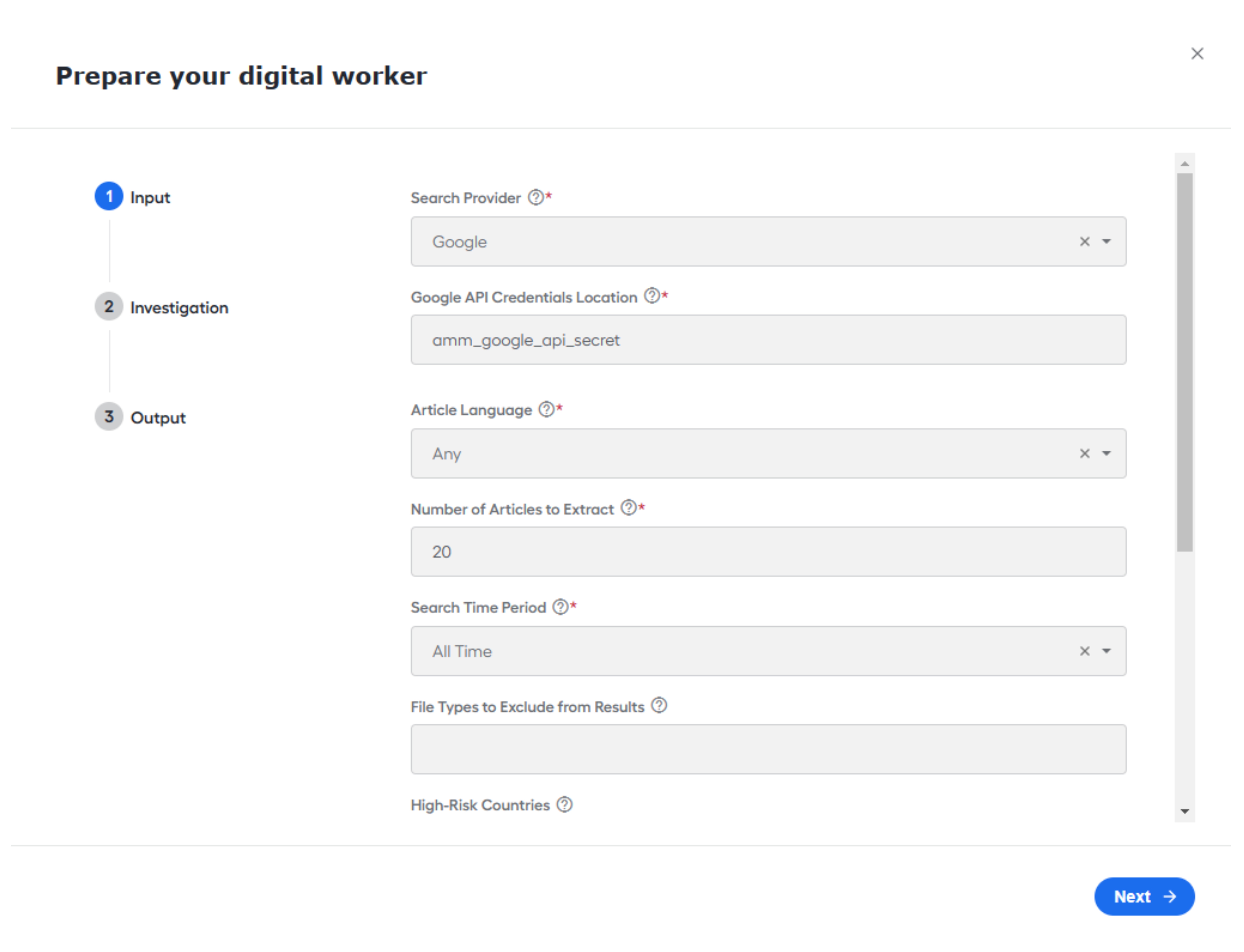
Added the capability to configure Ad hoc search requests tasks from the UI configuration screen. Earlier, this required a CSV file to be uploaded into the Business Process.
One ad hoc investigation task is created when the Launcher BP is run by default.
Added the capability to configure the Model version per variation instead of per AI Agent to support A/B testing better.
Added the capability to trigger the Ad hoc investigations from the Workspace Launcher without creating a Manual Task. You can set this behavior in a variation's configuration.
Added the settings to remove legal endings from the search request. Disabling this feature improves results for small entities and businesses with common names.
Extended the Search period options. Now, Factiva and Google support the following timeframes:
- Today
- 1 day
- 2 days
- 7 days
Google-specific features:
Redirect links are now identified, traced to their source, and checked for relevancy before being included.
Using the Google search provider, you can select "English" and "Spanish" as the article language.
The directory of excluded host sites now contains more names.
Bug fixes
Extended the timeout period for the Launcher tasks. Previously, tasks expired if they were not used for 30 days. That has been extended to 1 year.
Fixed the filter for Batch ID in Workspace.
Fixed the issues that prevented the generation of the PDF version of the report.
Added support for websites that were not downloaded or parsed correctly. This only impacted users using Google as the media provider.
Version 3.1.2
- Release date: February 1, 2023
- Compatible platform version: IA Cloud 10.2.5+
Bug fixes
- Fixed the issue with parsing the XML data obtained from Factiva that affected the AI Agent performance.
Version 3.1.1
- Release date: January 25, 2023
- Compatible platform version: IA Cloud 10.2.5+
Bug fixes
- Fixed a bug that affected ML Model execution. To apply the fix, install the updated model to the environment and change its version in the Data Store.
Version 3.1
- Release date: December 13, 2022
- Compatible platform version: IA Cloud 10.2.5+
New features
Updated the email notification sent when an investigation is ready. The message now includes the following:
Batch ID number
List of entities and their status:
- Needs Investigation: if one or more articles were escalated
- False Positive: if articles were found but all of them are false positive
- No results found: if no articles were found for the search criteria
Added the new Combined report type.
The report includes all entities submitted in a batch and is intended for investigations that require multiple entities to be screened (for example, company UBO). It contains a summary of the investigation results and a detailed report for each entity.
Updated the email notification sent when the final report was ready. The message now includes the following:
Batch ID number
Additional report download options:
- Combined report
- Download individually
- Download all reports individually with a single click
Updated the report to include the Batch and transaction ID to improve audit trail functionality.
Expanded the list of website schemas that can be parsed when returning results from Google.
Added additional post-processing options for the following items to further optimize results from Google:
- Search time
- State and location
- “Dead” links and 404 pages that can be set to ignore
- Insecure websites that can be set to ignore by default
- Additional logic to dynamically block ~35% of irrelevant content
Updated adjudications for articles for additional clarity.
Updated adjudication reason codes.
Added the capability to force users to disposition all articles before closing a task. By default, the parameter is disabled.
Added the capability to submit AMM investigations via a REST API instead of a scheduled Control Tower API.
Improved highlighting of the entity name on the summary and article details lists in the Manual Task.
Added capability to prevent users from submitting investigations with bad data via the Launcher.
Version 3.0.4
- Release date: October 31, 2022
- Compatible platform version: IA Cloud 10.2.5+
Bug fixes
- Fixed a bug that caused failures of the report generation, if the article title was unusually long and had to be trimmed.
Version 3.0.3
- Release date: October 14, 2022
- Compatible platform version: IA Cloud 10.2.5+
New features
Added the capability to exclude file types when the search provider is Google API.
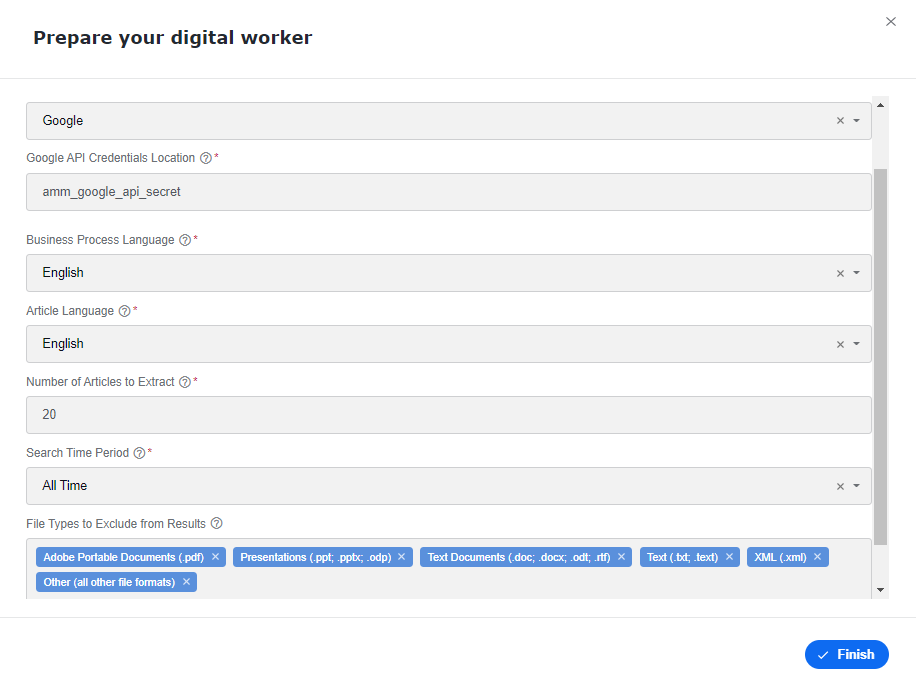
Added the ability to send notifications to two emails when submitting an investigation request via the Launcher in Workspace. With this feature, you can send targeted emails to an individual analyst and notify a group repository email group.
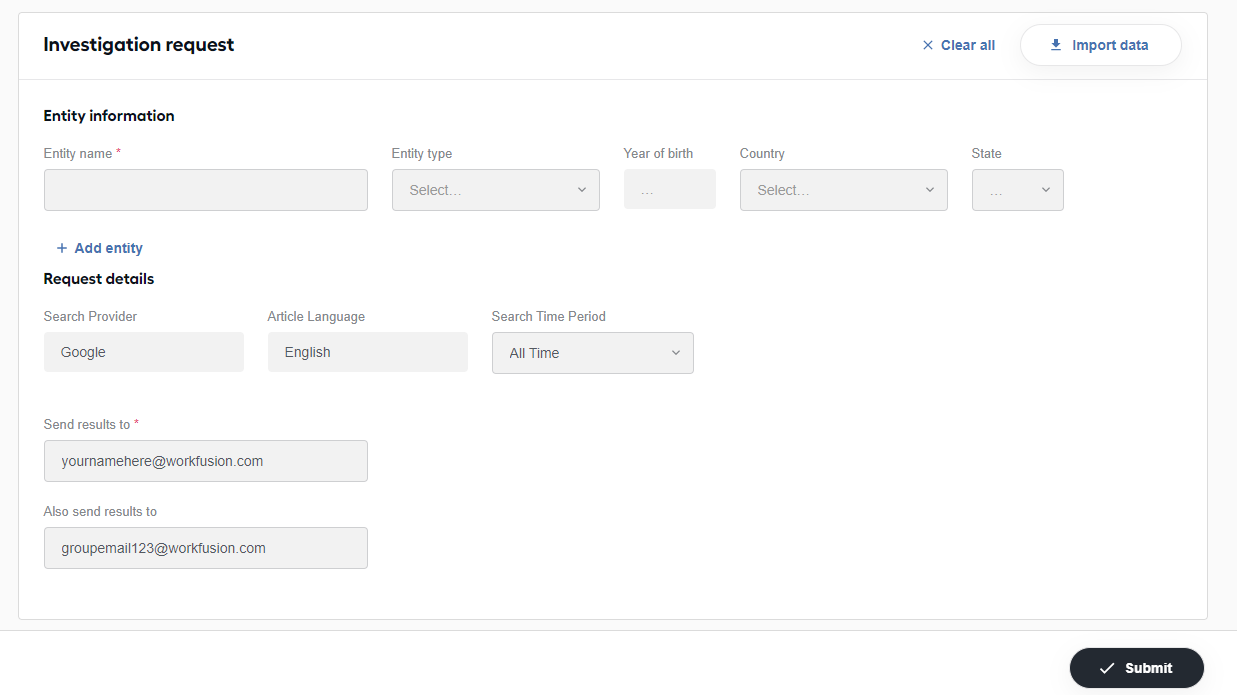
Wrapped multi-word keywords in parenthesis to optimize Google results.
For the Google search provider, in the final reports, added links to the articles' source URLs.
Bug fixes
- Fixed the issue with the investigation status selected originally by an Analyst that appeared different in the final report.
- Fixed the no-results issue for entities. In the final report email, the investigation status now shows "No Results Found" instead of "False Positive".
Version 3.0.2
- Release date: September 26, 2022
- Compatible platform version: IA Cloud 10.2.5+
Bug fixes
Fixed the highlighting of non-English characters to improve readability.
Improved the identifying legal endings for enterprise entities.
Fixed the calculation for the average Manual Task time if multiple users worked on the same manual assignments.
Fixed an issue where articles were not filtered based on the country specified in the investigation when using the Google search provider.
Version 3.0.1
- Release date: September 12, 2022
- Compatible platform version: IA Cloud 10.2.5+
Improvements
- Improved the highlighting of the entity name, keywords, and countries to be identified more easily.
- Updated the Manual Task to show the full name of a province or state.
Bug fixes
- Fixed an issue with a report's status incorrectly displayed in Control Tower.
- Fixed an issue that prevented passing the article's full text to the model.
- Fixed a few issues that prevented Mercury from updating when upgrading to a new version.
- Fixed a bug with email messages when the final status of the investigation chosen by an analyst was not shown.
Version 3.0
- Release date: August 18, 2022
- Compatible platform version: IA Cloud 10.2.5+
Adverse Media Monitoring now supports IA Cloud Enterprise v.10.2.5 and the Platform features released within that version, including multiple sets of configurations for a single AI Agent. Also, RPA is no longer required to run Adverse Media Monitoring.
Manual Tasks
Analysts can save their work and move to the next assignment without completing the entire investigation in a single sitting. Changes are saved for all users if it is reassigned to another analyst.
Improved the Summary page with a simplified view of articles. The articles are separated into two sections so that analysts can quickly identify which ones require their attention:
Articles to Review
Dispositioned Articles
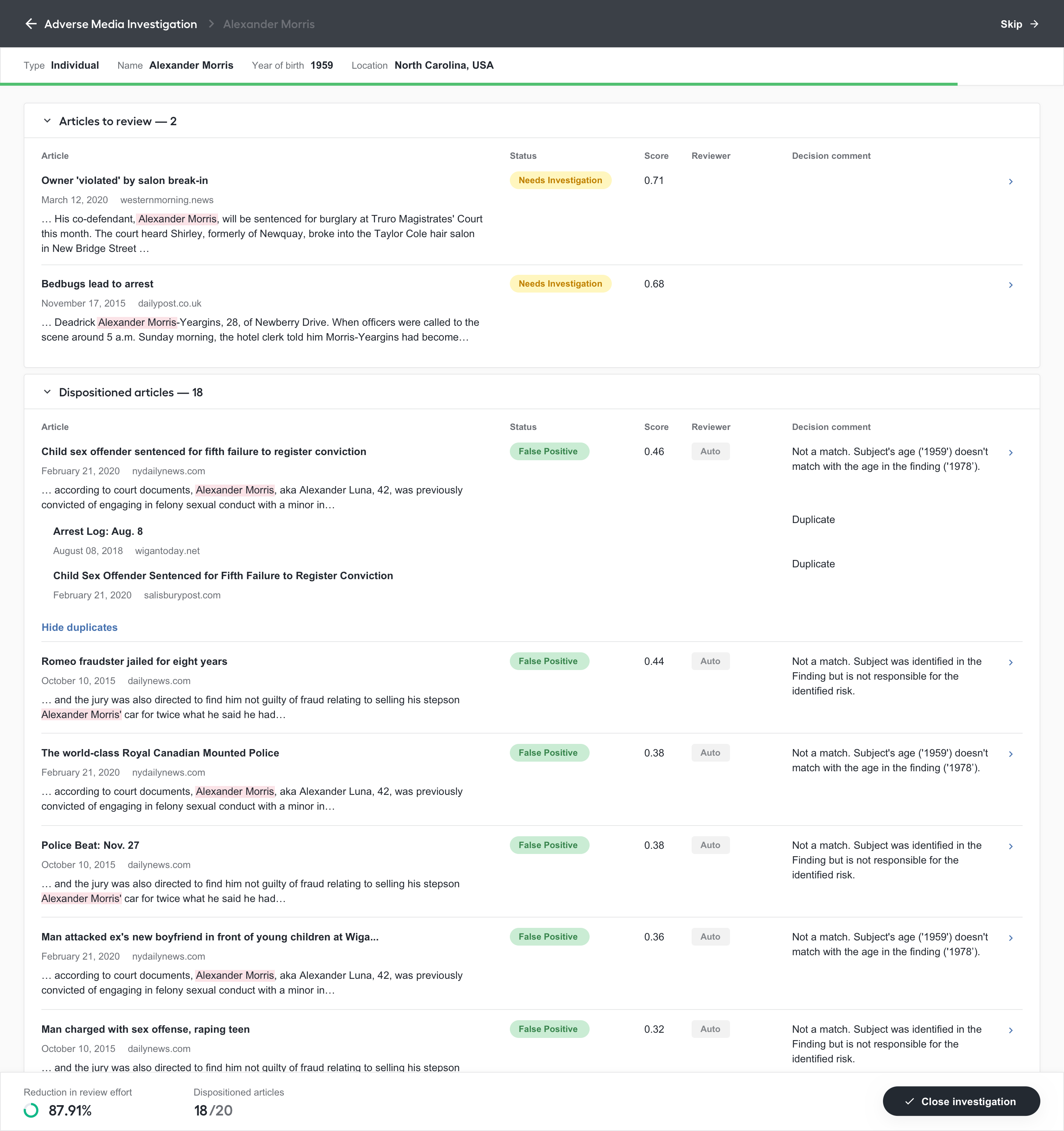
Added the additional information to aid analysts in their decisions:
- Article score.
- Comments from either the model or the human analyst.
- The name of the reviewer who last updated the article status and comment. If the article was automatically adjudicated, the name shows “Auto”.
Streamlined the Details page.
The page includes an “immersive” reader view to clean up the assignment view and add more focus.
Also, we added Article score, Comments from either the ML model or a previous human analyst, and the Read status to aid analysts in their decisions.
Now, we provide the ability to disposition an article as “True Positive”. Previously, only “False Positive” and “Escalate” were available.
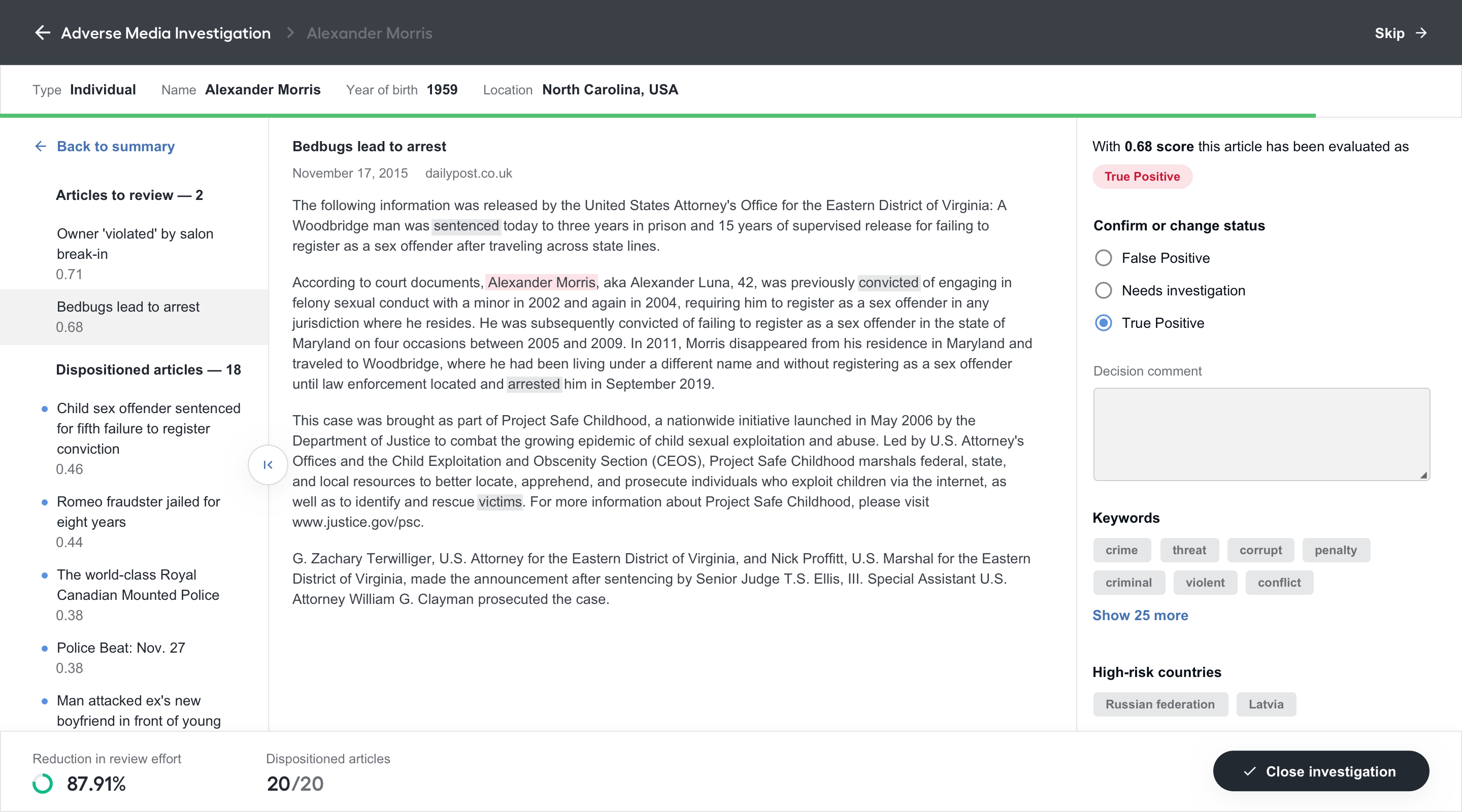
Enriched the “Close Investigation” process by adding the ability to close an investigation with a status and a comment. The following statuses are available:
True Positive
False Positive
Needs Investigation
When a user closes an investigation, a status will be automatically suggested based on the statuses of the adjudicated articles. You can select a different one, but in this case, you receive an error or warning if the status is not valid. For example, if all articles are dispositioned as “False Positive”, an error is raised when you close an investigation as “True Positive”. In case of closing with the status “Needs Investigation”, you receive a warning message but can proceed.
Also, a comment for the entire investigation is automatically suggested based on the statuses and comments from the adjudicated articles. Analysts can adjust this before closing the investigation.
Added the possibility for users to skip a case and automatically move on to the next assignment in their queue.
Added the ability to see the automation rate and progress for an investigation as articles are dispositioned.
Reports
Added additional information with regards to the search parameters and results to improve the audit trail:
- Entity information
- Keywords searched versus keywords found in the results
- High-risk countries searched versus high-risk countries found in the results
- Search period
- Article language
- Reviewers
- Media Source
Improved reports that are generated with no results found for an entity to add clarity and brevity.
Other updates
Improved the automatic adjudications.
Each explanation from the model became more specific. Explanations are provided for the escalated articles instead of those dispositioned as "False Positive". This enables analysts to understand what was evaluated and focus their time and energy more appropriately.
Added clarity to the email notifications for cases when the final report was generated because the Manual Task was available in Workspace or was bypassed. The reasons why a Manual Task is not created can be the following:
- A Business Process was manually stopped before running the investigation.
- No results were found.
- The Manual Task wasn’t created because of the customer’s settings.
Migrated the AI Agent to Open Development Framework v.2. For more information on the benefits of the new framework, see Why adopt ODF 2.
Pre-indexed Data Stores when Adverse Media Monitoring is installed. Now, you don't need to index data stores after the installation. This removed extra step will save you time and some disk space, and you never have to remember performing this routine operation.
Bugfixes
- Fixed the localization issues on the Spanish version of the report.
Version 2.9
- Release date: March 30, 2022
- Compatible platform version: IA Cloud 10.2.4+
New features
Allows users to specify the Business Process language when configuring the AI Agent in the Solution Catalog.
This selection drives their ability to select the language within the Business Process, regardless of whether they are running an ad hoc or scheduled search.
Driving the selection from the configuration also reduces maintenance from a technical perspective as the Business Processes are now combined. As a result, there is only one package and bundle available. Previously there were two: one for each language.
When running Adverse Media Monitoring using the Launcher, the BP definition UUID is automatically detected and applied. Previously, you had to copy and paste it.
Updated the model to improve the Automation Rate and Error Rate by enhancing the focality detection and age matcher logic.
Automation Rate went from 64% to 70% (upper threshold of 81%)
Error rate went from 5% to 7%
:::note Typically, the error rate increases along with the automation rate. This increase was considered within the desired error threshold, especially when compared to the gains in automation. When evaluating the confusion matrix, the model continued to err on the side of caution. The slight increase in error was due to the number of articles flagged for manual review that could have been dispositioned as False Positive. :::
Improved overall runtime and AQA testing time. Tests can now be run concurrently and save ~110 minutes per run.
Bugfixes
Fixed a bug that caused special characters to occasionally appear in the articles within the Manual Task even though they were not present in the article source.
Before the fix:
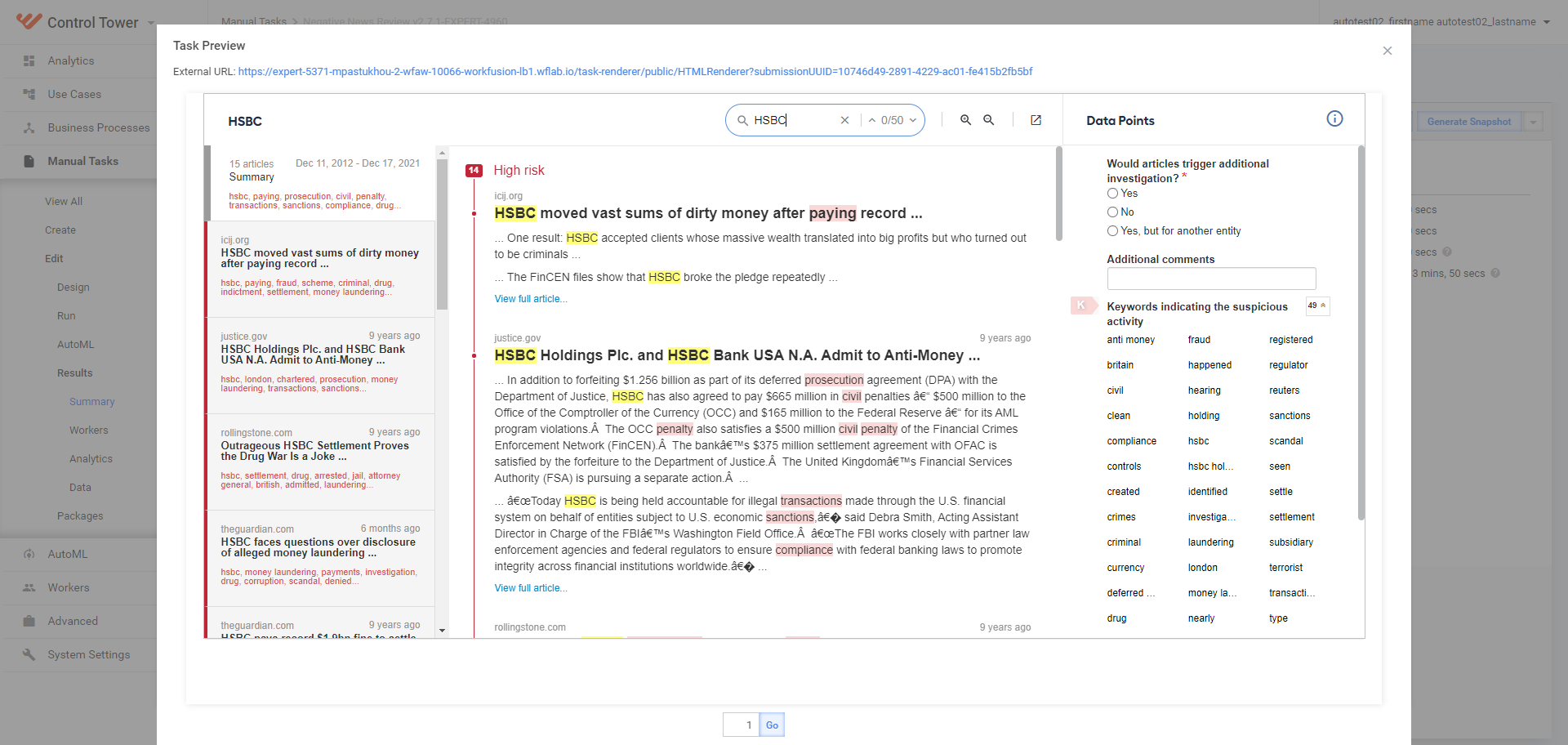
After the fix:
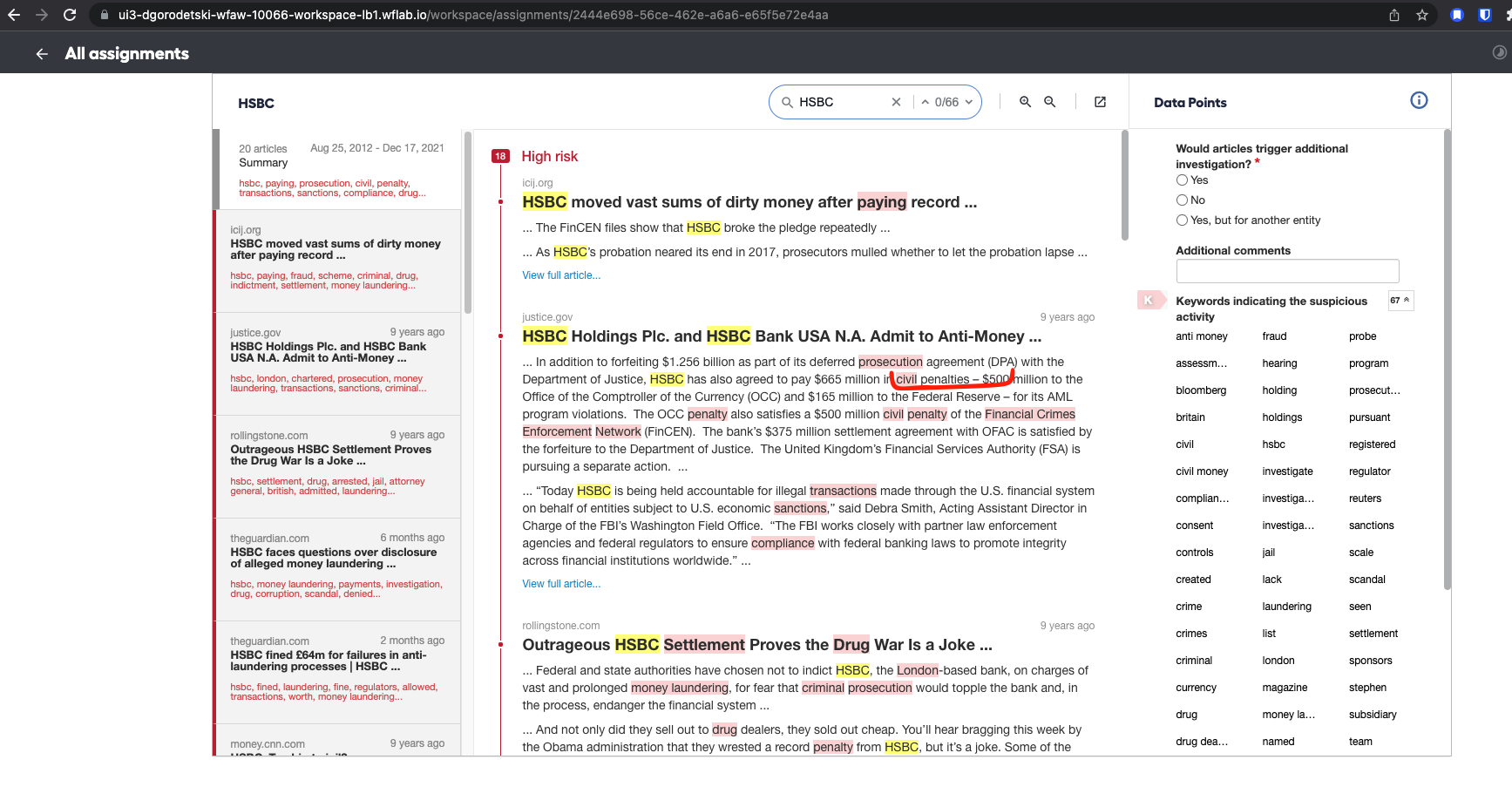
Fixed various bugs in the UI configuration:
- Incorrect default search provider language.
- High-Risk Countries and BP languages section missing from the Review tab in UI config.
- Incorrect selected time on the Review tab in UI config.
Addressed the issue with Mercury failing to parse particular articles.
It only impacts customers who utilize Google API as their media provider.
This fix is also available as a patch 2.7.0.2.
Version 2.8
- Release date: February 24, 2022
- Compatible platform version: IA Cloud 10.2.4+
Adverse Media Monitoring is now available as a packaged skill within the Solution Catalog (beta).
Users can download the package directly from the Solution Catalog and configure it via a user interface instead of within the Business Process ETL steps. For full details and installation instructions, go to Install and configure.
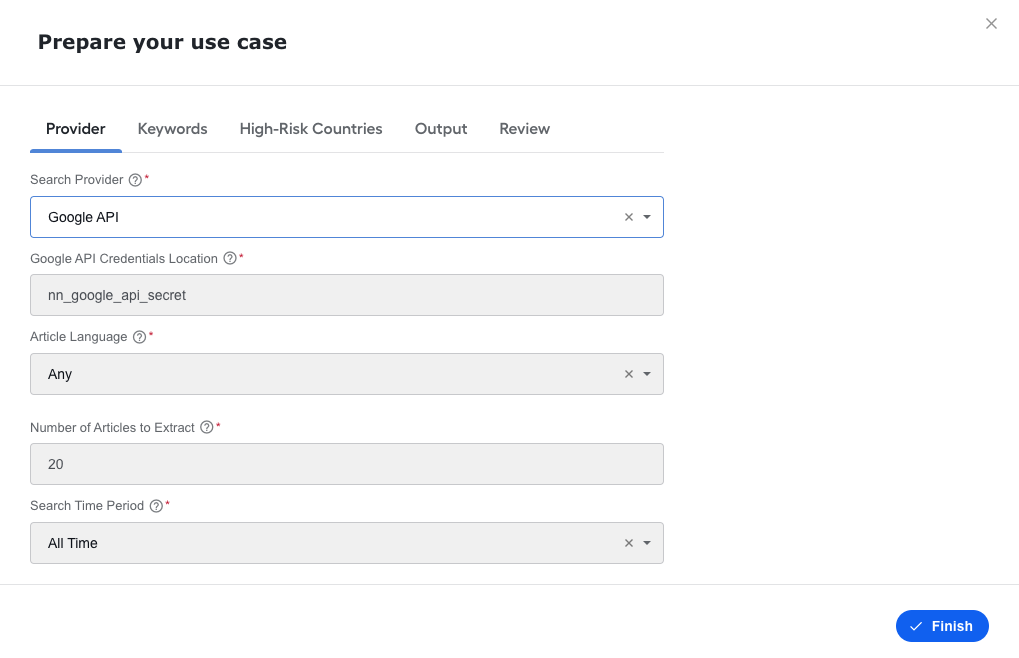
Bug Fixes
- High-risk countries are now highlighted in each article.
- Addressed a limitation caused by Java's built-in regular expression support. Before this fix, documents with a complex HTML or XML structure could cause a Business Process to get stuck.
- Fixed data using custom properties in UI configuration.