Evelyn | Name Sanctions and PEP Screening Alert Review
Version 4.3.0
- Released: September 14, 2026
- Compatible platform version: Work.AI 10.3.2+
The Evelyn v4.3.0 release extends Firco Trust message support to fixed-length formats, gives you finer control over middle name matching to reduce false positives, prevents unreadable alerts from consuming processing resources, and boosts overall security.
Features
The Firco Trust integration now supports fixed-length format files in addition to pipe-separated ones, and you can mark each configured format file as required. The update enables screening of Firco units that deliver messages in a fixed-length layout, while the required setting stops processing with an exception when an expected format file is missing from S3, instead of silently falling back to
CustomerInfo.Firco transactions that fail during message parsing are now suppressed rather than retried. Evelyn marks such a transaction as failed and excludes it from the rest of the screening flow, so no screening results, model scoring, or QC report are produced for it, then returns the alert to Firco Trust for manual review and cleans up the stored Firco data. The update preserves processing resources and prevents stale records from accumulating in the database. Messages that are parsed successfully are not affected.
The Model configuration now provides the Middle name matching strategy drop-down for individual (person) alerts instead of the previous Yes/No option for middle names. The IGNORE, LENIENT (default), and STRICT options define how strictly middle names are compared and influence the final name matching score, enabling you to adjust the balance between catching potential matches and reducing false positives to suit your screening requirements.
Improvements
To strengthen security, all critical and high-severity code vulnerabilities have been eliminated by upgrading and aligning the affected third-party dependencies. The Firco and address-lookup connectors are updated as part of the remediation.
The AI Agent is renamed to Evelyn: Name Sanctions Screening to align its name with other WorkFusion AI Agents, making it easier to recognize across the platform.
Version 4.2.0
- Released: August 17, 2026
- Compatible platform version: Work.AI 10.3.2+
The v4.2.0 Evelyn release improves billing transparency, strengthens security, simplifies screening provider configuration, and introduces a naming convention for Firco unit format files.
Features
NSS billing events now use the standard WorkFusion billing contract and include extended metadata. The following updates ensure clearer billing attribution and remove the need for custom billing interpretation:
- Evelyn emits one billing event for every successfully processed transaction.
- Billing events include metadata, such as
dw_name,dw_skill, andvariation_name. - Business Process details are cached by the run UUID to avoid repeated Control Tower calls when multiple transactions are processed in the same run.
- If a variation name cannot be retrieved, NSS logs a warning and sends an empty value.
- If billing delivery fails, NSS logs the failure without interrupting transaction completion.
- The legacy custom billing Data Transfer Object (DTO) and deprecated string-based API have been replaced with the typed
BillingInfoAPI. - The
odf_transaction_uuidfield is replaced bytransaction_uuid.
The NSS configuration has been simplified by removing the proactive and retrospective screening selection. The change enables you to select the correct screening provider faster without changing how existing integrations send or process screening requests.
The How entities be screened? option has been removed from the configuration interface. The screening system setup now uses a single drop-down selector listing all supported providers: Dow Jones Risk & Compliance, World-Check One, Firco Trust, and Thomson Reuters CLEAR. The existing
ongoing_monitoringpayload value and backend processing remain unchanged for compatibility.
Improvements
To strengthen the solution's security, critical code vulnerabilities have been addressed by upgrading and aligning dependencies in the root Maven configuration:
Spring Boot upgraded to v3.5.16
Spring Framework upgraded to v6.2.19
Java Native Worker (JNW) parent BOM upgraded to v2.1.0.56 and Worker base to v2.1.0.46
Jackson BOM upgraded to v2.21.5
Apache HttpClient upgraded to 5.6.2
Apache HttpCore H2 to v5.4.3
Logback upgraded to v1.5.36
AssertJ upgraded to v3.27.7
The Firco Trust provider input configuration now specifies the format file convention for the Firco Trust unit field. The expected pattern is
<unit_name>_format.csv. The update prevents processing errors and accelerates provider setup.
Bug fixes
Fixed the issue where the Name Screening Business Process failed with the
Cannot parse value for key 'connector_output' as JSON of type java.lang.Stringerror while processing the output from the Thomson Reuters (TR) connector. The TR response processor now handles the connector output correctly.Resolved the
UnsupportedClassVersionErrorexception in address lookup where Java Worker failed because it was compiled with a newer Java class file version than the runtime supported.
Version 4.1.3
- Released: July 7, 2026
- Compatible platform version: Work.AI 10.3.1+
The 4.1.3 release resolves the issue causing database deadlocks that resulted in failed transactions during processing. The fix improves transaction reliability and overall stability by reducing failures caused by database contention.
Version 4.1.2
- Released: June 11, 2026
- Compatible platform version: Work.AI 10.3.1+
This release improves matching accuracy and flexibility by allowing custom enrichment of screening data and watchlist entities. It also ensures more reliable and consistent processing by resolving issues in NSS Business Processes.
- Evelyn now offers custom enrichment for screening data and watchlist entities, allowing you to extend standard inputs with your own data sources and transformations. The update improves matching accuracy, reduces false positives, and enables tailored handling of jurisdiction- or business-specific attributes without code changes or redeployment. The feature supports no-code configuration for simple logic and synchronous Business Process calls for advanced enrichment.
Bug fixes
Resolved the issue with records stuck in the Firco provider subprocess during environment failures, restoring consistent processing behavior.
Fixed incorrect alert discounting when the Business Process was configured to run in parallel production mode. Alerts are now evaluated consistently regardless of the processing mode.
Version 4.1.0
- Released: December 16, 2025
- Compatible platform version: Work.AI 10.3.1
The 4.1.0 release makes Evelyn fully compatible with Work.AI v10.3.1 that now includes upgraded frameworks and libraries. The improvements strengthen security and align your workflows with the latest industry standards.
Version 4.0.1
- Released: November 28, 2025
- Compatible platform version: Work.AI 10.3
The Evelyn v4.0.1 release improves the handling of Thomson Reuters (TR) connector responses, enhancing Evelyn’s ability to correctly interpret incoming data and prevent incorrect downstream decisions.
Resolved the issue with date parsing by the TR connector, ensuring that invalid or incorrectly formatted dates no longer cause processing failures or inconsistent decision outputs.
Fixed the issue where watchlist entities (WLEs) containing invalid fields were not handled correctly. Such WLEs are now properly filtered, marked as
NEED_REVIEW, logged with theirwleId, and excluded from further processing to prevent incorrect alert decisions.Resolved the issue where certain entity types returned by the TR connector were not parsed correctly. Now, valid entity types are consistently mapped to the correct entity category, while invalid types are properly flagged, logged, and excluded from the final results.
Version 4.0
- Released: November 20, 2025
- Compatible platform version: Work.AI 10.3
The release updates Evelyn to ensure full compatibility with Work.AI v10.3. To support the new dependency requirements, Evelyn's codebase was migrated to Java 21, and all third-party libraries were upgraded to their latest compatible versions. These updates improve long-term maintainability, enhance runtime performance, and reduce operational risk associated with deprecated components.
To simplify setup, Evelyn now uses the external Thomson Reuters CLEAR for all related screening tasks. As part of this change, the Names Screening TR Ongoing Monitoring Business Process has been removed, and the Thomson Reuters CLEAR configuration is no longer available in AI Agent's settings.
Version 3.10.2
- Released: September 11, 2026
- Compatible platform version: Work.AI 10.2.9
The Evelyn v3.10.2 release resolves issues with selecting the Rare and Screened token overlap option and reading files from S3, so you can configure stricter name matching as intended and process input and format files reliably.
Bug fixes
Fixed the issue where the Rare and Screened option in the Name matcher token overlap drop-down list on the Model configuration screen was listed but could not be selected. You can now select the option to require both rare token overlap and full token coverage of the screened name in the watchlist entry.
Resolved the issue with reading files from S3, including format files.
Known issue: when the
doc-uploadbucket contains a large number of files, you might experience delays while Evelyn reads input or format files from S3.
Version 3.10.1
- Released: August 21, 2026
- Compatible platform version: Work.AI 10.2.9
The release improves usability and security by cleaning up the AI Agent configuration and updating a core third-party component to address known vulnerabilities.
The obsolete Stopwords settings are removed from the Model configuration, ensuring only relevant configuration options are displayed.
The log4j dependency is upgraded to v2.25.5 to address security vulnerabilities.
Version 3.10
- Released: August 17, 2026
- Compatible platform version: Work.AI 10.2.9
The Evelyn v3.10 release introduces more precise location matching, missing data handling in the discounting rules matrix, clearer CSV file upload settings, and improved validation on the output configuration step. Several reporting and matching issues have also been resolved for more consistent processing.
Features
The location matching logic now uses only selected address components to determine whether two addresses match or mismatch. Address components that are present in the data but are not selected do not affect the decision. For example, if only City is selected and both the input address and the hit address contain a country and a city, Evelyn compares the city values and ignores the country values.
If a selected component is missing from either the input address or the hit address, Evelyn returns Need more information and routes the case to manual review.
Component selection applies only to addresses supplied as separate components, whether one or several components are present. If an address is supplied as a single full address string, component selection has no effect and Evelyn compares the address as a whole.
The rules matrix now includes the Missing data option for comparison fields, such as date, location, and type. The new option lets you define how Evelyn handles incomplete data.
When you select Missing data for a field, the rule matches when the field has no value in the input data, the hit data, or both. A matching rule resolves the hit as False positive. For example, a date rule set to Missing data matches when the date is missing from either side of the comparison or from both sides.
Known issue: do not select Missing data for a name rule. Although the decision matrix allows this configuration, missing names are not currently supported. Evelyn returns a runtime error if the name is missing from either side of the comparison.
Improvements
Input configuration labels for CSV file upload have been updated to reduce confusion between input files and format files. The clearer wording enables faster NSS setup with fewer mistakes.
The Output step validation has been updated for the Custom folders and Custom file prefix fields. These fields now support only alphanumeric characters, underscores, and hyphens, with a maximum length of 25 characters. This prevents invalid output paths or file names.
Bug fixes
Fixed model matching for location hits when
input_record_type = INDIVIDUALandhit_record_type = LOCATION. When location watch list entity matching is enabled, the model now returns Not Compared for all non-location fields instead of returning mixed results.Eliminated the issue where alerts were incorrectly classified as Needs More Information when all compared fields, including Gender, resulted in a mismatch. Now, alerts are correctly classified as False Positive based on the configured field mismatch discounting rules.
Fixed the issue that caused quality control (QC) reports to use an incorrect naming convention. Reports are now generated with consistent naming.
Eliminated duplicate QC report generation.
Fixed the deadlock issue that caused interruptions in NSS processing.
Version 3.9
- Released: May 28, 2026
- Compatible platform version: Work.AI 10.2.8.54+
The release improves alert processing efficiency, reduces false positives in high-risk workflows, simplifies model configuration, and makes quality control information easier to access, trace, and integrate with downstream systems.
Automatic escalation for oversized alerts is added to skip automatic evaluation when the number of comparison data pairs exceeds a configured threshold. Such alerts are returned with the Need More Information status and a narrative explaining that they were not automatically evaluated due to their size. The enhancement reduces processing time for alerts that are likely to require manual review.
To streamline setup and reduce configuration complexity, the Model configuration screen no longer includes the Stopwords section.
A new Rare and Screened option is now available in the Name matcher token overlap dropdown on the Model configuration screen. When the option is selected, matching requires both rare token overlap and full token coverage of the screened name in the watchlist entry, reducing false positives in high-risk workflows.
The REST API response includes the automated quality control field, which indicates whether an alert is selected as a candidate for quality check. This helps downstream systems identify and process alerts that are subject to quality check review more easily.
To make quality control details more accessible, you can configure the REST API to return the full content of the quality check report instead of a link. If the report is missing or corrupted, the response returns an error message.
Quality check reports can now use the original input filename for CSV-based processing, making it easier to trace report results back to the source file, especially when multiple input files are processed. You can enable this behavior using the Do you want QC report file name to be copied from the input file? option on the Input configuration screen.
When an incoming Firco alert cannot be parsed, Evelyn now automatically sends a Need More Information status update to the Firco Trust system and adds a comment requesting manual review. This helps you identify alerts that require attention faster while preventing duplicate updates during retries.
Version 3.8
- Released: April 8, 2026
- Compatible platform version: Work.AI 10.2.8.54+
The Evelyn 3.8 release focuses on improving quality check (QC) reporting, audit transparency, and analytics performance, helping you generate and review screening outputs faster and with greater control.
A standalone Names Screening QC Report Business Process is introduced to enable independent QC report generation, allowing external systems to request QC reports without running the core Names Screening Business Process, which reduces operational overhead and simplifies integration.
Input-compatible QC report generation is now available to generate a QC report with all headers provided in the input CSV, along with a format file that enables rerunning the CSV provider using the generated QC report. The outputs are then saved in the configured S3 directory, enabling faster reruns and easier troubleshooting.
You can now include missing data explanations to the decision narrative for strengthened auditability and clearer insight into decision factors.
Firco Trust message handling capacity is increased to support larger screening batches, enabling Evelyn to safely process significantly higher volumes of messages from the data provider.
Extended automatic quality check configuration is now available to help you target QC sampling on the false positive alerts that matter most, making manual review more focused and efficient. You can set a default sampling percentage for false positives and, if needed, define discrete selection rules using additional settings and a configuration table.
The API contract is updated with the following changes:
A new
auto_qcboolean field is added to the API response to indicate whether an alert was selected for automatic quality control review based on eligibility and configured sampling.New
input_gold_resolutionandhit_gold_resolutionfields are added to expose alert- and hit-level quality check ground-truth outcomes, enabling downstream systems to perform quality evaluation.
Evelyn dashboards now include eight new charts to make analytics easier to use and interpret. A new Name Sanction Screening Verified Analytics dashboard is also available to provide additional dedicated insights.
Dashboard load time is also significantly reduced as the dashboards now read from a pre-aggregated analytics table that is refreshed by a dedicated Business Process.
The NSS output contract is updated to expose additional details to connectors while separating external and internal responses, supporting safer external reporting and richer internal connector-to-connector integration data.
The name matcher model is upgraded to v1.2.1 for enhanced accuracy in entity recognition.
Bug fixes
Resolved the issue causing a length-limit error when receiving large Firco batches. The number of Firco messages that can be received at once is increased to 100,000.
Resolved the issue where model execution could fail due to a Python out-of-memory error by increasing available Python memory to ensure more stable performance under heavy workloads.
Resolved the issue that could trigger an out-of-memory error during QC report generation for large transaction volumes.
Resolved the issue where large model-processing cases could fail with a timeout exception by extending the allowed processing time.
Resolved the issue allowing invalid S3 report location values in the Custom folder and Custom file prefix fields. Validation is now added to prevent configuration errors and ensure consistent report paths.
Version 3.7
- Released: September 10, 2025
- Compatible platform version: Work.AI 10.2.8.54+
The Evelyn v3.7 release enhances data validation, logging, and address matching to increase accuracy, simplify troubleshooting, and deliver more reliable results.
Detailed input data validation is designed to enhance error handling for Business Processes that use a CSV provider, offering more granular control over how Evelyn processes CSV files with data errors. You can now choose to process valid records while isolating invalid ones or stop the entire Business Process upon detecting the first error.
Errors in CSV input files are now logged in a standardized format that specifies the error type, column name, and exact line numbers, making troubleshooting faster and more precise.
Each Business Process log entry now includes a client ID and a transaction UUID, providing end-to-end transaction traceability. You can search by a transaction UUID to see all log entries related to a specific transaction or filter by client ID to isolate client-specific logs and quickly identify problematic transactions.
A new configuration option within the Model settings allows you to include or exclude street names in location matching. When street-level matching is enabled, the model applies additional logic to compare street information for more precise matches.
The address matching logic is reworked to remove unreachable conditions and ensure more consistent results. The model now evaluates addresses step by step: country → state → city → street. Matching stops immediately on a strong mismatch, while successful comparisons continue down to the lowest level available. Evelyn then returns the most specific strong match found. If no strong match exists, the address is reported as incomplete (
BadInfo).The classification model is upgraded to v4.3.0.
Bug fixes
Resolved the issue with the model failing when hit date fields were empty.
Resolved the issue where name enrichment by ticker symbols was disabled.
Resolved the issue with street addresses not being parsed into the model during CSV ingestion.
Resolved the issue when running an input file of names against the Thomson Reuters CLEAR API connector.
Version 3.6.7
- Released: May 12, 2026
- Compatible platform version: Work.AI 10.2.8.54+
The Evelyn 3.6.7 release improves traceability and exception handling for alert processing and reduces manual follow-up when incoming Firco alerts cannot be processed.
Quality check reports can now use the original input filename for CSV-based processing, making it easier to trace report results back to the source file, especially when multiple input files are processed. You can enable this behavior using the new Do you want QC report file name to be copied from the input file? option on the Input configuration screen.
When an incoming Firco alert cannot be parsed, Evelyn now automatically sends a Need More Information status update to the Firco Trust system and adds a comment requesting manual review. This helps you identify alerts that require attention faster, while preventing duplicate updates during retries.
Version 3.6.3
- Released: March 27, 2026
- Compatible platform version: Work.AI 10.2.8.54+
The Evelyn 3.6.3 release enhances name-matching logic, simplifies model configuration, and improves the clarity of alert resolution outcomes.
Evelyn now uses the unified name matcher for securities, ensuring consistent and reliable entity screening and reducing the risk of missed true positive alerts.
To streamline the setup process and reduce configuration complexity, the model configuration form no longer includes the Stopwords section.
Bug fixes
- Resolved the issue where alert resolution wording was incorrect when handling oversized alerts.
Version 3.6.2
- Released: February 27, 2026
- Compatible platform version: Work.AI 10.2.8.54+
The Evelyn 3.6.2 release improves scalability and stability for high-volume processing by streamlining handling of oversized alerts and strengthens model execution under heavy workloads.
- Automatic escalation for oversized alerts is added to skip automatic evaluation when the number of comparison data pairs exceeds a configured threshold. Such alerts are returned with the Need More Information status and a narrative explaining that the alert was not automatically evaluated due to its size. The enhancement reduces processing time for alerts that are likely to be escalated anyway.
Bug fixes
Resolved the issue where model execution could fail due to a Python out-of-memory error by increasing available Python memory to ensure more stable performance under heavy workloads.
Resolved the issue where large model-processing cases could fail with a timeout exception by extending the allowed processing time.
Version 3.6.1
- Released: August 28, 2025
- Compatible platform version: Work.AI 10.2.8.54+
The Evelyn v3.6.1 release fixes the issue where disabling ticker name enrichment caused a missing configuration property error.
Version 3.6.0
- Released: August 1, 2025
- Compatible platform version: Work.AI 10.2.8.54+
The Evelyn v3.6.0 release focuses on providing client data traceability, expanding ticker data enrichment options, and extending the API input to include street address data.
A new client_id field has been introduced in NSS input contracts to improve traceability of data linked to specific clients. This field allows you to identify transactions in Control Tower, Data Stores, and reports by the client ID.
You can now configure Evelyn NSS to enrich ticker data for all record types or for securities only. This flexibility allows you to adjust the scope of enriched ticker data in a transparent manner. To activate this feature, use the designated option on the Enrichment settings page.
A new
streetparameter has been added to the input and hit address data available through the Evelyn NSS API, providing more detailed information about the location of each screened entity.
Bug fixes
Updated the API contract to exclude
Locationfrom input entity types.Fixed the null pointer exception in the date matcher causing incorrect date matching proximity.
Fixed the incorrect filtering on NSS dashboard charts.
Version 3.5.4
- Released: April 20, 2026
- Compatible platform version: Work.AI 10.2.8.54+
The Evelyn 3.5.4 release enhances quality control workflows, name matching precision, and REST API capabilities.
A new Rare and Screened option is now available in the Name matcher token overlap dropdown on the Model configuration screen. When the option is selected, matching requires both a rare token overlap and full token coverage of the screened name in the watchlist entry, reducing false positives in high-risk workflows.
The REST API response includes the automated quality control field, which indicates whether an alert is selected as a candidate for quality check. This helps downstream systems identify and process alerts that are subject to quality check review more easily.
To make quality control details more accessible, you can configure the REST API to return the full content of the quality check report rather than just a link. If the report is missing or corrupted, the response returns an error message instead.
Evelyn now supports a discrete risk-based selection mode for automated quality control, allowing alerts to be prioritized based on configurable risk categories (high, medium, and low) and score thresholds relative to the strong name matching threshold. You can define individual false positive selection percentages for each category and score intersection, while all remaining false positive alerts fall back to the default percentage setting.
Version 3.5.0
- Released: July 4, 2025
- Compatible platform version: Work.AI 10.2.8.54+
The Evelyn v3.5.0 release introduces major enhancements to decision score calculation, location-based screening, output configuration, and usability improvements.
The decision score logic is refined to produce more accurate and context-sensitive results:
For False positive decisions, the final score now includes only the fields explicitly used during discounting.
For Need more information decisions, the final score includes all fields except those marked as
Bad_InfoorNot_Compared.
Evelyn now offers extended report location capabilities. Granular control over report storage paths is introduced, with options to include year, month, week, day, custom folders, and filename prefixes. The configurations apply to both Quality Check (QC) and HTML reports.
Location is now available as a new watchlist entity (WLE) type, enhancing screening for location-specific risk scenarios:
WLEs of the Location type are matched exclusively against address fields (country, state, city, street).
Non-location fields (name, date, identifier, gender) are ignored during parsing.
Accurate results require structured address data in both the WLE and screened data. Otherwise, the match returns
Bad_Info (-1).
A new configuration setting is available on the Model tab to compare names using only first and last names, excluding middle names. This provides greater control over name-matching logic in cases where middle name data is inconsistent or irrelevant.
To provide detailed insight into the model's resolution at the individual field level, you can now add match-per-field columns to the QC report using a new setting on the Output tab in the AI Agent configuration form.
The previously separate Name enrichment and Location enrichment tabs are combined into a single Enrichment tab to simplify configuration and consolidate enrichment logic in one place.
Evelyn now supports custom worker profiles for bot steps, allowing different steps within a Business Process to run with tailored resource configurations. The improvement is particularly beneficial for high-volume operations, such as processing large CSV inputs.
Each
ScreenedDataandWLErecord now includes a unique UUID to ensure consistent tracking and mapping across Manual Tasks, QC reports, and HTML reports.
Bug fixes
- Resolved the issue in the FircoMessageDetailsProcessor bot step where missing
nextFpStatusornextNMIStatusvalues were not properly validated. Evelyn now displays clear and actionable error messages when expected statuses are missing or invalid in Firco alerts.
Version 3.4.2
- Released: June 6, 2025
- Compatible platform version: Work.AI 10.2.8.54+
The Evelyn v3.4.2 release focuses on enhancing entity name enrichment and improving the readability of exported CSV reports.
- Name enrichment now supports tickers across all screened entity names, enabling more efficient and accurate compliance analysis. A new option, Do you want to enable name enrichment for all names?, is available in the AI Agent configuration form on the Name enrichment tab.
Bug fixes
- Resolved the issue where special characters, such as apostrophes, were incorrectly displayed as HTML entities in exported CSV reports. The fix ensures cleaner, more accurate report output and enhances overall reporting capabilities.
Version 3.4.1
- Released: May 9, 2025
- Compatible platform version: Work.AI 10.2.8.54+
The Evelyn v3.4.1 release aims at enhancing input name handling in NSS parsing logic.
A new fallback mechanism is introduced to ensure more robust name population across varying input formats. If input_full_name is not populated after parsing both CustomerInfo and MessageData, Evelyn now automatically assigns any available parsed alias to input_full_name.
Version 3.4.0
- Released: April 17, 2025
- Compatible platform version: Work.AI 10.2.8.54+
The Evelyn v3.4.0 release focuses on enhancing configurability and usability of the screening process while addressing Firco issues and improving model accuracy.
The
identifiersfield type has been added to both NSS screened data and watchlist entity (WLE) data. Only values from these fields are now considered as decision factors, improving control over match evaluation. To use the feature, add theinput_<SOME_VALUE>_identifierandhit_<SOME_VALUE>_identifierfields in the input and WLE data, respectively.To improve report management and support more granular access control, the Report bucket field is now available on the Output tab within the AI Agent configuration, allowing you to specify a custom MinIO bucket for storing HTML and CSV reports.
Descriptive text has been added to the Output tab to clarify that a CSV report includes detailed information about all completed transactions, while an HTML report is generated for each transaction. The additional context helps make informed decisions when choosing report formats.
During input parsing, Evelyn now automatically removes null, empty, and duplicate alias values—including duplicates of the primary name—to reduce resource usage and prevent inconsistencies.
A new
name_similarityfield in Quality Check (QC) reports provides a better visibility of name matcher results and supports easier error triage and verification during user acceptance testing (UAT) and parallel production.The wle_count column has been added to the bot step output to indicate the number of watchlist entries found per transaction, streamlining post-screening analysis and eliminating the need to manually parse the WLE list.
The Babel name matcher is removed to simplify the matching process.
The name matcher model is upgraded to v1.0.6 for enhanced accuracy in entity recognition.
Bug fixes
Fixed the issue with Firco being unable to parse massages with empty
CustomerInfo.Name.Fixed the issue with Firco sending an attachment for alerts selected for Automatic Quality Check (AutoQC).
Resolved the issue with Firco escaping
'&'insystemID.Updated the Firco response by sending
0and1for WLE resolutions instead of text representations such asFalse PositiveandNeed More Information.
Version 3.3.3
- Released: March 18, 2025
- Compatible platform version: Work.AI 10.2.8.54+
The Evelyn v3.3.3 release introduces improved Firco message parsing logic and resolves several issues, optimizing operational efficiency and increasing reporting accuracy.
The Firco message parsing logic was reworked to eliminate unnecessary verifications and enhance code quality and performance. The updated message parsing order is as follows:
- Filter all obsolete hits.
- Filter all no-name hits.
- Parse messages.
Bug fixes
Fixed the Ticker email issue, ensuring that result emails display the correct headers and footers.
Resolved the issue where special characters were incorrectly displayed instead of
''in QC reports.Resolved the issue with incorrect SOAP message chunking when updating Firco Trust.
Version 3.3.2
- Released: February 28, 2025
- Compatible platform version: Work.AI 10.2.8.54+
The Evelyn v3.3.2 release enhances World-Check One integration, improves name-matching accuracy, and addresses several issues to boost solution stability and performance.
New features
The World-Check One Case Manager is now automatically updated with decisions made by Evelyn using the World-Check One API, ensuring decisions are consistently reflected in the World-Check One system. Additionally, new settings are added to the AI Agent configuration form, allowing you to enable or disable result updates in World-Check One as needed.
The name matcher model is upgraded to v1.0.3 to enhance accuracy in identifying and matching names.
Bug fixes
Fixed the Firco update logger for improved traceability.
Resolved the issue with exception handling when encountering an invalid data format.
Resolved the issue with exporting transaction UUIDs from each bot step to improve tracking and logging.
Version 3.3.1
- Released: February 7, 2025
- Compatible platform version: Work.AI 10.2.8.54+
The Evelyn v3.3.1 release focuses on enhancing Firco Trust data parsing to improve accuracy, automation, and overall Firco performance.
To improve data parsing for Firco Trust messages, Evelyn now supports additional data feeds, such as Brokers, Employees, Investors, and KYC. The enhancement enables Evelyn to extract and map data using a configurable format file, increasing data accuracy and boosting automation rates in alert disposition.
The Firco parsing logic now supports a new date format (yyyy/mm/00), ensuring better compatibility with diverse data sources and improving the accuracy of date-based filtering and analysis.
A hit decision score is added to the API REST response for each hit processed, providing greater transparency into match confidence. Additionally, the original name matching score and hit decision score are now stored in the Hit Analytics Data Store, allowing for improved reporting and analytics.
Version 3.3
- Released: January 28, 2025
- Compatible platform version: Work.AI 10.2.8+
The Evelyn v3.3 release introduces advanced rule-based decision-making, greater flexibility in name enrichment processing, and enhanced tracking and reporting capabilities.
New features
The AI Agent configuration now includes a setting to turn name enrichment on or off. For setup instructions, see Configure name enrichment.
The Name Screening Ticker Lookup Business Process now supports email notifications, allowing you to get the Business Process execution results to specified email addresses.
A new option to use additional information for decision-making processes allows you to apply rules based on data, such as IDs, passport numbers, or SWIFT codes. For configuration instructions and decision-making logic, refer to Configure classification model | Rules.
For improved modularity, CSV input processors are decoupled from the core Names Screening Business Process into a separate CSV File Ingestion Business Process.
A configurable threshold for matching incomplete dates is added to the Model configuration options, improving Evelyn's date comparison logic. The new functionality is particularly beneficial when one of the dates in a comparison pair contains only a year. For details, see the Thresholds section.
To simplify setup and ensure accurate tracking of request statuses, we reworked the REST request status tracking mechanism for Evelyn variations executed via REST API with the Human-in-the-loop capability. Now, you can track REST requests without the need to install additional bundles. The dedicated Data Store, renamed to uc_B_AML_PEP_request_status_v3_0, is updated whenever a new Manual Task is created or saved or a manual review request is completed.
Bug fixes
Updated dependencies to address security vulnerabilities.
Added log notifications for FIRCO message processors to facilitate easier troubleshooting and improve tracking.
Version 3.2
- Released: November 15, 2024
- Compatible platform version: Work.AI 10.2.8+
The Evelyn v3.2 release aims to improve the automation rate and analytics.
New features
The Ticker Lookup logic was updated, resulting in the automation rate increase:
TickerLookupTaskProcessornow supports the new Quarterly Call and Quarterly Put tickers and new ticker formats.The Name Screening Ticker Lookup Business Process (BP) was modified to propagate the execution results to logs. The BP produces a log entry whenever a ticker is updated or added to a Data Store. If no updates are recorded, the log will also include a corresponding entry.
The analytics dashboards were enhanced with new data to allow you greater visibility into the NSS results:
The hit and alerts analytics tables now include columns with alert and hit category and gold decision data.
You can trace the time your employees spent on manual reviews using the newly introduced Average time per assignment widget.
New charts were added for true positive hits, missed true positive hits, false positive hits, and missed false positive hits in numbers and percentages.
The name matcher was updated to version 10.2.8.58.
Bug fixes
As part of the v3.2 release, we eliminated minor model and Business Process execution defects:
Stabilized the Evelyn's model calls to the Babel name matcher.
Stabilized the BP execution when the Firco Trust Case Manager data provider is called multiple times in parallel.
Fixed the data presentation issue when input and hit-level values were missing from Manual Tasks.
Eliminated the issue with processing
entity_typefor input and hit data.
Version 3.1
- Released: October 1, 2024
- Compatible platform version: Work.AI 10.2.8+
The Evelyn v3.1 release is designed to improve operational efficiency, ensure robust data handling, and deliver more accurate reporting results.
New features
The new option to generate single-page combined HTML reports makes it easier to view and share comprehensive information in a compact format. For setup details, see Install and configure | Configure output.
Now, you can select the type of Asset Bundle that best suits your needs, either with or without the Thomson Reuters ongoing monitoring feature.
Support for Manual Tasks is now available for the Work.AI v10.2.9 environment. To work with Manual Tasks in Work.AI v10.2.8, see the requirements.
Enhanced logging provides better transparency, enabling more effective monitoring and troubleshooting:
Logs for the Wait For Completion bot step show the number of transactions in progress.
Logs for the Download Firco Messages bot step indicate how many records are received from Firco.
The release contains the updated API with the following enhancements:
AlertRequestoperations now handle null values gracefully, reducing the chances of unexpected errors.The record type is changed to accept
SECURITIESinstead ofSECURITY.For more details, see the API documentation.
Bug fixes
Resolved the issue with an HTML report not containing all information from a Manual Task.
Fixed the issue with the model failing due to an invalid year format in the date.
Resolved the issue where it was possible to enter a double value for the date matching thresholds. Validation is now added with a prompt message indicating that only positive integers are allowed.
Fixed the schema-based Business Process error when manual review is enabled for all cases.
Fixed the issue with a Business Process failing when the input CSV file contains the rest_request column.
Resolved the issue with the delay in transferring billing transactions into elastic indexes. Now, the billing dashboard is updated in a timely manner.
Version 3.0
- Released: July 12, 2024
- Compatible platform version: Work.AI 10.2.8+
The v3.0 release focuses on introducing advanced data visualization tools, optimizing system performance, and expanding Evelyn's data enrichment capabilities. The enhancements aim to provide you with more reliable data, better insights, and greater control over your workflows. Below, see the detailed notes on new features:
Unified the name matcher for Evelyn. Evelyn is now using the same name matcher as Tara, ensuring consistency and accuracy in name matching and improving data reliability.
Integrated the Babel Street name matcher as a support option to Evelyn's native name matcher model. The additional name-matching option allows you to achieve higher accuracy and flexibility in handling various name formats and spellings.
Introduced Superset dashboards, offering additional metrics and advanced customization options. Enhanced data visualization and reporting capabilities allow you to gain a thorough understanding of data and make decisions more effectively.
Migrated to Java Native Worker and schema-based Business Process flow to enhance performance of your AI Agent installations with the novelty Work.AI features.
Incorporated Place API in addition to Geocoder API to enhance address enrichment. The new API provides more comprehensive location data, improving the accuracy of address-related information and the efficiency of decision-making.
Introduced conditional Human-in-the-Loop (HITL).
Enabled Thomson Reuters ongoing monitoring to enhance compliance and risk management and provide timely alerts and insights to mitigate potential issues.
Version 2.5.0
- Released: March 11, 2024
- Compatible platform version: Work.AI 10.2.8+
New features
Setting models is now possible directly from the Evelyn configuration screen, thus allowing for unifying and simplifying the configuration flow. On the Model step, you can set False Positive decision rules, comparison thresholds, and stopwords.
To allow for greater flexibility with the Evelyn configuration, the additional Include all criteria in the decision narrative checkbox is introduced in the user interface for the model configuration step. The option allows you to include all decision-making factors in the model's narrative.
Improvements
- The classification model is migrated to Python 3.11.
Deprecations
- The Generate model dataset settings are removed from the Model step due to 10.2.8 compatibility issues.
Bug fixes
- Fixed the issue when a Business Process continued processing with the Need more information status after a model error. Now, a Business Process fails if the model returns an error.
Version 2.4.2
- Released: January 25, 2024
- Compatible platform version: IA Cloud 10.2.7+
New features
Updated REST API contracts, enabling you to send the following parameters when the execution is triggered via REST API:
Additional customer and hit entity data for sending information to be displayed in Additional Information (
extdata) fields in manual review assignments.Customer and hit entity category.
Detailed names, such as the first, middle, and last names of customers and hit entities.
Implemented a configuration map for sending JSON code as part of REST requests to override existing manual assignment settings in Workspace. These settings include task assignee, priority, title, or forcing requests to go to manual review or to be skipped regardless of the skill's initial configuration.
Implemented REST request status tracking for Evelyn's variations executed via REST API with the Human-in-the-loop capability. To enable the tracking, a dedicated Data Store is updated whenever a new Manual Task is created or saved or a manual review request is completed.
Refined the classification model's decision-making process by introducing additional Strong match and Strong mismatch thresholds for the Date and Name comparison factors. Thus, the model now provides four outcomes: Strong match, Weak mismatch, Strong mismatch, Not available.
Improvements
- Simplified the narrative language and updated it to support the more granular model factor decisions.
Bug fixes
Fixed the issue with an invalid customer ID sent from Billing API.
Resolved the issue with incorrect name matching when comparing words with dots by improving the pre-processing of names.
Fixed the problem with UI configuration steps becoming non-clickable.
Updated billing SKUs.
Version 2.4.1
- Released: December 4, 2023
- Compatible platform version: IA Cloud 10.2.7+
New features
Added the capability to start the processing of REST API requests using a CSV file.
Updated REST API contracts, enabling you to send alias names of customers and hit entities for location enrichment when AI Agent execution is triggered via REST API.
To provide the alias names of customers and hit entities, JSON request bodies include two new fields:
input_aliasesandhit_aliases.Manual Tasks boast two new features:
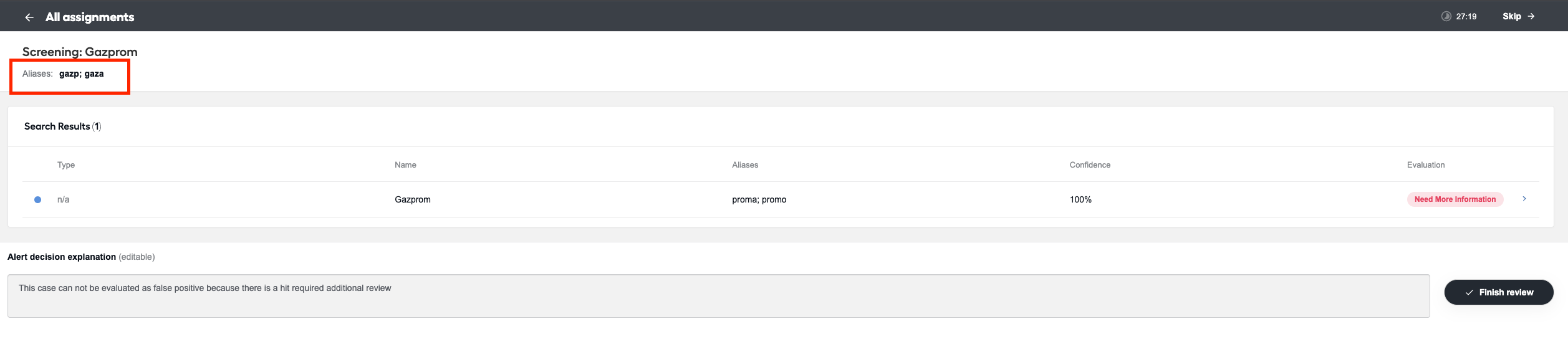
Aliases
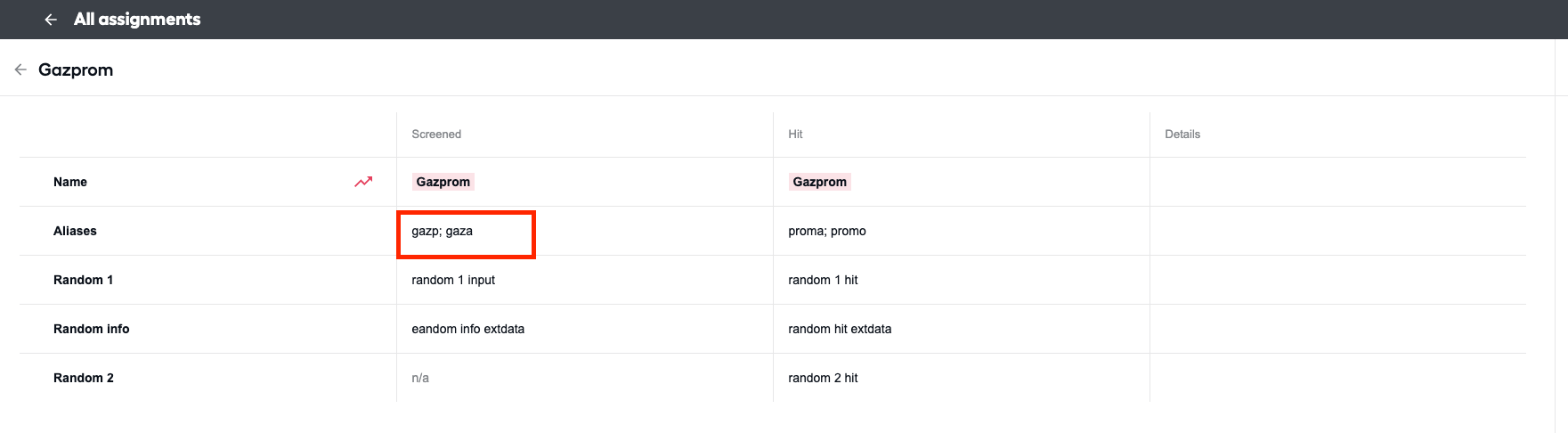
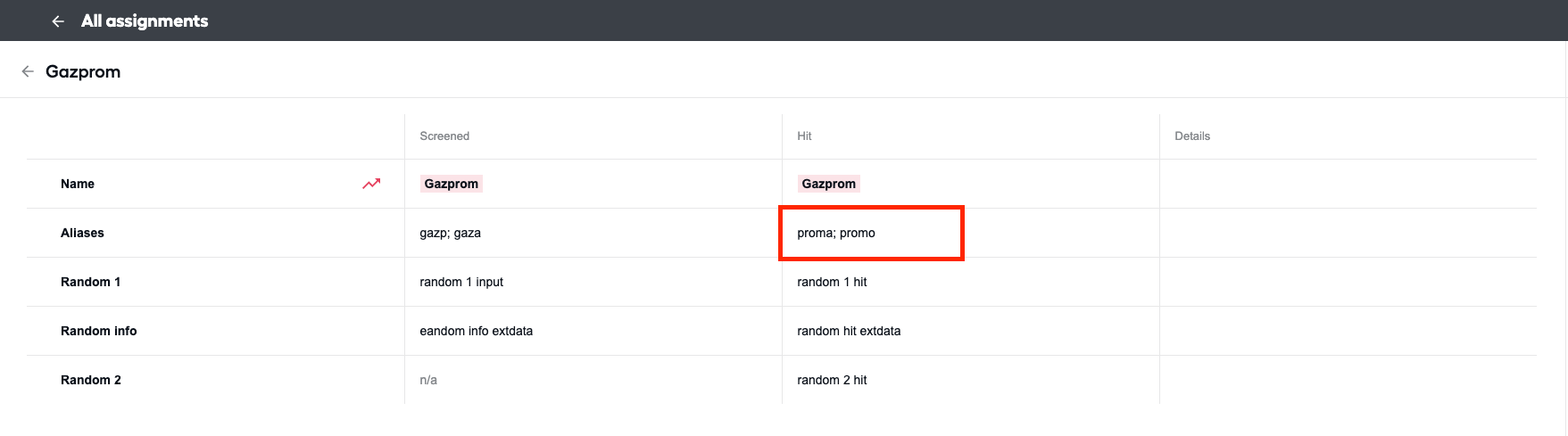
Any names other than primary (
input_full_name,hit_matched_name) passed as input data or as part of hit data to the Manual Task step are treated as aliases. If no aliases are present, the aliases column is not generated.Sample input aliases on the main alert page:
Sample input aliases on the hit page:
Sample hit aliases:
Additional info field
Any info passed to the Manual Task step as the
input_additional_info_extdatainput field orhit_additional_info_extdatahit field are displayed in Additional Information About the Screened Entity and Additional Information About the Watch List Entity fields, respectively. If no additional info is present, the respective columns are not generated.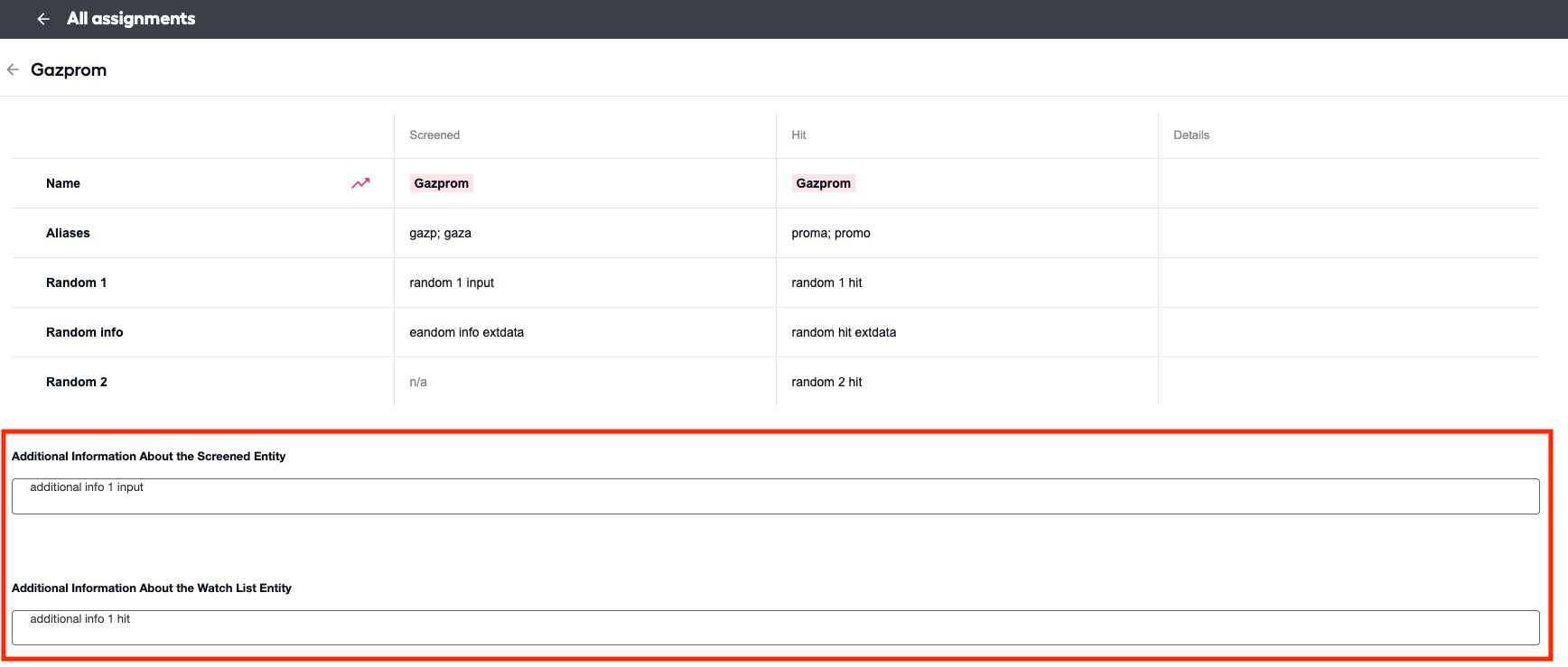
Any input or hit
extdatafields (ending withextdata) that are not additional info are displayed as respective columns. For instance, the information frominput_random_field_extdatais displayed in the column named Random field.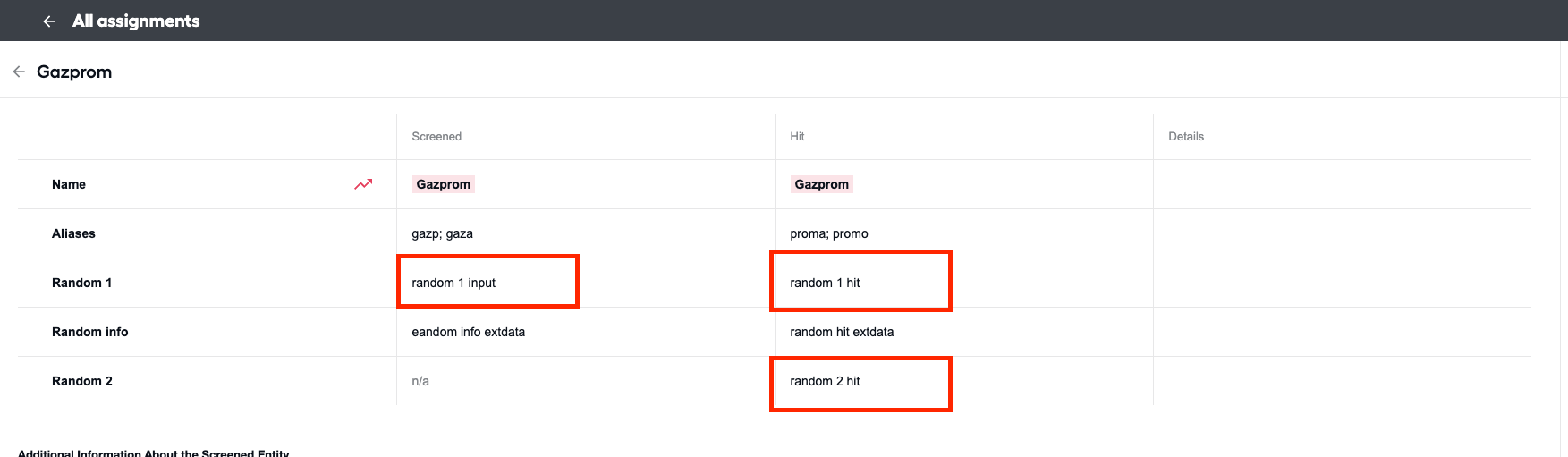
Bug fixes
- Fixed billing-related issues.
Version 2.4.0
- Released: November 14, 2023
- Compatible platform version: IA Cloud 10.2.7+
New features
Added an input field to represent the full address string that can be used for the Location Enrichment feature and proximity calculations. The field is fully supported by REST API, CSV, and flat file inputs.
Updated the classification model by enabling it to calculate proximity.
Added Google Geocoder as a source to enrich input with location data.
Version 2.3.0
- Released: October 13, 2023
- Compatible platform version: IA Cloud 10.2.7
New features
- Introduced integration with the Thomson Reuters CLEAR connector, enabling configuration via the user interface.
Improvements
- Improved exception handling in the Thomson Reuters CLEAR connector, adding a related error message in case Thomson Reuters fails due to unauthorized access.
- Enhanced the ticker lookup logic based on new data.
Bug fixes
Fixed the issue with incorrect calling a name mismatch when a numerical value is the same but a hit has a space.
Fixed the issue when WorkFusion REST API or CSV file were selected as input sources, but a Business Process started with the Factiva provider ID.
Resolved the issue with the connector failing when a full name and a date were provided in input but a location was null.
Version 2.2.2
- Released: October 13, 2023
- Compatible platform version: IA Cloud 10.2.7
Improvements
- Enhanced logic for detecting ticker symbols for Securities screening.
Version 2.2.1
- Released: October 9, 2023
- Compatible platform version: IA Cloud 10.2.7
Bug fixes
- Fixed the issue when WorkFusion REST API or CSV file were selected as input sources, but a Business Process started with the Factiva provider ID.
Version 2.2.0
- Released: September 27, 2023
- Compatible platform version: IA Cloud 10.2.7
New features
Added multiple usability enhancements to a Manual Task.
Added the ability to select a report type in the UI, for example, QC Report, HTML Report, or both.
Implemented updating of stopwords directly in the model UI.
Added the customer ID support to REST API.
Enabled downloading of format and input files when using a CSV provider in the UI instead of going to S3.
Improved the model selection mechanism to make it easier to select the latest model.
Updated the display of false-positive and escalation scores to provide more clarity to a user.
Added links to HTML and QC reports in a REST API response.
Updated the REST API flow.
Enabled a newly created Business Process to fetch ticker data from https://www.sec.gov/ automatically.
Updated the ticker logic based on new scenarios. Now, you can define a ticker symbol using RegEx.
Updated obsolete filtering to include more options.
Enabled REST API to be used with a Manual Task.
Updated the date-matching logic and enabled the threshold configuration.
Bug fixes
Resolved the issue with an alert level decision that is now updated based on a hit decision in a Manual Task.
Resolved the issue with Manual Tasks. A hit explanation in a Manual Task is saved and overrides the original model decision.
Fixed the issue with an HMTL report failing when no
input_idis provided.Updated the Business Process failure message for no name hits with Firco to make it more accurate.
Resolved the issue with CSV configuration parameters for a REST provider.
Fixed the issue with the company registration ID.
Fixed the issue with the v10.2.6 bundle upload.
Version 2.1.2.5
- Released: September 19, 2024
- Compatible platform version: IA Cloud 10.2.6+
Bug fixes
- Fixed the ticker symbol conversion issue that caused Evelyn to take incorrect false positive decisions.
Version 2.1.2
- Released: July 3, 2023
- Compatible platform version: IA Cloud 10.2.6+
Bug fixes
- Fixed a bug that allowed saving model results with deadlock.
Version 2.1.1
- Released: June 15, 2023
- Compatible platform version: IA Cloud 10.2.6+
Updates
- Downgraded the Firco Trust client from v.1.21 to v.1.20 to eliminate the connector bug.
Version 2.1.0
- Released: June 7, 2023
- Compatible platform version: IA Cloud 10.2.6+
New features
Added the support of the HTML format for the results from Evelyn.
Added the ticker lookup feature to ensure the accurate screening of sanction data containing stock ticker information.
The ticker Data Store contains a list of all the ticker and ETF symbols from the following sources:
U.S. Securities and Exchange Commission | Company Tickers
When Evelyn receives input data from securities feeds (via Firco Trust Case Manager API), it assesses whether the data includes ticker information. For example, Evelyn extracts a ticker symbol
HLFfrom the sample input dataHLF 18 JUL23 33 Weekly Calland refers to the ticker Data Store to check if such a symbol exists.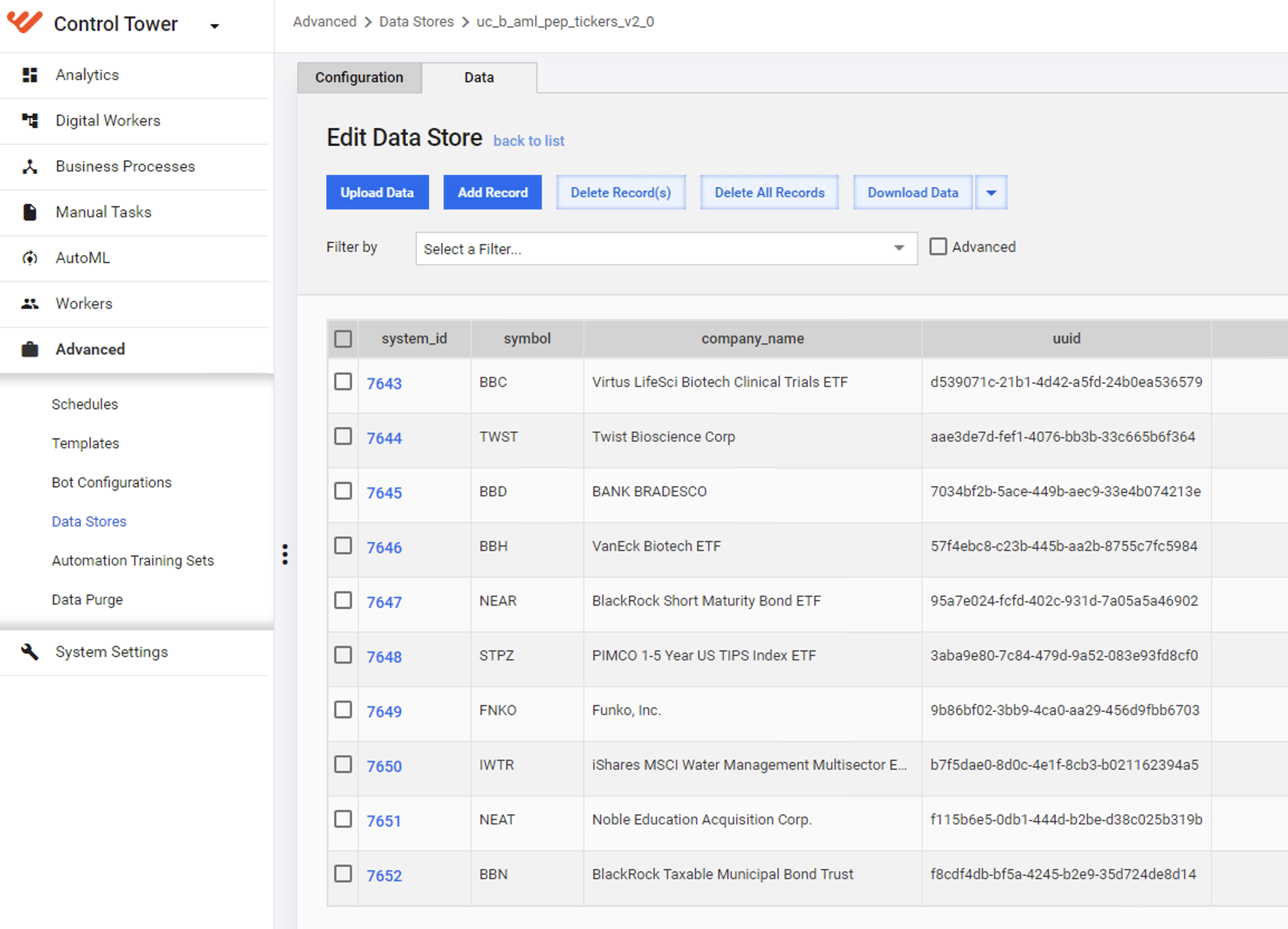 info
infoThe ticker lookup tool is triggered whenever Evelyn detects an input name containing the
CallorPuttext only.If Evelyn finds the ticker symbol, it uses the corresponding description as the input data. For example,
Herbalife Ltd. Common Shareswill be used as the input data rather thanHLF 18 JUL23 33 Weekly Call.The model explanation in the QC report is updated to notify that the input data is enriched by the ticker information.
If the symbol is unavailable in the Data Store, Evelyn continues as usual and performs the screening using the original input data.
The Data Store is maintained manually in coordination with the WorkFusion Support team. The automated updating of the Data Store is planned for a future release.
Improved performance to ensure high volumes of data are correctly handled.
Bug fixes
- Words and phrases that contain characters with accents or carets are now being handled correctly, for example, á > a.
- The
transaction_countfield required for billing data is now populated in Kibana.
Version 2.0.2.1
- Released: April 18, 2023
- Compatible platform version: IA Cloud 10.2.6+
Bug fixes
The model can now handle document.content from training.
Fixed the issue with sending requests to a BP via the External Streaming API. The problem was that the Firco provider didn't provide any data to users if the input hadn't returned Alerts or Hits. Now you receive a meaningful response with the COMPLETED status.
Resolved the oversampling issue that was caused by the force Auto-QC feature.
Fixed the issue with the model producing ML errors when a CSV provider is run.
Version 2.0.2
- Released: March 21, 2023
- Compatible platform version: IA Cloud 10.2.6+
New features
Added support for dataset creation via configuration on the AI Agent interface.
Enhanced the configuration of model rules by updating the logic and enabling users to specify when a case should be considered a false positive.
Revised the streaming API logic when screening with Firco to give the API unit value greater priority than the unit value defined in the interface.
Bug fixes
- Resolved the issue to ensure multiple hits with the same ID are processed.
Version 2.0.1
- Released: January 17, 2023
- Compatible platform version: IA Cloud 10.2.6.1
New features
Updated data filtering for Firco Trust provider to:
- Remove obsolete records older than 90 days, irrespective of the hit type.
- Remove non-name hit types.
Updated the resolution logic to include information in the explanation only if this information was used as criteria for matching. For example, location information is not included in the hit/alert resolution if not used as matching criteria.
The report name included as a hit attachment in Firco Trust no longer contains any special characters. This helps overcome Firco Trust’s limitations that don’t allow users to open the report.
Added the capability to generate a dataset via the UI. You can find this feature in step 2 of the AI Agent configuration interface.
Updated logs to inform users about empty CSV input files. The technical log message is no longer displayed.
Added validation for input format files on the configuration screen.
All ML models in the AI Agent configuration interface are now available for selection.
Upper- and lowercase characters are no longer accepted in UI config when using Firco Trust as an input provider.
Bug fixes
- Alerts with the “Needs further review” status are no longer selected for Auto QC.
- Fixed CSV providers failing with no hits found.
- The v2.0.x installation no longer fails on environments where v1.x is already installed.
- Fixed the issue with Russian names from WC1 not appearing correctly in Manual Task or Quality Check.
- Added the fix to ensure that non-Name messages are not selected for Auto QC.
Version 2.0
- Released: December 13, 2022
- Compatible platform version: IA Cloud 10.2.6.1
New features
Installation and configuration of the Evelyn AI Agent is now possible using the UI via Solution Catalog.
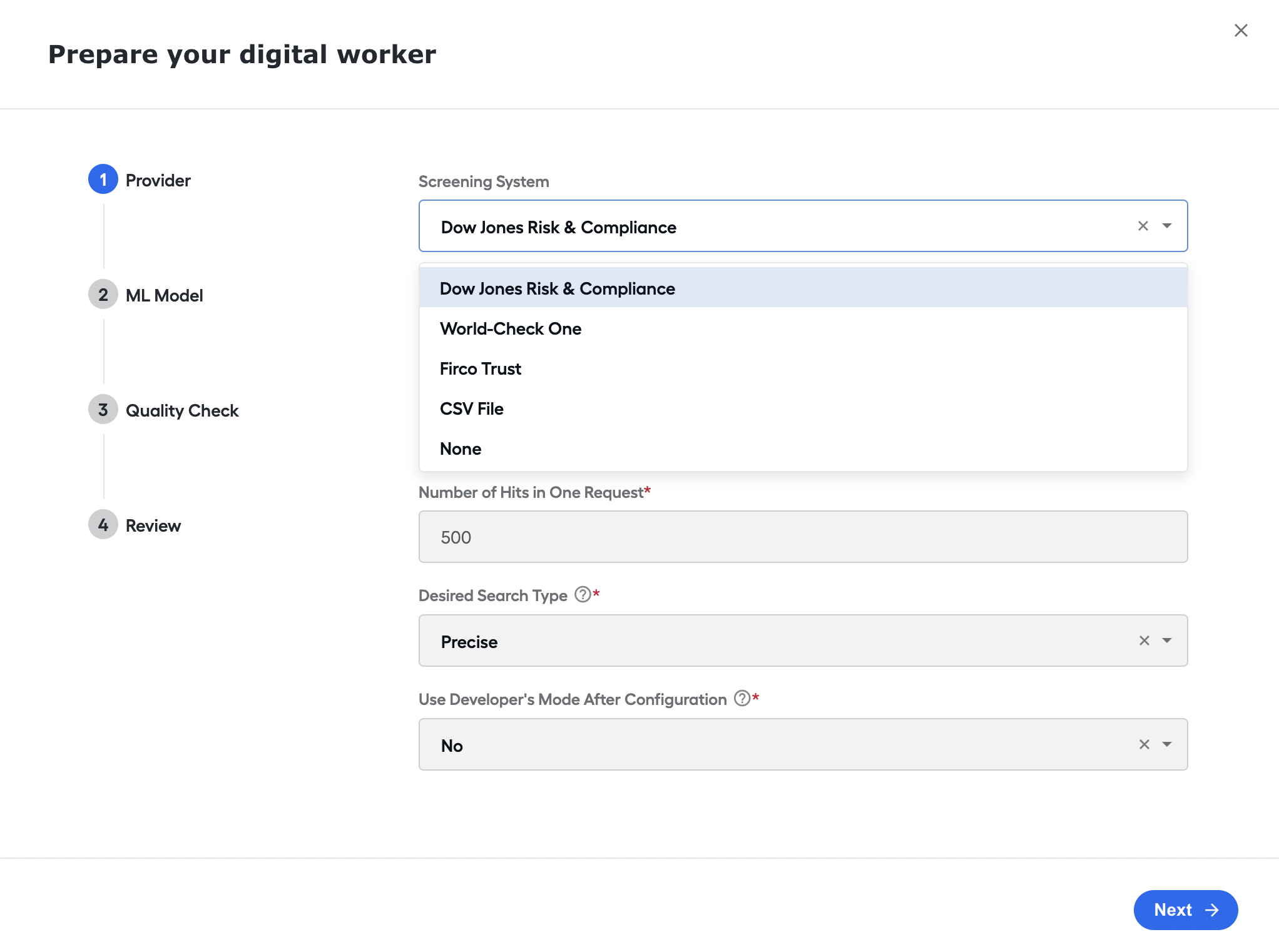
Users can now enable and disable the Auto Quality Check (Auto QC) feature from the UI. Step 3 of the configuration screen contains a checkbox to toggle the check. You can specify the percentage of alerts to be checked in the text box.
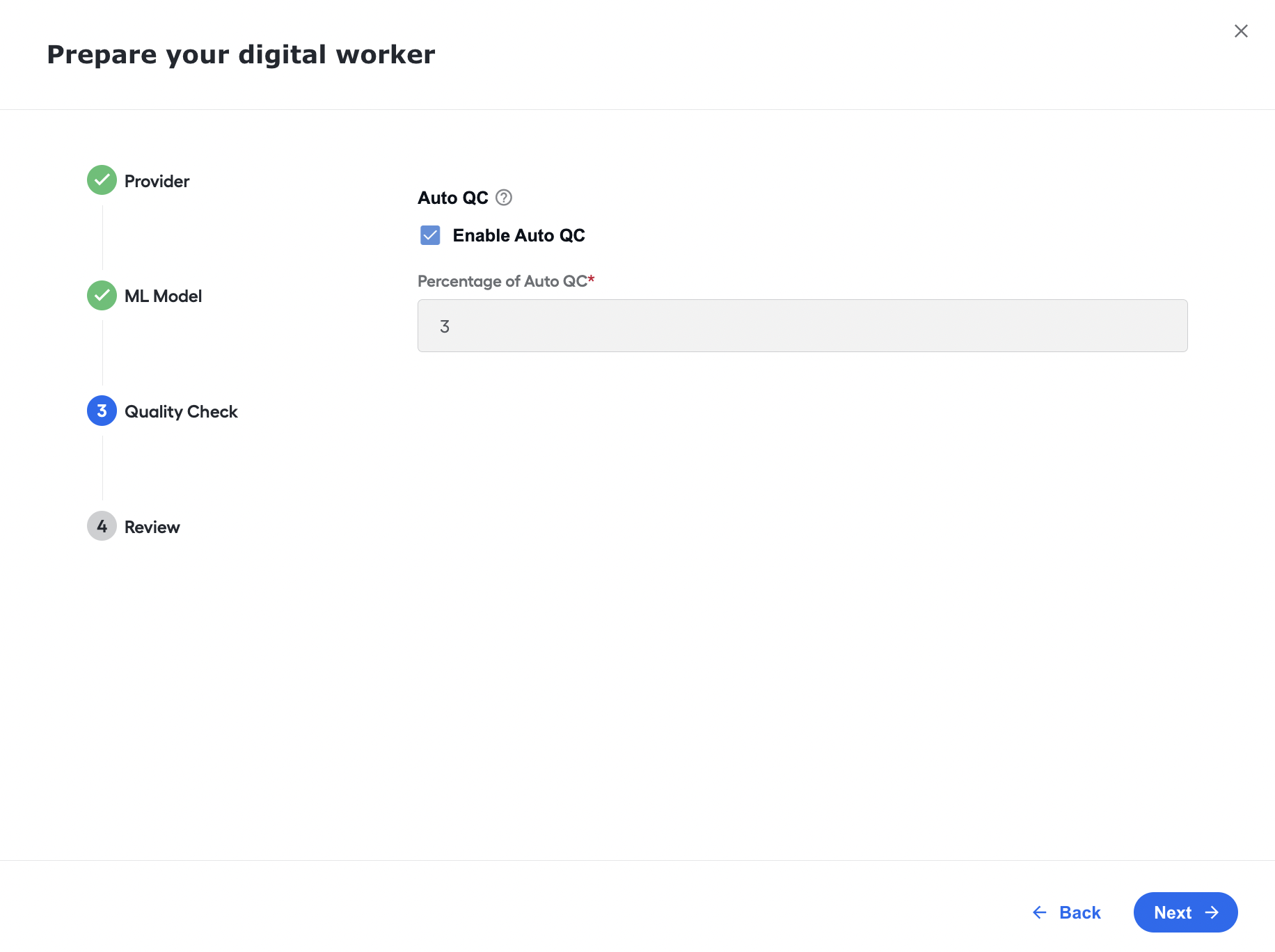
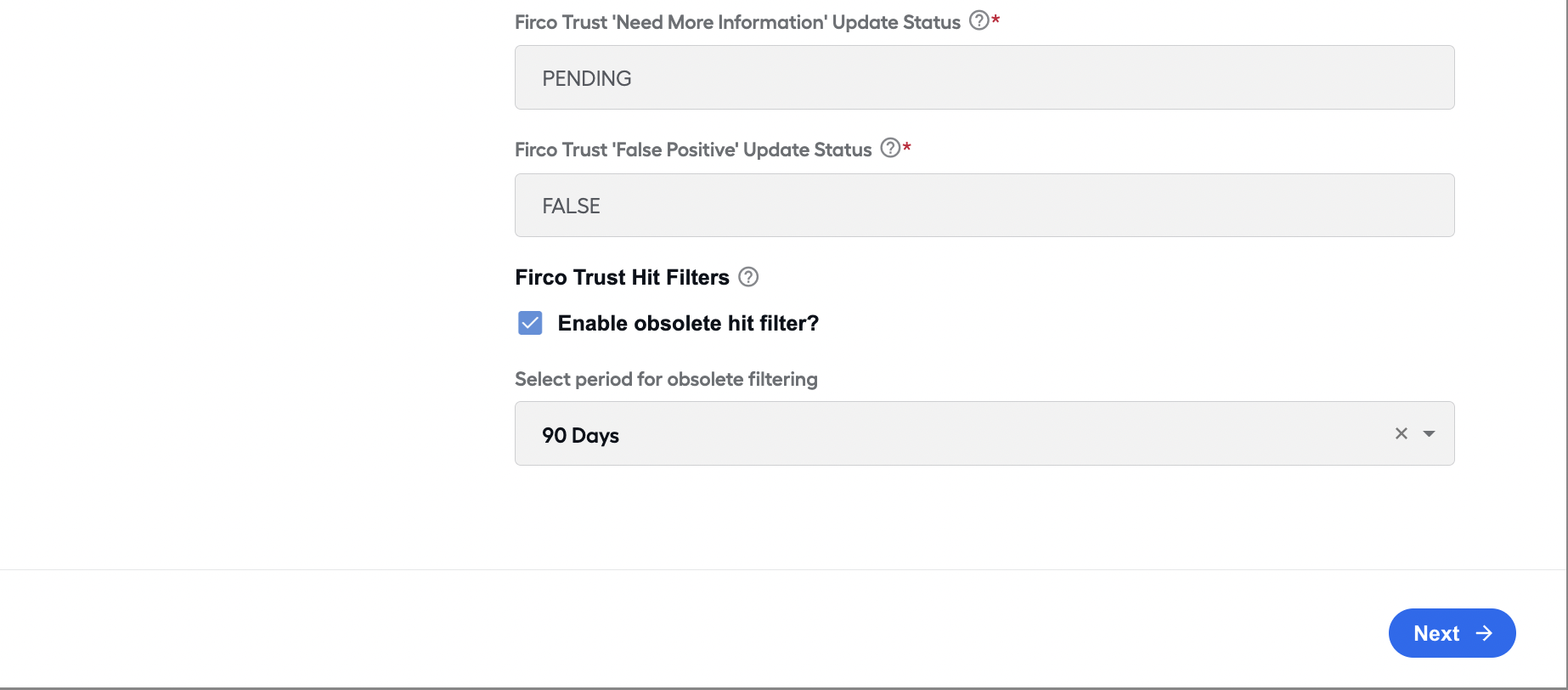
You can now toggle obsolete hits for Firco Trust via the UI, on the Provider step. Once the feature is enabled, select the number of days you want to enable obsolete filtering.
We updated the transaction calculation logic for historical data in non-PROD environments. To better capture transactions to track their actual testing level, we changed the CSV upload method to capture the number of alerts in addition to the number of hits and then sent the alerts as transactions for billing.
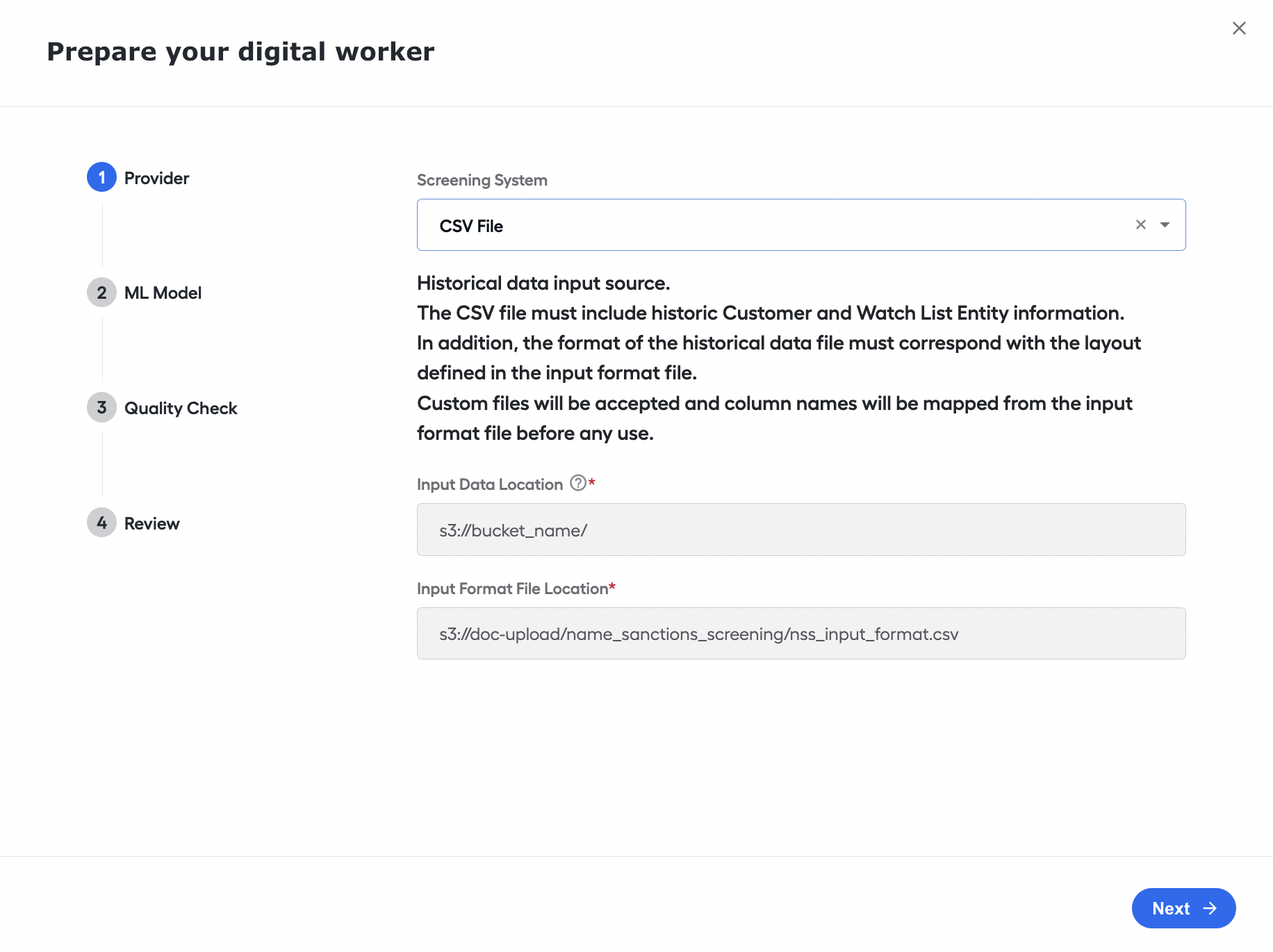
If the user selects CSV as the Provider on step 1 of the UI Config, they are prompted to provide a location on the MinIO S3 where the CSV files will be provided.
Now, you can start the Evelyn AI Agent via CT REST API. With this release, the API can:
- Initiate screening via REST API for Firco Trust.
- Initiate screening via REST API using CSV provider.
- Make full alert screening via REST API.
Version 1.3.2
- Released: November 17, 2022
- Compatible platform version: IA Cloud 10.2.4
New features
- Updated the Auto QC logic: each Business Process run now flags at least one hit for Auto QC.
- Added the resolution confidence score to the QC Report.
- Changed the way of the Analytics update. Now, this is done after a BP run.
Bug fixes
- Fixed the BP workflow view that contained a reference to the previous version of the BP.
- Added ”Term Loan” to NLP Terms.
- Fixed the issue with multiple generations of a QC Report.
Version 1.3.1
- Released: September 30, 2022
- Compatible platform version: IA Cloud 10.2.4
New features
- Added the Alert level decision and explanation to a QC Report.
Version 1.3
- Released: September 9, 2022
- Compatible platform version: IA Cloud 10.2.4
New features
QC Report updates:
- Added the AutoQC colum.n
- Added the
List_matching_stringandRecord_matching_stringvalues.
Updated the alert level message to add information if the alert has been selected for Auto QC.
Records marked as obsolete are now filtered from the Firco data.
Bug fixes
- Updated the status of alerts selected for Auto QC. ‘Closed’ is changed to ‘In progress’.
- Fixed the issue where the FT monitor was executed more than once, and BP tried to process one message twice.
Version 1.2.3
- Released: August 29, 2022
- Compatible platform version: IA Cloud 10.2.4
New features
- Updated calculation of the automation rate on alert level.
Version 1.2.2
- Released: August 3, 2022
- Compatible platform version: IA Cloud 10.2.4
New features
- Updated calculation of the automation rate on alert level.
Bug fixes
- Resolved issue with the AI Agent removing rows from an FT processing DB table.
Version 1.2.1
- Released: June 29, 2022
- Compatible platform version: IA Cloud 10.2.4
New features
- Added batch processing of all Firco messages.
- Removed the pooling check to stop looping if no message is returned from the Firco inventory request.
- After processing, the hit data is now removed from the
nss_documentstable.
Bug fixes
- Created the Liquibase migration for the
FIRCO_TRUST_B_UNITfield.
Version 1.2.0
- Released: June 10, 2022
- Compatible platform version: IA Cloud 10.2.4
New features
- Improved performance.
- Improved the PoC flow.
Version 1.1.0
- Released: April 25, 2022
- Compatible platform version: IA Cloud 10.2.4
New features
- Added the API integration with Firco Trust Case Manager.
- Remove PII data from the production logs.
Bug fixes
- The BP bot step no longer refers to the old class versions.
Version 1.0.1
- Released: April 11, 2022
- Compatible platform version: IA Cloud 10.2.4
New features
- Included the Decision Matrix configuration with thresholds and rules into AutoML.
Version 1.0
- Released: March 23, 2022
- Compatible platform version: IA Cloud 10.2.4
Name Screening Alert Review version 1.0 is released.
The scope includes:
- Person screening support.
- Basic decision model for person screening is implemented: Matching Type of Record, Date of Birth, Gender, Citizenship, and Residency.
- Location matching using synonyms dictionary.
- Manual task to review alert machine decisions.
- Analytics dashboard to evaluate the skill’s effectiveness.
- DowJones Risk & Compliance caches: development (for searches) and production (for alerts) to reduce the number of requests to DJ R&C API and make the Business Process more resilient to API connection problems.