Thomson Reuters CLEAR API connectors
Thomson Reuters (TR) CLEAR provides search, reporting, and analytics capabilities against public records data and external live gateway data sources. The instruction describes how to install and configure the Thomson Reuters Clear - Adverse Media Search Connector for the Evan and Evelyn AI Agents to work with TR CLEAR as a data provider.
You must have credentials to access TR CLEAR resources:
Installation
To obtain an Asset Bundle (zip archive) containing the required version of the TR CLEAR connector, contact your account manager or the Support team. Once you have the Asset Bundle, import it to Control Tower following the instructions provided in the guide.
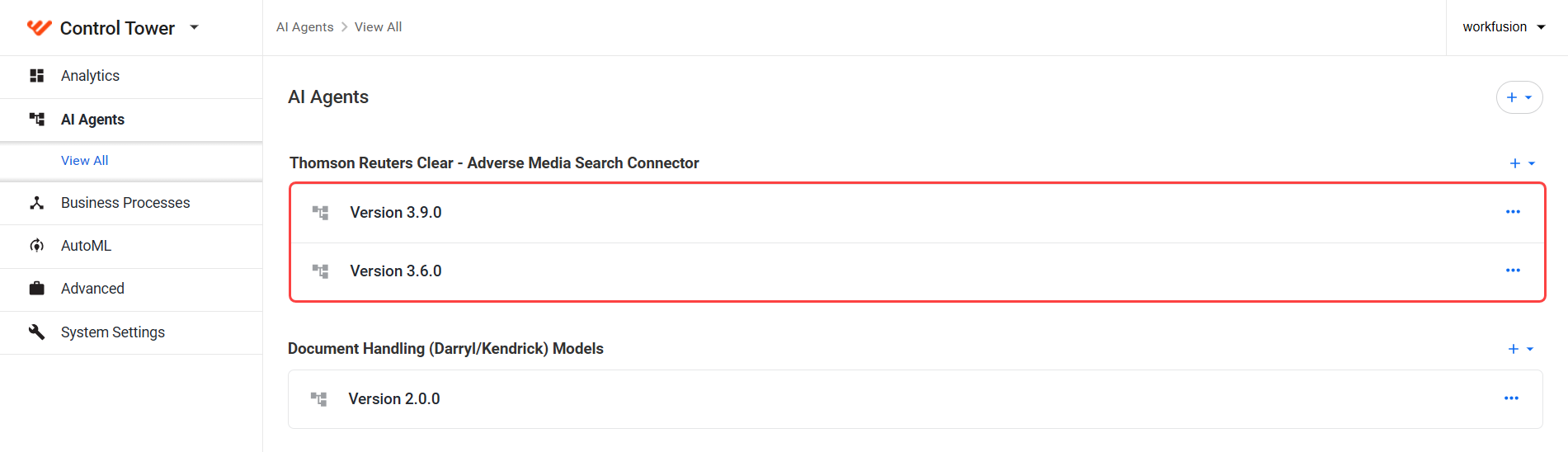
Once the import is completed successfully, you should see the installed connector variation in Control Tower in Digital Workers (Work.AI up to v10.2.9) or AI Agents (Work.AI v10.3+) listed under Thomson Reuters Clear - Adverse Media Search Connector.
Configuration
To configure the TR CLEAR connector as a data provider, follow the steps for your platform version:
For Work.AI versions up to v10.2.9: go to the Digital Workers page, open the Actions menu next to the connector variation, and select Settings.
For Work.AI v10.3+: go to the AI Agents page, open the Actions menu next to the connector variation, and select Settings.
In the configuration form, set the following parameters as needed:
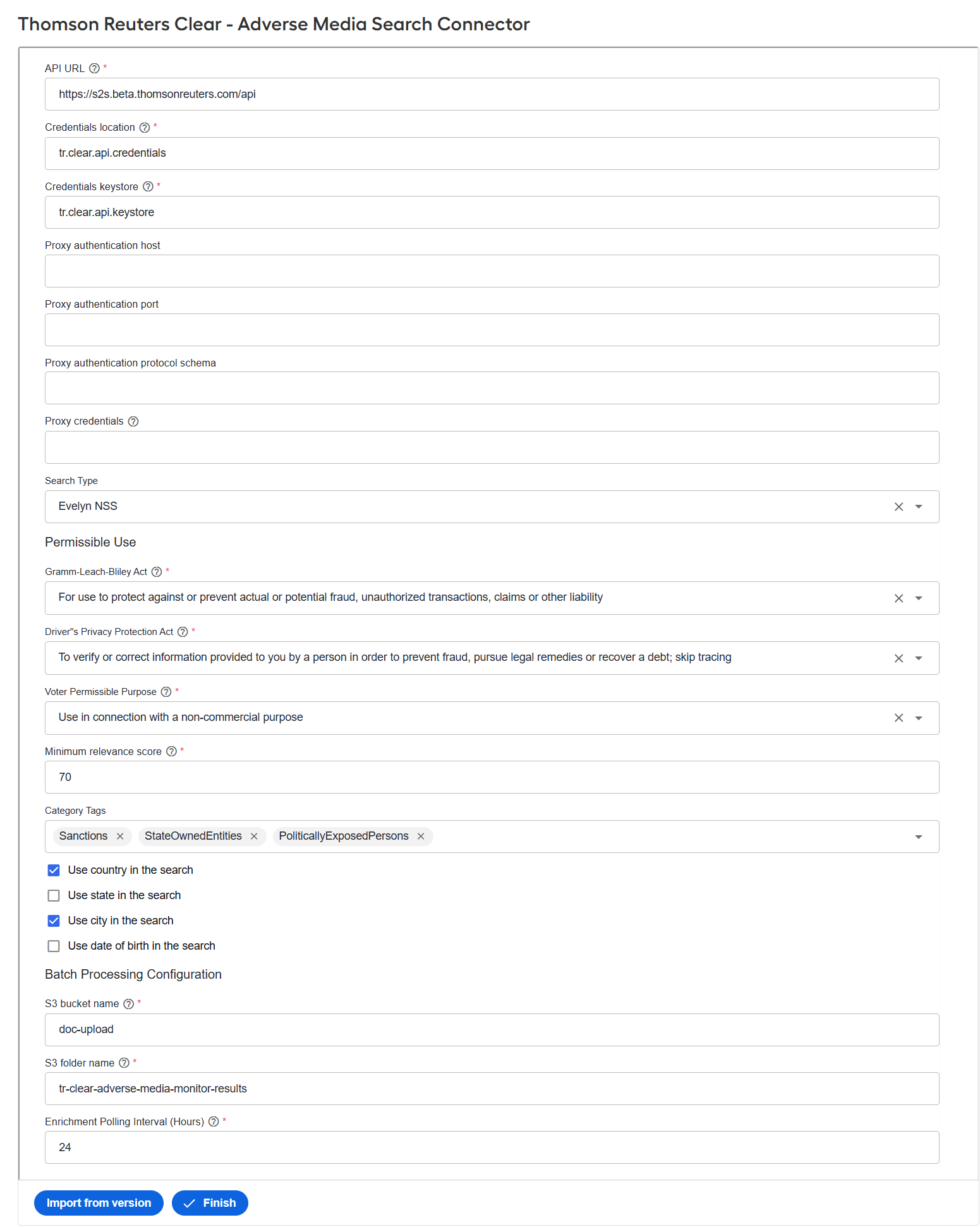
API URL. Enter the base URL for the TR CLEAR API endpoint provided by Thomson Reuters.
Credentials location. Specify the authentication alias stored in Secrets Vault.
Credentials keystore. Enter the keystore details associated with the credentials for the provider license.
Proxy authentication host. Provide the hostname of your proxy server if your environment requires outbound API calls to be routed through a proxy.
Proxy authentication port. Specify the port number used by your proxy server.
Proxy authentication protocol schema. Specify the protocol used by the proxy.
Proxy credentials. Enter the username and password for proxy access.
Search Type. Select Evelyn NSS for Evelyn or Evan AMM for Evan, depending on which AI Agent will use the connector.
Gramm-Leach-Bliley Act. Select the intended permissible purpose to comply with the privacy provisions of the GLB Act. Misrepresenting your purpose is a violation of the subscriber agreement and applicable laws. Any misuse of West (Thomson Reuters) data may result in account termination and referral to the appropriate authorities.
Driver's Privacy Protection Act. Select the intended permissible use while acknowledging the DPPA requirements. The Act restricts disclosure of personal information contained in motor vehicle records. It does not apply to accident reports, violations (MVRs), or driver status.
Voter Permissible Purpose. Select the intended permissible use when accessing voter registration records. State laws require that each search, including its purpose and details, be stored for at least five years. Not all permissible uses apply to every state.
Minimum relevance score. Enter a number from 0 to 100. Any results with a relevance score below this threshold are excluded.
Category Tags. Provide one or more category tags to include in the search. Tags help refine the scope of adverse media results.
Use country in the search. Select the checkbox to include the country field in subject requests.
Use state in the search (for Evelyn only). Select the checkbox to include the state field in subject requests.
Use city in the search (for Evelyn only). Select the checkbox to include the city field in subject requests.
Use date of birth in the search (for Evelyn only). Select the checkbox to include the date of birth field in subject requests.
S3 bucket name. Enter the name of the S3 bucket.
S3 folder name. Enter the name of the folder in the S3 bucket.
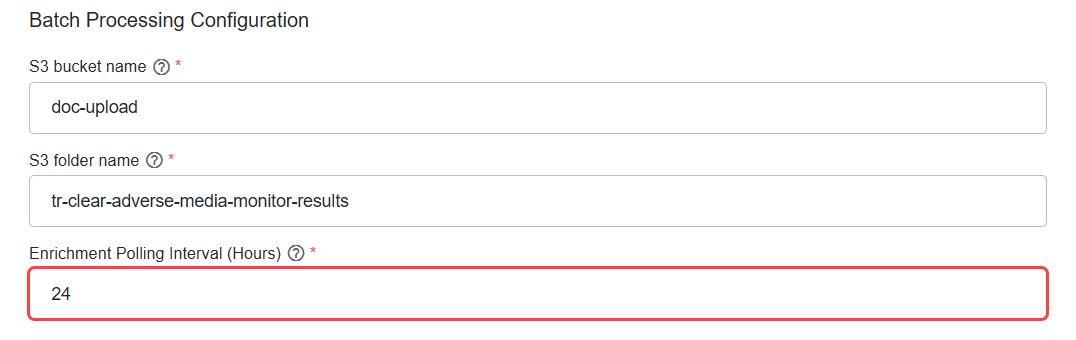
Enrichment Polling Interval (Hours). Specify the number of hours between each run of the TR Clear Manage Monitor Alert Enrichment Business Process (BP) to check for missing subject IDs. The minimum value is 1 hour.
Set up SSL certificate
In addition to the user ID and password needed for basic authentication, the TR CLEAR API requires an SSL client certificate to authenticate API calls. Once installed in the environment, the certificate can be used by any number of clients.
To install the client certificate, complete the following steps:
Create a keystore file using the client certificate and password provided by Thomson Reuters, for example:
keytool -importkeystore -v -srckeystore clientcert.pfx -srcstoretype pkcs12 -keystore newstore.ksUpload the keystore file to the WorkFusion environment on the Agent virtual machines. The path is
/opt/workfusion/vds-data/connectors/tr-clear.Create a secret entry with the
tr.clear.api.keystorealias containing the following values:- Key: the path to the
keystorefile on the Agent machine, for instance,/opt/workfusion/vds-data/connectors/tr-clear/newstore.ks - Value: the
keystorepassword
- Key: the path to the
Agent node IP addresses must also be added to the whitelist on the Thomson Reuters side. Otherwise, API calls from the TR CLEAR connector will fail.
Configure rate limiting
The TR CLEAR system enforces a limit of 25 concurrent open connections per CLEAR API user. To prevent HTTP 429 errors, set the following ZooKeeper property that limits the maximum number of workers to 25 when a single BP uses a single CLEAR API user. Adjust the number of workers accordingly if multiple BPs use the same TR CLEAR credentials.
TR Clear Adverse Media Monitor Adhoc Search BP:
/config/worker-management-service/bep.worker.pool.com.workfusion.connectors:tr-clear-adverse-media-adhoc-search:<version>.max-worker-count-pool-limitTR Clear Adverse Media Manage Monitor:
/config/worker-management-service/bep.worker.pool.com.workfusion.connectors:tr-clear-adverse-media-manage-monitor:<version>.max-worker-count-pool-limitTR Clear Adverse Media Monitor Results Poller:
/config/worker-management-service/bep.worker.pool.com.workfusion.connectors:tr-clear-adverse-media-monitor-results:<version>.max-worker-count-pool-limit
Once the ZooKeeper property is updated, restart the Worker Management Service for the changes to take effect.
Set error retry
By default, HTTP 5xx error codes and any other exceptions are retried twice, starting with a one-second delay and using exponential backoff with a 2x multiplier. This results in retry delays of 1 second and then 2 seconds, for a maximum processing time of approximately 4 seconds. If all retries are exhausted or a non-retryable HTTP error occurs (typically 4xx), the error is caught and returned in the error response.
You can modify the default configuration in ZooKeeper. Note that the node path differs for each BP:
TR Clear Adverse Media Monitor Adhoc Search:
/config/application,tr-clear-adhoc-search/<property_to_override>TR Clear Adverse Media Manage Monitor:
/config/application,tr-clear-manage-monitor/<property_to_override>TR Clear Adverse Media Monitor Results Poller:
/config/application,tr-clear-monitor-results/<property_to_override>
TR Clear Adverse Media Monitor Adhoc Search
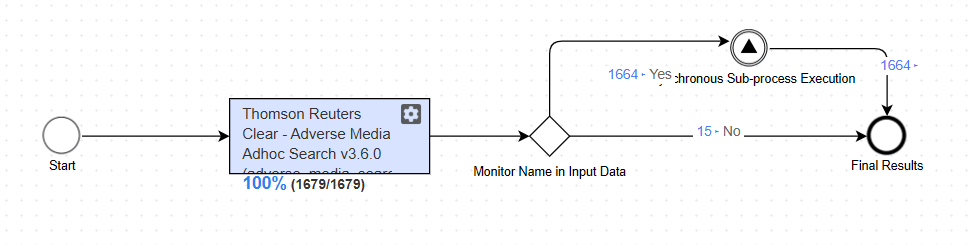
The TR CLEAR connector integrates with TR CLEAR APIs to support adverse media searches for the Evan and Evelyn AI Agents in the TR Clear Adverse Media Monitor Adhoc Search BP.
API endpoints
The connector integrates the following TR CLEAR API endpoints:
{{baseUrl}}/v2/adversemedia/searchResultssubmits the search criteria and returns a result URL that containsSearchIdandGroupCount(total number of results).{{baseUrl}}/v2/adversemedia/searchResults/<SearchID>?startGroup=<Start Index of the Group; 1 based>&maxGroups=<Number of Groups to fetch in one call>. ThemaxGroups(pageSize) parameter defaults to 50. To change its value, create and update the following ZooKeeper node with the desired number:/config/tr-clear-api/<userId>/maxRecordsPerPage.
Configuration parameters
The following configuration parameters are available for the connector:
| Property | Default value | Description | ZooKeeper node to override property value |
|---|---|---|---|
camel.error-handler.custom-enabled | true | Enables or disables the custom error handler. | /config/application,tr-clear-adhoc-search/camel.error-handler.custom-enabled |
camel.error-handler.maximum-redeliveries | 2 | Maximum number of retry attempts after the initial failure. When the value is set to 2, the message is attempted three times in total (1 initial attempt and 2 retries). | /config/application,tr-clear-adhoc-search/camel.error-handler.maximum-redeliveries |
camel.error-handler.redelivery-delay | 1000 | Initial delay in milliseconds before the first retry attempt. Default is 1000 ms (1 second). | /config/application,tr-clear-adhoc-search/camel.error-handler.redelivery-delay |
camel.error-handler.back-off-multiplier | 2 | Multiplier that increases the delay between retries. When the value is set to 2, retries follow an exponential backoff: 1s → 2s → 4s. | /config/application,tr-clear-adhoc-search/camel.error-handler.back-off-multiplier |
camel.error-handler.retryable-status-codes | 500-599 | HTTP status codes that trigger retries. The 500-599 range retries all server-side errors (5xx), while client-side errors (4xx) are not retried. | /config/application,tr-clear-adhoc-search/camel.error-handler.retryable-status-codes |
Connector input
{
    "searchRequest" : string,
    "searchPeriod": int //optional, only used by Evan
    "entityId": string //optional
    "location": [ //optional
        {
            "country": string,
            "state": string,
            "city": string
        }
    ],
    "dates": [ //optional, only used by Evelyn
        string
    ],
     "addToOngoingMonitor" : boolean // optional, true to add the monitor via the TR Clear Adverse Media Manage Monitor BP
     "inputData": string // optional. If 'addToOngoingMonitor'=true, its content is sent to the TR Clear Adverse Media Manage Monitor BP as 'subjectDetails'
    }
}
You can enable or disable processing of "country", "state", "city", and "dates" fields in the connector configuration.
When addToOngoingMonitor is set to true, the monitor is forwarded to the TR Clear Adverse Media Manage Monitor BP.
The rest_request field is populated with the JSON shown below, using values extracted from connector_input.
{
    "action": "addSubject",
    "userReference": string // entityId (Evan) or inputData.id (Evelyn)
    "subjectDetails" string // inputData
}
Connector output
Below are the connector response and mapping details.
Evan
{
    searchUrl - String (<Uri> field from the first response),
    articles: [
        {
            fullText - String,
            originalLink - String (<URL> response field),
            title - String (<Title> response field),
            summary - String (<Snippet> response field),
            publicationDate - LocalDate (<Date> response field).
            wordCount - Integer (should be calculated from the <FullText>. Null if content was not returned)
            language - String (<Language> response field)
   relevanceScore - double
        },
    ...
    ]
}
Evelyn
{
    //  AdverseMediaResultsPage.RecordId
    search_id: String
    hits: [{
        // AdverseMediaResultsPage.ResultGroup.RecordDetails.RecordId
        id: String
        AdverseMediaResultsPage.ResultGroup.RecordDetails.Relevance
        relevance_score: double
        // AdverseMediaResultsPage.ResultGroup.RecordDetails.FirstName
        first_name: String
        // AdverseMediaResultsPage.ResultGroup.RecordDetails.LastName
        last_name: String
        // AdverseMediaSanctionsResults.MatchedEntry
        matched_name: String
        // AdverseMediaSanctionsResults.MatchedEntryType
        entity_type: {"INDIVIDUAL", "ENTITY", null}
        // AdverseMediaSanctionsResults.SanctionAdditionalInfo.Alias
        // AdverseMediaSoeResults.AdditionalInfo.Aka
        alias_name: [String]
        // AdverseMediaSanctionsResults.AdverseMediaSoeResults.Gender
        gender: {"Male", "Female", "Other", null}
        // AdverseMediaSanctionsResults.AdditionalInfo.Citizenship = country, type = 'Citizenship'
        // AdverseMediaSanctionsResults.AdditionalInfo.BirthPlace = address
        // AdverseMediaSanctionsResults.AdditionalInfo.Country = country
        // AdverseMediaSanctionsResults.AdditionalInfo.Address = address
        // AdverseMediaSanctionsResults.AdditionalInfo.AddressCountry = country

        //
        address: [{
            type: String
            country: String
            state: String
            city: String
            address: String
        }]
        // AdverseMediaSanctionsResults.AdditionalInfo.DateOfBirth
        // AdverseMediaSanctionsResults.AdditionalInfo.BirthDate
        // AdverseMediaSanctionsResults.AdditionalInfo.Date
        dates: [{
            type: "String"
            date: "mm/dd/yyyy"
        }] or an empty array

    }]
}
If a failure occurs, the connector returns the following exception in its response:
{
  errorMessage: "<error message>"
}
For retry behavior, see Set error retry.
TR Clear Adverse Media Manage Monitor
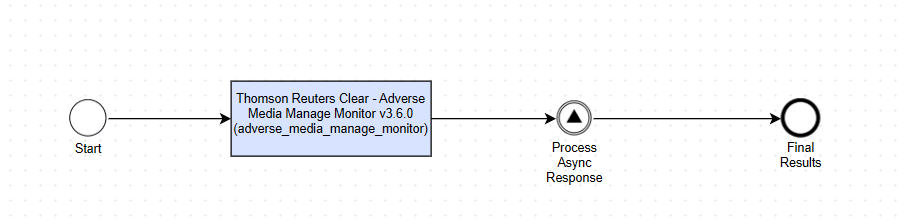
TR Clear Adverse Media Manage Monitor lets you create, update, and delete monitored subjects through the TR CLEAR APIs. It automatically creates monitor lists when needed and distributes subjects across them, keeping each list within the 500,000-subject limit.
API endpoints
The connector integrates the following TR CLEAR API endpoints:
/v2/adversemedia/createMonitorcreates a named adverse media monitor list containing one or more subjects, with theasyncflag set totrue./v2/adversemedia/createMonitor/:idretrieves the status of the asynchronous request to create a monitor list./v2/adversemedia/addMonitorSubjectsadds subjects to an existing adverse media monitor list, with theasyncflag set totrue./v2/adversemedia/addMonitorSubjects/:idretrieves the status of the asynchronous request to add subjects./v2/adversemedia/deleteMonitorSubjectsdeletes a subject from a monitor list./v2/adversemedia/monitorListDetailreturns details of a specific monitor list.
Configuration parameters
The following configuration parameters are available for the connector:
| Property | Default value | Description | ZooKeeper node to override property value |
|---|---|---|---|
camel.error-handler.custom-enabled | true | Enables or disables the custom error handler. | /config/application,tr-clear-manage-monitor/camel.error-handler.custom-enabled |
camel.error-handler.maximum-redeliveries | 2 | Maximum number of retry attempts after the initial failure. When the value is set to 2, the message is attempted three times in total (1 initial attempt and 2 retries). | /config/application,tr-clear-manage-monitor/camel.error-handler.maximum-redeliveries |
camel.error-handler.redelivery-delay | 1000 | Initial delay in milliseconds before the first retry attempt. Default is 1000 ms (1 second). | /config/application,tr-clear-manage-monitor/camel.error-handler.redelivery-delay |
camel.error-handler.back-off-multiplier | 2 | Multiplier that increases the delay between retries. When the value is set to 2, retries follow an exponential backoff: 1s → 2s → 4s. | /config/application,tr-clear-manage-monitor/camel.error-handler.back-off-multiplier |
camel.error-handler.retryable-status-codes | 500-599 | HTTP status codes that trigger retries. The 500-599 range retries all server-side errors (5xx), while client-side errors (4xx) are not retried. | /config/application,tr-clear-manage-monitor/camel.error-handler.retryable-status-codes |
tr.clear.adverse-media.list.maximum-subjects-count | 250000 | Maximum number of subjects assigned to one monitor list. When the limit is reached, the connector uses another existing list or creates a new one. | /config/application,tr-clear-manage-monitor/tr.clear.adverse-media.list.maximum-subjects-count |
tr.clear.adverse-media.bulk-add.max-subjects | 100000 | Maximum number of subjects accepted in one bulk add, update, or delete request. Requests that exceed the limit are rejected before processing. | /config/application,tr-clear-manage-monitor/tr.clear.adverse-media.bulk-add.max-subjects |
manage-monitor.async-poll.bulk.max-attempts | 30 | Maximum number of attempts to poll for the result of an asynchronous bulk add or update request. | /config/application,tr-clear-manage-monitor/manage-monitor.async-poll.bulk.max-attempts |
manage-monitor.async-poll.bulk.initial-delay | 5000 | Initial delay in milliseconds before the first polling retry. | /config/application,tr-clear-manage-monitor/manage-monitor.async-poll.bulk.initial-delay |
manage-monitor.async-poll.bulk.multiplier | 1.5 | Multiplier that increases the delay between polling attempts. | /config/application,tr-clear-manage-monitor/manage-monitor.async-poll.bulk.multiplier |
manage-monitor.async-poll.bulk.max-delay | 60000 | Maximum delay in milliseconds between polling attempts. | /config/application,tr-clear-manage-monitor/manage-monitor.async-poll.bulk.max-delay |
Operations
The connector exposes the operations below. Invoke them using the following URL:
<environment>/input-connector-rest/execute-record-json/tr-manage-monitor
Add subject
Use the following payload to add a subject for monitoring. The connector uses any additional fields in subjectDetails to build monitoring keywords and stores both the subject details and the derived keywords in the Data Store:
{
  "action": string, // always "addSubject"
  "userReference": string,
  "subjectDetails": { // JSON object representing subject details - required
    "search_request": string, // name to monitor
    // Any additional fields needed to build the keywords for the subject to monitor
  }
}
Evan
{
  "action": "addSubject",
  "userReference": "112233-3",
  "subjectDetails": {
    "search_request": "Osama Bin Laden III",
    "entity_type": "INDIVIDUAL",
    "residence_country": "US",
    "citizenship_country": "GB",
    "subdivision": "US-NY",
    "city": "New York",
    "year_of_birth": 1951,
    "date_of_birth": "1951-05-30",
    "external_id": "task_external_id",
    "additional_information": "some additional information"
  }
}
The subject name is extracted from subjectDetails.search_request. You can enable or disable processing of the residence_country, citizenship_country, monitor_country, and dates fields in the connector configuration.
Evelyn
{
  "action": "addSubject",
  "userReference": "ABC123456789",
  "subjectDetails": {
    "addToOngoingMonitor": true,
    "clientId": "1",
    "gender": "MALE",
    "entityType": "INDIVIDUAL",
    "dates": [
      {
        "original": {
          "month": null,
          "year": "1985",
          "type": "DOB",
          "day": null,
          "full": null
        },
        "source": null,
        "derived": null
      }
    ],
    "uuid": "46c7865b-7382-4077-8a2f-88abe71d9791",
    "goldDecision": null,
    "name": {
      "firstName": "Robert",
      "lastName": "Everest",
      "fullName": null,
      "middleName": "Landon",
      "source": null,
      "derived": null
    },
    "locations": [],
    "id": "ABC123456789",
    "additionalData": {},
    "category": null
  }
}
The subject name is extracted from name.fullName or from the concatenation of name.firstName, name.middleName, and name.lastName.
Add subjects in bulk
Use addSubjectBulk to add multiple subjects in one request. The connector deduplicates the subjects, groups them by monitor list, and makes one API call per list. A request can contain up to the number of subjects configured in tr.clear.adverse-media.bulk-add.max-subjects.
If userReference already exists in the Data Store, the subject is treated as an update. Changes to its name, location, or date of birth cause the existing TR CLEAR record to be replaced with the updated information. If only fields in subjectDetails change, the Data Store is updated without calling TR CLEAR.
{
  "action": "addSubjectBulk",
  "subjects": [
    {
      "userReference": string,
      "subjectDetails": {
        "search_request": string,
        // Any additional fields needed to build the keywords
      }
    },
    ...
  ]
}
Update subject
The payload for updating a subject is identical to the Add subject payload, except for the action value. If the subject's location or date of birth in subjectDetails changes, the connector updates the subject in TR CLEAR. Otherwise, it updates only subjectDetails in the Data Store.
{
  "action": string, // always "updateSubject"
  "userReference": string,
  "subjectDetails": { // JSON object representing subject details - required
    "search_request": string, // name to monitor
    // Any additional fields needed to build the keywords for the subject to monitor
  }
}
See an example
{
  "action": "updateSubject",
  "userReference": "112233-3",
  "subjectDetails": {
    "search_request": "Osama Bin Laden III",
    "entity_type": "INDIVIDUAL",
    "residence_country": "US",
    "citizenship_country": "GB",
    "subdivision": "US-NY",
    "city": "New York",
    "year_of_birth": 1951,
    "date_of_birth": "1951-05-30",
    "external_id": "task_external_id",
    "additional_information": "some additional information"
  }
}
Update subjects in bulk
Use updateSubjectBulk to update multiple monitored subjects in one request. The connector compares each subject with its stored record:
If the subject's name, location, or date of birth changes, the connector deletes and re-adds the subject on the same monitor list because TR CLEAR does not support partial identity updates. The connector makes one delete call and one add call per affected monitor list, rather than per subject.
If only other fields in
subjectDetailschange, the connector updates the Data Store without calling TR CLEAR.
The connector polls the asynchronous add response to retrieve the new subject ID. A request can contain up to the number of subjects configured in tr.clear.adverse-media.bulk-add.max-subjects.
{
    "action": "updateSubjectBulk",
    "subjects": [
      {
        "userReference": string,
        "subjectDetails": {
          "search_request": string,
          // Any additional fields needed to build the keywords
        }
      },
      ...
    ]
}
Delete subject
The payload for deleting a subject is similar to the add and update operations. subjectDetails is optional.
{
  "action": string, // always "updateSubject"
  "userReference": string,
  "subjectDetails": { // JSON object representing subject details - optional
    "search_request": string, // name to monitor
    // Any additional fields needed to build the keywords for the subject to monitor
  }
}
See an example
{
  "action": "deleteSubject",
  "userReference": "testUserReference"
}
Delete subjects in bulk
Use deleteSubjectBulk to delete multiple subjects in one request. The connector groups subjects by monitor list and makes one API call per list. A request can contain up to the number of subjects configured in tr.clear.adverse-media.bulk-add.max-subjects.
Each monitor list is processed independently. If deletion fails for one list, the connector records those subjects as failures, leaves their Data Store records unchanged, and continues processing the other lists. Data Store records are deleted only after TR CLEAR confirms the deletion.
{
    "action": "deleteSubjectBulk",
    "subjects": [
      { "userReference": "100-ab" },
      { "userReference": "100-cd" }
    ]
}
Response
Bulk operations return a response structured as follows:
{
  "processing": string // "success" or "failed"
  "details": string // response details from Thomson Reuters CLEAR system
  "action": string // manage monitor action (addSubject, deleteSubject, and so on)
  "bulk_summary": string // details of the bulk operation
}
For retry behavior, see Set error retry.
TR Clear Adverse Media Monitor Results Poller
TR Clear Adverse Media Monitor Results Poller connects to the TR CLEAR API and polls monitor lists for new results. You can configure the connector to work with Evan or Evelyn, depending on the sync event step defined in the BP.
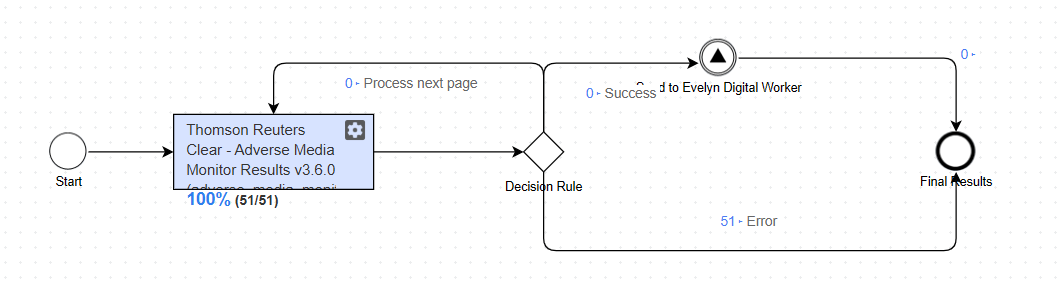
The BP is designed to run once per execution. Use the platform scheduler to schedule it to run every X days.
Several poller BPs are available:
TR Clear Adverse Media Monitor Results Poller calls the AI Agent asynchronously.
TR Clear - Adverse Media Search Connector before v3.9.0 TR Clear - Adverse Media Search Connector v3.9.0+ 
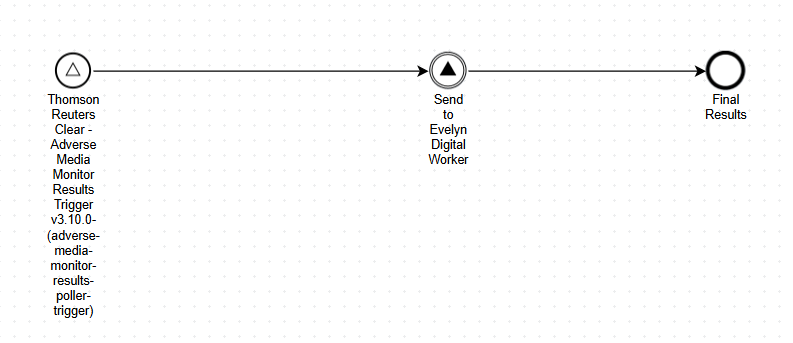
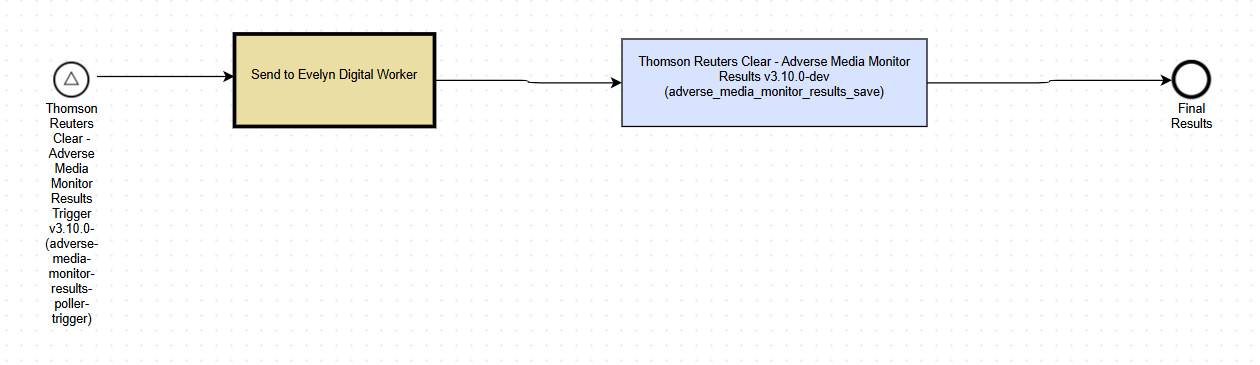
TR Clear Adverse Media Monitor Results Poller Batch (from version 3.9.0 onward) calls the AI Agent synchronously and saves the responses to the S3 location defined in the configuration.
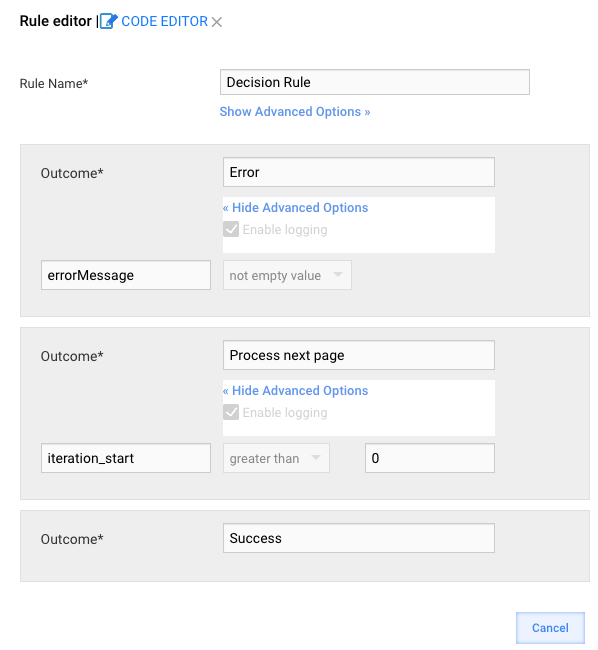
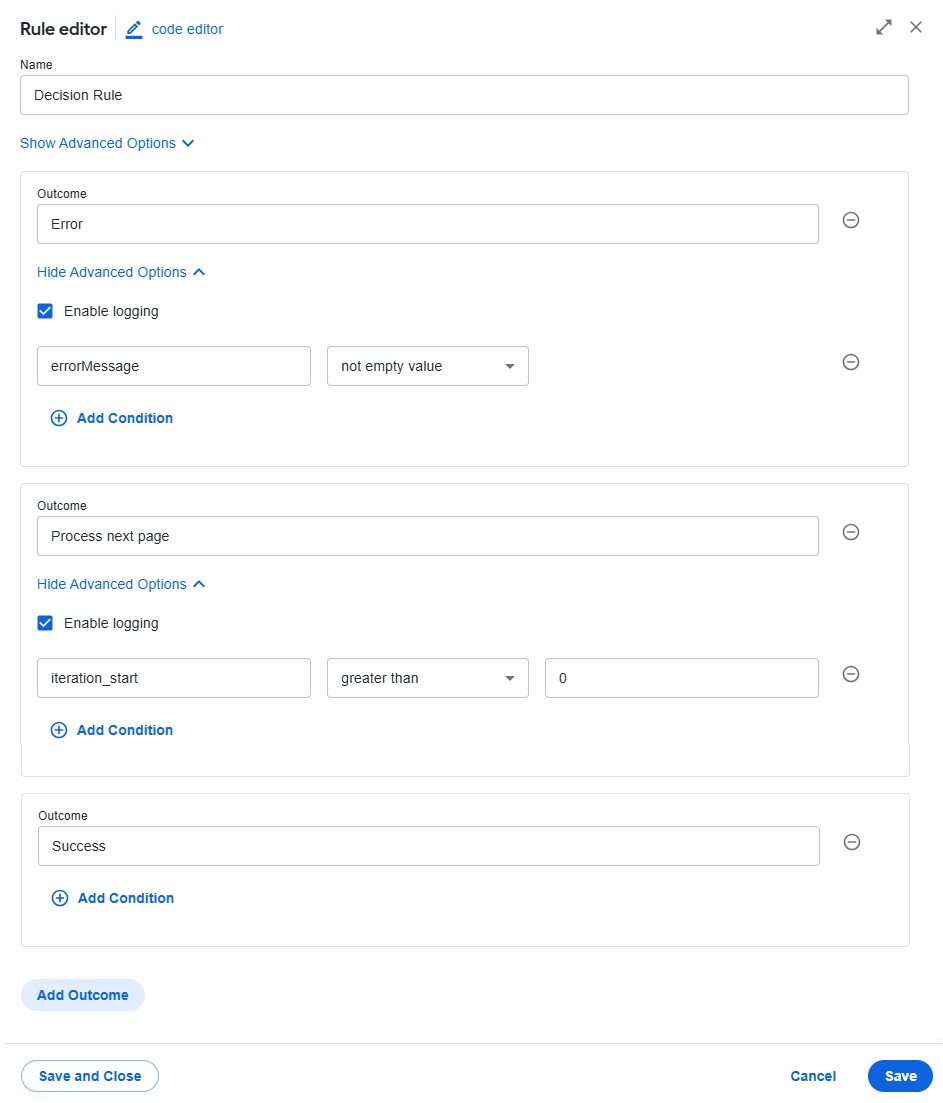
Configure the Decision Rule step as shown below:
| Work.AI up to v10.2.9 | Work.AI v10.3+ |
|---|---|
 |  |
API endpoints
The connector integrates the following TR CLEAR API endpoints:
{{baseUrl}}/v2/adversemedia/monitorResultssubmits the search criteria and returns a result URL that containsSearchIdandGroupCount(total number of results).{{baseUrl}}/v2/adversemedia/monitorResults/<SearchID>?startGroup=<Start Index of the Group; 1 based>&maxGroups=<Number of Groups to fetch in one call>. ThemaxGroups(pageSize) parameter defaults to 50. To change the value, create and update the following ZooKeeper node with the desired number:/config/tr-clear-api/<userId>/maxRecordsPerPage.
Do not set the value too low as this increases API call volume and may cause TR CLEAR to enforce rate limits.
Configuration parameters
The following configuration parameters are available for the connector:
| Property | Default value | Description | ZooKeeper node to override property value |
|---|---|---|---|
camel.error-handler.custom-enabled | true | Enables or disables the custom error handler. | /config/application,tr-clear-monitor-results/camel.error-handler.custom-enabled |
camel.error-handler.maximum-redeliveries | 2 | Maximum number of retry attempts after the initial failure. When the value is set to 2, the message is attempted three times in total (1 initial attempt and 2 retries). | /config/application,tr-clear-monitor-results/camel.error-handler.maximum-redeliveries |
camel.error-handler.redelivery-delay | 1000 | Initial delay in milliseconds before the first retry attempt. Default is 1000 ms (1 second). | /config/application,tr-clear-monitor-results/camel.error-handler.redelivery-delay |
camel.error-handler.back-off-multiplier | 2 | Multiplier that increases the delay between retries. When the value is set to 2, retries follow an exponential backoff: 1s → 2s → 4s. | /config/application,tr-clear-monitor-results/camel.error-handler.back-off-multiplier |
camel.error-handler.retryable-status-codes | 500-599 | HTTP status codes that trigger retries. The 500–599 range retries all server-side errors (5xx), while client-side errors (4xx) are not retried. | /config/application,tr-clear-monitor-results/camel.error-handler.retryable-status-codes |
Trigger usage
From version 3.9.0 onward, the Trigger connector is used to communicate with Thomson Reuters using the CLEAR APIs. The logic is as follows:
For the configured user and AI Agent combination, retrieve all list names and related properties from the uc_trclearmanagemonitor_monitorlistname_v1 Data Store.
For each returned
list_name, create a record in the uc_trclearmanagemonitor_monitorresults_processing_v1 Data Store, submit the search criteria, and receive the resulting URL containingSearchIdandGroupCount(the number of results).Generate the pagination list based on the
maxRecordsPerPageZooKeeper property associated with the user ID.For each page, retrieve the results and create a map of
<subjectName, Map<subjectUserReference, MonitorResult>>.Once all the maps associated with a specific
subjectNameare collected, the corresponding records for each unique subject reference with the same name are sent to processing.
Connector input
No input is required for the connector as it generates its own input based on the configuration parameters. Additionally, it generates a default date range covering the previous day. The last successful search date is stored in the following ZooKeeper location:
TR Clear - Adverse Media Search Connector before v3.9.0:
Evan:
/config/tr-clear-api/<userId>/monitorResults/adverse_media/lastSearchDateEvelyn
/config/tr-clear-api/<userId>/monitorResults/sanctions/lastSearchDate
TR Clear - Adverse Media Search Connector v3.9.0+: the uc_trclearmanagemonitor_monitorlistname_v1 Data Store > the last_search_date column
Subsequent runs check this stored value, if present, and use it as the From date. This ensures that if the TR Clear Adverse Media Monitor Results Poller BP does not run for several days (due to errors or an intentional stop), the lookback period starts from the last successful run, preventing gaps in result retrieval. If necessary, you can manually set a custom start date for the next run.
Connector output
Below are the connector response and mapping details.
Evan
{
  listName: String (Monitor list name),
  searchSubject: String,
  subjectId: String (TR CLEAR-generated ID),
  userReference: String (WorkFusion supplied reference for search subject),
  searchUrl - String (<Uri> field from the first response),
    articles: [
        {
            fullText - String,
            originalLink - String (<URL> response field),
            title - String (<Title> response field),
            summary - String (<Snippet> response field),
            publicationDate - LocalDate (<Date> response field),
            wordCount - Integer (should be calculated from the <FullText>. Null if content was not returned),
            language - String (<Language> response field)
   relevanceScore - double
        },
        ...
    ]
}
Evelyn
{
    listName: String (Monitor list name),
    searchSubject: String,
    subjectId: String (TR CLEAR-generated ID),
    userReference: String (WorkFusion supplied reference for search subject),
    //  AdverseMediaResultsPage.RecordId
    search_id: String
    hits: [{
        // AdverseMediaResultsPage.ResultGroup.RecordDetails.RecordId
        id: String
        AdverseMediaResultsPage.ResultGroup.RecordDetails.Relevance
        relevance_score: double
        // AdverseMediaResultsPage.ResultGroup.RecordDetails.FirstName
        first_name: String
        // AdverseMediaResultsPage.ResultGroup.RecordDetails.LastName
        last_name: String
        // AdverseMediaSanctionsResults.MatchedEntry
        matched_name: String
        // AdverseMediaSanctionsResults.MatchedEntryType
        entity_type: {"INDIVIDUAL", "ENTITY", null}
        // AdverseMediaSanctionsResults.SanctionAdditionalInfo.Alias
        // AdverseMediaSoeResults.AdditionalInfo.Aka
        alias_name: [String]
        // AdverseMediaSanctionsResults.AdverseMediaSoeResults.Gender
        gender: {"Male", "Female", "Other", null}
        // AdverseMediaSanctionsResults.AdditionalInfo.Citizenship = country, type = 'Citizenship'
        // AdverseMediaSanctionsResults.AdditionalInfo.BirthPlace = address
        // AdverseMediaSanctionsResults.AdditionalInfo.Country = country
        // AdverseMediaSanctionsResults.AdditionalInfo.Address = address
        // AdverseMediaSanctionsResults.AdditionalInfo.AddressCountry = country

        //
        address: [{
            type: String
            country: String
            state: String
            city: String
            address: String
        }]
        // AdverseMediaSanctionsResults.AdditionalInfo.DateOfBirth
        // AdverseMediaSanctionsResults.AdditionalInfo.BirthDate
        // AdverseMediaSanctionsResults.AdditionalInfo.Date
        dates: [{
            type: "String"
            date: "mm/dd/yyyy"
        }] or an empty array

    }]
}
If a failure occurs, the connector returns the following exception in the response. In this case, the BP is not triggered.
{
  errorMessage: "<error message>"
}
For retry behavior, see Set error retry.
TR Clear Manage Monitor Alert Enrichment
TR Clear Manage Monitor Alert Enrichment is a background recovery BP that keeps monitor subjects in the Data Store aligned with TR CLEAR. It restores missing subject IDs and reconciles older records after bulk operations, incomplete API responses, pagination gaps, or interrupted runs.
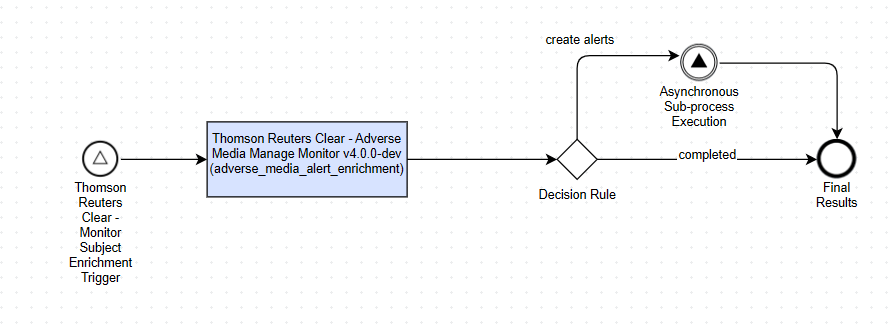
At each scheduled run, the BP processes monitor lists that contain records with missing subject IDs. When reconciliation is enabled, it also checks older records whose subject IDs are already populated but are due for revalidation. For each monitor list, the BP does the following:
Retrieves all available pages from the TR CLEAR monitor list.
Matches TR CLEAR subjects to Data Store records by
userReference. If duplicate references exist, the subject's name, location, and date of birth are used to identify a single safe match. Ambiguous matches are skipped.Updates blank subject IDs when a matching TR CLEAR subject is found.
Sends eligible records that are missing from TR CLEAR to the TR Clear Adverse Media Manage Monitor BP using
addSubjectBulk. By default, a record must be at least 60 minutes old before it can be re-added.Reconciles older records with populated subject IDs. It confirms matching records, repairs drifted subject IDs, and reports records that no longer exist in TR CLEAR.
Processes asynchronous bulk-add responses and updates the newly created subject IDs in the Data Store.
Subjects are re-added or considered for deletion only after the complete monitor list is retrieved. If the list retrieval is incomplete, the BP applies only updates that can be safely confirmed from the received data.
Physical deletion of local records that no longer exist in TR CLEAR is disabled by default. These records are reported in wouldDelete. If deletion is enabled, a safety threshold prevents the operation when the number of affected records exceeds the configured percentage of reconciliation candidates.
Configuration parameters
In the configuration form, use Enrichment Polling Interval (Hours) to specify the interval between enrichment runs. The default is 24 hours.
The following ZooKeeper properties control the main recovery and reconciliation behavior:
| Property | Default value | Description | ZooKeeper node to override property value |
|---|---|---|---|
tr.clear.adverse-media.monitor-enrichment.batch-size | 50000 | Batch size used to load records with blank subject IDs. | /config/application,tr-clear-monitor-results-trigger/tr.clear.adverse-media.monitor-enrichment.batch-size |
tr.clear.adverse-media.monitor-enrichment.reconciliation.enabled | true | Enables reconciliation of older records with populated subject IDs. If set to false, records with blank subject IDs are still processed. | /config/application,tr-clear-monitor-results-trigger/tr.clear.adverse-media.monitor-enrichment.reconciliation.enabled |
tr.clear.adverse-media.monitor-enrichment.reconciliation.recheck-interval-days | 30 | Minimum number of days before a record previously confirmed in TR CLEAR is checked again. | /config/application,tr-clear-monitor-results-trigger/tr.clear.adverse-media.monitor-enrichment.reconciliation.recheck-interval-days |
tr.clear.adverse-media.monitor-enrichment.list-detail.max-pages-per-list | 25 | Maximum number of pages retrieved for one monitor list. If the limit is reached, the list is marked incomplete and no re-add or delete decisions are made. | /config/application,tr-clear-manage-monitor/tr.clear.adverse-media.monitor-enrichment.list-detail.max-pages-per-list |
tr.clear.adverse-media.monitor-enrichment.null-readd-min-age-minutes | 60 | Minimum age in minutes of a record with a blank subject ID before it can be re-added to TR CLEAR. | /config/application,tr-clear-manage-monitor/tr.clear.adverse-media.monitor-enrichment.null-readd-min-age-minutes |
tr.clear.adverse-media.monitor-enrichment.reconciliation.delete-enabled | false | Enables deletion of local orphan records. Keep this disabled to report potential deletions without changing the Data Store. | /config/application,tr-clear-manage-monitor/tr.clear.adverse-media.monitor-enrichment.reconciliation.delete-enabled |
tr.clear.adverse-media.monitor-enrichment.reconciliation.max-delete-fraction | 0.10 | Maximum fraction of reconciliation candidates that can be deleted in one run. If the threshold is exceeded, deletion is skipped. | /config/application,tr-clear-manage-monitor/tr.clear.adverse-media.monitor-enrichment.reconciliation.max-delete-fraction |
Connector output
The BP provides the following fields for monitoring and validating each run:
| Field | Description |
|---|---|
monitor_list_name | Monitor list processed by the output row. |
processing | Human-readable processing status. |
enrichment_summary | JSON summary of subject ID recovery and reconciliation results. |
missing_subject_refs | User references that TR CLEAR did not confirm during asynchronous bulk-add processing. |
bulk_summary | Summary returned by the bulk Manage Monitor operation, when available. |
The enrichment_summary object can contain the following fields:
| Field | Description |
|---|---|
nullSubjectIdRowsReceived | Number of records with a blank subject ID at the start of the list run. |
nullSubjectIdsBackfilled | Number of blank subject IDs updated from TR CLEAR. |
subjectsMissingInTrQueuedForAdd | Number of records not found in TR CLEAR and queued for addSubjectBulk. |
confirmed | Number of populated subject IDs confirmed in TR CLEAR. |
repaired | Number of populated subject IDs corrected to the TR CLEAR value. |
deleted | Number of local orphan records deleted when deletion is enabled. The default is 0. |
wouldDelete | Number of local orphan records detected but not deleted. |
ambiguous | Number of records skipped because a single safe TR CLEAR match could not be identified. |
drift | Number of records with a matching subject ID but different identity details. |
subjectIdsUpdated | Total number of subject IDs written during the run, including backfilled and repaired IDs. |
walkIncomplete | Indicates that the final page of the TR CLEAR monitor list was not retrieved. Re-add and delete decisions are skipped. |
skipReason | Reason the monitor list was not processed, such as missing local list metadata. |