Input and output data
The Adverse Media Monitoring AI Agent supports a variety of ways for seamless integration into each financial institution’s ecosystem, such as client lifecycle management (CLM) systems, news sources, and case management archives, including through RPA and API connections.
Search input
The Adverse Media Monitoring search is triggered by specifying a name via the Ad-hoc search in Workspace or a batch upload of names set up and scheduled via Control Tower. To conduct a search, a name is required.
To configure a batch process, WorkFusion can be integrated with the bank’s internal systems to mimic how analysts are currently retrieving names that need to be monitored for adverse media events.
Examples include:
- Navigating alert queues in a transaction monitoring system and conducting searches on a non-customer in a potentially unusual transaction.
- Identifying customers who meet certain criteria within a CLM system. For example, you have a customer rated as high-risk, and yet the most recent Know-Your-Customer refresh is greater than one year.
- New applications created within a customer onboarding system or business line product extension system (such as a new lending application).
- A CSV file sent to a shared email inbox or uploaded to a shared folder.
You can also trigger a search via REST API that passes all required inputs as parameters and then receives the results from WorkFusion.
Additional inputs, including date of birth and location, can be submitted to increase the accuracy of results related to the searched party. The table below presents the required and optional search parameter requirements.
| Field | Example | Required |
|---|---|---|
| Name | John Smith | Yes |
| Date of Birth | 10252976 | No |
| Residence country | FR | No |
| Citizenship country | US | No |
| Entity Type | Individual | No |
Input data format
CSV input
The data input format for the Evan: Adverse Media Monitoring File Ingestion Business Process is a CSV file with simple fields and one or more rows with entity names to search.
Below is an example of the CSV file with possible content. You can also download the template when configuring the External source as the AMM input.
The data input format for the Evan: Adverse Media Monitoring Business Process is a CSV file with simple fields and one or more rows with entity names to search.
Below is an example of the CSV file with possible content.
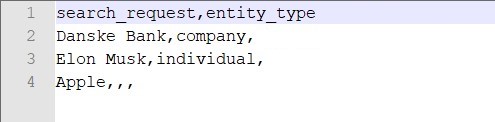
Input data schema
Only the search_request field is obligatory. All other fields are optional and are used to increase the relevancy of search results.
| Field | Description | Type | Required | Example |
|---|---|---|---|---|
search_request | Entity name. It is a person or a company subject to Adverse Media Monitoring. | String | YES |
|
search_period | Search period in days. | Integer | NO | 365 |
batch_id | A unique ID to group multiple search entities into combined reports. | String | NO | Unique free text in any format. See some examples below:
|
entity_type | Entity type. Currently, two possible values are supported (non-case-sensitive):
| String | NO |
|
entity_id | A unique ID of the screened entity used to re-apply decisions on the content previously reviewed by an analyst. | String | NO | E1234567 |
citizenship_incorporation_country | Two-letter country code. Supported format: ISO 3166-1 alpha-2. See the full list here. | String | NO | US (United States) / CA (Canada) / AU (Australia) |
residence_operating_country | Two-letter country code. Supported format: ISO 3166-1 alpha-2. See the full list here. | String | NO | S (United States) / CA (Canada) / AU (Australia) |
city | Full city’s name. Used only for Thomson Reuters CLEAR Investigations. | String | NO | New York |
subdivision | Two-letter subdivision code according to ISO 3166-2. | String | NO |
|
yob | Short for year_of_birth, year of birth for a single screened person. Not applicable when entity_type is Company. | String | NO | 1980 |
date_of_birth | Date of birth for a single screened person. Not applicable when entity_type is Company. List of accepted date formats:
| String | NO |
|
_sys_user_groups | The name of the user group assigned to manage the manual review task in Workspace. | String | NO | Reviewers |
additional_information | Additional information about the screened entity. | String | NO | John Doe has a brother Edward Doe |
add_to_ongoing_monitor | The field is used only when Thomson Reuters is configured as the data provider. If true, the corresponding entity will be automatically added to the ongoing monitoring scope. | Boolean | NO | true/ false |
article_data | The field is used only when the CSV file is selected as the input data source. It represents stringified JSON with an array of article data (links and additional information) | String | NO | [{\"link\":\"https://www.politico.com/news/2024/08/27/nancy-pelosi-jan-6-fury-00176529\",\"additional_information\":\"article level information\"}, {\"link\":\"https://www.bbc.com/news/articles/czdpq4en1vvo\"}] |
external_id | A unique ID to identify the search request. Unique free text, in any format. | String | NO | R1234567 |
cost_center_code | The code of the cost center team for billing transactions. | String | NO | R1234567 |
cost_center_name | The name of the cost center team for billing transactions. | String | NO | R1234567 |
sla_date | The date of the Service Level Agreement (SLA) for filtering Manual Tasks in Workspace. | String | NO | The date format is selected in the course of configuration. |
Search output
Once the entity search is completed, the results are displayed in a risk-prioritized manner as described above. The AI Agent user then reviews the results.
Once the user completes the review, the AI Agent generates a PDF report audit trail of the identified news, including the confidence score per article, the overall decision, and other data.
By default, the audit trail report is stored inside the WorkFusion platform. It is possible to configure this report to be pushed directly into the organization’s internal applications, for example:
- Save into a case management or transaction monitoring system
- Store in a shared folder
- Use a custom connector for an in-house application
Output data format
The Evan: Adverse Media Monitoring Business Process finishes with an output you can find on the Results page for the core AMM Business Process.
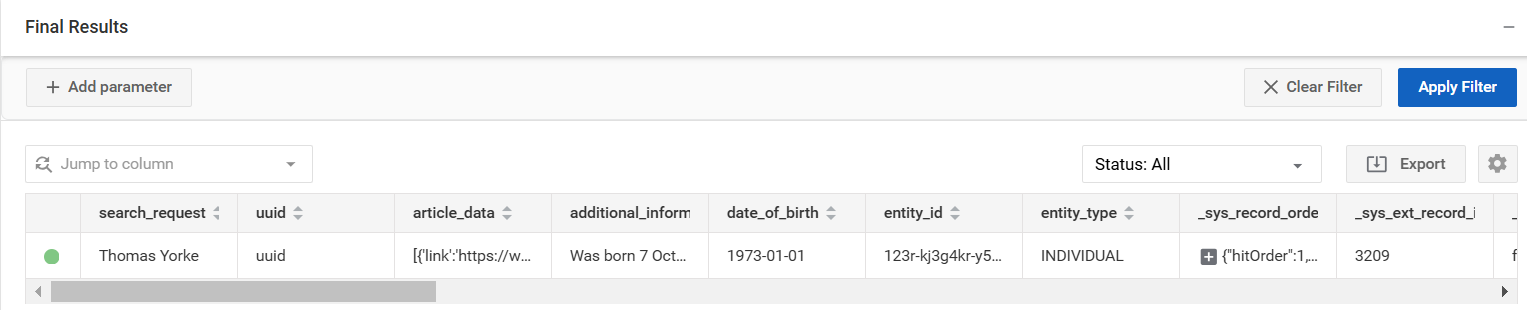
The table below specifies AMM BP output data fields.
| Field | Description | Example |
|---|---|---|
search_date | Transaction start date and time. | Mon Feb 26 17:32:59 UTC 2024 |
end_date | Transaction end date and time. | Mon Feb 26 17:37:25 UTC 2024 |
news_provider | News provider used to screen the entity. | |
search_language | Search language used to search for articles. | EN |
investigation_status | Final status of the investigation. Possible statuses:
| Needs Investigation |
review_comment | Shows manual review comments for investigations. | This investigation has a negative impact. |
articles_count | The number of articles retrieved from the provider for the investigation. | 20 |
combined_report_link | Link to the S3 storage with a combined report in the configured format. The link contains a combination of information on multiple entities and investigation results. The report includes the investigation date, all search results, links to articles, suspicious countries, score, and so on. If batch_id is specified in the input request, a combined report is generated per batch of configured entities. | |
quality_control_report_link | Link to the S3 storage with a quality control report file in Excel (XLSX) format. The file contains a combination of information on multiple entities and investigation results. If batch_id is specified in the input request, a combined report is generated per batch of entities configured. | |
run_uuid | The unique UUID of the BP run. | 97b75d5e-34f9-4f5e-87fb-b5d0e165db68 |
transaction_uuid | The unique UUID of the run transaction. | 97b75d5e-34f9-4f5e-87fb-b5d0e165db68 |
entity_id | The entity_id from the input data. | E1234567 |
variation_id | ID of the configuration variation. | 126 |
manual_task_was_executed | Informs if a Manual Task was executed during the investigation. | true / false |