Input and output data
The Adverse Media Monitoring AI Agent supports a variety of ways for seamless integration into each financial institution’s ecosystem, including Client Lifecycle Management systems, news sources, and case management archives, including through RPA and API connections.
Search Input
The Adverse Media Monitoring search is triggered by the entry of a name through an ad-hoc search in Workspace, or through a batch-upload of names organized and scheduled via Control Tower. A name is required to conduct the search.
To configure a batch process, WorkFusion can be integrated with the bank’s internal systems to mimic how analysts are currently retrieving names that need to be monitored for adverse media events.
Examples include:
- Navigating alert queues in a transaction monitoring system and conducting searches on a non-customer in a potentially unusual transaction.
- Identifying customers who meet certain criteria within a Client Lifecycle Management system. For example, you have a customer rated as high-risk and yet the most recent Know Your Customer refresh is greater than 1 year.
- New applications created within a customer onboarding system or business line product extension system (such as a new lending application).
- CSV file sent to a shared email inbox or uploaded to a shared folder.
You can also trigger a search via a REST API which passes all required inputs as parameters and then receives the results from WorkFusion.
Additional inputs, including date of birth and location, can be submitted to increase the accuracy of results related to the searched party. The table below presents the required and optional search parameters requirements.
| Field | Example | Required |
|---|---|---|
| Name | John Smith | Yes |
| Date of Birth | 10252976 | No |
| State of Residence | Miami, Florida | No |
| Country of Residence | FR | No |
| Entity Type | Individual | No |
Search Output
Once the entity search is completed, the results are displayed in a risk-prioritized manner as described above. The AI Digital Worker user then reviews the results.
Upon the user’s completed review, the AI Agent generates a PDF report audit trail of the news identified, including the confidence score per article, the overall decision, and other data. The audit trail report is stored inside WorkFusion platform by default. It is possible to configure this report to be pushed directly into an organization’s internal applications, for example:
- Saved into a case management or transaction monitoring system.
- Stored at a shared folder.
- Custom connector to in-house application.
Input Data Format
The data input format for the Evelyn: Adverse Media Monitoring business process is a CSV file with simple fields and one or more rows with entity name to search.
Below is the example of CSV file with possible content.
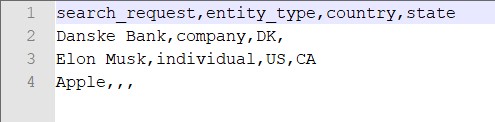
The AI Agent obtains the input data from that CSV file in which one row is equal to one full-cycle search for negative news.
Only the search_request field is obligatory, all other fields are optional and are used to increase search results relevancy.
The table below specifies AMM BP input data fields.
| Field | Description | Type | Required | Example |
|---|---|---|---|---|
search_request | Entity name. It is a person or a company) subject to a Adverse Media Monitoring. | String | YES | Danske BankSir Alex Ferguson |
entity_type | Defines concrete type of entity. Currently 2 possible values are supported (letter register does not matter):
| String | NO |
|
country | Two-letter country code. Supported format: ISO 3166-1 alpha-2. See the full list here | String | NO | US (United States) / CA (Canada) / AU (Australia) |
state | Two-letter state code. Currently supported are: | String | NO | FL (Florida state of the USA) CA (California state of the USA) QC (Quebec province of Canada) YT (Yukon territory of Canada) |
year_of_birth | Year of birth for an individual person being screened. Not applicable when entity_type is Company | String | NO | 1980 |
_sys_mt_hit_assignee | The ID of the user who will work on the task. | String | NO | JaneDoe |
Download the example Input file.
Output Data Format
Evelyn: Adverse Media Monitoring business process finishes with some output fields, the most important of which links to the final report.
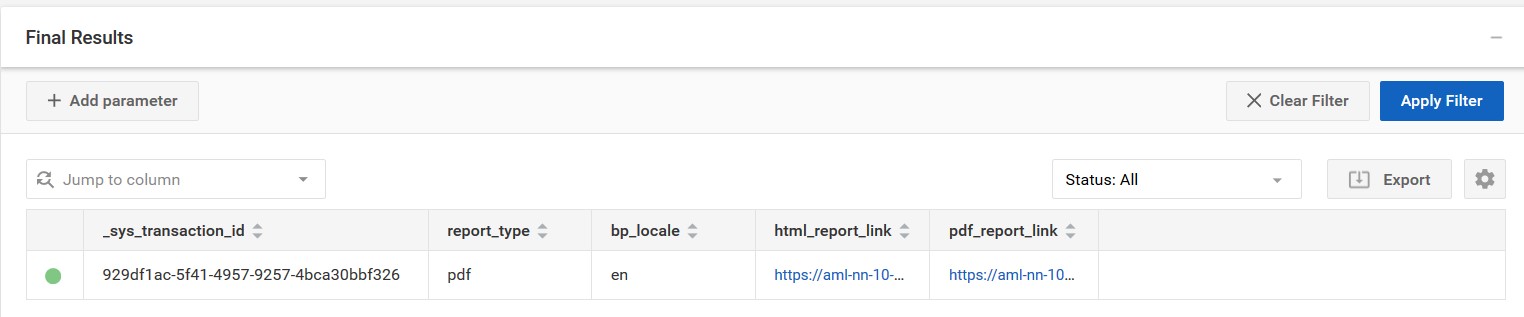
The table below specifies AMM BP output data fields.
| Field | Description | Example |
|---|---|---|
_sys_transaction_id | Specialized information. This is the unique ID of the ODF transaction. | 929df1ac-5f41-4957-9257-4bca30bbf326 |
report_type | Type of the final report. This is specified in the Data Store nn_settings under the 'report_type' column. Possible values are: html (only html report will be generated), pdf (html + pdf report will be generated) | html / pdf |
bp_locale | Locale mode of the currently finished business process.Currently 2 locales are supported: en (Englis language), es (Spanish language) | en / es |
html_report_link | Link to S3 storage with final report in HTML format. Link contains entity name and investigation result. Report includes date of investigation, all search results, links to articles, suspicious countries, score, etc. | https://s3-instance.workfusion.com/doc-upload/negativenews/10.8.24/uuid/report/html/Danske-Bank-requires-escalation-uuid.html |
pdf_report_link | Link to S3 storage with final report in PDF format. Link contains entity name and investigation result. Report includes date of investigation, all search results, links to articles, suspicious countries, score, etc. | https://s3-instance.workfusion.com/doc-upload/negativenews/10.8.24/uuid/report/pdf/Danske-Bank-requires-escalation-uuid.pdf |