Perform data enrichment
Location enrichment
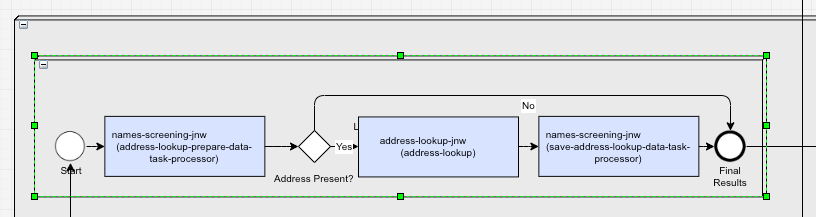
Location enrichment allows Evelyn to enhance location data with more detailed information for further distance calculations between input and hit data. With the feature enabled, the AI Agent enriches the provided address information with structured data, such as country, city, state, and coordinates.
Evelyn uses the following providers for location lookup to retrieve detailed information about a location and enrich ScreenedData and WleData:
Google Geocoder. Evelyn uses the Geocoding API and creates one call for each address to retrieve the detailed location information.
Google Places API. Evelyn makes two calls for each address:
A call to https://maps.googleapis.com/maps/api/place/autocomplete/json is made to retrieve a list of predicted addresses.
The list of predicted addresses is sent to https://maps.googleapis.com/maps/api/place/details/json to receive the detailed address information.
For the configuration instructions, see Install and configure | Configure enrichment. The location enrichment bot steps are available in the core NSS Business Process within the Data Enrichment sub-process.
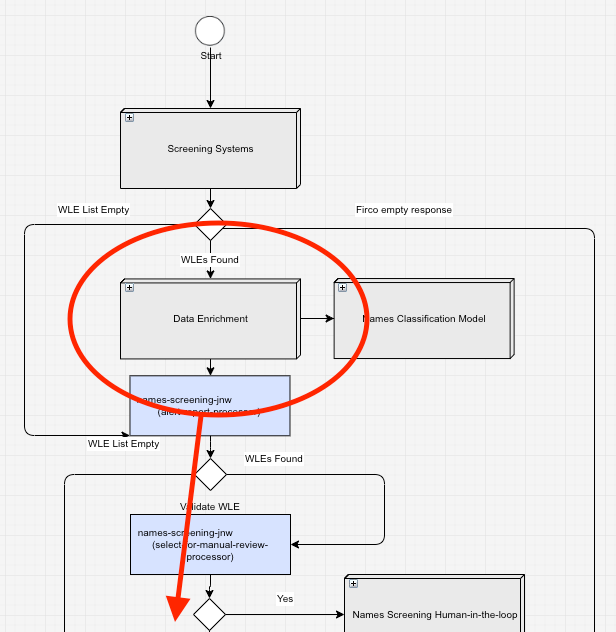
Location enrichment is applied to address data only; no Personally Identifiable Information (PII) data is sent. To take advantage of location enrichment, provide the full address only.
A REST request example:
{
    "input_id": "1234",
    "input_full_name": "John Doe",
    "input_address":
    [
        {
            "address": "New York"
        },
        {
            "address": "Houston"
        }
    ]
}
A CSV input file example:

If any _city, _state, or _country address prefix is provided, enrichment is skipped. Addresses are filtered for duplicates to decrease the number of calls to the enrichment service and reduce costs.
From the above examples, Evelyn creates a list for enrichment that looks like this: ["New York", "Houston"]. For each address, the enrichment service makes a call and returns detailed location information for Evelyn to update the information in ScreenedData and WleData. The result contains all the information about the enriched location, including latitude and longitude, allowing for a more accurate decision.
Location enrichment enables checking address matching within a predefined radius and determines if escalation is needed.
The Geocoding API usually returns the most prominent address. For example, the expected result for "Dublin" is "Dublin, Ireland". The API can also return multiple places as the provided address ("Dublin") might be located in different countries, for example, "Dublin, Ohio, USA" or "Dublin, California, USA". Therefore, you get a list of different Dublins from different countries.
Name enrichment
The name enrichment process is implemented in the Ticker Lookup bot step of the core Names Screening Business Process. You can enable or disable the feature while configuring the AI Agent.
The NSS bundle also contains a special Name Screening Ticker Lookup Business Process ensuring that the internal storage of ticker information within Evelyn is kept up to date by fetching data from https://www.sec.gov/. You can set up email notifications for the Business Process runs. For more details, see Run screening | Name Screening Ticker Lookup Business Process and Install and configure | Configure enrichment.
Evelyn can compare companies when their ticker symbol (or stock symbol) is provided. This unique symbol is recognized and replaced with the proper company name for screening. It works only with Securities. The mechanism is enabled automatically when all conditions are met. The ticker information is stored in the WorkFusion database and updated when needed.
On receiving a screening request, Evelyn does the following:
Checks if the entity type is Securities.
Checks the
ScreenedDataname against a regex.^[a-z]{1,4}\s+(\d{1,2}\s+)?(jan|feb|mar|apr|may|jun|jul|aug|sep|oct|nov|dec)\d{2}\s+(0|([1-9]\d*))(\.\d+)?\s+(weekly\s+)?(call|put)$An example of
input_full_namethat matches the regex is"AMD 29 Oct21 70 Weekly Call". The important parts of a ticker name are as follows:- Ticker symbol:
AMD
REGEX
^[a-z]{1,4}\s+
The ticker information must be located at the beginning. A ticker must be a string of 1 to 4 letters followed by a space.
- Date:
29 Oct21
REGEX
(\d{1,2}\s+)?(jan|feb|mar|apr|may|jun|jul|aug|sep|oct|nov|dec)\d{2}\s+
The date consists of an optional one- or two-digit number followed by one or more whitespace characters. A three-letter month abbreviation with a two-digit number represents a year followed by a whitespace character.
- Strike price:
70
REGEX
(0|([1-9]\d*))(\.\d+)?\s+
The strike price is a positive number not starting with 0 followed by an optional fractional part consisting of a period and one or more digits, ending with a whitespace character.
- Option type:
Weekly Call
REGEX
(weekly\s+)?(call|put)$
The option type consists of an optional occurrence of the word "weekly" and one or more whitespace characters followed by the words "call" or "put".
- Ticker symbol:
Checks if the extracted ticker symbol is not a currency code.
Fetches the company name from the database and enriches
ScreenedDatawith the company name as a derived object.
The Ticker Lookup Task Processor supports tickers with "Quarterly Call" and "Quarterly Put" options, for example, "ABC 29 Oct21 70 Quarterly Call" and "ABC 29 Oct21 70 Quarterly Put".
The processor also accepts incoming tickers in the [ABC24JUN24_123X.YZ4] format, for example, "Abcdef Corp [ABC] Jun 24 123 Call (AM)".
The original ticker is not used in the model.
If a ScreenedData name is enriched by the ticker symbol, the narrative contains the following sentence: ““.
When a Quality Check report is produced, input_name contains the original name, and the ticker data is present in model_explanation.