Perform message content parsing
Message content formats
Tara can parse different types of message content. Currently, the supported formats are as follows:
- FUF (Fircosoft Unified Format)
- SWIFT or SWIFT_MT (Original SWIFT format)
- XML (ISO20022, SWIFT_MX, SWIFT_NPP)
Using the combination of the provided message format, message type, and hit tag name, Tara invokes the corresponding parser to retrieve the tag content value that was a hit during the screening. For example, if an alert is identified as ISO20022, Tara applies the ISO20022 parser to help better identify a screened entity to use in decision-making.
For certain defined tags, such as 50F or 59F, Tara attempts to parse the tag content into the ID, name, address, and country fields and populate a screened data object, allowing better adjudication during processing.
Tag list dictionaries
Each message content format has its own dictionary. Using tag dictionaries, Tara groups related tags to find additional information about a screened entity. An out-of-the-box dictionary has a limited number of entries and needs to be updated.
To access the dictionaries, go to Control Tower > Advanced > Data Stores.
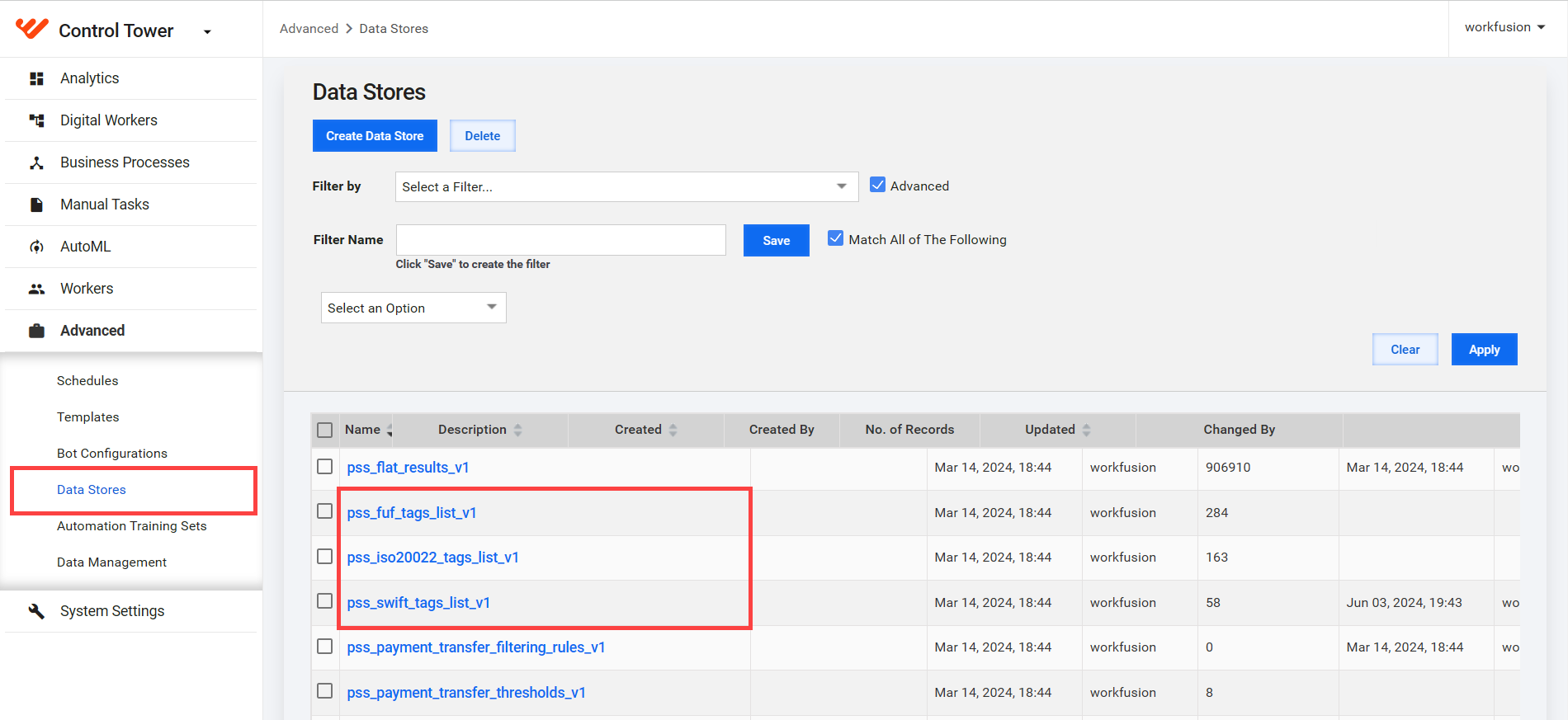
Available tag dictionaries are as follows:
- pss_fuf_tags_list_v1: FUF tag list dictionary
- pss_swift_tags_list_v1: SWIFT tag list dictionary
- pss_iso20022_tags_list_v1: ISO20022 tag list dictionary
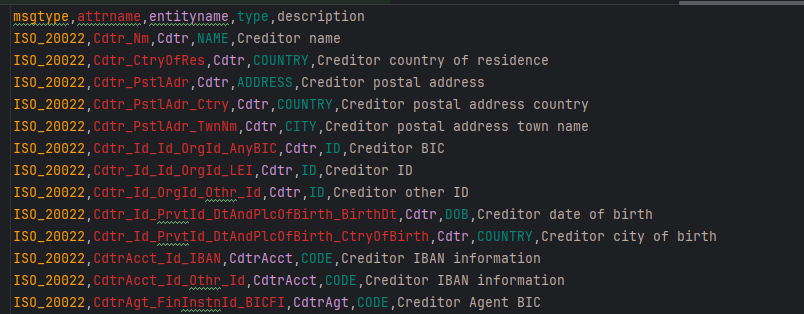
Each tag list dictionary has the following structure:
msgtype: the request message type.attrname: the hit's tag name.entityname: the name of the parent element whose children should be grouped together, for example,Cdtr.type: the data type of theattrnameelement. Available values areNAME,NAMEADDRESS,ADDRESS,CITY,STATE,ZIP,POSTALCODE,COUNTRY,ID,VESSEL,FREETEXT, andDOB.description: a description of the attribute.
See pss_iso20022_tags_list_v1 as an example.
Parsing
Let's take the ISO_20022 (XML) parser as an example and see how it works:
A new alert request arrives. The parser is loaded if the original payment message is applied to the
contentfield and:The
MessageTypevalue is"ISO_20022", and theContentFormatvalue is"NATIVE".The
MessageTypevalue is"ISO_20022", and theContentFormatvalue is"SWIFT_MX".The
MessageTypevalue is"ISO_20022", and theContentFormatvalue is"SWIFT_NPP".
An XML document is extracted from the
contentfield, and a map of tag and value pairs is produced. A tag is the hierarchical path to the element that has a value. When the element contains child elements, it also includes the combined value of all the children separated by a new line. A tag name can be long, depending on the XML structure depth, for example: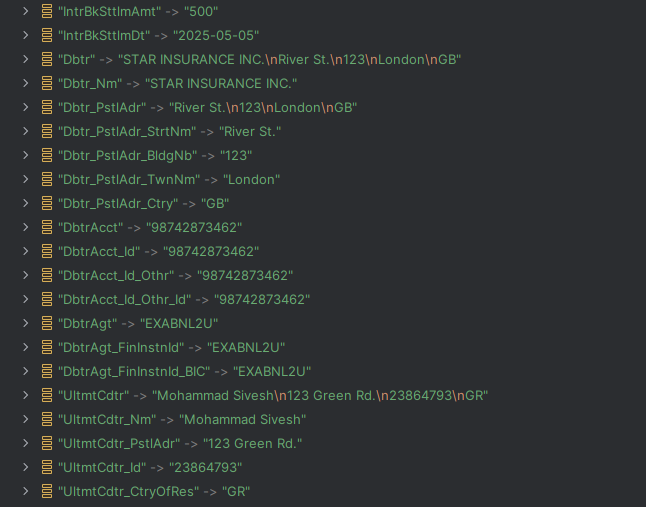
Using the content map and the target tag name from the
tagNamefield, the tag content and other related entity data are fetched.With the help of the tag name and the hit text, Tara retrieves the tag content and identifies the entity name. If the entity name is found in the dictionary, the parser gets all related attribute names with the same entity name. Otherwise, only the tag content is used.
The parser gathers all found attributes and creates an
EntityAttributeMap object that contains the attribute, type, and value of all related elements, such as information related to a debtor or a creditor.
The parser processor updates the hit's screened data with found elements using the entity attribute list. Once the parsing is complete, an input message is sent to the next Business Process step.
Entity attribute types
The type of an entity attribute informs the parser processor where to insert the found XML information. For example, if the type is NAME, the entity attribute value is inserted into the Screened name field, and if the type is FREETEXT, the value is inserted into the Tag content field. The tag content and tag type must always be populated. Screened data is populated if the needed information can be identified in XML.
The pss_iso20022_tags_list_v1 dictionary allows mapping attributes with their types grouped by an entity name. For example, Dbtr_Nm of the NAME type and Dbtr_PstlAddr of the ADDRESS type belong to the same entity, Dbtr. You can build a list of entity attributes using the dictionary if this dictionary contains the target tag name (tagName) from the alerted hit.
If the target tag name is not in the dictionary, a function checks if the dictionary contains its parent XML element. If the parent is in the dictionary, the parent's type is used.
If there is no information in the dictionary, tagType is set to FREETEXT.
Message examples
See an input message JSON as an example:
{
  "id": "5123456",
  "type": "ISO_20022",
  "contentFormat": "NATIVE",
  "content": "<CdtTrfTxInf>\r\n\t<IntrBkSttlmAmt Ccy=\"USD\">500<\/IntrBkSttlmAmt>\r\n\t<IntrBkSttlmDt>2025-05-05<\/IntrBkSttlmDt>\r\n\t<Dbtr>\r\n\t\t<Nm>STAR INSURANCE INC.<\/Nm>\r\n\t\t<PstlAdr>\r\n\t\t\t<StrtNm>River St.<\/StrtNm>\r\n\t\t\t<BldgNb>123<\/BldgNb>\r\n\t\t\t<TwnNm>London<\/TwnNm>\r\n\t\t\t<Ctry>GB<\/Ctry>\r\n\t\t<\/PstlAdr>\r\n\t<\/Dbtr>\r\n\t<DbtrAcct>\r\n\t\t<Id>\r\n\t\t\t<Othr>\r\n\t\t\t\t<Id>98742873462<\/Id>\r\n\t\t\t<\/Othr>\r\n\t\t<\/Id>\r\n\t<\/DbtrAcct>\r\n\t<DbtrAgt>\r\n\t\t<FinInstnId>\r\n\t\t\t<BIC>EXABNL2U<\/BIC>\r\n\t\t<\/FinInstnId>\r\n\t<\/DbtrAgt>\r\n\t<UltmtCdtr>\r\n\t\t<Nm>John Doe<\/Nm>\r\n\t\t<PstlAdr>123 Green Rd.<\/PstlAdr>\r\n\t\t<Id>23864793<\/Id>\r\n\t\t<CtryOfRes>GR<\/CtryOfRes>\r\n\t<\/UltmtCdtr>\r\n<\/CdtTrfTxInf>",
  "hits": [
    {
      "id": "52968422",
      "tagName": "UltmtCdtr",
      "tagContent": null,
      "hitText": "John",
      "screenedData": null,
      "sanctionData": {
        "name": "John",
        "type": "INDIVIDUAL",
        "dob": "1950",
        "city": null,
        "country": "myanmar",
        "state": null
      }
    }
  ]
}
In the input message, the content field contains XML data. tagName refers to the target tag name, which is UltmtCdtr. In the dictionary, the tag type is "NAMEADDRESS". Thus, the parser reads values in UltmtCdtr in the XML data and writes them into the output's tagContent field, adding screened data. The resulting output message JSON example is as follows:
{
  "id": "5123456",
  "type": "ISO_20022",
  "contentFormat": "NATIVE",
  "content": "<CdtTrfTxInf>\r\n\t<IntrBkSttlmAmt Ccy=\"USD\">500<\/IntrBkSttlmAmt>\r\n\t<IntrBkSttlmDt>2025-05-05<\/IntrBkSttlmDt>\r\n\t<Dbtr>\r\n\t\t<Nm>STAR INSURANCE INC.<\/Nm>\r\n\t\t<PstlAdr>\r\n\t\t\t<StrtNm>River St.<\/StrtNm>\r\n\t\t\t<BldgNb>123<\/BldgNb>\r\n\t\t\t<TwnNm>London<\/TwnNm>\r\n\t\t\t<Ctry>GB<\/Ctry>\r\n\t\t<\/PstlAdr>\r\n\t<\/Dbtr>\r\n\t<DbtrAcct>\r\n\t\t<Id>\r\n\t\t\t<Othr>\r\n\t\t\t\t<Id>98742873462<\/Id>\r\n\t\t\t<\/Othr>\r\n\t\t<\/Id>\r\n\t<\/DbtrAcct>\r\n\t<DbtrAgt>\r\n\t\t<FinInstnId>\r\n\t\t\t<BIC>EXABNL2U<\/BIC>\r\n\t\t<\/FinInstnId>\r\n\t<\/DbtrAgt>\r\n\t<UltmtCdtr>\r\n\t\t<Nm>John Doe<\/Nm>\r\n\t\t<PstlAdr>123 Green Rd.<\/PstlAdr>\r\n\t\t<Id>23864793<\/Id>\r\n\t\t<CtryOfRes>GR<\/CtryOfRes>\r\n\t<\/UltmtCdtr>\r\n<\/CdtTrfTxInf>",
  "hits": [
    {
      "id": "52968422",
      "tagName": "UltmtCdtr",
      "tagContent": "John Doe\n123 Green Rd.\n23864793\nGR",
      "tagType": "NAMEADDRESS"
      "hitStartIndex": null,
      "hitEndIndex": null,
      "hitText": "John",
      "screenedData": {
        "name": "John Doe",
        "address": "123 Green Rd.\n23864793\nGR",
        "country": "GR",
        "state": null
      },
      "sanctionData": {
        "name": "John",
        "type": "INDIVIDUAL",
        "dob": "1950",
        "city": null,
        "country": "myanmar",
        "state": null
      }
    }
  ]
}