Parse message content
Overview
Tara can parse various types of message content. Currently, the supported formats are as follows:
FUF(Fircosoft Unified Format)SWIFTorSWIFT_MT(original SWIFT format)ISO20022,SWIFT_MX,SWIFT_NPP(XML)SWIFT_ADK(SWIFT Alliance Developer Kit)
Using the provided message format, message type, and hit tag name, Tara invokes an appropriate parser to extract the tag content value that triggered a hit during screening. For example, if an alert is identified as ISO20022, Tara applies the ISO20022 parser to better identify the screened entity for decision-making.
For certain defined tags, such as 50F or 59F, Tara parses the tag content into fields like ID, name, address, and country. This data populates a screened data object to facilitate adjudication during processing.
Tara uses tag dictionaries to group related tags and extract additional information about a screened entity. Each message format has its own dictionary. Out-of-the-box dictionaries contain a limited number of entries and must be updated as needed.
To access dictionaries, go to Control Tower > Advanced > Data Stores.
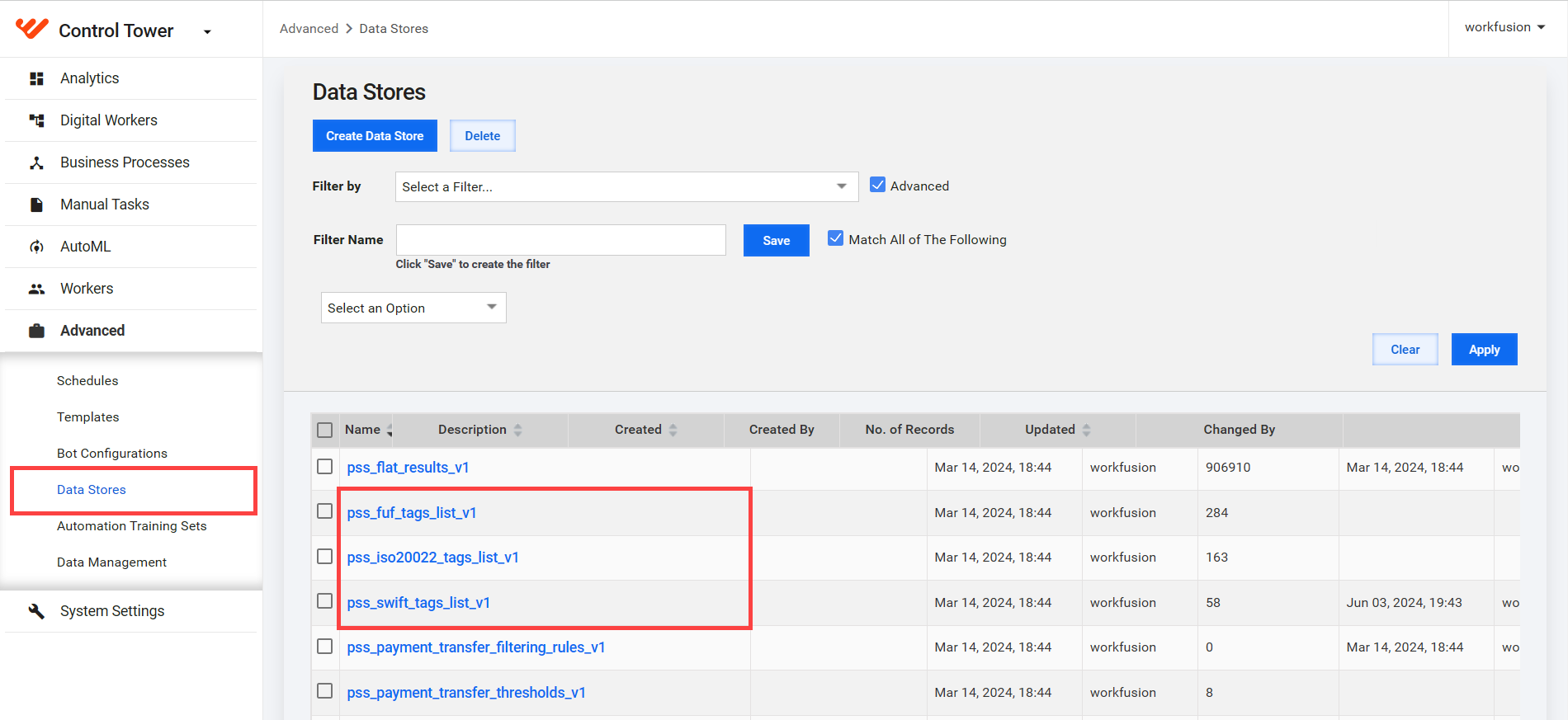
Available tag dictionaries are as follows:
- pss_fuf_tags_list_v1: FUF tag list dictionary
- pss_swift_tags_list_v1: SWIFT tag list dictionary
- pss_iso20022_tags_list_v1: ISO20022 tag list dictionary
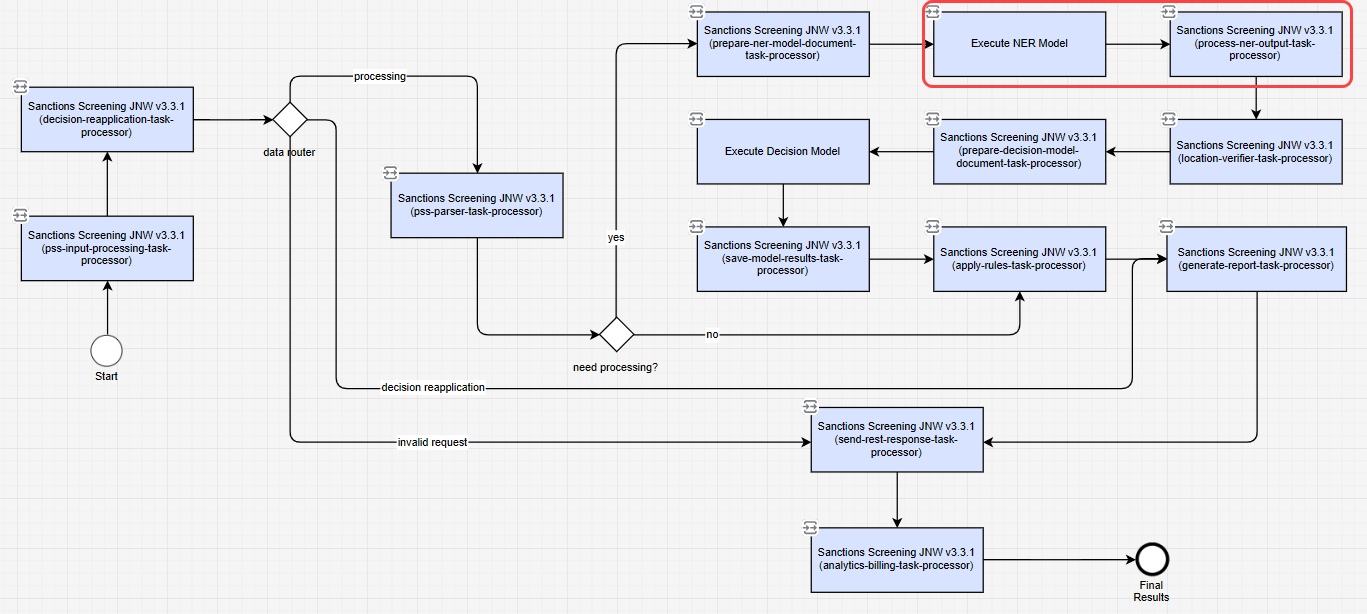
If the built-in parsers cannot parse or extract relevant information (screened data details), Tara uses a custom Named Entity Recognition (NER) model in the NER Business Process (BP) step to extract screened data out of the tag content.
ISO20022 parser
If an alert is identified as ISO20022 (SWIFT_MX or SWIFT_NPP), Tara applies a parser to better identify the screened entity for decision-making.
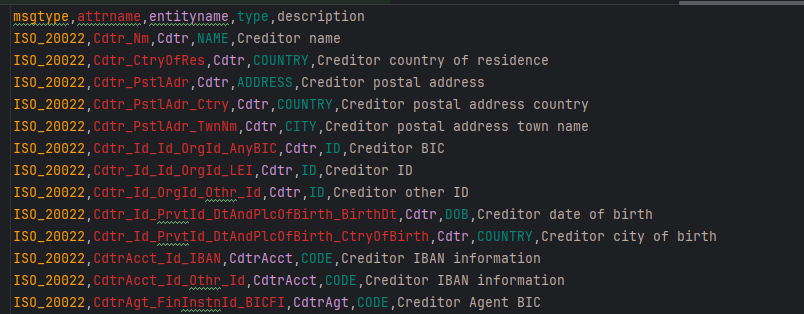
The ISO20022 tag list dictionary is stored as a Data Store in Control Tower. It has the same structure as the dictionaries for the SWIFT and FUF parsers:
msgtype: the request message type.attrname: the tag name associated with the hit.entityname: the parent element that groups related child elements, for example,Cdtr.type: the data type of theattrnameelement. Available values areNAME,NAMEADDRESS,ADDRESS,CITY,STATE,ZIP,POSTALCODE,COUNTRY,ID,VESSEL,FREETEXT, andDOB.description: a description of the attribute.
See pss_iso20022_tags_list_v1 as an example.
Parsing process
When a new alert request arrives, the following actions take place:
The parser is loaded if the original payment message is applied to the
contentfield and:MessageTypeis"ISO_20022", andContentFormatis"NATIVE".MessageTypeis"ISO_20022", andContentFormatis"SWIFT_MX".MessageTypeis"ISO_20022", andContentFormatis"SWIFT_NPP".
An XML document is extracted from the
contentfield, producing a map of tag-value pairs. A tag represents the hierarchical path to the element containing a value. When elements contain child elements, the tag also includes the combined values of all children, separated by new lines. Thus, a tag name can be long, depending on the XML structure depth.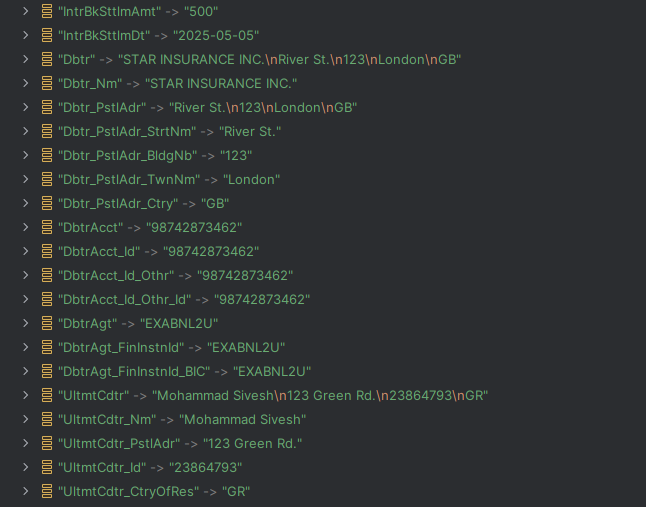
Using the content map and the target tag name from the
tagNamefield, Tara fetches the tag content and related entity data.If the entity name is found in the dictionary, related attribute names for the same entity are retrieved. Otherwise, only the tag content is used.
The parser creates an
EntityAttributemap object containing attributes, types, and values of related elements, such as debtor or creditor information.
The parser processor updates the hit's screened data with found elements using the entity attribute list. Once parsing is complete, the input message is sent to the next BP step.
Entity attribute types
The type of an entity attribute determines where the parser processor inserts the extracted XML information. For example, if the type is NAME, the entity attribute value is inserted into the Screened name field. If the type is FREETEXT, the value is inserted into the tagContent field. The tag content and tag type must always be populated. Screened data is populated only if the needed information can be identified in the XML.
The pss_iso20022_tags_list_v1 dictionary allows mapping attributes and their types grouped by entity names. For example, Dbtr_Nm (NAME type) and Dbtr_PstlAddr (ADDRESS type) both belong to the same entity (Dbtr). You can build a list of entity attributes using the dictionary if this dictionary contains the target tag name (tagName) from the alerted hit.
If the target tag name is not in the dictionary, a function checks for its parent XML element. If found, the parent's type is used. If there is no information in the dictionary, tagType is set to FREETEXT.
Message examples
See sample JSON input message
{
  "id": "5123456",
  "type": "ISO_20022",
  "contentFormat": "NATIVE",
  "content": "<CdtTrfTxInf>\r\n\t<IntrBkSttlmAmt Ccy=\"USD\">500<\/IntrBkSttlmAmt>\r\n\t<IntrBkSttlmDt>2025-05-05<\/IntrBkSttlmDt>\r\n\t<Dbtr>\r\n\t\t<Nm>STAR INSURANCE INC.<\/Nm>\r\n\t\t<PstlAdr>\r\n\t\t\t<StrtNm>River St.<\/StrtNm>\r\n\t\t\t<BldgNb>123<\/BldgNb>\r\n\t\t\t<TwnNm>London<\/TwnNm>\r\n\t\t\t<Ctry>GB<\/Ctry>\r\n\t\t<\/PstlAdr>\r\n\t<\/Dbtr>\r\n\t<DbtrAcct>\r\n\t\t<Id>\r\n\t\t\t<Othr>\r\n\t\t\t\t<Id>98742873462<\/Id>\r\n\t\t\t<\/Othr>\r\n\t\t<\/Id>\r\n\t<\/DbtrAcct>\r\n\t<DbtrAgt>\r\n\t\t<FinInstnId>\r\n\t\t\t<BIC>EXABNL2U<\/BIC>\r\n\t\t<\/FinInstnId>\r\n\t<\/DbtrAgt>\r\n\t<UltmtCdtr>\r\n\t\t<Nm>Mohammad Sivesh<\/Nm>\r\n\t\t<PstlAdr>123 Green Rd.<\/PstlAdr>\r\n\t\t<Id>23864793<\/Id>\r\n\t\t<CtryOfRes>GR<\/CtryOfRes>\r\n\t<\/UltmtCdtr>\r\n<\/CdtTrfTxInf>",
  "hits": [
    {
      "id": "52968422",
      "tagName": "UltmtCdtr",
      "tagContent": null,
      "hitText": "Mohammad",
      "screenedData": null,
      "sanctionData": {
        "name": "Mohammad",
        "type": "INDIVIDUAL",
        "dob": "1950",
        "city": null,
        "country": "myanmar",
        "state": null
      }
    }
  ]
}
See sample JSON output message
For the UltmtCdtr target tag name with the NAMEADDRESS tag type, the parser extracts values from UltmtCdtr in the XML and writes them to the tagContent field, adding screened data.
{
  "id": "5123456",
  "type": "ISO_20022",
  "contentFormat": "NATIVE",
  "content": "<CdtTrfTxInf>\r\n\t<IntrBkSttlmAmt Ccy=\"USD\">500<\/IntrBkSttlmAmt>\r\n\t<IntrBkSttlmDt>2025-05-05<\/IntrBkSttlmDt>\r\n\t<Dbtr>\r\n\t\t<Nm>STAR INSURANCE INC.<\/Nm>\r\n\t\t<PstlAdr>\r\n\t\t\t<StrtNm>River St.<\/StrtNm>\r\n\t\t\t<BldgNb>123<\/BldgNb>\r\n\t\t\t<TwnNm>London<\/TwnNm>\r\n\t\t\t<Ctry>GB<\/Ctry>\r\n\t\t<\/PstlAdr>\r\n\t<\/Dbtr>\r\n\t<DbtrAcct>\r\n\t\t<Id>\r\n\t\t\t<Othr>\r\n\t\t\t\t<Id>98742873462<\/Id>\r\n\t\t\t<\/Othr>\r\n\t\t<\/Id>\r\n\t<\/DbtrAcct>\r\n\t<DbtrAgt>\r\n\t\t<FinInstnId>\r\n\t\t\t<BIC>EXABNL2U<\/BIC>\r\n\t\t<\/FinInstnId>\r\n\t<\/DbtrAgt>\r\n\t<UltmtCdtr>\r\n\t\t<Nm>Mohammad Sivesh<\/Nm>\r\n\t\t<PstlAdr>123 Green Rd.<\/PstlAdr>\r\n\t\t<Id>23864793<\/Id>\r\n\t\t<CtryOfRes>GR<\/CtryOfRes>\r\n\t<\/UltmtCdtr>\r\n<\/CdtTrfTxInf>",
  "hits": [
    {
      "id": "52968422",
      "tagName": "UltmtCdtr",
      "tagContent": "Mohammad Sivesh\n123 Green Rd.\n23864793\nGR",
      "tagType": "NAMEADDRESS"
      "hitStartIndex": null,
      "hitEndIndex": null,
      "hitText": "Mohammad",
      "screenedData": {
        "name": "Mohammad Sivesh",
        "address": "123 Green Rd.\n23864793\nGR",
        "country": "GR",
        "state": null
      },
      "sanctionData": {
        "name": "Mohammad",
        "type": "INDIVIDUAL",
        "dob": "1950",
        "city": null,
        "country": "myanmar",
        "state": null
      }
    }
  ]
}
SWIFT ADK parser
If an alert is identified as SWIFT_ADK, Tara applies a parser to better identify the screened entity for decision-making.
The dictionary for SWIFT_ADK is the same as that for SWIFT_MT messages and has a structure similar to the ISO20022 tag list dictionary.
Parsing process
When a new alert request arrives, the parser loads, provided the original payment message applied to the
contentfield andMessageTypeisSWFandContentFormatisSWIFT_ADK.The
contentfield is processed to produce a map of tag-value pairs.Using the
tagNamefield, the parser retrieves the tag content and related entities. If an entity name is in the dictionary, related attributes are fetched; otherwise, only the tag content is used.The parser creates an
EntityAttributeMap object containing attributes, types, and values of related elements, such as debtor or creditor information.The parser processor updates the hit's screened data with found elements using a list of entity attributes. Once parsing is complete, the input message proceeds to the next BP step.
Entity attribute types
As in ISO20022, entity attribute types determine where data is inserted.
For example, if the type is NAME, the entity attribute value is inserted into the Screened name field. If the type is FREETEXT, the value is inserted into the tagContent field. The tag content and tag type must always be populated. Screened data is populated only if the needed information can be identified in the XML.
The pss_swf_tags_list_v1.csv dictionary maps attributes and types grouped by entity names. You can build a list of entity attributes using this dictionary if the target tagName from the alerted hit is in this dictionary.
If no dictionary information is found, tagType is set to FREETEXT.
Message examples
See sample JSON input message
{
  "id": "32893_adk",
  "type": "SWF",
  "contentFormat": "SWIFT_ADK",
  "content": ":SND:WFBIUS6SBXXX\r\n:RCV:NBADAEAAAXXX\r\n:111:001\r\n:121:6ced294d-6bcd-4664-95be-fd6b5772487b\r\n:20:2023053100240000\r\n:23B:CRED\r\n:32A:230601AED8885,75\r\n:33B:USD2475,\r\n:36:0,278536\r\n:50K:/62765450000\r\nMUHAMMAD ALI\r\n1290 ALEXANDER DR NE\r\nBREMERTON WA 98311\r\nUNITED STATES\r\n:52D://FW325070980\r\nHASHINGTON FEDERAL BANK\r\nSEATTLE, WA\r\nUS\r\n:57A:B0MLAEAD\r\n:59:/AE840330000019010170000\r\nMUHAMMAD ALI\r\nABZ/SD297/X9478\r\nSUMAC HILLS 2 DUBAI\r\nUNITED ARAB EMIRATES\r\n:70:MORTGAGE PAYMENT LEL- LEASING IN\r\nTHE UAE\r\n:71A:OUR\r\n:72:/CCT/",
  "hits": [
    {
      "id": "32893_adk_hit",
      "tagName": "59",
      "hitText": "MUHAMMAD",
      "sanctionData": {
        "name": "MUHAMMAD",
        "type": "INDIVIDUAL"
      }
    }
  ]
}
See sample JSON output message
For the 59 target tag name with the NAMEADDRESS type, the parser reads values in the :59: field and writes them to the tagContent field, adding screened data.
{
   "id":"32893_adk",
   "type":"SWF",
   "content":":SND:WFBIUS6SBXXX\r\n:RCV:NBADAEAAAXXX\r\n:111:001\r\n:121:6ced294d-6bcd-4664-95be-fd6b5772487b\r\n:20:2023053100240000\r\n:23B:CRED\r\n:32A:230601AED8885,75\r\n:33B:USD2475,\r\n:36:0,278536\r\n:50K:/62765450000\r\nMUHAMMAD ALI\r\n1290 ALEXANDER DR NE\r\nBREMERTON WA 98311\r\nUNITED STATES\r\n:52D://FW325070980\r\nHASHINGTON FEDERAL BANK\r\nSEATTLE, WA\r\nUS\r\n:57A:B0MLAEAD\r\n:59:/AE840330000019010170000\r\nMUHAMMAD ALI\r\nABZ/SD297/X9478\r\nSUMAC HILLS 2 DUBAI\r\nUNITED ARAB EMIRATES\r\n:70:MORTGAGE PAYMENT LEL- LEASING IN\r\nTHE UAE\r\n:71A:OUR\r\n:72:/CCT/",
   "contentFormat":"SWIFT_ADK",
   "hits":[
      {
         "id":"32893_adk_hit",
         "tagContent":"/AE840330000019010170000\nMUHAMMAD ALI\nABZ/SD297/X9478\nSUMAC HILLS 2 DUBAI\nUNITED ARAB EMIRATES",
         "tagName":"59",
         "tagType":"NAMEADDRESS",
         "hitText":"MUHAMMAD",
         "screenedData":{
            "country":"",
            "codeMap":{
               "ID":"AE840330000019010170000"
            }
         },
         "sanctionData":{
            "name":"MUHAMMAD",
            "type":"INDIVIDUAL"
         }
      }
   ]
}
Parsing with NER model
If built-in parsers are inapplicable, Tara uses a custom NER model to extract relevant information from the tag content and hit text.
For example, consider the following tag content and associated hit text provided in a hit:
"tagContent": "Watson, John sends money to Ireland",
      "tagType": "FREETEXT",
      "hitText": "Watson",
      "sanctionData": {
        "name": "doe, john",
        "type": "INDIVIDUAL",
The truncated hit has the tag content: "Watson, John sends money to Ireland", with the hit text being "Watson". In most cases, it is expected that the hit text refers to a portion of the original tag content. Hence, the hit text most likely refers to the individual "Watson, John" (or John Watson), which, further down the pipeline, needs to be adjudicated against the sanctioned individual "Doe, John" in the example.
NER processing steps
Preconditions for the NER processing step are as follows:
- Message objects and their constituent hits are parsed by the built-in parsers in the Tara workflow.
- The
tagContentfield in each hit is populated, either by the parsers or externally. - The
hitTextfield is optionally provided in each hit, indicating where thetagContenthit is located. - The watchlist entity (WLE) data is provided as part of the hit (as the
sanctionDatasection in the hit object). - The NER model is invoked for each
tagContentfield, producing a list of NER-recognized objects associated with the field.
Hit text calculation
Calculation of hit entity greatly depends on the NER output.
For each NER entity from the list of entities provided by the NER model, Tara matches the associated text with the provided hit text. If the hit text is missing, blank, or ambiguous, Tara reverts to matching against the provided sanctioned data (watch list entity, WLE) name. If the WLE name is fully contained within the hit text, the WLE name is used.
Priority is given to full-token matches or partial-token matches. If none exist, a fuzzy match is performed, and the entity with the highest score is chosen. For example,
"Sherlock Holmes"to"sherlock"is a full token match, whereas"Sher"is a partial match."lock Holm"is considered a close fuzzy match.It is checked whether a legitimate hit was found in multiple locations in the tag content. Legitimate matches are considered full-token matches, partial-token matches, or high fuzzy matching scores. If direct matches are found, split hits are created for each of these multiple hits. Otherwise, the highest similarity score is used.
If split hits are generated, unnecessary ones are removed:
Check if split hits are created for the same NER entity. If found, these split hits are merged back together, ensuring any complementary information in the split hits is added to the final merged hit. For example, those IDs or countries that differ in different split hits are included in the final merged hit.
If one of the splits is an ID and there are no IDs on the sanctioned side, such a split is removed.
Multiple hits on tag content
Occasionally, the provided hit text directly or closely matches multiple places in the tag content:
{
      "id": "1-A",
      "tagName": "CDTXX",
      "tagType": "FREETEXT",
      "tagContent": "Jack London lives in 221B Baker Street London",
      "hitText": "London",
      ...
  }
Here, the hit text "London" can refer to either the writer "Jack London" or the address "221B Baker Street, London", creating ambiguity in selecting the correct entity.
See another example:
{
      "id": "Z06301047",
      "tagName": "CDTXX",
      "tagType": "FREETEXT",
      "tagContent": "BANQUE MONEYPENNY\nOVERSEAS BRANCH\n123 MOHAMED FARID STREET\nCAIRO, EGYPT\n",
      "hitText": "BANQUE MONEYPENNY, CAIRO, EGYPT, CAIRO",
    ...
  }
In this case, the hit text appears to combine multiple hits. The tokens "BANQUE MONEYPENNY" can refer to a bank name, while "CAIRO, EGYPT, CAIRO" is an address. This creates ambiguity in determining the correct entity.
In such scenarios, Tara internally splits the given hit into multiple hits for all potential entities referenced by the hit text. Each split hit is adjudicated separately, and the results are merged to produce the final decision.
See sample JSON
"hits":
  [
    {
      "id": "Z06301047-SPLIT-0",
      "tagName": "CDTXX",
      "tagType": "FREETEXT",
      "tagContent": "BANQUE MONEYPENNY\nOVERSEAS BRANCH\n123 MOHAMED FARID STREET\nCAIRO, EGYPT\n",
      "hitText": "BANQUE MONEYPENNY, CAIRO, EGYPT, CAIRO",
      "hitType": "NAME",
      "screenedData": {},
      "nerData": {
        "name": "BANQUE MONEYPENNY",
        "type": "ORGANIZATION",
        "address": "123 MOHAMED FARID STREET\nCAIRO, EGYPT"
        },
      "enrichmentData": {},
      "sanctionData":
      {...
      }
  },
  {
      "id": "Z06301047-SPLIT-1",
      "tagName": "CDTXX",
      "tagType": "FREETEXT",
      "tagContent": "BANQUE MONEYPENNY\nOVERSEAS BRANCH\n123 MOHAMED FARID STREET\nCAIRO, EGYPT\n",
      "hitText": "BANQUE MONEYPENNY, CAIRO, EGYPT, CAIRO",
      "hitType": "NAME",
      "screenedData": {},
      "nerData": {
      "name": "OVERSEAS BRANCH"
      "address": "123 MOHAMED FARID STREET\nCAIRO, EGYPT"
      "type": "LOCATION"
      },
      "enrichmentData": {},
      "sanctionData":
      {...
      }
A single hit is split into two separate hits, with its ID suffixed by "-SPLIT-<split#>". The NER data section in the first split reflects the hit on an organization, while the second split corresponds to an address.
NER output
For the above example, the tag content is processed by the NER model, and the output can look like this:
See sample JSON output message
The JSON is truncated to show the relevant details.
{
        "id": "2",
        "content": "Watson, John sends money to Ireland",
        "entities_found": [
          {
            "type": "PER",
            "text": "Watson, John",
            "confidence": "0.91",
            "offsets": {
              "begin": 0,
              "end": 11
            }
          },...
          {
            "type": "LOC",
            "text": "ireland",
            "confidence": "0.5",
            "offsets": {
              "begin": 20,
              "end": 27
            }
          }
        ]
      },
The NER model identified two relevant NER entities: "Watson, John", which is of the PERSON type, and "Ireland", which is of the LOCATION type. The next step is to compare the hit text with the NER entities to determine the best match. In this example, "Watson, John" is the best match. Consequently, the model extracts relevant information and supplements the hit object with it:
"tagContent": "Watson, John sends money to Ireland",
      "tagType": "FREETEXT",
      "hitText": "Watson",
      "nerData" : {
      "name": "Watson, John",
      "type": "INDIVIDUAL"
      }
      "sanctionData": {
        "name": "doe, john",
        "type": "INDIVIDUAL",
The added nerData section contains relevant information extracted from tagContent. This data can be used for adjudication against the provided sanction data.
Tara can extract more information based on the proximity of other recognized NER entities to the hit entity. Common cases include:
Name (an individual or an organization) followed by an address:
Example tag content:
"Sherlock Holmes, 221 B Baker Street, London".Result: name and address entities are associated in
nerData."tagContent": "Sherlock Holmes, 221 B Baker Street, London",
"tagType": "FREETEXT",
"hitText": "Holmes",
"nerData" : {
"name": "Sherlock Holmes",
"type": "INDIVIDUAL",
"address": "221 B Baker Street, London"
}
"sanctionData": {
"name": "doe, john",
"type": "INDIVIDUAL",ID followed by a name (usually an organization):
Example tag content:
"ISIN US6200763075 Motorola Inc".Result: the ID (
ISIN) is associated with the organization name."tagContent": "ISIN US6200763075 Motorola Inc",
"tagType": "FREETEXT",
"hitText": "Motorola",
"nerData" : {
"name": "Motorola Inc",
"type": "ORGANIZATION",
"codeMap": {
"ISIN":"US6200763075"
}
}
"sanctionData": {
"name": "Moto Evil",
"type": "ORGANIZATION",The corresponding NER output is as follows:
{
      "id": "2a",
      "content": "ISIN US6200763075 Motorola Inc",
      "entities_found": [
        {
          "type": "O",
          "text": "ISIN",
          "confidence": "0.91",
          "offsets": {
            "begin": 0,
            "end": 3,
          }
        },
        {
          "type": "ID_ISIN",
          "text": "US6200763075",
          "confidence": "1.0",
          "offsets": {
            "begin": 5,
            "end": 16
          }
        {
          "type": "ORG",
          "text": "Motorola Inc",
          "confidence": "0.9",
          "offsets": {
            "begin": 18,
            "end": 30
          }
        }
      ]
    },