
Troubleshoot Business Process issues
The guide contains a list of the most common exceptions that can be thrown in a Business Process (BP), their possible causes, and steps to troubleshoot them.
Cannot create session on any available node (Nodeid = null)
Expand to learn more
Cause 1
The number of nodes in the quota file does not correspond to the number of threads.
Resolution
- Check the quota file specified in your robotic flow (user.xml, if not specified). Make sure that the number of nodes in the file is equal to the actual number of nodes. For details, refer to RPA issues logs and settings.
- Check the Bot Source configuration of your RPA bot steps. In the default configuration, each quota file should have a dedicated Bot Source, with the number of threads is equal to the number of nodes in the quota file. This Bot Source should be applied to each bot step using the quota.
- Check other quota files. They should not contain the same nodes: the number of free nodes will come out higher than the actual one.
- Check custom node capabilities. If the same quota file contains nodes with custom capabilities and nodes without them, it often leads to a situation when a custom node is occupied with a non-specific BP while the BP waiting for that particular node is not able to start.
caution
Remember that capabilities are deprecated starting from 8.X. Only quotas should be used where it is possible.
Cause 2
t``askkill is used at some RPA bot step.
Resolution
Check your code and correct, if needed.
Cannot find element
Expand to learn more
Cause 1
A wrong element locator was used.
Resolution
Refer to Element selectors.
Cause 2
A wrong window was selected.
Resolution
For instructions on how to switch to the required window, see the guide Switching to Window, Frame, Popup.
Cause 3
A short wait interval was used, for example, the locator is correct, but the page is not loaded yet.
Resolution
Check and correct the wait interval as described in the article Webdriver Waits.
Element does not exist on the window
Expand to learn more
Symptoms
org.openqa.selenium.NoSuchElementException: Element "" doesn't exist on the window
Cause
In most cases, the exception occurs when you tried to perform sendKeys() without specifying any element. In reality, the action can be performed, only provided you use the Desktop driver and you didn't switch to any window before using the sendKeys() method.
Resolution
- Check that the driver is set to Desktop (Universal with the
inDesktop()closure). Other drivers do not support usage ofsendKeys()without specifying any element. - If you use the Desktop driver, check whether you switched to any window before. If you already switched to a window, you also cannot use
sendKeys()without specifying any element. Add an element to thesendKeys(). - In case the window you switched to before was already closed (for example, the Save As dialog), you need to switch to another window and use
sendKeys()with a specific element in the window. If you don't have any other desktop window to switch to (the web browser driver is used), use thedriver().close()method in the Desktop block to release the driver handle. After that, you will be able to usesendKeys()without specifying any element.
Failed to execute script. C:\Downloads (Access is denied)
note
The actual path can differ from the one you see in the exception below. This is just an example!
Expand to learn more
Cause 1
Maybe, the file was not loaded completely or was removed by another program/user.
Resolution
- Check that the path to the file is valid and the file exists.
- If the file is absent, check whether it was created/downloaded in this folder or not (sources that create files can vary—your code or a 3-rd party software, another user, etc). A common practice is to check additionally within the code whether the file exists (downloaded or created).
Cause 2 (known issue)
The Browser (Chrome driver) version does not allow downloading the file without the Save As dialog.
Resolution
Automate the Save As dialog window via the RPA code. You can also add an exception handling section.
java.lang.ArrayIndexOutOfBoundsException during insert or update of a Data Store
Expand to learn more
Cause 1
Invalid SQL query or missing data.
Resolution
Check that the SQL query is valid, all data is present. If the query is generated by the String concatenation, additionally check that there's no extra , character at the end of the line.
Cause 2
Data contains the' character.
Resolution
Check the data for the ' character. If the character is actually present, use the expression below to escape it.
${org.apache.commons.lang.StringEscapeUtils.escapeSql(field_name.toString())}
Unknown command: Cannot call non W3C standard command while in W3C mode
Expand to learn more
Symptoms
The following exception occurs:
Exception: unknown command: Cannot call non W3C standard command while in W3C mode
Resolution
To resolve the issue, disable the W3C when initializing the robot driver via options.setExperimentalOption("w3c", false). You can use the sample code below.
<robotics-flow>
<robot name="seleniumDriver" driver="chrome" close-on-completion="false" start-in-private="false">
<capability name="chromeOptions">
<script return="chromeArgs"><![CDATA[
import java.util.Hashtable;
import org.openqa.selenium.remote.DesiredCapabilities;
import org.openqa.selenium.chrome.ChromeOptions;
//stops Chrome from saying "Your browser is being automated"
ChromeOptions options = new ChromeOptions();
//If you have additional options here, just add the following line:
options.setExperimentalOption("w3c", false);
chromeArgs = options;
]]></script>
</capability>
<script></script>
</robot>
</robotics-flow>
org.openqa.selenium.WebDriverException
Expand to learn more
Symptoms
org.openqa.selenium.WebDriverException: java.lang.ClassNotFoundException: com.sun.tools.attach.AgentInitializationException
The exception occurs when Java tries to initialize the JVM agent and fails to do it because of lacking permissions.
Resolution
- Check the java.policy file for both the JRE_HOME/lib/security and JDK_HOME/jre/lib/security folders (depending on what is installed in your system). The permissions there should be as follows:
grant codeBase "file:/c:/RPA/rpa-grid/dependency/rpa-jvmagent.jar" {
   permission java.security.AllPermission;
};
- If the permissions are not there, add the required row.
Script timeout exception
Expand to learn more
Symptoms
org.openqa.selenium.remote.ScriptExecutionException: org.openqa.selenium.ScriptTimeoutException: Script has not been completed during allowed timeout. Increase script timeout parameter if you want to execute longer scripts. Script timeout millis value: 60000
The exception occurs when script execution takes longer than specified for the scriptTimeout parameter.
Resolution
Increase the timeout as shown in the code sample below.
import java.util.concurrent.TimeUnit;
driver().manage().timeouts().setScriptTimeout(10, TimeUnit.MINUTES)
Failed to execute script due to openExcel() method
Expand to learn more
Symptoms
org.webharvest.exception.ScriptException

org.openqa.selenium.WebDriverException: Failed to execute script. null
The exception may occur while the openExcel() method is being executed in your script.
org.webharvest.exception.ScriptException
org.openqa.selenium.WebDriverException: Failed to execute script. null
Resolution
Check that the Excel file is not opened or used by another application, user, or bot.
Custom Answer Type required for recognizing credits
Expand to learn more
Symptoms
Issue Summary: Need an appropriate data type to handle $ sign and credit amounts for our "policy amount" field in human extraction task.
Issue Description: We have a human extraction task to extract certain fields from policy checks. One of the fields is termed "Policy Amount" and is used to grab the Policy Amount from a support document that's used to indicate which policy a check is making a payment for.
The answer type for this field is a Number. However, we get inputs in various formats (with or without the dollar sign) like $123.23 as well as credits which are denoted by any of the below:
A. -$121.21
B. -111.12
C. ($122.22)
For type B, the analyst performing human tagging is able to select the amount, but for types 1 and 2, the analyst needs to manually enter the amount since we have a We're not able to find an appropriate answer type for options A and C and this is resulting in the analyst manually entering the values, ignoring the dollar sign and converting parenthesis to a - sign.
In order to solve this issue, we request you to help us defining a custom answer type that satisfies our requirement.
Resolution
Find the below solution which we tried for credit values and its working absolutely fine for all the variations in the pattern we had.
str = str.trim().replace("$", "");
str = str.trim();
if (str.startsWith('(') && str.endsWith(')')) {
str = "-" + str.replace(/(|)|/g, '');
}
Unable to build Maven Project in WorkFusion Studio
Expand to learn more
Symptoms
The possible Exceptions:
java.lang.TypeNotPresentException: Type com.workfusion.nlp.uima.result.builders SimpleViewFinalResultsBuilder not presentjava.lang.ClassNotFoundException: com.workfusion.nlp.uima.result.builders.SimpleViewFinalResultsBuilder
Resolution
There are 3 possible sources of issue:
- Issue with Nexus.
- Issue with local maven-repository.
- Local network is proxied, required to specify proxy configuration for the setting.xml file and review DNS policy on the local machine. For more information use the following guide https://maven.apache.org/guides/mini/guide-proxies.html.
Need to check:
- Check that Nexus-repository is available for downloading jar-files to local repository.
- Check that there are correct versions of jar-files on Nexus.
- Try to reload .jar files from maven-repository on Nexus to local repository (usually, C:\users<user>.m2\repository) by running the
mvn clean installcommand in the current project directory.
Business processes are not displayed for specific user
Expand to learn more
Symptoms
The View all Business Processes tab in Control Tower is empty for a specific user.
There are no exceptions. Only an empty screen is available when selecting Business Processes > View all Business Processes.
Cause
The possible source of issue is that the illegal filter was created (for example, filter contains illegal characters).
Resolution
Reset incorrect filter in Configuration > System Preferences > User Settings by selecting it in Select filter type and clicking the Reset button.
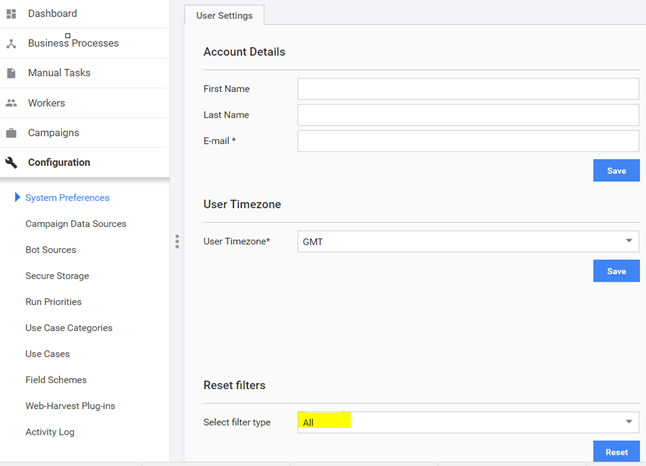
Business processes are not displayed
Expand to learn more
Symptoms
URLs were changed during migration procedure and human tasks are not displayed.
Cause
User's preferences are incorrect.
Resolution
- Check the preferences for user in MysqlDB (replace 'user' with the username which you are using to View all the business processes (for example, workfusion)):
use wfdb;
select * from PREFERENCE where PREFERENCE_KEY = "SELECTED_FILTER_BusinessProcess" \G

select pr.STRING_VALUE from PREFERENCE pr join ApplicationUser au on au.id = pr.PREFERENCE_USER_ID where pr.PREFERENCE_KEY = 'SELECTED_FILTER_BusinessProcess' and au.name = 'user';
- Make a backup using the following commands:
mysqldump -u${WORKFUSION_MYSQL_USER} -p${WORKFUSION_MYSQL_PASS} ${WORKFUSION_DB} PREFERENCE > preference.sql
or
mysql> use wfdb;
select * from PREFERENCE pr join ApplicationUser au on au.id = pr.PREFERENCE_USER_ID where pr.PREFERENCE_KEY = 'SELECTED_FILTER_BusinessProcess'   and au.name = 'user' into outfile '/var/lib/installation/user.csv' fields enclosed by '"' terminated by ';' escaped by '"' lines terminated by '\r\n';
- Run the following queries to clean the preferences for "user" user:
use wfdb;
select id from ApplicationUser where name='user';

DELETE FROM PREFERENCE WHERE PREFERENCE_KEY = 'SELECTED_FILTER_BusinessProcess' and PREFERENCE_USER_ID = "output from previous command";
Example
use wfdb;
select id from ApplicationUser where name='workfusion';

#It should be 1, if no please enter your id to the command below after PREFERENCE_USER_ID:

DELETE FROM PREFERENCE WHERE PREFERENCE_KEY = 'SELECTED_FILTER_BusinessProcess' and PREFERENCE_USER_ID = 1;
After that, re-log into Control Tower WI and check all business processes.
Get business process URL in machine configs
Expand to learn more
Symptoms
The WorkFusion Context wrapper class returns the "null" value. Find the context code:
((com.freedomoss.crowdcontrol.webharvest.WebHarvestTaskItem) item.getWrappedObject()).getCampaignDto().getSource().getUrl();((SourceDto) source.getWrappedObject()).getUrl();
Resolution
You need ((com.freedomoss.crowdcontrol.webharvest.WebHarvestTaskItem) item.getWrappedObject()).getRun().getRootRunUuid() as you call that method from the root Business Process.
Memory Leak on JVM: OutOfMemory: metaspace
Expand to learn more
Symptoms
Approximately after 60-70 business process runs, a fatal error occurs tied with the exception "OutOfMemory: metaspace". Also, after each run, there is a constant grow of consumed memory from the heap.
Resolution
Usage of static instance of the Gson utility (com.workfusion.common.utils.GsonUtils.GSON) from Groovy for the third-party class (loaded from the script) causes GroovyClassloader leak and leads to the OutOfMemory: Metaspace error. The issue relates to any class that is loaded by the system classloader context and can be somehow retained by GroovyClassLoader. It leads to filling Metaspace with unusable classes that cannot be deleted by GC because of non-null references.
See the script as an example.
script
0: A groovy script is started
// withing groovy script
 1: import some.package.som.class.FooBar
...
 2. FooBar foo = new FooBar();
...
 3: GsonUtils.GSON.toJson(foo);
...
// end of groovy script
GroovyShell runs a groovy compiler to create a dynamic java class for the script execution named, for example, Script1_gen1.
GroovyShell creates an instance of GroovyClassLoader to load the dynamic class.
GroovyShell executes the dynamic class using the instance of GroovyClassLoader as a context classloader for the script.
If the FooBar constructor uses other classes not loaded by a parent system classloader, they are loaded by GroovyClassLoader as well. Their bytecode is placed in the Metaspace retained by the instance of GroovyClassLoader.
Gson static instance (from the system classloader context) has a private fieldtypeTokenCache:
typeTokenCache
private final Map<TypeToken<?>, TypeAdapter<?>> typeTokenCache = new ConcurrentHashMap<TypeToken<?>, TypeAdapter<?>>();The TypeToken key in the map has a hard reference to a java type serialized:
TypeToken class
public class TypeToken<T> {
  final Class<? super T> rawType;
...
As a result, after the toJson call, a reference to some.package.som.class.FooBar.class from GroovyClassLoader context is stored in the ConcurrentHashMap key as a TypeToken field. TheTokenCache type is never cleaned up until the whole com.google.gson.Gson instance is garbage-collected. Taking into account that the instance is a static field from a helper class loaded in the web application context, it will never be garbage-collected until Control Tower web application is unloaded from Tomcat container, i.e., never.
The script ends execution, GroovyClassLoader is not used anymore and should be garbage-collected.
However, there is a reference com.workfusion.common.utils.GsonUtils::GSON > com.google.gson.Gson::typeTokenCache > .. TypeToken::rawType > some.package.som.class.FooBar.c;ass::classloader > GroovyClassLoader, which retains the instance of GroovyClassloader forever. The classloader retains its metaspace with all the loaded classes.
The script starts execution again to process the next hit. The whole sequence is repeated once more.
Now, you have two copies of GroovyClassLoader with the second copy of all the loaded classes, then third, fourth, etc., until you get OutOfMemory: Metaspace and Control Tower crash.
Workarounds
- Never use the static instance of the com.google.Gson class from com.workfusion.common.utils.GsonUtils the new local instance of Gson should be created each time a script runs. Also, try to use GroovyCLassLoader context classes only instead of System ClassLoader context classes.
- Restart Control Tower each time you get OutOfMemory Metaspace.
- Increase the metaspace memory. It prolongs the working time but you will get OutOfMememory Metaspace. Then, restart Control Tower once again.
OOTB OCR Business Process failure: IO error during HTTP execution for URL
Expand to learn more
Symptoms
Event log shows the following exception:
org.webharvest.exception.HttpException: IO error during HTTP execution for URL: https://<ocr_url>/api/v1/cloud/submitImage
…
Caused by: java.net.ConnectException: Connection timed out (Connection timed out)
…
at java.net.PlainSocketImpl.socketConnect(Native Method)
 at java.net.AbstractPlainSocketImpl.doConnect(AbstractPlainSocketImpl.java:350)
 at java.net.AbstractPlainSocketImpl.connectToAddress(AbstractPlainSocketImpl.java:206)
 at java.net.AbstractPlainSocketImpl.connect(AbstractPlainSocketImpl.java:188)
Resolution
Ask IT team to check the Security group rule and restart services on the OCR server.
OOTB OCR Business Process failure: A fatal error has been detected by the Java Runtime Environment
Expand to learn more
Symptoms
The exception below occurs in the ocr_failed_response field or appears in event logs:
<?xml version="1.0" encoding="UTF-8" standalone="yes"?><response><task id="e9202eba-d125-45ca-8d14-720c38616419" message="#
# A fatal error has been detected by the Java Runtime Environment:
#
#
SIGSEGV (0xb) at pc=0x00007fb45bc3ea59, pid=26707, tid=0x00007fb4a2f79700
#
#
JRE version: Java(TM) SE Runtime Environment (8.0_144-b01) (build 1.8.0_144-b01)
#
Java VM: Java HotSpot(TM) 64-Bit Server VM (25.144-b01 mixed mode linux-amd64 compressed oops)
#
Problematic frame:
# C [libFineObj.so+0xdca59] FObj::CBlockManager::Free(void*)+0x9
#
#
Failed to write core dump. Core dumps have been disabled. To enable core dumping, try "ulimit -c unlimited" before starting Java again
#
#
An error report file with more information is saved as:
#
/opt/workfusion/ocr/hs_err_pid1111.log
#
#
If you would like to submit a bug report, please visit:
#
http://bugreport.java.com/bugreport/crash.jsp
#
...
status="ProcessingFailed"/></response>
This means that some document contains mathematical formulas that cannot be recognized with OCR. As a result, OCR crashed.
Resolution
- Add the
detectLanguage=falseparameter for OCR API request/processDocument. - Save your Business Process and run it.