
Modify layout and controls
Layout
When a Task has been posted to a Crowd, it is rendered in an iframe. The iframe height is set in Task Advanced Options > Properties > Frame Height.
The Task content is wrapped in the <div class="center-box"> elements with default max-width = 985px. To modify the width, use the following css code:
Task width
.template-wrapper > .center-box {
    width:1000px !important;
}
To effectively manage the Task layout, wrap each section (Instructions, Question, Answers) into div with appropriate class or id and add custom styles.
Basic Task Schemes
See the following schemes with code examples (Bootstrap styles are used):
- Vertical – sections are displayed one under another.
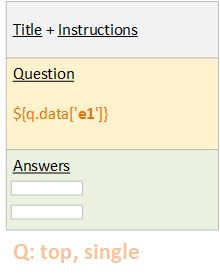
Code Example
``` xml
<#include "extras.ftl" parse=true/>
<#include "html.ftl" parse=true/>
<#include "answers.ftl" parse=true/>
<#assign FEEDBACK_ENABLED = true>
<@hit contentCss="https://s3.amazonaws.com/public.crowdcontrol/saas/ms/ms.bootstrap.min.css">
<@script src="https://s3.amazonaws.com/crowdcontrol.taglib/bootstrap/js/bootstrap-tab.js"/>

<style>
  .row-fluid {
    position:relative;
  }
  .record-number {
    font-weight: bold;
    position:absolute;
    right:-15px;
    background-color: #e0e0e0;
    border: 1px solid #C0C0C0;
  }
  .question-img {
    max-width: 400px;
    height: auto;
  }
</style>

<@instructions title="<h2>[SZ] - Task Layout</h2>">
  <@editable id="__INSTRUCTIONS__"><p>Here is some guidance</p></@editable>
</@instructions>
<@form>
<#if questions??>
    <div class="thumbnail">
      <#list questions as question>
        <@report question=question includeAll=true/>
        <div class="container-fluid">
          <div class="row-fluid">
              <div class="span6">
                <@editable id="__DATA__">
                  <img class="question-img" src="${question.data['url1']}">
                </@editable>
              </div>

              <div class="span6">
                <@editable id="__DATA__">
                  <img class="question-img" src="${question.data['url2']}">
                </@editable>
              </div>

              <div class="record-number">
                ${question_index + 1}
              </div>
          </div>

          <div class="row-fluid">
              <div class="span12">
                <@answers question=question/>
              </div>
          </div>
        </div>
      </#list>
    </div>
</#if>
<@submit text="Submit" />
</@form>
</@hit>
```
1.  You can switch the sections order (for example, Answer before Question).
2.  Question section can contain child divs in one or several rows. This layout is useful for image or document comparison.
- Horizontal – Questions and Answers are displayed in one row
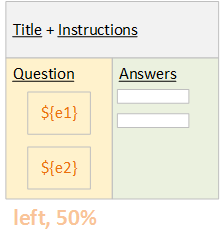
Code Example
``` xml
<#include "extras.ftl" parse=true/>
<#include "html.ftl" parse=true/>
<#include "answers.ftl" parse=true/>
<#assign FEEDBACK_ENABLED = true>
<@hit contentCss="https://s3.amazonaws.com/public.crowdcontrol/saas/ms/ms.bootstrap.min.css">
<@script src="https://s3.amazonaws.com/crowdcontrol.taglib/bootstrap/js/bootstrap-tab.js"/>

<style>
  .row-fluid {
    position:relative;
  }
  .record-number {
    font-weight: bold;
    position:absolute;
    right:-15px;
    background-color: #e0e0e0;
    border: 1px solid #C0C0C0;
  }
  .question-img {
    max-width: 100%;
    height: auto;
  }
  .span4 input {
    max-width: 100%;
  }
</style>

<@instructions title="<h2>[SZ] - Task Layout Horizontal</h2>">
  <@editable id="__INSTRUCTIONS__"><p>Here is some guidance</p></@editable>
</@instructions>
<@form>
<#if questions??>
    <div class="thumbnail">
      <#list questions as question>
        <@report question=question includeAll=true/>
        <div class="container-fluid">
          <div class="row-fluid">
              <div class="span4">
                <@answers question=question/>
              </div>

              <div class="span8">
                <@editable id="__DATA__">
                  <img class="question-img" src="${question.data.url}">
                </@editable>
              </div>

              <div class="record-number">
                ${question_index + 1}
              </div>
          </div>
        </div>
      </#list>
    </div>
</#if>
<@submit text="Submit" />
</@form>
</@hit>
```
1.  You can switch the horizontal order (left, right)
2.  You can set the width of each section (50% and 50%, 30% and 70%, etc.)
- Tabs Layout - the idea is to save the vertical space by using Bootstrap Tabs component.
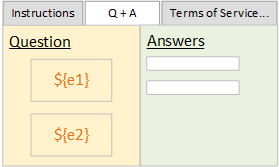
Code Example
``` xml
<#include "extras.ftl" parse=true/>
<#include "html.ftl" parse=true/>
<#include "answers.ftl" parse=true/>
<#assign FEEDBACK_ENABLED = true>
<@hit contentCss="https://s3.amazonaws.com/public.crowdcontrol/saas/ms/ms.bootstrap.min.css">
    <@script src="https://s3.amazonaws.com/crowdcontrol.taglib/bootstrap/js/bootstrap-tab.js"/>

    <style>
      .row-fluid {
        position:relative;
        padding-top: 20px;
      }
      .record-number {
        font-weight: bold;
        position:absolute;
        right:0px;
        background-color: #e0e0e0;
        border: 1px solid #C0C0C0;
      }
      .question-img {
        max-width: 400px;
        height: auto;
      }
    </style>
    <div class="container-fluid">
        <div class="row-fluid">

            <ul class="nav nav-tabs tabs">
              <li class="active"><a href="#guidance" data-toggle="tab">Instructions</a></li>
              <li><a href="#questions" data-toggle="tab">Questions</a></li>
              <li><a href="#terms" data-toggle="tab">Terms and Conditions</a></li>
            </ul>
            <div class="tab-content">
                <div class="tab-pane active" id="guidance">
                    <@instructions title="<h2>[SZ] - Task Layout</h2>">
                      <@editable id="__INSTRUCTIONS__"><p>Here is some guidance</p></@editable>
                    </@instructions>
                </div>

                <div class="tab-pane" id="questions">
                    <@form>
                      <#if questions??>
                        <div class="thumbnail">
                            <#list questions as question>
                                <@report question=question includeAll=true/>
                                <div class="row-fluid">
                                  <div class="span12">
                                    <@editable id="__DATA__">
                                        <img class="question-img" src="${question.data.url}">
                                    </@editable>
                                  </div>

                                  <div class="record-number">
                                    ${question_index + 1}
                                  </div>
                                </div>

                                <div class="row-fluid">
                                  <div class="span12">
                                    <@answers question=question/>
                                  </div>
                                </div>
                            </#list>
                        </div>
                      </#if>
                      <@submit text="Submit" />
                    </@form>
                </div>

                <div class="tab-pane" id="terms">
                    Terms and Conditions text
                </div>
            </div>

        </div> <!--row -->
    </div> <!--container -->
</@hit>
```
   One of the variants:

1.  Instructions tab
2.  Questions and Answers tab
3.  Additional tabs (for example, Terms of Service)
Arrange Records as Tabs for Block Size > 1.
To include all Records, use the following cycle:
Loop example
<#list questions as question>
    <@report question=question includeAll=true />
    <div>
        Your html code, ${question.data['interpolations']} and <@editable id="your_id"></@editable>
    </div>
    <@answers question=question />
</#list>
- By default, the Question and Answers sections for all Records in a Worker Task are placed one below another.
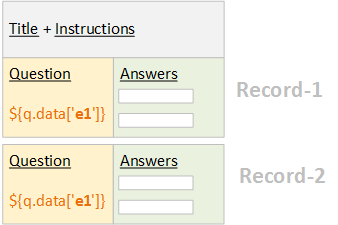
- To display Each Record in a new tab, use the following code:
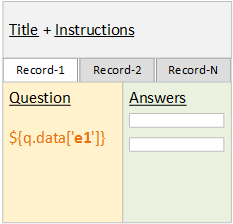
Code Example
``` xml
<#include "extras.ftl" parse=true/>
<#include "html.ftl" parse=true/>
<#include "answers.ftl" parse=true/>
<#assign FEEDBACK_ENABLED = true>
<@hit contentCss="https://s3.amazonaws.com/public.crowdcontrol/saas/ms/ms.bootstrap.min.css">
<@script src="https://s3.amazonaws.com/crowdcontrol.taglib/bootstrap/js/bootstrap-tab.js"/>
    <style>
      .record-number {
        font-weight: bold;
        position:absolute;
        right:140px;
        text-align:right;
        background-color: #e0e0e0;
        border: 1px solid #C0C0C0;
      }
      .question-img {
        max-width: 400px;
        height: auto;
      }
      .row-fluid {
        padding-top: 20px;
      }
    </style>
    <div class="container-fluid">
        <@instructions title="<h2>[SZ] - Task Layout</h2>">
            <@editable id="__INSTRUCTIONS__"><p>Here is some guidance</p></@editable>
        </@instructions>

        <div class="row-fluid">
            <@form>
            <#if questions??>
            <ul class="nav nav-tabs tabs">
                <#list questions as question>
                    <#if question_index == 0>
                        <li class="active"><a href="#record-${question_index + 1}" data-toggle="tab">${question_index + 1}</a></li>
                    <#else>
                        <li><a href="#record-${question_index + 1}" data-toggle="tab">${question_index + 1}</a></li>
                    </#if>
                </#list>
            </ul>
            <div class="tab-content">
                <#list questions as question>
                    <#if question_index == 0>
                        <div class="tab-pane active" id="record-${question_index + 1}">
                    <#else>
                        <div class="tab-pane" id="record-${question_index + 1}">
                    </#if>


                                <div class="thumbnail">

                                        <@report question=question includeAll=true/>
                                        <div class="row-fluid">
                                          <div class="span6">
                                            <@editable id="__DATA__">
                                                <img class="question-img" src="${question.data.url}">
                                            </@editable>
                                          </div>


                                          <div class="span6">
                                            <@answers question=question/>
                                          </div>
                                        </div>

                                </div>

                        </div>
                </#list>
            </div> <!--tab-content -->
            </#if>
            <@submit text="Submit" />
            </@form>
        </div> <!--row -->
    </div> <!--container -->
</@hit>
```
Styles and Scripts
To explore default styles and scripts, see the styles defined in Macro Templates (html.ftl, answers.ftl, extras.ftl) in Campaigns > Templates > Macro.
To add your custom styles, use one of the following variants:
<link rel="stylesheet" href="https://your_cdn.css" />

<!--OR-->

<style>
    .my_class {border: 1px solid green;}
</style>
To add styles for Answers, see the CSS Rules for Answers and Sub-Answers topic.
To add your custom scripts, use one of the following variants:
<@script src="https://your_cdn.js" />

<!--OR-->

<script>
    $(function(){});
</script>
Components and Controls
To minimize the Task code and utilize tested components, you can use the following frameworks (already included in html.ftl):
Bootstrap (v 2.0.2) – http://bootstrapdocs.com/v2.0.2/docs/