
Upgrade from 10.2.1 to 10.2.1.1
The guide describes the upgrade to the 10.2.1.1 version of WorkFusion Intelligent Automation Cloud Enterprise. Note that this operation only involves patching the RPA components with the corresponding installer.
Prepare for upgrade
Before the upgrade, ensure that:
- No Business Process or Manual Task is running.
- You prepared fleets for migration.
- You verified that the SSO or LDAP authentication you enabled on the existing environment is working.
Save fleet names for Bot Units
To save currently used fleet names for Bot Units, do the following:
Log in to Control Tower, and click Bot Manager.
In the Bot Manager UI window, click your RPA server to expand the fleets.
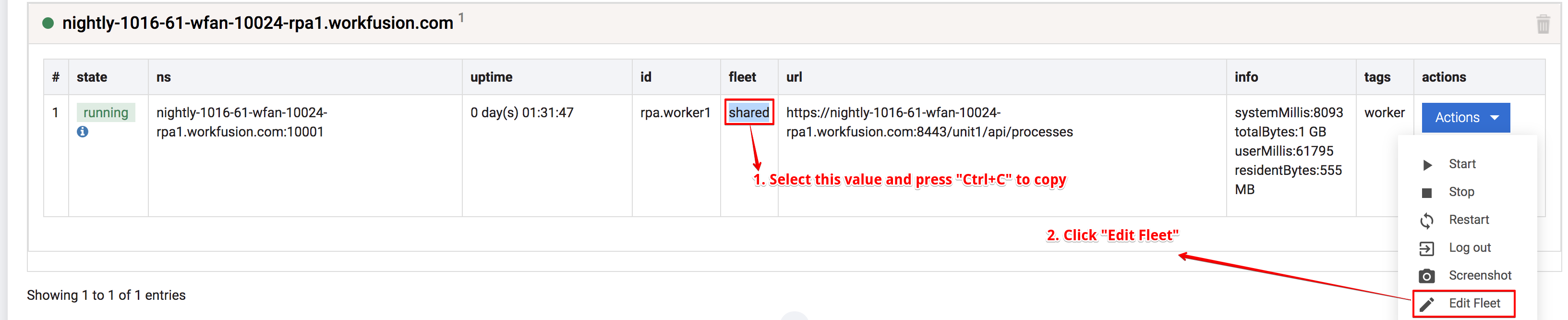
Copy the value into the fleet column → Actions → Edit Fleet.
In the Edit Fleet window, click Create new, and paste the values copied earlier.
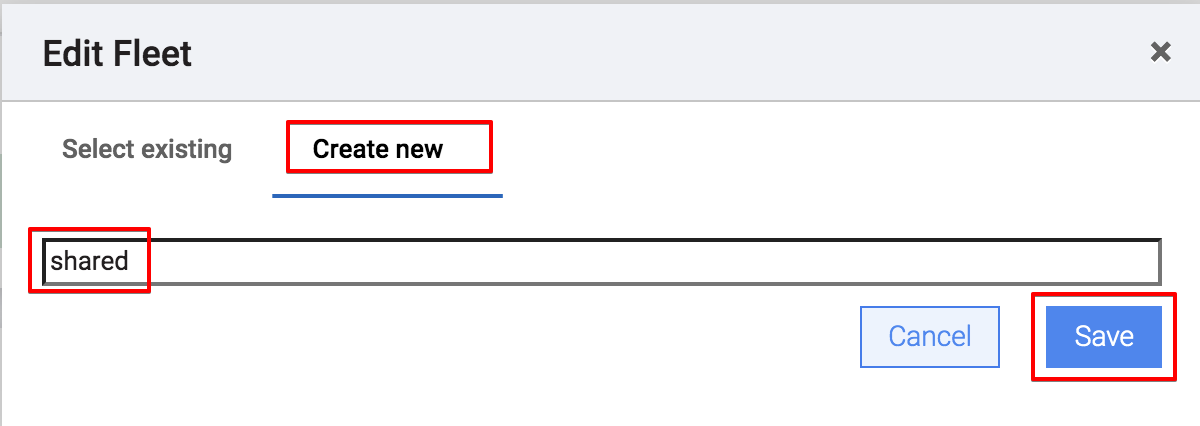
Repeat steps 3-4 for all fleets.
Upgrade RPA components
caution
Before uninstalling the RPA component, manually copy the log content if you want to preserve the logs, as the corresponding folder and all of its content will get deleted.
Log locations:
- bot-agent logs: ..\RPA\bot-agent\logs
- worker logs: ..\RPA\logs
- nginx logs: ..\RPA\nginx\logs
- WFSvc logs: ..\RPA\tools\logs
Upgrade the RPA components, depending on your installation approach:
Log in to the MASTER server as
APPLICATION_USER.Download the RPA installer for v.10.2.1.1 and place it to the
INSTALL_DIR/wf_installer/sourcesdirectory, for example,/opt/workfusion/wf_installer/sources.In
INSTALL_DIR/wf_installer/manifest.yml, specify the new version of the installer:rpa_installer: 10.2.1.10
# instead of rpa_installer: 10.2.1.9Uninstall current RPA and perform a clean installation of new RPA:
$ ./install.sh uninstall rpa
$ ./install.sh install rpa
$ ./install.sh check rpa
- Log in to the RPA server and uninstall RPA components: Control Panel → Programs and Features → RPA (Uninstall). After that, remove the RPA folder.
- Download the RPA installer for v.10.2.1.1.
- Install RPA by following the instructions in the section Install RPA package.
The upgrade is complete.