Perform monitoring in case of non-standard setup
View RPA standard setup workflow
The RPA standard setup workflow looks as follows:
- Bot Master starts via WFSvc started by Windows scheduler triggers.
- Master Agent starts an RDP client.
- RDP logs in as Unit User.
- Scheduler starts Unit Agent.
- Unit Agent starts Worker.
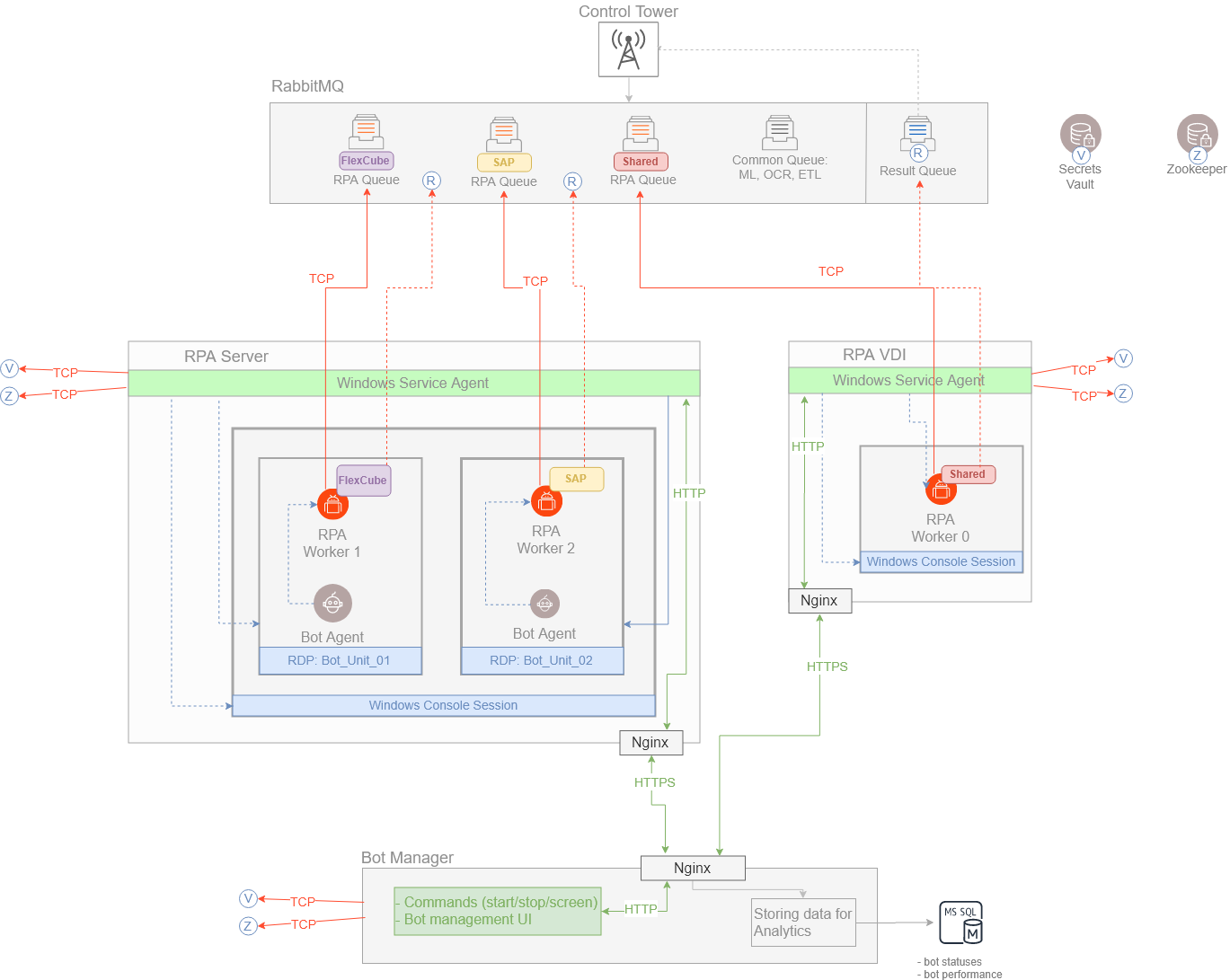
If you enable automatic reconnection, Worker sends a request to Unit Agent, and then Unit Agent sends a request to Master Agent for reconnecting.
- In case of closing RDP, Master Agent monitors and restarts it.
- In case of closing Worker, Unit Agent restarts it.
If Unit Agent crashes, Unit disappears from Bot Manager, but Worker can still proceed with execution of Bot Tasks. There are error messages in a Worker log while Worker sends a request to reconnect.
Perform monitoring in non-standard setup
When some elements are disabled (for example, WFSvc or automatic reconnection) or Windows RDP is used, mind the following scenarios:
- In case of a Windows RDP client, close a legal banner manually.
- If automatic reconnection is disabled, before the execution, make sure Unit is running and the session is active. You have to unlock the screen before each execution.
- Monitor an RDP connection status and log in to Unit manually before the execution. For a standard WorkFusion setup, Master Agent monitors a Unit status and restarts Unit in case of closing RDP.
- In case of native Windows RDP, if automatic reconnection is enabled, disable the following policy to push credentials to Windows Credentials Manager to log in: Network access: Do not allow storage of passwords and credentials for network authentication.
Distribute RPA tasks
RPA Worker refers to an RPA queue and takes tasks one by one.
A queue name consists of an RPA queue template and a fleet name.
- The RPA queue template is stored in the ZooKeeper node value:
config/bot-agent/rpa.rabbitmq.worker.queue.template. - The fleet name (if exists) is taken from the ZooKeeper node:
config/bot-agent/fleet.rpa-host-name.unitID. Otherwise, RPA Worker takes the default value fromINSTALL_DIR/bot-agent/conf/units/unit{Unit_id}.yml.