Apply BEP Worker
A Worker is a single instance of a Worker application process started by BEP to process BEP Worker tasks.
Worker types and default configurations
| Worker type | Description | Default CPU | Default memory configuration |
|---|---|---|---|
| CT | Default Workers. Processes common BP Bot Tasks. | 0.4 Core |
|
| AutoML training | Processes the AutoML training step. A separate pool is created for each training process. | 1 Core |
|
| AutoML execution | Processes AutoML model execution tasks. A separate pool is created for each model. | 1 Core |
|
| RPA | Processes RPA Bot steps containing the robotics-flow code. Execution occurs on the RPA node proper, outside the BEP cluster, and is not managed by the Worker Management Service. | Not limited |
|
| OCR | Processes OCR tasks. Replaces the single-server approach. | 1 Core |
|
For BEP Worker dependencies, refer to the Browse libraries and tools article.
Example
To execute five different ML models simultaneously, the required minimum capacity of a BEP Agent is 5 CPU and 20 GB RAM. Also, consider at least 1 CPU and 4 GB RAM for system processes. Therefore, the recommended capacity is 8 CPU and 32 GB RAM.
BEP Worker lifecycle
Each BEP Worker has the following lifecycle:
Once started, a Worker begins listening to a specific Worker queue, depending on its type.
The Worker takes a task to process from the queue. For more information, see Task processing details.
After the Worker finishes processing the task, it checks for "death pills".
If the Worker detects no "death pill," it takes another task from the queue to process. If there is a "death pill," the Worker stops processing tasks. The Worker notifies WMS it is ready to stop and then waits for the stop from Marathon, which is to be initiated upon a WMS command.
The "death-pill" mechanism is not used for RPA workers because WMS is not responsible for managing them. For details, read the BEP Worker execution article.
Task processing details
The following two sections describe how AutoML and CT Workers process tasks, including uploading and handling dependencies.
For task-worker relations, see BEP Worker Framework | Task-Worker relations.
CT Workers
For CT Workers, pay attention to third-party dependency versions to avoid class and version collisions.
Once a CT Worker gets its task, it checks the task code for BCB markers. If one is found, the CT Worker proceeds as follows:
Extracts BCB's GAV (
groupId,artifactId,versionparameters) from the marker.Checks the local folder for any previous downloads of the same BCB. If none is found, uploads the BCB to the local folder from Nexus based on GAV.
Creates
GroovyClassLoader(for WebHarvest) and adds the BCB jar to it.Processes the task.
Once the task is processed, the CT Worker produces a variable pointing to the GroovyClassLoader so that the garbage collector could later clear memory.
AutoML Workers
For AutoML training Worker, a separate pool is created for each training process. The same rule is valid for AutoML execution Workers: for each model, a separate pool is created as each requires loading different training data.
Large hyper models and trained models, exceeding 500 MB, can cause high IOPS (high iowait) when Workers are launched.
The figure below illustrates AutoML services within BEP:
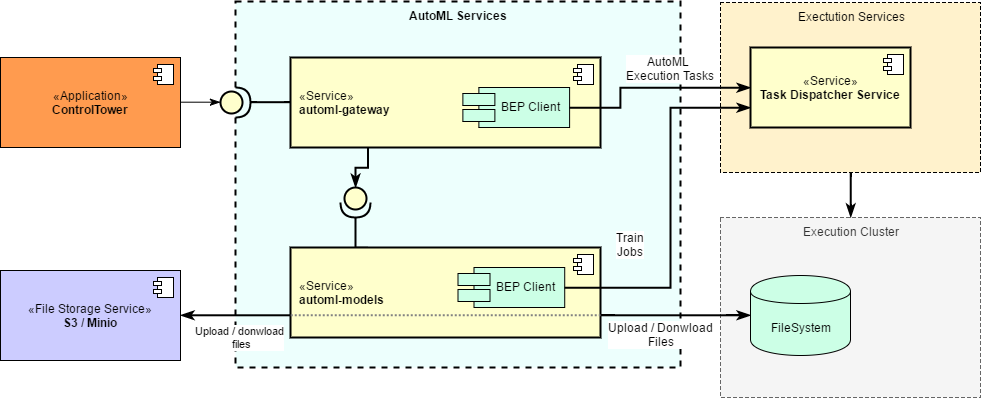
Once the AutoML model service (AMS) gets a request for model training or execution via the Gateway service or AutoML bridge, the following happens:
AMS creates a task. From the S3 storage, the service copies the following files to the cluster: trained model files for model execution or input resources for model training.
AMS adds the task to an AutoML input queue. BEP starts the required number of AutoML workers.
AutoML Workers process the task: deserialize it, extract the class (for training tasks only), and send the response to the result queue. All required dependencies are already inside AutoML Workers.
AMS reads the response and sends it to the Gateway service. Model output artifacts (for AutoML training workers) are copied from the cluster to the S3 storage.