Manage data lifecycle
Work.AI generates a considerable amount of data. Much of it results from completed Business Processes (BP) or internal maintenance. Accumulation of obsolete data can lead to the following issues:
- Low disk space. The database can run short of free disk space, resulting in unexpected BP errors.
- Low performance. The increasing number of strings in the database affects the data processing speed.
- Security flaws. Sometimes, corporate security policies require data to be removed when it is older than two or four weeks.
For the above reasons, it is strongly recommended to remove unwanted data regularly. To enable the removal, you need to set up a specific data management configuration.
In the Work.AI platform, data removal (otherwise called purging) is available for the following components:
Learn about best practices
As you start working with a BP that writes data to a disk, make sure to enable automatic purging for CT data. If you fail to do this before you start, here is what you must do:
- Once you see that the free space on the database server is quickly diminishing and the data occupies about 70-75% of the disk, configure automatic purging for 20 hours with minimal delay.
- If it is too late for Step 1, run a forced purge.
- As a last resort, you can do the following:
- Mount another disk with enough available space.
- Copy the data to it.
- Clean up the
AwsHitQuestiontable. By default,AwsHitQuestionoccupies about 70% of the available disk space. After cleaning it up, you can free another 30-40%. - Execute
shrink_dbto restore all freed extends to the system. - Restore the copied data and set up automatic purging.
It is also recommended to monitor the Analytics component regularly and clean it up monthly.
Purge CT data
The out-of-the-box CT data management procedure does the following:
Cleans up the data from completed BPs.
Removes the BPs that were idle for over 90 days or beyond any other customer-defined purging period.
Verifies that the process is finished correctly, accounting for all links, and that the data integrity inside the database is preserved.
Together with data from completed BPs, the default out-of-the-box data management procedure removes automatically all BPs that have not been run for over 90 days or beyond your custom purging period. So, make sure to back up BPs before the defined expiration period if you need them to remain in use.
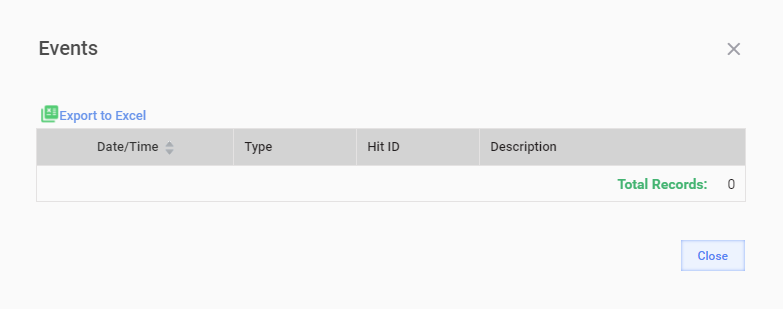
After purging, a BP contains no result data, snapshots, or events.
Out-of-the-box purge
The out-of-the-box (OOTB) data purge in Control Tower removes the data automatically from the following main tables according to a configured schedule:
| Schema | Table | Description |
|---|---|---|
| ct | AwsHit | Contains the BP record execution information. |
| ct | AwsHitAssignment | Contains job execution information per process task. |
| ct | AwsHitAssignmentAnswer | Contains raw answers given by a worker to a record. |
| ct | AwsHitQuestion | Contains JSON with the answer processing output for a record. |
| ct | BotRecordExecutionAttempt | Contains all non-completed bot step execution attempts, including step execution errors or retry limits exceeded, release plugin timeout exceeded, steps without the release or export plugin execution. |
| ct | dataitemtracker | See DataItemTrackerLog. |
| ct | DataItemTrackerLog | Contains information about a transaction passing through BP steps to support the transaction tracking capability. |
| ct | data_store | Contains the binary content of files. |
| ct | EndpointTask | Appears as an AwsHit clone after AwsHit is submitted successfully to workers. |
| ct | EndPointTaskAssignment | It is a temporal entity. Contains the number of assignments accepted by workers and appears when a worker accepts an assignment. |
| ct | event_object | Contains a reference to an object-induced event, for example, a BP step or a definition. |
| ct | event_tracking | Contains a text description of an event, for example, a message or an exception stack trace. |
| ct | external_record | Maintains information on all run IDs with the IN_PROGRESS and COMPLETED record processing statuses or no results submitted. |
| ct | file | Contains the information on files or generated results for every execution. |
| ct | HitSubmissionDataItem | Contains JSON with the input data for a record. |
| ct | HitSubmissionDataItemHistory | Contains snapshots of the existing record input data if it is modified by step transition (for example, two records are merged). |
| ct | HitDataItemLog | Contains a log of life cycle events for a record, for example, posting, submission, approval. |
| ct | PluginExecutionLog | Contains information about plugin executions to support bot analytics. |
| ct | run | Tracks the executions, or runs, of Business Processes, tasks, or bots, which also includes information about Manual Task steps of BPs. |
| ct | runactionevent | Maintains any specific actions by users. |
| ct | runhittype | Maintains all records executed by human workers where the submission size is not zero. |
| ct | runinfo | Contains all run IDs. Additionally, it maintains snapshot headers for record runuuid=uuid, including records executed by human workers. |
| ct | runtag | Provides a tag value for every execution. |
| ct | runworkerstatistics | Contains AI Agent statistics (if any). |
| ct | WorkerActivityLog | Contains the worker or bot assignment statistics. |
The figure below illustrates the relationship diagram for some of the described entities:
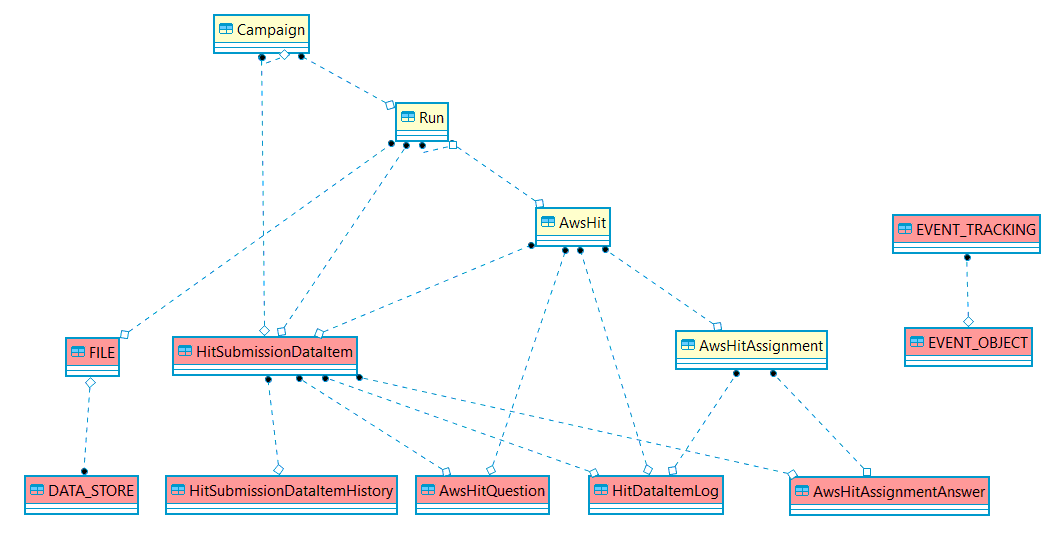
To set up the OOTB data purge, create a database data management configuration in the Control Tower UI based on respective stored procedures as described in the Manage database and S3 data topic.
Forced purge
Forced purge is applied manually to remove all data before a specific date by id.
Forced purge is not intended for consistent data removal. It uses
run.createDateto get runs for purging, which can lead to losing some data of the runs closed after the last date.Purging data produces a high disk load. So, before running the procedure, make sure there are no non-completed BPs started before the purge date and you understand what you are doing. Otherwise, a forced purge may lead to unpredictable consequences.
Forced purge can clean up the following tables:
| Schema | Table | Description |
|---|---|---|
| ct | AuditData | Contains audit information stored by CT objects. |
| ct | AwsHit | Contains the BP record execution information. |
| ct | AwsHitAssignment | Contains job execution information per process task. |
| ct | AwsHitAssignmentAnswer | Contains raw answers given by a worker to a record. |
| ct | AwsHitQuestion | Contains JSON with the answer processing output for a record. |
| ct | EndpointTask | Appears as a clone of AwsHit after AwsHit is submitted successfully to workers. |
| ct | EndPointTaskAssignment | It is a temporal entity. Contains the number of assignments accepted by workers and appears when a worker accepts an assignment. |
| ct | HitSubmissionDataItem | Contains JSON with the input data for a record. |
| ct | HitSubmissionDataItemHistory | Contains snapshots of the existing record input data if it is modified by step transition (for example, two records are merged). |
| ct | HitDataItemLog | Contains a log of life cycle events for a record, for example, posting, submission, approval. |
| ct | DataItemTrackerLog | Contains information about a transaction passing through BP steps to support the transaction tracking capability. |
| ct | Package | Contains the description of packages created in CT. |
| ct | WorkerActivityLog | Contains the worker or bot assignment statistics. |
| ct | WorkerDayActivity | Contains daily worker or bot statistics. |
| ct | PluginExecutionLog | Contains information about plugin executions to support bot analytics. |
| ct | BotRecordExecutionAttempt | Contains all non-completed bot step execution attempts, including step execution errors or retry limits exceeded, release-plugin timeout exceeded, steps without release or export plugin execution. |
| ct | file | Contains a file description, for example, name and type. |
| ct | data_store | Contains the binary content of files. |
| ct | event_tracking | Contains a text description of an event, for example, a message or an exception stack trace. |
| ct | event_object | Contains a reference to an object-induced event, for example, a BP step or a definition. |
The best option to force purge these tables is to create a database data management configuration and run it manually via the Control Tower UI as described in the guide. When creating the configuration, choose the dp#purge_forced_sp procedure.
Alternatively, proceed the old way:
- Via console, connect to the
workfusionMS SQL database. - Create a
purgeData_forceByIdgeneric procedure. The process removes all rows where IDs are lower than thei_lastIdvalue.
MS SQL purgeData_forceById (with progress tracking)
Prerequisites:
    -- as db_owner (sys.admin):
    create table ct.force_purge_log
    ( id bigint     identity(1,1)   not null primary key
    , log_date      datetime2       not null default getUTCDate()
    , table_name    nvarchar(128)   not null
    , n_rows        bigint          not null
    );
Stored procedure:
    if object_id('[ct].[purgeData_forceById]') is not null drop procedure [ct].[purgeData_forceById];
    go
    create procedure [ct].[purgeData_forceById]
    ( @i_tableName  nvarchar(63)
    , @i_idColumn   nvarchar(63)
    , @i_lastId     bigint
    , @i_batchSize  bigint       = 30000
    , @i_sleepTime  nvarchar(12) = '00:00:00.01'
    ) as
    begin
    --set nocount on;
    set xact_abort on;
        /***
        PRE-REQUESITES:
            create table ct.force_purge_log
            ( id bigint     identity(1,1)   not null primary key
            , log_date      datetime2       not null default getUTCDate()
            , table_name    nvarchar(128)   not null
            , n_rows        bigint          not null
            );
        CHANGELOG: 10.1-rev-5
            2021-01-22 apouckatch   added: logging, @i_sleepTime
            2020-11-11 ksakharchuk  changed to delete top() and removed transaction
            2020-10-02 apouckatch   commit every batch (instead of once per table)
            2020-02-01 onovak       adopt for MSSQL
            2018-08-31 apouckatch   lower a transaction level to READ COMMITTED
            2018-08-21 apouckatch   created
        ***/
        declare @v_tabCount  bigint;
        declare @v_rowCount  bigint;
        declare @v_rowTotal  bigint;
        declare @batchSize   bigint = @i_batchSize;
        declare @batchDeleteSQL nvarchar(max);

        -- check the table name in DB dictionary (prevent an SQL injection):
        select @v_tabCount = count(*)
        from information_schema.columns as c
        where c.table_schema = 'ct'
          and c.table_name   = @i_tableName
          and c.column_name  = @i_idColumn;

    if @v_tabCount >= 1
    begin
    try
        set @v_rowTotal = 0;

        set @batchDeleteSQL  = N'
            declare @row_count bigint;
            while (1=1)
            begin
                    delete top ('+cast(@batchSize as nvarchar(10))+')
                    from ct.['+ @i_tableName + ']
                    where [' + @i_idColumn + '] <= ' + cast(@i_lastId as nvarchar(100)) +';

                    set @row_count = @@rowcount;
                    if @row_count = 0
                        break;
                    set @v_rowTotal =@v_rowTotal + @row_count;

                    insert into ct.force_purge_log( table_name, n_rows)
                    values( ''' + @i_tableName + ''', @row_count);
                    waitfor delay @sleep;
            end;';

        exec sp_executeSql @batchDeleteSQL, N'@sleep nvarchar(12), @v_rowTotal bigint output', @sleep = @i_sleepTime, @v_rowTotal = @v_rowTotal output;

    end try
    begin catch
        declare @errormessage   nvarchar(4000)  = error_message();
        declare @errorseverity  int             = error_severity();
        declare @errorstate     int             = error_state();
        raiserror(@errormessage, @errorseverity, @errorstate);
    end catch;

    select @i_tableName  as Table_Name
         , @v_rowTotal   as Deleted_Rows;

    end;
    go
MS SQL purgeData_forceById (without progress tracking, obsolete)
    if object_id('[ct].[purgeData_forceById]') is not null drop procedure [ct].[purgeData_forceById];
    go
    create procedure [ct].[purgeData_forceById]
    ( @i_tableName  nvarchar(63)
    , @i_idColumn   nvarchar(63)
    , @i_lastId     bigint
    , @i_batchSize  bigint = 30000
    ) as
    begin
    --set nocount on;
    set xact_abort on;
        /*** CHANGELOG: 10.1-rev-3
        2020-11-11 ksakharchuk  changed to delete top() and removed transaction
        2020-10-02 apouckatch   commit every batch (instead of once per table)
        2020-02-01 onovak       adopt for MSSQL
        2018-08-31 apouckatch   lower a transaction level to READ COMMITTED
        2018-08-21 apouckatch   created
        ***/
        declare @v_tabCount  bigint;
        declare @v_rowCount  bigint;
        declare @v_rowTotal  bigint;
        declare @batchSize   bigint = @i_batchSize;
        declare @batchDeleteSQL nvarchar(max);
        declare @sleep_time  nvarchar(12) = '00:00:01';

        -- check the table name in DB dictionary (prevent an SQL injection):
        select @v_tabCount = count(*)
        from information_schema.columns as c
        where c.table_schema = 'ct'
          and c.table_name   = @i_tableName
          and c.column_name  = @i_idColumn;

    if @v_tabCount >= 1
    begin try
        set @v_rowTotal = 0;

        set @batchDeleteSQL  = N'
            declare @row_count int = 1;
            while (@row_count > 0)
            begin
                    delete top ('+cast(@batchSize as nvarchar(10))+')
                    from ct.['+ @i_tableName + ']
                    where [' + @i_idColumn + '] <= ' + cast(@i_lastId as nvarchar(100)) +';

                    set @row_count = @@rowcount;
                    set @v_rowTotal =@v_rowTotal + @row_count;
                    waitfor delay @sleep;
            end;';

        --set transaction isolation level read committed;
        --print @batchDeleteSQL
        exec sp_executesql @batchDeleteSQL, N'@sleep nvarchar(12), @v_rowTotal bigint output', @sleep = @sleep_time, @v_rowTotal = @v_rowTotal output;

    end try
    begin catch
        declare @errormessage nvarchar(4000) = error_message();
        declare @errorseverity int = error_severity();
        declare @errorstate    int = error_state();
        raiserror(@errormessage, @errorseverity, @errorstate);
    end catch;

    select @i_tableName  as Table_Name
         , @v_rowTotal   as Deleted_Rows;

    end;
    go
- Edit the value of the last date:
set @last_date = '<insert-your-date-here>';. All data before the date is removed. - Copy and save the following script. Remember to redefine
@last_date.
MS SQL script
    declare @last_date          datetime = '2020-12-31'
        ,   @preserve_active    bit      = 0            -- = 1, to keep any active RUNs and their BPs
        ,   @preserve_draft     bit      = 0            -- = 1, to keep 'DRAFT' BPs
        ,   @batch_size         int      = 3000
        ,   @last_run_id        bigint
        ;
    with cte_min_active_run as
    (   select  min(r_min.id) as run_id
        from ct.run as r_min
        where r_min.status not in
            ( 'COMPLETED'
            , 'DELETED'
            , case when @preserve_draft = 0 then 'DRAFT' else '-dummy-' end
            )
    )
    , cte_first_active_root_run as
    (   select first_act_root_run.id as run_id
        from ct.run             as first_act_run_full
        join cte_min_active_run as first_act_run_1    on first_act_run_full.id   = first_act_run_1.run_id
        join ct.run             as first_act_root_run on first_act_root_run.uuid = first_act_run_full.rootRunUUID
    )
    , cte_upper_limit_run as
    (   select coalesce
            (   (select run_id from cte_first_active_root_run where @preserve_active = 1)
            ,   (select max(id) + 1 from ct.run)
            ,   1
            ) as run_id
    )
    select @last_run_id = max(id)
    from ct.run as r
    where r.id < (select run_id from cte_upper_limit_run)
        and r.startDate <= @last_date
    ;
    /*** previous version without preserving runs: ***
    declare @last_run_id  bigint = (select isnull( max(id) , 0) as last_run_id  from ct.Run                    as r  where r.startDate     <  @last_date  );
    ***/
    declare @last_item_id bigint = (select isnull( max(id) , 0) as last_item_id from ct.HitSubmissionDataItem  as i  where i.run_id        <= @last_run_id);
    declare @last_aud_id  bigint = (select isnull( max(id) , 0) as last_aud_id  from ct.AuditData              as a  where a.createdDate   <  @last_date  );
    declare @last_hit_id  bigint = (select isnull( max(id) , 0) as last_hit_id  from ct.AwsHit                 as h  where h.run_id        <= @last_run_id);
    declare @last_trk_id  bigint = (select isnull( max(tracker_id), 0) as tr_id from ct.DataItemTrackerHitLink as tr where tr.data_item_id <= @last_item_id);
    declare @last_aha_id  bigint = (select isnull( max(id) , 0) as last_aha_id  from ct.AwsHitAssignment       as ha where ha.hit_id       <= @last_hit_id);
    declare @last_et_id   bigint = (select isnull( max(id) , 0) as last_et_id   from ct.EndpointTask           as et where et.run_id       <= @last_run_id);
    declare @last_ev_id   bigint = (select isnull( max(id) , 0) as last_ev_id   from ct.event_tracking         as et where et.created_time <  @last_date  );
    declare @last_file_id bigint = (select isnull( max(id) , 0) as last_file_id from ct.[file]                 as f  where f.runid         <= @last_run_id);
    declare @last_ds_id   bigint =
    (   select coalesce
            (   (   -- case 1: skip the Data_Store that has the [file] not purged this time
                    select min(f.data_store_id) - 1 as last_ds_id
                    from ct.[file] f
                    where f.runid <= @last_run_id
                    and exists
                        (   select 1
                            from ct.[file] fr
                            where fr.data_store_id = f.data_store_id
                            and fr.id > (select max(id) from ct.[file] where runid <= @last_run_id)
                        )
                )
            ,   (   -- case 2: just fetch Data_Store for the last purged [file]
                    select max(f.data_store_id) as last_ds_id
                    from ct.[file] f
                    where f.runid <= @last_run_id
                )
            ,   -- case 3: dummy id
                0
            ) as last_ds_id
    );

    -- output interim results:
    select
          @last_run_id  as last_run_id
        , @last_item_id as last_item_id
        , @last_aud_id  as last_aud_id
        , @last_hit_id  as last_hit_id
        , @last_trk_id  as last_trk_id
        , @last_aha_id  as last_aha_id
        , @last_et_id   as last_et_id
        , @last_ev_id   as last_ev_id
        , @last_file_id as last_file_id
        , @last_ds_id   as last_ds_id
    ;

    begin try
        exec ct.purgeData_forceById 'AwsHitQuestion'                  , 'item_id'          , @last_item_id, @batch_size;
        exec ct.purgeData_forceById 'HitDataItemLog'                  , 'item_id'          , @last_item_id, @batch_size;
        exec ct.purgeData_forceById 'HitSubmissionDataItemHistory'    , 'item_id'          , @last_item_id, @batch_size;
        exec ct.purgeData_forceById 'PluginExecutionLog'              , 'data_item_id'     , @last_item_id, @batch_size;
        exec ct.purgeData_forceById 'HitRecordSource'                 , 'runId'            , @last_run_id , @batch_size;
        exec ct.purgeData_forceById 'AuditData'                       , 'id'               , @last_aud_id , @batch_size;
        exec ct.purgeData_forceById 'HitDataItemLog'                  , 'assignment_id'    , @last_aha_id , @batch_size;
        exec ct.purgeData_forceById 'DataItemTrackerHitLink'          , 'tracker_id'       , @last_trk_id , @batch_size;
        exec ct.purgeData_forceById 'DataItemTrackerLog'              , 'tracker_id'       , @last_trk_id , @batch_size;
        exec ct.purgeData_forceById 'DataItemTracker'                 , 'id'               , @last_trk_id , @batch_size;
        exec ct.purgeData_forceById 'AwsHitAssignmentAnswer'          , 'assignment_id'    , @last_aha_id , @batch_size;
        exec ct.purgeData_forceById 'WorkerFitnessHistoryAssignment'  , 'assignmentId'     , @last_aha_id , @batch_size;
        exec ct.purgeData_forceById 'AwsHitAssignment'                , 'hit_id'           , @last_hit_id , @batch_size;
        exec ct.purgeData_forceById 'HitSubmissionDataItem'           , 'id'               , @last_item_id, @batch_size;
        exec ct.purgeData_forceById 'WorkerActivityLog'               , 'run_id'           , @last_run_id , @batch_size;
        exec ct.purgeData_forceById 'WorkerDayActivity'               , 'runId'            , @last_run_id , @batch_size;
        exec ct.purgeData_forceById 'Package'                         , 'fileId'           , @last_file_id, @batch_size;
        exec ct.purgeData_forceById 'FILE'                            , 'id'               , @last_file_id, @batch_size;
        delete from ct.WorkerQualification where qualification_id in (select id from ct.CustomQualification cq where cq.TEST_STORE_ID <= @last_ds_id);
        exec ct.purgeData_forceById 'CustomQualification'             , 'TEST_STORE_ID'    , @last_ds_id  , @batch_size;
        exec ct.purgeData_forceById 'DATA_STORE'                      , 'ID'               , @last_ds_id  , @batch_size;
        exec ct.purgeData_forceById 'EndPointTaskAssignment'          , 'task_id'          , @last_et_id  , @batch_size;
        exec ct.purgeData_forceById 'EndpointTask'                    , 'id'               , @last_et_id  , @batch_size;
        exec ct.purgeData_forceById 'event_object'                    , 'event_tracking_id', @last_ev_id  , @batch_size;
        exec ct.purgeData_forceById 'event_tracking'                  , 'id'               , @last_ev_id  , @batch_size;
    end try
    begin catch
        throw;
    end catch;
To reclaim free space, run the dbcc shrinkdatabase workfusion command.
Transactional purge
Out-of-the-box purge can also remove data related to a specific record or business transaction. Such an action can be requested by various regulators to remove the ID of a document or transaction from all systems.
Before you launch a transactional purge, make sure that the associated BP contains a step with activated tracking.
The operation finds all hits or items by tracker_id and then clears all related tables in the ct (Control Tower) and ws (Workspace) schemas.
Root tables:
ct.AwsHitws.hit(ws.hit.unique_request_token = ct.AwsHit.uuid)
Initial key: AwsHit.uuid
Purged CT tables:
| Table | Column |
|---|---|
assignmentforhitjob | hitid |
awshit | id, hitid |
awshitassignment | hitid |
awshitevent | hit_id |
awshitquestion | hitid |
awshitviewhistory | hitid |
botrecordexecutionattempt | hitid |
endpointtask | awshitid |
event_tracking | hitid |
external_task_submission | hitid |
hitdataitemlog | hit_id |
hitdisabledforworker | hitid |
hitrecordsource | hitid |
hitsubmissiondataitem | hitid |
run_assignments | hitid |
run_aws_hits | hit_id hit_uuid |
submission | awshit_id |
worker_message | hitid |
workeractivitylog | hitid |
workercommunication | hitid |
workerfeedback | hitid |
workerfitnesshistory | hitid |
Purged Workspace tables:
| Table | Column |
|---|---|
assignment | hit_id |
hit | unique_request_token |
hit_audit | hit_id |
hit_history | hit_id |
hit_type_preview_data | hit_id |
notification_event | hit_vid |
notification_receptor | hit_type_id |
To run a transactional purge, use the following procedure:
View procedure
CREATE PROCEDURE dbo.purge_tx_hit_sp
  @i_hit_uuid   nvarchar(36)
, @o_rec_cnt    bigint output
, @i_estimate   bit = 0
, @i_verbose    bit = 0
AS
begin
    set nocount on;
/***
    CHANGELOG: 10.1-rev-7
        2019-12-16 apouckatch reverse order
        2019-12-13 apouckatch created

    SAMPLE:
        declare @uuid   nvarchar(36) = '7641e603-6bac-450e-ac21-82998bf5a12f';
        declare @cnt    int;
        exec purge_tx_hit_sp @i_hit_uuid = @uuid, @o_rec_cnt = @cnt output;
        print formatMessage( 'CNT:%s', cast( @cnt as nvarchar(10))

***/
    declare cur_tables_to_purge cursor read_only forward_only for
    select
          schema_name
        , table_name
        , key_col_name
        , case sql_where_in
            when 'CT_HIT_ID'    then 'select ct_hit_id   from #tx_hits'
            when 'CT_HIT_UUID'  then 'select ct_hit_uuid from #tx_hits'
            when 'CT_ITEM_ID'   then 'select ct_item_id  from #tx_hits'
            when 'CT_ASMT_ID'   then 'select a.id        from ct.AwsHitAssignment a where a.hit_id in (select ct_hit_id from #tx_hits)'
            when 'CT_TRK_ID'    then 'select tracker_id  from #tx_tracker'
            when 'WS_HIT_ID'    then 'select ws_hit_id   from #tx_hits'
            when 'WS_ASMT_ID'   then 'select a.id        from ws.assignment a where a.hit_id in (select ws_hit_id from #tx_hits)'
            else sql_where_in
            end             as sql_where_id
    from ( values
              -- Control Tower:
                (      0, 'ct' , 'AwsHit'                       , 'id'              , 'CT_HIT_ID'  )
              , (      5, 'ct' , 'DataItemTracker'              , 'id'              , 'CT_TRK_ID'  )
              , (     10, 'ct' , 'AwsHitEvent'                  , 'hit_id'          , 'CT_HIT_ID'  )
              , (     20, 'ct' , 'AwsHitAssignment'             , 'hit_id'          , 'CT_HIT_ID'  )
              , (     30, 'ct' , 'AwsHitViewHistory'            , 'hitid'           , 'CT_HIT_ID'  )
              , (     40, 'ct' , 'AwsHitAssignmentAnswer'       , 'assignment_id'   , 'CT_ASMT_ID' )
              , (     41, 'ct' , 'AwsHitAssignmentAnswer'       , 'item_id'         , 'CT_ITEM_ID' )
              , (     50, 'ct' , 'HitSubmissionDataItem'        , 'hit_id'          , 'CT_HIT_ID'  )
              , (     60, 'ct' , 'HitSubmissionDataItemHistory' , 'item_id'         , 'select i.id from ct.HitSubmissionDataItem i where i.hit_id in (select ct_hit_id from #tx_hits)')
              , (     70, 'ct' , 'AwsHitQuestion'               , 'hit_id'          , 'CT_HIT_ID'  )
              , (     71, 'ct' , 'AwsHitQuestion'               , 'item_id'         , 'CT_ITEM_ID' )
              , (     80, 'ct' , 'HitDataItemLog'               , 'hit_id'          , 'CT_HIT_ID'  )
              , (     81, 'ct' , 'HitDataItemLog'               , 'item_id'         , 'CT_ITEM_ID' )
              , (     82, 'ct' , 'HitDataItemLog'               , 'assignment_id'   , 'CT_ASMT_ID' )
              , (     90, 'ct' , 'DataItemTrackerLog'           , 'data_item_id'    , 'CT_ITEM_ID' )
              , (     91, 'ct' , 'DataItemTrackerLog'           , 'tracker_id'      , 'CT_TRK_ID'  )
              , (    100, 'ct' , 'DataItemTrackerHitLink'       , 'data_item_id'    , 'CT_ITEM_ID' )
              , (    101, 'ct' , 'DataItemTrackerHitLink'       , 'tracker_id'      , 'CT_TRK_ID'  )
              , (    110, 'ct' , 'HitRecordSource'              , 'hitid'           , 'CT_HIT_ID'  )
              , (    120, 'ct' , 'WorkerActivityLog'            , 'hitid'           , 'CT_HIT_UUID')
              , (    130, 'ct' , 'run_aws_hits'                 , 'hit_id'          , 'CT_HIT_ID'  )
              -- Workspace:
              , (    500, 'ws' , 'hit'                          , 'id'              , 'WS_HIT_ID'  )
              , (    510, 'ws' , 'assignment'                   , 'hit_id'          , 'WS_HIT_ID'  )
              , (    520, 'ws' , 'hit_submission'               , 'assignment_id'   , 'WS_ASMT_ID' )
              , (    530, 'ws' , 'assignment_audit'             , 'assignment_id'   , 'WS_ASMT_ID' )
              , (    540, 'ws' , 'hit_history'                  , 'hit_id'          , 'WS_HIT_ID'  )
              , (    550, 'ws' , 'hit_type_preview_data'        , 'hit_id'          , 'WS_HIT_ID'  )
              , (    560, 'ws' , 'hit_audit'                    , 'hit_id'          , 'WS_HIT_ID'  )
         ) as t ( seq_id, schema_name, table_name               , key_col_name      , sql_where_in )
    order by seq_id desc   -- to track dependencies from details to master

    if @i_verbose = 1
        print 'Purging [hit_uuid:' + @i_hit_uuid + ']'

    set @o_rec_cnt = 0

    -- prepare a tracker:
    select trk.tracker_id
    into #tx_tracker
    from ct.awsHit                  as hit
    join ct.hitSubmissionDataItem   as item on hit.id  = item.hit_id
    join ct.dataItemTrackerHitLink  as trk  on item.id = trk.data_item_id
    where hit.uuid = @i_hit_uuid

    -- prepare a set of hits:
    select
          tx_ct_hits.id     as ct_hit_id
        , tx_ct_hits.uuid   as ct_hit_uuid
        , tx_items.id       as ct_item_id
        , tx_ws_hits.id     as ws_hit_id
    into #tx_hits
    from #tx_tracker                as trk
    join ct.dataItemTrackerHitLink  as tx_trk       on tx_trk.tracker_id = trk.tracker_id
    join ct.hitSubmissionDataItem   as tx_items     on tx_items.id       = tx_trk.data_item_id
    join ct.awsHit                  as tx_ct_hits   on tx_ct_hits.id     = tx_items.hit_id
    left join ws.hit                as tx_ws_hits   on tx_ct_hits.uuid   = tx_ws_hits.unique_request_token

    create nonclustered index idx_tx_hits_ct_hit_id   on #tx_hits( ct_hit_id  )
    create nonclustered index idx_tx_hits_ct_hit_uuid on #tx_hits( ct_hit_uuid)
    create nonclustered index idx_tx_hits_ct_item_id  on #tx_hits( ct_item_id )
    create nonclustered index idx_tx_hits_ws_hit_id   on #tx_hits( ws_hit_id  )

    -- loop tables:
    open cur_tables_to_purge

    while (1=1)
    begin
        declare @schema_name    nvarchar(128)
            ,   @table_name     nvarchar(128)
            ,   @key_col_name   nvarchar(128)
            ,   @sql_where_in   nvarchar(4000)
            ,   @sql_from_where nvarchar(1000)
            ,   @sql_execute    nvarchar(1000)
            ,   @start_date     datetime2
            ,   @end_date       datetime2
            ,   @exec_ms        bigint
            ,   @rec_cnt        bigint

        fetch cur_tables_to_purge
        into  @schema_name  , @table_name
            , @key_col_name , @sql_where_in

        if @@fetch_status != 0
            break

        set @start_date = getDate()

        set @sql_from_where = formatMessage
            ( 'from [%s].[%s] where [%s] in (%s)'
            , @schema_name, @table_name, @key_col_name, @sql_where_in
            )

        if @i_estimate = 1
        begin
            set @sql_execute = formatMessage( 'select @cnt = count(*) %s', @sql_from_where)
            exec sp_executeSql @sql_execute
                , N'@cnt int out'
                , @cnt = @rec_cnt output
        end
        else
        begin
            set @sql_execute = formatMessage('delete %s', @sql_from_where)
            exec sp_executeSql @sql_execute
            set @rec_cnt = @@rowcount
        end

        set @end_date = getDate()

        set @exec_ms = dateDiff( ms, @start_date, @end_date)

        set @o_rec_cnt = @o_rec_cnt + @rec_cnt

        if @i_verbose = 1
            print formatMessage
                ( 'DBG: [%3s].[%-30s][cnt: %7s][ms: %7s][sql:%s]'
                , @schema_name
                , @table_name
                , cast( @rec_cnt as nvarchar(7))
                , cast( @exec_ms as nvarchar(7))
                , @sql_execute
                )

    end -- while(1=1)

    close      cur_tables_to_purge
    deallocate cur_tables_to_purge

end
Purge Data Stores
Purging of Data Stores is required to avoid performance issues when executing Bot Tasks. To purge a Data Store, create a database data management configuration based on custom SQL as described in the Manage database and S3 data guide.
Purge S3
You can set up and manage S3 data purging in one of the following ways:
Via the Data Management user interface in Control Tower. For details, refer to the Manage database and S3 data topic.
Using the API endpoints described in the Data Management API topic.
Purge Analytics
The Analytics component features a customizable procedure that cleans up data from Control Tower, Elasticsearch, RPA, Data Stores, and other components you can add. You have to run the procedure manually. It executes the delete process table by table based on specific settings for each table (dp_config).
For instructions on purging Analytics, refer to Manage database and S3 data | Purge Analytics.
Levels
According to the solution architecture, the Analytics data contains a number of levels:
- source: pm tables
- ods: an intermediate level between the source and wh storages
- wh: the dashboard creation level
A data management procedure cleans up all these levels at a time.
Tables
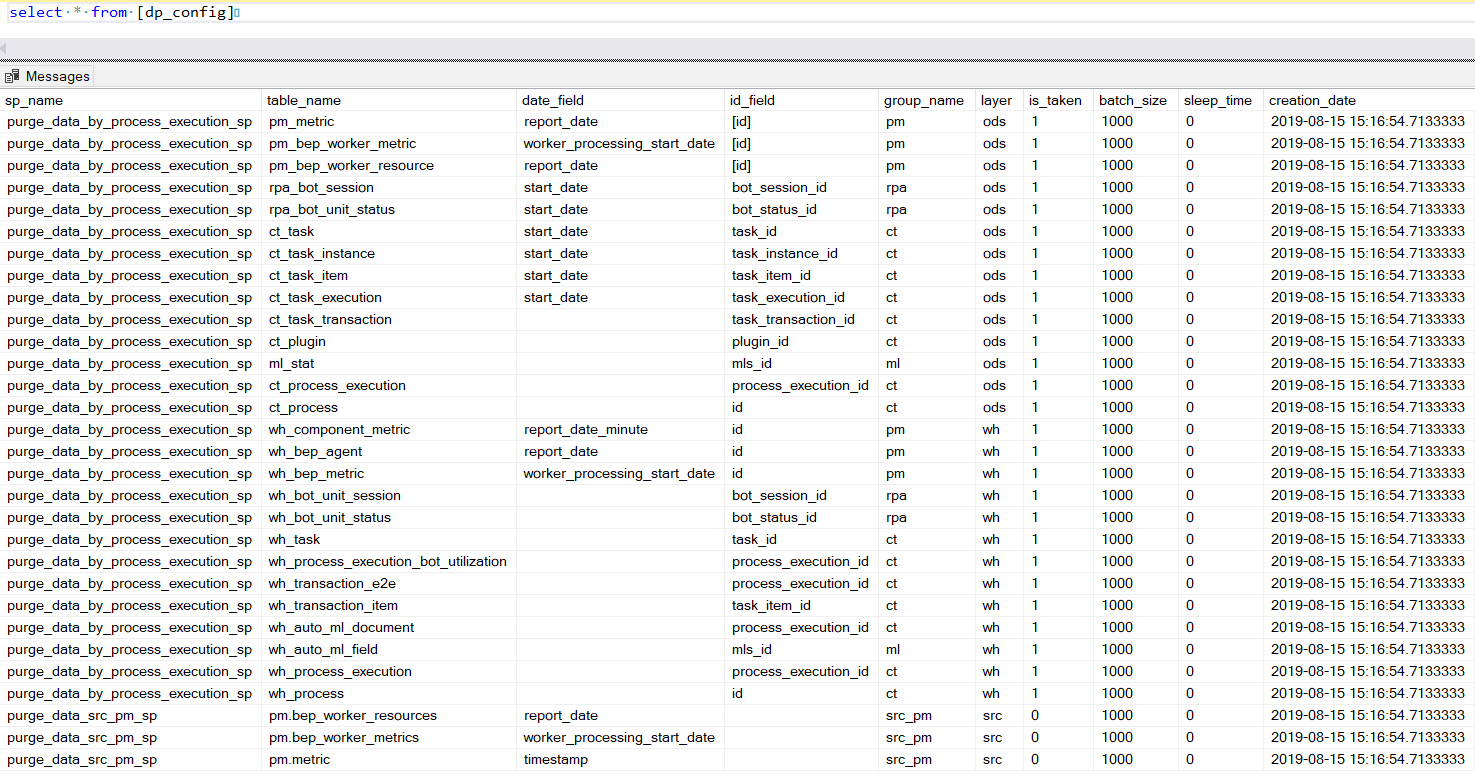
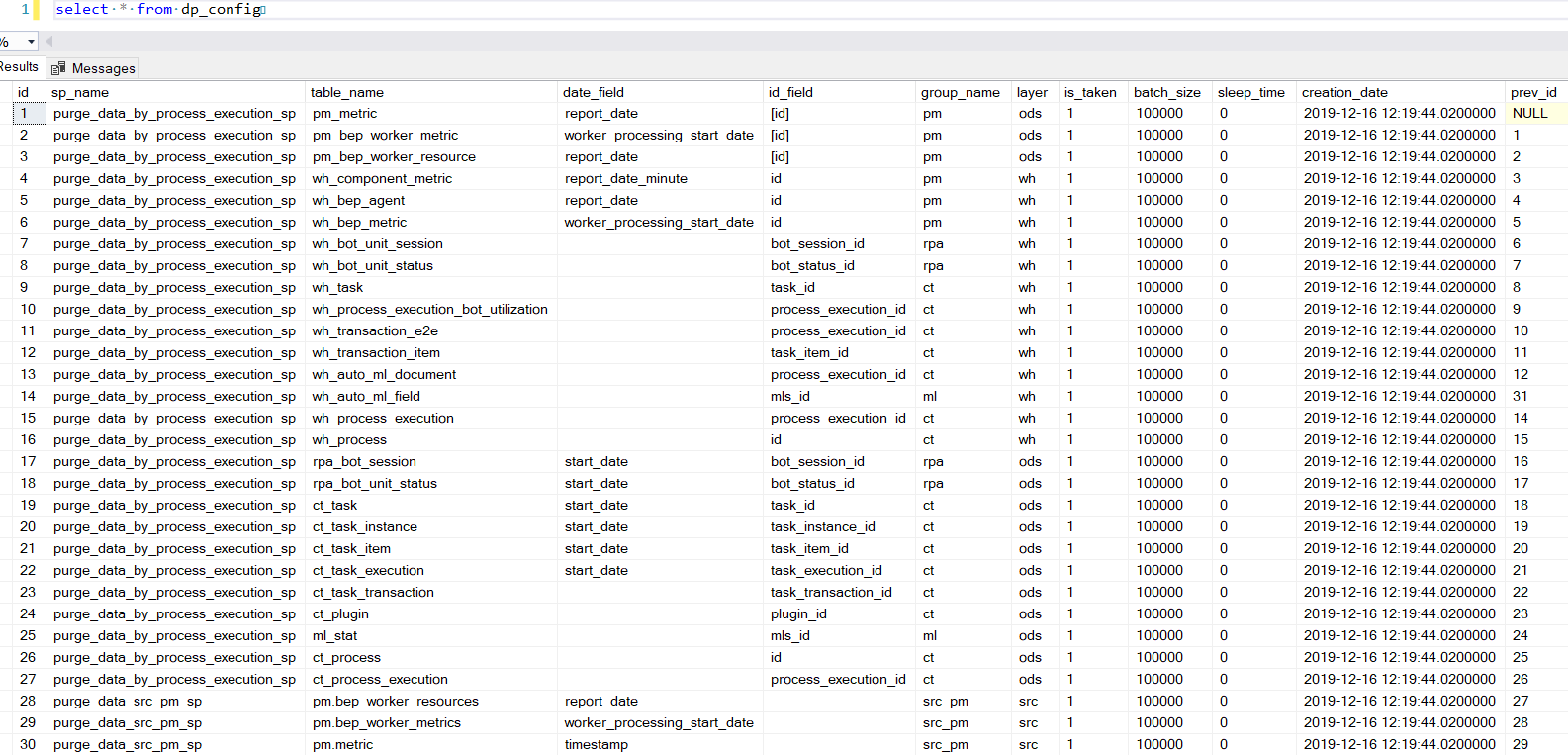
dp_config
The table stores the settings for cleansing data per table. For a data management procedure to run correctly, it should have at least one row with the is_taken = 1 flag.
| Schema | Table | Description |
|---|---|---|
| pm | metric | Source table with system metrics, such as CPU, disk, and memory usage, for all components |
| pm | bep_worker_metrics | Source table containing the results of processing tasks of Bot Execution Platform (BEP) Agents |
| pm | bep_worker_resources | Source table with information about the consumption of resources by a BEP Agent |
| dm | pm_bep_worker_metric | Transitional table between the source and data warehouse containing the results of processing the tasks of BEP Agents |
| dm | pm_bep_worker_resource | Transitional table with information about the consumption of resources by BEP Agents |
| dm | ct_task_instance | Transitional table with information about tasks per each BP step |
| dm | ct_task_execution | Transitional table with information about each assignment in a task for workers |
| dm | ct_task_item | Transitional table with information about each input record |
| dm | wh_bep_agent | Data Warehouse table with information about the resource consumption by a BEP Agent |
| dm | wh_bep_metric | Data Warehouse table containing the results of processing the tasks of BEP Agents |
| dm | wh_component_metric | Data Warehouse table with system metrics, such as CPU, disk and memory usage, for all components |
| dm | wh_transaction_item | Data Warehouse table with information about each input record or document in a BP |
| dm | wh_transaction_e2e | Data Warehouse table with aggregated statistics about each input record or document in a BP |
The stored settings are as follows:
id: increment bigint.sp_name: the nvarchar(255) name of the stored procedure to delete rows in a table.table_name: the nvarchar(255) name of the table.date_field: the nvarchar(255) name of thedatetimefield in thetable_nametable. Used when data deletion is based on a time range.id_field: the name of the identity column in thetemptable. It is used when data deletion is based on IDs.group_name: the name of the group to which the data belongs (pm,rpa,ct,ml,src_pm).layer:ods,wh, orsrc.is_taken: the flag to define whether the table is taken next time.batch_size: the count of rows to delete at a time. The default value is 100000. Limiting the rows is required for performance improvement. The count is to be investigated and depends on the size and load of your database.sleep_time: delay time in milliseconds before the next step begins. The default value is 0.prev_id: the ID of the previous step. If null, it's the first step in a sequence.
dp_log
The table stores the dataset for a purge run:
id: increment bigint.sp_name: the nvarchar(255) name of the stored procedure.table_name: the nvarchar(255) name of the table.date_field: the nvarchar(255) name of thedatetimefield in thetable_nametable.purge_run_id: the increment integer to count purge sets. Each execution of the master procedure adds 1 to previouspurge_run_id.rows_cnt: the number of rows deleted per table.duration_sec: the duration in seconds of the data purging process per table.start_date: the date and time when the process started.end_date: the date and time when the process ended.status:okor an error message if something went wrong.
For troubleshooting tips, refer to the following support guides: