Learn about technology
Optical Character Recognition
Optical Character Recognition (OCR) is the electronic conversion of typed, handwritten, or printed text images into machine-encoded text. The image can be a scanned document, a document photo, or subtitle text in an image (for example, from a television broadcast).
OCRing of input documents is a separate step of the development process. Usually, it involves conversion from PDF into HTML or XML documents. The input quality of the original documents influences the output of the process.
WorkFusion works with the following OCR providers:
ABBYY
Azure AI Document Intelligence
Google Vision API
Paddle OCR
UiPath
Labeling tasks
With the labeling (also known as Tagging-over-Document) experience, working with a document is as easy as in any text editor:
A worker views an original document with text values layered underneath.
The scan is rotated and scaled, and the image is optimized where needed for convenience.
In the text, word boundaries are highlighted, and you can select a single value with one click.
Labeling methods
Let's compare different labeling methods and decide which one is better.
OCR without labeling
In legacy 9.x versions, workers labeled the plain text of OCR results. Often, it looked nothing like the original documents because all information about sizes, fonts, positions, and layouts was lost. At times, workers even failed to recognize the documents they worked with. It took significant effort to precisely identify required values. This led to user mistakes and increased labeling time.
The technology has the following characteristics:
Uses the standard OCR XML output to split texts into words.
Calculates absolute positioning coordinates for each word and generates HTML. In the HTML, the original page is used as a background, whereas the HTML words are put on top of images as an overlay.
OCR with labeling
Preparing and labeling a high-quality training set is time-consuming and costly. It equals a human worker teaching a bot to mimic human work—that is, to recognize values, such as invoice numbers and dates. Workers know the real-world document structure and, therefore, can perform swiftly and effectively on what's familiar to them: hard and digital copies and scans.
Work.AI reproduces the natural workflow by introducing the labeling experience. See the feature in action in the GIF below.
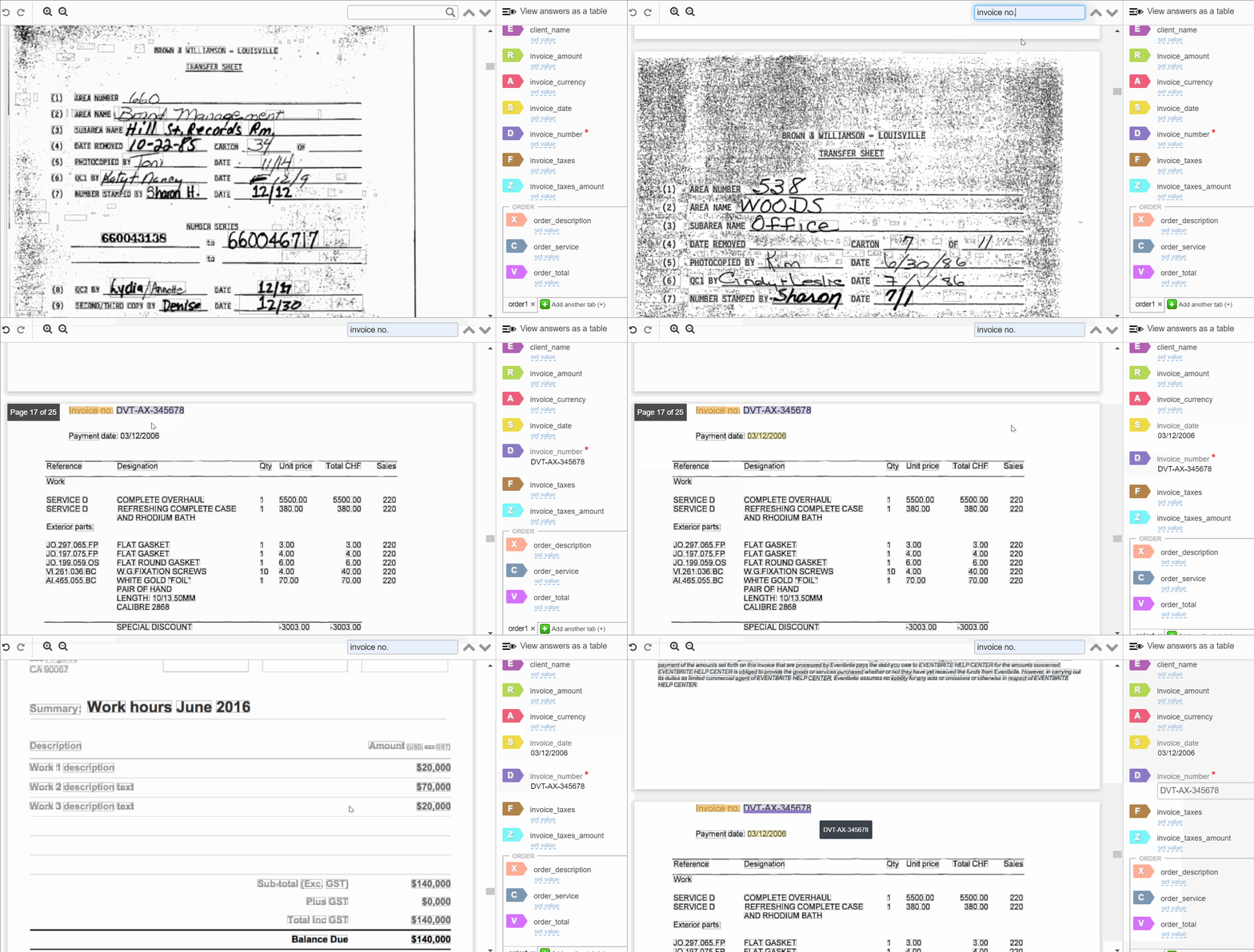
The labeling workflow allows the following actions:
- Label values, chunks of sentences, or entire table rows and columns
- Search for other occurrences of a specific value across a document
- Evaluate labeled values and jump-click to the ones extracted based on the labels even if the document has many pages.
As a result, the average labeling time decreases by 52%. The user experience gets more intuitive. The labeling feature also cuts the time needed to teach a bot to mimic human actions, thus streamlining automation.
AutoML
Why is AutoML essential? OCR is an engine, and the labeling workflow is an advanced labeling interface. However, if the engine cannot cope with concrete tasks and fails to recognize important documents, even a great interface can't help. The WorkFusion's patented AutoML technology helps adapt the automation process to specific business cases.
AutoML boasts two particular features complementing each other:
AutoML can review large volumes of data and identify specific trends and patterns that are not apparent to humans. AutoML algorithms are good at handling multi-dimensional and multi-variant data in dynamic or variable environments.
AutoML algorithms are capable of self-improvement. As the algorithms gain experience with data, their results show better accuracy and higher efficiency, resulting in better decisions.
Next, we'll study the labeling process more closely.