Issues related to service failures
These are issues due to failed processing by such services as Control Tower (CT), RabbitMQ, ZooKeeper (ZK), Task Dispatcher Service (TDS), Worker Management Service (WMS).
As the first step to investigate, perform an initial check and execute the wfmanager status command with the OPS team and verify all service statuses. It should report RUNNING for all of them.
Additionally, review the issues and troubleshooting scenarios described in the sections below.
Task queue processing by RabbitMQ or CT
A task queue was not created in RabbitMQ, or a task queue was created, but CT failed to send a message. To investigate, act as follows:
In control-tower log files or Kibana, check if the task queue was created in RabbitMQ and the task was sent. For detailed instructions on searching specific messages in Kibana logs, refer to the article.
You can find the queue in the Control Tower user interface by ID. For example, a log record can look like this:
Task [hit - 17651459, bep_uuid - a87405ab-786a-4a50-8765-56cbe1d9a51b] was sent to run 3a258147-848e-4c23-9cca-c62970f71d2e queue.If the task was not sent, check the Control Tower state based on the Troubleshoot infrastructure article. If the task queue was not created, look for errors in RabbitMQ logs and RabbitMQ UI.
Check if the root cause is one of the following known issues:
No available disk space on the server causing "The channelMax limit is reached. Try later." warning.
TDS has maximum channels per RabbitMQ connection set to 2047, and the limit can be exceeded.
Task queue processing by TDS or WMS
Check if TDS failed to forward the task queue to a Worker queue. To investigate, act as follows:
Task queue verification
Check if the task queue has a consumer (in this case, it's TDS). Go to RabbitMQ UI > Queues and look at the task queue Acked and Unacked message counts. When the disparity grows persistently, there's a good chance that TDS as a consumer does not receive messages or doesn't accept them for some reason.
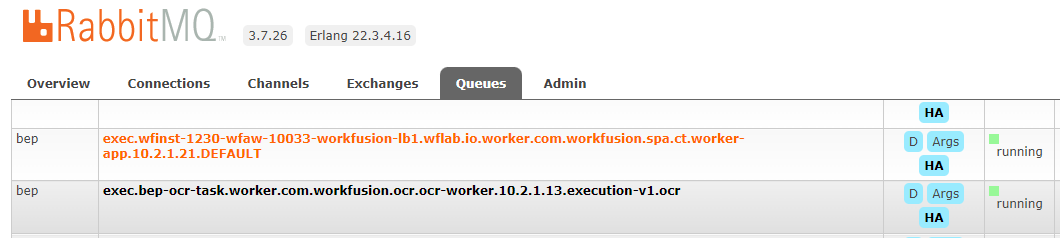
Ensure the Worker queue was created. If the Worker queue was not created, check if TDS is running. Go to Marathon UI and make sure green 1 of 1 is in place:
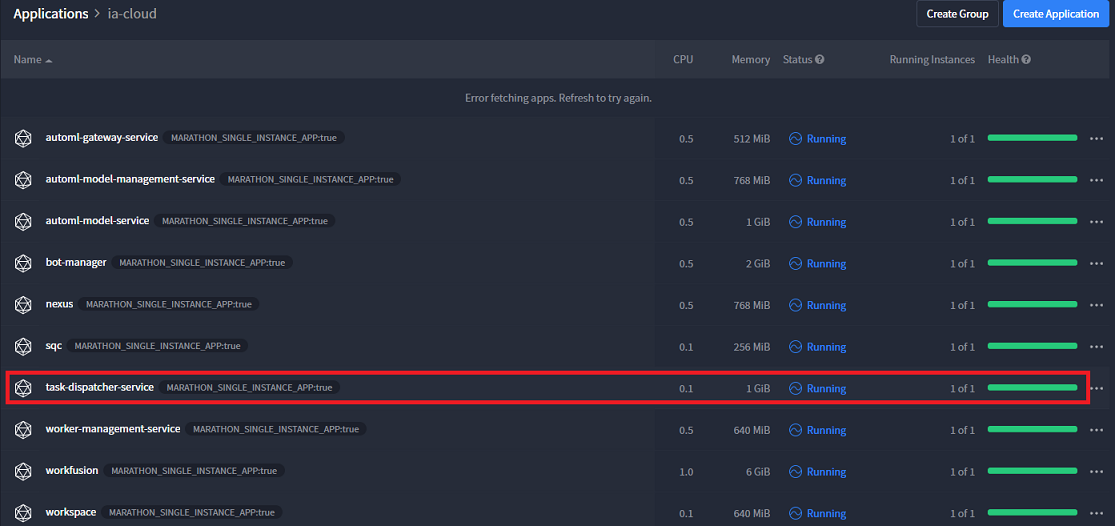
When you discover a TDS fallback, go to Kibana and try to find failure logs by keywords, such as:
MessageForwarderwas stopped- Failed to dispatch messages
- Failed to re-submit tasks
- Task failed because of missing configuration for Bot Source
For detailed instructions on searching specific messages in Kibana logs, refer to the article.
Worker queue suspect
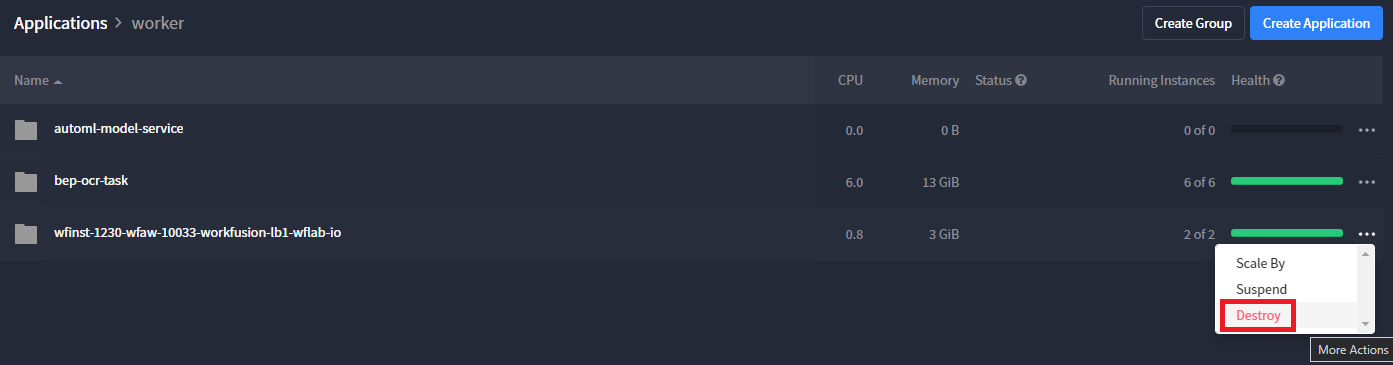
If TDS dispatches a task from the task queue to a Worker queue, check the consumers of the latter. TDS forwards tasks only if there is at least one consumer (a Worker). Therefore, go to Marathon UI and check Workers. When they are up, destroy them and make sure they are re-deployed correctly:
Worker Management Service and services generic verification
If no Workers are scaled, ensure that a BEP Agent is up and running. Go to Marathon UI and check the WMS condition.
WMS can fail to scale Workers due to the following reasons:
- A Worker artifact doesn't exist in Nexus. Go to Nexus UI and check this.
- A Worker artifact is corrupted. Go to Nexus UI and check this.
- The Worker's ZooKeeper properties are invalid. Submit a ticket to the Workfusion team to verify this.
- No disk space is available on the Mesos agent node. Check server resources.
In this case, WMS can activate the error mode mechanism. The BP event log contains the output of stdout and stderr logs with failure details.
If you suspect problems specifically with Worker management, go to Kibana and search for logs containing:
- "New workers failed to start, but there are healthy workers running, error mode will not be activated."
- "New workers failed to start, no healthy workers running, error mode will be activated!"
- "No agent resources available to launch workers."
In the error mode, WMS notifies TDS about the malfunctions of a particular Worker type and sends troubleshooting information. TDS starts forwarding tasks for the Worker type directly from the input queue to the result one.
In its turn, WMS activates a retry mechanism for the Worker group with the interval configured in the bep.wms.worker.error.retry-period property (one minute by default), enabling the recovery of the system or Worker artifact.
In case another retry fixes the problem, and WMS can start the Worker type properly, the error mode is shut down. TDS receives a notification requesting to enable regular task routing.
Check ZooKeeper orphan nodes
The step is relevant only for Bot steps with Bot Sources.
If a Worker queue has consumers, there can be another reason for TDS not forwarding messages to it—orphan nodes in ZooKeeper for the Bot Source. This can happen when, for example, the Worker queue is purged manually.
To make sure nodes are orphaned you need to verify that there are no active tasks corresponding to these nodes. In cooperation with the OPS team, remove the nodes at the following ZooKeeper path: /control-tower/bot-source/<id>/state/tasks-in-progress.
Output
If you confirm any of the issues, do the following:
Gather the event logs of the step,
task-dispatcher-service.log,worker-management-service.log.To help identify the root cause, find out the number of created channels in RabbitMQ UI.
If the Error mode is enabled, collect the entire output of the stdout and stderr logs of failed Workers.
Otherwise, continue the investigation.
Read also: