F.A.Q.
Frequently asked questions
What news sources does the solution work with?
Connectors for the following media providers are available out of the box:
- Google API v1-rev86-1.25.0
- Factiva Session API with REST 1
- LexisNexis L&P News v1
- World-Check One
I don’t see the media provider I want to work with. Is it possible to add a connection for them?
Adding a media provider is a relatively simple configuration to implement. As a rule of thumb, it can take two weeks of development on the WorkFusion side for a completely new media provider. Additional time to establish a partnership agreement may be required.
A key element of configuring the process for production requirements includes ensuring the default search parameters are correct and meet your business requirements.
What languages are supported?
As part of the out-of-the-box solution, you can select either English or Spanish for the business process and report language. Additional languages require customization.
You also have the option to dictate the language of the returned articles. Currently, you can select English, Spanish, or Any. If you choose “Spanish”, you will not receive articles in English and vice versa.
Can the solution automatically translate the articles and present the article in the language specified by the user?
The adverse media monitoring solution supports translating, adjudicating, and dispositioning articles in English and Spanish. Additional languages require customization.
Can the output report be modified?
As part of the packaged AMM solution, customers can choose to receive the report in PDF or HTML format. Additional modifications to the report require customization.
The articles in Workspace are not the same as the search results retrieved manually. Why is that?
There are three common reasons a comparison of searches (manual vs. WorkFusion) may produce different results:
It is not the exact search - conducting searches with different parameters or media providers.
WorkFusion automatically filters out results that are located behind a paywall or not credible (i.e., Facebook comments, Tweets from Twitter etc.). This list is compiled based on best practices from industry consultants and the processes which are in place at top 50 banks. However, it can be customized based on individual customer needs.
For customers using Google, the results are ranked based on Google’s internal algorithm which is optimized for advertising. The AMM solution from WorkFusion ranks the articles based on their relevance and risk for an AML compliance violation. When looking at the results after WorkFusion has completed its analysis the order will be different.
Does the solution filter out duplicate articles?
Dow Jones Factiva and LexisNexis Bridger have a duplicate check which is turned on by default. Duplicate articles are shown as a single article for analysis when those media providers are used. Articles sourced from other media providers who do not offer a duplicate check as part of their service will not be flagged or suppressed within WorkFusion’s solution.
How is an age mismatch determined?
When the year of birth is provided for an entity, the AMM solution will calculate the age automatically so that it can be used for comparison. This age is buffered by 24 months to account for differences with regards to the month. As each article is reviewed, the machine learning model takes into consideration the year that the article was published, the age listed in the article and the year of birth that was provided for the entity.
For example:
An entity “Jane Doe” was born in 1980 and is being screened in 2022. She has a calculated age of 42. An article that was published in 2010 that showed “Jane Doe, age 42” would be automatically dispositioned as False Positive because the entity being screened was 32 that year.
An entity “John Smith” was born in 1980 and is being screen in 2022. He has a calculated age of 42. An article that was published in 2020 that shows “John Smith, age 41” would be escalated for additional review because the model calculated that he would have been 40 in 2020. Due to the nature of birth months and age, the model erred on the side of caution as the age is within the 24-month buffer.
How does the AMM AI Digital Worker handle continuous monitoring with respect to duplicates (customers are hesitant to pay for the same search over and over within a specified window)?
In the current version, customers have the option to either schedule adverse media screenings for their customers (whether new or existing) or run investigations on an ad-hoc basis. There is no check within the AI Agent to flag and/or skip entities which were previously screened within a given time frame; however, it is available as a customization.
How are ad-hoc searches executed within the platform?
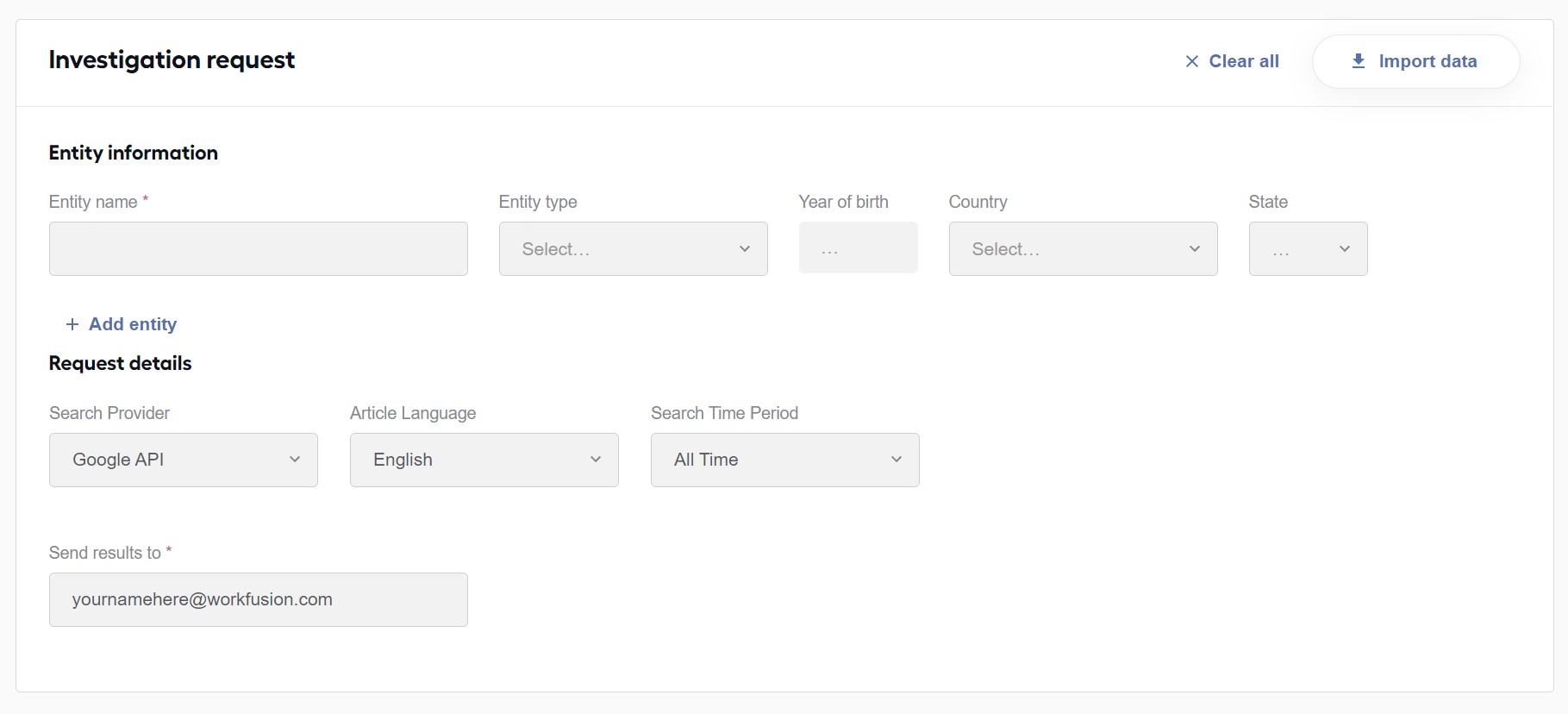
To perform an ad-hoc search, you must first run the Launcher business process from the control tower. This business process will “Launch” and ad-hoc search task within Workspace.
To use the search, users can either hand key in the information using the user interface or choose to upload a .csv file with the entities they wish to investigate.
Note that selecting certain parameters, such as the Search Provider or Article Language are determined by the parameters set when installing the AI Digital Worker as they require additional licenses, keys and permissions.
Can Google news searches be executed to include multiple languages in a single process (for example, can the AMM AI Agent read English and Spanish articles without having to run the process twice)?
This functionality is supported in version AMM 3.0 (release date planned for July 2022) and higher. Customers on earlier releases are required to run the process twice, once to disposition English articles and once to disposition Spanish articles.
When using the Google API, why do PDF articles only show with the preview text?
There are two common reasons why this occurs:
At this time, the model will review, prioritize and adjudicate articles based on their relevance to AML related crimes. The majority of articles are available in html format, however any content that is not available in html (such as a pdf, excel file, xml file etc.) will not be rendered within the Workspace application. Instead, a link to the source is provided for the user so that they can navigate directly to the source and review the content in a separate browser tab. Note that if it is a file the analyst may be prompted to download the file instead.
Google API sources articles across the web from sites which follow varying maintenance schedules. Occasionally, an investigation may be run during a scheduled (or unexpected) downtime. When this occurs, the preview text from Google is able to be extracted and rendered (i.e., the preview text you would normally see when manually screening an entity). The full content of the article is unable to be extracted and therefore cannot be rendered within the UI. A link to the source is provided for the user so that they can navigate directly to the source and review the content in a separate browser tab. Note that if it is a file the analyst may be prompted to download the file instead.
Is there any benchmark to check the skill's benchmark?
| Criteria | Value |
|---|---|
| Provider | Google API |
| Requested number of articles | 20 |
| Number of Agents | 3 BEP agents |
| Duration | ~ 25 mins |
| Input file count (Entities) | 100 |
| Processing Names per hour (average) | 256 |
| Average article processing time | ~ 1 record per 6 sec |