F.A.Q.
Human-in-the-loop
Does Evan (formerly Evelyn AMM) come with a Human-in-the-loop task for exception handling?
Yes.
Data providers
What data providers does the solution work with?
Connectors for the following media providers are available out of the box:
- Google API
- Dow Jones Factiva (Headlines)
- LexisNexis L&P News v1
- Refinitiv World-Check One
- Thomson Reuters CLEAR Adverse Media
In addition, users have the option to import data for an entity directly using a CSV file.
I don’t see the data provider I want to work with listed. Is it possible to add a connection for them?
Typically, integrating with a new data provider is easy. However, it depends on the provider’s capabilities and business requirements.
Additional time may be required for establishing a partnership agreement or for vendor approval processes. Precise business requirements are key to expediting the process.
Screening and classification
Does the solution filter out duplicate articles?
Google API, Dow Jones Factiva Headlines, LexisNexis L&P Media, Thomson Reuters CLEAR Adverse Media, and Refinitiv World-Check One have duplicate checks enabled by default. Duplicate articles are shown as a single article for analysis when those data providers are used. These are generally basic filters based on the publication date and the media source.
The AMM AI Agent also allows you to set the duplicate threshold to detect and suppress articles based on their content. This means the AI Digital Worker groups the duplicates even if the content varies slightly or if the title, publication date, or media source vary.
The AMM AI Agent also groups and dispositions duplicate articles across data providers, ensuring that users who source content from two data providers (such as Google and Thomson Reuters) do not have to review duplicate content.
How is an age mismatch determined?
When the year of birth is provided for an entity, the AMM solution calculates the age automatically so as to use it for comparison. This age is buffered by 24 months to account for month differences. As each article is reviewed, the machine learning model considers the year when the article was published, the age listed in the article, and the year of birth provided for the entity.
For example:
An entity, "Jane Doe," was born in 1980 and was being screened in 2022. At that time, the entity had a calculated age of 42. Thus, an article published in 2010 showing "Jane Doe, age 42" would be automatically dispositioned as False Positive because the screened entity was 32 that year.
An entity, "John Smith," was born in 1980 and was being screened in 2022. At that time, he had a calculated age of 42. An article published in 2020 showing "John Smith, age 41" would be escalated for additional review because the model calculated that he would have been 40 in 2020. Due to birth months and age, the model erred on caution as the age is within the 24-month buffer.
Why do some articles have a high score and the False Positive status?
The machine learning model leverages natural language processing, historical data, and customizable risk factors when determining the likelihood that an article indicates a risk for the screened entity. Once risk is assessed, and the score is generated, it determines if additional information can be leveraged to eliminate the article as a False Positive.
For example, an article for an entity named Theodore Bundy may return a few articles for the infamous criminal Ted Bundy. However, the particular Theodore Bundy being screened was born in 1995, after the crimes were committed. In this instance, those articles would be flagged as high risk but then correctly dispositioned by the model as False Positive due to an age mismatch. Note that within the Manual Task and the final report, a human-readable explanation is always provided for decisions made by the model.
How does the AMM AI Agent handle continuous monitoring for duplicates (customers are hesitant to pay for the same search over and over within a specified window)?
In the current version, you can either schedule Adverse Media screening for customers (whether new or existing) or run investigations on the ad-hoc basis.
If you provide entity_ID, the AI Agent remembers previous decisions on the content for that entity and reapplies them (also referred to as Decision reapplication). You have the option to send the content to the human-in-the-loop for an additional check or conditionally skip it and generate a report only if there is no "net new" content or content that needs investigation. In the final audit trail, a history of the investigations for the entity is provided. You can view a summary of the previous decisions and click a link to download the full report.
How does the AMM AI Agent handle changes to entity information when the decision reapplication feature is used?
If you provide entity_ID, the AI Agent remembers previous decisions on the content for that entity and reapplies them through Decision reapplication. The AI Agent also remembers the demographic information provided for the entity. If the information changes, the AI Digital Worker escalates those articles for additional review because it can impact the original decision.
For example, an information change can be that an entity’s year of birth or location details were added, an individual's name changed (such as married or divorced), or a company’s name changed (such as a merger or rebrand).
How does the AMM AI Agent handle partial names?
The machine learning model includes Name Entity Recognition (NER). NER is used to find full names, partial names, and common nicknames (Mikhail and Misha, William and Bill, and so on).
Names and partial names are included in the classification decision and highlighted within the text in the Manual Task and report. This way, users can easily see entities that were partial matches and disposition them faster.
Why is an entity name highlighted in the article text even though it is only a partial match?
Names and partial names are highlighted within the text in a Manual Task and report so that users can easily see entities that are partial matches and make a decision faster.
With the highlights, it becomes much easier to quickly tell when it is a false positive even if the AI Agent's confidence score was not high enough to discount it entirely.
Can the AMM AI Agent use exact name matches to disposition articles as False Positive?
This can be adjusted in the model if required. However, it is not recommended for Adverse Media screening as it increases the likelihood that a true hit is missed. It is very common for an entity to be referred to by a partial name only (such as a nickname or last name only).
Reporting and output
Can I post AMM results back to a data provider?
Currently, the AMM AI Agent only pulls results from a data provider. However, this process might vary based on the data provider’s capabilities.
Can I post AMM results back to World-Check One?
Posting results back to World-Check One is not supported out of the box. Any solutions of the kind require customization by Professional Services.
Can I post AMM results back to Dow Jones Factiva?
No, this is not supported by Factiva.
Can I configure where the AMM results are stored?
Out of the box, final results (in the format of a report) are stored in S3. It is also possible to send a final report by email if you trigger the investigation from the Ad hoc investigation tool or through API if you integrate with the REST API.
Storing in a different location requires customization.
Can the output report be modified?
Customers can receive the report in the PDF or HTML format as part of the packaged AMM solution. Additional modifications to the report require customization.
When using Google API, Thomson Reuters, or an uploaded CSV file as the data source, why do some articles only show with a preview text?
There are a few reasons why this may occur:
Currently, the model reviews, prioritizes, and adjudicates articles based on their relevance to AML-related crimes. The majority of articles are available in the HTML format. However, any content that is not available in HTML (such as PDF, Excel, or XML) is not rendered within the Workspace application.
Instead, a link to the source is provided for the user so that they can navigate directly to the source and review the content in a separate browser tab. Note that if it is a file, the analyst may be prompted to download it instead.
The specified input methods require the AI Agent to source articles from open-source locations. Prominent news providers may require subscriptions to access their content or block bots if they are detected. If this occurs, the AI Agent passes the article along, but the content cannot be downloaded as it is hidden behind a paywall or blocked for another reason. Users should click the link to navigate to the article and review it manually.
Open-source websites follow varying maintenance schedules. Occasionally, an investigation may be run during a scheduled (or unexpected) downtime. When this occurs, the preview text is extracted and rendered (such as the preview text you normally see when manually screening an entity). However, the full content of the article cannot be extracted and, therefore, cannot be rendered within the user interface. A link is provided so that users can navigate directly to the source and review the content in a separate browser tab. Note that if it is a file, the analyst may be prompted to download it instead.
Some websites do not use best practices when creating a content schema. While the AI Agent has spent a few years learning various unusual schemas, the Internet changes rapidly, and a new schema may be encountered that is very difficult to parse. If this occurs, contact the WorkFusion's team and include a link to the article so that the team can add the required logic.
Language and localization
What languages are supported?
The model within the AMM AI Agent natively understands both English and Spanish articles. Other languages are not supported now but can be discussed as a future enhancement. In addition, the entire Business Process, Manual Tasks, and the final report can be localized to either English or Spanish.
You also have the option to dictate the language of returned articles. This is partially dependent on what each provider allows.
The article language options for Google are listed below. This list can be expanded if required.
- English
- Spanish
- English & Spanish
- Any
Factiva Headlines and LexisNexis allow you to choose English or Any.
Refinitiv World-Check One and Thomson Reuters currently support English only.
Can the solution automatically translate articles and present them in the language specified by the user?
The Adverse Media Monitoring solution supports translating, adjudicating, and dispositioning articles in English and Spanish. Additional languages require customization.
Search
The articles from Google displayed in WorkFusion are not the same as the search results retrieved manually using Google. Why is that?
There are three common reasons a comparison of searches (manual vs. WorkFusion) may produce different results:
The searches are not exactly the same. You conduct them with different parameters or data providers.
Using the browser also means that your location and search history influence the results. Using API is less biased as the location and history factors have no impact here.
WorkFusion automatically filters out results that are located behind a paywall or not credible (Facebook comments, tweets from Twitter, and so on). This list is compiled based on the best practices from industry consultants and the processes in place at the top 50 banks. However, it can be customized based on the individual customer needs.
For customers using Google, the results are ranked based on Google’s internal algorithm optimized for advertising. The AI Agent ranks the articles based on their relevance and risk for an AML compliance violation. The order is different when you look at the results after WorkFusion has completed its analysis.
How are ad-hoc searches executed within the platform?
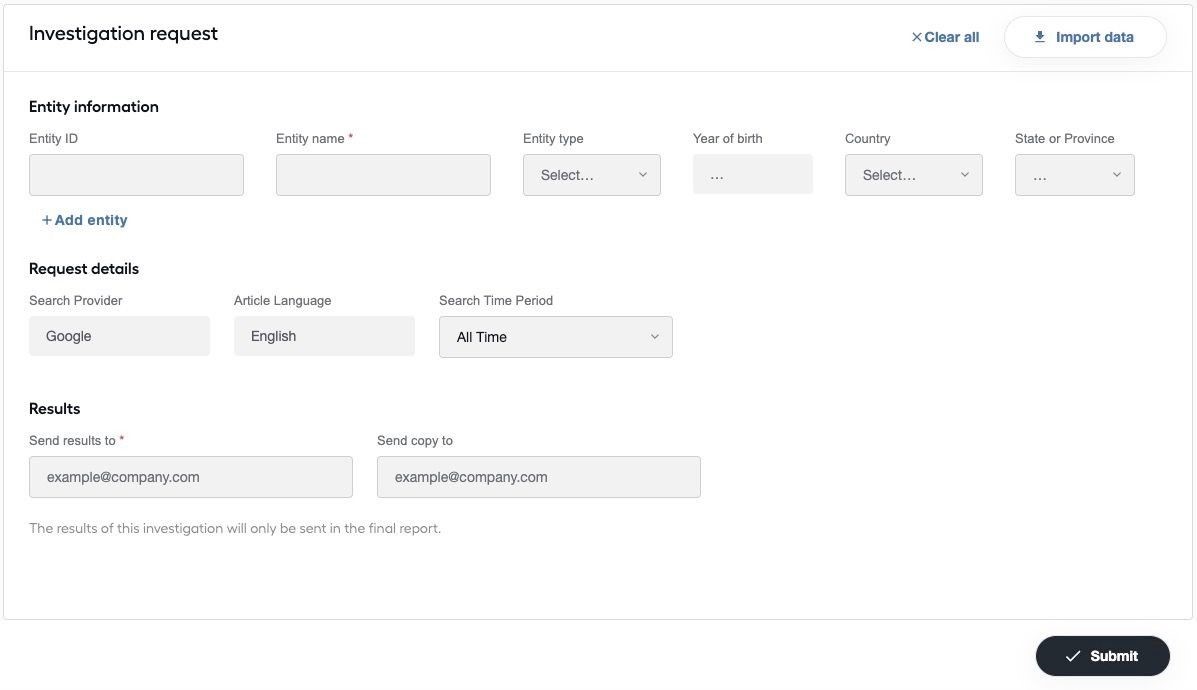
To perform an ad-hoc search, you must first run the Ad hoc Investigation Business Process from Control Tower. This Business Process will launch an ad-hoc search task within Workspace.
To use the search, users can either add information via the interface or upload a CSV file with the entities they want to investigate.
Note that selecting specific parameters, such as the Search Provider or Article Language, is determined by the parameters set when configuring the AI Digital Worker as they require additional licenses, keys, and permissions.
Can Google news searches be executed to include multiple languages in a single process? For example, can the AMM AI Agent read English and Spanish articles without running the process twice?
This functionality is supported in version AMM 3.0 and higher. Customers on earlier releases must run the process twice: once to disposition English articles and once to disposition Spanish articles.
How does changing the Search Period affect the search results?
The Search Period filters out results that do not fit within the specified time.
It is important to remember that sometimes new articles are written about older crimes. This means that if you set the period to 30 days, it is possible to receive an article published yesterday in the results for a crime committed ten years ago.