Apply continuous learning
Overview
The Continuous Learning Data Store (CLDS), also known as continuous learning or decision reapplication, optimizes Tara's processing of payment sanctions screening (PSS) alerts by recognizing alerts containing the same hits as previously received alerts. If the hits associated with such alerts have been released a configurable number of times over a configurable time interval by a configurable number of different analysts, Tara automatically releases these alerts, bypassing all further processing by downstream Tara models and logic. The default CLDS settings are as follows:
CLDS compares incoming alerts with those received over the previously configured number of days.
CLDS automatically releases any alerts where hits satisfy the following conditions:
Have never been escalated during the specified time interval
Have been released at least the specified number of times
Have been released by at least the specified number of different analysts
To provide this functionality, CLDS depends on historical alert decisions supplied on a regular basis. This historical alert decision information is provided as a pair of CSV files uploaded to a defined bucket in the MinIO S3 storage. Currently, CLDS supports PSS alerts sent in Firco Unique Format (FUF), Swift_MT, Swift_MX, and SWIFT_NPP (the Australian standard New Payments Platform) message types. Tara can process any XML-formatted content with properly supplied input.
To support CLDS, Tara includes an additional Business Process that ingests the data from the message and hit data CSV files and populates two Data Stores used by CLDS during message processing. The Data Stores enable CLDS to associate alerts with the hits they contain and maintain a hash value per hit that uniquely identifies the hit.
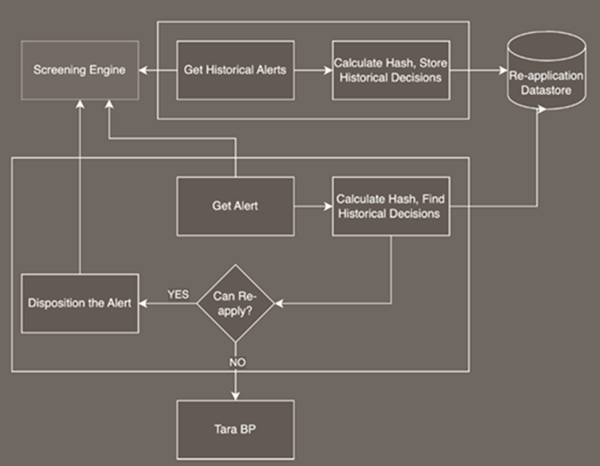
When CLDS is enabled, upon receiving each message containing a PSS alert, Tara first invokes the CLDS Business Process step that applies the following logic for each hit in the alert:
Computes the hash value using the content of the fields listed above.
Searches the Data Store for an entry with a matching hash value.
If a matching hash value is found, identifies the alert with which the hit was previously associated in the Data Store to determine if the alert was always released during the previous time interval (120 days by default) at least the minimum number of times (five times by default) by at least the minimum number of different analysts (two analysts by default).
After matching hit hashes and finding corresponding alerts, compares message-level tags to filter out messages that are not identical. The tags used for the message-level comparison must be set during the Reapplication Data step configuration. If the Require tag content match for decision reapplication option is enabled, the hit tag content is fetched from the message content using the tag name. It is then compared with the stored hashed message content.
Upon determining that the alert contains any hit that does not satisfy the above criteria, passes the message to the next Business Process step. If the alert contains only hits that satisfy the above criteria, it is automatically released, bypassing the rest of the Business Process processing.
Mind the following special cases:
Case 1. Tara receives an alert that contains fewer hits than previous instances of alerts with the same hits. If all hits in the current instance of the alert satisfy the previously stated criteria for applying the CLDS decision reapplication, CLDS automatically releases the alert. For example, if an alert was previously received and released more than five times over the past 120 days and always contained hits H1, H2, and H3 and a new instance of the alert contains only hits H1 and H2, CLDS can automatically release the alert.
Case 2. Tara receives an alert that previously satisfied the CLDS criteria for auto-release, but the new instance of the alert contains one or more new hits. The release decision is automatically applied to the hits contained in previous instances, and the decision on whether to release the alert depends on Tara's processing of the new hits. For example, if an alert was previously received, satisfying the criteria for CLDS auto-release and all previous instances included hits H1, H2, and H3, but the new instance of the alert includes hits H4 and H5, CLDS sets the decisions for hits H1, H2, and H3 to released. Then, Tara only processes hits H4 and H5, and the decision regarding the new alert depends on the decisions for hits H4 and H5.
The following diagram depicts the workflow for CLDS:
Add historical decisions
To use the CLDS feature and reapply previous decisions, add the decisions to the Control Tower Data Stores.
Run CLDS Business Process
The Ingest Historical Decisions For Continuous Learning Business Process (BP) included in Tara's bundle is used to reapply decisions.
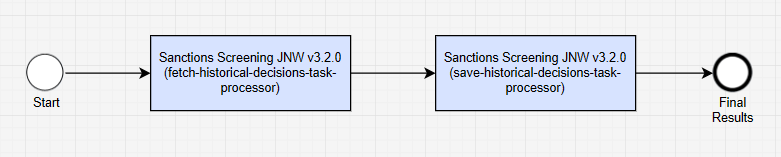
In the BP, there are only two steps:
To run the BP automatically as frequently as needed, create a schedule. For more details, see Schedule Business Process.
Fetch historical decisions
The step locates historical decisions (CSV files) in S3 and converts them into a standard flat-format CSV file appropriate for Tara to save the decisions to relevant Data Stores. A pair of historical files is expected, representing messages and hit information. The exact implementation of the step varies, depending on how you store historical decisions. Currently, the data columns match the standard Fircosoft DB extract. The resulting CSV file is uploaded to S3, and its location is sent to the next step.
Mind the requirements for naming historical files:
Names of message files must start with
messagesfollowed by a unique identifier such as date, for example,messages-01012025.Names of hit files must start with
hitsfollowed by a unique identifier such as date, for example,hits-01012025.A unique identifier must be the same in both file names.
The supported file format is CSV.
The message_decision value is set to RESOLVE or NO_DECISION according to the provided configuration.
The expected columns in a historical file are as follows:
WF-MEANS == COLUMN_NAME
-----------------------------
HIT_ID = "SEQNUMBER"
HIT_MESSAGE_ID = "SYSTEM_ID"; //must match messageId. It is a link between the message and hits.
HIT_TAG_NAME = "TAG";
HIT_TEXT = "LIST_MATCHING_STRING";
HIT_TYPE = "HIT_TYPE";
HIT_WLE_CITY = "CITY"; (optional)
HIT_WLE_COUNTRY = "COUNTRY";
HIT_WLE_ENTRY_ID = "ID_LIST";
HIT_WLE_NAME = "RECORD_MATCHING_STRING";
HIT_WLE_PRIMARY_NAME = "NAME";
HIT_WLE_STATE = "STATE";(optional)
HIT_WLE_TYPE = "TYPE"; (optional)
MESSAGE_ANALYST_DECISION = "T_DECISION_TYPE";
MESSAGE_ANALYST_NAME = "T_LASTOPERATOR";
MESSAGE_CONTENT = "T_MESSAGE";
MESSAGE_DECISION_DATE = "T_COMPLETED";
MESSAGE_ID = "T_SYSTEM_ID";
MESSAGE_ORIGINAL_FORMAT = "T_NATURE";
MESSAGE_ORIGINAL_SUBTYPE = "T_TYPE";(optional)
MESSAGE_CONTENT_FORMAT = "T_CONTENT_FORMAT"
IS_RELEASED = "T_IS_RELEASED" //flag TRUE/FALSE
Not all columns are used in making a decision on the reapplication.
See the HIT_WLE_TYPE value conversion:
("O", EntityType.LOCATION);
("LOC", EntityType.LOCATION);
("LOCATION", EntityType.LOCATION);
("C", EntityType.ORGANIZATION);
("COMPANY", EntityType.ORGANIZATION);
("ORG", EntityType.ORGANIZATION);
("ORGANIZATION", EntityType.ORGANIZATION);
("I", EntityType.INDIVIDUAL);
("IND", EntityType.INDIVIDUAL);
("INDIVIDUAL", EntityType.INDIVIDUAL);
("PERSON", EntityType.INDIVIDUAL);
("V", EntityType.VESSEL);
("VESSEL", EntityType.VESSEL);
Expected HIT_TYPE values are as follows:
- UNKNOWN
- NAME
- COD
- PASSPORT
- BIC
- EMBARGO
- NATIONAL ID
- FML
- EMC
Expected MESSAGE_CONTENT_FORMAT values are as follows:
- FUF (default)
- SWIFT_MT
- SWIFT_MX
- SWIFT_NPP
The converted CSV file columns are as follows:
idtypehit_idcontentcontentformatgold_decisiongold_decision_commentgold_decision_dateanalyst_namehit_tagnamehit_hittexthit_hittypetypesubtypehit_sanctiondata_namehit_sanctiondata_typehit_sanctiondata_primarynamehit_sanctiondata_countryhit_sanctiondata_cityhit_sanctiondata_statehit_sanctiondata_sourceentryid
Save historical decisions
The step batch-loads decisions to relevant Data Stores using a URL to the Tara-formatted CSV file. All sensitive data in the Data Stores is hashed and does not contain any readable information. All historical data is saved in two tables linked by the reapplication ID.
The following hit-level information is hashed:
TAG_NAMEHIT_TEXTHIT_TYPESANCTION_DATA_NAMESANCTION_DATA_PRIMARY_NAMESANCTION_DATA_COUNTRYSANCTION_DATA_ENTRY_ID
The alert-level reapplication data columns in the pss_reapplication_data_v1 Data Store are as follows:
| Data column | Description |
|---|---|
| id | Reapplication ID. |
| msg_id | Original alert ID. |
| message_json | Original payment content converted into a map of tags versus values. The values are hashed. |
| msg_format | Original payment content format. Currently, the FUF value is supported. |
| analyst_name | Name or ID of the analyst who made the final decision. |
| decision_date | Date when the final decision was made. |
| message_decision | Analyst's final decision. |
| message_narrative | Analyst's final decision comment. |
The message_decision value is set to RESOLVE or NO_DECISION according to the provided configuration.
The hit-level reapplication data columns in the pss_reapplication_hashcodes_v1 Data Store are as follows:
| Data column | Description |
|---|---|
| reapplication_data_id | Link between two tables |
| hit_hash_value | Hashed sum of hit parameters |
Record data analysis
Each time you upload historical data to the Data Stores, new records are added to the pss_dr_file_analytics_data_v1 Data Store.
The information is stored in the following columns:
| Data column | Description |
|---|---|
| filename | Name of the processed file. If an upload fails, the field also contains the reason for the failure. |
| load_date | Timestamp of upload. |
| status | Status of execution: SUCCESS or FAILED. |
| number_alerts_total | Total number of alert-level records from the message CSV file. |
| number_alerts_loaded | Number of successfully loaded alert-level records from the message CSV file. |
| number_hits_total | Total number of hit-level records from the hit CSV file. |
| number_hits_loaded | Number of successfully loaded hit-level records from the hit CSV file. |
Apply continuous learning
The Continuous Learning bot step is enabled for the FUF, SWIFT_MT, SWIFT_MX, and SWIFT_NPP tag content format messages. If the alert content is not in the above mentioned formats, the bot step outputs a "decision_reapplied" signal with the FALSE value, and the BP continues to run through all the steps. If a decision is reapplied ("decision_reapplied signal" == TRUE), the workflow execution skips all ML and data manipulation steps and goes directly to the Generate report bot step. Here, it records the decision reapplication and all relevant data and sends out a response as a decision object fully populated with alerts and hits. For more details, see Overview | Core Business Process.
There are two levels of decision reapplication:
Alert level. All hits of an incoming alert must match all hits of a resolved historical alert. Otherwise, all incoming hits are processed by Tara.
Hit level. Any hits of an incoming alert must match any hits of a resolved historical alert. Matched hits are marked as resolved, while other hits are processed by Tara.
Identify candidate for continuous learning
Tara fetches all the decisions that analysts make on alerts and hits that match the incoming request. The initial match is based on hashed unique fields and the number of hits in the alert.
The following fields are hashed and must match a historical alert from the Decision Reapplication Data Store:
TAG_NAMEHIT_TEXTHIT_TYPESANCTION_DATA_NAMESANCTION_DATA_PRIMARY_NAMESANCTION_DATA_COUNTRYSANCTION_DATA_ENTRY_ID
For example, you have the following hit:
{
  "hit_tagcontent": "bank of atlantida",
  "hit_tagname": "ORGR_NAME",
  "hit_hittext": "atlantida",
  "hit_hittype": "NAME",
  "hit_sanctiondata_name": "Atlantida INC",
  "hit_sanctiondata_primaryname": " Atlantida Solutions INC",
  "hit_sanctiondata_country": "VUT",
  "hit_sanctiondata_sourceentryid": "12546",
}
Tara normalizes the values and concatenates them to generate a hit key. The hit key is then hashed, and Tara queries the Data Store for a matching hit key. This query returns a list of alerts suitable for reapplication within the configured timeframe. For more details, see Install and configure | Configure.
Compare tags
When a query returns a list of similar alerts from a historical table, tags are compared on the per-message basis. Tara uses configured tags as input for the comparison.
If you provide no tags, the decision reapplication is based on hit hashes only. The more tags are used to compare, the less likely reapplication will occur.
If the incoming content does not have all matching tags, the decision reapplication is not applied.
If a configured tag does not exist in an incoming alert, the tag is ignored.
All historical records are stored in a Data Store, with the original message values hashed for PII protection. The records are compared with current requests based on a hashed value per field, so no PII is stored in raw format.
See sample payment content in Data Store
{
  "VALUEDATE": "f9df48ebdfc2d576729bfb7e9e1e956c155534b3f5e4f8aebbd5ea2923c84584",
  "APPLI": "4bc968e78749c8a201d1e51680b36a842f3499fa4a3e719f1e9bf32bb7821874",
  "MSGAMOUNT": "342e489174cc8579d038ea97683b010fee86de2c274d2a2eafcb595b213e643f",
  "BUSINESS": "11d40417959631d3d2420e8cd8709893c11cd7a4db737af63e8d56cfa7866f85",
  "PYMTDTLS": "3633fe22c5b852b1a3f738508d74127669fa0bd9f8873db5b1013d98c2171fe1",
  "BEN_NAME": "2de4e108f9a40c2863416eae468cad624954b45d67d64c3a030814e600848e78",
  "BEN_ADDR": "2320995e4fe697e19c6ef23dd04dc46a77db87081e7e30fdc0ec4419b374921a",
  "USERREF": "e3b0c44298fc1c149afbf4c8996fb92427ae41e4649b934ca495991b7852b855",
  "BUNIT": "46109ac6e235cdb78b9e0ec1ec19d4b0c6df919e968297d77f3c9a488e116e28",
  "AMOUNT": "28abef94cbe0103801b323d0e0c9e852847f980fc00ef4ff3be8e7f3e4cc515b",
  "BNFCRYREF": "ca0dd26a286c75298d1dca246306965e8bec14fdf32c4f41e531b0c5ee859de4",
  "ORGR_APD": "3ba755fe7dc814ffbe4cbc056cf26ddf31e86e497f8d4480a4e43ba4a18623e7",
  "SEND_FICD": "0fb5783adefdf3168cf7dce238959108aa2ffbbe24c6c167f451ba4aadeb9cf3",
  "REFERENCE": "3cb83b3b870ae03c53ac679a254142cac56ba612d141973ea84c1d69d61fe2bc",
  "MSGSRCTYPE": "d9705d8ee25f3f783a0c0a5e4b15bd7f6279dcfe11fa053504b2c14c5fb2a8b9",
  "SERVICE": "e3b0c44298fc1c149afbf4c8996fb92427ae41e4649b934ca495991b7852b855",
  "RECV_INFO": "d19ca194aacf0af1e6d7dfc3a066e0e64df3b9e999384f5d2d258cd30e4ade39",
  "BNFCRY": "99d7bef242865b79e7ddef6d16792e399e889c2e8dbde5dd66673d48b7ce4e91",
  "UUMID": "fa3c78b5a50ca497fe784f31eb89f7d206db3ca46d7f0126b2da9ace51a5dc86",
  "TYPE": "1d1db7e3c147afd3f427fa652031b77efc0de7d7869c7eacca972a9daa334529",
  "ORGR_ADDR": "befd7fe00cbf664a95b1c0ce01855a7f264d7fe9edad0526ac2247280e535296",
  "RECEIVER": "0fb5783adefdf3168cf7dce238959108aa2ffbbe24c6c167f451ba4aadeb9cf3",
  "CURRENCY": "d60fbd8718eceb7f7751c68b695e33ef974d0ecca2b1bf20c928e6d1b995f00e",
  "UNIT": "385cfdbc00ec32031699460779c15099b2bba3cad0e440fffb08e10df0acb9e1",
  "MSGINSTNBR": "6b86b273ff34fce19d6b804eff5a3f5747ada4eaa22f1d49c01e52ddb7875b4b",
  "MSGDATE": "5724bebd9b23019941c78f6d13b9f14e01e161b9abac00010f4e3cc55adc0ddc",
  "SENDREF": "3cb83b3b870ae03c53ac679a254142cac56ba612d141973ea84c1d69d61fe2bc",
  "SENDER": "0fb5783adefdf3168cf7dce238959108aa2ffbbe24c6c167f451ba4aadeb9cf3",
  "MSGKEY": "09272a9f73441a50e7bbc3e18300281751c2e516520cf720e1df8e26ed90a627",
  "RECV_FICD": "0fb5783adefdf3168cf7dce238959108aa2ffbbe24c6c167f451ba4aadeb9cf3",
  "MSGTYPECD": "71d6a37fa41aba8789868f45be4dfa89f0ad81e93aca9e8b8f1be8abba972ca4",
  "SEND_INFO": "6561800aaa202f3ab8fa9790db111931a8331dd6d2bf066a62326d81e75b3f18",
  "BEN_APD": "81b6be0394acc3d9888f013a61e7364e1902d80ec50836d68333d7f29bb35530",
  "SRCHDEFID": "ba7816bf8f01cfea414140de5dae2223b00361a396177a9cb410ff61f20015ad",
  "MSGDIR": "3a7470e00c076b678c41c8ae4a4945198a9e243cdb42e044612535facb5f225d",
  "ORIGNTR": "243457eb1cd29d738867d23036e884436f00d0c4f35a1b07fb6a62eaf93b4578",
  "ORGR_NAME": "25c23dd62e4ebfc5c7f9e730bd06909e7fe5cbfdf8f47670d697dd047c37f646",
  "FIRCOSOFT": "c027d7f3740e067819848be6ab32e4b801b635f3fddd3c2c9a07115b04f495e4"
}
While all message values are hashed, only a subset is considered relevant. This subset is selected during Tara's configuration.
If all relevant values in an incoming message match the candidate, it moves on to the next phase. The list of matched records can be extensive, so only the latest 100 records are kept.
If the list contains both RESOLVE and NO_DECISION adjudications, continuous learning is not applied.
Apply custom rules
The decision reapplication leverages the Drools rule engine and its rule language to replicate and carry forward the analyst's decision.
The rules are stored and retrieved from S3 MinIO. When you upload a Tara bundle to Control Tower, place the default file with rules (reapplicationRules.drl) to the doc-upload/sanctions/{$tara_version}/rules repository. You can modify the rules and replace the default file, but ensure the filename remains the same.
The reapplication data list contains only resolved (released) records within the configured timeframe.
See a sample rule below:
rule "Check for 10 RESOLVED alerts from 3 different analysts"
    dialect "mvel"
    when
        ReapplicationDecisions($dataList: reapplicationDataList)
        // alert has been dispositined at least 10 times
        eval($dataList.size() > 9)
        ReapplicationData($decisionDate: decisionDate) from $dataList
        eval($decisionDate != null && $decisionDate.isAfter(LocalDateTime.now().minusMonths(6)))
        $distinctAnalystNames: java.util.Set() from accumulate (
           ReapplicationData($distinctAnalystName: analystName) from $dataList,
           collectSet($distinctAnalystName)
        )
        // at least three different analyst names
        eval($distinctAnalystNames.size() > 2)
        $sameDecision: java.util.Set() from accumulate (
           ReapplicationData($messageDecision: messageDecision) from $dataList,
           collectSet($messageDecision)
        )
        eval($sameDecision.size() == 1) // All decisions are the same
    then
        ReapplicationData rd = $dataList.get(0);
        decisionReapplication(rulesAnswer, rd.messageDecision, $dataList);
end
The rule engine receives a ReapplicationDecisions object that contains a list of the ReapplicationData objects, based on which you can create rules to return a decision and explanation in the form of a RulesAnswer object.
For more details on rules, refer to Make decisions.