Apply continuous learning
Overview
The Continuous Learning Data Store (CLDS), also referred to as continuous learning or decision reapplication, enhances Tara's processing of payment sanctions screening (PSS) alerts by identifying alerts containing the same hits as previously received alerts. If the hits associated with such alerts have been released a configurable number of times over a configurable time interval by a configurable number of different analysts, Tara automatically releases the alerts, bypassing all further processing by downstream Tara models and logic. The default CLDS settings are as follows:
CLDS compares incoming alerts with those received over the previously configured number of days.
CLDS automatically releases any alerts where hits satisfy the following conditions:
Hits have never been escalated during the specified time interval, have been released at least the specified number of times and by at least the specified number of different analysts.
Hit hash is enabled. If the configuration of minimum releases and anylysts is modified, CLDS is re-evaluated.
The CLDS functionality depends on regular uploads of historical alert decision data. This data is supplied as two CSV files uploaded to a designated bucket in the MinIO S3 storage. Currently, CLDS supports PSS alerts sent in the following message formats: Firco Unique Format (FUF), Swift_MT, Swift_MX, and SWIFT_NPP (the Australian standard New Payments Platform). Tara can process any XML-formatted content with properly supplied input.
To support CLDS, Tara includes an additional Business Process that ingests the data from the message and hit data CSV files and populates two Data Stores: the historical hash Data Store and the hash analytics Data Store. These Data Stores enable CLDS to associate alerts with the hits they contain and maintain a unique hash value per hit. The process includes:
Computing the hash value using the content of specific fields.
Collecting the hash counter, analyst names, and the is all released flag, then writing the data to the hash analytics Data Store.
When CLDS is enabled, upon receiving each message containing a PSS alert, Tara invokes the CLDS Business Process step that applies the following logic for each hit in the alert:
Computes the hash value using the content of specific fields.
Searches the hash analytics Data Store for an entry with a matching hash value.
If a matching hash value is found, determines whether the hit was previously associated with an alert that was always released within the configured time interval (365 days by default), at least the minimum number of times (five times by default), and by at least the minimum number of different analysts (two analysts by default).
After identifying matching hash values and corresponding alerts, compares message-level tags to filter out messages that are not identical. The tags used for the message-level comparison, as well as other CLDS configurations, must be set during the Reapplication Data configuration before historical upload. All configured fetched values are used in computing the hit hash (the default is the
TYPEtag).
If enabled,
HIT_TAG_CONTENTis fetched from the message content using a tag name.SUBTYPEis fetched directly from the input.
- Upon determining that the alert contains any hit that does not satisfy the criteria, passes the message to the next Business Process step. If the alert contains only hits that satisfy the criteria, it is automatically released, bypassing further Business Process steps. All hits are evaluated independently.
Mind the following special cases:
Alert-level CLDS. All hits in an incoming message must meet the criteria for reapplication. Otherwise, all hits proceed through normal Tara processing.
Hit-level CLDS. Only hits that are unsuitable for reapplication proceed through normal Tara processing.
Add historical decisions
To use the CLDS feature and reapply previous decisions, add the decisions to the Control Tower Data Stores.
Run CLDS Business Process
The Ingest Historical Decisions For Continuous Learning Business Process (BP) included in Tara's bundle is used to reapply decisions.
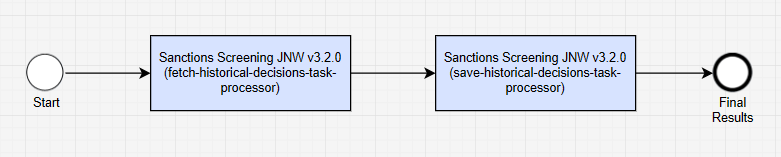
In the BP, there are only two steps:
To run the BP automatically as frequently as needed, create a schedule. For more details, see Schedule Business Process.
Fetch historical decisions
The step locates historical decisions (CSV files) in S3 and converts them into a standard flat format CSV file appropriate for saving data to relevant Data Stores. Two historical files are expected, representing messages and hit information. The exact implementation of the step varies, depending on how you store historical decisions. Currently, data columns match the standard Fircosoft DB extract. A resulting CSV file is uploaded to S3, and its location is sent to the next step. To avoid memory issues, you might have more than one CSV file with results, currently allowed 100K records per file.
If an alert in the message file does not have corresponding hits in the hit file, such records are ignored.
Mind the requirements for naming historical files:
Names of message files must start with
messagesfollowed by a unique identifier such as date, for example,messages-01012025.Names of hit files must start with
hitsfollowed by a unique identifier such as date, for example,hits-01012025.A unique identifier must be the same in both file names.
The supported file format is CSV.
The message_decision value is set to RESOLVE or NO_DECISION according to the provided configuration.
Columns in historical files
Not all the columns below are used in decision reapplication. Columns marked as Mandatory must be present in a CSV input file.
The expected columns in a message file are as follows:
| Column name | Meaning | Description |
|---|---|---|
T_DECISION_TYPE | MESSAGE_ANALYST_DECISION | Mandatory. Contains an analyst's decision. Example: STP_Released. |
T_LASTOPERATOR | MESSAGE_ANALYST_NAME | Mandatory. Contains the name of the analyst who made the decision. Example: e625124. |
T_MESSAGE | MESSAGE_CONTENT | Mandatory. Contains the original message content. |
T_COMPLETED | MESSAGE_DECISION_DATE | Mandatory. Contains a timestamp. Example: 2023/12/28 11:10:43. |
T_MESSAGE_ID | MESSAGE_ID | Mandatory. Alert ID. Example: QU2312283S9543000I0001. |
T_TYPE | MESSAGE_ORIGINAL_SUBTYPE | Mandatory. Used in calculating hash. Can have an empty value. Example: 304. |
T_NATURE | MESSAGE_ORIGINAL_FORMAT | Mandatory. Can be used to set a message type. Can have an empty value. Example: SWF. |
T_CONTENT_FORMAT | MESSAGE_CONTENT_FORMAT | Optional. Contains expected format of the message content. The column might not exist. The default value is FUF. |
T_IS_RELEASED | IS_RELEASED | Optional. Boolean. Specifies if an alert was released by analysts. If not present, T_DECISION_TYPE is used. The column might not exist. Example: true. |
The expected columns in a hit file are as follows:
| Column name | Meaning | Description |
|---|---|---|
SEQNUMBER | HIT_ID | Mandatory. Contains a unique hit ID. Example: 0. |
SYSTEM_ID | HIT_MESSAGE_ID | Mandatory. It is a link between message and hit files. |
TAG | HIT_TAG_NAME | Mandatory. Contains tag name information. Used in calculating hash. Example: SWF_4_79. |
LIST_MATCHING_STRING | HIT_TEXT | Mandatory. Contains a matched part of the tag content that caused the hit. Used in calculating hash. |
HIT_TYPE | HIT_TYPE | Mandatory. Used in calculating hash. Example: NAME. |
CITY | HIT_WLE_CITY | Mandatory. Might contain an empty value. |
COUNTRY | HIT_WLE_COUNTRY | Mandatory. Used in calculating hash. |
ID_LIST | HIT_WLE_ENTRY_ID | Mandatory. Used in calculating hash. Example: WCP7491861. |
RECORD_MATCHING_STRING | HIT_WLE_NAME | Mandatory. Sanctioned name. Used in calculating hash. |
NAME | HIT_WLE_PRIMARY_NAME | Mandatory. Sanctioned primary name. Used in calculating hash. |
STATE | HIT_WLE_STATE | Mandatory. Might contain an empty value. |
TYPE | HIT_WLE_TYPE | Mandatory. Might contain an empty value. Example: C. |
See the HIT_WLE_TYPE value conversion:
("O", EntityType.LOCATION);
("LOC", EntityType.LOCATION);
("LOCATION", EntityType.LOCATION);
("C", EntityType.ORGANIZATION);
("COMPANY", EntityType.ORGANIZATION);
("ORG", EntityType.ORGANIZATION);
("ORGANIZATION", EntityType.ORGANIZATION);
("I", EntityType.INDIVIDUAL);
("IND", EntityType.INDIVIDUAL);
("INDIVIDUAL", EntityType.INDIVIDUAL);
("PERSON", EntityType.INDIVIDUAL);
("V", EntityType.VESSEL);
("VESSEL", EntityType.VESSEL);
Expected HIT_TYPE values are as follows:
UNKNOWNNAMECODPASSPORTBICEMBARGONATIONAL IDFMLEMC
Expected MESSAGE_CONTENT_FORMAT values are as follows:
FUF(default)SWIFT_MTSWIFT_MXSWIFT_NPP
The converted CSV file columns are as follows:
idtypehit_idcontentcontentformatgold_decisiongold_decision_commentgold_decision_dateanalyst_namehit_tagnamehit_hittexthit_hittypetypesubtypehit_sanctiondata_namehit_sanctiondata_typehit_sanctiondata_primarynamehit_sanctiondata_countryhit_sanctiondata_cityhit_sanctiondata_statehit_sanctiondata_sourceentryid
Save historical decisions
The step batch-loads decisions to relevant Data Stores using a URL to the Tara-formatted CSV file (currently 1000 hits per batch). All sensitive data in the Data Stores is hashed and does not contain any readable information. All historical data is saved in two Data Stores linked by the hash ID: pss_reapplication_hashcodes_v1 and pss_hash_analytics_v1.
During historical records upload, ensure that the same historical records are not saved multiple times and are not part of the analytics. The same data file can be uploaded multiple times, but it will be reconsidered only once.
There is no concept of consecutive releases. Historical data can be loaded in any order, for example, June data, then January, and so on.
The following hit-level information is hashed:
TAG_NAMEHIT_TEXTHIT_TYPESANCTION_DATA_NAMESANCTION_DATA_PRIMARY_NAMESANCTION_DATA_COUNTRYSANCTION_DATA_ENTRY_ID- Tag content (optional)
The following configurable message-level data is hashed optionally:
- Message tags
- Subtype
Record data analysis
Each time you upload historical data to the Data Stores, new records are added to the pss_dr_file_analytics_data_v1 Data Store.
The following data is calculated for each hit during historical uploads:
hash_countanalystsis_all_released
If the record completion time is greater than the configurable threshold, it is skipped. hash_count and analysts are updated only for released records.
Apply continuous learning
If the alert content format is not FUF, SWIFT_MT, SWIFT_MX, and SWIFT_NPP, the bot step outputs a "decision_reapplied" signal with the FALSE value, and the BP continues to run through all the steps. If a decision is reapplied ("decision_reapplied signal" == TRUE), the workflow execution skips all ML and data manipulation steps and goes directly to the Generate report bot step. Here, it records the decision reapplication and all relevant data and sends out a response as a decision object fully populated with alerts and hits. For more details, see Overview | Core Business Process.
There are two levels of decision reapplication:
Alert level. All hits of an incoming alert have to be resolved by CLDS. Otherwise, all incoming hits are processed by Tara.
Hit level. Only hits of an incoming alert that are not resolved by CLDS are processed by Tara. Hits resolved by CLDS go through standard Tara processing.
Identify candidate for continuous learning
Tara fetches all the decisions that analysts make on alerts and hits that match the incoming request. The initial match is based on hashed unique fields and the number of hits in the alert.
The following fields are hashed and must match a historical alert from the pss_clds_hash_analytics_v1 Data Store:
TAG_NAMEHIT_TEXTHIT_TYPESANCTION_DATA_NAMESANCTION_DATA_PRIMARY_NAMESANCTION_DATA_COUNTRYSANCTION_DATA_ENTRY_ID
Optional configuration fields are as follows:
- Tag content
- Subtype
- List of message tags
For example, you have the following hit:
{
  "hit_tagcontent": "bank of atlantida",
  "hit_tagname": "ORG_NAME",
  "hit_hittext": "atlantida"
  "hit_hittype": "NAME"
  "hit_sanctiondata_name": "Atlantida INC",
  "hit_sanctiondata_primaryname": " Atlantida Solutions INC",
  "hit_sanctiondata_country": "VUT",
  "hit_sanctiondata_sourceentryid": "12546",
}
Tara normalizes values and concatenates them to generate the hash_id hit. Then, Tara queries the pss_clds_hash_analytics_v1 Data Store for a matching hash ID. The result of this query returns one row of information collected during historical data uploads.
Examining returned data, Tara makes a decision whether or not an incoming request is suitable for reapplication.
Some data in the pss_clds_hash_analytics_v1 Data Store are written or updated in real time, such as:
Enabling a hash status when a hash becomes suitable for reapplication
Recording the date and configuration state when a hash becomes enabled
If the hash is disabled, hits go through regular Tara processing. Only an analyst can disable the hash ID.
The real-time adjudication is configuration-driven. During a historical upload run, settings must match those during data processing.
View CLDS Data Stores
The CLDS Data Stores are as follows:
- Hit level reapplication Data Store
- Hit level hash statistics Data Store
- Historical upload execution Data Store
Hit level reapplication Data Store
All historical alerts are written in the pss_reapplication_hashcodes_v1 Data Store. Each row represents a hit.
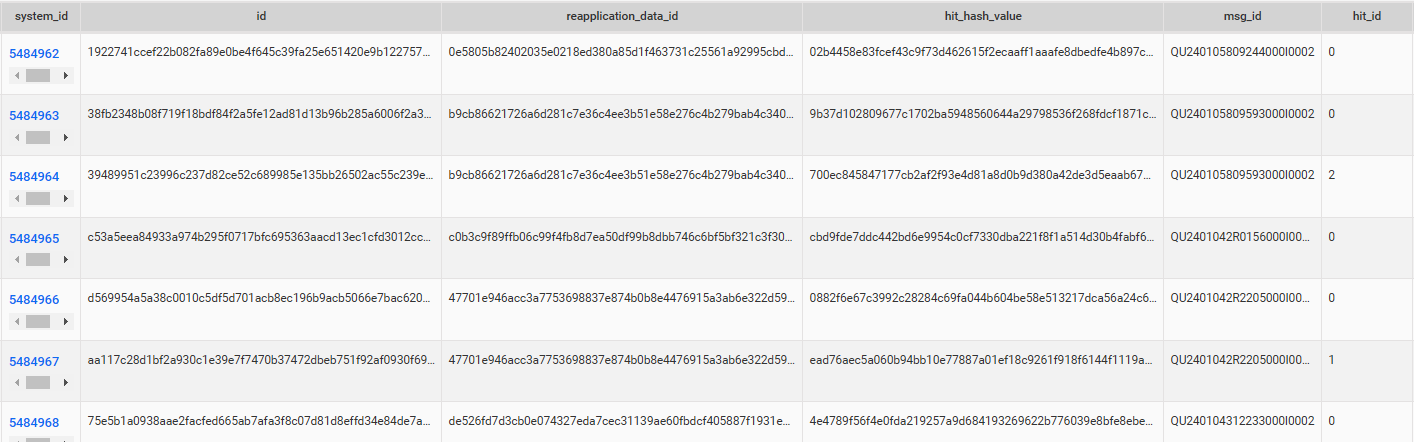
The information is stored in the following columns:
- id: unique record identifier
- reapplication_data_id: unique alert identifier
- hit_hash_value: hashed sum of parameters
- msg_id: historical alert ID
- hit_id: historical hit ID
Hit level hash statistics Data Store
Statistics for each hash are calculated during historical uploads and saved into the hash_id, hash_counter, analyst_names, and is_all_released columns of the pss_clds_hash_analytics_v1 Data Store. Other columns are filled during real-time processing when the hash becomes enabled.
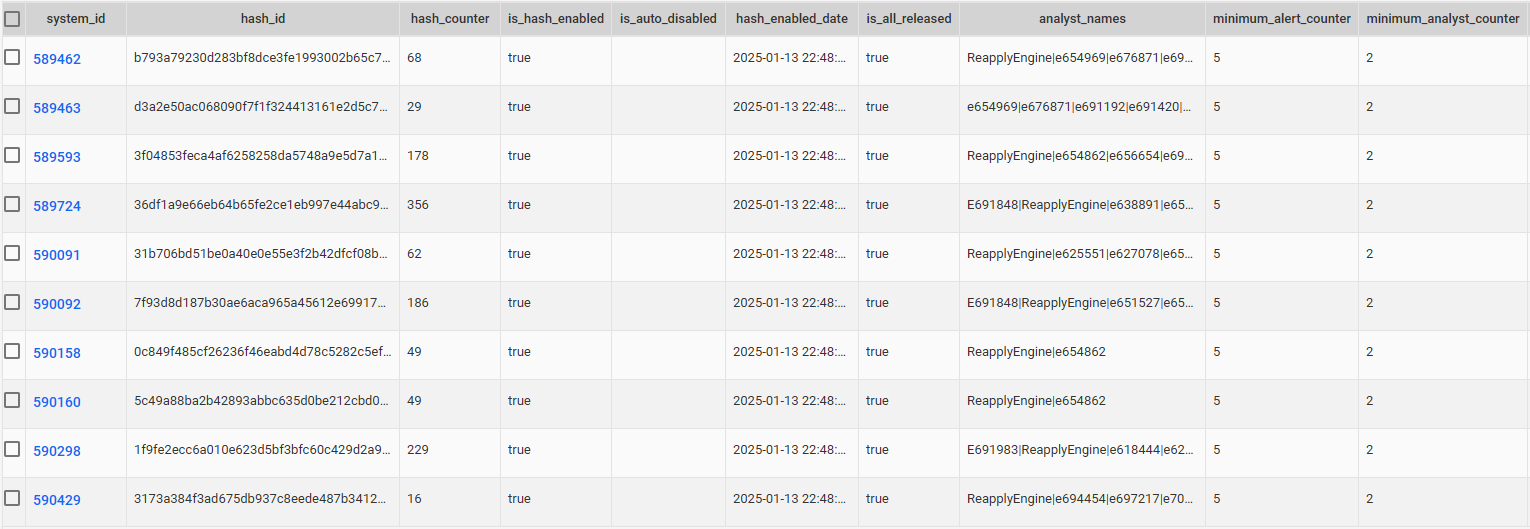
The information is stored in the following columns:
- hash_id: unique calculated hash of the hit. The hash element depends on the CLDS configuration (hit hash, message tags, and tag content).
- hash_counter: number of times each hit hash occurred in the history table.
- is_hash_enabled: hash status. Initially blank. When continuous learning rules are satisfied, the field is set to
true. When continuous learning is no longer satisfied, the field reverts to blank. The value can also be manually set tofalse. - is_auto_disabled: indicates whether a business operator enabled or disabled a hash item outside of the counter process. The initial value is
‘’(not used in CLDS processing). - hash_enabled_date: timestamp indicating when the decision reapplication was first applied to the hash by CLDS. The field relates to is_hash_enabled and follows the same update logic. Initially blank.
- is_all_released: indicates if all decisions for the hash are marked as released and match the configuration, for example,
STP_Releases. - analyst_names: unique names of the analysts who made decisions for the hash ID. Required for rules.
- minimum_alert_counter: number of alerts required to be cleared by continuous learning at the time of enabling (based on the configuration).
- minimum_analyst_counter: number of analysts required to be cleared by continuous learning at the time of enabling (based on the configuration).
Historical upload execution Data Store
Records of every historical data upload attempt are stored in the pss_dr_file_analytics_data_v1 Data Store.

The information is stored in the following columns:
- load_date: timestamp of the upload.
- status: execution status (
SUCCESSorFAILED). - number_alerts_total: total number of alert-level records from the message CSV file.
- number_alerts_loaded: number of successfully loaded alert-level records from the message CSV file.
- number_hits_total: total number of hit-level records from the hit CSV file.
- number_hits_loaded: number of successfully loaded hit-level records from the hit CSV file.
- filename: name of the processed file. If the upload fails, the field includes the reason for failure.
View CLDS report
The PSS CLDS report BP is included in Tara's bundle and generates CLDS reports. The BP has one step.
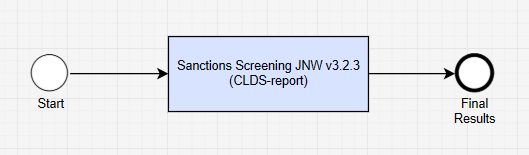
You can run reports manually or schedule them. The recommended scheduling options are as follows:
- End of business day. Select the Today option to collect data for the current day.
- After midnight. Select the Last x days option and enter
1in the field to collect data for the previous day. For more details, see Install and configure | Output.
Generated CSV files are saved in MinIO S3 at doc-upload/payment_sanctions_screening/CLDS_Reports.
Generated filenames follow the format: CLDS-Payment-Screening-{date}_{time}-{part}.csv For example, CLDS-Payment-Screening-20250113_225716-1.csv.
The report template is located in MinIO at doc-upload/payment_sanctions_screening/CLDS_Reports/clds_report_template.csv. This template cannot be customized and includes the following predefined columns:
| Column | Description |
|---|---|
| HashID | Calculated unique hit hash value. |
| MessageID | Message ID of an incoming alert. |
| TransactionID | Content of the [REFERENCE] field of an incoming alert. |
| MessageType | Available in a subtype field of the message. Content of the [TYPE] field of an incoming alert. |
| Message | Content of an incoming message. |
| HitID | Unique hit ID within an alert. |
| MessageText | Parsed or supplied value defined by the tag name in a payment message. |
| LocationOfMatch | Name of the tag in a message that was a hit during screening. |
| MatchedText | Part of the text that triggered a sanctioned match. |
| HitType | Type of a sanctioned hit. |
| ListMatchText | Name of the matching sanctioned entity (best matching alias or primary name). |
| EntityName | Primary name of the matching sanctioned entity. |
| MatchedType | Type of the matching sanctioned entity. |
| ListRecordID | Source ID of the matching sanctioned entity. |
| Keywords | Keywords for sanctioned listing sources. |
| SenderBIC | Available in the payment section of a message. Value of the [SENDER] field of an incoming FUF message. |
| ReceiverBIC | Available in the payment section of a message. Value of the [RECEIVER] field of an incoming FUF message. |
| PaymentDirection | Incoming or outgoing. Available in the payment section of a message. |
| HitsCount | Number of hits in an alert. |
| HashCounter | Number of times each hit hash occurred. |
| MinimumCounter | Number of alerts required to clear for a hash ID before continuous learning begins auto-disposition. |
| EnabledDate | Date when each hit hash achieves the CLDS-enabled status. |
| HashStatus | Current enabled or disabled status of the hash. |
| AlertReleased | Indicates whether all hits are resolved by continuous learning (Y). |
| CreatedDate | Date when a message was sent to Tara. |
A hash ID is calculated as the sum of hit-level fields and message-level fields used for decision reapplication and tag content. The hit-level hash comprises predefined hard-coded fields. You can configure message tags during reapplication data setup.
The data used to generate reports is located in the pss_request_processing_v1 Data Store. If a hit matches historical data, it includes a CLDS object with all necessary report information.