
Properties
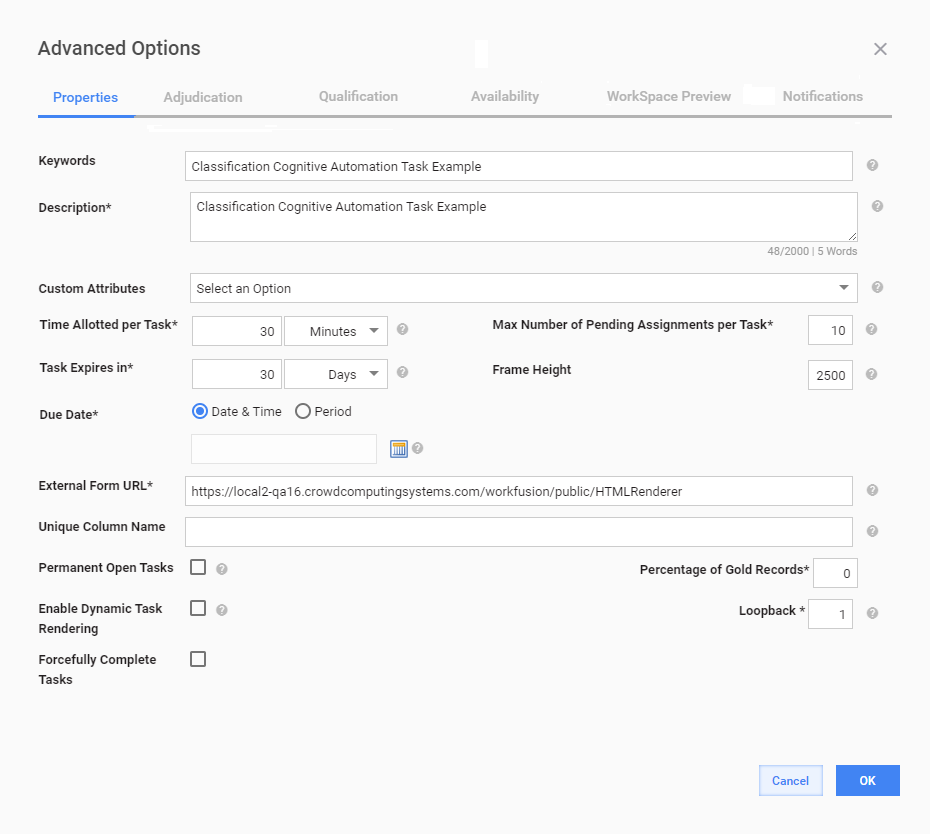
On the Properties tab, you can set different options for running a Manual Task. If you are new to the WorkFusion platform, edit the Keywords and Description fields, and leave the default values for the rest of the fields.
| Field | Description |
|---|---|
| Keywords | Provide keywords to help workers identify MTs while searching. |
| Description | Briefly describe what workers are expected to do to successfully complete the MT. |
| Custom Attributes | If you want to add custom attributes to an MT, select a Field Scheme to serve as a basis for them. |
| Task Expires in | A period after which an MT expires if no worker accepts it. Once the task expires, it is no longer available in Workspace. By default, MTs are set to expire in 30 days. To extend the expiration period, change the values in the boxes. |
| Due Date | Date by which an MT is to be completed. After the date, the MT becomes unavailable. |
| Max Number of Pending Assignments per Task | The maximum number of tasks a user can accept and keep in the accepted (not submitted) state. When the count is reached, to accept new tasks, workers should start submitting the accepted ones. Set the value to -1 for unlimited pending tasks per worker. |
| External Form URL | Displays the URL of the Manual Task. After the task is started, the URL is used to build its preview link with public access. |
| Unique Column Name | Used for grouping records from an uploaded data file. See the Group records by Unique Column topic. |
| Permanent Open Tasks | The number of tasks available to workers simultaneously. Assume, an MT contains 100 records, and the Permanent Open Tasks value is 10. This means each worker in Workspace can see only 10 tasks available for the task type. |
| Percentage of Gold records | Used to create MTs with Gold Data for specific Records. These tasks are intended to imperceptibly check worker qualifications. |
| Enable Dynamic Task Rendering | Enable sorting MTs by type to make it possible to complete them in a custom order. See Dynamic Task Rendering. |
| Forcefully Complete Tasks | Allows you to forcefully complete individual tasks and BPs when both of the following completion criteria are met:
|
| Loopback | Use to automatically assign a task to a new worker if the majority is not reached. The Loopback value defines how many times an MT is to be launched if its results contain records without Confidence. The default value is 1, which means no new worker answer is required. The option is helpful for tasks with Block Size > 1. |