
Migrate from 9.2+ to 10.1+
Version 10.x has substantial architectural overhauls in comparison with version 9.x. The most notable changes are as follows:
These changes drive speed and performance increase, while also meaning that migrating a project to the new architecture requires careful planning and execution.
Migration approach
The optimal approach is illustrated in the following diagram.
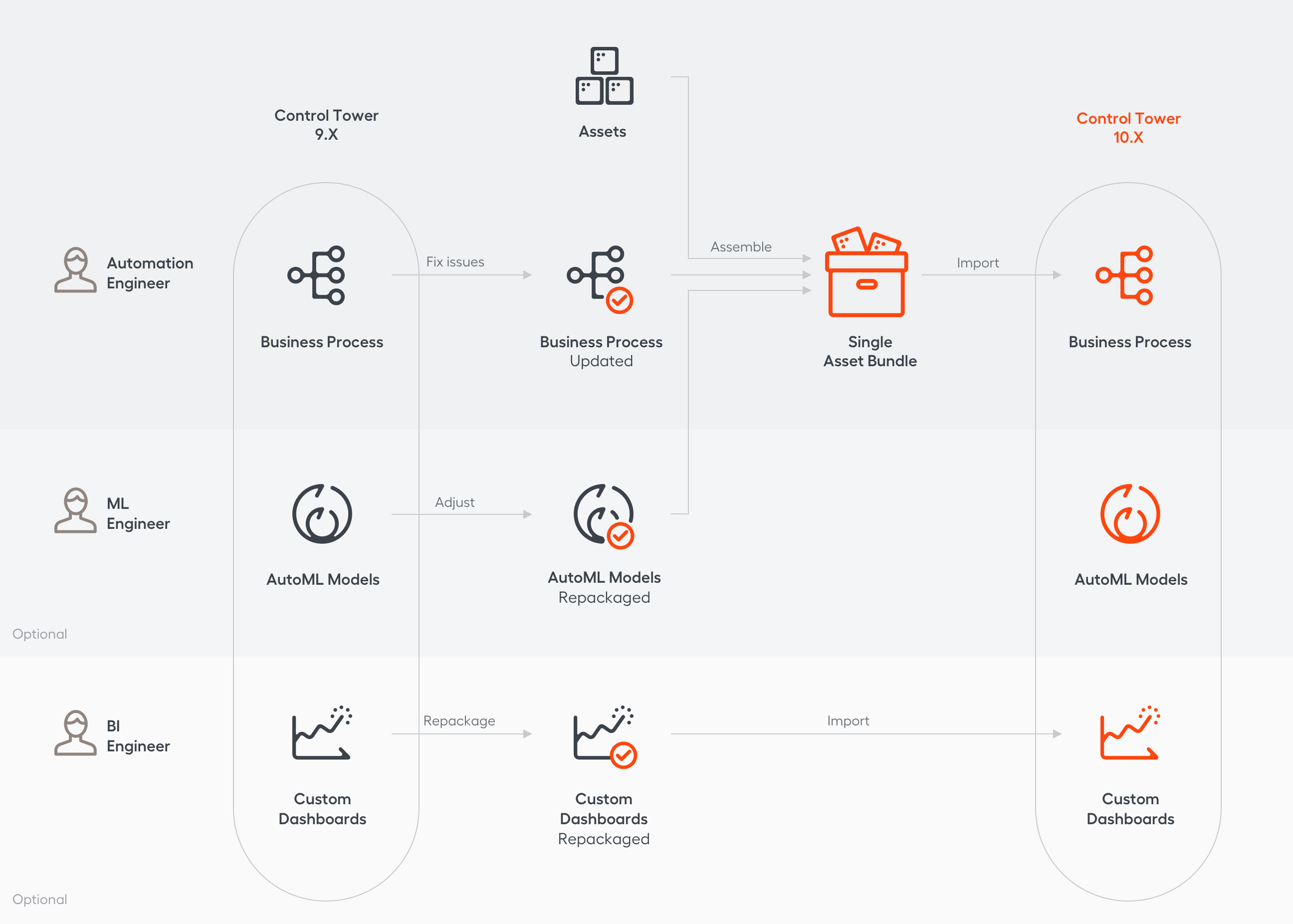
- The Automation Engineer updates the Business Process using the usage report.
- The ML Engineer adjusts the AutoML model (if needed).
- The Automation Engineer prepackages BP and all components required for its effective work (AutoML models, Data Stores, BCB, and so on) in an Asset Bundle.
- The Automation Engineer ports the Asset Bundle to a target environment using a script or API.
- The BI Engineer repackages custom Analytics dashboards and sets them up on the target environment.
- The Database Engineer manually exports the historical data and activity log from the database (if needed).
Bot step migration
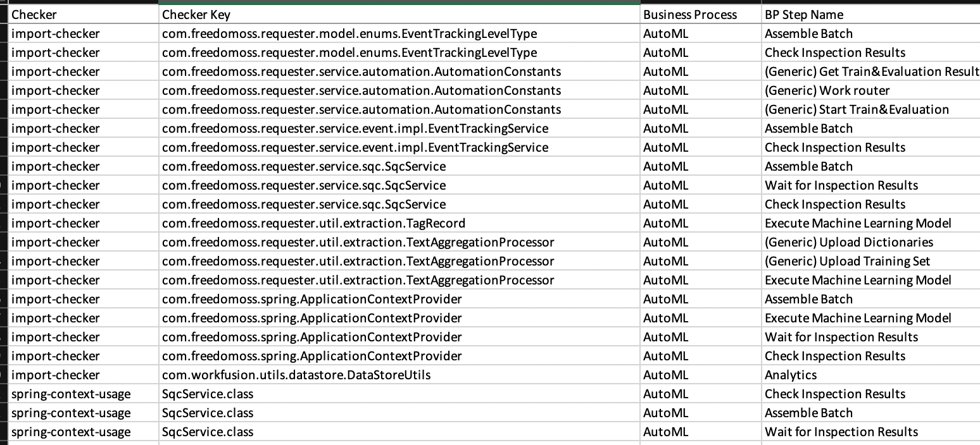
Utilize the Usage Report Tool to proactively identify potential issues.
warning
The tool is designed for versions 9.x only.
Below is an example of the usage report tool log.
Before migrating bot steps, you need to make certain adjustments, such as:
- Adjust the PostgreSQL syntax for the MS SQL database in 10.x.
- Bot Sources were removed in v10.x. So, find and rewrite all configs where they were previously used.
- Install external utilities on every BEP Agent.
- RPA API is backward compatible, and no changes are required with respect to it.
- Version 10.x introduced a new RPA Bot Execution architecture, removing RPA nodes.
- Bot Fleets replaced quotas and are easier to configure. See the Distribute tasks reference for more information on the RPA architecture.
When migrating bot steps, it is important to take into consideration the deprecations for versions 10.0 and 10.1:
AutoML artifact migration
AutoML migration is available from version 9.2+ to version 10.1+ only. It does not require document retagging or model retraining. The migration strategy depends on the artifact type. See the diagram below:
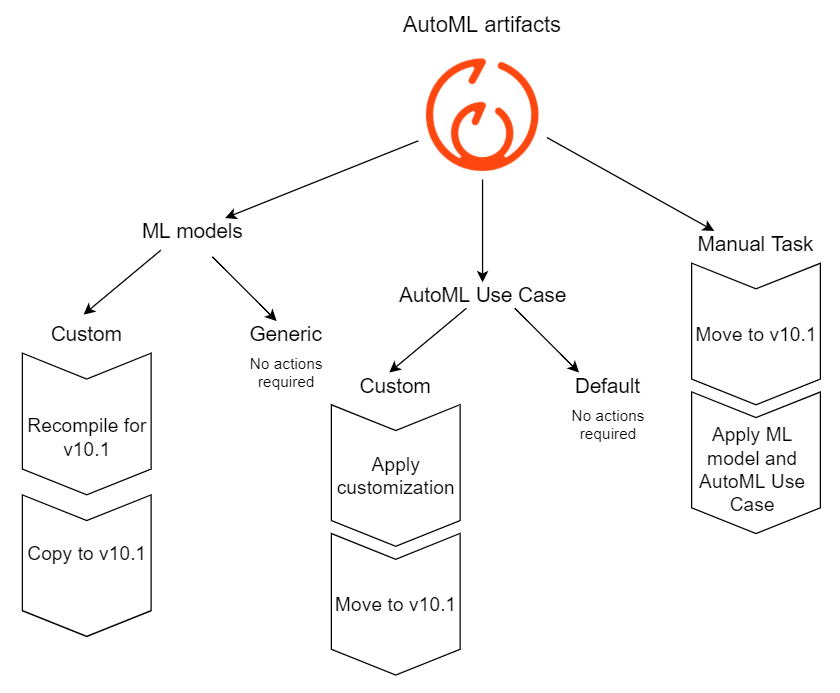
For a step-by-step migration instruction, refer to the Migrate AutoML model guide.
Analytics
Version 10.1 includes a revamped set of out-of-the-box analytics dashboards. The BI Engineer can migrate custom dashboards in less than one day following the custom dashboards backup and restore procedure.
Business Process data
With a single Asset Bundle, you can port the following resources to a 10.x environment:
For more information on what you can import in an Asset Bundle, refer to Package assets into an Asset Bundle for deployment.
System data
Historical data and activity log are not supported for migration and can be exported as Excel per request.
FAQs
Can I do an in-place upgrade?
No, a parallel 10.1 environment is required.
Do I need to retrain models?
Not necessarily, you can repackage a model in version 10 format without retraining.
Do I need to retag documents?
No, it is possible to reuse an existing training set.
Do I need developers?
Yes, migration requires assistance from the following specialists:
- The RPA Engineer corrects bot steps.
- The Automation Engineer makes a Business Process (BP) compatible with the 10.x environment, packages the BP, its model and resources into an Asset Bundle and imports it to the target environment.
- The BI Engineer repackages custom dashboards.
- The Database Engineer manually exports the historical data and activity log from the database (if needed).