
Distribute tasks
General overview
There are various types of Bot Tasks. For example, several lines of businesses may want to automate different types of applications. In this case, there is a need to divide RPA Units into separate queues with one type of tasks to be transferred to the first queue, the second type of tasks—to the second, and so on. The reasons for segregation can be as follows:
- Regulatory or security requirements.
- Business Processes with a significantly varied nature (in terms of applications used).
- Segregated development teams for different Business Processes with no direct communication or collaboration path, for example, when different service providers are responsible for implementations.
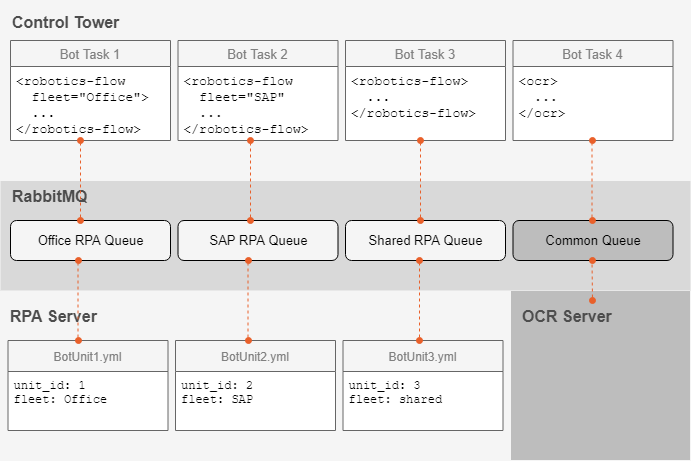
To distribute Bot Tasks, use the unified method of task routing via fleets. Fleets stand for groups of RPA Units used to segregate tasks according to their business purpose.
Thus, a specific fleet attribute is defined within the robotics-flow plugin. If no fleet attribute is provided, a task is sent to Shared Fleet. If no robotics-flow plugin is defined, a task is assigned to the Common queue to be transferred further.
Set up fleets
Mind the following requirements:
- Configuration of RPA Units is performed on the RPA Windows server.
- Bot Tasks need to specify a fleet to utilize. Dynamic fleet attributes with variables cannot be used. For more information, see Robotics plugins.
The basic steps are as follows:
Go to
INSTALL_DIR/bot-agent/conf/unitsand modify or copy theunit{Unit_id}.ymlfile, where{Unit_id}refers to the RPA Unit identifier.Change
unit_idandfleet.unit_id: 2 fleet: sharedsharedis the default fleet. If yourunit_idis more than 9, remove the last 0 in each port—the maximum number for one machine is 99.To define custom fleets to submit tasks to, specify
fleetfor each RPA Unit:unit_id: 3 fleet: SAP
tip
Refer to Install RPA Windows server for more details.