
CI/CD overview
Introduction to CI/CD
CI/CD stands for Continuous Integration (CI) and Continuous Deployment or Continuous Delivery (CD). Although the basics are relatively similar, there are fundamental differences that define the key beneficiaries and the results to achieve. Of central importance here is the automation of engineers’ repetitive work and reducing the need to handle dull and detailed processes. As with all engineering, however, the devil is in the details.
Read more...
What is Continuous Integration?
CI is, at least theoretically, the less troublesome half of the equation. Continuous Integration uses automation tools that empower development teams to build and test code after each merge as seamlessly as possible.
Developers working in the CI paradigm merge their changes with the main code as often as possible. However, it only sounds simple. Modern software is composed of various components built with a multiplicity of technologies, including programming languages, platforms, and clouds—to name only the obvious ones. Thus, there is a strong need for reliable frameworks for developers to operate in and integrate and validate changes.
The key component of a CI/CD ecosystem is a test environment reducing the testing time by automatically spotting major bugs at early stages of software delivery. Automated code testing smoothes out the process. Frequently merging small pieces of code is a good way to avoid conflicts. All team members can have access to the latest code base and ensure the compatibility of committed code on the go. Running regular integration testing is crucial to maintaining software consistency.
What is Continuous Delivery?
Focused on keeping the code ready to deploy at any given time, Continuous Delivery is a natural follow-up to CI. It’s not about making bugged code available for the production environment. Rather, all the sets of features are ready to go, and the latest build is ready to be delivered at any time given.
CD is challenging the traditional means of releasing code, eschewing the big-bang approach and opting instead to make new releases available on demand, even a few times a day. This ultimately makes the code more bug-resistant. With smaller batches released, it is easier to manage the bug fixing. The possibility of delivering an update that needs to be nuked due to unexpected heavy-weight bugs is significantly lower.
What is Continuous Deployment?
The second version of the CD acronym stands for Continuous Deployment. It is the CI paradigm taken to a new level—as the idea of constant and automated production deployment of every change made to the code. The changes are ideally automated, without human intervention.
The approach works well in a corporate environment where the user and the tester are ultimately one person.
Differences between two CDs
Both CD versions focus on working in fast iterations and delivering small batches of code to apply to the app, regardless of how it looks. The differences come down to the fact how different groups benefit from approaches.
- Continuous Delivery focuses on building the code to be released more quickly, but it does not define what and when is released for production. Although this approach is highly influenced by Agile methodologies, it is also possible to run a project by delivering a new software version once a year. That wouldn’t be wise, but it is possible. Moreover, someone still has to be responsible for accepting the new software releases and launching them to the public. This is a safer way to work on apps that need to be polished and are released to a large group of users. Accounting software delivered to small and medium businesses or a B2C market app are great examples.
- Continuous Deployment, unlike the previous CD version, focuses on putting all changes straight into production. With all the testing and delivery automated, deployment is transformed into a stream rather than a batch of changes to integrate code. In the ideal situation, the code is constantly evolving, automated tests prevent crashes, and the users get new features every day, if not every hour. The approach works well when the need for seamless work or stability is not so critical. Internal corporate apps supporting daily work are a great example.
Is maintaining the paradigm’s purity important? Not in this case. The approaches can be mixed or merged in any number of ways. In the most iconic case, apps are tested in house by all users in the Continuous Delivery way to be polished before the release in the Continuous Deployment format.
Summary: so who benefits
CI focuses on automation tools to allow development teams to integrate their efforts, build and test the code. During the integration, errors are detected much faster and returned to the development team for improvement. When tests don’t show any errors, the code is ready to be released for production, together with the confidence that it will work as planned.
One or the other CD then enables the code to be packaged and delivered with a fully automated deployment process. Small but more frequent releases are much easier to conduct and a whole lot less risky than big-bang integrations done "by hand". The right CD allows users to enjoy new features earlier while avoiding downtime.
In a nutshell, any business that relies on internally developed apps could well benefit from the CI/CD paradigm.
Architecture
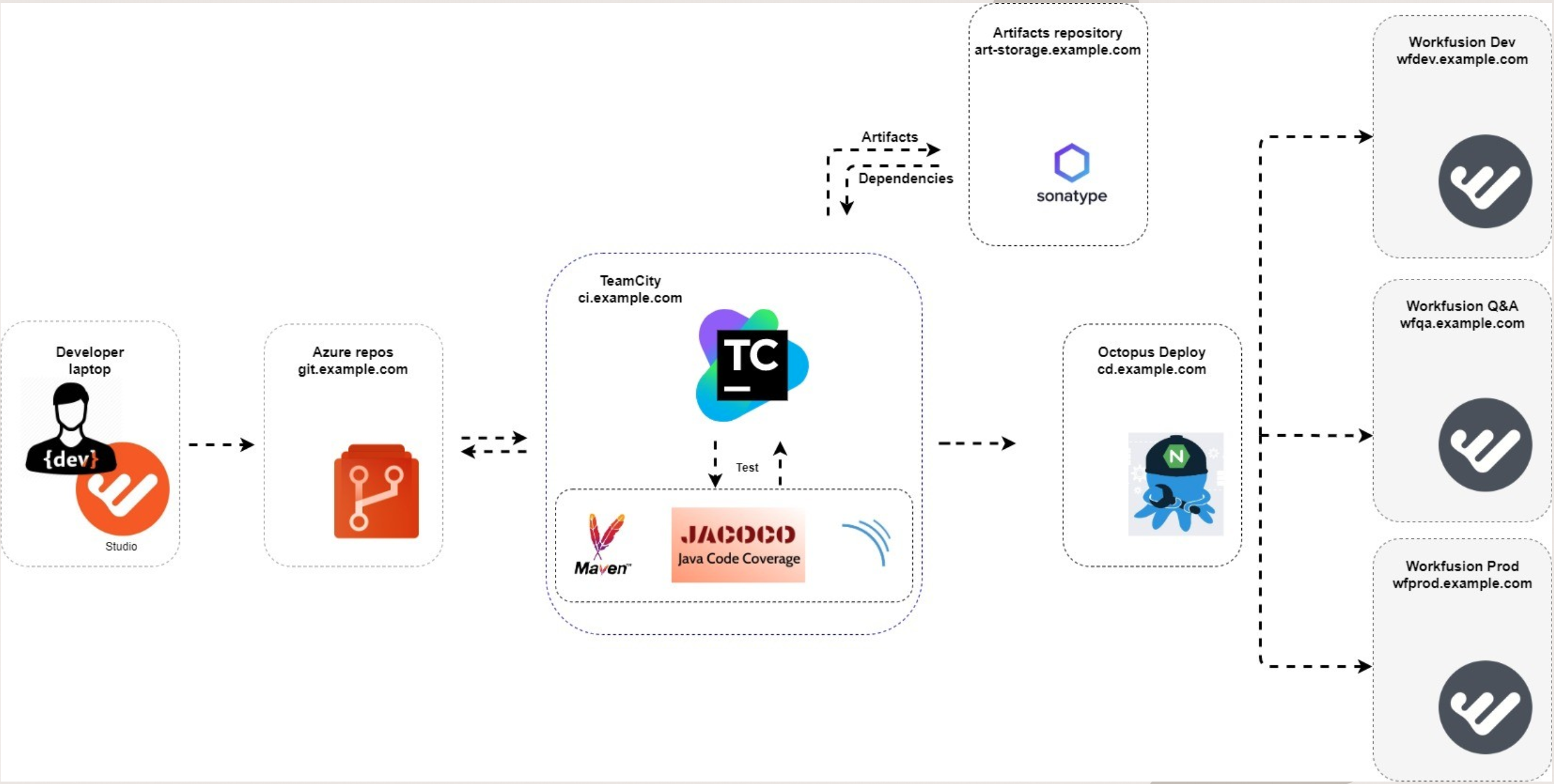
The diagram below illustrates the components of a sample CI/CD pipeline compatible with the WorkFusion platform:
Minimum requirements
| Requirements | Azure DevOps Server | SonarQube | TeamCity | Nexus | Octopus Deploy |
|---|---|---|---|---|---|
| Supported OS | Windows Server 2012 R2, 2016, 2019 | Windows, Linux | Windows, MacOS, Linux | Windows, Linux, MacOS | Windows Server 2012 R2, 2016, 2019 |
| CPU | 1 | 2 | 4 | 4 | 1 |
| RAM (GB) | 4 | 4 | 4 | 8 | 512 MB |
| Disk space (GB) | Any size; SSD is recommended. | Depends on the amount of code to analyze. | Depends on data usage. | > 4 | 2 |
| Dependencies | MS SQL (Enterprise or Express) | Java (Oracle JRE 11 or OpenJDK 11); PostgreSQL / MS SQL / Oracle DB | MS SQL |
note
To ensure compatibility of your CI/CD pipeline with WorkFusion-based development projects, make sure to install Azul Zulu OpenJDK 8.x on your integration servers.
Services
For more information on services, read the following documentation:
Repository: installation documentation for Azure Repos
Artifact repository: installation documentation Nexus Sonatype
Continuous integration
For more information on continuous integration, refer to the following WorkFusion guides:
- Implement continuous integration with Git and Jenkins
- Create CI/CD pipeline with TeamCity and SonarQube
Additional references:
Continuous delivery
For more information on implementing continuous delivery, refer to the following guides: